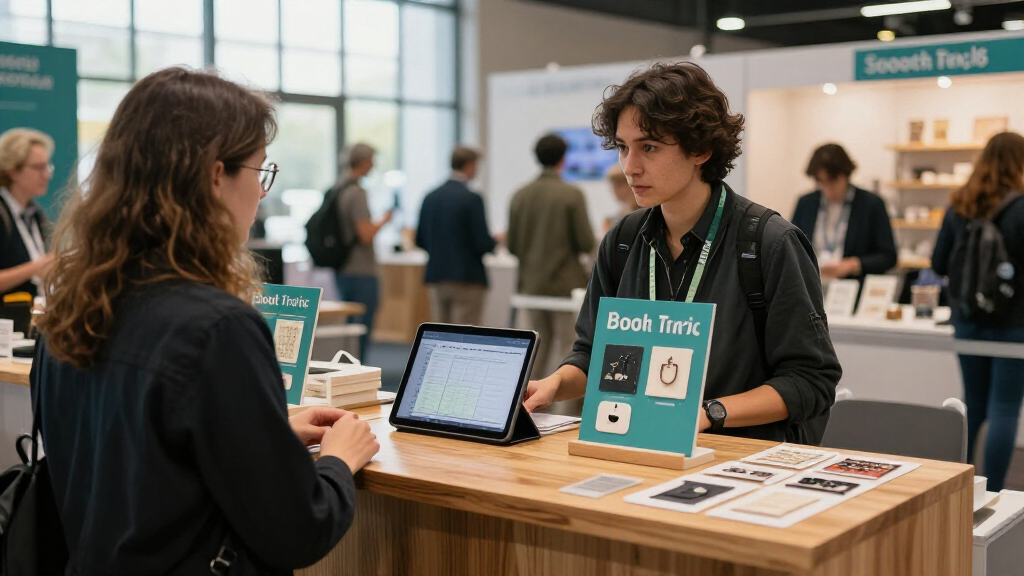

This checklist is for small business owners and startup teams preparing for a trade show and deciding what to bring to their booth. It focuses on practical display and handout essentials that help you plan a setup around your space, materials, and team.

Get office and shipping supplies delivered free — and shop member deals
- Fast, free delivery on millions of items
- Access to Prime Big Deal Days deals on October 6–7
- Prime Video, Amazon Music and more included
The checklist is organized by booth item: display signage, table presentation, business card organization, and label printing. It also includes advice for a pop-up booth and branded tote bags, where no specific product pick was provided.
Use it to build your list in stages. Confirm venue requirements and booth dimensions first, then check each item’s size, setup needs, and compatibility with your materials. Match the choices to what your team will actually transport, assemble, and use.
Retractable Banner Stand
A retractable banner can give your booth a clear visual anchor and help visitors recognize your business from a distance. The Instahibit 10 Pack 33 x 79 Inch Retractable Roll Up Banner Stands is a multi-stand pick, so consider how many banners your event plan calls for and whether you can use the set across several locations or occasions. Before ordering, confirm the listed dimensions work with your booth footprint and any venue display rules.
A common mistake is planning the banner artwork before checking the stand size, print requirements, and how the display will sit beside other booth elements. Verify what is included with the stands and whether the banner graphics are part of the product or need to be prepared separately. Also think about transport: a retractable format is meant to roll up, but your team still needs room to carry and store the equipment. Keep the message legible at a glance, and avoid crowding the banner with details visitors can get from a handout or conversation.
What to look for:
- Confirm the 33 x 79 inch dimensions fit your booth and display plan.
- Check how many stands your team needs before choosing a 10-pack.
- Verify whether printed graphics are included or must be sourced separately.
- Review setup, takedown, and storage requirements for your team.
- Check venue rules for banner placement and display height.
Instahibit 10 Pack 33 x 79 Inch Retractable Roll Up Banner Stands

This set of 10 retractable banner stands features a quick setup design, sturdy aluminum frames, and protective retractable mechanisms for easy transport and display. Ideal for trade shows, conferences, and promotional events, they offer a versatile and professional advertising solution.
Pros:
- Quick and easy to set up for instant branding
- Sturdy and durable aluminum frame
- Portable with collapsible design and carrying bags
- Supports easy banner replacement
Cons:
- Limited to standard banner size only
- No mention of weather resistance or outdoor suitability
Best for: Teams planning several banner placements or multiple events
Not ideal for: Businesses needing only one display stand
Bottom line: Confirm the quantity, dimensions, and graphic requirements before adding this set to your booth plan.
Pop-Up Display Booth
A pop-up display booth can help create a cohesive backdrop and give your team a defined space for conversations. With no product pick specified, start with the event’s booth dimensions and the display format your team can assemble. The right setup depends on what the venue permits, how you plan to use the space, and what your team can transport.
One frequent mistake is choosing a display based on appearance alone. Check the assembled footprint, height limits, setup instructions, and what components are included. Ask whether graphics, lighting, or accessories must be purchased or prepared separately. Consider how the display fits with a table, banner stands, and visitor flow so that the booth remains easy to enter and navigate. Before committing, make sure your team has a workable plan for carrying, storing, and assembling the system at the venue.
What to look for:
- Measure the booth footprint and check venue height restrictions.
- Confirm the assembled display leaves a clear visitor path.
- Review setup instructions and the number of people needed to assemble it.
- Check whether graphics and accessories are included or separate.
- Plan how the display will be transported and stored between events.
Promotional Tablecloth
A branded tablecloth can make your table feel like part of the booth rather than a separate surface. The Personalized Custom Logo 6 ft Tablecloth for Events and Trade Shows is intended for a six-foot table, so check your table dimensions before ordering. Confirm how the logo is personalized and where it appears, especially if you expect to place products, brochures, or a card holder on top.
A common buying mistake is assuming every six-foot table has the same height or that a cloth will drape the way you expect. Review the product’s fit details and compare them with the venue’s table configuration. Check the artwork requirements, proofing process, and whether the logo placement remains visible with your planned tabletop arrangement. Think through care and transport as well: a custom cloth should be packed so it arrives ready for setup, and your team should know how to keep the display neat during the event.
What to look for:
- Measure the table and compare it with the listed six-foot sizing.
- Review the logo artwork format and personalization process.
- Check logo placement against your planned tabletop items.
- Confirm the fit works with the table height and drape you want.
- Plan packing and care so the cloth is ready for event setup.
Personalized Custom Logo 6 ft Tablecloth for Events and Trade Shows
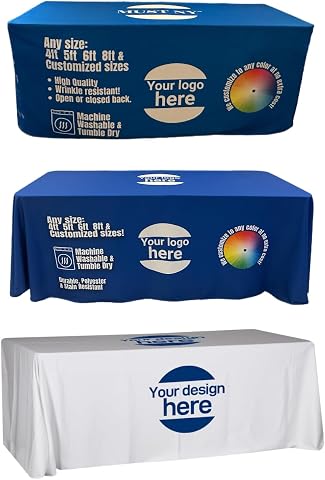
This heavyweight 6 ft polyester tablecloth features sublimation printing for vibrant, long-lasting images. It offers full print coverage on five sides and is available in multiple sizes, including throw-style options for a relaxed fit.
Pros:
- High-quality heavyweight polyester fabric
- Full-color sublimation printing with fade resistance
- Multiple sizes and styles available
- Custom digital proof provided before printing
Cons:
- Requires customization and proof approval process
- Limited to specific sizes listed
- May be more expensive due to custom printing
Best for: Teams using a six-foot table and a custom logo
Not ideal for: Exhibitors whose table size or logo needs are unconfirmed
Bottom line: Match the cloth dimensions and logo placement to your actual table and display plan.
Business Card Holder
A card holder keeps business cards easy to find and reach during conversations, instead of leaving them in a stack or tucked away. The HIIMIEI Acrylic Business Card Holder Desk, 4 Slot, 4 Tier offers multiple slots and tiers, which may help organize different card types or keep several stacks visible. Check the holder’s footprint against your table plan and confirm the card dimensions it accepts.
A frequent mistake is choosing a holder for its capacity without considering how visitors will use it. Make sure the cards are visible, accessible, and replenishable from the position where the holder will sit. If you plan to display more than one card type, decide how each slot will be labeled or distinguished so people can choose confidently. Verify the holder’s measurements and stability, and consider how it will travel with the rest of your booth supplies. Keep it within reach without letting it crowd the table or block other materials.
What to look for:
- Confirm your business cards fit the holder’s slots.
- Check the footprint against available table space.
- Decide how to organize different card types across four slots.
- Place the holder where visitors can reach it easily.
- Consider how it will be packed and kept stable during transport.
HIIMIEI Acrylic Business Card Holder Desk, 4 Slot, 4 Tier
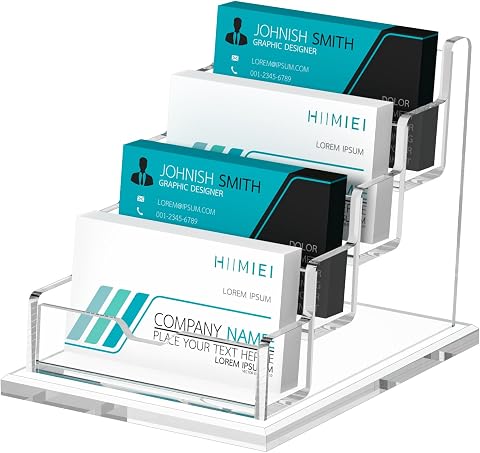
This acrylic business card holder features a professional and elegant design, suitable for organizing and displaying business cards in offices, reception areas, and retail spaces. Made of durable 4mm acrylic with a sturdy base, it can hold up to 60 standard-sized cards.
Pros:
- Elegant and professional appearance enhances business image
- Durable acrylic material resists breakage and deformation
- Large capacity for standard business cards
Cons:
- Limited to standard card size, not suitable for larger cards
- No lid or cover for protection against dust
- Design may be too basic for some aesthetic preferences
Best for: Teams displaying several card stacks at one booth
Not ideal for: Exhibitors with limited table space or one card type
Bottom line: Check card fit and table footprint, then position the holder where visitors can reach it.
Portable Label Printer
A portable label printer can support on-the-go label work for a team preparing event materials or organizing supplies. The MUNBYN RealWriter 130B Bluetooth Thermal Label Printer is a Bluetooth thermal label printer; check that its connection and label format suit the devices and tasks you plan to use. Confirm the specific label sizes and materials you need before relying on it for event preparation.
A common mistake is assuming a printer will work with every phone, computer, app, or label roll. Check the manufacturer’s compatibility details for your devices and operating systems, and verify which labels are supported. Consider power and connectivity needs at the venue, along with how your team will create and send label designs. If labels are part of a time-sensitive setup, prepare a few examples in advance and confirm that the workflow works with your equipment. Also account for carrying the printer and label supplies alongside the rest of your booth kit.
What to look for:
- Confirm Bluetooth compatibility with your devices and operating systems.
- Check supported label sizes and materials for your intended tasks.
- Review the app or software needed to create and print labels.
- Plan power and connectivity for use at the venue.
- Test your label workflow and pack suitable supplies before the event.
MUNBYN RealWriter 130B Bluetooth Thermal Label Printer

This portable monochrome thermal printer supports wireless Bluetooth printing from iOS and Android devices, with USB connectivity for computers. It prints labels up to 4 × 6 inches at 203 dpi and works with a range of shipping, marketplace, and label design platforms.
Pros:
- Prints wirelessly via Bluetooth or through USB
- Supports shipping labels and a variety of specialty label formats
- Includes label design tools, templates, and fonts
Cons:
- May not be compatible with UPS thermal paper
- Manufacturer recommends using MUNBYN thermal labels for optimal results
Best for: Teams that need portable thermal label printing
Not ideal for: Buyers who have not checked device or label compatibility
Bottom line: Verify your devices, label formats, software, and power plan before depending on it at an event.
Branded Tote Bags
Branded tote bags can give visitors a useful way to carry materials and help keep your handouts together. No specific product pick was provided, so define the bag’s purpose before comparing options: decide what it should hold, how many you expect to distribute, and whether it needs to carry brochures, samples, or other items from your booth.
A common mistake is selecting a bag before checking the size and weight of the items it must carry. Gather the materials you plan to include and compare their dimensions with the bag’s interior. Review handle construction, printing area, material, and any care or reuse considerations that matter to your audience. Confirm the logo artwork and placement suit the bag shape, and check production and delivery timing against your event schedule. If visitors will carry the bags around the venue, make sure the format is comfortable and practical for that use.
What to look for:
- List the handouts or samples the bag needs to hold.
- Compare bag dimensions with the items you plan to include.
- Review handle construction and material for the intended use.
- Check logo artwork, print area, and placement.
- Confirm production and delivery timing fits your event schedule.
Build your checklist in budget-first order: cover the items essential to presenting your booth, then add the pieces that support handouts and event operations. Measure the table and booth, confirm venue requirements, and verify quantities and compatibility before committing to purchases. Keep a little room in your plan for transport and setup supplies.
A thoughtful booth comes together one decision at a time. Use this list to focus on fit and function, confirm the details that matter for your event, and make choices your team can set up and use comfortably.
Fall Picks
fall essentials
As an affiliate, we earn on qualifying purchases.