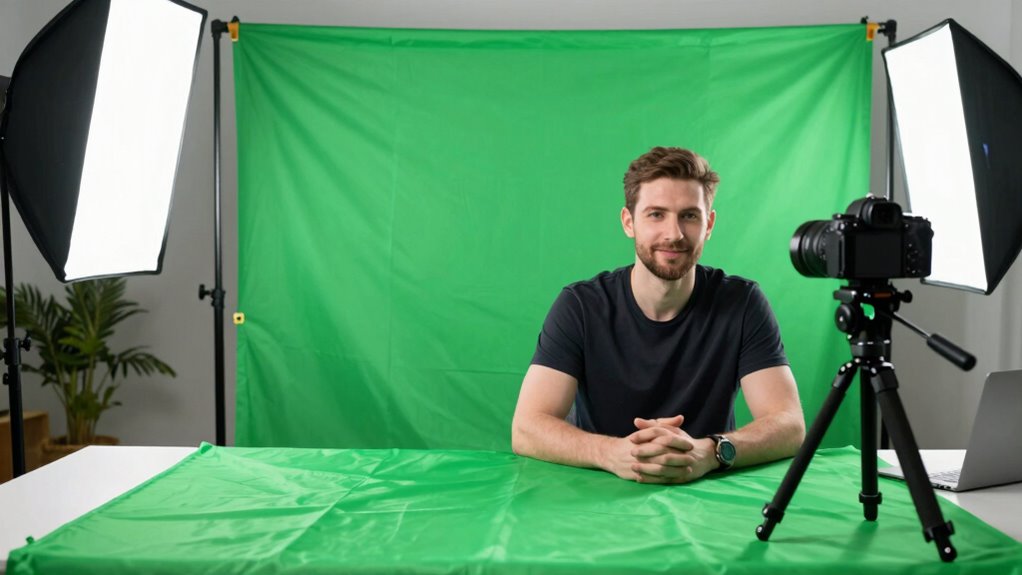
For most webinar hosts, I’d start with the EMART 7 × 10 ft Green Screen Kit: its larger backdrop and wheeled stand suit full-body framing and a more permanent home studio. The Hemmotop 8.2 × 6.5 ft Kit is a strong alternative when you want broad coverage without the same extra-wide footprint, while the RAUBAY collapsible screen favors quicker setup and storage. The main tradeoff is between a freestanding kit’s coverage and stability and a collapsible screen’s faster pack-away routine. Chair-mounted screens can save room, but they limit framing and depend on your seating position. Read on for the full breakdown and help matching a screen to your webinar setup.

Get business pricing on office and shipping supplies
- Business-only prices and quantity discounts
- Tax-exempt purchasing
- Multiple users, one account, clear invoices
Key Takeaways
- Freestanding kits offer the widest framing range: The EMART 7 × 10 ft, Hemmotop 8.2 × 6.5 ft, and other stand-based options suit hosts who need more than a head-and-shoulders crop.
- Wheels favor a semi-permanent studio: The EMART 7 × 10 ft kit adds mobility for moving a large setup around one room, but its larger stand is less suited to frequent packing.
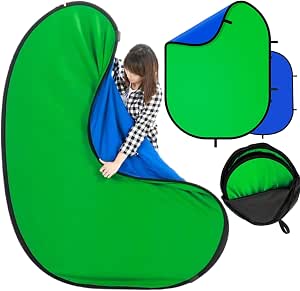
- Collapsible screens prioritize quick storage: The RAUBAY, EMART 77 × 76 in, and EMART 58 × 74 in models offer a different space-saving approach than kits with separate stands.
- Chair backdrops are a focused solution, not an all-purpose background: The Aiuca, 56-inch, 57-inch, and 59-inch options fit seated framing but provide less flexibility if you change camera distance or stand up.
- Double-sided blue-and-green designs add color choice, not extra coverage: Options from BiZiSOFON, Hahawalker, and the chair-backdrop models can help match a keying color to clothing or room conditions, while their dimensions still set the framing limit.




| portable green screens for webinar | Material | Color |
|---|---|---|
| Aiuca 57-Inch Foldable Green S | Cotton | — |
| EMART 5 × 6.5 ft Green Screen | — | — |
| Qoolfoto Green Screen Backdrop | Polyester | — |
| JEBUTU Green Screen Backdrop K | — | — |
| RAUBAY 78.7 x 82.7-Inch Collap | Composite polyester fabric | Green |
| Portable 56" Collapsible Green | Thick polyester cloth | Green |
| EMART 77x76in Collapsible Gree | Composite polyester | Green |
| Portable Green Screen Chair Ba | Flocked material | Green |
| BiZiSOFON Double-Sided Blue an | Polyester | — |
| Cosmos Green Screen Backdrop | Polyester fabric with steel ring | Green |
| EMART 7 × 10 ft Green Screen B | — | Green |
| Portable 57-Inch Double-Sided | — | Green/Blue |
| Hemmotop Adjustable Green Scre | — | — |
| Hahawalker 2-in-1 Collapsible | — | — |
| EMART Collapsible Green Screen | — | Green |
More Details on Our Top Picks
Aiuca 57-Inch Foldable Green Screen Backdrop for Chairs
The Aiuca 57-inch chair backdrop makes the most sense when your webinar setup is a seated, single-person shot and floor space is limited. It folds to 19 inches and packs into its included bag, so it is easier to store between calls than a stand-and-fabric kit such as the EMART 5 × 6.5 ft Green Screen Backdrop Kit. Its cotton surface can be steamed or carefully ironed to smooth creases, which helps keep the background more even on camera. The tradeoff is its chair-dependent design: placement and coverage are less flexible than a freestanding screen, and the spring frame takes care when opening and folding. I would choose it for a compact home office, not for presenters who move around or need a broad standing shot.
Pros:- Folds to 19 inches and includes a carrying bag for compact storage
- 57-inch open diameter suits a seated presenter
- Cotton surface can be smoothed with a low-temperature iron or steamer
- Double-sided design provides a usable surface on either side
Cons:- Chair-hanging design limits where and how the screen can be positioned
- Spring frame requires care during setup and folding
- Smaller coverage than the freestanding EMART and Qoolfoto kits
Best for: Webinar presenters who stay seated in one chair and need a screen they can store in a small office between calls.
Not ideal for: Presenters who stand, shift their chair position, or need a freestanding backdrop with adjustable placement.
- Brand:Aiuca
- Model:MB-001
- Material:Cotton
- Open diameter:57 in (145 cm)
- Folded diameter:19 in (50 cm)
- Design:Double-sided, foldable steel frame
- Included:Carrying bag
Our verdict“Choose the Aiuca if you present seated and want a compact chair-mounted screen, but pick a stand kit for more flexible framing.”
EMART 5 × 6.5 ft Green Screen Backdrop Kit with T-Shape Stand and 6 Clamps
The EMART 5 × 6.5 ft kit is my flexible pick for webinar hosts who alternate between seated and standing presentations. Its stand adjusts from 4 to 6.5 feet, while the crossbar and six clamps give the fabric a supported, full-width hanging setup. That makes it more adaptable than the chair-mounted Aiuca 57-inch backdrop, though the Aiuca is quicker to tuck away and avoids a separate stand. EMART’s wrinkle-resistant, washable fabric suits recurring use, but “wrinkle-resistant” does not mean crease-free: the supplied details note that low-temperature ironing may still be needed. The kit folds into a carry bag, but it weighs 2.79 kg and its fabric is not water resistant. I’d favor this one for a home office where framing flexibility matters more than the smallest storage footprint.
Pros:- Height adjusts from 4 to 6.5 feet for different presenter positions
- Includes a T-shaped stand, 5-foot crossbar, six clamps, and carry bag
- Wrinkle-resistant fabric can be machine- or hand-washed
- Folding stand supports transport and storage
Cons:- Fabric may still need low-temperature ironing to smooth creases
- Backdrop is not water resistant
- Stand and fabric take more setup space than the chair-mounted Aiuca
Best for: Webinar hosts who need a freestanding screen with adjustable height for seated calls, standing talks, or varied camera framing.
Not ideal for: People with very limited setup space or those seeking a chair-mounted screen that can be packed away with minimal assembly.
- Brand:EMART
- Backdrop size:5 × 6.5 ft
- Crossbar length:5 ft (1.5 m)
- Stand height:4–6.5 ft (121–200 cm)
- Stand height without telescopic pole:2.7–5.1 ft (82–155 cm)
- Item weight:2.79 kg
- Included accessories:T-shape stand, 6 clamps, carry bag
- Fabric care:Machine wash or hand wash
- Water resistance:Not water resistant
Our verdict“Choose this EMART kit if adjustable, freestanding framing matters more than a minimal chair-back setup.”
Qoolfoto Green Screen Backdrop Kit with Foldable T-Shaped Stand, 5 × 7 ft
For a webinar host who wants a conventional stand kit without a drawn-out assembly process, the Qoolfoto 5 × 7 ft stands out. Its T-shaped stand assembles without tools in under three minutes and adjusts from 3.9 to 6.5 feet, giving it a wider lower-height range than the EMART kit’s listed 4-foot minimum. The polyester backdrop is machine washable and ironable, a useful combination for a screen that travels in its bag and may pick up folds. That convenience comes with a 5-foot stand width, which limits coverage compared with the larger two-person RAUBAY. The backdrop may also need ironing or steaming after unpacking, and it is not water resistant. I’d choose Qoolfoto for a solo presenter who values quick assembly over wider framing.
Pros:- Tool-free assembly takes under three minutes
- Stand adjusts from 3.9 to 6.5 feet
- Machine-washable and ironable polyester backdrop
- Folds into a carrying case and includes five clamps
Cons:- Five-foot stand width limits coverage for wider shots
- Backdrop may need steaming or ironing after being folded
- Not water resistant
Best for: Solo webinar presenters who want a portable freestanding kit that can be assembled quickly without tools.
Not ideal for: Two-person calls or presenters who need a backdrop wider than five feet or want to avoid smoothing fabric before use.
- Brand:Qoolfoto
- Model:QF-GSBK57
- Backdrop size:5 × 7 ft
- Stand height:3.9–6.5 ft
- Stand width:5 ft
- Material:Polyester
- Item weight:2.8 kg
- Included accessories:5 clamps, carrying bag
- Care and assembly:Machine washable and ironable; tool-free assembly under 3 minutes
Our verdict“Pick Qoolfoto for a quick-to-assemble solo webinar setup, but choose the wider RAUBAY if your frame must fit two people.”
JEBUTU Green Screen Backdrop Kit with Stand, 5 × 6.5 ft
The JEBUTU 5 × 6.5 ft kit covers the basics for a portable webinar backdrop: an adjustable T-shaped stand, washable polyester fabric, five clips, and a carry bag. Its stand reaches from 2.69 to 6.5 feet, giving it a lower minimum height than the EMART kit and making shorter tabletop or seated arrangements easier to set up. The aluminum-alloy stand is a practical alternative to the Aiuca chair backdrop when the screen needs to stand independently, though it requires more floor space and assembly. JEBUTU’s listed weight is 4.9 lb, but the fabric may need steaming after travel, and the backdrop is not water resistant. I’d place it ahead of more specialized options for a straightforward, reusable kit, while buyers seeking faster setup should look at Qoolfoto’s tool-free assembly.
Pros:- Stand adjusts from 2.69 to 6.5 feet
- Aluminum-alloy T-shaped stand folds for storage and transport
- Washable polyester backdrop and five clips are included
- Carry bag supports moving the kit between rooms or locations
Cons:- Backdrop may need steaming to remove travel creases
- Not water resistant
- Requires more floor space and setup than the Aiuca chair-mounted screen
Best for: Webinar users who want a basic freestanding kit with a broad height range for seated or standing camera setups.
Not ideal for: People who need a fast, tool-free setup or want a backdrop that arrives ready to hang without crease care.
- Brand:JEBUTU
- Backdrop size:5 × 6.5 ft
- Stand height:2.69–6.5 ft (82–200 cm)
- Backdrop material:Polyester
- Stand material:Aluminum alloy
- Item weight:4.9 lb
- Included:Backdrop, T-shaped stand, carrying bag, 5 clips
- Care:Hand wash or machine wash
- Compatible devices:Cameras, video recording devices, chroma key software
Our verdict“Choose JEBUTU for a straightforward freestanding kit with a low minimum stand height, but favor Qoolfoto if quick tool-free assembly is your priority.”
RAUBAY 78.7 x 82.7-Inch Collapsible Green Screen Backdrop
When a webinar frame needs to include two people, the RAUBAY 78.7 × 82.7-inch screen offers far more coverage than the five-foot-wide EMART and Qoolfoto kits. Its retractable screen sets up in seconds and folds into a hard case, so it suits presenters who want broad coverage without hanging and clamping a separate fabric panel. The composite polyester is described as wrinkle resistant, which can reduce prep compared with Qoolfoto’s backdrop, though the RAUBAY’s larger unit weighs 10.02 kg and needs a flat area for its stand legs. That makes it less appealing for frequent carrying up stairs or tight desk setups. It is also not water resistant. I’d select it for a fixed home webinar space or occasional two-person calls, not for the lightest travel kit.
Pros:- Large 78.7 × 82.7-inch screen can accommodate two people
- Retractable design sets up quickly
- Wrinkle-resistant composite polyester reduces fabric-prep demands
- Folds into a hard case for storage and transport
Cons:- At 10.02 kg, it is heavier than the EMART, Qoolfoto, and JEBUTU kits
- Stand legs require a flat area and take up floor space
- Not water resistant
Best for: Co-hosts or interviewers who need enough green screen coverage to frame two people in one webinar shot.
Not ideal for: Solo presenters with a cramped office or frequent travelers who need a lightweight kit to carry between locations.
- Brand:RAUBAY
- Model:K97876
- Screen dimensions:78.7 × 82.7 in
- Material:Composite polyester fabric
- Color:Green
- Weight:10.02 kg
- Included features:Retractable screen, stand, hard case
- Warranty:1 year
- Water resistance:Not water resistant
Our verdict“Choose the RAUBAY when two-person coverage matters more than low weight or a small floor footprint.”
Portable 56″ Collapsible Green Screen Backdrop for Chair
For webinar hosts who stay seated and want a backdrop that packs away quickly, this 56-inch chair-mounted screen keeps setup simple: elastic sleeves attach it directly to most chair backs, with no separate stand to position. Its spring steel frame helps the cloth keep a smooth shape, while washable polyester is practical for a screen used regularly at home. Compared with the Cosmos 43-inch backdrop, this model gives a wider chair-covering area, but the Cosmos is lighter and adds hook-and-loop straps. The main limitation is mounting: this screen depends on a chair backrest, so it is less adaptable than the EMART 77×76-inch backdrop, which stands independently and adjusts in height. Choose it for a tidy seated webcam setup; skip it if you need a freestanding background or want color options.
Pros:- Elastic sleeves attach to most chair backrests without a separate stand.
- Spring steel outer ring helps maintain a smooth screen shape.
- Polyester cloth is washable and can be ironed.
- Collapsible design is convenient to store between webinars.
Cons:- Requires a suitable chair backrest for mounting.
- Green is the only listed color.
- Chair-mounted coverage is less flexible than a freestanding backdrop.
Best for: Webinar presenters who remain seated, have a compatible chair back, and want a washable screen that folds away between calls.
Not ideal for: Presenters who need a freestanding screen, plan to stand during webinars, or want a backdrop that can attach to surfaces other than a chair.
- Size:56 inches
- Material:Thick polyester cloth
- Surface:Non-reflective
- Frame:High-strength spring steel outer ring
- Installation:Elastic sleeves attach to chair backrest
- Care:Washable and ironable
- Color:Green
Our verdict“Choose this screen for a simple, washable chair setup; pick the EMART 77×76-inch model if you need an adjustable freestanding background.”
EMART 77x76in Collapsible Green Screen Backdrop
Among these five options, the EMART 77×76-inch backdrop is the strongest fit for webinar hosts who want broad coverage without relying on a chair. Its adjustable 48-to-81-inch height gives more control over framing than the chair-mounted 56-inch screen, while the aluminum base and dual support feet provide a freestanding setup. The wrinkle-resistant composite polyester and hard case also suit presenters who move between rooms or pack equipment away after calls. That flexibility comes with a real portability cost: at 8.75 kg, it is much heavier than the 0.3 kg Cosmos screen. Height adjustment also calls for care, since the extension tube needs steadying to prevent sliding. I’d choose it for a dedicated webinar corner or larger camera frame, not for frequent lightweight travel.
Pros:- Freestanding aluminum base with dual support feet avoids dependence on a chair.
- Height adjusts from 48 to 81 inches for different camera framing.
- Wrinkle-resistant fabric supports a more even chroma key surface.
- Collapses into a hard case for storage and transport.
Cons:- At 8.75 kg, it is heavy compared with the smaller collapsible screens.
- The extension tube needs steadying during height adjustment.
- Its larger frame takes more storage space than chair-mounted options.
Best for: Webinar hosts who need a freestanding, height-adjustable background with broad coverage and have space to store a hard case.
Not ideal for: Frequent travelers or presenters seeking a lightweight screen that can be carried and set up with minimal effort.
- Dimensions:77 × 76 inches
- Weight:8.75 kg
- Material:Composite polyester
- Color:Green
- Height range:48 to 81 inches
- Base:Aluminum base with dual support feet
- Storage:Retractable design with hard case
- Model number:EM-JY-DBSG2020-CA
Our verdict“Pick the EMART for adjustable, freestanding webinar coverage, but choose the Cosmos if low carry weight matters more than screen area.”
Portable Green Screen Chair Backdrop with Stand, 59-Inch, Double-Sided and Foldable
The appeal here is flexibility: this 59-inch flocked screen can serve as a chair backdrop or be combined with another panel for a larger background. That makes it a better fit than the 56-inch chair-only screen for hosts who may later want a wider setup, while its included carrying bag supports storage between sessions. The flocked material is described as wrinkle-resistant and suited to chroma keying, but care is less convenient than the washable polyester on the 56-inch model: hand washing is recommended, and the screen is not water resistant. The product title mentions a stand, but the supplied details emphasize chair use and panel combination rather than specifying stand construction, so buyers should not assume it provides the same independent support as the EMART 77×76-inch model. It suits adaptable home setups, not users seeking weather-resistant or clearly freestanding gear.
Pros:- Can be used on a chair or combined with another panel for a larger background.
- Wrinkle-resistant flocked material is intended for chroma key use.
- Folds for storage and includes a carrying bag.
- Suitable for video calls, streaming, and photography.
Cons:- Not water resistant.
- Hand washing is recommended, which makes routine care less convenient.
- Stand construction is not clearly detailed in the supplied product information.
Best for: Webinar presenters who want a chair-friendly screen with the option to combine panels for a wider background later.
Not ideal for: Buyers who need a confirmed freestanding support system, water resistance, or machine-easy fabric care.
- Screen size:59 inches
- Item dimensions:78.74 × 59.06 inches
- Combined size:4.92 × 9.51 feet
- Material:Flocked material
- Color:Green
- Care:Hand wash recommended
- Included:Carrying bag
- Water resistance:Not water resistant
Our verdict“Choose this model if you value chair use and the possibility of joining panels, but select the EMART if clearly specified freestanding support is a priority.”
BiZiSOFON Double-Sided Blue and Green Collapsible Screen, 39.4 x 59.1 Inches
The BiZiSOFON stands apart by giving webinar users green and blue surfaces in one lightweight panel. That choice can help when a presenter’s clothing or on-camera setup blends too closely with green; the single-color chair screens, including the Portable 56-inch Collapsible Green Screen, do not offer that fallback. At 0.95 kg, it is also easier to carry than the freestanding EMART, and the included bag keeps the folded screen together. The tradeoff is that there is no stand, so a buyer must supply a way to hold it upright; that makes setup less self-contained than the Cosmos, which includes chair straps. Its 39.4 × 59.1-inch dimensions also provide less broad coverage than the EMART backdrop. This is a useful travel pick for compact seated framing, provided you already have a support solution.
Pros:- Reversible blue and green surfaces offer two chroma key color choices.
- Light 0.95 kg weight suits portable setups.
- Opaque, non-reflective polyester is suited to video use.
- Folds for storage and includes a carrying bag.
Cons:- No stand is included, so additional support may be needed.
- Smaller dimensions offer less coverage than the EMART 77×76-inch screen.
- Hand wash only.
Best for: Mobile webinar presenters who want a lightweight, reversible blue-and-green panel and already have a way to support it.
Not ideal for: Buyers who need a complete ready-to-stand setup or a wide background that fills more of the camera frame.
- Dimensions:39.4 × 59.1 inches
- Weight:0.95 kg
- Colors:Blue and green
- Material:Polyester
- Surface:Opaque and non-reflective
- Stand:Not included
- Included:Carrying bag
- Care:Hand wash only
Our verdict“Choose the BiZiSOFON for a light, reversible screen when you have separate support; choose the Cosmos for a chair-mounted setup with straps included.”
Cosmos Green Screen Backdrop – 1 Piece, 43 in (110 cm) Diameter, Foldable Portable Photography Background for Photo, Video, Live Streaming
For a presenter who wants the easiest screen to carry between rooms, the Cosmos weighs just 0.3 kg and folds into its included bag. Hook-and-loop straps attach it to a chair backrest without extra brackets, making it a more self-contained chair option than the BiZiSOFON, which has no stand or mounting method listed. Its 43-inch diameter is the clear compromise: it covers less of the frame than the 56-inch chair screen and is far smaller than the EMART 77×76-inch backdrop. That smaller footprint can suit a tight desk area and a closely framed seated webinar, but it is a poor match for wide shots or presenters who move around. The polyester fabric and steel ring are described as wrinkle-resistant, while the green-only surface gives no alternate key color. I’d choose it when low weight and quick chair attachment matter more than coverage.
Pros:- At 0.3 kg, it is the lightest option in this group.
- Hook-and-loop straps attach to a chair without extra brackets.
- Foldable design includes a carry bag for storage and travel.
- Polyester fabric with steel reinforcement is described as wrinkle-resistant.
Cons:- The 43-inch diameter limits coverage for wider camera framing.
- A chair is required for mounting and is not included.
- Only a green screen surface is listed.
Best for: Seated webinar hosts with a tight workspace who want a very lightweight screen that attaches directly to a chair.
Not ideal for: Presenters using a wide camera frame, standing on camera, or needing a large freestanding background.
- Diameter:43 inches (110 cm)
- Dimensions:43 × 43 inches
- Weight:0.3 kg
- Material:Polyester fabric with steel ring
- Color:Green
- Mounting:Hook-and-loop straps for chair backrest
- Included:Backdrop and carry bag
- Warranty:30-day return
Our verdict“Choose the Cosmos for a lightweight, chair-mounted screen in a compact workspace; opt for the 56-inch chair screen or EMART if you need more coverage.”
EMART 7 × 10 ft Green Screen Backdrop Kit with Adjustable Stand and Wheels
For webinars where more than one person may appear on camera, I’d favor this kit’s large backdrop and wheeled stand over compact chair screens such as the Hahawalker 2-in-1. The listed backdrop measures 9.5 × 9.5 ft, while the stand is 7 × 10 ft, so it offers generous coverage but needs a room with enough clear floor space. Reinforced pipes, a bottom support bar, and four wheels make it easier to reposition the setup than a basic stationary frame; the wheels also help secure it once placed. The washable, wrinkle-resistant fabric suits frequent use, though it is not water resistant. I’d choose the Hemmotop kit instead if regular packing and transport matter more than a rolling, room-based setup.
Pros:- Large 9.5 × 9.5 ft backdrop provides broad coverage for standing presenters.
- Wheeled stand makes repositioning easier than a fixed frame.
- Reinforced pipes and a bottom support bar add support to the frame.
- Washable fabric is designed to resist wrinkles.
Cons:- The backdrop and stand dimensions differ, so buyers should check the space needed for both.
- Not water resistant.
- The large kit is less suited to frequent pack-up and transport than the Hemmotop carry-bag kit.
Best for: Webinar hosts with a dedicated room who need broad coverage for standing presenters or multiple people and want to reposition the frame.
Not ideal for: Hosts in small rooms or people who pack their screen after each call; the large backdrop and stand dimensions take up space, and the two listed sizes differ.
- Backdrop size:9.5 × 9.5 ft
- Stand size:7 × 10 ft
- Color:Green
- Item weight:6.15 kg
- Water resistance:Not water resistant
- Included items:Backdrop stand kit, backdrop, 2 bases, 4 wheels, gloves, carrying bag
- Model number:EM-GSBS-7010
Our verdict“Choose this EMART kit for a spacious, semi-permanent webinar setup that benefits from wide coverage and a movable frame.”
Portable 57-Inch Double-Sided Green and Blue Screen Chair Backdrop with Stand
This 57-inch screen is aimed at a different webinar setup than the large EMART 7 × 10 ft kit: it sits behind a chair for a close-framed speaker rather than covering a wide area of a room. Green on one side and blue on the other gives you a choice when clothing or other on-camera colors clash with one background. Its included stand and foldable design make it a more self-contained option than the Hahawalker 3 × 5 ft backdrop, which lists a clip but no stand. At two pounds, it is easy to carry, though the 57-inch coverage may not reach far enough for a standing presenter or a camera framed well beyond the chair. The dry-clean-only care instruction also makes routine fabric cleanup less convenient.
Pros:- Reversible green and blue sides give presenters a background choice.
- Includes a stand, unlike the Hahawalker screen, which lists only a clip.
- Foldable and lightweight at 2 pounds for storage and transport.
- 57-inch format suits a close-framed seated webcam setup.
Cons:- Limited coverage compared with full-height kits such as the Hemmotop.
- Dry clean only, which makes fabric care less convenient.
- A chair-backdrop format is not suited to standing presenters or broad room coverage.
Best for: Remote presenters who sit close to their webcam and want a lightweight screen with both green and blue options and a stand in the package.
Not ideal for: Standing presenters, wide camera shots, or buyers who want an easy-care fabric; its chair-scale coverage is limited and care is dry clean only.
- Size:57 inches
- Dimensions:57 × 57 in
- Weight:2 lb
- Color:Green/Blue
- Unit count:1
- Care instructions:Dry clean only
Our verdict“Pick this screen for a seated, close-framed webinar when you want two background colors and an included stand in a portable package.”
Hemmotop Adjustable Green Screen Backdrop Kit with Stand, 8.2 x 6.5 ft
The Hemmotop is a strong fit for webinar hosts who need a freestanding screen but cannot dedicate a permanent spot to it. Its height range from 3.1 to 8 ft and three width settings let the stand adapt to different rooms and camera framings; the EMART wheeled kit offers more coverage, but is bulkier and less focused on compact storage. This kit’s machine-washable polyester backdrop and carry bag make it more practical for repeated pack-up than the 57-inch chair screen, whose fabric is dry clean only. The listed backdrop is 8.2 × 6.5 ft, despite larger dimensions appearing in the product title, so I’d verify that coverage suits your camera view. Assembly and disassembly add setup time, and the fabric still needs careful positioning for an even chroma-key background.
Pros:- Height adjusts from 3.1 to 8 ft to suit different rooms and framing.
- Three stand-width settings allow the frame to fit different spaces.
- Machine-washable, foldable polyester backdrop is practical for repeat use.
- Carry bag, clips, and five support side rods are included.
Cons:- Requires assembly and disassembly for storage or transport.
- Backdrop dimensions listed in the specs differ from the larger dimensions in the title.
- Less suited to instant deployment than the pop-up EMART collapsible screen.
Best for: Webinar hosts who need a full-height, adjustable backdrop that can be packed away between calls or moved between rooms.
Not ideal for: People seeking instant setup or relying on the larger dimensions stated in the title; the kit requires assembly, and the supplied backdrop is listed as 8.2 × 6.5 ft.
- Backdrop dimensions:8.2 × 6.5 ft
- Stand height range:3.1–8 ft
- Stand width options:3
- Support side rods:5
- Backdrop material:Polyester
- Backdrop features:Non-reflective front, reflective back, machine washable, foldable
- Included accessories:Stand, clips, carry bag
Our verdict“Choose the Hemmotop if you want adjustable full-height coverage, washable fabric, and a kit that can travel between webinar spaces.”
Hahawalker 2-in-1 Collapsible Green and Blue Screen Backdrop with Clip, 3 × 5 ft
For a presenter who wants a screen that pops open without assembling a full frame, the Hahawalker is the simplest option here. Its steel spring frame gives it a quick-deploy format, while the reversible green and blue fabric offers more flexibility than the single-color EMART collapsible screen. Folded dimensions of 50 × 50 × 3 cm help with storage, but the 3 × 5 ft surface is smaller than the Hemmotop kit’s listed 8.2 × 6.5 ft backdrop, so it suits a tightly framed seated speaker better than a standing presentation. The package lists a clip, not a light stand, which may limit where it can be mounted. The fabric may arrive wrinkled and calls for steaming, adding a preparation step before a polished webinar.
Pros:- Reversible green and blue sides suit different clothing and keying needs.
- Steel spring frame supports quick pop-up setup.
- Folds to 50 × 50 × 3 cm for storage and transport.
- Includes a clip for hanging.
Cons:- Smaller coverage than the Hemmotop adjustable kit.
- A light stand is not listed as included.
- May arrive wrinkled and require steaming before use.
Best for: Occasional webinar presenters who need a compact, reversible screen for a seated or closely framed camera shot and already have a way to mount it.
Not ideal for: Standing presenters or buyers who need a complete freestanding setup; the 3 × 5 ft backdrop is smaller than full kits, and a light stand is not listed.
- Size:3 × 5 ft
- Colors:Reversible green and blue
- Folded dimensions:1.6 × 1.6 × 0.1 ft (50 × 50 × 3 cm)
- Frame:Steel spring frame
- Included items:Backdrop and clip
- Care:Steam iron if wrinkled
- Warranty:2 years
Our verdict“Choose the Hahawalker for compact storage and quick occasional use if your camera framing is tight and you can provide a mounting point.”
EMART Collapsible Green Screen, 58 × 74 in
If webinar time is tight and the screen has to disappear after each call, this EMART model has a practical advantage over the Hemmotop kit: it pops up, locks at an adjustable height, and retracts into a hard case rather than requiring stand assembly. Its 58 × 74 in open surface is suited to a seated presenter, and the wrinkle-resistant chroma-key surface reduces one common source of uneven background results. Unlike the Hahawalker, it offers only green, so there is no blue side for presentations where green clothing or objects could complicate keying. The tradeoff is weight: at 8.89 kg, it is portable for storage but not especially light to carry. Hand-wash-only care and no water resistance also call for more caution than the machine-washable Hemmotop fabric.
Pros:- Pops up and locks at an adjustable height for quick setup.
- Retracts into a hard case for storage and transport.
- Wrinkle-resistant surface is designed for chroma key use.
- Compatible with webcams, DSLR cameras, and video conferencing systems.
Cons:- Weighs 8.89 kg, making it heavier to carry than the 2-pound double-sided chair screen.
- Hand wash only and not water resistant.
- Green-only surface lacks the blue option offered by the Hahawalker.
Best for: Webinar hosts who set up and put away a seated-presenter screen often and value a quick pop-up mechanism with a protective hard case.
Not ideal for: People who need a lightweight screen for frequent carrying, a blue background option, or machine-washable fabric.
- Open dimensions:58 × 74 in
- Retracted dimensions:3.9 × 4.5 × 61 in
- Weight:8.89 kg
- Color:Green
- Compatible devices:Webcams, DSLR cameras, video conferencing systems
- Care instructions:Hand wash only
- Water resistance:Not water resistant
- Included quantity:1
Our verdict“Pick this EMART screen for fast, repeatable setup and hard-case storage when a green backdrop for a seated presenter is all you need.”

How We Picked
I ranked these options around the needs of webinar hosts: a background must cover the camera’s frame, set up reliably in a home or office, and pack away without turning every meeting into a production. I compared the listed dimensions and form factors, including full stand kits, collapsible panels, and chair-mounted screens. I also weighed practical differences such as included stands and clamps, adjustable support, wheels, reversible colors, and how much room each type is likely to occupy.
The order favors versatility for regular webinar use, then portability and ease of setup, with narrower chair and compact screens placed where their space savings make more sense than broad coverage. Larger kits rank well for framing range, but their footprint and assembly needs count against them for occasional calls in a small room. Since the product names and listed specifications do not establish fabric opacity, wrinkle performance, or long-term durability, I do not treat those qualities as proven advantages.
Factors to Consider When Choosing Portable Green Screens For Webinars
Choosing a webinar screen is less about finding the largest green rectangle and more about matching the screen to your camera view, room, and setup routine. I’d settle those details before picking between a stand kit and a collapsible panel.
Match Screen Size to Your Camera Frame
Measure the camera’s actual field of view rather than choosing by the screen’s headline dimensions alone. A wide-angle webcam can reveal the edges of a compact backdrop, especially when you shift in your chair or lean back. For a seated head-and-shoulders shot, a chair-mounted screen may cover the needed area, but it can become restrictive if you move farther from the camera. A wider or taller stand kit gives more room to change framing, at the cost of taking up more floor space. Leave extra backdrop beyond the visible frame so small posture changes do not expose the wall behind you. Before ordering, check the dimensions against your camera distance and the space available behind your desk.
Choose a Stand or Collapsible Panel Around Your Routine
A stand kit makes sense when the screen can remain assembled or when you need to reposition it as a complete setup. Its separate parts can take longer to assemble and store, so frequent webinar hosts should plan where the stand will live between calls. Collapsible screens are easier to put away, but opening and folding them still takes room and care. Check whether the product includes the support hardware you need; a backdrop without a stand may require a separate mounting solution. A common mistake is treating “portable” as synonymous with instant setup. Think through the full routine: carrying it, opening it, positioning it, and storing it.
Plan for Lighting and Wrinkle Control
Even a generously sized screen can key poorly if its surface has uneven brightness, folds, or shadows. Green-screen software works best when the backdrop color appears consistent across the camera image, so the lighting plan matters as much as the fabric. Keep your lights aimed to reduce shadows on the screen and, when room permits, sit far enough forward to limit spill on your face and clothing. Do not assume a compact screen will look smooth simply because it is easy to fold; inspect how it stores and whether it needs time to flatten before a call. A kit with a stand may help maintain a fixed position, but it does not replace even lighting. If you cannot control the room’s light, prioritize a setup that lets you keep the screen in one repeatable location.
Decide Whether Reversible Colors Solve a Real Problem
Blue-and-green screens offer a useful alternative when a presenter wears green or when one color blends into the room or camera image. That flexibility is only valuable if the product’s dimensions still cover the shot and switching sides fits your setup routine. Test clothing against the color you plan to use; bright or reflective items can complicate keying regardless of backdrop color. A double-sided panel does not give you two screens at once, and it does not make a small backdrop larger. For a fixed webinar wardrobe and controlled background, a single-color screen may be simpler. Choose two colors for a recurring wardrobe or environment issue, not just because the feature sounds versatile.
Account for Room Footprint and Storage
Measure the full setup area, including the stand’s feet and the space needed to open a collapsible frame. Product dimensions usually describe the backdrop, not the clearance needed for a stable working setup. In a shared room, a screen that stores neatly may be more useful than a larger kit that blocks a walkway or remains visible on camera. Wheeled stands can make repositioning a larger backdrop easier, but they still need a clear route and somewhere to park. Check storage height and width as well as the assembled footprint. This avoids buying a screen that fits the camera frame but not the room.
Pay for Flexibility You Will Use
Extra size, adjustable stands, wheels, and included clamps can save time when you host often or change the room layout. Those features add little value if you only need a stable seated crop in one fixed corner. For a first webinar setup, keeping the camera, chair, and lights in one marked position can make a simpler screen work more reliably. If you expect to change from seated calls to standing presentations, broader coverage is a better use of added hardware than a more compact chair panel. Compare what is included with what you already own, especially stands and clamps, before deciding. The right spend is the one that removes a recurring setup problem, not the one with the longest feature list.
Frequently Asked Questions
Will a chair-mounted green screen work with a wide-angle webcam?
It can work for a close, seated shot, but a wide-angle lens captures more of the room and may show the backdrop’s edges. Check the screen dimensions against your camera’s field of view at the distance you normally sit. If you move around or lean back, a larger freestanding screen gives you more tolerance. You can also narrow the camera view in software if your webcam or meeting app allows it. Test the frame before a live webinar rather than relying on the screen’s stated size alone.
Should I buy a stand kit or a collapsible screen for weekly webinars?
Choose based on how often you assemble and store the setup, not simply how often you go on camera. A stand kit can be a good fit if it stays in place or if you need broader coverage and adjustable positioning. A collapsible screen suits a shared room where clearing the space after each call matters more. Include setup and storage time in your decision, since both styles require some handling. If you change between seated and standing presentations, the wider framing of a stand kit may outweigh the quicker storage of a compact panel.
How much larger should a green screen be than what appears on camera?
There is no single extra margin that works for every webcam, because camera angle and subject movement change how much background enters the frame. Leave visible coverage beyond all four edges of your planned shot, especially if you lean or shift during presentations. A screen that only just fills a static head-and-shoulders crop can expose the wall with a small camera adjustment. Check your framing in the actual webinar app, since some apps crop or widen the webcam image differently. If you expect to move or stand, size up rather than trying to solve a coverage gap with keying software.
Does choosing a blue-and-green screen make chroma keying easier?
It can give you another color to use, but it does not automatically improve the key. The useful side is the one that contrasts with your clothing and the visible room while receiving even light. If you often wear green, a blue side may reduce the chance that parts of your outfit disappear in the virtual background. The screen still needs to fill the camera frame, and shadows or wrinkles can affect either color. Treat the extra color as a wardrobe and lighting option, not a substitute for proper framing and illumination.
Can I use a portable green screen in a small home office?
Yes, but the room’s available clearance should guide the form factor. A chair-mounted or compact collapsible screen can suit a tight office when the camera stays close and your framing is seated. A freestanding kit may offer more coverage, yet its legs and setup area can compete with a desk or walkway. Measure the assembled footprint and the space needed to put it away, not only the backdrop dimensions. If you cannot keep the screen in place, choose a style you can store and reopen consistently.
Conclusion
For a regular webinar studio with room for a larger setup, I’d choose the EMART 7 × 10 ft kit as best overall for its broad framing and wheeled stand. The best premium-leaning choice is the Hemmotop 8.2 × 6.5 ft kit for hosts who need generous coverage in a different footprint; compare its dimensions with your room before committing. For a beginner, I’d favor a simple collapsible screen if storage and quick setup matter more than changing shot sizes, while the best value depends on the gear you already own: a kit with a stand and clamps may reduce extra purchases, whereas a basic panel can be enough for a fixed seated shot. Choose an Aiuca or similar chair-mounted screen for a compact desk setup, or a double-sided blue-and-green model if clothing or lighting makes a second keying color useful. Match the screen to your camera frame and storage space, and the right choice becomes much clearer.