For merch creators seeking a top rated embroidery machine, my best overall pick is the Poolin EOX 15-Needle Commercial Embroidery Machine, which suits repeat production better than the single-needle home models in this lineup. The Brother PE900 is a strong fit for creators who value a 5″ x 7″ field and a simpler single-needle workflow, while the Smartstitch S-1501 Ultra stands out for larger-scale production needs. The main tradeoff is between lower setup complexity and the speed and capacity of multi-needle machines. Hoop size, garment handling, digitizing, and workspace needs matter as much as the machine’s headline features. Read on for my full comparison and guidance by merch workflow.

Get business pricing on office and shipping supplies
- Business-only prices and quantity discounts
- Tax-exempt purchasing
- Multiple users, one account, clear invoices
Key Takeaways
- Multi-needle models lead for repeat merch runs: The Poolin EOX, Poolin EOM models, and Smartstitch commercial machines are aimed at production workflows that benefit from multiple thread colors loaded at once.
- Single-needle Brother machines suit smaller operations: The PE900 family, SE700, SE2000, and NQ1700E trade production speed for a more approachable home or studio setup.
- A bigger field changes what you can stitch in one placement: The PE900’s 5″ x 7″ field is more accommodating than 4″ x 4″ options, while larger commercial fields can reduce repositioning for some designs.
- Bundles differ in what they solve: Thread, stabilizer, needles, and hoops can help a new owner get started, but they do not replace digitizing skills or a plan for garment hooping.
- Merch workflow should decide the ranking: The EOX leads for production-minded buyers, the PE900 is a balanced single-needle choice, and the Poolin EOC03 favors accessible, smaller-scale projects.
| Brother SE700 Sewing and Embroidery Machine with Ultimate Embroidery Package |  | Best for Sewing-and-Embroidery Merch Starters | Embroidery designs: 135 built-in | Sewing stitches: 103 built-in | Embroidery field: 4 × 4 in | VIEW ON AMAZON | See Our Full Breakdown |
| Brother PE900 Large Embroidery Machine Bundle with Thread, Needles, Bobbins, and Stabilizer |  | Best Ready-to-Run 5 × 7-Inch Bundle | Model: PE900-K1 | Hoop size: 5 × 7 in | Built-in designs: 193 | VIEW ON AMAZON | See Our Full Breakdown |
| Brother PE900 Embroidery Machine – 5″ x 7″ Ultimate Embroidery Package |  | Best for Multi-Placement Starter Flexibility | Embroidery area: 5 × 7 in | Built-in designs: 193 | Lettering fonts: 13 | VIEW ON AMAZON | See Our Full Breakdown |
| Poolin EOX 15-Needle Commercial Embroidery Machine |  | Best for Commercial Merch Production | Needles: 15 | Embroidery area: 20 × 14 in | Maximum flat speed: 1,200 stitches per minute | VIEW ON AMAZON | See Our Full Breakdown |
| Poolin EOC07 Embroidery Machine – 15″ x 7.9″ Large Embroidery Area and 4 Hoops |  | Best Mid-Scale Choice for Large Flat Designs | Maximum embroidery area: 15 × 7.9 in | Included hoops: Two 5.5 × 5.5 in, one 7.9 × 7.9 in, and one 7.9 × 15 in | Display: 7 in color touchscreen | VIEW ON AMAZON | See Our Full Breakdown |
| Smartstitch S-1201 Plus Commercial Embroidery Machine | 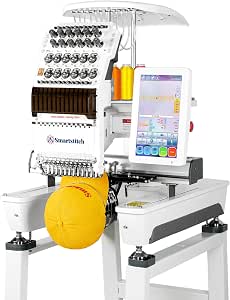 | Best for Large Designs Without a 15-Needle Setup | Needles: 12 | Maximum speed: 1200 stitches per minute | Embroidery area: 12″ x 16″ | VIEW ON AMAZON | See Our Full Breakdown |
| Poolin EOM 15-Needle Commercial Embroidery Machine Starter Bundle |  | Best Starter Bundle for a 15-Needle Workflow | Needles: 15 | Screen: 9-inch touchscreen | Connectivity: Wi-Fi and USB | VIEW ON AMAZON | See Our Full Breakdown |
| Brother PE900 Wireless Embroidery Machine |  | Best for Small-Batch Merch and New Embroiderers | Machine type: Embroidery-only | Embroidery area: 5″ x 7″ | Built-in designs: 193 | VIEW ON AMAZON | See Our Full Breakdown |
| Smartstitch S-1501 Ultra Embroidery Machine – 15 Needles, 1200 SPM, 12″ Touchscreen, Wi-Fi, 20″ x 14″ Embroidery Area |  | Best for Hat-Focused, High-Volume Merch | Needles: 15 | Maximum speed: 1200 stitches per minute | Embroidery area: 20″ x 14″ | VIEW ON AMAZON | See Our Full Breakdown |
| Smartstitch S-1001 Commercial Embroidery Machine |  | Best Compact Commercial Entry Point | Needles: 10 | Maximum speed: 1200 stitches per minute | Embroidery area: 9.5″ x 14.2″ | VIEW ON AMAZON | See Our Full Breakdown |
| Poolin EOM-15 15-Needle Commercial Embroidery Machine |  | Best for Small Merch Shops | Needles: 15 | Flat embroidery speed: Up to 1,200 stitches per minute | Cap embroidery speed: Up to 850 stitches per minute | VIEW ON AMAZON | See Our Full Breakdown |
| Brother SE700 Sewing and Embroidery Machine Bundle |  | Best for Sewing-and-Embroidery Beginners | Embroidery area: 4 × 4 inches | Built-in embroidery designs: 135 | Built-in embroidery fonts: 10 | VIEW ON AMAZON | See Our Full Breakdown |
| Brother NQ1700E Embroidery Machine with BES Blue Software and Magnetic Hoop |  | Best for Large Designs and Digitizing Tools | Embroidery field: 6 × 10 inches | Screen: 4.85-inch full-color LCD touchscreen | Built-in designs: 258 | VIEW ON AMAZON | See Our Full Breakdown |
| Poolin EOC03 Embroidery Machine – 4×4 & 4×9.25″ Embroidery Area, Beginner Friendly, 130 Built‑in Designs, WiFi Transfer, Starter Kit |  | Best Starter Kit for New Embroiderers | Embroidery areas: 4 × 4 inches and 4 × 9.25 inches | Built-in designs: 130 | Built-in fonts: 8 | VIEW ON AMAZON | See Our Full Breakdown |
| Brother SE2000 Sewing & Embroidery Machine with 5″ x 7″ Hoop – Ultimate Embroidery Kit |  | Best Sewing-and-Embroidery Upgrade | Embroidery area: 5 × 7 inches | Built-in embroidery designs: 193 | Additional designs: More than 50,000 downloadable designs listed | VIEW ON AMAZON | See Our Full Breakdown |
| top rated embroidery machine for merch creator | Connectivity | Embroidery area |
|---|---|---|
| Brother SE700 Sewing and Embro | Wireless LAN; Artspira app compatible | — |
| Brother PE900 Large Embroidery | Wireless LAN | — |
| Brother PE900 Embroidery Machi | Wireless LAN | 5 × 7 in |
| Poolin EOX 15-Needle Commercia | Wireless and USB | 20 × 14 in |
| Poolin EOC07 Embroidery Machin | Wi-Fi and USB flash drive | — |
| Smartstitch S-1201 Plus Commer | Wi-Fi and USB | 12" x 16" |
| Poolin EOM 15-Needle Commercia | Wi-Fi and USB | — |
| Brother PE900 Wireless Embroid | Wireless LAN and USB | 5" x 7" |
| Smartstitch S-1501 Ultra Embro | Wi-Fi and USB | 20" x 14" |
| Smartstitch S-1001 Commercial | — | 9.5" x 14.2" |
| Poolin EOM-15 15-Needle Commer | — | 14.2 × 9.5 inches |
| Brother SE700 Sewing and Embro | Wireless LAN | 4 × 4 inches |
| Brother NQ1700E Embroidery Mac | Wireless | — |
| Poolin EOC03 Embroidery Machin | — | — |
| Brother SE2000 Sewing & Embroi | Wireless LAN | 5 × 7 inches |
More Details on Our Top Picks
Brother SE700 Sewing and Embroidery Machine with Ultimate Embroidery Package
The Brother SE700 is the most flexible entry point here for a creator who also wants to sew, alter, or finish garments. Its 4 × 4-inch embroidery field suits small chest marks, labels, and pocket details, while three included hoops and starter supplies help cover different small-format jobs. The color touchscreen supports on-machine editing, and wireless transfer offers a simpler design workflow than moving files only by USB. Compared with the embroidery-only Brother PE900, the SE700 trades a larger stitching area and more built-in embroidery designs for sewing capability and a smaller footprint. That tradeoff matters for merch: larger front graphics will need repositioning or another machine. I’d choose it for varied craft work and modest logo runs, not for scaling production around oversized designs.
Pros:- Combines sewing and embroidery, making it useful for garment alterations as well as decoration.
- Three hoops, thread, stabilizers, needles, and clippers provide a broad starter setup.
- Wireless LAN and Artspira compatibility simplify design transfer.
- Color touchscreen allows on-screen design editing.
Cons:- The 4 × 4-inch embroidery field restricts larger merch graphics.
- A combination machine is less focused on embroidery production than the dedicated PE900.
Best for: New merch creators who want one machine for small embroidered logos, garment sewing, and basic alterations.
Not ideal for: Creators whose products rely on large chest graphics or repeatable high-volume embroidery; the 4 × 4-inch field limits design size and throughput.
- Embroidery designs:135 built-in
- Sewing stitches:103 built-in
- Embroidery field:4 × 4 in
- Included hoops:4 × 6.75 in multi-position, 4 × 4 in, and 1 × 2.5 in pocket hoop
- Lettering fonts:10
- Display:3.7 in color LCD touchscreen
- Connectivity:Wireless LAN; Artspira app compatible
- Dimensions:16.5 × 7.76 × 12.09 in (D × W × H)
Our verdict“Choose the SE700 if sewing versatility matters as much as small-format merch embroidery; skip it if larger designs are central to your line.”
Brother PE900 Large Embroidery Machine Bundle with Thread, Needles, Bobbins, and Stabilizer
This Brother PE900 bundle is a practical pick for creators moving beyond tiny logos who want a dedicated embroidery machine and a substantial supply of consumables in the same package. The 5 × 7-inch hoop area accommodates larger garment designs than the SE700, reducing the need to split artwork into multiple placements. Wireless LAN and a touchscreen support a straightforward file-to-stitch workflow, while the included 80-spool thread kit, needles, bobbins, and water-soluble stabilizer help stock a new workbench. Compared with the other PE900 Ultimate Embroidery Package in this roundup, this bundle emphasizes thread volume and core supplies rather than multiple hoops and a stated library of USB designs. The tradeoff is clear: it cannot sew, and the thread rack is not included, so buyers need separate garment-sewing equipment and a storage plan.
Pros:- 5 × 7-inch embroidery area supports larger designs than the SE700.
- 80-spool polyester thread kit, needles, bobbins, and stabilizer provide useful starting supplies.
- Wireless LAN supports file transfer without relying solely on USB.
- Automatic needle threading and jump-stitch trimming can reduce hands-on steps.
Cons:- Embroidery-only design means sewing and garment alterations require another machine.
- Thread rack is not included, so organizing the large thread kit takes extra planning.
Best for: Solo merch makers who already have a sewing machine and want a 5 × 7-inch embroidery setup with plentiful thread and consumables.
Not ideal for: Creators who need one machine for both sewing and embroidery, or who need multiple hoop sizes and accessories bundled for varied placements.
- Model:PE900-K1
- Hoop size:5 × 7 in
- Built-in designs:193
- Built-in fonts:13
- Display:3.7 in LCD touchscreen
- Connectivity:Wireless LAN
- Thread kit:80 spools, 500 m each, 40 WT polyester
- Included needles:100-piece Organ 75/11 embroidery needle set
- Stabilizer:Water-soluble roll, 3.2 yd
Our verdict“Pick this PE900 bundle for a dedicated 5 × 7-inch workflow backed by abundant thread, provided sewing is already covered elsewhere.”
Brother PE900 Embroidery Machine – 5″ x 7″ Ultimate Embroidery Package
The PE900 Ultimate Embroidery Package stands out for creators who want more placement options alongside a 5 × 7-inch main field. Its four included hoops range from a small pocket hoop to a 5 × 12-inch option, giving a merch maker more ways to handle compact marks and longer layouts than the PE900 bundle focused on a single 5 × 7-inch hoop. The machine itself adds wireless transfer, a color touchscreen, 193 built-in designs, and 13 lettering fonts. The package also lists multiple stabilizers and a 20-count thread set, plus USB designs and software resources. That breadth can reduce separate supply purchases, but it also adds choices and setup work for someone new to embroidery. Like the other PE900, it is embroidery-only, and the included design tools may take time to learn before a consistent production workflow develops.
Pros:- Four hoops cover pocket-size through 5 × 12-inch placements.
- 5 × 7-inch main field supports larger designs than the SE700.
- Wireless LAN and touchscreen editing support a convenient digital workflow.
- Thread, stabilizers, needles, bobbins, and USB design resources provide a broad setup.
Cons:- Embroidery-only operation does not handle sewing or garment alterations.
- The software resources and accessory range may create a steeper learning curve for beginners.
- A 20-count thread set is less extensive than the 80-spool kit in the other PE900 bundle.
Best for: Merch creators who want a dedicated 5 × 7-inch machine with several hoop sizes for pockets, standard placements, and longer designs.
Not ideal for: Buyers seeking a simple, sewing-capable first machine or those who prefer a minimal package with fewer software and accessory decisions.
- Embroidery area:5 × 7 in
- Built-in designs:193
- Lettering fonts:13
- Display:3.7 in color LCD touchscreen
- Connectivity:Wireless LAN
- Included hoops:5 × 12 in, 5 × 7 in, 4 × 4 in, and 1 × 2.5 in
- Thread set:20-count premium polyester
- Stabilizers:Cut-away, tear-away, and water-soluble
- USB designs:50,000+ ready-to-stitch designs
Our verdict“Choose this PE900 package if hoop variety matters more than a very large thread supply or built-in sewing capability.”
Poolin EOX 15-Needle Commercial Embroidery Machine
For a merch operation that needs to run varied jobs rather than occasional one-offs, the Poolin EOX is the production-oriented pick in this group. Its 15 needles can keep multiple thread colors loaded, reducing manual changes across multicolor orders, while the 20 × 14-inch area accommodates oversized work and fewer rehooping steps. The cap system adds a route into front, side, and 3D puff hat decoration—work the PE900 bundles cannot match with their smaller, flat-work focus. A 9-inch touchscreen, wireless and USB transfer, stand, hoops, and starter supplies make this a more complete shop setup. The cost in complexity is substantial: it needs dedicated floor space, and commercial operation and digitizing demand more skill than the consumer Brother machines. I’d reserve it for creators with recurring production needs, not hobby-scale runs.
Pros:- 15 needles reduce thread changes during multicolor production.
- 20 × 14-inch embroidery area supports oversized work and fewer rehoops.
- 270° cap system supports front, side, and 3D puff cap embroidery.
- Stand, hoops, cap equipment, and starter supplies are included.
Cons:- Commercial size requires dedicated workspace and a more involved setup than either Brother PE900.
- Professional machine operation and digitizing add a learning curve for new creators.
- Included thread is limited to four spools, so additional colors may be needed for varied orders.
Best for: Established merch businesses producing frequent multicolor orders, oversized pieces, or embroidered caps and able to dedicate workspace to a commercial machine.
Not ideal for: Home hobbyists, small-batch sellers without regular production demand, or beginners who need a compact and simple machine.
- Needles:15
- Embroidery area:20 × 14 in
- Maximum flat speed:1,200 stitches per minute
- Maximum cap speed:850 stitches per minute
- Display and OS:9 in touchscreen; InStitch OS4
- Connectivity:Wireless and USB
- Included hoops:11 standard hoops and 2 cap hoops
- Cap equipment:Cap station, cap drive, and 270° cap system
- Included supplies:4 thread spools, 144 bobbins, stabilizer, and basic tools
Our verdict“Choose the EOX when regular merch volume, large designs, and cap work justify a full commercial setup.”
Poolin EOC07 Embroidery Machine – 15″ x 7.9″ Large Embroidery Area and 4 Hoops
The Poolin EOC07 offers a middle ground between the small-format Brother machines and the floor-standing, multi-needle Poolin EOX. Its maximum 15 × 7.9-inch area gives merch creators room for broader flat designs without stepping up to the EOX’s 20 × 14-inch commercial footprint and 15-needle workflow. Four hoops make it adaptable to different garment placements, while Wi-Fi and USB transfer provide two ways to bring in designs. The 7-inch color screen and 200 built-in patterns help with setup, and the included thread, stabilizers, and bobbins cover basic startup needs. Compared with the PE900, it offers a much larger maximum area, but the product data does not list automatic needle threading or thread cutting. That means more manual handling, and the single-needle workflow is a less production-focused choice than the EOX for frequent multicolor orders.
Pros:- 15 × 7.9-inch maximum area handles larger flat designs than the Brother PE900.
- Four hoops support a range of project sizes and placements.
- Wi-Fi and USB offer flexible design transfer.
- 7-inch color touchscreen and included starter supplies support initial setup.
Cons:- Automatic needle threading and thread cutting are not listed, so more manual handling may be required.
- Its single-needle setup is less suited to repeated multicolor production than the 15-needle EOX.
- The large maximum stitching area may call for more workspace than compact Brother machines.
Best for: Independent apparel sellers who make larger flat designs, want several hoop options, and are not ready for a commercial 15-needle machine.
Not ideal for: High-volume multicolor shops or creators who prioritize automatic thread handling, dedicated cap equipment, or a compact machine.
- Maximum embroidery area:15 × 7.9 in
- Included hoops:Two 5.5 × 5.5 in, one 7.9 × 7.9 in, and one 7.9 × 15 in
- Display:7 in color touchscreen
- Connectivity:Wi-Fi and USB flash drive
- Operating system:InStitch OS3
- Built-in designs:200 patterns
- Built-in fonts and languages:8 fonts and 10 languages
- Supported file formats:DST and DSB
- Included supplies:Embroidery thread, stabilizers, and pre-wound bobbins
Our verdict“Pick the EOC07 for larger flat designs and multiple hoop choices without moving to the Poolin EOX’s commercial scale.”
Smartstitch S-1201 Plus Commercial Embroidery Machine
I’d pick the Smartstitch S-1201 Plus for merch creators who need a generous stitching field but don’t want to step up to a 15-needle machine. Its 12″ x 16″ embroidery area gives larger back graphics and multi-item layouts more room than the Smartstitch S-1001’s 9.5″ x 14.2″ field, while 12 needles support several thread colors without constant rethreading. Automatic trimming and color changes can reduce hands-on work across repeat jobs, and laser positioning helps with placement. Wi-Fi and USB offer two ways to transfer designs.
The tradeoff is a more involved commercial setup than the embroidery-only Brother PE900, which is aimed at smaller projects and a simpler workflow. I’d also factor in the stated return requirement to retain the original pallet and packaging. Training support and included starter materials help, but this machine still suits a creator prepared to learn commercial equipment.
Pros:- 12″ x 16″ embroidery area accommodates larger designs than the Smartstitch S-1001.
- 12 needles reduce thread changes across multicolor designs.
- Automatic trimming, color changing, thread-break detection, and laser positioning support a more automated workflow.
- Wi-Fi and USB transfer, plus included starter materials and training support.
Cons:- Commercial controls and setup can take time to learn.
- Return requirements call for keeping the original wooden pallet and packaging.
- Its larger work area and commercial build need a dedicated setup space.
Best for: Merch sellers producing larger flat designs who want commercial automation and a roomy field without choosing a 15-needle model.
Not ideal for: New hobbyists or creators with little workshop space who need a simple, easy-to-store machine or a forgiving return process.
- Needles:12
- Maximum speed:1200 stitches per minute
- Embroidery area:12″ x 16″
- Screen:10″ touchscreen
- Connectivity:Wi-Fi and USB
- Automation:Automatic thread trimming and color changing
- Positioning:Laser positioning
- Additional features:Self-lubrication and thread-break detection
Our verdict“Choose the S-1201 Plus if larger merch graphics and automated multicolor work matter more than a beginner-friendly setup.”
Poolin EOM 15-Needle Commercial Embroidery Machine Starter Bundle
The Poolin EOM 15-Needle stands out for creators who want supplies on hand as soon as the machine is set up. Its bundle includes 15 colors of polyester thread, 144 pre-wound bobbins, tear-away stabilizer, and puffy foam, a practical mix for launching hat and apparel orders without assembling a separate starter kit. Automatic color change and trimming also make repeat multicolor jobs less hands-on. Compared with the Smartstitch S-1001, the EOM offers more needles, which can mean fewer thread changes when a design uses many colors.
The supplied details don’t state an embroidery field or maximum speed, so I wouldn’t choose it based on capacity claims that aren’t specified here. Its 9-inch touchscreen and Wi-Fi/USB transfer cover key workflow needs, but a 15-needle commercial machine takes space and has a steeper learning curve than the Brother PE900. This is a bundle-first pick for creators ready to manage commercial equipment.
Pros:- 15 needles support multicolor work with fewer manual thread changes.
- Starter bundle includes 15 thread colors, 144 pre-wound bobbins, stabilizer, and puffy foam.
- Automatic color change and trimming help reduce routine handling.
- Wi-Fi and USB provide options for design transfer.
Cons:- Commercial-grade operation can be challenging for first-time machine embroiderers.
- The 15-needle setup requires substantial dedicated workspace.
- The provided product details don’t specify embroidery area or maximum speed for capacity comparisons.
Best for: New merch businesses moving into commercial production that want a 15-needle machine and common thread, bobbin, and stabilizer supplies together.
Not ideal for: Small-space creators or beginners seeking a compact, straightforward machine; commercial setup and operation may be more than they need.
- Needles:15
- Screen:9-inch touchscreen
- Connectivity:Wi-Fi and USB
- Included thread:15 colors of 40WT polyester thread
- Included bobbins:144 pre-wound, size L/SA155
- Included stabilizer:12″ x 25 yards, tear-away, 2.0 oz
- Automatic functions:Automatic color change and trimming
Our verdict“Pick the Poolin EOM if an all-in-one supply bundle and 15 needles matter more than a compact footprint or clearly stated stitching-field capacity.”
Brother PE900 Wireless Embroidery Machine
For a creator testing designs or making small-batch items, I’d favor the Brother PE900 over the commercial Smartstitch and Poolin machines when ease of use and a smaller setup take priority. It has a 5″ x 7″ embroidery area, wireless transfer, USB, and a touchscreen with editing tools and tutorials. Its 193 built-in designs and 13 lettering fonts offer ways to start personalizing products before investing in custom design workflows. Automatic needle threading also reduces one repetitive setup task.
The capacity limit is real: the PE900 is not built for the larger graphics possible on the Smartstitch S-1201 Plus or S-1501 Ultra, and its single-needle workflow is less suited to frequent multicolor production. It is embroidery-only, not a sewing machine, and is specified for 120-volt US use. I’d treat it as an accessible entry point for small designs, not a substitute for a commercial multi-needle production machine.
Pros:- 5″ x 7″ field suits many small logos, patches, and apparel placements.
- Wireless LAN and USB support design transfer.
- Touchscreen includes editing tools and tutorials.
- Automatic needle threading and built-in designs simplify early projects.
Cons:- Smaller embroidery field limits larger merch graphics compared with the Smartstitch S-1201 Plus and S-1501 Ultra.
- Embroidery-only design means it cannot perform regular sewing.
- Specified for 120-volt US use, and a USB drive for firmware updates is not included.
Best for: New or small-batch merch creators focused on chest logos, patches, and lettering who want built-in designs and wireless file transfer.
Not ideal for: High-volume sellers, creators making large back graphics, or buyers who need a combined sewing and embroidery machine.
- Machine type:Embroidery-only
- Embroidery area:5″ x 7″
- Built-in designs:193
- Lettering fonts:13
- Display:3.7-inch LCD touchscreen
- Connectivity:Wireless LAN and USB
- Maximum space from needle to arm:7.4 inches
- Power compatibility:120 volts, US use
Our verdict“Choose the PE900 for small designs and a gentler learning curve, but move to a commercial multi-needle model for production volume or larger artwork.”
Smartstitch S-1501 Ultra Embroidery Machine – 15 Needles, 1200 SPM, 12″ Touchscreen, Wi-Fi, 20″ x 14″ Embroidery Area
The Smartstitch S-1501 Ultra is the strongest fit here for creators whose orders center on hats and larger designs. Its reinforced nylon-carbon fiber cap driver is the standout distinction: compared with the more general-purpose Smartstitch S-1201 Plus, this model puts more emphasis on cap work while also offering 15 needles and a 20″ x 14″ embroidery area. A maximum speed of 1200 stitches per minute and automatic color changes support repeat production, while laser positioning can help with design placement. Wi-Fi and USB provide flexible file transfer, and the included starter pack gets basic supplies into the workflow.
That capacity comes with a serious footprint and a steeper learning curve than the Brother PE900. The PE900 is easier to place in a smaller workspace, but it cannot match this machine’s multi-needle production setup or stated field size. I’d choose the S-1501 Ultra for a dedicated shop prepared to handle commercial equipment—not for occasional home projects.
Pros:- Reinforced cap driver is tailored to hat embroidery.
- 15 needles and automatic color changes support multicolor production.
- 20″ x 14″ embroidery area accommodates large designs and layouts.
- 1200-stitch-per-minute maximum speed, laser positioning, Wi-Fi, and USB.
Cons:- Large footprint calls for ample workshop space.
- Commercial controls and features may overwhelm beginners.
- Its larger capacity may be unnecessary for small logos or occasional projects.
Best for: Established cap and apparel merch sellers who need a 15-needle workflow, a specialized cap driver, and room for larger embroidery designs.
Not ideal for: Hobbyists, small workshops, or first-time embroiderers who lack space or don’t need commercial-scale capacity.
- Needles:15
- Maximum speed:1200 stitches per minute
- Embroidery area:20″ x 14″
- Screen:12-inch touchscreen
- Cap feature:Reinforced nylon-carbon fiber cap driver
- Connectivity:Wi-Fi and USB
- Positioning:Laser positioning
- Included components:Starter pack with threads, stabilizers, and bobbin threads
Our verdict“Choose the S-1501 Ultra when cap production and large designs justify a dedicated commercial setup; otherwise, the S-1201 Plus or PE900 is a more restrained fit.”
Smartstitch S-1001 Commercial Embroidery Machine
The Smartstitch S-1001 is a practical step into commercial embroidery for merch creators who want automation without moving to a 12- or 15-needle model. Its 10 needles and 9.5″ x 14.2″ field give it more production-oriented capacity than the Brother PE900’s 5″ x 7″ area, while its 7-inch touchscreen and automatic trimming, color changes, and laser positioning support a more hands-off workflow. At up to 1200 stitches per minute, it has the stated speed for repeat jobs, and the starter pack and technical support can help new commercial operators get oriented.
Compared with the Smartstitch S-1201 Plus, the S-1001 has fewer needles, a smaller field, and a smaller screen, so it gives up room and convenience for a more compact commercial option. Compact is relative, though: at 93 pounds and 34 inches wide, it still needs a stable, dedicated spot. The strict packaging requirement for returns is another factor before purchase.
Pros:- 10 needles offer a commercial multicolor workflow in a smaller configuration than the 12-needle S-1201 Plus.
- 9.5″ x 14.2″ field exceeds the Brother PE900’s 5″ x 7″ area.
- Automatic trimming, color changing, and laser positioning reduce routine manual steps.
- Starter pack and video and online technical support aid setup.
Cons:- At 93 pounds, it is difficult to move despite its compact positioning.
- Its field, needle count, and screen are smaller than the Smartstitch S-1201 Plus.
- Returns require keeping the original packaging and pallet intact.
Best for: Small merch businesses moving beyond a home embroidery machine that want automated multicolor work and a smaller field than the S-1201 Plus.
Not ideal for: Creators who need a lightweight portable machine, a large-format field, or the simplest possible beginner setup.
- Needles:10
- Maximum speed:1200 stitches per minute
- Embroidery area:9.5″ x 14.2″
- Screen:7-inch touchscreen
- Dimensions:25″ D x 34″ W x 33″ H
- Weight:93 lbs
- Material:Aluminum
- Power source:Corded electric
Our verdict“Pick the S-1001 for a first commercial workflow with useful automation, but choose the S-1201 Plus if you need a larger field and more needles.”
Poolin EOM-15 15-Needle Commercial Embroidery Machine
For creators producing repeat orders across caps and flat goods, the 15-needle setup is the key advantage: automatic color changes and trimming reduce pauses between color sections. Its 14.2 × 9.5-inch field handles larger pieces than the Brother SE2000’s 5 × 7-inch area, while 270° cap embroidery adds a useful merch category, including 3D puff work. Laser positioning helps place designs consistently, and Wi-Fi or USB transfer gives you two ways to load files. The tradeoff is that this is a commercial-style machine, not a compact all-purpose sewing-and-embroidery option like the SE2000. Its field also has limits for oversized apparel graphics, and the one-year warranty is a relatively short support window for a production purchase.
Pros:- 15 needles with automatic color changes and trimming reduce manual stops on multicolor designs.
- Supports flat embroidery and 270° cap embroidery, including 3D puff designs.
- Laser positioning helps place designs consistently across repeat jobs.
- Includes standard and cap hoops, thread, stabilizer, stand, and basic tools.
Cons:- Commercial setup is more machine than a casual creator needs, especially if sewing functions are also a priority.
- The 14.2 × 9.5-inch field can constrain oversized garment designs.
- The listed warranty is one year.
Best for: Small merch shops and home studios producing recurring, multicolor orders on caps and flat garments.
Not ideal for: Hobbyists who want one compact machine for sewing and embroidery, or shops that need a larger field for oversized jacket-back designs.
- Needles:15
- Flat embroidery speed:Up to 1,200 stitches per minute
- Cap embroidery speed:Up to 850 stitches per minute
- Embroidery area:14.2 × 9.5 inches
- Cap embroidery:270°
- Screen:9-inch touchscreen
- Design transfer:Wi-Fi or USB
- Supported file formats:DST, DSB
- Included hoops:5 standard hoops and 2 cap hoops
Our verdict“Choose the EOM-15 if cap work and repeated multicolor merch runs matter more than compact size or sewing versatility.”
Brother SE700 Sewing and Embroidery Machine Bundle
The Brother SE700 is the most approachable choice here for someone who wants to sew merch blanks and add small embroidered details on the same machine. Its built-in sewing stitches, buttonhole options, designs, and fonts make it more versatile for general craft work than the embroidery-only Brother NQ1700E. The bundle’s four hoops and thread spools also provide useful starting supplies. The limit is the 4 × 4-inch embroidery field: chest logos, labels, and small accents fit the brief, but larger back graphics do not. Compared with the Brother SE2000, the SE700 gives up embroidery area and some built-in sewing stitch variety, so I’d favor it for simpler projects and a lower-complexity workflow, not for expanding merch production around bigger designs.
Pros:- Combines computerized sewing and embroidery in one machine.
- Includes 135 embroidery designs, 10 embroidery fonts, and more than 103 sewing stitches.
- Wireless LAN supports design transfer from a compatible computer and software.
- Bundle includes four hoops, thread, and sewing accessories.
Cons:- The 4 × 4-inch embroidery field limits design size on apparel.
- Wireless design transfer depends on compatible software.
- Offers less embroidery room and fewer sewing stitches than the Brother SE2000.
Best for: New creators who want to sew, personalize blanks, and make small logos or labels without buying separate machines.
Not ideal for: Merch sellers whose designs need a 5 × 7-inch or larger field, or who plan frequent large garment graphics.
- Embroidery area:4 × 4 inches
- Built-in embroidery designs:135
- Built-in embroidery fonts:10
- Built-in sewing stitches:More than 103
- Buttonhole styles:10 one-step styles
- Display:3.2 × 1.8-inch color touchscreen
- Connectivity:Wireless LAN
- Included hoops:Four
- Included embroidery thread:40 polyester spools, 500 m each
Our verdict“Pick the SE700 if you want one beginner-friendly machine for sewing and small-scale embroidered merch details.”
Brother NQ1700E Embroidery Machine with BES Blue Software and Magnetic Hoop
The NQ1700E earns its place for creators who need more room for apparel graphics and want design software in the same bundle. Its 6 × 10-inch field gives it a clear size advantage over the Brother SE2000’s 5 × 7-inch area, making broader garment designs easier to frame. The included BES Blue software adds a large library of designs and fonts, while the magnetic sash frame can make handling larger pieces of material less fiddly. A full-color touchscreen, wireless connectivity, and automatic trimming round out a workflow aimed at embroidery rather than sewing. That focus is also the tradeoff: unlike the SE2000 or SE700, it does not combine sewing functions. At 27 pounds, it is also better suited to a dedicated work surface than frequent transport.
Pros:- The 6 × 10-inch field accommodates larger designs than the Brother SE2000’s 5 × 7-inch area.
- BES Blue includes more than 800 designs and 199 fonts.
- Magnetic sash frame simplifies material handling for larger pieces.
- Full-color touchscreen supports on-screen positioning and editing.
Cons:- Embroidery-only format lacks the sewing versatility of the Brother SE2000 and SE700.
- At 27 pounds, it is not a convenient choice for frequent moving.
- Software and manual materials are primarily digital or video-based.
Best for: Apparel creators making larger front or back designs who want embroidery software and a magnetic frame in the bundle.
Not ideal for: Buyers who need sewing and embroidery in one machine, or creators who need a lightweight unit they can move often.
- Embroidery field:6 × 10 inches
- Screen:4.85-inch full-color LCD touchscreen
- Built-in designs:258
- Included software:BES Blue with 800+ designs and 199 fonts
- Included hoop:Magnetic Sash Frame SAMF 180, 5 × 7 inches
- Connectivity:Wireless
- Weight:27 pounds
- Dimensions:17.62 × 29.3 × 13.87 inches
Our verdict“Choose the NQ1700E if larger apparel designs and bundled embroidery software outweigh the need for built-in sewing.”
Poolin EOC03 Embroidery Machine – 4×4 & 4×9.25″ Embroidery Area, Beginner Friendly, 130 Built‑in Designs, WiFi Transfer, Starter Kit
The EOC03 is aimed at creators learning embroidery while testing a range of small merch formats. Its two embroidery areas let a beginner work with compact designs or longer layouts without stepping up to a commercial machine like the Poolin EOM-15. Wi-Fi transfer, built-in designs and fonts, tutorials, and a starter kit with stabilizers, bobbins, and tools lower the number of separate purchases and setup tasks. The machine is listed at 15 pounds, making it easier to move than the 27-pound Brother NQ1700E. The compromise is production capacity: its 130 built-in designs may feel limiting once a shop relies on a distinctive catalog, and the supplied details do not position it as a multi-needle system for fast color-heavy orders. Corded power also keeps it tied to a work area.
Pros:- Two embroidery areas offer flexibility for compact and elongated designs.
- Wi-Fi transfer supports custom patterns without a cable connection.
- Starter kit includes threads, stabilizers, prewound bobbins, and tools.
- Online support, video tutorials, and a user community can help beginners learn the workflow.
Cons:- The 130 built-in designs may not satisfy creators who need a broad ready-made catalog.
- It is not specified as a multi-needle machine for reducing color-change interruptions.
- Corded power limits where it can be set up and used.
Best for: First-time embroidery creators making small apparel runs who want included supplies, tutorials, and a choice of compact or elongated design areas.
Not ideal for: Established merch shops running frequent multicolor jobs, or designers whose work needs a larger field or multi-needle production.
- Embroidery areas:4 × 4 inches and 4 × 9.25 inches
- Built-in designs:130
- Built-in fonts:8
- Design transfer:Wi-Fi
- Included components:Machine, table, thread stand, 6 threads, 20 stabilizers, 25 prewound bobbins, and tool kit
- Power source:Corded electric
- Input voltage:110 volts
- Dimensions:15.35 × 18.11 × 16.54 inches
- Weight:15 pounds
Our verdict“Choose the EOC03 to learn embroidery and make varied small merch designs with starter supplies included, not to run high-volume production.”
Brother SE2000 Sewing & Embroidery Machine with 5″ x 7″ Hoop – Ultimate Embroidery Kit
The SE2000 is a stronger fit than the SE700 for creators who want sewing functions but need more room for branded apparel designs. Its 5 × 7-inch embroidery area exceeds the SE700’s 4 × 4-inch field, while 241 sewing stitches and custom stitch creation give it wider utility for making or altering merch. Wireless LAN and a touchscreen support design handling, and the bundle adds hoops, thread, stabilizers, tutorials, and a large ready-to-stitch collection. Those supplies make it a broad starter package, though the claimed downloadable design count does not change the machine’s physical embroidery limits. Compared with the embroidery-focused NQ1700E, the SE2000 is more versatile for sewing but offers a smaller field. At 20.5 pounds, it is also better left set up than carried between work sites.
Pros:- The 5 × 7-inch embroidery area is larger than the Brother SE700’s 4 × 4-inch field.
- Combines embroidery with 241 sewing stitches and custom stitch creation.
- Wireless LAN and a touchscreen support design transfer and machine setup.
- Bundle includes multiple hoops, thread, stabilizers, tutorials, and a large design collection.
Cons:- The embroidery field remains smaller than the Brother NQ1700E’s 6 × 10-inch area.
- At 20.5 pounds, it is less convenient to move frequently.
- The range of features may take time for absolute beginners to learn.
Best for: Creators who sew or alter blanks and want a larger-than-4 × 4-inch embroidery area plus bundled supplies for apparel projects.
Not ideal for: Merch sellers who need a field larger than 5 × 7 inches, or who want a lighter machine for regular transport.
- Embroidery area:5 × 7 inches
- Built-in embroidery designs:193
- Additional designs:More than 50,000 downloadable designs listed
- Built-in sewing stitches:241 with 10 buttonhole styles
- Hoops included:4: 5 × 12, 5 × 7, 4 × 4, and 1 × 2.5 inches
- Display:3.7-inch LCD touchscreen
- Connectivity:Wireless LAN
- Weight:20.5 pounds
- Dimensions:17.56 × 9.49 × 11.81 inches
Our verdict“Pick the SE2000 if sewing versatility and a mid-size embroidery field matter more than the larger dedicated embroidery space of the NQ1700E.”
How We Picked
I compared these machines through the needs of merch creators: how well each fits repeat orders, apparel decoration, design size, setup demands, and growth from occasional projects to steady production. I weighed needle count and stated embroidery area alongside usability, included accessories, connectivity, and the likely learning and maintenance burden. Those factors matter because a machine that can stitch quickly still may not suit a creator who mainly makes one-off pieces or has limited workspace.
The ranking gives priority to workflow fit rather than a single headline specification. The Poolin EOX takes the top spot for its multi-needle production orientation; the Brother PE900 models rank well for creators who want a simpler single-needle path with a useful 5″ x 7″ field. Larger commercial options such as the Smartstitch S-1501 Ultra can suit ambitious production plans, but their scale and setup demands make them a less natural first choice for every small merch operation. Similar models and bundles are separated by their stated features and intended use, not by assumptions about performance that product details cannot verify.
Factors to Consider When Choosing Top Rated Embroidery Machine For Merch Creators
For merch, the right machine is the one that matches your products, order rhythm, and available workspace—not necessarily the one with the most needles or the largest embroidery field. I’d decide how garments will be hooped and how often designs need color changes before comparing bundles or accessories.
Match Needle Count to Your Order Rhythm
A multi-needle machine can keep several colors threaded at once, reducing manual rethreading during designs with frequent color changes. That advantage matters most when you repeat the same design across multiple garments or fulfill batches of orders. For occasional one-offs, a single-needle machine may be easier to place, learn, and manage. A common mistake is buying commercial capacity before there is enough consistent work to use it. Consider both how many items you make and how much time you spend changing thread, trimming, and preparing each garment.
Plan Around the Design Field and Garment
The embroidery field sets the maximum area available for a design in one hooping, but it does not describe every part of the garment you can decorate. A chest logo may fit a modest field, while a larger back graphic can call for a bigger machine or multiple placements. Sleeves, pockets, and structured caps each create different hooping challenges, so check which garment types and hoops the machine supports before buying. Avoid choosing by the widest advertised dimension alone; field shape and hoop availability affect whether your artwork fits in practice. Keep common design sizes for your product line nearby while comparing models.
Treat Hooping and Stabilizing as Part of the Workflow
Machine capability is only one part of producing clean apparel embroidery: fabric stretch, seams, garment shape, and stabilizer choices all affect results. A flat test on scrap fabric may not reveal how difficult it is to position a finished hoodie or shirt under the needle. Before committing, map out how you will hold the garment steady, keep seams clear, and repeat placement consistently across an order. Bundled stabilizer and hoops can help with initial setup, but they do not cover every fabric or garment style. Budget time to learn placement and test each fabric combination before selling a new design.
Check Digitizing and File Compatibility Before Buying
An embroidery machine stitches embroidery files; it does not automatically turn every logo or illustration into a clean stitch plan. Digitizing determines stitch direction, density, underlay, and other details that shape how a design behaves on fabric. Check the file formats the machine accepts, how designs transfer, and whether you have compatible software or a reliable digitizing source. Wireless transfer can make moving files easier, but it does not fix a poorly prepared design. Creators who expect to customize logos often should plan for software learning or digitizing costs alongside the machine.
Account for Space, Setup, and Ongoing Care
Commercial machines can require more room for the machine itself, hoops, garment positioning, thread, and maintenance access. Measure the full working area, not just the table footprint, and think about noise, power, and how you will move or service the equipment. More needles and greater production capacity can bring a steeper setup and maintenance routine than a home-oriented machine. A frequent buying error is treating workspace as an afterthought, then struggling to hoop bulky garments or reach service points. Choose a setup you can keep clean, thread, and use safely during the busiest part of your workflow.
Compare Bundles by What You Will Actually Use
Bundles can make the first projects easier by including thread, needles, bobbins, stabilizer, hoops, or software, but package contents vary. Separate the value of useful supplies from items that duplicate tools you already own or do not suit your garments. A larger starter kit does not necessarily mean a better production setup, especially if it lacks the hoop or accessory needed for your main product. Check what is included, what is consumable, and what you will need to buy soon after setup. Paying more for a bundle makes sense when its contents solve a real first-project need rather than simply adding more pieces to store.
Frequently Asked Questions
Is a multi-needle machine worth it for a small merch shop?
It can be worthwhile when you regularly repeat designs with several thread colors or fulfill batches, since fewer manual color changes can make production easier to manage. For sporadic orders and simple logos, a single-needle Brother model may be a more manageable starting point. The machine’s capacity only helps if you have the space and time to set up, hoop, and maintain it. Estimate how much production time goes to rethreading versus garment preparation before choosing. If orders are still unpredictable, starting with a single needle can limit the commitment while you refine your workflow.
Will a 5″ x 7″ embroidery field cover most shirt logos?
That field can accommodate many chest logos and medium-sized designs, but the design’s dimensions and the garment’s shape still determine whether it will fit. It may not cover a large back graphic in one hooping, and some placements are difficult because of seams or narrow garment openings. Check your actual artwork measurements rather than relying on a general idea of logo size. Also confirm which hoop is included and whether other compatible hoops are available. A larger field offers flexibility, but it does not remove the need to position and stabilize garments correctly.
Can I embroider finished hoodies and T-shirts on these machines?
Many embroidery machines can decorate finished garments, but the challenge is getting the garment hooped and positioned without catching a second layer under the needle. Bulky hoodie seams and stretchy T-shirt fabric call for careful hooping, stabilizer, and placement. A machine’s stated embroidery area alone does not confirm that every garment style will fit comfortably. Look at hoop options and the physical clearance around the needle area, then test on garments like the ones you plan to sell. Starting with scrap fabric or a sample garment can reveal positioning problems before you work on customer pieces.
Do the included bundles provide everything I need to start selling?
Bundles may provide useful supplies such as thread, needles, bobbins, stabilizer, or hoops, but included accessories do not create production-ready designs or a repeatable workflow. You may still need compatible embroidery files, digitizing support, garment-specific stabilizers, and practice with placement. Bundle contents also vary, so read the included-items list rather than assuming similar product names mean identical kits. Plan for consumables and replacement supplies as well as initial setup. Before taking paid orders, test each design on the fabric and garment style you intend to sell.
Should I choose a larger commercial machine or start with a Brother PE900?
Choose based on the work you expect to do consistently, not only on future ambitions. The PE900 is a single-needle option with a 5″ x 7″ field that can suit smaller runs and creators who prefer a home-studio scale. Larger commercial machines in this lineup are aimed at higher-capacity workflows, but they call for more space, setup, and familiarity with production equipment. If you already have recurring batch orders and need to manage multiple colors efficiently, commercial capacity may fit your business. If demand is still taking shape, a simpler machine can help you learn garment embroidery before expanding.
Conclusion
For creators building a repeatable production workflow, my best overall pick is the Poolin EOX 15-Needle Commercial Embroidery Machine, while the Smartstitch S-1501 Ultra is my best premium choice for buyers seeking a larger commercial setup and able to support its scale. For best value in a single-needle path, I’d compare the Brother PE900 options and choose based on the bundle and connectivity details that fit your setup. Beginners who want an approachable home-studio machine should look first at the Brother PE900 or the beginner-oriented Poolin EOC03, depending on their design sizes and workflow. For sewing and embroidery in one machine, the Brother SE700 or SE2000 suits creators who need both functions. If most of your work involves repeat, multicolor runs, prioritize the Poolin or Smartstitch multi-needle options; if you make occasional custom pieces, a single-needle model is the more practical place to start.
Fall Picks
fall essentials
As an affiliate, we earn on qualifying purchases.