
The best productivity mice with programmable buttons make repetitive tasks faster without forcing you to trade comfort or control. Logitech G502 HERO is my best overall pick for its flexible button layout, while the Logitech M720 Triathlon stands out for switching between computers and the Corsair Scimitar Elite Wireless SE for workflows that need many thumb-accessible commands. The main tradeoff is between a familiar, versatile layout and a dense grid of buttons that takes time to learn. Wireless convenience, physical size, and software support can matter as much as button count. Read on for the full breakdown and guidance on matching a mouse to your daily tasks.

Get business pricing on office and shipping supplies
- Business-only prices and quantity discounts
- Tax-exempt purchasing
- Multiple users, one account, clear invoices
Key Takeaways
- The G502 HERO is the most balanced pick: it offers programmable controls without the MMO-style button grid that can feel excessive for everyday office work.
- The M720 Triathlon prioritizes device switching: it suits people who move between computers, though its button setup is less expansive than the dedicated MMO mice.
- High button counts favor repeatable, command-heavy workflows: models such as the Redragon M901P-KS and Corsair Scimitar Elite Wireless SE offer more shortcuts, but ask for more thumb training.
- Wireless models serve different needs: the M901P-KS and M913 add cordless flexibility to button-heavy setups, while wired options avoid charging and connection management.
- Button count alone does not determine productivity: layout, grip comfort, software support, and whether the buttons are easy to distinguish can matter more than the maximum number of assignments.
| INFINMIND Multi-Device Bluetooth Mouse with 7 Programmable Buttons |  | Best for Multi-Device Work | Connectivity: Bluetooth and 2.4 GHz USB | Device connections: Up to 3 | Programmable buttons: 7 | VIEW ON AMAZON | See Our Full Breakdown |
| Redragon M901P-KS Wireless MMO Gaming Mouse, 16,000 DPI, 16 Programmable Buttons, RGB, Rechargeable |  | Best Wireless MMO Control | Connectivity: Wired or wireless | Programmable buttons: 16, including 12 side buttons | Maximum sensitivity: 16,000 DPI | VIEW ON AMAZON | See Our Full Breakdown |
| Redragon M908 Impact Wired MMO Gaming Mouse, White |  | Best for Wired Macro Density | Connectivity: USB wired | Programmable buttons: 18, including 12 side buttons | Sensor: Pixart PAW3327 optical | VIEW ON AMAZON | See Our Full Breakdown |
| Redragon M901K MMO Gaming Mouse with 19 Programmable Buttons |  | Best for Maximum Button Mapping | Connectivity: USB wired | Programmable buttons: 19, including 12 side buttons | DPI range: 100–12,400 | VIEW ON AMAZON | See Our Full Breakdown |
| AFUNTA C12 Wired Gaming Mouse with 12 Programmable Buttons |  | Best Entry-Level Button Grid | Connectivity: Wired USB | Buttons: 12 | Listed DPI settings: 1000, 1500, 2000, 4000 | VIEW ON AMAZON | See Our Full Breakdown |
| Corsair Scimitar Elite Wireless SE MMO Gaming Mouse, White |  | Best for Stream Deck Workflows | Programmable buttons: 16, including an adjustable 12-button thumb slider | Sensor: CORSAIR MARKSMAN S optical | Maximum DPI: 33,000 | VIEW ON AMAZON | See Our Full Breakdown |
| Logitech G502 HERO Wired Gaming Mouse, Black |  | Best for Wired Control and Custom Balance | Programmable buttons: 11 | Sensor: Optical | Sensitivity range: 200–25,600 DPI | VIEW ON AMAZON | See Our Full Breakdown |
| Redragon M908 Wired MMO RGB Gaming Mouse |  | Best for Maximum Button Count | Programmable buttons: 18 | Sensor: Pixart PAW3327 optical | Maximum sensitivity: 12,400 DPI | VIEW ON AMAZON | See Our Full Breakdown |
| Redragon M913 Impact Elite Wireless RGB MMO Gaming Mouse |  | Best Value Wireless MMO Option | Programmable buttons: 16, including 12 side buttons | Sensor: Pixart 3335 optical | Maximum sensitivity: 16,000 DPI | VIEW ON AMAZON | See Our Full Breakdown |
| Razer Basilisk V3 Pro Wireless Gaming Mouse |  | Best Premium All-Rounder | Programmable buttons: 11 | Sensor: Razer Focus Pro 30K optical | Maximum sensitivity: 30,000 DPI | VIEW ON AMAZON | See Our Full Breakdown |
| Logitech M720 Triathlon Full-Size Multi-Device Wireless Mouse | 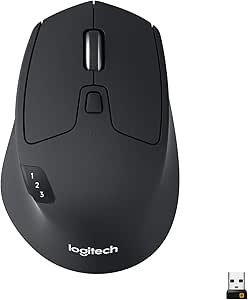 | Best for Multi-Computer Productivity | Connectivity: Bluetooth or USB Unifying receiver | Buttons: 6 customizable buttons | Device switching: Up to 3 computers | VIEW ON AMAZON | See Our Full Breakdown |
| productivity mice with programmable button | Connectivity | Programmable buttons | Maximum sensitivity | Sensor |
|---|---|---|---|---|
| INFINMIND Multi-Device Bluetoo | Bluetooth and 2.4 GHz USB | 7 | — | — |
| Redragon M901P-KS Wireless MMO | Wired or wireless | 16, including 12 side buttons | 16,000 DPI | — |
| Redragon M908 Impact Wired MMO | USB wired | 18, including 12 side buttons | 12,400 DPI | Pixart PAW3327 optical |
| Redragon M901K MMO Gaming Mous | USB wired | 19, including 12 side buttons | — | — |
| AFUNTA C12 Wired Gaming Mouse | Wired USB | — | — | — |
| Corsair Scimitar Elite Wireles | 2.4 GHz wireless, Bluetooth 4.2 + LE, USB 2.0 Type-A | 16, including an adjustable 12-button thumb slider | — | CORSAIR MARKSMAN S optical |
| Logitech G502 HERO Wired Gamin | USB wired | 11 | — | Optical |
| Redragon M908 Wired MMO RGB Ga | USB wired | 18 | 12,400 DPI | Pixart PAW3327 optical |
| Redragon M913 Impact Elite Wir | 2.4 GHz wireless, USB-C wired | 16, including 12 side buttons | 16,000 DPI | Pixart 3335 optical |
| Razer Basilisk V3 Pro Wireless | 2.4 GHz, Bluetooth, USB | 11 | 30,000 DPI | Razer Focus Pro 30K optical |
| Logitech M720 Triathlon Full-S | Bluetooth or USB Unifying receiver | — | 1000 dpi | — |
More Details on Our Top Picks
INFINMIND Multi-Device Bluetooth Mouse with 7 Programmable Buttons
The INFINMIND is the most office-focused option here: its seven programmable buttons and three-device switching support separate setups across a work computer, tablet, or personal machine. It connects through two Bluetooth pairings and a 2.4 GHz USB receiver, while four-way scrolling and five DPI settings add flexibility for documents and wide spreadsheets. Compared with the button-heavy Redragon M901K, it gives up a large grid of side controls and adjustable weights in favor of broader device compatibility and a stated battery life of up to 20 months. Its key limitation is that button programming is available only on Mac and Windows, even though the mouse itself supports more operating systems. Choose it for switching between devices, not MMO-style command mapping.
Pros:- Pairs with up to three devices through Bluetooth and a 2.4 GHz USB receiver.
- Seven programmable buttons provide shortcuts for supported Mac and Windows systems.
- Four-way scrolling and five DPI levels suit varied desktop tasks.
- Includes an AA battery rated for up to 20 months of use.
Cons:- Button programming is limited to Mac and Windows.
- Seven programmable buttons offer fewer command options than the Redragon M901K’s 19.
- Battery life varies with usage.
Best for: People who alternate among a Windows or Mac computer, tablet, and another device and want programmable shortcuts on their main computer.
Not ideal for: MMO players or users who need extensive programmable side buttons, and buyers who need to configure buttons on Linux, iOS, Android, or Chrome OS.
- Connectivity:Bluetooth and 2.4 GHz USB
- Device connections:Up to 3
- Programmable buttons:7
- DPI settings:1000, 1600, 2400, 3200, 4800
- Scrolling:4-way
- Compatible operating systems:Windows, Mac OS, Linux, iOS, Android, Chrome OS
- Battery:1 AA battery included; up to 20 months stated
- Hand orientation:Right
Our verdict“Choose the INFINMIND if switching among several devices matters more than having a large bank of programmable MMO controls.”
For buyers who want MMO-style shortcuts without a cable tether, the M901P-KS pairs 16 programmable buttons, including 12 on the side, with wireless and wired operation. That button cluster can keep frequently used commands close at hand, while five memory profiles let users save different arrangements. Compared with the wired Redragon M901K, this model adds wireless freedom and can keep working while charging; the tradeoff is a battery life of up to 70 hours only with RGB off. Its stated compatibility is limited to Windows versions, so it is a less flexible productivity choice for mixed-device or Mac households than the INFINMIND. This pick makes sense when programmable controls and cordless use outweigh operating-system breadth and lighter office-oriented design.
Pros:- Sixteen programmable buttons include 12 side buttons for mapped commands.
- Works wirelessly or over a wired connection, including while charging.
- Five memory profiles support separate button setups.
- Adjustable sensitivity reaches 16,000 DPI.
Cons:- The stated compatibility is limited to Windows versions.
- The up-to-70-hour battery figure applies with RGB lighting off.
- Its right-handed, button-dense gaming layout may be excessive for routine office work.
Best for: Windows users who want a wireless mouse with a dense side-button layout for MMO commands, macros, or frequently used shortcuts.
Not ideal for: Mac or Linux users, and people seeking a simple multi-device office mouse rather than a right-handed gaming layout.
- Connectivity:Wired or wireless
- Programmable buttons:16, including 12 side buttons
- Maximum sensitivity:16,000 DPI
- Polling rate:125–1,000 Hz
- Memory profiles:5
- Battery:1,000 mAh rechargeable; up to 70 hours with RGB off
- Wireless range:10 m
- Compatibility:PC; Windows 10, 8, 7, Vista, XP
Our verdict“Pick the M901P-KS for wireless Windows workflows that benefit from many thumb-accessible commands, and skip it if broad OS support is a priority.”
Redragon M908 Impact Wired MMO Gaming Mouse, White
The M908 Impact is built for users who want a large, configurable command set and prefer a wired connection. Its 18 programmable buttons, including 12 side buttons, create more room for shortcuts than the INFINMIND’s seven, while five onboard profiles can preserve different mappings. The removable weight set also lets users tune the feel rather than accept a fixed balance. In return, this right-handed mouse stays tethered by a 6-foot cable, and its programmable features are limited on Mac, where only basic use is supported. Compared with the Redragon M901P-KS, it trades wireless operation and a higher maximum DPI for a wired setup with weight tuning. It suits a stationary desk where macro access matters more than portability.
Pros:- Eighteen programmable buttons include 12 side buttons.
- Five onboard memory profiles keep different control layouts available.
- Eight removable weights allow balance and feel adjustments.
- Six-foot braided cable avoids charging interruptions.
Cons:- Wired USB connection limits movement compared with the wireless Redragon M901P-KS.
- Right-handed design does not suit left-handed users.
- Mac support is limited to basic use.
Best for: Right-handed Windows users who want many programmable controls, saved profiles, and a mouse they can customize with removable weights.
Not ideal for: Left-handed users, people who need wireless freedom, or Mac users who expect full access to programmable features.
- Connectivity:USB wired
- Programmable buttons:18, including 12 side buttons
- Sensor:Pixart PAW3327 optical
- Maximum sensitivity:12,400 DPI
- Polling rate:1,000 Hz
- Memory profiles:5
- Weight tuning:Eight removable 2.4 g weights
- Cable length:6 ft
Our verdict“Choose the M908 Impact for a stationary Windows setup where extensive wired macros and adjustable weight matter more than wireless convenience.”
Redragon M901K MMO Gaming Mouse with 19 Programmable Buttons
The M901K puts button count first: 19 programmable buttons, including 12 remappable side buttons, give users an unusually broad set of controls for macros and app shortcuts. Five memory profiles can separate those layouts, and the eight removable weights let users adjust how the mouse balances. Against the M908 Impact, it offers one more programmable button and lists compatibility with Windows, macOS, and Linux; both remain wired, right-handed MMO-style mice with 12 side buttons and weight tuning. That makes the M901K the stronger fit for buyers prioritizing maximum mappings, but not for anyone who wants a clean, lightweight office mouse or wireless movement. The feature set is better suited to a fixed desk and users willing to configure a dense control surface.
Pros:- Nineteen programmable buttons include 12 remappable side buttons.
- Five memory profiles support distinct control arrangements.
- Eight removable weights allow balance customization.
- Listed compatibility includes Windows, macOS, and Linux.
Cons:- Wired USB connection restricts movement compared with wireless options such as the Redragon M901P-KS.
- Right-handed shape excludes left-handed users.
- The large number of buttons may be harder to manage for buyers who need only a few shortcuts.
Best for: Right-handed power users who want to assign many macros across several profiles and value adjustable mouse balance.
Not ideal for: Left-handed users, people who need a wireless mouse, or office users who would rather have a compact, uncluttered control layout.
- Connectivity:USB wired
- Programmable buttons:19, including 12 side buttons
- DPI range:100–12,400
- Polling rate:125–1,000 Hz
- Memory profiles:5
- Weight tuning:Eight removable 2.4 g weights
- Lighting:RGB, 4 modes
- Compatible operating systems:Windows, macOS, Linux
Our verdict“Choose the M901K if your priority is fitting the largest number of programmable commands into a wired, right-handed mouse.”
AFUNTA C12 Wired Gaming Mouse with 12 Programmable Buttons
The AFUNTA C12 offers a 12-button layout and adjustable weights for buyers who want more mapped controls than a conventional office mouse without stepping up to the Redragon models’ 16–19 programmable buttons. Its four listed DPI settings cover common pointer-speed preferences, and the braided 6-foot cable suits a fixed desk. There is a useful caveat: the product data lists DPI settings up to 4,000 and also describes movement speed reaching 8,000 DPI with double-speed adjustment, so I would not choose it for a clearly specified high-sensitivity range. Compared with the INFINMIND, it gives up multi-device wireless connections and broad stated OS support, but offers weight tuning and a denser button layout. It is a basic wired pick when programmable controls matter more than connection flexibility.
Pros:- Twelve buttons provide a larger control set than the INFINMIND’s seven programmable buttons.
- Eight adjustable weights allow changes to balance.
- Braided 6-foot cable suits a stationary desk setup.
- Four listed DPI settings provide several pointer-speed choices.
Cons:- Wired connectivity limits movement and device switching.
- Product information gives different maximum DPI figures: 4,000 DPI settings and up to 8,000 DPI with double-speed adjustment.
- Compatibility and button-programming details are less clearly specified than for the Redragon M901K.
Best for: Desktop users who want a wired mouse with a dozen buttons and adjustable weight for shortcuts, without needing wireless device switching.
Not ideal for: Buyers who need wireless connectivity, a clearly stated maximum DPI, or confirmed programmable-button support across multiple operating systems.
- Connectivity:Wired USB
- Buttons:12
- Listed DPI settings:1000, 1500, 2000, 4000
- Additional movement-speed claim:Up to 8000 DPI with double-speed adjustment
- Lighting:Multicolor LED
- Weight tuning:8 adjustable weights
- Cable length:6 feet
- Dimensions:5.12 x 3.21 inches
Our verdict“Pick the AFUNTA C12 if you want a wired, weight-adjustable mouse with a dozen buttons, but skip it if clear sensitivity specs or wireless use are priorities.”
Corsair Scimitar Elite Wireless SE MMO Gaming Mouse, White
The Corsair Scimitar Elite Wireless SE is the strongest fit here for users who want a dense set of shortcuts and a direct link to Elgato Stream Deck workflows. Its adjustable 12-button thumb slider lets you position the keypad around your grip, while three onboard profiles can keep separate mappings ready without relying on a single software setup. Compared with the wired Redragon M908, it adds wireless and Bluetooth options plus Stream Deck integration, though the M908 offers more programmable buttons overall. The tradeoff is a fairly specialized, right-handed shape and a 114 g weight; its Bluetooth battery figure also assumes RGB is off. Choose it for customizable creative or MMO controls, not for a simple, light office mouse.
Pros:- 16 programmable buttons, including an adjustable 12-button thumb slider
- 2.4 GHz, Bluetooth, and USB connectivity support different desk setups
- Three onboard profiles can store separate button configurations
- Elgato Stream Deck integration adds a useful workflow option
Cons:- Right-handed design excludes left-handed users
- 114 g body may feel heavy for users who favor quick, light movement
- Bluetooth battery-life figure of up to 500 hours is specified with RGB off
Best for: Stream Deck users and MMO or creative-app users who want many mapped commands, adjustable thumb-button placement, and wireless connection choices.
Not ideal for: Left-handed users, people who prefer a light, compact mouse, or buyers who want straightforward office controls rather than a dense thumb keypad.
- Programmable buttons:16, including an adjustable 12-button thumb slider
- Sensor:CORSAIR MARKSMAN S optical
- Maximum DPI:33,000
- Connectivity:2.4 GHz wireless, Bluetooth 4.2 + LE, USB 2.0 Type-A
- Polling rate:Up to 1,000 Hz
- Onboard profiles:3
- Battery life:Up to 150 hours via 2.4 GHz; up to 500 hours via Bluetooth with RGB off
- Weight:114 g without cable and accessories
- Compatibility:Windows, macOS
Our verdict“Pick the Scimitar Elite Wireless SE if adjustable thumb controls and Stream Deck integration matter more than a lighter, simpler mouse.”
Logitech G502 HERO Wired Gaming Mouse, Black
The Logitech G502 HERO is a practical choice for desk-bound work when you want programmable shortcuts without managing a battery. Its 11 buttons provide useful access to app commands, while the dual-mode wheel can speed through long documents or return to tactile scrolling for precise movement. Compared with the wireless Razer Basilisk V3 Pro, the G502 gives up cordless convenience and multiple connection modes, but its adjustable weights let you tune the balance instead. The cord can restrict movement, and its right-handed shape will not suit everyone. It also has fewer buttons than the MMO-focused Redragon and Corsair options, making it better for a moderate shortcut set than a full bank of mapped commands.
Pros:- 11 programmable buttons cover a useful range of everyday shortcuts
- Dual-mode scroll wheel switches between free scrolling and controlled steps
- Up to five removable weights allow balance adjustments
- USB connection avoids battery charging
Cons:- Wired connection limits movement around the desk
- Right-handed ergonomic shape does not accommodate left-handed use
- Fewer programmable buttons than the Corsair Scimitar Elite Wireless SE and Redragon M908
Best for: Right-handed desk users who want a reliable wired mouse, a fast-scroll option for documents, and the ability to adjust weight and balance.
Not ideal for: Left-handed users, people who need wireless freedom, or buyers who want more than 11 programmable controls for MMO or complex app macros.
- Programmable buttons:11
- Sensor:Optical
- Sensitivity range:200–25,600 DPI
- Connectivity:USB wired
- Scroll wheel:Dual-mode hyper-fast scroll
- Adjustable weights:Up to five 3.6 g weights
- Cable length:1.0 m
- Hand orientation:Right-handed
- Operating system requirement:Windows 7 or later
Our verdict“Choose the G502 HERO for customizable wired control and scroll flexibility, but skip it if wireless use or a large side-button grid is a priority.”
Redragon M908 Wired MMO RGB Gaming Mouse
With 18 programmable buttons and five memory profiles, the Redragon M908 suits users who want to assign commands across several games or applications. Its supplied weight set gives more room to tune the feel than the Redragon M913 Impact Elite, but the M913 adds wireless operation and a rechargeable battery. The M908 keeps things wired, with a six-foot braided cable that supports a fixed desk setup without charging interruptions. Its high button count can reduce reliance on keyboard shortcuts, yet the 175 g body is substantial, and its right-handed form is limiting for left-handed users. Programmable features require Windows, so Mac users should not expect the full customization experience. This is a feature-dense pick, not a lightweight general-purpose mouse.
Pros:- 18 programmable buttons offer the largest button count among these five picks
- Five memory profiles support different applications or control layouts
- Eight-piece weight set allows adjustments to mouse balance
- Six-foot braided cable suits a fixed workstation
Cons:- Programmable features require Windows; Mac supports normal use only
- At 175 g, it is substantially heavier than the other mice in this group
- Wired design and right-handed shape limit placement and user fit
Best for: Windows users who want an extensive set of mapped commands, multiple stored profiles, and a wired mouse for a stationary gaming or productivity setup.
Not ideal for: Mac users who need programmable features, left-handed users, or anyone seeking a light mouse or cordless desk setup.
- Programmable buttons:18
- Sensor:Pixart PAW3327 optical
- Maximum sensitivity:12,400 DPI
- Connectivity:USB wired
- Polling rate:1,000 Hz
- Memory profiles:5
- Weight tuning set:Eight pieces, 2.4 g each
- Cable length:6 ft
- Item weight:175 g
Our verdict“Choose the M908 if Windows-based button mapping and a large shortcut grid outweigh its heavy build and wired, right-handed design.”
Redragon M913 Impact Elite Wireless RGB MMO Gaming Mouse
The Redragon M913 Impact Elite brings a 12-button side panel and 16 programmable controls to a mouse that can work either wirelessly or over USB-C. That flexibility makes it a more mobile alternative to the wired Redragon M908, while still offering enough side buttons for MMO commands or repeated productivity macros. Its 2.4 GHz connection and stated battery life of up to 45 hours with lighting or 80 hours in eco mode give users a choice between visual effects and longer sessions. The compromises are a 132 g weight and a right-handed layout, while its 16,000 DPI ceiling is below the Corsair Scimitar and Razer Basilisk. It suits users who value wireless convenience and many buttons over maximum sensor sensitivity.
Pros:- 16 programmable buttons include 12 side buttons for quick access
- Supports both 2.4 GHz wireless and USB-C wired use
- Eco mode extends stated battery life to up to 80 hours
- Works with PC, Mac, Linux, and Unix
Cons:- 132 g weight may feel heavy during long sessions or quick movements
- Right-handed design excludes left-handed users
- 16,000 DPI maximum is lower than the Corsair Scimitar Elite Wireless SE and Razer Basilisk V3 Pro
Best for: Right-handed users who want a wireless MMO-style button grid, USB-C fallback, and programmable controls for games or repetitive desktop tasks.
Not ideal for: Left-handed users, people who prefer lightweight mice, or buyers who need a higher maximum sensitivity or more than 16 programmable buttons.
- Programmable buttons:16, including 12 side buttons
- Sensor:Pixart 3335 optical
- Maximum sensitivity:16,000 DPI
- Connectivity:2.4 GHz wireless, USB-C wired
- Battery life:Up to 45 hours with backlighting; up to 80 hours in eco mode
- Wireless range:10 m
- Weight:132 g
- Lighting:Customizable RGB, 16.8 million colors
- Compatibility:PC, Mac, Linux, Unix
Our verdict“Pick the M913 if you want a wireless 12-button side grid with wired backup and can accept its weight and right-handed fit.”
Razer Basilisk V3 Pro Wireless Gaming Mouse
The Razer Basilisk V3 Pro is the most balanced premium pick here for users who want programmable controls without committing to an MMO-style 12-button panel. Its 11 buttons cover a practical set of shortcuts, and the scroll wheel’s free-spin and tactile modes make it adaptable to long documents as well as precise selections. Compared with the Corsair Scimitar Elite Wireless SE, it has fewer buttons but a more general-purpose layout, 13-zone lighting, and three connection options. The high-sensitivity sensor is listed to track on surfaces including glass, broadening desk placement options. Tradeoffs include right-handed ergonomics and battery life that changes by connection; 8,000 Hz polling also needs a separately sold dongle or dock. It is less suited to users who need a large MMO keypad.
Pros:- 11 programmable buttons provide shortcuts without an MMO-sized side grid
- Bluetooth, 2.4 GHz wireless, and USB connectivity support different setups
- Scroll wheel switches between free-spin and tactile modes
- 13-zone Chroma RGB and a 30,000 DPI sensor offer extensive customization
Cons:- 8,000 Hz polling requires a separately sold dongle or mouse dock
- Battery life varies by connection and polling rate
- Right-handed shape does not suit left-handed users
Best for: Right-handed professionals and gamers who want a flexible wireless mouse with a moderate number of programmable controls and a scroll wheel suited to both long pages and precise work.
Not ideal for: Users who need 12 or more side buttons, left-handed buyers, or anyone seeking 8,000 Hz polling without purchasing an additional accessory.
- Programmable buttons:11
- Sensor:Razer Focus Pro 30K optical
- Maximum sensitivity:30,000 DPI
- Connectivity:2.4 GHz, Bluetooth, USB
- Lighting:13-zone Chroma RGB
- Battery life:Up to 150 hours on Bluetooth; up to 110 hours on HyperSpeed wireless
- Wireless range:10 m
- Hand orientation:Right-handed
- Compatibility:Mac, PC; Windows and macOS
Our verdict“Choose the Basilisk V3 Pro for versatile wireless controls and scroll modes, but opt for the Corsair Scimitar if a dense side-button array matters more.”
Logitech M720 Triathlon Full-Size Multi-Device Wireless Mouse
The M720 makes the most sense for desk work across several computers: its six customizable buttons can handle shortcuts, while a dedicated switch lets you move among up to three devices. That setup is more practical for everyday office workflows than the larger banks of programmable controls on MMO-focused options such as the Redragon M901P-KS, which are better suited to complex macros and gaming commands. The M720 also offers Bluetooth and a Unifying receiver, plus up to 24 months of battery life from one AA battery, reducing charging interruptions. Its sculpted rubber grip and hyper-fast scroll wheel suit long documents and spreadsheets. The tradeoff is a 1000 dpi maximum sensitivity and right-handed shape; buyers seeking finer cursor control or extensive one-hand command mapping should look elsewhere.
Pros:- Switches among up to three connected computers
- Six customizable buttons support common productivity shortcuts
- Bluetooth and included Unifying receiver offer connection flexibility
- Runs for up to 24 months on one included AA battery
Cons:- Right-handed shape does not suit left-handed users
- 1000 dpi maximum sensitivity is limited for users who want finer cursor control
Best for: Office users who regularly switch between a personal computer, work laptop, and tablet and want a few programmable shortcuts without frequent charging.
Not ideal for: Left-handed users, high-DPI mouse users, and people who need a large programmable button grid for macros or game commands.
- Connectivity:Bluetooth or USB Unifying receiver
- Buttons:6 customizable buttons
- Device switching:Up to 3 computers
- Movement detection:Optical
- Maximum sensitivity:1000 dpi
- Battery:1 included AA battery; up to 24 months
- Hand orientation:Right-handed
- Compatible operating systems:Windows, macOS, Chrome OS, Linux, iPadOS, Android
Our verdict“Choose the M720 if you want dependable programmable shortcuts and easy switching between several work devices rather than a gaming mouse’s extensive button grid.”

How We Picked
I ranked these mice by how well their programmable controls support practical work, not by raw button count. I weighed button placement and likely ease of learning alongside connection type, device switching, and whether the layout makes sense for general productivity or command-heavy tasks. A familiar set of extra controls ranks higher for broad office use; a dense MMO grid can rank higher for users with many repeated actions, but it is less universally suited.
I also considered the tradeoffs buyers live with after setup: wired versus wireless use, the need to charge, physical size, and how much a mouse’s gaming-focused design may complicate everyday work. That puts the G502 HERO first for its balance, while multi-device and MMO-focused models earn their places for narrower needs. The list includes close variants, so I distinguish them by their connection and control priorities rather than treating near-identical button counts as equal reasons to buy.
| productivity mice with programmable button | Sensor |
|---|---|
| INFINMIND Multi-Device Bluetoo | — |
| Redragon M901P-KS Wireless MMO | — |
| Redragon M908 Impact Wired MMO | Pixart PAW3327 optical |
| Redragon M901K MMO Gaming Mous | — |
| AFUNTA C12 Wired Gaming Mouse | — |
| Corsair Scimitar Elite Wireles | CORSAIR MARKSMAN S optical |
| Logitech G502 HERO Wired Gamin | Optical |
| Redragon M908 Wired MMO RGB Ga | Pixart PAW3327 optical |
| Redragon M913 Impact Elite Wir | Pixart 3335 optical |
| Razer Basilisk V3 Pro Wireless | Razer Focus Pro 30K optical |
| Logitech M720 Triathlon Full-S | — |
Factors to Consider When Choosing Productivity Mice With Programmable Buttons
Button count is an easy spec to compare, but it does not tell you whether a mouse will make your work smoother. I recommend starting with the tasks you repeat, the way you hold a mouse, and how many computers you use. These choices help narrow the field before you compare individual models.
Match Button Layout to the Actions You Repeat
List the commands you use repeatedly before choosing a mouse: application switching, copy and paste, timeline controls, or spreadsheet navigation are common examples. A few well-placed buttons can be quicker to learn than a larger grid, especially if your shortcuts change across applications. MMO-style layouts make more sense when you have many stable commands and can assign each one consistently. A common mistake is choosing the highest button count and leaving half the controls unused. Favor buttons you can identify by touch, since looking down to find a shortcut interrupts the task it was meant to speed up. Check whether assignments support the actions and applications you actually use.
Check Software and Application Support
Programmable hardware only helps when its configuration software works with your computer and lets you assign useful actions. Before buying, check operating-system compatibility and whether profiles can be saved or switched for different applications. Some users need simple keyboard shortcuts; others want per-app assignments or macros, which may not be supported in the same way by every mouse. Avoid assuming that a mouse’s advertised button count means every button can be customized freely. If you work on a managed computer where installing software is restricted, confirm whether assignments remain available without the configuration app running. Software support can matter more to your workflow than a small difference in sensor specifications.
Choose Wired or Wireless Around Your Work Setup
A wired mouse removes battery charging and wireless connection management, which can suit a fixed desk or long sessions. Wireless models reduce cable drag and make it easier to move between work areas, but rechargeable options add a routine you need to manage. Multi-device connectivity is useful when you regularly use more than one computer; it offers less benefit if your work stays on a single machine. Do not treat wireless as an automatic upgrade: compare how you connect and switch devices with your actual setup. Also check whether the mouse supports the connection method your computer can use. For a stationary workstation, a cable may be a simpler way to keep the mouse ready.
Prioritize Grip, Shape, and Button Reach
A mouse can have well-placed shortcuts on paper and still be awkward if its shape does not suit your hand. Consider whether you use a palm, claw, or fingertip grip, then think about whether your thumb can reach side buttons without shifting your hold. Dense button arrays can be efficient for some hands but harder to distinguish for others. If possible, compare the mouse’s dimensions with a device you already find comfortable rather than relying on photos alone. Larger MMO mice may be a poor fit for compact desks or users who prefer a light, simple shape. Comfort matters over a full workday, so do not trade it away for buttons you rarely use.
Decide How Much Customization You Will Actually Use
More programmable controls are most useful when your work contains repeated, predictable actions. If your tasks vary often, a smaller set of shortcuts may be easier to remember and maintain. Macros can combine several commands, but they may need adjustment when software or workflows change. Start with a handful of assignments you can remember, then add more only when a repeated task justifies them. This avoids spending time configuring controls that do not save time later. Buyers who want basic navigation shortcuts should not feel obliged to choose an MMO layout just because it offers more assignments.
Weigh Long-Term Convenience Against Up-Front Complexity
A programmable mouse can save repeated clicks, but the benefit depends on whether setup and upkeep stay manageable. Wireless charging, profile management, and learning a crowded button layout all add small demands to daily use. A simpler model may be the better productivity tool if it reduces those demands while covering your regular shortcuts. Pay more attention to build and support when you depend on the mouse throughout the workday or want elaborate per-app controls. For occasional shortcut use, a more complex feature set may not repay the time spent configuring it. Choose the least complicated option that handles your recurring tasks well.
Frequently Asked Questions
Is a mouse with 16 or more programmable buttons better for office productivity?
Not automatically. A large button array is useful when you repeat many commands and can keep their assignments consistent, but it can slow you down if you have to search for the right control. For common office tasks, a smaller set of easy-to-reach buttons may be easier to learn and remember. Think about the number of shortcuts you use every day, rather than the number a mouse can support. If you only have a few recurring actions, a balanced layout such as the G502 HERO may make more sense than an MMO-style grid.
Should I choose a multi-device mouse or an MMO mouse for work?
Choose based on the bottleneck in your workflow. A multi-device mouse is more helpful when you regularly switch between computers and want one pointer device for both; an MMO mouse is better suited to assigning many commands on a single workstation. These are different kinds of productivity, so a higher button count does not replace convenient device switching. If you use one computer and repeat complex sequences, prioritize programmable controls. If you split your day across devices, prioritize switching behavior and connection compatibility.
Are wired gaming mice a sensible choice for everyday work?
Yes, if their shape and controls suit your desk and hand. Wired models avoid charging and wireless pairing, which can be helpful for a stationary setup. Their gaming-focused design may include more controls than you need, and a cable can add drag or clutter. Compare the benefits of extra programmable buttons with the comfort and workspace simplicity of a more office-oriented mouse. A wired mouse is a practical choice when you value a ready-to-use connection over cordless movement.
Will programmable buttons work the same way on every computer I use?
No; behavior can depend on the mouse’s software, operating system, and whether custom assignments are stored on the device or managed by an app. Before buying, check compatibility with each computer and whether you can use your preferred shortcuts without installing software on all of them. This matters especially for work computers with installation restrictions. Multi-device connection does not necessarily mean that every programmed profile will follow you across systems. If you rely on custom commands, confirm how profiles are saved and selected.
How can I tell whether a thumb-button grid will be comfortable?
Look at the spacing, shape, and location of the side controls, then compare them with your hand size and grip. A grid is easier to use when you can distinguish buttons by touch without moving your thumb far or changing how you hold the mouse. If possible, try a similar layout before committing, especially if you have not used MMO mice before. A large array can feel productive after the assignments become familiar, but it is not the safest choice for every hand. If reliable reach is your priority, a simpler side-button layout may be easier to live with.
Conclusion
For most people seeking a capable daily pointer with useful shortcuts, I recommend the Logitech G502 HERO as best overall: its control set is more approachable than a dense MMO grid. For multi-computer work, the Logitech M720 Triathlon is my best value and beginner-friendly choice, since device switching is its clearest advantage and its layout is less demanding to learn. Buyers who want a premium wireless setup with extensive thumb controls should compare the Corsair Scimitar Elite Wireless SE with the Razer Basilisk V3 Pro, choosing based on whether they prefer a button grid or a more general-purpose control layout. For command-heavy workflows, consider the Redragon M901P-KS or M913; for a straightforward wired MMO layout, look at the Redragon M908 family or AFUNTA C12. The best fit is the mouse whose programmable controls match the work you repeat, not the one with the longest feature list.
Columbus Day / Indigenous Peoples' Day Picks
long weekend sales
As an affiliate, we earn on qualifying purchases.