
For event coverage, I rank the Insta360 X5 Starter Bundle as the best overall choice in this lineup for its 8K capture and action-camera versatility. The DJI Osmo 360 Essential Combo is a strong alternative for buyers weighing a newer action-camera option, while the Ricoh Theta X suits events where detailed still images and straightforward 360-degree documentation matter more than action-focused shooting. Your main tradeoffs are video detail, low-light performance, ease of operation, battery and storage planning, and how much editing your workflow can absorb. Read on for the full ranking, practical buying advice, and picks matched to different kinds of events.

Get business pricing on office and shipping supplies
- Business-only prices and quantity discounts
- Tax-exempt purchasing
- Multiple users, one account, clear invoices
Key Takeaways
- The X5 models lead the action-camera group with 8K capture, but the Starter and Essentials Bundles differ in included accessories rather than camera identity; compare bundle contents against your event setup.
- The DJI Osmo 360 and GoPro MAX offer action-oriented alternatives, while the Ricoh Theta models are more fitting when event documentation and still-image capture matter more than rugged movement.
- The Theta X and Theta Z1 serve different priorities: the Theta X emphasizes high-resolution stills and 5.7K video, while the Z1 is a specialized 360 camera with a larger onboard storage capacity listed in its name.
- The older X3 and AKASO 360 may appeal to buyers seeking a less feature-heavy entry point, but their place in this lineup reflects a step down from the newer 8K X5 and X6 options in capture resolution.
- Bundle names do not determine event readiness. Coverage still depends on spare batteries, storage, mounting, audio plans, and whether your crew can manage reframing and stitching after the event.
| GoPro MAX Waterproof 360 Action Camera with Touch Screen |  | Best for Rugged, Mixed-Format Event Coverage | 360° video: 5.6K at 30 fps | Other video modes: 3K at 60 fps; 1080p or 1440p single-lens video | 360° photo resolution: 16.6 MP | VIEW ON AMAZON | See Our Full Breakdown |
| AKASO 360 Action Camera, Standard Combo |  | Best for Two-Battery Coverage | Video resolution: 5.7K 360° video | 360° photo resolution: 72 MP | Sensors: Dual 1/2-inch 48MP CMOS | VIEW ON AMAZON | See Our Full Breakdown |
| Insta360 X3 360 Action Camera with 5.7K Video | 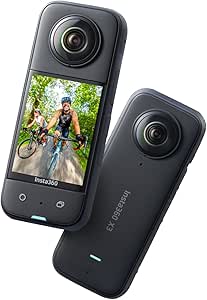 | Best for Beginners Learning to Reframe | Video resolution: 5.7K 360° and 4K wide-angle | Maximum listed frame rate: 4K at 30 fps | MaxView mode: 2.7K at 60 fps, 170° field of view | VIEW ON AMAZON | See Our Full Breakdown |
| DJI Osmo 360 Essential Combo 360 Action Camera |  | Best Overall for High-Detail Event Coverage | 360° video: 8K UHD at up to 30 fps | High-frame-rate video: Up to 4K at 120 fps | 360° photo resolution: 120 MP | VIEW ON AMAZON | See Our Full Breakdown |
| Ricoh Theta Z1 360° Camera, 51GB, Black |  | Best for 360° Event Photography and Spatial Audio | Image sensors: Two 1-inch back-illuminated CMOS sensors | Still image resolution: 23MP (6720 × 3360) | Video resolution: 3840 × 1920 at 30 fps | VIEW ON AMAZON | See Our Full Breakdown |
| Insta360 X5 Starter Bundle 8K 360° Action Camera |  | Best for Event Coverage in Tough Conditions | Video resolution: Up to 8K at 30 fps | Sensors: Dual 1/1.28-inch CMOS sensors | Battery life: Up to 208 minutes in the description; title also states 3 hours | VIEW ON AMAZON | See Our Full Breakdown |
| Insta360 X5 Essentials Bundle 8K 360° Action Camera |  | Best Ready-to-Shoot Bundle | Video resolution: Up to 8K at 30 fps | Sensors: Dual 1/1.28-inch sensors | Battery life: Up to 208 minutes | VIEW ON AMAZON | See Our Full Breakdown |
| Ricoh Theta X 360° Camera, 60 MP Still Images and 5.7K Video |  | Best for 360° Event Stills | Still image resolution: Up to 60 MP | Video resolution: 5.7K (5760 × 2880) at 30 fps | Display: 2.25-inch touchscreen | VIEW ON AMAZON | See Our Full Breakdown |
| Insta360 X6 Essentials Bundle 8K 360 Camera |  | Best for High-Frame-Rate Event Video | Video resolution: Up to 8K | 8K frame rate: Up to 50 fps | Other video modes: 5K at up to 60 fps; 4K at up to 120 fps | VIEW ON AMAZON | See Our Full Breakdown |
| camera for event coverage buyer guide | Video resolution | Display | Stabilization | Weight |
|---|---|---|---|---|
| GoPro MAX Waterproof 360 Actio | — | 2-inch touchscreen | Max HyperSmooth with Horizon Lock | 13.12 oz |
| AKASO 360 Action Camera | 5.7K 360° video | 2.29-inch touchscreen | Digital stabilization with 360° Horizon Lock | 180 g |
| Insta360 X3 360 Action Camera | 5.7K 360° and 4K wide-angle | 2.29-inch touchscreen | FlowState Stabilization and Horizon Lock | 200 g |
| DJI Osmo 360 Essential Combo 3 | — | — | — | — |
| Ricoh Theta Z1 360° Camera | 3840 × 1920 at 30 fps | — | — | — |
| Insta360 X5 Starter Bundle 8K | Up to 8K at 30 fps | 2.5 inches | FlowState stabilization and 360° horizon lock | 1.16 kg |
| Insta360 X5 Essentials Bundle | Up to 8K at 30 fps | 2.5-inch touchscreen | FlowState Stabilization and 360° Horizon Lock | 1.42 kg |
| Ricoh Theta X 360° Camera | 5.7K (5760 × 2880) at 30 fps | 2.25-inch touchscreen | — | — |
| Insta360 X6 Essentials Bundle | Up to 8K | — | — | — |
More Details on Our Top Picks
GoPro MAX Waterproof 360 Action Camera with Touch Screen
For events that move between indoor activity and unpredictable weather, the GoPro MAX pairs 5.6K 360° recording with a waterproof, rugged body and stabilization designed to keep moving footage level. Its Quik app reframing and object tracking give editors room to pick a view after recording, while single-lens modes suit moments that do not need a spherical perspective. Compared with the DJI Osmo 360, it offers less resolution and no stated built-in storage, but its 1/4-20 threads make common mounting setups straightforward. The tradeoffs are a MicroSD card requirement and reliance on the app for some editing features. Choose it for action-led coverage where durability and flexible mounting matter more than maximum detail; skip it if large venue scenes need the finest 360° image.
Pros:- 5.6K 360° video plus 1080p or 1440p single-lens recording supports both immersive and conventional event clips.
- Waterproof, rugged construction suits outdoor coverage and active crowds.
- Max HyperSmooth with Horizon Lock helps steady moving footage.
- Quik app reframing and object tracking allow angle choices after capture.
Cons:- Requires a separately supplied MicroSD card.
- Some reframing and editing features depend on the Quik app.
- 5.6K capture offers less stated resolution than the 5.7K AKASO 360 and Insta360 X3.
Best for: Event shooters covering outdoor activities, crowd movement, or wet conditions who want a rugged camera that can also record conventional single-lens clips.
Not ideal for: Teams prioritizing the highest 360° resolution or a camera ready to record without separately supplying a MicroSD card.
- 360° video:5.6K at 30 fps
- Other video modes:3K at 60 fps; 1080p or 1440p single-lens video
- 360° photo resolution:16.6 MP
- Stabilization:Max HyperSmooth with Horizon Lock
- Display:2-inch touchscreen
- Water resistance:Waterproof
- Storage:MicroSD
- Weight:13.12 oz
Our verdict“Choose the GoPro MAX for rugged, flexible event coverage where reliable stabilization and standard-video options matter more than the highest resolution.”
AKASO 360 Action Camera, Standard Combo
The AKASO 360 Standard Combo is a practical fit for event shooters who want 5.7K spherical video, subject tracking, and a spare battery in the box. Its two rechargeable batteries can help cover a longer stretch of activity without pausing to recharge, while digital stabilization and horizon lock support handheld movement through a venue. Compared with the Insta360 X3, the AKASO supplies a second battery and lists 72MP 360° photos, but it lacks the X3’s Active HDR video. That matters for venues with bright windows, stage lighting, or dim rooms: the AKASO’s description warns that low-light video may be limited, and HDR is unsupported. The MicroSDXC card and invisible selfie stick are also separate purchases. Pick it for battery flexibility; choose another option for challenging mixed lighting.
Pros:- 5.7K 360° video and 72MP 360° photos capture immersive event scenes and detailed stills.
- Two rechargeable batteries support longer coverage between charging breaks.
- AI subject tracking helps keep a moving speaker or performer in view.
- Digital stabilization and 360° horizon lock help smooth handheld footage.
Cons:- HDR is unsupported, limiting flexibility in high-contrast event lighting.
- Low-light video quality may be limited for dim receptions and indoor venues.
- MicroSDXC card and invisible selfie stick are not included.
Best for: Event videographers who need a spare battery for extended handheld coverage and want AI subject tracking without relying on a single charge.
Not ideal for: Shooters covering dim receptions or high-contrast stages who need HDR support, or buyers expecting a memory card and selfie stick in the combo.
- Video resolution:5.7K 360° video
- 360° photo resolution:72 MP
- Sensors:Dual 1/2-inch 48MP CMOS
- Stabilization:Digital stabilization with 360° Horizon Lock
- Display:2.29-inch touchscreen
- Battery life:Up to 2 hours
- Included batteries:Two rechargeable batteries
- Weight:180 g
Our verdict“Choose the AKASO 360 if spare-battery coverage matters more than HDR performance or an all-in-one accessory bundle.”
Insta360 X3 360 Action Camera with 5.7K Video
The Insta360 X3 suits event creators who want to record the whole scene first and decide later which moments deserve a conventional frame. Its AI-powered reframing in the Insta360 app, 5.7K 360° video, and 4K wide-angle mode make it more adaptable for mixed deliverables than the photo-focused Ricoh Theta Z1. FlowState stabilization and Horizon Lock are useful when following people through a reception or moving around an event floor, and the waterproof design adds flexibility outdoors. The limitation is that the app-based workflow takes time after capture, and recording requires a MicroSD card. The X3 also does not match the DJI Osmo 360 for stated 8K detail or built-in storage. It makes the most sense for newer creators who value forgiving framing over a ready-to-use file workflow.
Pros:- 5.7K 360° and 4K wide-angle modes serve immersive and conventional event edits.
- AI-powered app reframing lets beginners select a view after recording.
- FlowState stabilization and Horizon Lock help keep moving footage smooth and level.
- Waterproof construction supports outdoor event coverage.
Cons:- A MicroSD card is required for recording.
- App-based reframing adds an editing step after an event.
- Its 5.7K video and storage setup are less capable on paper than the 8K DJI Osmo 360 with built-in storage.
Best for: New event videographers who want to choose framing after recording and need both 360° and wide-angle capture modes.
Not ideal for: Editors seeking the highest available listed 360° resolution, built-in storage, or a workflow that avoids app-based reframing.
- Video resolution:5.7K 360° and 4K wide-angle
- Maximum listed frame rate:4K at 30 fps
- MaxView mode:2.7K at 60 fps, 170° field of view
- Display:2.29-inch touchscreen
- Stabilization:FlowState Stabilization and Horizon Lock
- Water resistance:Waterproof
- Weight:200 g
- Warranty:1 year
Our verdict“Choose the X3 if post-capture reframing and straightforward stabilization matter more than maximum resolution or built-in storage.”
DJI Osmo 360 Essential Combo 360 Action Camera
For event teams wanting one camera to cover a full scene with room for detailed reframing, the DJI Osmo 360 leads this group with 8K/30fps 360° video and 120MP stills. Its 105 GB built-in storage removes the separate memory-card step found on the GoPro MAX, AKASO 360, and Insta360 X3, while the included 1.2 m invisible selfie stick helps capture wide venue views without placing a visible pole in the shot. Four microphones and up to 190 minutes of recording also suit longer coverage blocks. Compared with the Ricoh Theta Z1, the DJI is geared more toward high-resolution motion video than 360° still photography. Its app situation needs checking: DJI Mimo is not available on Google Play, and some features may depend on compatible software or accessories.
Pros:- 8K/30fps 360° video and 120MP 360° photos provide the highest stated capture resolution in this group.
- 105 GB built-in storage avoids an immediate memory-card purchase.
- Up to 190 minutes of recording supports longer event sessions.
- Includes a 1.2 m invisible selfie stick and extra 1950 mAh battery.
Cons:- DJI Mimo is not available on Google Play.
- Some camera and app features may require compatible DJI accessories or software.
- The higher-resolution workflow may demand more from editing and storage systems than the 5.6K GoPro MAX.
Best for: Event crews seeking high-resolution 360° video, substantial built-in storage, and an included selfie stick for long venue or outdoor coverage.
Not ideal for: Android users who depend on Google Play for app installation, or buyers who prefer a simpler software and accessory setup.
- 360° video:8K UHD at up to 30 fps
- High-frame-rate video:Up to 4K at 120 fps
- 360° photo resolution:120 MP
- Built-in storage:105 GB
- Maximum recording time:Up to 190 minutes
- Microphones:Four
- Water resistance:Waterproof
- Included accessories:1.2 m invisible selfie stick and extra 1950 mAh battery
Our verdict“Choose the DJI Osmo 360 for detailed, extended event coverage if its app access and software requirements fit your setup.”
Ricoh Theta Z1 360° Camera, 51GB, Black
The Ricoh Theta Z1 is the still-photo specialist here: two 1-inch back-illuminated sensors, 23MP 360° images, and HDR processing give event photographers a tool aimed at polished spherical stills rather than maximum action-video resolution. Its 51GB internal storage also avoids the MicroSD-card requirement listed for the Insta360 X3, GoPro MAX, and AKASO 360. For immersive event sound, the four-channel microphone records spatial audio. The tradeoff is video: its 3840 × 1920 at 30 fps is below the 5.7K options from the Insta360 X3 and AKASO, and far below the DJI Osmo 360’s 8K capture. The supplied details list no waterproof rating, so I would not choose it for wet or highly active coverage. It fits controlled venues where still-image quality takes priority.
Pros:- Two 1-inch back-illuminated sensors support 23MP 360° still images.
- HDR processing helps with scenes containing varied brightness.
- 51GB internal storage avoids reliance on a separate MicroSD card.
- Four-channel spatial audio adds immersive sound capture.
Cons:- 3840 × 1920 at 30 fps video is less detailed than the 5.7K Insta360 X3 and 8K DJI Osmo 360.
- No water-resistance rating is provided in the product details.
- The photography-led specification is less suited to fast-moving event video.
Best for: Event photographers creating 360° venue images and spatial-audio captures in controlled indoor settings.
Not ideal for: Action-focused crews needing high-resolution 360° motion video, waterproofing, or a camera built for wet outdoor events.
- Image sensors:Two 1-inch back-illuminated CMOS sensors
- Still image resolution:23MP (6720 × 3360)
- Video resolution:3840 × 1920 at 30 fps
- Internal storage:51GB
- Image stabilization:3-axis rotation correction
- Audio:Built-in 4-channel microphone with spatial audio recording
- Aperture settings:f/2.1, f/3.5, or f/5.6
- Connection:USB 3.0 Type-C
Our verdict“Choose the Theta Z1 for 360° still photography and spatial audio at controlled events, not for high-resolution action video.”
Insta360 X5 Starter Bundle 8K 360° Action Camera
For events where the camera may face rain, splashes, or rough handling, I’d put the Insta360 X5 Starter Bundle near the front of the shortlist. Its 8K 360° capture gives editors room to reframe crowd moments after recording, while FlowState stabilization and horizon lock help keep moving footage level. The included 114 cm selfie stick supports elevated crowd views, and waterproofing to 49 ft adds flexibility for outdoor or waterside events without a case. Compared with the Ricoh Theta X, the X5 is better suited to action and movement; the Ricoh has the advantage for high-resolution stills and GPS. The tradeoff is that the Starter Bundle is relatively lean, and the listing gives conflicting battery-life figures—up to 208 minutes in the description and three hours in the title. I’d verify runtime expectations before planning a long, uninterrupted shoot.
Pros:- 8K30fps 360° capture provides room to reframe shots for event highlights.
- Waterproof to 49 ft (15 m) without a case.
- FlowState stabilization and 360° horizon lock help steady moving footage.
- Includes a 114 cm invisible selfie stick and has replaceable lenses.
Cons:- Battery-life information conflicts: the listing says three hours in the title and up to 208 minutes in the description.
- The Starter Bundle includes fewer protection and charging accessories than the X5 Essentials Bundle.
- The listed 1.16 kg weight may be a drawback for extended handheld coverage.
Best for: Event videographers covering active outdoor gatherings who want 8K reframing, stabilization, and case-free waterproofing.
Not ideal for: Photographers whose main priority is high-resolution 360° stills or buyers who need a clearly specified runtime and a larger accessory kit.
- Video resolution:Up to 8K at 30 fps
- Sensors:Dual 1/1.28-inch CMOS sensors
- Battery life:Up to 208 minutes in the description; title also states 3 hours
- Stabilization:FlowState stabilization and 360° horizon lock
- Audio:Four-microphone array with wind reduction
- Waterproofing:To 49 ft (15 m)
- Display:2.5 inches
- Weight:1.16 kg
- Included accessories:Lens cap, one battery, 114 cm invisible selfie stick
Our verdict“Choose this X5 bundle for mobile event coverage in wet or demanding settings, but check the runtime and bundle contents against your shoot plan.”
Insta360 X5 Essentials Bundle 8K 360° Action Camera
I’d choose the X5 Essentials Bundle over the Starter Bundle when event coverage calls for more protection and charging support from the outset. Both offer 8K30fps video, replaceable lenses, stabilization, and waterproofing to 49 ft, but this package adds a fast charge case, lens guards, and a carry case alongside the invisible selfie stick. Those extras make it easier to organize a mobile kit between venues and reduce exposure to lens scratches during transport. Against the Insta360 X6 Essentials Bundle, the X5’s listed video ceiling is lower: the X6 reaches 8K at up to 50 fps and includes two batteries. The X5 Essentials remains a strong fit if 30 fps is enough and lens protection is a priority. I’d plan for a separately supplied microSD card, and the listing’s 1.42 kg weight is worth checking against a handheld-heavy schedule.
Pros:- Captures 8K 360° video at up to 30 fps.
- Includes lens guards, a carry case, and a fast charge case.
- Waterproof to 49 ft (15 m) without a case.
- Replaceable lenses and 360° horizon lock support ongoing event use.
Cons:- MicroSD card is sold separately.
- Listed weight is 1.42 kg, which may be cumbersome for prolonged handheld coverage.
- Its 8K frame rate tops out at 30 fps, below the X6’s listed 8K50fps mode.
Best for: Event crews who want an 8K camera with bundled lens guards, a carry case, and a charging case for transport between locations.
Not ideal for: Buyers prioritizing higher 8K frame rates, a lighter listed kit, or a complete setup that includes a microSD card.
- Video resolution:Up to 8K at 30 fps
- Sensors:Dual 1/1.28-inch sensors
- Battery life:Up to 208 minutes
- Stabilization:FlowState Stabilization and 360° Horizon Lock
- Lens:Replaceable wide-angle lenses
- Display:2.5-inch touchscreen
- Connectivity:HDMI and USB
- Weight:1.42 kg
- Included accessories:114 cm invisible selfie stick, battery, fast charge case, standard lens guards, carry case, lens cap
Our verdict“Pick the X5 Essentials Bundle if built-in lens protection and charging accessories matter more than the X6’s higher frame-rate ceiling.”
Ricoh Theta X 360° Camera, 60 MP Still Images and 5.7K Video
The Ricoh Theta X takes a different route from the action-oriented Insta360 models: its strongest event case is 60 MP 360° still photography, supported by RAW HDR-DNG capture for post-production. That makes it a better match for venue documentation, virtual tours, or static crowd and room scenes than for fast-moving coverage where 8K video and rugged waterproofing matter more. Its touchscreen lets an operator preview and adjust settings without reaching for a phone, while built-in GPS can attach location information to a shoot. Compared with the Insta360 X5 Starter Bundle, the Theta X trades video resolution and listed waterproofing for a still-image emphasis and interchangeable battery and microSDXC storage. Those removable media options help with longer assignments, but a spare DB-110 battery is sold separately, and the supplied information does not specify waterproofing. I’d skip it for action-heavy outdoor events.
Pros:- Captures 360° still images up to 60 MP.
- Records RAW HDR-DNG images for editing.
- Touchscreen supports on-camera preview and settings adjustments.
- Interchangeable battery and microSDXC storage support extended shooting sessions.
Cons:- 5.7K video is lower-resolution than the 8K video offered by the Insta360 X5 and X6.
- A spare DB-110 battery is sold separately.
- Waterproofing is not specified in the supplied product information.
Best for: Event photographers and venue teams who need high-resolution 360° stills, RAW editing, and location-tagged images.
Not ideal for: Videographers covering fast-moving or wet events who need 8K capture, rugged waterproofing, or a supplied spare battery.
- Still image resolution:Up to 60 MP
- Video resolution:5.7K (5760 × 2880) at 30 fps
- Display:2.25-inch touchscreen
- GPS:Built-in GPS with QZSS and A-GPS compatibility
- Storage:External microSDXC card
- Battery:Interchangeable
- Image format:RAW HDR-DNG
Our verdict“Choose the Theta X for still-led 360° event documentation, not for action coverage where high-resolution video and stated waterproofing take priority.”
Insta360 X6 Essentials Bundle 8K 360 Camera
For event shooters who want to slow down energetic moments or capture fast movement with more temporal detail, the Insta360 X6 has the clearest spec advantage here: it records 8K at up to 50 fps, compared with 30 fps on both X5 bundles. Its dual 1/1.1-inch sensors, 10-bit color, and AI-assisted editing and tracking features also give editors more options for shaping footage after an event. The Essentials Bundle includes two batteries, a charging case, a selfie stick, and protective items, making it more shoot-ready than the X5 Starter Bundle. The tradeoff is runtime: the stated maximum is 140 minutes at 8K30fps, so recording at higher settings may call for a battery plan rather than assuming a full event on one charge. Compared with the Ricoh Theta X, the X6 favors video and action over high-resolution stills; its listed still resolution is 120 MP, but no still workflow detail is supplied.
Pros:- Records 8K 360° video at up to 50 fps.
- Dual 1/1.1-inch sensors and 10-bit color support more detailed, flexible footage.
- AI-assisted editing and subject tracking can help shape event highlights.
- Bundle includes two batteries, a charging case, and a 114 cm invisible selfie stick.
Cons:- Maximum runtime is listed as up to 140 minutes at 8K30fps, not at the highest 8K frame rate.
- Runtime is shorter on paper than the up-to-208-minute figure listed for the X5 bundles.
- The supplied information does not specify the display size or waterproof depth.
Best for: Event videographers covering fast performances, dance, or sports who want high-frame-rate 8K, AI tracking, and multiple included batteries.
Not ideal for: Crews needing a documented all-day runtime at the highest recording settings or buyers whose main need is 360° still photography with a specified RAW workflow.
- Video resolution:Up to 8K
- 8K frame rate:Up to 50 fps
- Other video modes:5K at up to 60 fps; 4K at up to 120 fps
- Sensors:Dual 1/1.1-inch square CMOS sensors
- Color:10-bit
- Maximum runtime:Up to 140 minutes at 8K30fps
- Effective still resolution:120 MP
- Battery capacity:2600 mAh
- Included items:114 cm invisible selfie stick, two Xtreme batteries, utility fast charge case, USB-C cable, protective pouch, lens cloth, lens cap
Our verdict“Choose the X6 for high-motion event coverage where 8K50fps and bundled spare batteries matter more than the X5’s stated longer runtime.”

How We Picked
I ranked these cameras around the demands of event coverage: capturing a wide scene without a camera operator constantly reframing, producing usable footage in changing light, and getting through a session with practical storage and power planning. I also weighed resolution, still-photo capability, ruggedness, usability, and the likely editing workload. A higher resolution can preserve more detail when reframing, but it does not by itself solve poor lighting, audio limits, or long-event battery needs.
The order favors cameras that balance flexible event video with a workable production path. The Insta360 X5 Starter Bundle leads for its 8K action-camera positioning and broad use case; the X5 Essentials Bundle and X6 remain close alternatives, with bundle contents and model choice affecting the fit. The DJI Osmo 360, GoPro MAX, and X3 offer different action-oriented paths, while the Theta X and Z1 earn consideration for more documentation- and still-focused work. The AKASO 360 sits lower because buyers comparing this field have several higher-resolution alternatives, though it may still fit simpler coverage needs.
| camera for event coverage buyer guide | Stabilization |
|---|---|
| GoPro MAX Waterproof 360 Actio | Max HyperSmooth with Horizon Lock |
| AKASO 360 Action Camera | Digital stabilization with 360° Horizon Lock |
| Insta360 X3 360 Action Camera | FlowState Stabilization and Horizon Lock |
| DJI Osmo 360 Essential Combo 3 | — |
| Ricoh Theta Z1 360° Camera | — |
| Insta360 X5 Starter Bundle 8K | FlowState stabilization and 360° horizon lock |
| Insta360 X5 Essentials Bundle | FlowState Stabilization and 360° Horizon Lock |
| Ricoh Theta X 360° Camera | — |
| Insta360 X6 Essentials Bundle | — |
Factors to Consider When Choosing 360 Camera For Event Coverage Buyer Guide
Choosing an event camera is as much a production decision as a camera decision. I would start with the event’s lighting, runtime, audience, and post-production plan, then match the camera to the work it must do without relying on headline resolution alone.
Match Resolution to Your Final Deliverable
360 footage often gets cropped into a conventional horizontal or vertical frame, so capture resolution affects how much detail remains after reframing. That advantage matters when a single camera must supply several social clips from one recording. It matters less if your deliverable is a small embedded panorama or a behind-the-scenes archive. Higher-resolution footage also takes more storage and can demand more from editing hardware. Before paying for a resolution upgrade, identify the final frame sizes and platforms your audience will actually see. A test clip at the intended crop can reveal more than comparing resolution labels alone.
Plan for the Event’s Light, Not Just Its Stage
Ballrooms, receptions, and evening venues often mix dim corners with bright stage lighting, a difficult combination for small cameras. A high-resolution spec does not guarantee clean shadows or balanced highlights. If the camera will sit in one spot, place it where faces receive usable light and avoid aiming directly into bright fixtures when possible. For a moving camera, test how exposure changes as it passes between lighting zones. Buyers should also decide whether the result needs to look polished or simply preserve the full scene. That choice can favor a dedicated still or documentation camera over an action-first model.
Treat Runtime and Storage as Coverage Requirements
A ceremony or conference session can outlast a camera’s practical continuous recording window, and missed minutes cannot be recreated. Estimate the longest uninterrupted segment, then account for setup time and breaks rather than planning around the advertised maximum alone. High-resolution 360 files can fill cards quickly, so calculate storage using your intended recording mode and keep a clear file-offload plan. Spare batteries help only if the camera can be changed without interrupting a critical moment. For multi-hour events, scheduled recording breaks or a second camera may be more dependable than relying on one device. Assign someone to monitor recording status if the camera will be unattended.
Decide How Much Reframing Your Team Can Handle
360 capture shifts some camera decisions from the event floor to post-production. That flexibility is useful when an operator cannot follow every speaker or guest, but it creates work choosing viewpoints, stabilizing clips, and exporting separate edits. A solo creator may benefit from automatic reframing tools, while a production team may prefer more manual control. Before the event, make a short workflow test from recording through export on the computer or phone you plan to use. Check whether the output formats match the platforms and delivery deadlines. If there is little time for editing, a conventional fixed-angle camera alongside the 360 camera can reduce dependence on reframing.
Build a Mounting and Audio Plan Before the Day
Placing a 360 camera where it can see the room does not mean it will capture clear speech. The camera may be far from a speaker, surrounded by crowd noise, or mounted where handling sounds reach the microphones. For speeches, vows, or panels, plan a separate audio source and confirm how it will sync with the camera footage. Choose mounts that keep the camera stable and out of guests’ sightlines without blocking important views. A tall stand may widen coverage but can create a distracting obstruction or a safety risk in a crowded space. Check venue rules and obtain any needed permissions before recording attendees.
Compare Bundle Contents Against Your Actual Setup
Two listings for the same camera can differ mainly in included accessories, so bundle names should prompt a contents check rather than an automatic upgrade. Make a list of what you already own: mounts, protective gear, spare batteries, storage cards, and charging equipment. Then compare each bundle against the gaps in that list. An extra accessory is useful only if it supports your venue, mounting position, or recording schedule. For event work, a needed power or mounting item may be more valuable than an accessory that stays in the case. Also check compatibility and availability of replacement parts before building a kit around one bundle.
Frequently Asked Questions
Can one 360 camera cover a full wedding or conference day?
It can capture wide coverage, but I would not assume one camera can record every important moment continuously. Long sessions raise battery, storage, heat, and file-management concerns, and a single camera position may miss close-up details. Use it as a room-wide or immersive viewpoint, then pair it with a conventional camera or a second unit for key moments when possible. Plan recording breaks around the schedule and assign someone to confirm that recording has restarted. For speeches and vows, arrange a separate audio source rather than relying on distant camera audio.
Is an 8K camera worth choosing over a 5.7K model for event coverage?
Choose 8K when you expect to crop footage into several standard-format clips or need room to reframe a distant subject. That extra capture detail can be useful, but it brings larger files and more demanding editing. A 5.7K model may be a better fit for modest delivery formats, lighter workflows, or still-photo-oriented event documentation. Neither resolution guarantees better results in a dark venue or clear speech. I would base the choice on a sample export at your planned crop and the computer you will edit on.
Should I choose an action camera or a Ricoh Theta for a corporate event?
Start with the deliverable. Action-camera models such as the X5, DJI Osmo 360, and GoPro MAX are more aligned with moving coverage and action-oriented video, while the Theta X and Z1 fit buyers emphasizing room documentation and still imagery. A corporate event with stage clips, attendee movement, and social video may favor the action-camera approach. A venue record, virtual walkthrough, or still-photo archive may point toward a Theta model. Audio and low-light needs still require separate planning whichever style you choose.
Do I need the Essentials Bundle if I already own camera accessories?
Not automatically. Compare the bundle’s actual included items with the gear you already have, including mounts, batteries, charging equipment, and protective accessories. Check that existing accessories are compatible with the specific camera and useful for your venue. If the bundle duplicates equipment, a different package may leave you with a simpler kit. If it fills a real coverage gap, the included items can save setup effort. Make the choice from the contents list rather than assuming a larger bundle is better for events.
What should I prioritize for a dim reception or evening event?
Prioritize a well-placed camera, reliable exposure in mixed light, and a separate plan for speech audio. Resolution alone will not keep faces clean in dark corners, so test footage in lighting similar to the venue before the event. Avoid placing the camera where bright fixtures dominate the frame, and check that important people are not hidden by guests or decor. If polished close-ups matter, use a conventional camera or a photographer alongside the 360 view. A 360 camera works best here as broad scene coverage, not necessarily as the only source of finished footage.
Conclusion
For most buyers who want one versatile camera for immersive event video, I would choose the Insta360 X5 Starter Bundle as the best overall pick. The AKASO 360 is the best value-oriented option for simpler coverage needs, while the Insta360 X5 Essentials Bundle is a strong premium choice when its included accessories match a more demanding setup; compare its contents with the Starter Bundle before deciding. Beginners should look closely at the Insta360 X3 for a less advanced path into 360 shooting, while buyers prioritizing still documentation can favor the Ricoh Theta X. For action-focused alternatives, compare the DJI Osmo 360 and GoPro MAX; for a specialized 360 documentation setup, consider the Ricoh Theta Z1. Choose the Insta360 X6 Essentials Bundle if its specific camera and bundle fit your workflow, but verify accessories, storage, power, and editing demands before making any model the sole camera for a major event.
Columbus Day / Indigenous Peoples' Day Picks
long weekend sales
As an affiliate, we earn on qualifying purchases.