For most small businesses that need invoices as well as everyday documents, I’d choose the Epson EcoTank ET-4800 as the best overall pick, since it handles color, scanning, and copying without relying on thermal paper alone. The Epson TM-T20III is a stronger fit for a fixed checkout counter, while the Rongta RP327 adds useful connection options for receipt and narrow-format printing. The central tradeoff is between flexible standard-page printing and fast, compact thermal output that usually suits receipts or short transaction records better than formal invoices. Portability, software compatibility, paper width, and ongoing supply needs also separate these options. Read on for the full breakdown and help matching a printer to your invoice workflow.

Get business pricing on office and shipping supplies
- Business-only prices and quantity discounts
- Tax-exempt purchasing
- Multiple users, one account, clear invoices
Key Takeaways
- The EcoTank ET-4800 stands apart for versatile office documents: it prints in color and adds scanning and copying, making it a better match for standard-page invoices and mixed admin tasks than the thermal models.
- The TM-T20III and Rongta RP327 favor counter workflows: they are dedicated thermal printers, with the Epson suited to a more fixed POS setup and the RP327 offering USB, serial, and Ethernet connections.
- Most of the lineup prints on narrow thermal rolls: the 58 mm and 80 mm options are compact, but buyers should confirm that their invoice layout and recordkeeping needs suit narrow-format output.
- Portability comes with workflow limits: the portable 58 mm models and Rongta RPP300 prioritize mobility, while their smaller paper format can be awkward for detailed invoices or customer-facing documents.
- The Canon PIXMA TR4720 is the flexible home-office alternative: it can handle ordinary document printing and all-in-one tasks, while the EcoTank ET-4800 is the more appealing choice for businesses focused on reducing cartridge replacement frequency.
| Canon PIXMA TR4720 Wireless All-in-One Inkjet Printer | 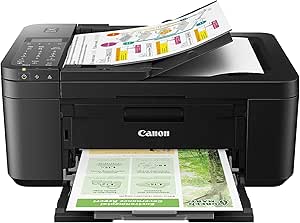 | Best for Complete Invoice Workflows | Printer type: Inkjet | Functions: Print, copy, scan, fax | Connectivity: Wireless | VIEW LATEST PRICE | See Our Full Breakdown |
| Rongta RP327 80mm Thermal Receipt Printer with USB, Serial, Ethernet, and Auto Cutter |  | Best for Networked Receipt Counters | Printer type: Thermal | Maximum print speed: 250 mm/s | Connectivity: USB, Ethernet (LAN), serial | VIEW LATEST PRICE | See Our Full Breakdown |
| Portable 58mm Thermal Receipt Printer with USB and Bluetooth |  | Best for Mobile Android Receipts | Printer type: Direct thermal | Print width: 58 mm | Resolution: 203 dpi | VIEW LATEST PRICE | See Our Full Breakdown |
| Epson TM-T20III Monochrome Thermal POS Printer |  | Best for Square-Compatible Checkout | Printer type: Monochrome thermal | Connectivity: USB only | Print speed: Up to 250 mm/sec | VIEW LATEST PRICE | See Our Full Breakdown |
| Rongta 80mm USB Thermal Receipt Printer with Auto Cutter (RP326) |  | Best for Flexible Wired POS Setups | Printer type: Thermal | Print speed: 250 mm/sec | Print resolution: 203 dpi | VIEW LATEST PRICE | See Our Full Breakdown |
| Epson EcoTank ET-4800 Wireless Color All-in-One Printer |  | Best for Full-Service Invoice Workflows | Printer type: Inkjet | Ink system: Refillable ink tank | Functions: Print, scan, copy, fax | VIEW LATEST PRICE | See Our Full Breakdown |
| Rongta RPP300 Portable 80 mm Thermal Receipt Printer |  | Best for Portable 80 mm Receipts | Printer type: Portable receipt printer | Supported paper widths: 80 mm, 58 mm | Maximum paper roll diameter: 40 mm | VIEW LATEST PRICE | See Our Full Breakdown |
| MUNBYN IMP001 58 mm Portable Wireless Thermal Receipt Printer |  | Best for Android Sellers Who Need Standby Time | Printer type: Thermal | Print width: 58 mm | Connectivity: Bluetooth; USB 3.0 | VIEW LATEST PRICE | See Our Full Breakdown |
| 58mm Bluetooth Thermal Receipt Printer for Android and Windows |  | Best for High-Detail 58 mm Receipts | Printer type: Direct thermal | Paper width: 58 mm | Print resolution: 300 dpi | VIEW LATEST PRICE | See Our Full Breakdown |
| Sunydog Portable 58mm Thermal Receipt Printer |  | Best for Battery-Powered Mobile Receipts | Printer type: Thermal | Connectivity: Bluetooth, USB | Compatible devices: Android, Windows | VIEW LATEST PRICE | See Our Full Breakdown |
| business invoice printer | Printer type | Connectivity | Resolution |
|---|---|---|---|
| Canon PIXMA TR4720 Wireless Al | Inkjet | Wireless | — |
| Rongta RP327 80mm Thermal Rece | Thermal | USB, Ethernet (LAN), serial | 203 × 203 DPI |
| Portable 58mm Thermal Receipt | Direct thermal | Bluetooth, USB | 203 dpi |
| Epson TM-T20III Monochrome The | Monochrome thermal | USB only | 203 × 203 dpi |
| Rongta 80mm USB Thermal Receip | Thermal | USB, Ethernet, serial | — |
| Epson EcoTank ET-4800 Wireless | Inkjet | Wi-Fi, Ethernet, USB | — |
| Rongta RPP300 Portable 80 mm T | Portable receipt printer | Bluetooth, USB | 203 dpi |
| MUNBYN IMP001 58 mm Portable W | Thermal | Bluetooth; USB 3.0 | 203 × 203 DPI |
| 58mm Bluetooth Thermal Receipt | Direct thermal | Bluetooth | — |
| Sunydog Portable 58mm Thermal | Thermal | Bluetooth, USB | — |
More Details on Our Top Picks
Canon PIXMA TR4720 Wireless All-in-One Inkjet Printer
For a small office that needs to create, scan, copy, and send invoices rather than just print receipts, the Canon PIXMA TR4720 is the most versatile fit in this group. Its automatic document feeder can help handle multi-page paperwork, while two-sided printing reduces paper use for longer documents. Wireless and mobile printing also make it easier to send an invoice from a phone or laptop without a fixed USB connection. Compared with the Epson TM-T20III, this Canon produces standard inkjet documents and includes scanning and faxing, but it is far slower for rapid counter receipts. Its main tradeoff is pace: black output reaches 8.8 ipm and color 4.4 ipm, so it suits a modest invoice queue, not high-volume billing. It also uses replaceable ink cartridges.
Pros:- Prints, copies, scans, and faxes, covering common invoice paperwork tasks
- Automatic document feeder helps process multi-page documents
- Wireless and mobile printing support flexible placement and sending
- Automatic two-sided printing can reduce paper use
Cons:- Modest print speeds can slow larger invoice batches
- Ink cartridges add an ongoing supply requirement absent from thermal receipt printers
Best for: Small businesses that print full-page invoices and need scanning, copying, faxing, and wireless printing in one device.
Not ideal for: Retail counters that need a continuous stream of fast receipts, or offices printing large batches of invoices where its modest speed and ink cartridges are a poor fit.
- Printer type:Inkjet
- Functions:Print, copy, scan, fax
- Connectivity:Wireless
- Paper capacity:100 sheets
- Automatic document feeder:Yes
- Automatic two-sided printing:Yes
- Print speed:Black: up to 8.8 ipm; color: up to 4.4 ipm
- Dimensions:11.7 × 17.2 × 7.5 in
Our verdict“Choose the Canon PIXMA TR4720 if your business needs full-page invoices and document handling in one wireless machine more than receipt-printing speed.”
Rongta RP327 80mm Thermal Receipt Printer with USB, Serial, Ethernet, and Auto Cutter
The Rongta RP327 is built for businesses that use “invoice” to mean a short thermal receipt or transaction slip, not a full-page bill. It combines 250 mm/s printing with an auto cutter, so completed slips can be separated quickly at a busy counter. Ethernet, USB, and serial connections give it more wired setup options than the Epson TM-T20III, which is USB-only, and its cash drawer port suits a traditional point-of-sale station. Thermal printing avoids ink and toner supplies. The tradeoff is compatibility and connectivity: it has no Wi-Fi or Bluetooth, and the supplied data lists incompatibility with platforms such as Square and Clover. I would choose it over the Rongta RP326 only after confirming the specific POS software works with it; neither is a general-purpose full-page invoice printer.
Pros:- Prints at up to 250 mm/s and includes an auto cutter for quick receipt handling
- USB, Ethernet, and serial connections support several wired setups
- Cash drawer port fits a conventional POS counter
- Thermal printing requires no ink or toner
Cons:- No Wi-Fi or Bluetooth connectivity
- Listed as incompatible with Square and Clover, so software fit needs checking
- Prints narrow 80 mm media rather than standard full-page invoices
Best for: Retail and hospitality operators with a verified compatible POS system who need fast 80 mm receipts, wired network options, and cash drawer support.
Not ideal for: Businesses that need full-page invoices, wireless printing, or dependable compatibility with Square, Clover, or other unsupported POS platforms.
- Printer type:Thermal
- Maximum print speed:250 mm/s
- Connectivity:USB, Ethernet (LAN), serial
- Cash drawer port:Yes
- Auto cutter:Yes
- Maximum media size:80 mm
- Resolution:203 × 203 DPI
- Wireless connectivity:No Wi-Fi or Bluetooth
Our verdict“Pick the RP327 for fast thermal receipts at a wired counter only when your POS platform is confirmed compatible.”
Portable 58mm Thermal Receipt Printer with USB and Bluetooth
This compact printer is the lineup’s most portable option for a worker who needs short receipts or transaction records away from a counter. Its 58 mm thermal format and 1500mAh rechargeable battery favor quick, narrow printouts over formal, full-page invoices; Bluetooth works with Android devices, while USB connects to Windows computers. Unlike the desk-focused Rongta RP327, it can travel with a mobile operator, and it avoids ink, toner, and ribbons. That convenience comes with firm limits: the listed compatibility excludes iOS and Square POS, and its 70 mm/s speed is far below the 250 mm/s desktop thermal models. I would treat it as a niche field tool, not a primary office invoice printer. Buyers should confirm their app and device combination before relying on it for business records.
Pros:- Rechargeable battery and compact form make it suitable for mobile use
- Bluetooth connection supports Android devices
- USB connection supports Windows computers
- Direct thermal printing avoids ink, toner, and ribbons
Cons:- Does not support iOS or Square POS
- 58 mm output is too narrow for conventional full-page invoices
- Maximum speed of 70 mm/s trails the desktop Rongta RP327 and Epson TM-T20III
Best for: Android-based mobile sellers or field staff who need occasional narrow thermal receipts and can charge the printer between jobs.
Not ideal for: Businesses using iPhones, Square POS, high-volume checkout stations, or workflows that require standard full-page invoices.
- Printer type:Direct thermal
- Print width:58 mm
- Resolution:203 dpi
- Maximum print speed:70 mm/s
- Connectivity:Bluetooth, USB
- Compatible devices:Android, Windows
- Battery capacity:1500mAh
- Dimensions:2 × 4 × 3 in
Our verdict“Choose this printer for lightweight Android field receipts, not for a fixed office’s full-page invoice workload.”
Epson TM-T20III Monochrome Thermal POS Printer
For a shop or hospitality business that prints transaction slips through Square Stand or Square Register, the Epson TM-T20III offers a clearer compatibility case than the Rongta models in this group. It prints at up to 250 mm/sec and its cutter is rated for 1.5 million cuts, useful details for repeated checkout use. The two-year warranty and stated printhead life also make its durability profile more explicit than the portable 58 mm printer. Its narrow thermal output is still a receipt format, not a substitute for full-page invoices from the Canon PIXMA TR4720. Connection is the main compromise: this model is USB-only, with no Wi-Fi or Bluetooth, and Square operation requires a Square Stand or Register. It fits a fixed, compatible counter better than a flexible office setup.
Pros:- Prints at up to 250 mm/sec for quick checkout receipts
- Auto cutter is rated for 1.5 million cuts
- Compatible with Square Stand and Square Register
- Two-year warranty and stated printhead life provide useful service-life information
Cons:- USB-only connection, with no Wi-Fi or Bluetooth
- Square use requires a Square Stand or Square Register
- Monochrome thermal receipts do not replace full-page invoice printing
Best for: Retail and hospitality businesses using Square Stand or Square Register that want a fast, fixed USB receipt printer.
Not ideal for: Mobile teams, wireless-first offices, or businesses that need full-page invoices, scanning, or printing without Square Stand or Register.
- Printer type:Monochrome thermal
- Connectivity:USB only
- Print speed:Up to 250 mm/sec
- Resolution:203 × 203 dpi
- Auto-cutter life:1.5 million cuts
- Printhead life:150 km / 150 million pulses
- Weight:1.4 kg
- Warranty:2 years
Our verdict“Choose the TM-T20III for a fixed Square checkout station; pick the Canon PIXMA TR4720 instead when you need actual full-page invoices.”
Rongta 80mm USB Thermal Receipt Printer with Auto Cutter (RP326)
The Rongta RP326 suits a business that wants a conventional 80 mm thermal counter printer with several wired connection choices. At 250 mm/sec, it can keep up with receipt-style transaction slips, while USB, Ethernet, and serial provide more setup flexibility than the USB-only Epson TM-T20III. Cash drawer support, ESC/POS commands, and desktop or wall mounting add practical options for a fixed till. It also uses thermal paper rather than ink or toner. The limitation is that its broad connection list does not guarantee broad POS support: the product data names exclusions among POS, delivery, and Chromebook platforms, so software compatibility needs checking before purchase. Like the RP327, it produces narrow receipts rather than standard full-page invoices, and it has no Wi-Fi or Bluetooth.
Pros:- USB, Ethernet, and serial provide flexible wired connection options
- 250 mm/sec printing and an auto cutter support quick receipt handling
- Cash drawer support and ESC/POS commands suit compatible POS workflows
- Thermal printing and wall-mount capability reduce supply and placement constraints
Cons:- No Wi-Fi or Bluetooth
- Listed POS, delivery, and Chromebook incompatibilities can limit software choice
- 80 mm thermal output is not a replacement for full-page invoice documents
Best for: Small retailers with a compatible Windows, Mac, or Linux POS setup that need 80 mm receipts, cash drawer support, and multiple wired connection options.
Not ideal for: Businesses relying on Wi-Fi, Bluetooth, Chromebook, or listed unsupported POS and delivery platforms, or those printing formal full-page invoices.
- Printer type:Thermal
- Print speed:250 mm/sec
- Print resolution:203 dpi
- Print width:79.5 ± 0.5 mm
- Connectivity:USB, Ethernet, serial
- Wireless connectivity:No Wi-Fi or Bluetooth
- Compatible operating systems:Windows, Mac, Linux
- Mounting:Desktop or wall-mounted
Our verdict“Choose the RP326 for a compatible wired POS counter that needs flexible connections, but use an inkjet such as the Canon PIXMA TR4720 for full-page invoices.”
Epson EcoTank ET-4800 Wireless Color All-in-One Printer
For a business that needs more than a receipt, the Epson EcoTank ET-4800 is the most versatile choice in this group. Its refillable ink tanks support color invoices and other office documents, while the flatbed scanner, copier, and fax can handle paperwork without a separate machine. Wi-Fi, Ethernet, and USB give small offices options for connecting shared workstations. Compared with the portable thermal models such as the Sunydog 58mm, this Epson makes sense for full-page invoices and records, not quick narrow receipts. The tradeoff is a 100-sheet tray and a listed black-and-white copy speed of 10 pages per minute, so it is less suited to high-volume counter printing. Choose it when document flexibility matters more than compactness or receipt speed.
Pros:- Refillable ink tanks avoid disposable cartridges
- Prints in color and handles scan, copy, and fax tasks
- Supports Wi-Fi, Ethernet, and USB connections
- Print resolution is 5760 x 1440
Cons:- 100-sheet capacity means more frequent reloading in busy offices
- Maximum listed black-and-white copy speed is 10 pages per minute
- Larger and less portable than the thermal receipt printers in this roundup
Best for: Small businesses that print full-page color invoices and also need scanning, copying, and faxing in one office machine.
Not ideal for: Mobile sellers or busy checkout counters that need fast, narrow receipts and a compact printer.
- Printer type:Inkjet
- Ink system:Refillable ink tank
- Functions:Print, scan, copy, fax
- Print output:Color
- Print resolution:5760 x 1440
- Maximum media size:8.5 x 14 inches
- Maximum sheet capacity:100 sheets
- Connectivity:Wi-Fi, Ethernet, USB
Our verdict“Choose the ET-4800 if your invoices are full-page office documents and you want scanning and faxing alongside color printing.”
Rongta RPP300 Portable 80 mm Thermal Receipt Printer
The Rongta RPP300 suits businesses that need portable receipts wider than the 58 mm output of the MUNBYN IMP001. It supports both 80 mm and 58 mm thermal paper, so buyers can match the roll width to their receipt layout, and Bluetooth or USB provides flexible connections to phones and computers. At 335 g, it is built for mobility rather than a permanent checkout station. Its limits matter for invoice workflows: thermal output is monochrome and narrow, so it cannot replace the Epson EcoTank ET-4800 for full-page invoices or color records. Phone use requires the ELabel app, and it is not compatible with Square, Chromebook, Uber Eats, or Clover POS. I would choose it only after confirming that the business’s software and device setup support it.
Pros:- Supports both 80 mm and 58 mm thermal paper
- Bluetooth and USB connectivity
- Compact 335 g design for portable use
- ESC/POS command set supports compatible software
Cons:- Not compatible with Square, Chromebook, Uber Eats, or Clover POS
- Phone printing requires the ELabel app
- Thermal receipt output cannot replace full-page invoice printing
Best for: Mobile Android or Windows sellers who need an 80 mm-capable portable receipt printer and have verified their app supports ESC/POS.
Not ideal for: Businesses using Square, Chromebook, Uber Eats, or Clover POS, or offices that need full-page invoices and color documents.
- Printer type:Portable receipt printer
- Supported paper widths:80 mm, 58 mm
- Maximum paper roll diameter:40 mm
- Resolution:203 dpi
- Connectivity:Bluetooth, USB
- Compatible devices:Smartphones, tablets, computers
- Supported operating systems:Android, iOS, Windows
- Weight:335 g
Our verdict“Pick the RPP300 for portable, wider thermal receipts only if your POS software and devices are confirmed compatible.”
MUNBYN IMP001 58 mm Portable Wireless Thermal Receipt Printer
The MUNBYN IMP001 is a portable option for Android-based sellers who value ready-to-print convenience over broad device support. Its 58 mm monochrome thermal output suits short receipts, and the stated 5–6 days of standby time, auto-sleep, and auto-wake help limit battery drain between jobs. Compared with the Rongta RPP300, it offers a narrower paper format and a more restrictive platform list; the RPP300 supports iOS, while this MUNBYN does not. Windows connection requires USB, and the printer also excludes Mac, DoorDash, Zettle POS, and Square. That makes compatibility the deciding factor, not print quality or portability. It is a poor substitute for the Epson EcoTank ET-4800 when invoices need full-page formatting or color.
Pros:- Lightweight 0.45 kg body with an included carrying belt
- 5–6 days of stated standby time with auto-sleep and auto-wake
- 203 × 203 DPI monochrome printing
- Includes a USB cable, power adapter, and thermal paper roll
Cons:- Does not support iOS, Mac, Square, DoorDash, or Zettle POS
- Windows connection requires a USB cable
- 58 mm monochrome output is limited for detailed or full-page invoices
Best for: Android merchants who print short 58 mm receipts and want a compact printer with extended standby and auto-wake features.
Not ideal for: Businesses using iPhones, iPads, Macs, Square, DoorDash, or Zettle POS, or teams that need wireless printing from Windows.
- Printer type:Thermal
- Print width:58 mm
- Connectivity:Bluetooth; USB 3.0
- Compatible devices:Android; Windows via USB
- Resolution:203 × 203 DPI
- Print color:Monochrome, black
- Standby time:5–6 days
- Weight:0.45 kg
Our verdict“Choose the IMP001 if your workflow is Android-based and narrow receipt printing matters more than broad compatibility.”
58mm Bluetooth Thermal Receipt Printer for Android and Windows
This 58 mm Bluetooth thermal printer stands out among the small receipt models for its listed 300 dpi resolution, higher than the 203 dpi specified for the Sunydog Portable 58mm and Rongta RPP300. That could help small text and compact receipt layouts remain more legible, though the narrow monochrome format still is not a replacement for full-page business invoices. It connects to Android through compatible POS apps and supports Windows with the included driver; the bundled SDK may also help businesses with custom software needs. The platform limits are substantial: iOS, iPad, and Mac are unsupported, and many POS or payment platforms are incompatible. I would treat the listed 150 pages per minute cautiously as a specification, since the supplied data does not explain how that rate is measured.
Pros:- Listed 300 dpi resolution is higher than the 203 dpi on several portable alternatives
- Thermal printing needs no ink or ribbon
- Includes a Windows driver, SDK, and manual
- Compact dimensions suit portable setups
Cons:- Does not support iOS, iPad, or Mac
- Incompatible with many POS and payment platforms
- 58 mm monochrome output is unsuitable for full-page invoices
Best for: Android or Windows businesses printing compact receipts or tickets that benefit from finer monochrome detail and can verify software compatibility.
Not ideal for: Teams using Apple devices or POS platforms not confirmed as compatible, and businesses that need standard full-page invoice documents.
- Printer type:Direct thermal
- Paper width:58 mm
- Print resolution:300 dpi
- Connectivity:Bluetooth
- Compatible operating systems:Android, Windows 7/8/10/11/XP
- Print color:Monochrome
- Dimensions:4.5 x 3.15 x 2.2 inches
- Included accessories:USB disk with driver, SDK, and English manual
Our verdict“Consider this model for fine-detail 58 mm receipts if your Android or Windows software is confirmed compatible.”
Sunydog Portable 58mm Thermal Receipt Printer
The Sunydog Portable 58mm is the straightforward pick for Android and Windows sellers who need receipts away from a fixed counter. Its 1500 mAh rechargeable battery, Bluetooth and USB connections, and compact 0.25 kg body support mobile use, while thermal printing removes the need for ink, toner, or ribbons. Compared with the higher-resolution 58mm Bluetooth Thermal Receipt Printer, Sunydog specifies 203 dpi rather than 300 dpi, but it lists a print speed of up to 70 mm/s. The key compromise is compatibility: it does not support iOS or Square, and smartphone printing depends on a compatible app. Like the MUNBYN IMP001, its 58 mm monochrome output is for receipts, not polished full-page invoices. Check app support before choosing it for an established POS workflow.
Pros:- Rechargeable 1500 mAh battery for portable printing
- Bluetooth and USB connectivity
- Thermal printing requires no ink, toner, or ribbons
- Prints at up to 70 mm/s with 203 dpi resolution
Cons:- Not compatible with iOS or Square POS
- Smartphone printing requires a compatible app
- 58 mm monochrome output is limited to receipt-style documents
Best for: Mobile Android or Windows sellers who need battery-powered 58 mm receipts and can use a compatible app other than Square.
Not ideal for: Businesses using iPhones or Square POS, or offices that need full-page invoices, color printing, or broad POS compatibility.
- Printer type:Thermal
- Connectivity:Bluetooth, USB
- Compatible devices:Android, Windows
- Print width:58 mm
- Print speed:Up to 70 mm/s
- Print resolution:203 dpi
- Battery capacity:1500 mAh
- Weight:0.25 kg
Our verdict“Choose the Sunydog for mobile Android or Windows receipt printing when battery operation matters and your app is supported.”
How We Picked
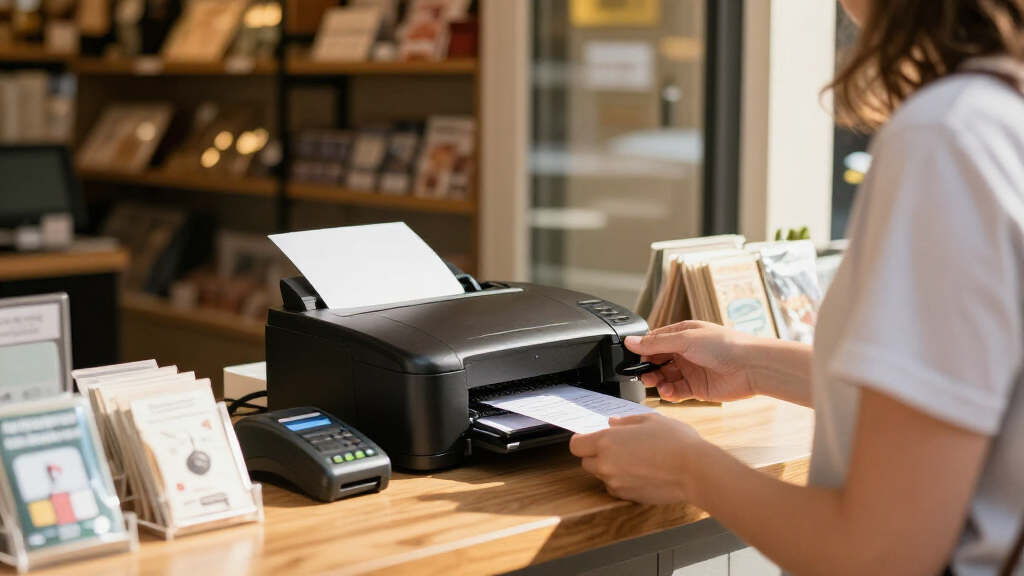
I ranked these business invoice printers by how well their printing format matches common business paperwork, not by headline speed alone. Standard-page inkjet all-in-ones, such as the Epson EcoTank ET-4800 and Canon PIXMA TR4720, suit invoices that need full-page layouts, color, or scanning. Thermal receipt models earned places for compact counter or mobile workflows, but their narrow rolls make them less suitable for formal, detailed invoices.
I also weighed connection options, portability, ease of fitting into a workflow, and ongoing supply needs. Dedicated counter printers rank ahead of small portable devices for steady POS use; mobile models make more sense when staff need to print away from a desk. The ordering favors broad invoice usefulness first, then specialized value for particular setups. Since compatibility can vary by operating system, point-of-sale software, and device, buyers should confirm support before choosing a thermal model.
| business invoice printer | Printer type |
|---|---|
| Canon PIXMA TR4720 Wireless Al | Inkjet |
| Rongta RP327 80mm Thermal Rece | Thermal |
| Portable 58mm Thermal Receipt | Direct thermal |
| Epson TM-T20III Monochrome The | Monochrome thermal |
| Rongta 80mm USB Thermal Receip | Thermal |
| Epson EcoTank ET-4800 Wireless | Inkjet |
| Rongta RPP300 Portable 80 mm T | Portable receipt printer |
| MUNBYN IMP001 58 mm Portable W | Thermal |
| 58mm Bluetooth Thermal Receipt | Direct thermal |
| Sunydog Portable 58mm Thermal | Thermal |
Factors to Consider When Choosing Business Invoice Printers
Before choosing from this lineup, decide what you mean by “invoice.” A full-page document sent to a customer, a printed transaction slip, and a field-service work order place different demands on a printer. I’d start with the document itself, then check how the printer connects to the software and devices already in use.
Match paper format to the document you issue
A thermal receipt printer and a standard-page office printer do not produce interchangeable paperwork. Narrow rolls can work for short transaction records, but they may leave little room for itemized services, payment terms, addresses, or branding. Before buying, measure an existing invoice layout and check whether customers, accountants, or business systems require a standard page. Also confirm whether the paper type fits your retention and filing practices. A common mistake is treating every printout called an invoice as a receipt; choosing the wrong format can create a daily workaround. If you issue both detailed invoices and counter slips, a single printer may not cover both jobs well.
Check software and device compatibility before comparing connections
USB, Bluetooth, serial, and Ethernet describe physical connections, not guaranteed support from your invoicing or POS software. Check the printer’s supported operating systems, driver availability, and whether the application can select the required paper width and print commands. Bluetooth is convenient for mobile use, but pairing and device support can vary; a wired connection may be more predictable at a fixed workstation. Ethernet can help a shared counter setup, but it is useful only if the intended software and network configuration support it. Ask your software provider or consult its printer compatibility list before ordering. A printer that cannot communicate with your invoicing system can cost more in setup time than a less feature-rich model that works immediately.
Estimate ongoing supplies and maintenance
Thermal printers use rolls rather than ink, which simplifies supply management, but they still need paper and may not suit every record-retention need. Inkjet printers handle broader document types, though ink replacement becomes part of routine operating costs. Compare how often you expect to print, whether output needs color, and how easily you can source the correct supplies. Low-volume offices may prefer a flexible all-in-one even if it requires ink; steady receipt workflows may value roll-based printing. Don’t judge ongoing cost from the printer alone: paper size, output volume, and the cost of downtime also matter. Keep a small supply buffer if invoices or transaction records are needed to serve customers each day.
Choose portability only when printing away from a desk is routine
Portable thermal models can help mobile sellers, delivery teams, or service staff print records on site. Their smaller paper width and compact design are tradeoffs, not automatic advantages for every business. Consider where the printer will travel, how it will connect to the phone or computer, and whether its battery or power arrangement suits a full workday. A desktop thermal model may be a better fit for a permanent counter because mobility adds little value there. Likewise, a portable unit can be a poor choice if employees need full-page invoices or scan-and-copy functions. Buy for a recurring mobile task rather than an occasional possibility.
Pay more for workflow coverage, not a longer feature list
An all-in-one can justify its place when the same device must print invoices, scan signed forms, and copy paperwork. That broader role may matter more than a dedicated thermal printer’s compact output if the business has varied administrative needs. On the other hand, paying for scanning and color makes little sense when a printer will only produce counter slips. Compare the cost of adding a second device with the time saved by keeping tasks together. Think about who will maintain the printer and how disruptive a failure would be. The best upgrade is the one that removes a real bottleneck, not the one with the most functions.
Frequently Asked Questions
Can a 58 mm or 80 mm thermal printer print a formal business invoice?
It can print transaction details or a short invoice-style record, but a narrow thermal roll is not a direct substitute for a standard-page invoice. Long descriptions, tax details, payment terms, and branding may become difficult to read or fit. Check the required document layout and ask whether your customers or accounting process accept roll-paper records. Thermal paper also differs from ordinary office paper, so consider how the records will be stored. If you regularly send detailed invoices, a standard-page printer such as an all-in-one is usually the safer match.
Should I choose a thermal printer or an inkjet all-in-one for my business?
Choose thermal when your main task is printing short receipts or transaction records at a counter or on the move. Choose an inkjet all-in-one when you need standard-page invoices, color, scanning, or copying as part of routine office work. The EcoTank ET-4800 offers broader office coverage, while dedicated thermal models focus on narrow-format output. Neither type is universally better: the document and software workflow decide the fit. If you issue both full invoices and receipts, consider whether one printer can handle both reliably or whether separate devices would reduce compromises.
Is Bluetooth enough for a mobile invoice printer?
Bluetooth can be convenient when staff print from a supported phone or tablet, but the connection alone does not guarantee that an invoicing app will work with the printer. Confirm the exact device, operating system, app, and printer support before purchase. Also check how paper loading, power, and any battery arrangements fit the work location. A mobile printer that pairs easily but cannot receive the right print format will not solve the problem. If printing happens at a fixed desk, a wired or network connection may be easier to manage.
When does paying for an all-in-one invoice printer make sense?
An all-in-one is useful when the business regularly prints invoices and also scans signed documents, copies forms, or produces other office paperwork. The ET-4800 and Canon TR4720 cover more than receipt printing, which can reduce the need for separate equipment. If the printer will only print narrow slips at a checkout, those extra functions may add little value. Compare the tasks your staff actually perform each week rather than choosing by feature count. Also factor in ink supplies and the space available for a larger office device.
What should I verify before connecting a thermal printer to my POS or invoicing software?
Check the software’s supported printer models or standards, compatible operating systems, available drivers, and accepted paper widths. Then confirm that the printer’s connection type—USB, serial, Ethernet, or Bluetooth—matches the device and network setup. Ask whether the application can control cutting and formatting if those functions matter to your workflow. A connector that fits does not prove the software can send the right print commands. Testing compatibility with the vendor or software provider before purchase can prevent avoidable setup delays.
Conclusion
For a business that needs one device for invoices and general office paperwork, I recommend the Epson EcoTank ET-4800 as the best overall; its color, scanning, and copying make it more flexible than the thermal picks. The Canon PIXMA TR4720 is my best value-style choice for a small office that wants an all-in-one without prioritizing the EcoTank’s supply approach. For best premium fit in a dedicated counter workflow, choose the Epson TM-T20III when its POS compatibility and fixed thermal setup suit your operation; the Rongta RP327 is a strong alternative when its USB, serial, or Ethernet connections better match your system. The best choice for beginners is the model that works with their existing invoicing software and paper format, so I’d verify that before favoring a portable thermal unit. For mobile teams, compare the 58 mm printers and Rongta RPP300, but pick a wider or standard-page printer if detailed invoices are part of the job.
Halloween Picks
halloween
As an affiliate, we earn on qualifying purchases.