
Choosing the right monitor light bar can significantly enhance your productivity setup by reducing eye strain and creating better ambient lighting. The Quntis RGB Pro+ stands out as the best overall for its versatile lighting modes and remote control, while the YEELIGHT Monitor Light Bar offers excellent eye-care features at a competitive price. These products differ mainly in their brightness levels, color options, and ease of control, which can be tradeoffs depending on your workspace needs. If you work long hours or game late into the night, selecting a light with stepless dimming and eye-care features is essential. Keep reading for a detailed comparison to help you find the best fit for your productivity setup.

Get business pricing on office and shipping supplies
- Business-only prices and quantity discounts
- Tax-exempt purchasing
- Multiple users, one account, clear invoices
Key Takeaways
- Top picks balance brightness, eye-care features, and controllability for long work sessions.
- RGB modes and backlight features add ambiance but vary in ease of use and customization.
- Remote controls and touch interfaces improve user experience but can increase cost and complexity.
- Budget options often lack advanced dimming or color modes but still provide effective task lighting.
- Design compatibility with large or curved monitors is a key factor for seamless integration.
| Quntis Curved Monitor Light Bar 15 RGB Backlight for 34+ Inch Screens |  | Best for Ultra-Wide and Curved Monitors | Compatibility: Monitors over 34 inches with 1000R to 3000R curvature | Lighting Modes: RGB backlight with 15 modes | Brightness: Up to 1400 lux at center | VIEW ON AMAZON | See Our Full Breakdown |
| Monitor Light Bar, Eye-Care USB Computer Monitor Lamp for Home Office Gaming, 15.7” Ultrawide LED Light, 3 Color Temperatures Stepless Dimming Screen Bar |  | Best for Wide Coverage and Simplicity | Length: 15.7 inches | Brightness: 900 lux | Color Temperatures: 3000K-6500K | VIEW ON AMAZON | See Our Full Breakdown |
| Quntis 15.7 Inch Monitor Light Bar with RGB Modes and Eye Care |  | Best for Customizable RGB and Glare-Free Lighting | Size: 15.7 inches | Color Temperature: 3000K-6500K | Brightness: Up to 900 Lux | VIEW ON AMAZON | See Our Full Breakdown |
| Quntis RGB Pro+ Monitor Light Bar with Remote, 20-Inch, Gray |  | Best for Large, Ultrawide Monitors with Remote Control | Length: 20 inches | Color Temperature Range: 3000-6500K | Brightness Levels: 100 stepless | VIEW ON AMAZON | See Our Full Breakdown |
| YEELIGHT Monitor Light Bar, USB Desk Lamp with Stepless Dimming, Eye-Care LED Screen Light for Home Office and Gaming |  | Best for Simplicity and Basic Eye Care | Brightness: 250 lumens | Color Temperature Range: 2700K to 6500K | Color Rendering Index: Ra95 | VIEW ON AMAZON | See Our Full Breakdown |
| Quntis Monitor Light Bar with Remote, Eye-Care No Glare Computer Light for Desk, Reading, Gaming, and Study |  | Best Overall for Adjustable, Glare-Free Lighting | Length: 16.1 inches (41 cm) | Color Temperature: 3000K–6500K | Brightness Adjustment: 20%–100% | VIEW ON AMAZON | See Our Full Breakdown |
| Onway Curved Monitor Light Bar with RGB Backlight, Wireless Remote & Touch Control |  | Best for Curved Monitors with Ambient RGB Effects | Compatibility: 27-34 inch monitors with 1000R/1800R curvature | Color temperature: 3000K-6500K | Brightness: 275 lumens | VIEW ON AMAZON | See Our Full Breakdown |
| Quntis Computer Monitor Light Bar with Backlight, Desk Lamp with Remote | 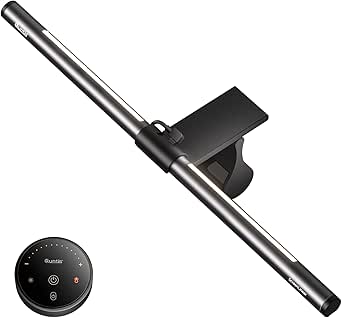 | Best for Color-Accurate, Glare-Free Workspaces | Light Source Type: LED | Control Method: Remote | Power Source: Corded Electric | VIEW ON AMAZON | See Our Full Breakdown |
| RGB Monitor Light Bar with Dual Light Modes, 9 RGB Effects, Dimmable Front Light, USB-C Powered |  | Best for Dual Task and Ambient Lighting with RGB Effects | Length: 15.75 inches | Lighting Modes: 9 RGB modes, 3 front light temperatures | Power Source: USB-C | VIEW ON AMAZON | See Our Full Breakdown |
| LYMAX Monitor Light Bar, Eye-Care USB Dimmable Screen Light with Wireless Controller |  | Best Wireless Control for Adjustable, Eye-Friendly Lighting | Color Temperature: 2900K–6000K | Control: Wireless remote and touch | Power Source: USB-C | VIEW ON AMAZON | See Our Full Breakdown |
| monitor light bars for productivity setup | Brightness | Color Temperature |
|---|---|---|
| Quntis Curved Monitor Light Ba | Up to 1400 lux at center | 3000K to 6500K |
| Monitor Light Bar | 900 lux | — |
| Quntis 15.7 Inch Monitor Light | Up to 900 Lux | 3000K-6500K |
| Quntis RGB Pro+ Monitor Light | — | — |
| YEELIGHT Monitor Light Bar | 250 lumens | — |
| Quntis Monitor Light Bar with | — | 3000K–6500K |
| Onway Curved Monitor Light Bar | 275 lumens | 3000K-6500K |
| Quntis Computer Monitor Light | — | — |
| RGB Monitor Light Bar with Dua | — | — |
| LYMAX Monitor Light Bar | — | 2900K–6000K |
More Details on Our Top Picks
Quntis Curved Monitor Light Bar 15 RGB Backlight for 34+ Inch Screens
This light bar is tailored for large ultrawide and curved monitors over 34 inches, standing out for its customizable RGB backlight modes that create immersive environments. Its stepless brightness and color temperature control allow precise adjustment, making it ideal for late-night work or gaming. Compared with smaller or flat-panel options like the YEELIGHT Monitor Light Bar, this model offers more tailored support for expansive screens, but its reliance on USB-C power and the need for specific monitor sizes limit versatility. The sturdy clamp and high CRI rating (RA98) ensure high-quality, glare-free illumination, reducing eye strain on large displays. However, setup can be tricky for some, and it’s not suited for smaller monitors or those without USB-C connections.
Pros:- Customizable RGB backlight modes for ambient control
- Stepless brightness and color temperature adjustments
- High CRI (RA98) for accurate color rendering
- Stable clamp fits large, curved monitors
Cons:- Limited to monitors over 34 inches, reducing applicability for smaller screens
- Requires USB-C port, which may necessitate adapters or limit placement
- Setup instructions can be unclear for some users
Best for: Owners of large, curved, or ultrawide monitors needing customizable RGB lighting for immersive or professional setups
Not ideal for: Users with smaller monitors or those seeking a simple, minimal lighting solution without RGB features
- Compatibility:Monitors over 34 inches with 1000R to 3000R curvature
- Lighting Modes:RGB backlight with 15 modes
- Brightness:Up to 1400 lux at center
- Color Temperature:3000K to 6500K
- CRI:RA98
- Clamp Thickness:Up to 3.35 inches
- Cable:Right-angle USB-C
- Dimensions:66 cm (26 inches)
Our verdict“This pick is best for users with large, curved monitors who want vibrant, customizable backlighting to enhance their workspace ambiance.”
Monitor Light Bar, Eye-Care USB Computer Monitor Lamp for Home Office Gaming, 15.7” Ultrawide LED Light, 3 Color Temperatures Stepless Dimming Screen Bar
This ultrawide LED light bar offers full coverage illumination with a straightforward clamp mount, making it ideal for those who want effective, shadow-reducing lighting without fuss. Its adjustable color temperature and brightness provide personalized comfort, similar to the Quntis 15.7 Inch Monitor Light Bar. Compared to models with RGB modes, this option emphasizes simplicity and broad light coverage, which significantly reduces eye strain during long sessions. Its 900 lux output ensures ample brightness, but it lacks remote control, requiring manual adjustments, and is limited to USB power sources. It’s better suited to users with standard-sized monitors and minimal setup needs.
Pros:- Wide coverage reduces shadows and eye strain
- Adjustable color temperature and brightness for comfort
- Easy tool-free clamp installation
- Minimal glare with high-quality LED
Cons:- No remote control, manual operation needed
- Dependent on USB power, limiting placement options
- Less suitable for very thick monitors
Best for: Home office or gaming users seeking a reliable, wide-area light that’s quick to install and simple to operate
Not ideal for: Power users who want customizable RGB effects or advanced features, or those with very thick monitors
- Length:15.7 inches
- Brightness:900 lux
- Color Temperatures:3000K-6500K
- Power Source:USB
- Installation:Clamp mount
Our verdict“This model suits users who prioritize simple, effective illumination for standard-sized monitors in home or gaming setups.”
Quntis 15.7 Inch Monitor Light Bar with RGB Modes and Eye Care
This 15.7-inch light bar emphasizes customizable RGB modes with 24 options, including static and dynamic effects, making it ideal for mood setting and dynamic environments. Its high-CRI (≥95) lighting reduces eye strain with glare-free, vibrant illumination, surpassing basic single-mode lights like the YEELIGHT Monitor Light Bar. Its universal fit for monitors between 0.16″ and 2.36″ thick offers broad compatibility. However, reliance on USB power can lead to cable clutter, and some users might find the RGB modes less versatile than dedicated ambient lighting systems with more granular control. The glare-free, high-CRI lighting makes it suitable for prolonged use.
Pros:- Multiple RGB modes for mood and environment customization
- High CRI (≥95) for accurate, glare-free illumination
- Universal fit for monitor thicknesses from 0.16″ to 2.36″
- Smart memory function for quick setup
Cons:- USB power dependency can cause cable clutter
- Limited customization options compared to dedicated ambient systems
- Some users may find RGB modes less adjustable than high-end systems
Best for: Creative professionals or gamers who want customizable RGB effects and high-quality glare-free lighting on various monitor sizes
Not ideal for: Minimalist users or those with very tight space constraints who prefer simple, single-color lighting
- Size:15.7 inches
- Color Temperature:3000K-6500K
- Brightness:Up to 900 Lux
- Color Modes:24 RGB modes (9 static, 15 dynamic)
- CRI:≥ 95
- Power:USB
Our verdict“This pick is well-suited for those who want vibrant, customizable RGB lighting with high color fidelity on a variety of monitor sizes.”
Quntis RGB Pro+ Monitor Light Bar with Remote, 20-Inch, Gray
The Quntis RGB Pro+ offers an expansive 20-inch length, making it ideal for large or ultrawide monitors. Its 15 RGB modes and 4 color temperatures enable tailored ambient lighting, while the remote control simplifies adjustments from a distance. Its glare-free, high color accuracy (Ra95) is comparable to premium options like the Quntis 15.7 Inch RGB Model, but with a larger footprint. The design is sleek and easy to install, yet its reliance on USB power means cable management can be a challenge, especially in cluttered setups. This model is best suited for users with extensive, multi-monitor setups or large screens that benefit from broad, customizable illumination.
Pros:- Large 20-inch coverage for expansive illumination
- Multiple RGB modes and four color temperatures for customization
- Remote control for easy, wireless adjustments
- High color accuracy and glare-free design
Cons:- Requires USB power, which may complicate cable routing
- Larger size may not fit all desk configurations
- Setup may be more complex due to additional features
Best for: Owners of large or ultrawide monitors who want extensive, customizable RGB lighting with remote control convenience
Not ideal for: Users with small or standard-sized monitors or those seeking a minimalist setup with limited space
- Length:20 inches
- Color Temperature Range:3000-6500K
- Brightness Levels:100 stepless
- Lighting Modes:15 RGB modes
- Cable:DC 5V/1.5A
- Lifespan:50,000 hours
Our verdict“This light bar is perfect for users with large or ultrawide screens needing extensive, customizable ambient lighting controlled remotely.”
YEELIGHT Monitor Light Bar, USB Desk Lamp with Stepless Dimming, Eye-Care LED Screen Light for Home Office and Gaming
The YEELIGHT Monitor Light Bar offers a straightforward, flicker-free design with adjustable brightness and color temperature, making it a reliable choice for basic eye care. Its sleek, full-metal build and easy retractable clip make it simple to install on most flat or curved monitors, similar to the Monitor Light Bar, Eye-Care USB. Unlike RGB models, it focuses on providing consistent, glare-free lighting to reduce eye fatigue during long work or gaming sessions. Its limited brightness (250 lumens) and lack of advanced features make it less suitable for environments requiring mood lighting or dynamic effects. The need for USB power and absence of a battery may add cable clutter, but its minimalism suits users who want reliable, no-fuss illumination.
Pros:- Adjustable brightness and color temperature for personalized comfort
- High color accuracy (Ra95) for true-to-life colors
- Space-saving, easy-to-attach clip design
- Flicker-free, eye-care features reduce fatigue
Cons:- Limited brightness output at 250 lumens
- No remote control or advanced features
- Dependent on USB power, which can cause clutter
Best for: Professionals or gamers who need a dependable, simple light source with adjustable settings for healthy eye use
Not ideal for: Users seeking vibrant RGB effects or multi-functional ambient lighting setups
- Brightness:250 lumens
- Color Temperature Range:2700K to 6500K
- Color Rendering Index:Ra95
- LED Beads:78
- Cable Length:1.5 meters
- Monitor Compatibility:0.3″ to 1.1″ thickness
Our verdict“This is an excellent choice for users who want straightforward, reliable lighting that prioritizes eye comfort over effects or customization.”
Quntis Monitor Light Bar with Remote, Eye-Care No Glare Computer Light for Desk, Reading, Gaming, and Study
This model stands out for its high CRI of Ra95, delivering natural color accuracy crucial for color-sensitive tasks. Its stepless brightness and color temperature controls, combined with a smart remote, make it incredibly versatile for different work and leisure needs. Unlike the Onway curved light, the Quntis offers a broader compatibility with various monitor shapes thanks to its universal clamp, though it requires a USB Type-C port for power, which could limit setup flexibility. Its glare-free, flicker-free illumination helps reduce eye fatigue during long hours at the screen, making it ideal for users prioritizing eye comfort. However, the clamp might struggle with very thick or irregular monitor edges, and it isn’t portable beyond fixed desk setups.
Pros:- High CRI (Ra95) for accurate color rendering
- Stepless brightness and color temperature control
- Glare-free, flicker-free lighting reduces eye fatigue
- Universal clamp fits most monitors
Cons:- Requires a USB Type-C port for power, limiting flexibility
- Potential compatibility issues with very thick or irregular monitor edges
Best for: Professional users who need precise, adjustable lighting with minimal eye strain across diverse monitor setups
Not ideal for: Users with older monitors lacking USB-C ports or those seeking portable lighting solutions
- Length:16.1 inches (41 cm)
- Color Temperature:3000K–6500K
- Brightness Adjustment:20%–100%
- LED Count:76 LEDs
- CRI:Ra95
- Power Port:Type-C
Our verdict“This pick suits professionals needing customizable, eye-friendly lighting that adapts to various monitor designs.”
Onway Curved Monitor Light Bar with RGB Backlight, Wireless Remote & Touch Control
This curved light bar is tailored for 27-34 inch monitors with 1000R or 1800R curvature, providing glare-free lighting paired with vibrant RGB backlights. Its wireless touch remote simplifies adjustments for brightness, color temperature, and RGB effects, creating an immersive gaming or relaxing environment. Compared to the more utilitarian Quntis, the Onway emphasizes ambiance with multiple RGB modes, making it ideal for users who want both task lighting and mood lighting in one device. However, its specific compatibility with curved monitors limits its use for flat-screen setups, and installation can be complex for some. The USB-C power requirement adds to setup considerations, especially in multi-device environments.
Pros:- RGB backlight modes for ambient atmosphere
- Wireless remote for seamless control
- Adjustable brightness and color temperature
- No glare design reduces eye fatigue
Cons:- Limited to curved monitors, restricting compatibility
- Requires USB-C connection, which may complicate setup
Best for: Gamers or streamers who want integrated ambient lighting with customizable effects on curved screens
Not ideal for: Users with flat monitors or those seeking simple, no-frills task lighting
- Compatibility:27-34 inch monitors with 1000R/1800R curvature
- Color temperature:3000K-6500K
- Brightness:275 lumens
- LED count:88 LEDs
- Remote control:Wireless 8cm touch remote
- Cable length:1.8 meters
Our verdict“This option is perfect for users who want immersive RGB effects combined with glare-free task lighting on curved displays.”
Quntis Computer Monitor Light Bar with Backlight, Desk Lamp with Remote
This model offers a straightforward, adjustable lighting solution with multiple modes to reduce eye strain, making it ideal for work, gaming, and reading. Its secure clip enables damage-free installation on curved monitors, and the remote with stepless dimming allows for quick adjustments. Compared to the LYMAX, the Quntis emphasizes high CRI (though not specified) and easy setup, but it lacks RGB backlight or ambient effects. Its 5-watt LED is sufficient for most tasks, though not as bright as some larger, more feature-rich options. Its simplicity and high color accuracy make it perfect for color-sensitive tasks, but it’s less suited for users wanting mood lighting or RGB effects.
Pros:- Adjustable lighting modes to reduce eye strain
- Secure, damage-free clip for easy installation
- Remote with memory function for convenience
- High color accuracy for color-sensitive tasks
Cons:- Limited to adjustable, but not RGB backlight
- Not water-resistant or suitable for humid environments
Best for: Color-critical professionals who need simple, flicker-free lighting without distractions
Not ideal for: Users seeking dynamic RGB effects or ambient mood lighting in their workspace
- Light Source Type:LED
- Control Method:Remote
- Power Source:Corded Electric
- Wattage:5 watts
- Dimensions:15.7″D x 0.78″W x 0.78″H
- CRI:High (unspecified)
Our verdict“This is ideal for users prioritizing accurate, glare-free illumination with simple control over lighting modes.”
RGB Monitor Light Bar with Dual Light Modes, 9 RGB Effects, Dimmable Front Light, USB-C Powered
This light bar combines dual functionality with a front light for task visibility and RGB backlighting for ambiance, making it versatile for work and play. Its dual tactile controls allow for easy switching between 9 RGB effects and brightness levels, with the ability to toggle the front light separately. Compared with the simpler Quntis, this model offers more customization but may be distracting during intense focus sessions due to its RGB effects. Its USB-C power makes placement flexible, and the clip-on design fits a wide range of monitors. However, some users may find the RGB effects too lively during work, and manual adjustments can be necessary to achieve the perfect angle.
Pros:- Dual lighting modes for task and ambiance
- 9 RGB effects for customization
- Dimmable front light for task clarity
- Easy clip-on installation
Cons:- Limited to USB-C power sources
- RGB effects may distract during focused tasks
Best for: Creative professionals or gamers wanting personalized ambient and task lighting in one device
Not ideal for: Those seeking minimal distraction or a dedicated, straightforward task light
- Length:15.75 inches
- Lighting Modes:9 RGB modes, 3 front light temperatures
- Power Source:USB-C
- Control:Dual tactile buttons
- Compatibility:Universal clip
Our verdict“This is best for users who want a flexible, colorful lighting setup that enhances both work and gaming environments.”
LYMAX Monitor Light Bar, Eye-Care USB Dimmable Screen Light with Wireless Controller
The LYMAX monitor light bar offers flicker-free, adjustable color temperature from 2900K to 6000K, providing a customizable environment that minimizes eye fatigue. Its wireless remote simplifies operation, making it easy to switch settings without disrupting workflow. Compared with the Quntis, the LYMAX emphasizes wireless convenience and a longer, 59-inch power cord, accommodating various desk setups. However, it requires a USB-C port with 5V/1A capacity, and the remote uses a disposable battery, which could be an annoyance over time. Designed for monitors between 0.2 and 1.8 inches thick, it fits a broad range of screens, though it’s less effective if the monitor is very thick or needs RGB backlighting.
Pros:- Flicker-free, glare-free lighting reduces eye fatigue
- Wide color temperature range for personalized lighting
- Wireless remote control for convenience
- Long cable for flexible placement
Cons:- Requires a specific USB power capacity
- Remote uses disposable batteries
Best for: Long-hour professionals who value easy, wireless adjustments and flicker-free, customizable lighting
Not ideal for: Users with older monitors or setups without sufficient USB power capacity
- Color Temperature:2900K–6000K
- Control:Wireless remote and touch
- Power Source:USB-C
- Cord Length:59 inches
- Monitor Compatibility:0.2 to 1.8 inches thick
Our verdict“This choice suits users seeking wireless, adjustable lighting with minimal eye strain for extended use.”

How We Picked
I evaluated these monitor light bars based on several criteria that matter most for productivity setups. Performance factors included brightness, color temperature options, and eye-care technology to reduce fatigue during extended use. Usability was assessed through control methods—such as remote, touch, or app-based—and ease of installation. Build quality and durability were also considered, ensuring the products can withstand daily use. Lastly, value was weighed against features, with an eye toward affordability without sacrificing essential functionality. The ranking reflects a balance of these factors, prioritizing products that deliver reliable performance and user-friendly features for typical workspace needs.Factors to Consider When Choosing Monitor Light Bars For Productivity Setups
When choosing a monitor light bar for your productivity setup, it’s important to consider how lighting quality, control options, and compatibility will impact your daily use. A well-chosen light can reduce eye strain, improve focus, and create a comfortable environment, but tradeoffs exist between features and price. Understanding these factors helps ensure you pick a product that matches your workspace, budget, and lighting preferences.Brightness and Light Quality
Look for a light bar with adjustable brightness levels that can cater to different times of day and task types. A light that’s too bright or too dim can cause eye fatigue or inadequate illumination. Color temperature options, typically ranging from warm to cool tones, help create a more natural or ambient environment, which is vital for long hours of work or gaming. Prioritizing lights with flicker-free and anti-glare technology can further reduce eye strain and improve overall comfort.
Control Methods and Ease of Use
Consider how you will adjust the lighting—remote controls, touch panels, or smartphone apps each offer different convenience levels. Remotes are intuitive but can be misplaced, while app controls provide advanced customization but may require setup. Touch controls on the light bar itself are quick and accessible but might be limited in functionality. The best choice depends on your preference for ease versus advanced control features.
Compatibility and Size
Ensure the light bar fits your monitor size and shape, especially if you have a curved or ultrawide display. Some models are designed specifically for large screens, offering seamless coverage, while others work well with standard-sized monitors. Compatibility with your monitor’s mount or stand is also important for a clutter-free setup. Proper sizing ensures even lighting without excessive glare or shadows.
Build Quality and Durability
Invest in a product with sturdy construction and high-quality materials to withstand daily use. Cheaper options may use flimsy plastics or have fragile joints, which can lead to breakage or malfunction over time. A well-built light bar will also maintain its appearance and functionality, providing consistent illumination without flickering or dimming. Consider customer reviews and brand reputation as indicators of reliability.
Budget and Value
While budget options can suffice for casual use, investing a bit more often yields better lighting quality, features, and durability. Determine which features are essential for your needs—such as RGB modes or stepless dimming—and weigh those against the price. Sometimes, paying slightly more ensures long-term satisfaction and fewer replacements, especially if you spend many hours at your desk daily.
Frequently Asked Questions
Can I use a monitor light bar with any size monitor?
Most monitor light bars are designed to fit standard monitor sizes, but compatibility varies. Check the product specifications for maximum width or curved monitor compatibility. Ultrawide or very large monitors may require special models with longer arms or wider coverage. Ensuring the light bar matches your monitor’s dimensions prevents uneven lighting or installation issues.
Are RGB modes necessary for productivity?
RGB modes mainly add ambiance and aesthetic appeal, which can enhance your workspace environment. However, they are not essential for task lighting. For productivity, focus on quality white light with adjustable temperature and brightness. RGB features are more about customization than functional lighting, so consider whether they justify additional cost for your setup.
How important is eye-care technology in a monitor light bar?
Eye-care features like flicker-free lighting, anti-glare design, and stepless dimming significantly reduce eye strain during long work or gaming sessions. These technologies help prevent headaches and fatigue, making them worthwhile investments if you spend many hours at your desk. Cheaper models often lack these features, which can lead to discomfort over time.
Should I prioritize controllability or simplicity?
It depends on your preference for convenience and customization. Remote controls and app-based controls offer more options but add complexity and cost. Simpler touch or basic controls are easier to use but may limit adjustments. Choose based on whether you prefer quick, on-the-fly adjustments or a straightforward setup with minimal fuss.
Is it worth paying extra for RGB backlighting?
For most productivity setups, RGB backlighting is a luxury rather than a necessity. It can improve mood and workspace aesthetics but doesn’t impact task performance significantly. If you value ambiance or want to match your gaming or aesthetic theme, investing in RGB features makes sense. Otherwise, focusing on adjustable white light might provide better value and functional benefit.
Conclusion
For most users seeking a reliable, versatile lighting solution, the Quntis RGB Pro+ offers the best balance of features and value, making it ideal for those who want customization and ease of control. The YEELIGHT Monitor Light Bar suits budget-conscious buyers prioritizing eye-care and straightforward functionality. Professionals or serious gamers might lean toward premium options with more advanced controls and RGB modes, while newcomers should consider simple, easy-to-use models. Ultimately, your choice depends on your workspace size, lighting preferences, and how much you value additional features like RGB modes or remote control.
Fall Picks
fall essentials
As an affiliate, we earn on qualifying purchases.