

Get business pricing on office and shipping supplies
- Business-only prices and quantity discounts
- Tax-exempt purchasing
- Multiple users, one account, clear invoices
Complete the kit

Key Takeaways
- The FLEXISPOT 79×32 Inch Electric Standing Desk offers the broadest work surface in this lineup, making it the clearest fit for two monitors plus peripherals and notes.
- The FlexiSpot E6 Bamboo and E6 MAX pair a full desk format with dual motors and a 55-by-28-inch top; choose between them by checking each model’s specific controls, capacity, and included features.
- VIVO’s converters are a way to add sit-stand use without replacing a desk, but their smaller platforms call for careful monitor placement and cable planning.
- The VIVO 36-inch converter includes a monitor stand, while the VIVO 32-inch models serve tighter spaces; the wider footprint can make dual-screen placement easier, but still does not match a full desk.
- A converter and a full electric desk solve different problems: converters reduce replacement and assembly needs, while full desks give monitor arms, keyboards, and other gear more room to stay set up.
| FLEXISPOT EN2 Standing Desk with Power Strip Bundle |  | Best for Built-In Charging | Desktop: 55 x 28 inches | Height range: 28.1 to 45.7 inches | Weight capacity: 176 pounds | VIEW ON AMAZON | See Our Full Breakdown |
| VIVO Black 36″ Standing Desk Converter with Monitor Stand (DESK-V036K-M2) |  | Best Converter for Dual Monitors | Work surface width: 36 inches | Dimensions: 36 x 16 x 20 inches | Height adjustment: 4.5 to 20 inches | VIEW ON AMAZON | See Our Full Breakdown |
| VIVO 32-Inch Standing Desk Converter with Keyboard Tray, Black |  | Best Simple Dual-Monitor Riser | Work surface: 31.5 x 15.7 inches | Keyboard tray: 31.3 x 11.8 inches | Height adjustment: 4.5 to 20 inches | VIEW ON AMAZON | See Our Full Breakdown |
| VIVO Black 32-inch Standing Desk Riser (DESK-V000S) |  | Best Compact Riser | Surface: 31.5 x 15.8 inches | Weight capacity: 26 pounds | Lift range: 4.9 to 19.7 inches | VIEW ON AMAZON | See Our Full Breakdown |
| FlexiSpot E6 Bamboo Electric Standing Desk, 55″ x 28″, Dual Motor, 220 lbs Capacity |  | Best for Heavy Dual-Monitor Setups | Desktop: 55 x 28 inches | Height range: 23.6 to 48.8 inches | Weight capacity: 220 pounds | VIEW ON AMAZON | See Our Full Breakdown |
| VIVO Black 48″ Standing Desk Converter (DESK-V048KB) |  | Best Wide Converter | Top surface: 47.6 × 15.7 inches | Keyboard tray: 47.6 × 11.8 inches; 10.2 inches at center | Desktop capacity: 33 pounds | VIEW ON AMAZON | See Our Full Breakdown |
| FLEXISPOT 79×32 Inch Electric Standing Desk, White |  | Best for a Spacious Workstation | Dimensions: 79 × 32 inches | Height range: 28.9–46.5 inches | Weight capacity: 154 pounds | VIEW ON AMAZON | See Our Full Breakdown |
| Mount-It! Dual Monitor Electric Standing Desk Converter, Sit-Stand Riser |  | Best for Mounted Dual Monitors | Base dimensions: 28.3 × 18.9 inches | Height range: 1.4–21.1 inches | Monitor support: Two monitors up to 32 inches each | VIEW ON AMAZON | See Our Full Breakdown |
| VIVO Black 32 in Standing Desk Converter with Monitor Stand, DESK-V000K-M2 |  | Best Compact Converter with Monitor Arms | Top surface: 31.5 × 15.7 inches | Keyboard tray: 31.3 × 11.8 inches; 10.5 inches at center | Height adjustment: 4.5–20 inches | VIEW ON AMAZON | See Our Full Breakdown |
| FLEXISPOT E6 MAX 55″ x 28″ Bamboo Standing Desk with Dual Motor |  | Best Heavy-Duty Pick | Dimensions: 55 × 28 inches | Height range: 23.6–89.7 inches, as listed | Weight capacity: 330 pounds listed | VIEW ON AMAZON | See Our Full Breakdown |
| standing desks for dual monitor setup | Warranty | Height range | Weight capacity |
|---|---|---|---|
| FLEXISPOT EN2 Standing Desk wi | 5 years for frame and motor; 2 years for electronics | 28.1 to 45.7 inches | 176 pounds |
| VIVO Black 36" Standing Desk C | — | — | — |
| VIVO 32-Inch Standing Desk Con | 3 years | — | — |
| VIVO Black 32-inch Standing De | 3 years | — | 26 pounds |
| FlexiSpot E6 Bamboo Electric S | 5 years for frame and motor; 2 years for electronics | 23.6 to 48.8 inches | 220 pounds |
| VIVO Black 48" Standing Desk C | — | — | — |
| FLEXISPOT 79×32 Inch Electric | 5 years for frame and mechanics; 2 years for electronics | 28.9–46.5 inches | 154 pounds |
| Mount-It! Dual Monitor Electri | Limited lifetime warranty listed | 1.4–21.1 inches | — |
| VIVO Black 32 in Standing Desk | — | — | — |
| FLEXISPOT E6 MAX 55" x 28" Bam | 10 years for frame and motors; 2 years for electronics | 23.6–89.7 inches, as listed | 330 pounds listed |
More Details on Our Top Picks
FLEXISPOT EN2 Standing Desk with Power Strip Bundle
The EN2 suits a dual-monitor setup that needs a full desk rather than a riser: its 55-by-28-inch desktop leaves room for screens, keyboard, and accessories, while the 176-pound capacity accommodates a substantial workstation. Its removable power strip with three outlets and two USB ports can cut down on cords across the desktop. Compared with the FlexiSpot E6 Bamboo, the EN2 has a lower stated load limit and a narrower height range, but its included charging strip gives it a practical advantage for peripherals. Four memory presets make switching between sitting and standing straightforward. The tradeoffs are a two-package delivery and assembly that calls for an electric drill, which is not included.
Pros:- 55-by-28-inch desktop provides room for two monitors and everyday work items
- Included power strip has three AC outlets and two USB ports
- Four memory presets simplify repeat height changes
- Steel frame supports up to 176 pounds
Cons:- Height range tops out at 45.7 inches, below the FlexiSpot E6
- Assembly requires an electric drill that is not included
- Desktop and frame may arrive in separate packages
Best for: People building a two-monitor workstation who want desk space and accessible charging for peripherals.
Not ideal for: Taller users or owners of unusually heavy monitor arms and equipment who need the E6’s greater height range or load capacity.
- Desktop:55 x 28 inches
- Height range:28.1 to 45.7 inches
- Weight capacity:176 pounds
- Frame:Steel
- Desktop material:FSC-certified wood
- Power strip:3 AC outlets and 2 USB ports
- Memory presets:4
- Warranty:5 years for frame and motor; 2 years for electronics
Our verdict“Choose the EN2 if you want a roomy dual-monitor desk with charging built in and do not need the E6’s higher lift range or capacity.”
VIVO Black 36″ Standing Desk Converter with Monitor Stand (DESK-V036K-M2)
This converter makes the most sense when you want a dedicated mount for two monitors without replacing your existing desk. Its arms support screens from 13 to 30 inches, up to 17.6 pounds each, and the 36-inch surface gives a broader platform than the VIVO 32-Inch Standing Desk Converter with Keyboard Tray. The separate monitor mount can free the surface for keyboard and work items, while the height adjustment adds a standing position to a seated desk. The compromise is weight: at 35.4 pounds, it is less convenient to move than the simpler 32-inch VIVO riser. Buyers should also check monitor weight and VESA fit before choosing it; the mount’s stated limits shape which dual-screen setups it can support.
Pros:- Monitor mount supports two 13-to-30-inch screens up to 17.6 pounds each
- 36-inch work surface is wider than the VIVO 32-inch riser
- Height adjustment range is 4.5 to 20 inches
- Padded underside helps protect the existing desk
Cons:- At 35.4 pounds, it is cumbersome to relocate
- Assembly involves aligning multiple components
- Monitor compatibility is limited by screen weight and VESA pattern
Best for: Desk owners with two VESA-compatible monitors who want a converter with a dedicated monitor mount and wider work surface.
Not ideal for: People who regularly move or stow their converter, or whose monitors exceed 30 inches or 17.6 pounds each.
- Work surface width:36 inches
- Dimensions:36 x 16 x 20 inches
- Height adjustment:4.5 to 20 inches
- Monitor support:Two monitors, 13 to 30 inches, up to 17.6 pounds each
- VESA patterns:75 x 75 mm and 100 x 100 mm
- Keyboard tray:36 x 11.8 inches
- Frame:Steel
- Item weight:35.4 pounds
Our verdict“Pick this VIVO when you want a dual-monitor mount and standing positions on an existing desk, provided its weight and assembly demands suit your space.”
VIVO 32-Inch Standing Desk Converter with Keyboard Tray, Black
The 32-inch VIVO is a straightforward way to raise a compact dual-monitor workstation while keeping the keyboard at a usable height: its keyboard tray moves with the work surface, so your hands do not stay down on the original desk as the screens rise. Compared with the VIVO DESK-V036K-M2, it lacks a dedicated dual-monitor arm, but it is lighter and calls for only minimal assembly. Its 33-pound weight recommendation requires care when adding two screens, mounts, and accessories; the total load must stay within that limit. The 31.5-by-15.7-inch surface also gives less room than the 36-inch VIVO converter. This is a practical fit for a modest setup and an existing desk, though it is not a replacement for a full-size standing desk.
Pros:- Keyboard tray rises with the work surface
- Supports a compact dual-monitor workstation
- Height adjusts from 4.5 to 20 inches
- Minimal assembly is required
Cons:- 33-pound maximum weight recommendation limits heavier monitor setups
- 31.5-by-15.7-inch surface is smaller than the 36-inch VIVO converter
- Requires an existing desk and does not provide a full desk replacement
Best for: People with an existing desk and two lightweight monitors who want a simple riser with a keyboard tray that lifts in sync.
Not ideal for: Owners of heavy monitors, substantial monitor arms, or equipment that would push the total load above 33 pounds.
- Work surface:31.5 x 15.7 inches
- Keyboard tray:31.3 x 11.8 inches
- Height adjustment:4.5 to 20 inches
- Maximum weight recommendation:33 pounds
- Item weight:26 pounds
- Frame:Alloy steel
- Assembly:Attach the keyboard tray
- Warranty:3 years
Our verdict“Choose this riser for a compact, lighter dual-monitor setup when synchronized keyboard height matters more than a dedicated monitor mount.”
VIVO Black 32-inch Standing Desk Riser (DESK-V000S)
The DESK-V000S is the compact pick for a desk that cannot spare much surface area: its 31.5-by-15.8-inch steel platform adds a standing position while occupying less space than the 36-inch VIVO DESK-V036K-M2. A pneumatic lift and touch height lock keep the adjustment simple, and minimal assembly helps it suit a shared or temporary workspace. Its 26-pound capacity is the main constraint for dual monitors, especially if the screens sit on a heavy arm; check the combined load before committing. The 19.7-inch maximum lift may also fall short for taller users. Compared with the 32-inch VIVO model rated for 33 pounds, this one favors a smaller footprint over more load headroom.
Pros:- Compact 31.5-by-15.8-inch surface fits many existing desks
- Pneumatic lift with touch height lock
- Steel construction
- Minimal assembly required
Cons:- 26-pound capacity is lower than the 33-pound VIVO 32-inch converter
- Maximum lift of 19.7 inches may not suit taller users
- Limited surface area leaves less room for accessories
Best for: People with limited desk space and a lightweight dual-monitor setup who want a compact riser with simple pneumatic adjustment.
Not ideal for: Taller users or anyone using heavy monitors and mounts that approach or exceed the 26-pound capacity.
- Surface:31.5 x 15.8 inches
- Weight capacity:26 pounds
- Lift range:4.9 to 19.7 inches
- Construction:High-grade steel frame
- Adjustment:Pneumatic lift with touch height lock
- Included components:Desk riser and keyboard tray
- Warranty:3 years
Our verdict“Choose the DESK-V000S when desk space is tight and your monitors and accessories fit comfortably within its lower load limit.”
FlexiSpot E6 Bamboo Electric Standing Desk, 55″ x 28″, Dual Motor, 220 lbs Capacity
For a two-monitor workstation with arms, a laptop, and other equipment, the E6 offers the most stated load headroom in this batch: its 220-pound capacity exceeds the EN2’s 176 pounds, while the dual motors lift the 55-by-28-inch desk. The bamboo surface gives this full desk a different feel from the EN2’s wood top, and its 23.6-to-48.8-inch range suits a wider range of seated and standing positions. Compared with a converter such as the VIVO DESK-V036K-M2, the E6 replaces the work surface and avoids putting the full setup on an existing desk, but it requires more assembly and floor space. Its split-box shipping can also complicate delivery; the higher capacity is useful only if your room can accommodate a full desk.
Pros:- 220-pound capacity provides more headroom than the EN2
- Dual motors support electric height adjustment
- 23.6-to-48.8-inch range accommodates a broad range of seated and standing positions
- FSC-certified bamboo desktop
Cons:- Requires assembly
- Ships in two boxes that may complicate delivery
- Full desk format needs more floor space than a converter
Best for: People with two monitors on arms and several peripherals who want a full electric desk with generous capacity and height range.
Not ideal for: People who need a compact add-on for an existing desk or cannot accommodate a 55-by-28-inch desktop.
- Desktop:55 x 28 inches
- Height range:23.6 to 48.8 inches
- Weight capacity:220 pounds
- Motors:Dual
- Noise level:Under 45 dB
- Desktop material:FSC-certified bamboo
- Frame:Steel
- Warranty:5 years for frame and motor; 2 years for electronics
Our verdict“Choose the E6 for a full-size dual-monitor workstation when you need more load capacity and lift range than the EN2 provides.”
VIVO Black 48″ Standing Desk Converter (DESK-V048KB)
The 47.6-inch-wide deck gives a dual-monitor setup more room than the VIVO 32 in Standing Desk Converter with Monitor Stand, especially if you also need space for a laptop. Its touch-lock height adjustment raises the work surface from 4.5 to 20 inches, so you can alternate positions without replacing your existing desk. The broad top is the main draw, but this is a riser rather than a full standing desk: its 15.7-inch depth can limit monitor placement, and the stated 33-pound desktop capacity calls for checking the combined weight of screens, stands, and accessories. The synchronized keyboard tray is convenient, though its 4-pound limit leaves little room for heavier equipment. I’d choose this over the VIVO 32-inch model when width matters more than an integrated monitor arm.
Pros:- 47.6-inch-wide surface can fit two monitors and a laptop.
- Touch-lock adjustment supports quick sit-to-stand changes.
- Steel frame and 33-pound desktop capacity support a substantial workstation.
- Minimal assembly gets the riser ready with little setup.
Cons:- Keyboard tray supports only 4 pounds.
- Maximum height of 20 inches may not suit taller users.
- The 15.7-inch deck depth can constrain monitor placement.
Best for: Dual-monitor users who want a wide riser for an existing desk and have lightweight keyboard and mouse gear.
Not ideal for: Taller users who need more than 20 inches of lift, or anyone whose keyboard tray setup exceeds its 4-pound limit.
- Top surface:47.6 × 15.7 inches
- Keyboard tray:47.6 × 11.8 inches; 10.2 inches at center
- Desktop capacity:33 pounds
- Keyboard tray capacity:4 pounds
- Height adjustment:4.5–20 inches
- Frame material:Steel
Our verdict“Choose this wide VIVO riser if your existing desk is sound and you want room for two monitors without buying a full standing desk.”
FLEXISPOT 79×32 Inch Electric Standing Desk, White
For a dual-monitor setup that sprawls beyond the screens, this 79 × 32-inch work surface offers far more room than the VIVO Black 48-inch converter. It is a complete electric desk, with four memory presets and a 28.9–46.5-inch height range, so you can save preferred positions instead of resetting the height each time. Its 154-pound capacity is adequate for many office setups, though it is well below the FLEXISPOT E6 MAX’s listed 330-pound capacity. The white engineered-wood top and included cable tray, cup holder, and headphone hook give it a tidy, accessory-friendly feel. The tradeoff is assembly: the product details call for a power drill, which is not included. This model makes most sense when desk area and saved heights matter more than maximum load capacity.
Pros:- 79 × 32-inch top leaves space around dual monitors for other work.
- Four programmable presets make height changes repeatable.
- Electric motor adjusts across a 28.9–46.5-inch range.
- Cable tray, cup holder, and headphone hook support a more organized setup.
Cons:- Requires assembly with a power drill that is not included.
- 154-pound capacity is lower than the FLEXISPOT E6 MAX.
- Large footprint may overwhelm smaller offices.
Best for: People running two monitors alongside a laptop, paperwork, or other desk equipment who have room for a wide, deep desk.
Not ideal for: Buyers with limited floor space, very heavy equipment, or no access to a power drill for assembly.
- Dimensions:79 × 32 inches
- Height range:28.9–46.5 inches
- Weight capacity:154 pounds
- Height presets:4
- Top material:Engineered wood
- Frame material:Alloy steel
- Top thickness:0.63 inches
- Warranty:5 years for frame and mechanics; 2 years for electronics
Our verdict“Pick this FLEXISPOT if you want a full-size dual-monitor desk with generous extra workspace and programmable height settings.”
Mount-It! Dual Monitor Electric Standing Desk Converter, Sit-Stand Riser
The Mount-It! is the most screen-focused converter here: its included VESA arms hold two compatible monitors up to 32 inches each, with independent tilt, swivel, and rotation. That flexibility can make alignment easier than on the VIVO Black 48-inch converter, which offers a broad deck but no monitor arms in the supplied details. The electric lift spans 1.4–21.1 inches, and the compact base is aimed at existing desks where a full-size option like the FLEXISPOT 79 × 32-inch desk would take too much room. There is a tradeoff in usable surface: the listed dimensions are about 28 inches across and 19 inches deep, so space for a laptop or papers may be tight once the screens are mounted. Capacity figures also differ in the supplied information: 55 pounds in the description and 44 pounds in the product details. I’d confirm the applicable limit before loading it.
Pros:- Includes two VESA arms for monitors up to 32 inches each.
- Independent tilt, swivel, and rotation allow flexible screen positioning.
- Electric adjustment reaches up to 21.1 inches.
- Compact base fits desks where a full standing desk is impractical.
Cons:- Limited surface area may leave little room for a laptop or papers.
- Capacity is listed as both 55 pounds and 44 pounds in the supplied product information.
- Each monitor is limited to 17.6 pounds according to the description.
Best for: Dual-screen workers with VESA-compatible monitors who need an electric riser for a compact desk or cubicle.
Not ideal for: People with non-VESA monitors, heavier screen combinations, or a need for broad surface space for laptops and paperwork.
- Base dimensions:28.3 × 18.9 inches
- Height range:1.4–21.1 inches
- Monitor support:Two monitors up to 32 inches each
- Monitor weight limit:17.6 pounds per monitor
- VESA patterns:75 × 75 mm and 100 × 100 mm
- Capacity:55 pounds in description; 44 pounds in product details
- Frame material:Alloy steel
- Warranty:Limited lifetime warranty listed
Our verdict“Choose the Mount-It! if integrated, adjustable arms for two VESA monitors matter more than extra desktop space.”
VIVO Black 32 in Standing Desk Converter with Monitor Stand, DESK-V000K-M2
This VIVO combines a 31.5-inch riser with a dual-monitor mount, making it a more compact all-in-one choice than the wider VIVO Black 48-inch converter. Its arms support two 13- to 30-inch screens weighing up to 17.6 pounds each, with tilt, swivel, and full rotation for portrait or landscape positioning. That is useful when screen alignment matters but desk width is limited. The adjustment range is 4.5–20 inches, matching the 48-inch VIVO, while the smaller keyboard tray and top provide less room for a laptop or paperwork. Unlike the Mount-It! electric converter, this model uses a height-lock mechanism rather than a motor, so it trades push-button adjustment for a simpler riser design. I’d shortlist it for a tidy two-screen station, after checking monitor weight and VESA compatibility.
Pros:- Integrated arms support two 13- to 30-inch monitors.
- Each screen can tilt, swivel, and rotate for flexible positioning.
- Height-lock adjustment spans 4.5–20 inches.
- Smaller footprint than the VIVO 48-inch converter.
Cons:- 31.5-inch top offers less room for accessories and paperwork.
- Each monitor must weigh no more than 17.6 pounds.
- Requires compatible 75 × 75 mm or 100 × 100 mm VESA mounting holes.
Best for: Users with two lightweight VESA monitors who want integrated positioning arms on a compact existing desk.
Not ideal for: People needing a wide surface for a laptop and documents, or monitors outside the listed size, weight, or VESA limits.
- Top surface:31.5 × 15.7 inches
- Keyboard tray:31.3 × 11.8 inches; 10.5 inches at center
- Height adjustment:4.5–20 inches
- Monitor size:13–30 inches, two screens
- Monitor weight limit:17.6 pounds per screen
- VESA patterns:75 × 75 mm and 100 × 100 mm
- Monitor adjustment:+45° to −45° tilt, 180° swivel, 360° rotation
- Frame material:Steel
Our verdict“Pick this compact VIVO if you want adjustable arms for two compatible monitors and can work within its narrower surface.”
FLEXISPOT E6 MAX 55″ x 28″ Bamboo Standing Desk with Dual Motor
The E6 MAX is the heavy-load choice in this group: its dual motors and listed 330-pound capacity leave more headroom for two monitors, arms, and other equipment than the 154-pound FLEXISPOT 79 × 32-inch desk. Its 55 × 28-inch bamboo top is smaller than that desk’s surface, though, so it suits a focused dual-monitor workstation better than a setup that spreads into paperwork and peripherals. Four memory presets and a stated motor noise level below 50 dB support frequent, quieter height changes. The listed height range of 23.6–89.7 inches is unusually broad; buyers should verify the range against the desk configuration they receive. Assembly is required, and the electronics warranty is two years compared with ten years for the frame and motors. I’d choose it for load capacity and a bamboo top, not maximum desktop area.
Pros:- 330-pound listed capacity accommodates heavier monitor and equipment setups.
- Dual motors provide powered height adjustment.
- Bamboo top offers a durable natural surface.
- Four memory presets and a stated noise level below 50 dB support routine adjustment.
Cons:- 55 × 28-inch surface is smaller than the FLEXISPOT 79 × 32-inch desk.
- Assembly is required.
- Electronics warranty is two years, shorter than the frame and motor warranty.
Best for: Users with heavy dual-monitor arms or equipment who want a bamboo surface and frequent electric height adjustment.
Not ideal for: People who need a very wide work area, want to avoid assembly, or expect the electronics to share the frame’s longer warranty.
- Dimensions:55 × 28 inches
- Height range:23.6–89.7 inches, as listed
- Weight capacity:330 pounds listed
- Motor:Dual motor, 3-stage
- Noise level:Below 50 dB
- Top material:Bamboo
- Height presets:4
- Warranty:10 years for frame and motors; 2 years for electronics
Our verdict“Choose the E6 MAX if your dual-monitor setup is heavy and you value a bamboo top more than an extra-wide desktop.”
How We Picked
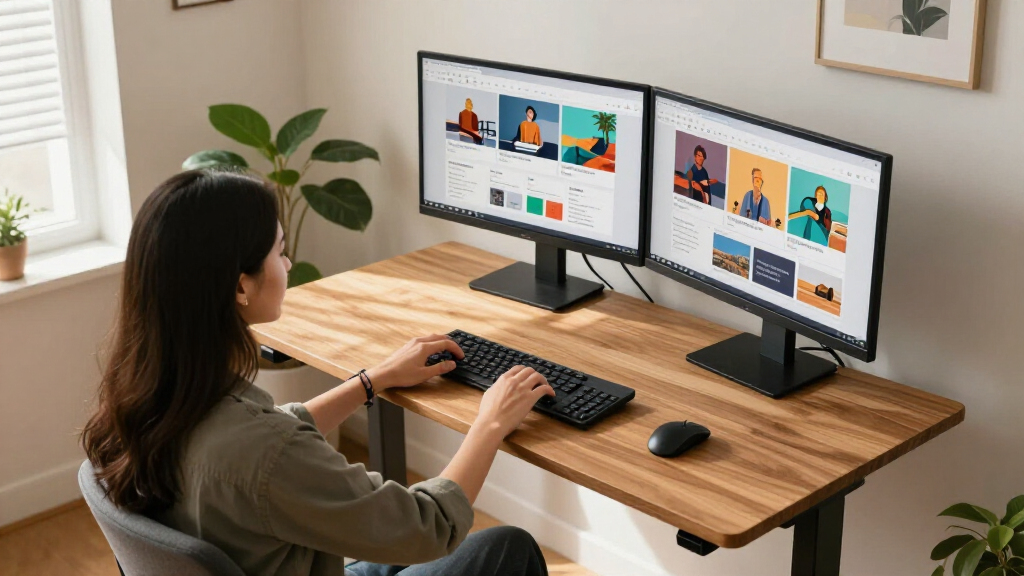
I ranked these desks around the demands of a dual monitor workstation: usable surface area, stated lifting capacity, adjustment format, and how easily two screens can coexist with a keyboard, mouse, and everyday work items. Full desks received an advantage where their broader tops and higher stated capacities make it easier to arrange heavier equipment; converters remain strong choices when retaining an existing desk matters more.
Within each format, I considered the practical differences called out in the product names and specifications, including dual motors, monitor stands, keyboard trays, and included power access. Those details shape setup and daily use, but they do not replace checking dimensions, monitor weight, and mounting compatibility. The ordering favors flexible dual-screen layouts first, then narrower full desks and converters whose smaller footprints suit more specific spaces.
Factors to Consider When Choosing Standing Desks For Dual Monitor Setups
A dual monitor desk is a fit problem as much as a lifting problem. Check how the whole workstation will sit at both heights before choosing between a new desk and a riser.Measure the full working footprint
Measure the width of both monitors together, including their stands or the space needed for an arm clamp. Add room for a keyboard and mouse at the height where you actually work, then account for speakers, notebooks, or a laptop. A desktop can look wide enough on paper and still feel cramped once screens are angled inward. Depth matters too: monitors pushed to the back can leave little space for writing or a comfortable viewing distance. If your desk sits against a wall, check that monitor arms and cables can move without hitting it.
Check capacity as a complete setup
Use the desk’s lifting capacity as a ceiling for the entire moving load, not just the monitors. Include the desktop if the rating applies to the lifting frame, along with monitor arms, computer gear, and items that stay on the surface. A heavy dual-screen arrangement can leave less capacity for anything else, even when each monitor seems light on its own. Leave some headroom rather than planning to operate at the stated limit. If the product listing does not make clear whether a capacity includes the desktop, confirm the detail before choosing.
Choose a converter only when its footprint works
A converter can make sense if your current desk is sound and replacing it would waste usable furniture. Its platform and base occupy space even in the seated position, so measure both the riser and the remaining work area around it. Check whether the keyboard tray gives you enough width for your input devices without forcing an awkward mouse position. A converter also raises the monitors relative to the desk, which may affect viewing height and how much room remains for other equipment. For large or widely spaced screens, a full desk can be easier to arrange.
Plan monitor mounting before buying
Monitor stands, desk surfaces, and arms do not always work together as expected. A stand takes up desktop depth, while an arm needs a compatible edge and enough clearance to clamp securely. Verify the surface thickness and any rear crossbar or frame obstruction before relying on an arm. Two separate arms can also need more usable edge space than one central support. If you prefer to keep the original monitor stands, confirm that both fit without crowding your keyboard area.
Think through cables and power at standing height
Raising a workstation changes how much slack its cables need. Trace the routes from each monitor and computer to the outlet while the desk is both low and high, leaving enough slack to move without pulling plugs or snagging a cable. A power strip bundle may simplify access at the desktop, but it does not remove the need for a safe route to the wall. Keep power bricks and cable loops clear of moving parts. This planning is especially useful for dual setups because two displays can double the number of cables to manage.
Pay for the format and features you will use
A full electric desk makes more sense when you want the whole surface to move and need room to keep a dual-monitor layout assembled. A converter is the more focused choice when the existing desk should stay in place or you want to try standing work without replacing it. Dual motors and higher listed capacity can be useful for a heavier setup, but check the full specifications rather than treating the feature name as a guarantee of stability. Bamboo and other finish choices affect the look and feel of the workspace, not whether your equipment fits. Spend attention on measurements and mounting needs before choosing convenience features.
Frequently Asked Questions
Can a standing desk converter hold two monitors?
It can, provided both the converter’s stated capacity and usable platform dimensions suit your equipment. Add the monitor weights, stands or arms, and other gear that moves with the riser, then leave capacity for the keyboard and anything else on the platform. Check whether the screens fit without blocking the keyboard or forcing an uncomfortable viewing angle. A converter with an integrated monitor stand may help organize the screens, but its measurements still determine whether your particular pair fits.
Should I choose a full standing desk or a desktop converter for two screens?
Choose a full desk when you want more room, need the entire workstation to move, or plan to use monitor arms that require a clear edge. A converter can be a better fit when your existing desk works well and you want a smaller change to the setup. Remember that a riser occupies part of the existing surface and may leave less room for accessories. Compare the usable area in both formats, not just their overall width.
Do I need a dual-motor desk for a dual monitor setup?
Two monitors alone do not determine whether you need dual motors; their combined weight and the rest of the equipment matter. Compare the full moving load with the desk’s listed capacity and consider how much headroom remains. Dual motors are a feature to weigh alongside capacity, desktop size, and the frame specifications. If the product details do not clearly state what the capacity covers, seek clarification before placing a heavy setup on it.
Will a monitor arm fit on a standing desk or converter?
Compatibility depends on the desk edge, surface thickness, clamp clearance, and any frame parts beneath the top. Measure the clamp and check whether a rear crossbar or converter structure blocks its placement. With two monitors, also confirm that the arm’s reach lets you position both screens without hitting a wall or each other. If those details are uncertain, using the included monitor stands may be the simpler arrangement.
How much desk space do I need for two monitors?
There is no single width that works for every pair because screen size, stand design, and preferred spacing all affect the footprint. Measure both displays in their intended positions, then include room for the keyboard, mouse, and any equipment that must remain on the desktop. Check depth as well as width: stands can push screens forward and consume the space you would otherwise use for input devices. A larger top such as the 79-by-32-inch FLEXISPOT gives more room to arrange a complete workstation, while compact converters call for tighter planning.
Conclusion
For a roomy dual-monitor workstation, I’d choose the FLEXISPOT 79×32 Inch Electric Standing Desk as the best overall fit in this lineup. The best value depends on what you already own: the VIVO converters make more sense when you want to keep a usable desk, while a full desk is the better investment in workspace if you need room for the entire setup. For a premium full-desk option, compare the FlexiSpot E6 Bamboo with the E6 MAX by checking their model-specific specifications and included features. Beginners who want to retain their current desk can start with a VIVO converter, while buyers with especially tight space should measure carefully and look at the 32-inch VIVO options. Before choosing, match the actual monitor footprint, mounting method, and total load to the product’s stated dimensions and capacity.
Fall Picks
fall essentials
As an affiliate, we earn on qualifying purchases.