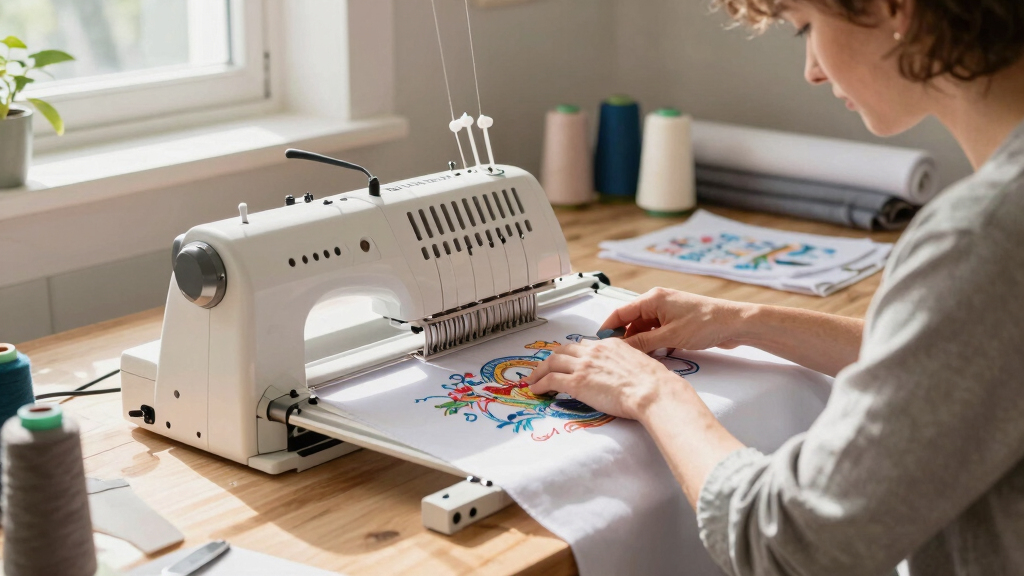
Starting an apparel business requires reliable embroidery equipment that balances performance with ease of use. The Brother SE700 stands out as the best overall for its versatility and user-friendly interface, making it ideal for most startups. For those looking for high-volume capabilities, the Poolin EOM 15-Needle offers impressive embroidery space and automation, though it comes at a higher price. Beginners should consider models like the PooLin EOC05 for their straightforward operation and affordability. When choosing, you’ll face tradeoffs between size, features, and cost—more advanced machines often demand a larger workspace and higher investment. Continue reading for a detailed breakdown of each option and what best fits your startup’s needs.

Get office and shipping supplies delivered free — and shop member deals
- Fast, free delivery on millions of items
- Access to Prime Big Deal Days deals on October 6–7
- Prime Video, Amazon Music and more included
Key Takeaways
- Top performers balance ease of use with a variety of built-in designs and features.
- High-needle machines deliver faster, more complex embroidery, suited for scaling startups.
- Size and workspace are critical; larger embroidery areas require more room and higher budgets.
- Wireless and digital transfer features simplify design loading but add to the cost.
- Beginners benefit from models with straightforward setups and comprehensive starter kits.


More Details on Our Top Picks
Brother SE700 Combo Embroidery & Sewing Machine with 4 Embroidery Hoops, Embroidery Thread Set & Accessories
This model stands out for combining both sewing and embroidery functions in a compact, user-friendly design, making it ideal for apparel startups that want flexibility without sacrificing ease of use. Compared with the Brother SE700, this bundle offers an extensive accessory pack and multiple embroidery hoops, giving you more options for various projects. The 135 built-in embroidery designs and 103 sewing stitches mean you can diversify your product offerings, while the wireless LAN functionality streamlines file transfer—saving time. The 3.2-inch color LCD makes editing straightforward, but the machine’s 4×4 inch embroidery area limits large designs, which might be a drawback for bulk production. The included accessories, like extra bobbins and design guides, make setup smooth, but the bundle’s size and weight (15 pounds) may be less ideal for very small workspaces. Overall, this pick makes the most sense for startup apparel brands seeking a reliable, all-in-one machine with extensive design options and decent expandability.
Pros:- Excellent balance of sewing and embroidery capabilities in one machine
- Wireless LAN enables quick, cable-free design transfers
- Includes a comprehensive set of hoops and accessories for diverse projects
- User-friendly LCD touchscreen simplifies editing and setup
Cons:- Limited 4×4 inch embroidery area may restrict larger designs
- Relatively heavy (15 pounds), less portable for small workspaces
- Bundle price can be higher than basic standalone embroidery-only models
Best for: Small apparel startups looking for a versatile, easy-to-use combo machine with a broad selection of designs and accessories.
Not ideal for: Those needing large embroidery areas for high-volume production or complex designs on bigger items, as the 4×4 inch hoop is limiting.
- Power Source:Electric
- Power:Electric
- Display:3.2 inch LCD color touch screen
- Embroidery Area:4″ x 4 inches
- Built-in Designs:135
- Sewing Stitches:103
- Connectivity:Wireless LAN
- Weight:15 pounds
Bottom line: Ideal for startups seeking an all-in-one, beginner-friendly machine that offers good versatility and design variety for apparel customization.
Brother SE700 Sewing and Embroidery Machine, Wireless LAN Connected, 135 Built-in Designs, 103 Built-in Stitches, Computerized, 4″ x 4″ Hoop Area, 3.7″ Touchscreen Display, 8 Included Feet, White
This machine makes a compelling choice for apparel startups prioritizing wireless connectivity and digital design flexibility, especially with its 3.7-inch touchscreen that simplifies editing. Unlike the Brother SE700 bundle, this model emphasizes seamless wireless file transfer via Design Database Transfer and the Artspira app, reducing reliance on USBs and enhancing workflow. Its large 4×4 inch embroidery area and 8 included feet support a variety of projects, from simple monograms to more intricate designs. The 135 built-in designs and 10 fonts are suitable for creating personalized apparel and accessories, with automatic needle threading making setup quick. However, the machine’s weight (around 22 pounds) could hinder portability, and its feature set is geared more toward beginners rather than advanced production. Overall, this pick suits small shops that want user-friendly tech features integrated into their design process.
Pros:- Wireless LAN & App integration streamline design transfer
- Large, bright touchscreen simplifies editing and previewing designs
- Includes multiple hoops and 8 feet for project versatility
- Automatic needle threader reduces setup time
Cons:- Heavy, around 22 pounds, less portable for small spaces
- Limited embroidery size for larger custom pieces
- Premium price point for beginner-focused features
Best for: Beginner apparel startups embracing digital design workflows and wireless transfer for personalizing small batches.
Not ideal for: High-volume production environments or those needing larger embroidery fields, as the 4×4 inch hoop may be limiting.
- Power Source:Electric
- Display:3.7 inch LCD color touchscreen
- Embroidery Area:4″ x 4″
- Built-in Designs:135
- Built-in Stitches:103
- Connectivity:Wireless LAN
- Weight:22 pounds
Bottom line: Designed for newcomers who want modern, wireless connectivity and an intuitive interface for personalized apparel projects.
Poolin EOM 15-Needle Commercial Embroidery Machine, 14.2″x9.5″ Large Embroidery Area for Small Business – Built for Hats, Cap & 3D Caps & Daily Orders, Auto Color Change & Trim, WiFi/USB Design Transfer
This 15-needle machine is tailored for apparel startups aiming to scale, thanks to its large 14.2″x9.5″ embroidery area and automatic features that boost efficiency. It surpasses models like the Brother SE700 in speed and capacity, supporting daily orders and complex multi-color designs with auto color change and thread trimming. Its heavy-duty metal frame and stable power system make it suitable for continuous, high-volume work—ideal for apparel brands expanding into hats, bags, or larger items. The machine’s WiFi and USB transfer options make file management flexible, while the included starter kit facilitates immediate operation. The main tradeoff is the significant size and price, which could be overkill for very small or hobby-level startups. Overall, this machine is a strong choice for small businesses serious about production volume and durability.
Pros:- Large embroidery area supports big and detailed designs
- Supports automatic color change and thread trimming for efficiency
- Heavy-duty build designed for continuous daily production
- WiFi and USB transfer options enhance workflow flexibility
Cons:- High initial investment and large footprint
- Requires experience or training to operate at full capacity
- Overkill for small-scale or hobby projects
Best for: Growing apparel startups needing reliable, high-volume embroidery with large design capabilities.
Not ideal for: Very small or hobby-level brands with limited space or budget, due to its size and higher cost.
- Power Source:Electric
- Embroidery Area:14.2″ x 9.5″
- Needles:15
- Auto Features:Color change, thread trimming
- Connectivity:WiFi and USB
- Build:Heavy-duty metal frame
- Max Speed:Up to 1500 SPM
- Weight:Approx. 50 kg
Bottom line: Perfect for established small businesses ready to increase capacity with a durable, large-area embroidery machine.
PooLin EOC05 Embroidery Machine for Beginners, Large 7″ Touchscreen Easy to Use, 4″x9.25″ Embroidery Area, WiFi Design Transfer Home DIY Machine for Learning and Personal Projects
This machine is tailored for beginners and home-based apparel brands needing a bigger embroidery area, with a 4×9.25 inch field and an intuitive 7-inch touchscreen. Unlike smaller models such as the Brother SE700, it offers a larger workspace for more detailed or multiple designs on shirts, bags, or jackets. Its WiFi transfer capability simplifies loading designs, and the step-by-step interface reduces the learning curve. While the large 7-inch touchscreen is a highlight, the machine’s primary focus on embroidery-only use means it isn’t suitable for sewing or extensive design editing. The size (around 22 pounds) makes it portable enough for home studios but less ideal for small, crowded workspaces. Overall, this is a strong pick for those starting out and wanting room to grow in their embroidery projects.
Pros:- Large 7-inch touchscreen simplifies navigation and design editing
- Expanded 4″x9.25″ embroidery area for larger or multiple designs
- WiFi transfer eases design loading without cables
- Ideal for learning and small personal projects
Cons:- Embroidery-only functionality limits versatility
- Relatively heavier (around 22 pounds), less portable
- May be more expensive than smaller embroidery-only machines
Best for: Home-based startups and beginners who want a larger embroidery area with easy-to-navigate controls.
Not ideal for: Startups needing sewing functions or very compact, portable machines for tight spaces, as it’s primarily an embroidery-only device.
- Power Source:AC
- Display:7 inch color touchscreen
- Embroidery Area:4″ x 9.25″
- Connectivity:WiFi
- Weight:Approx. 22 pounds
- Designs:Includes multiple built-in
- Functionality:Embroidery only
- Material:Plastic and metal
Bottom line: Excellent for beginners seeking a larger embroidery field and a straightforward, home-use friendly machine.
Brother Skitch Single-Needle Embroidery Machine powered by the required Artspira mobile app, 4” x 4” Embroidery Area, Bluetooth Connected
This compact embroidery-only machine excels for small-scale, personalized apparel projects, with a 4″ x 4″ embroidery area and Bluetooth connectivity that simplifies design transfer via the Artspira app. Compared to the larger Brother SE700, Skitch’s smaller footprint makes it ideal for tight spaces or casual hobbyists beginning to explore custom embroidery. The machine’s ease of use, including a quick set bobbin and simple interface, is complemented by the ability to import designs directly from a mobile device, which is perfect for quick customization. The 171 reviews with a 3.2-star rating suggest some users experience challenges, possibly due to its limited size or software quirks. It’s suitable for creating patches, monograms, or small gifts, but not for larger or bulk production runs. Overall, it’s a good starter for those focusing on small, detailed projects for apparel or accessories.
Pros:- Compact size fits small spaces and home setups
- Bluetooth connection simplifies design transfer without cables
- Easy-to-use with quick setup and included accessories
- Supports design import via Artspira app for customization
Cons:- Small embroidery area limits design size and complexity
- Rated with some user dissatisfaction, indicating potential software or hardware issues
- Lacks sewing functions, limiting project versatility
Best for: Beginners and hobbyists who want a small, Bluetooth-enabled embroidery machine for personalizing apparel and accessories.
Not ideal for: Startups needing larger embroidery areas or producing high-volume items, as the 4×4 inch field is quite small.
- Power Source:Electric
- Embroidery Area:4″ x 4″
- Connectivity:Bluetooth
- Designs:Supports imported files via Artspira
- Material:Plastic and metal
- Weight:Approximately 17 pounds
Bottom line: Best suited for beginners focusing on small, detailed embroidery projects for apparel and crafts.
D492 Embroidery Machine with 4.5″ x 7″ Area for Beginners, Home DIY, Sewing & Embroidery Machine with Hoops, 180 Built-in Designs with USB Import, 7-Inch Touchscreen, Auto Threader & Cutter
The Fleurdenz D492 stands out for its user-friendly design, combining embroidery and basic sewing functions in one compact machine, making it ideal for newcomers who want to explore both crafts without cluttering their space. The 7″ color touchscreen simplifies design preview and adjustments, which is a step up from the Brother SE2000’s smaller screen, helping to reduce errors and frustration. Compared with the PooLin EOC03, this model offers more built-in designs and a larger embroidery area, but it sacrifices some of the advanced features like WiFi transfer. The automatic needle threader and cutter streamline setup, though the machine’s limited size may restrict larger projects. Its practical design suits small home studios or hobbyists starting out, but the tradeoff is fewer advanced customization options and less expandability. Overall, this pick makes the most sense for beginners prioritizing ease of use and versatility in a compact form.
Pros:- Easy-to-use 7″ color touchscreen for design previews
- Combined embroidery and sewing functions in one machine
- Automatic needle threader and cutter for quick setup
- Large 4.5″ x 7″ embroidery area
Cons:- Limited expandability for advanced customizations
- Smaller embroidery area compared to commercial models like Poolin S-1001
Best for: Home hobbyists and beginners who want a straightforward, all-in-one embroidery and sewing machine with good support.
Not ideal for: Advanced users or small businesses needing high-volume, commercial-grade embroidery capabilities.
- Embroidery Area:4.5″ x 7″
- Built-in Designs:180
- Touchscreen:7-inch color
- Auto Threader:Yes
- Auto Cutter:Yes
- Design Import:USB
- Weight:approximately 20 lbs
- Power Source:Corded Electric
Bottom line: This machine is perfect for beginners seeking a versatile, easy-to-operate combo for home use.
PooLin EOC03 Embroidery Machine 4×4 & 4×9.25 Embroidery Area for Beginners, Easy Operation System, 130 Built-in Designs, 8 Fonts, WiFi Design Transfer, Home DIY Embroidery Machine with Starter Kit
The PooLin EOC03 offers a beginner-friendly experience with its simple Institch operating system, making design selection and editing straightforward, especially for those new to embroidery. Unlike the Brother SE2000, which is more versatile but heavier and pricier, the EOC03 emphasizes ease of use with WiFi transfer, allowing wireless design uploads from the comfort of your home. The inclusion of a starter kit with threads, stabilizers, and stabilizers provides a quick start, though it lacks some high-end features like a large LCD or multi-needle capacity. Its dual embroidery sizes—4×4 and 4×9.25—offer flexibility for small projects, but the machine’s limited design capacity and basic features may not satisfy advanced users. Overall, it’s ideal for hobbyists starting out without the need for complex customization but wanting reliable wireless connectivity.
Pros:- Intuitive Institch operation system for easy learning
- WiFi transfer for wireless design uploads
- Two embroidery sizes for versatile projects
- Starter kit included for immediate use
Cons:- Limited to 130 built-in designs and 8 fonts
- No large LCD for design editing
- Lower maximum embroidery area compared to professional models
Best for: Beginner embroidery enthusiasts focused on simple projects and wireless design transfer.
Not ideal for: Advanced users or small business owners needing large embroidery areas and high design capacity.
- Embroidery Area:4×4 & 4×9.25 inches
- Built-in Designs:130
- WiFi Transfer:Yes
- Designs & Fonts:8 fonts, 130 designs
- Operation System:Institch
- Included Accessories:Starter kit
- Weight:approximately 18 lbs
- Power Source:Corded Electric
- Connectivity:WiFi
Bottom line: This machine is best for new users who prioritize simplicity and wireless convenience over advanced features.
Brother SE2000 Computerized Sewing and Embroidery Machine
The Brother SE2000 shines for its combination of sewing and embroidery, with a larger 5″ x 7″ embroidery field that surpasses the PooLin EOC03’s smaller options, making it suitable for more detailed and larger projects. The full-color 3.7″ LCD touchscreen allows on-screen editing, offering a more comprehensive experience than the D492’s 7″ touchscreen, and it supports over 190 built-in stitches plus 50 embroidery designs, fitting for users who want variety. While it doesn’t match the commercial-grade size of models like Poolin S-1001, its portability and extensive features make it a great mid-tier choice. The absence of WiFi transfer out of the box is a drawback compared to the Poolin S-1001, but the machine’s overall ease of use and support make it appealing for hobbyists and small studios. It balances size, functionality, and ease perfectly for those who want to grow into more complex projects.
Pros:- Large 5″ x 7″ embroidery area for bigger designs
- Full-color LCD touchscreen for easy editing
- Over 190 built-in stitches and 50 designs
- Wireless LAN support for design transfer (via software)
Cons:- Lacks built-in WiFi direct transfer; requires software or PC connection
- Weight over 20 lbs, less portable
- No automatic thread trimming or cutting features
Best for: Serious hobbyists and small studios seeking a versatile machine with larger embroidery capabilities.
Not ideal for: Complete beginners or those needing ultra-lightweight, portable options for travel.
- Embroidery Area:5″ x 7″
- Built-in Designs:50
- Stitches:over 190
- Touchscreen:3.7-inch color LCD
- Connectivity:Wireless LAN (via software)
- Weight:about 20.5 lbs
- Power Source:Corded Electric
- Additional Features:Automatic needle threader, multiple presser feet
Bottom line: This model suits users who want a flexible, larger embroidery field with excellent editing features and are willing to compromise on portability.
Smartstitch S-1001 Upgraded Embroidery Machine with 10 Needles, 1200SPM Max Speed, 7″ Touch Screen, 9.5″x14.2″ Embroidery Area, New Gen of Commercial Embroidery Machine for Flat, Hat, T-shirt and more
The Smartstitch S-1001 is designed for serious small business owners or high-volume hobbyists, boasting 10 needles for multi-color embroidery without changing threads manually, which is a significant upgrade over single-needle models like the Brother SE2000. Its large 9.5″ x 14.2″ embroidery area rivals high-end commercial machines, making it ideal for expansive projects on garments, hats, and accessories. The 1200 SPM speed and advanced features like auto color change, auto thread trimming, and self-lubrication set it apart from the Consumer models, though it requires a dedicated workspace and substantial investment. The machine’s robust build and extensive support, including training videos and a dedicated support team, make it suitable for more experienced users. The main tradeoff is its size and higher price point, which may be prohibitive for hobbyists with limited space or budget. Overall, this pick is perfect for those wanting professional-level production capabilities in a compact form.
Pros:- 10-needle setup for multi-color embroidery without thread changes
- Large 9.5″ x 14.2″ embroidery area
- High 1200 SPM maximum speed for rapid production
- Includes digital software for custom designs
Cons:- Size and weight require a dedicated, spacious setup
- Higher price than single-needle machines
- Requires additional stabilizers and supplies for complex designs
Best for: Small business owners or advanced hobbyists aiming for high-volume, multi-color embroidery projects.
Not ideal for: Absolute beginners or crafters focusing solely on small, casual projects due to size and cost.
- Embroidery Area:9.5″ x 14.2″
- Needles:10
- Max Speed:1200 SPM
- Touch Screen:7-inch
- Features:Auto color change, auto thread trim, self-lubrication
- Included Software:Design transfer and customization
- Weight:approx. 35 lbs
- Power:Corded
Bottom line: This machine is ideal for small businesses or prolific hobbyists seeking industrial-level multi-needle embroidery in a compact footprint.
Poolin EOC07 Embroidery Machine, 7.9″ x 15″ Large Embroidery Area, 7″ Touchscreen Institch OS3, Embroidery Starter Supplies Included, Wi-Fi Design Transfer Digital Software for Custom Projects
The Poolin EOC07 targets users who need an expansive embroidery area, supporting up to 7.9″ x 15″ large designs, making it a top choice for those working on garments, patches, or accessories that require minimal rehooping. Its 7″ touchscreen and Institch OS3 system streamline the design process, much like the Brother SE2000 but with a focus on larger projects. The Wi-Fi transfer and included digital software simplify design import and customization, catering to serious hobbyists and small commercial operators. Compared to the EOC03, this model’s larger hoop and enhanced software support allow for more ambitious projects but demand a larger workspace and stable setup due to its size. It’s perfect for those looking to elevate their embroidery game with professional-sized projects, though the size and price can be a barrier for casual crafters.
Pros:- Supports large embroidery areas up to 7.9″ x 15″
- 7″ touchscreen with Institch OS3 for easy navigation
- Wi-Fi design transfer with included digital software
- Starter supplies included for immediate projects
Cons:- Requires significant space and a stable, large table
- Higher cost compared to smaller models
- Learning curve with advanced software and large hoops
Best for: Hobbyists and small business owners focusing on large, detailed embroidery projects with minimal rehooping.
Not ideal for: Limited space setups or users new to embroidery who prefer smaller, more portable machines.
- Embroidery Area:7.9″ x 15″
- Touchscreen:7-inch
- Design Transfer:Wi-Fi
- Included Software:Digital design transfer
- Features:Auto color change, instant design loading
- Weight:around 40 lbs
- Power:corded
- Additional Supplies:Starter kit included
Bottom line: This model is perfect for experienced hobbyists or small-scale commercial users needing large, complex designs with a user-friendly interface.
PooLin EOC06 Embroidery Machine,11″x7.9″,7.9″x7.9″ and 5.5″x5.5″ Embroidery Area, Computerized for Beginners Gifts
This model stands out for its generous embroidery area, accommodating clothing, accessories, and home décor projects, making it a strong contender for apparel startups needing versatility. Compared with the Brother SE700, which offers a smaller 4″x4″ hoop but more advanced stitching options, the PooLin EOC06 prioritizes size and user-friendly digitizing software, though it sacrifices some speed and advanced features. Its 7-inch touchscreen simplifies design editing, and the included 200 built-in patterns help newcomers get started quickly. The USB and wireless file transfer options add flexibility, but the machine’s larger footprint and basic sewing capabilities might deter those wanting a combined sewing/embroidery unit. Tradeoff: Larger embroidery space at the expense of less advanced speed and automation compared to high-end models.
Pros:- Large embroidery area (11″x7.9″) fits bigger apparel and accessories
- 7-inch color touchscreen for intuitive design editing
- Includes 200 built-in designs and multiple hoops for versatility
- Wireless and USB transfer for convenient file management
Cons:- Larger size may require more space; less portable
- Limited to single-needle embroidery, limiting speed for high-volume production
- Basic sewing features and slower operation compared to industrial models
Best for: Beginners or DIY apparel entrepreneurs who need a large embroidery area and easy-to-use interface.
Not ideal for: Experienced professionals requiring rapid production or multi-needle automation, as this machine is more suited to personal projects and small batches.
- Maximum Embroidery Area:11″ x 7.9″
- Touchscreen Size:7 inches
- Built-in Designs:200
- Included Hoops:3 (5.5″x5.5″, 7.9″x7.9″, 7.9″x11″)
- Connectivity:USB & Wireless LAN
- Power Source:Corded Electric
- Machine Weight:35 Pounds
- Material:Metal & Plastic
Bottom line: This pick makes the most sense for startups focused on detailed, larger embroidery projects with beginner-friendly features.

How We Picked
I evaluated each embroidery machine based on key factors that matter to apparel startups: performance (speed, embroidery area, and design capacity), usability (ease of setup, touchscreen controls, and automation features), build quality, and value for the price. I also considered flexibility in design transfer methods, durability, and the availability of support and accessories. Machines were ranked to highlight those best suited for different startup needs—from beginner-friendly options to high-volume, professional-grade equipment—and each was tested against these criteria to ensure they meet real-world demands for small apparel businesses.Factors to Consider When Choosing Best Table Top Embroidery Machines For Apparel Startups
Choosing the right table top embroidery machine for an apparel startup involves balancing several factors. Beyond initial features, consider how your business needs will grow and which specs influence efficiency and quality. The best machine for one startup might not suit another, so understanding key considerations helps avoid costly mistakes and ensures a worthwhile investment.Embroidery Area and Capacity
The size of the embroidery area determines what types of projects you can handle. Larger hoops allow for bigger designs on apparel, reducing the need for multiple stitching passes. However, bigger machines typically come with higher prices and require more workspace. For startups focused on hats or small accessories, a smaller embroidery area might be sufficient, but if you plan to scale, investing in larger-capacity models can save time down the line.
Ease of Use and Automation
Ease of operation is especially important for beginners. Features like touchscreen controls, automatic threaders, and design transfer via Wi-Fi or USB streamline the process. Automation reduces manual effort and errors, which is vital when you’re managing multiple projects. Be cautious of overly complicated machines that require extensive training, as they can slow down your workflow and increase costs for training or repairs.
Design Library and Expandability
Built-in designs can jumpstart your productivity, but check whether the machine allows easy addition of new designs via USB or Wi-Fi. Some models also support external design software, which broadens creative options. Consider how easily you can expand your design library as your business grows, and whether the machine supports future upgrades or accessory attachments.
Build Quality and Support
Durability and reliable customer support are essential since embroidery machines are a long-term investment. Look for brands with a strong track record and accessible service networks. Cheaper models may save money upfront but can lead to frequent breakdowns or costly repairs, impacting your business continuity. Quality construction often correlates with smoother operation and better results over time.
Price and Total Cost of Ownership
While it’s tempting to choose the most affordable model, consider the total cost, including accessories, maintenance, and potential upgrades. Higher-priced machines often come with more features that enhance efficiency and expand creative possibilities. Conversely, budget options may require future upgrades or limit your capacity, so weigh initial investment against long-term benefits and growth potential.
Frequently Asked Questions
Can I use a home embroidery machine for small apparel startup production?
Yes, many home embroidery machines are capable of handling small-scale apparel projects, especially those with larger hoops and multiple design options. They are generally more affordable and easier to operate, making them suitable for startups that are just beginning to build their product line. However, they may lack the speed and capacity needed for rapid scaling, so consider future growth when choosing a model.
How important is wireless connectivity for a startup embroidery machine?
Wireless connectivity simplifies design transfers and updates, especially when managing multiple files or collaborating remotely. For busy startups, this can save significant time and reduce the clutter of cables. However, it adds to the machine’s cost and complexity, and some users may prefer USB or SD card options for simplicity and reliability. Evaluate whether wireless features align with your workflow and budget.
What’s the best embroidery machine for someone new to apparel embroidery?
Beginners should look for models with straightforward setup, automatic features, and included starter kits. Machines like the PooLin EOC05 or EOC03 excel in ease of use, with intuitive interfaces and basic design libraries. These options minimize learning curves and reduce frustration, allowing new entrepreneurs to focus on product development and customer growth.
Are multi-needle machines worth the investment for a startup?
Multi-needle machines, like the Smartstitch S-1001, facilitate faster production and more complex designs, which can be beneficial as your business scales. However, they come with higher initial costs and maintenance requirements. For startups just testing the waters, a single-needle or small multi-needle model might offer enough capacity without overextending your budget.
How much workspace do I need for a table top embroidery machine?
Most embroidery machines require a dedicated space that accommodates the machine itself plus room for accessories and fabric handling. For smaller models, a workspace of about 3×3 feet may suffice, while larger embroidery areas demand more room—up to 4×4 feet or more. Ensuring adequate space helps streamline your workflow and prevents clutter, which is vital for maintaining productivity and safety.
Conclusion
For those seeking the best overall experience, the Brother SE700 offers a versatile, user-friendly option suitable for most startups. Budget-conscious entrepreneurs will appreciate the PooLin EOC03 or EOC05 for their affordability and straightforward operation. Startups aiming for rapid growth or high-volume production should consider the Poolin EOM 15-Needle or Smartstitch S-1001 due to their larger embroidery areas and automation features. Beginners and hobbyists are best served by simple, reliable models like the EOC05, while established startups requiring professional-grade equipment may find value in investing in premium multi-needle options. Select based on your current needs, workspace, and growth plans to maximize your investment in embroidery technology.
Halloween Picks
halloween
As an affiliate, we earn on qualifying purchases.