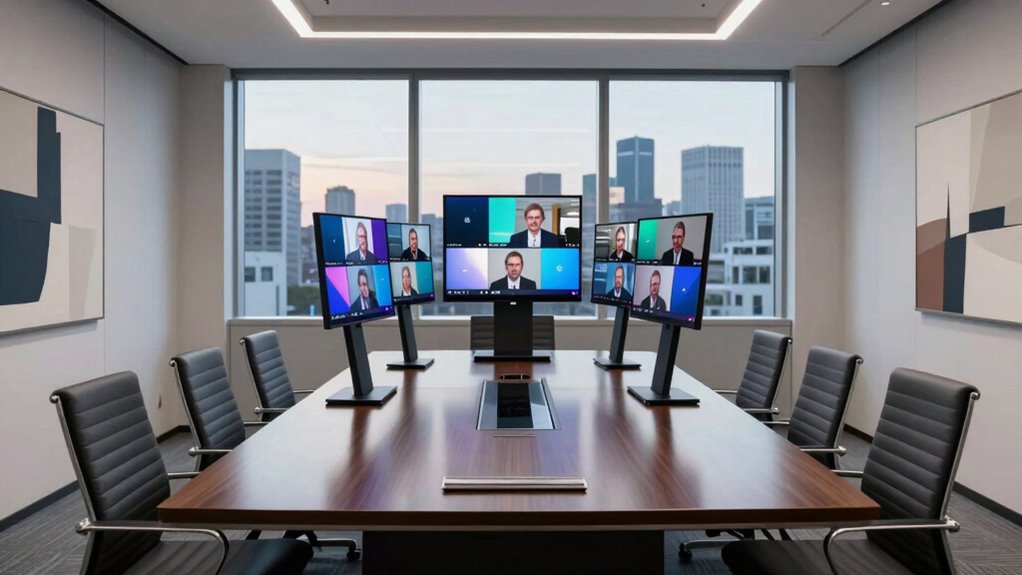

For a reliable video conferencing meeting bar for conference rooms on Amazon USA, I’d start with the Logitech Rally Bar Room Kit as the strongest all-around choice for a more complete room setup. The Poly Studio V52 is a compelling USB option for teams that want a simpler computer-connected workflow, while the TONGVEO 20× PTZ system suits rooms where optical zoom and camera positioning matter more than a streamlined bar design. The lineup ranges from compact, straightforward USB devices to larger or more specialized systems, so room size, seating layout, and platform needs matter as much as camera resolution. Buyers also need to weigh ease of setup against control, coverage, and the complexity of a dedicated room system. Read on for the full breakdown and a guide to matching the right format to your meeting space.

Get business pricing on office and shipping supplies
- Business-only prices and quantity discounts
- Tax-exempt purchasing
- Multiple users, one account, clear invoices
Key Takeaways
- Logitech Rally Bar Room Kit leads for buyers seeking a more complete room-oriented setup; its room-kit approach makes it a different proposition from a USB bar that depends on a laptop.
- Poly Studio V52 and Bose VB1 represent the USB-first path: they suit teams that want to connect a room to a computer, but they leave more of the meeting workflow dependent on that host device.
- TONGVEO’s 20× PTZ system prioritizes optical reach and adjustable framing, while fixed-bar options favor a cleaner installation and fewer camera controls.
- 360-degree models, including the TOUCAN SC360 and PANOCORE360, address table-centered seating patterns that front-facing bars may not cover as naturally.
- The lineup’s main dividing line is not simply 4K versus 1080p: room geometry, BYOD or dedicated-system workflow, and how much setup complexity a team will manage shape the better choice.
| Jabra PanaCast 40 Video Bar System, BYOD |  | Best for Small-Room Coverage | Camera resolution: 4K Ultra HD | Viewing angle: 180° | Digital zoom: 4× | VIEW ON AMAZON | See Our Full Breakdown |
| TONGVEO 20× Optical Zoom PTZ Conference Camera and Speakerphone System |  | Best for Long-Range Camera Control | Camera resolution: Full HD 1920 × 1080 | Frame rate: Up to 60 fps | Optical zoom: 20× | VIEW ON AMAZON | See Our Full Breakdown |
| TOUCAN SC360 360-Degree Conference Camera with 1080p Webcam, Microphones, and Speaker |  | Best for Simple 360° USB Meetings | Video resolution: 1080p FHD in the title; description also mentions 4K | Capture angle: 360° | Sensor type: CMOS | VIEW ON AMAZON | See Our Full Breakdown |
| Poly Studio V52 USB Video Bar |  | Best for Medium-Sized Rooms | Camera resolution: 20 MP | Maximum video resolution: 3840 × 2160 (4K UHD) | Maximum frame rate: 60 fps | VIEW ON AMAZON | See Our Full Breakdown |
| Bose VB1 All-in-One USB Conferencing Videobar with 4K Camera |  | Best for Flexible Small-to-Medium Room Installation | Camera resolution: 4K UHD | Microphones: Six beam-steering microphones | Speakers: 2 | VIEW ON AMAZON | See Our Full Breakdown |
| UC-SB1-CAM Soundbar and Video Conferencing Device |  | Best for Wide Tabletop Coverage | Camera resolution: HD 1080p | Field of view: 150° diagonal | Audio output: Stereo | VIEW ON AMAZON | See Our Full Breakdown |
| PANOCORE360 All-in-One 360° Meeting Camera |  | Best Compact 360° Pick | Camera capture: 4K 360° | Video output: 1080p FHD | Microphones: Omnidirectional 3-mic array | VIEW ON AMAZON | See Our Full Breakdown |
| Yealink MeetingBar A25-031 All-in-One 4K Video Conferencing System with CTP25 Touch Panel |  | Best for Managed Teams Rooms | Camera: Three 4K cameras with 8MP image sensors | Horizontal field of view: 151° | Microphones: 8 MEMS microphones | VIEW ON AMAZON | See Our Full Breakdown |
| 4K Conference Room Camera System with AI Auto Framing |  | Best for Zooming Across Larger Rooms | Resolution: 4K UHD | Lens: 120° wide angle | Optical zoom: 5× | VIEW ON AMAZON | See Our Full Breakdown |
| Logitech Rally Bar Room Kit 4K Video Conferencing System | 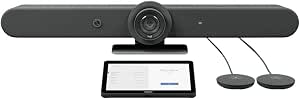 | Best Premium Room Kit | Camera resolution: 4K | Camera zoom: 15× HD | Field of view: 90° diagonal | VIEW ON AMAZON | See Our Full Breakdown |
| TONGVEO 4K USB Conference Webcam with Dual Microphones and Speaker |  | Best Compact USB All-in-One | Resolution: 4K UHD | Viewing angle: 116° | Microphones: 2 built-in omnidirectional microphones with noise reduction | VIEW ON AMAZON | See Our Full Breakdown |
| video conferencing meeting bar for conference rooms on amazon usa | Microphones | Connectivity | Camera resolution |
|---|---|---|---|
| Jabra PanaCast 40 Video Bar Sy | Six beamforming, noise-cancelling microphones | Bluetooth, Ethernet, HDMI, USB | 4K Ultra HD |
| TONGVEO 20× Optical Zoom PTZ C | — | — | Full HD 1920 × 1080 |
| TOUCAN SC360 360-Degree Confer | 4 | USB, Bluetooth | — |
| Poly Studio V52 USB Video Bar | — | — | 20 MP |
| Bose VB1 All-in-One USB Confer | Six beam-steering microphones | USB, Bluetooth | 4K UHD |
| UC-SB1-CAM Soundbar and Video | — | HDMI | HD 1080p |
| PANOCORE360 All-in-One 360° Me | Omnidirectional 3-mic array | USB-C or USB-A | — |
| Yealink MeetingBar A25-031 All | 8 MEMS microphones | — | — |
| 4K Conference Room Camera Syst | 4-mic array with noise reduction | USB | — |
| Logitech Rally Bar Room Kit 4K | 6 omnidirectional MEMS beamforming microphones | HDMI, USB-C, USB-A, Gigabit Ethernet, Wi-Fi | 4K |
| TONGVEO 4K USB Conference Webc | 2 built-in omnidirectional microphones with noise reduction | USB-C | — |
More Details on Our Top Picks
Jabra PanaCast 40 Video Bar System, BYOD
The Jabra PanaCast 40 suits compact meeting rooms where a standard forward-facing camera might miss people seated at the edges. Its 180° panoramic 4K view captures the room broadly, while AI speaker tracking and auto-framing can help remote attendees follow the conversation. Six beamforming microphones and a built-in speaker make it a more consolidated setup than the TONGVEO 20× PTZ system, which separates its camera and speakerphone. The Jabra’s Android 13 base and USB, HDMI, Ethernet, and Bluetooth connections give teams several ways to fit it into a room setup. Its tradeoffs are room size and control: it is intended for small rooms, and the touch controller is sold separately. Choose it for wide coverage, not for zooming in on distant speakers.
Pros:- 180° panoramic 4K camera can capture participants across the room
- Six beamforming, noise-cancelling microphones and a built-in speaker combine audio and video in one device
- AI speaker tracking and auto-framing can keep the active discussion in view
- USB, HDMI, Ethernet, and Bluetooth support flexible room connections
Cons:- Designed for small meeting rooms, limiting its fit for larger spaces
- Touch controller is sold separately
- 4× digital zoom offers less reach than the TONGVEO system’s 20× optical zoom
Best for: Small-room teams that want broad 4K coverage, integrated audio, and speaker tracking in one bar.
Not ideal for: Organizations outfitting large conference rooms or buyers who need a touch controller included in the system.
- Camera resolution:4K Ultra HD
- Viewing angle:180°
- Digital zoom:4×
- Microphones:Six beamforming, noise-cancelling microphones
- Operating system:Android 13
- Connectivity:Bluetooth, Ethernet, HDMI, USB
- Weight:3.9 pounds
- Focus type:Autofocus
Our verdict“Choose the Jabra PanaCast 40 for a small room where panoramic 4K coverage matters more than long-range zoom or an included touch controller.”
TONGVEO 20× Optical Zoom PTZ Conference Camera and Speakerphone System
For rooms where speakers sit far from the display, the TONGVEO’s 20× optical zoom is its clearest advantage: it can frame a distant presenter without relying on digital enlargement. The camera also pans 350° horizontally and tilts 180° vertically, giving an operator more control over where the view lands than the fixed panoramic approach of the Jabra PanaCast 40. Full HD video at up to 60 fps supports smooth motion, while the separate Bluetooth speakerphone provides 360° pickup and up to 20 feet of stated microphone range. That separation is also the main compromise: the camera is wired while the speakerphone is wireless, so this is less of a single-bar installation than the Poly Studio V52. It makes sense where adjustable framing takes priority over an integrated all-in-one design.
Pros:- 20× optical zoom can frame speakers across larger spaces
- Camera pans 350° horizontally and tilts 180° vertically
- Full HD video supports frame rates up to 60 fps
- Speakerphone offers 360° pickup and a stated range up to 20 feet
Cons:- Camera is wired while the speakerphone is wireless, creating a split setup
- Full HD resolution is below the 4K offered by the Jabra PanaCast 40 and Poly Studio V52
- Compatibility information lists older Windows versions and Mac OS 10.10 or higher, rather than a broader platform range
Best for: Teams in larger rooms that need to zoom in on individual speakers and can accommodate a separately placed camera and speakerphone.
Not ideal for: Small-room buyers seeking a compact all-in-one bar or teams that want a single-cable, unified installation.
- Camera resolution:Full HD 1920 × 1080
- Frame rate:Up to 60 fps
- Optical zoom:20×
- Camera rotation:350° horizontal, 180° vertical
- Camera outputs:USB 3.0, HDMI
- Microphone pickup range:Up to 20 feet
- Speakerphone connectivity:USB, Bluetooth 5.0, dongle
- Speakerphone battery life:Up to 17 hours
Our verdict“Pick the TONGVEO when long-range optical zoom and camera movement matter more than having an integrated 4K video bar.”
TOUCAN SC360 360-Degree Conference Camera with 1080p Webcam, Microphones, and Speaker
The TOUCAN SC360 is the straightforward pick for a team that wants 360° room capture and a USB-connected meeting device without the more room-specific framing systems of the Jabra PanaCast 40 or Poly Studio V52. Its four microphones and built-in speaker bring basic group audio into the same compact conference camera, and plug-and-play compatibility with PCs, laptops, MacBooks, and tablets keeps setup approachable. The tradeoff is that the provided product information is less consistent than for the other bars: the title says 1080p, while the description also mentions 4K, so I would not choose it on the assumption of 4K video. It also lacks stated AI framing or optical zoom, and its fixed/auto-focus listing is unclear. This suits simple shared-table meetings better than a room needing precise speaker framing.
Pros:- 360° capture can include participants around the meeting table
- Four microphones and one speaker are integrated into the device
- USB plug-and-play use supports PCs, laptops, MacBooks, and tablets
- Listed compatibility includes common conferencing platforms such as Zoom and Microsoft Teams
Cons:- Resolution information conflicts: the title states 1080p while the description also mentions 4K
- No optical zoom or AI framing is specified
- Fixed focus and autofocus are both listed, leaving the focus behavior unclear
Best for: Small teams that want a USB-connected 360° camera with built-in microphones and speaker for basic laptop-based meetings.
Not ideal for: Buyers who require clearly specified 4K video, reliable camera zoom, or documented AI framing for a more managed conference room.
- Video resolution:1080p FHD in the title; description also mentions 4K
- Capture angle:360°
- Sensor type:CMOS
- Microphones:4
- Speakers:1
- Connectivity:USB, Bluetooth
- Focus:Fixed focus and autofocus listed
- Item weight:1.28 kg
Our verdict“Choose the TOUCAN SC360 for uncomplicated 360° USB meetings, but skip it if your purchase depends on confirmed 4K video or advanced framing.”
Poly Studio V52 USB Video Bar
The Poly Studio V52 is the room-scaled choice in this group: its 20MP 4K camera, 95° field of view, and 5× zoom target medium rooms where a compact 180° bar like the Jabra PanaCast 40 may be a less suitable fit. Poly’s AI framing and NoiseBlockAI with Acoustic Fence aim to keep the image composed and reduce unwanted sound, while built-in four-way speakers avoid a separate speakerphone like the TONGVEO system requires. Gigabit Ethernet, HDMI connections, and USB give it a broader installation profile than a basic plug-in webcam. The narrower 95° view is a deliberate contrast to panoramic cameras: it favors a forward-facing room layout over seeing every seat around a table. At 11 pounds, and with physical dimensions not specified in the supplied details, planning placement takes more care.
Pros:- 20MP camera captures video up to 4K UHD at 60 fps
- 5× zoom and a 95° field of view suit forward-facing medium-room layouts
- AI framing and Poly NoiseBlockAI with Acoustic Fence target image composition and unwanted noise
- Built-in four-way speakers plus Ethernet, HDMI, and USB support room integration
Cons:- Designed for medium-sized rooms rather than compact meeting spaces
- 95° field of view is narrower than the Jabra PanaCast 40’s 180° panoramic view
- Supplied product details do not state complete physical dimensions
Best for: Teams setting up a medium-sized conference room that want 4K video, integrated speakers, and AI-assisted framing and noise reduction.
Not ideal for: Small-room buyers who need a wide panoramic view or organizations that need full physical dimensions before planning a tight installation.
- Camera resolution:20 MP
- Maximum video resolution:3840 × 2160 (4K UHD)
- Maximum frame rate:60 fps
- Field of view:95°
- Zoom:5×
- Audio:Built-in 4-way speakers
- Noise reduction:Poly NoiseBlockAI and Acoustic Fence
- Weight:11 pounds
Our verdict“Choose the Poly Studio V52 for a medium room that benefits from 4K, zoom, and integrated audio rather than panoramic 360°-style coverage.”
Bose VB1 All-in-One USB Conferencing Videobar with 4K Camera
The Bose VB1 earns its place for teams that want an all-in-one bar with more than one mounting option. Its 4K camera with automatic framing handles the video side, while six beam-steering microphones are designed to focus on voices and reduce ambient noise. The included table stand and wall-mount kit make placement easier to plan than with the Jabra PanaCast 40, whose touch controller is sold separately, though Bose lists its VESA mounting accessory as optional. USB and Bluetooth offer useful connection choices, and Bose Work software adds remote management. Unlike the Poly Studio V52, the supplied details do not state a camera field of view, zoom level, or frame rate, so room coverage is harder to compare on paper. Its stated fit is small to medium rooms, not expansive conference spaces.
Pros:- 4K UHD camera includes automatic framing
- Six beam-steering microphones are designed to focus on voices and reduce ambient noise
- USB and Bluetooth support flexible connections
- Table stand and wall-mount kit are included, with remote management through Bose Work software
Cons:- Designed for small-to-medium rooms rather than large conference spaces
- VESA mounting accessory is optional
- Supplied specs do not state the camera’s field of view, zoom, or maximum frame rate, unlike the Poly Studio V52 listing
Best for: Small-to-medium meeting-room teams that want an all-in-one 4K bar, voice-focused microphones, and included table or wall mounting options.
Not ideal for: Large-room buyers who need documented optical zoom or a specified field of view, and installations that require VESA mounting without an optional accessory.
- Camera resolution:4K UHD
- Microphones:Six beam-steering microphones
- Speakers:2
- Connectivity:USB, Bluetooth
- Dimensions:3.8″ D × 27″ W × 1.9″ H
- Focus type:Autofocus
- Included installation accessories:Table stand, wall-mount kit
- Compatible platforms:Google Meet, Microsoft Teams, Zoom
Our verdict“Pick the Bose VB1 for a small-to-medium room where included mounting choices and voice-focused audio matter more than published zoom and field-of-view figures.”
UC-SB1-CAM Soundbar and Video Conferencing Device
The UC-SB1-CAM earns its place for rooms where people sit around a table and need a broad camera view without adding a separate webcam. Its 150° diagonal field of view is wider than the 4K Conference Room Camera System’s 120° lens, making it a better fit when participants spread across the room, though the 4K system adds optical zoom for framing more distant speakers. This unit pairs its 1080p camera with stereo speakers and an adaptive beamforming microphone, so audio and video come in one tabletop device. Digital autozoom can adjust framing, but the supplied details do not specify advanced speaker tracking or a dedicated touch controller like the Yealink MeetingBar A25 package includes. Its 19.25-pound weight and corded power also make placement less flexible than the compact PANOCORE360.
Pros:- 150° diagonal field of view covers a broad area of the room.
- Adaptive beamforming microphone supports clearer pickup across the table.
- Stereo speakers and digital signal processing are designed for full-duplex, echo-controlled calls.
- Built-in 1080p camera with digital autozoom avoids a separate webcam.
Cons:- 1080p video has lower stated resolution than the 4K options in this roundup.
- At 19.25 pounds, it is less convenient to move than the compact PANOCORE360.
- Corded power and tabletop mounting limit placement flexibility.
Best for: Small conference rooms that need a wide view of seated participants and a single tabletop device for camera, microphone, and speakers.
Not ideal for: Teams that need 4K video, substantial optical zoom, or a lightweight bar that is easy to reposition between rooms.
- Camera resolution:HD 1080p
- Field of view:150° diagonal
- Audio output:Stereo
- Microphone:Adaptive beamforming
- Connectivity:HDMI
- Mounting:Tabletop
- Weight:19.25 lb
- Power:Corded electric
Our verdict“Choose the UC-SB1-CAM for broad tabletop coverage and integrated stereo audio, but pick a 4K model if image detail matters more.”
PANOCORE360 All-in-One 360° Meeting Camera
The PANOCORE360 is the most compact way in this group to show a whole small meeting room, rather than pointing a conventional bar at one end of the table. Its four-camera 360° capture combines to a 1080p output, with automatic speaker focus intended to keep the active participant in view. That makes it a different proposition from the Yealink MeetingBar A25, whose three 4K cameras provide a wide front-facing view and whose package includes a touch panel for room control. The PANOCORE360 instead emphasizes portability and USB plug-and-play, plus an integrated speaker and three-microphone array. The stated pickup range is up to 10 feet and the device is aimed at rooms with up to 12 participants, so it is not a substitute for a more substantial system in larger spaces. Local recording also depends on a separately supplied MicroSD card.
Pros:- 360° capture can include participants seated around the device.
- Compact 10-ounce design is easier to move than the larger conference bars.
- USB-C or USB-A connection supports plug-and-play use with major meeting platforms.
- Automatic speaker focus and MicroSD recording add useful meeting features.
Cons:- Meeting video output is 1080p despite the 4K camera capture.
- Designed for small to medium rooms, with a stated microphone pickup range of up to 10 feet.
- A MicroSD card is required for local recording and is not listed among the included components.
Best for: Small or medium teams that meet around a table and want a portable 360° camera with an integrated speaker and microphone array.
Not ideal for: Large conference rooms, groups beyond the stated 12-participant design, or buyers who need higher-than-1080p meeting output or recording without adding a card.
- Camera capture:4K 360°
- Video output:1080p FHD
- Microphones:Omnidirectional 3-mic array
- Microphone pickup range:Up to 10 ft (3 m)
- Connectivity:USB-C or USB-A
- Recording:MicroSD (TF) card
- Compatibility:Zoom, Microsoft Teams, Webex, Google Meet; PC and Mac
- Weight:10 oz
Our verdict“Pick the PANOCORE360 for compact, all-around coverage in smaller rooms, not for larger spaces that need a conventional 4K room system.”
Yealink MeetingBar A25-031 All-in-One 4K Video Conferencing System with CTP25 Touch Panel
The Yealink MeetingBar A25 stands out for organizations setting up a repeatable Teams Rooms or Zoom Rooms space rather than simply attaching a USB camera to a laptop. It combines three 4K cameras, an eight-microphone array, and an Android 13 system, while the included CTP25 touch panel gives participants a room-control surface that the UC-SB1-CAM does not include. Auto framing, speaker tracking, and noise suppression are aimed at reducing manual camera and audio adjustments during meetings. Its 151° horizontal view is close to the UC-SB1-CAM’s 150° diagonal coverage, but the Yealink has a more detailed stated camera system and broader room-platform options, including BYOD. The tradeoff is a 14-pound installation and voice pickup specified up to 5 meters; buyers wanting a tiny plug-in device may prefer the PANOCORE360.
Pros:- Three 4K cameras and auto framing support detailed, participant-focused video.
- Eight-microphone array, speaker tracking, and noise suppression combine in one room system.
- Supports Microsoft Teams Rooms, Zoom Rooms, and BYOD use.
- CTP25 touch panel and setup accessories are included for room control.
Cons:- Voice pickup is specified up to 5 meters, which may constrain placement in larger rooms.
- At 14 pounds, installation is less portable than the PANOCORE360.
- The room-focused platform and touch panel may be unnecessary for teams seeking a simple USB device.
Best for: IT teams furnishing huddle and conference rooms around Microsoft Teams Rooms or Zoom Rooms, especially when a touch controller and remote management matter.
Not ideal for: Casual laptop-based meetings or very large rooms where the specified 5-meter microphone pickup may not cover every participant comfortably.
- Camera:Three 4K cameras with 8MP image sensors
- Horizontal field of view:151°
- Microphones:8 MEMS microphones
- Voice pickup:Up to 5 m
- Speaker:Built-in 10W
- Operating system:Android 13
- Supported platforms:Microsoft Teams Rooms, Zoom Rooms, BYOD
- Touch panel:CTP25 included
Our verdict“Choose the Yealink A25 when you want a managed Teams or Zoom room with a touch panel and integrated 4K conferencing hardware.”
4K Conference Room Camera System with AI Auto Framing
This system is the more flexible choice for rooms where a fixed wide shot does not give remote attendees a useful view of speakers. Its 120° lens and 5× optical zoom trade some of the UC-SB1-CAM’s 150° coverage for the ability to bring distant participants closer without relying only on digital enlargement. AI auto framing and speaker tracking further support changing views, while the four-microphone array and built-in speakers keep the setup consolidated. Compared with Logitech’s Rally Bar Room Kit, this model lists USB connectivity and a lighter, simpler system but does not specify the Rally Bar’s 23-foot microphone pickup, beamforming microphones, or broad HDMI, Ethernet, and Wi-Fi connections. It is a practical fit for standard USB meeting setups, though the product details do not give a microphone pickup distance or room-control package.
Pros:- 5× optical zoom can frame distant speakers with more detail than digital zoom alone.
- AI auto framing and speaker tracking help follow changing participation.
- 4K UHD resolution and a 120° wide-angle lens support both room coverage and closer framing.
- Built-in speakers and four-microphone array reduce the need for separate audio hardware.
Cons:- USB is the only listed connection, limiting the stated integration options compared with the Logitech Rally Bar.
- Microphone pickup distance is not specified, making room-size matching less certain.
- No touch controller or room-control accessories are listed.
Best for: Teams using a USB-connected room PC in medium or larger rooms that need optical zoom and automatic speaker framing.
Not ideal for: Organizations needing a specified long-range microphone pickup, a dedicated room controller, or the broader network and HDMI options listed for the Logitech Rally Bar.
- Resolution:4K UHD
- Lens:120° wide angle
- Optical zoom:5×
- Digital zoom:8×
- Microphones:4-mic array with noise reduction
- Connectivity:USB
- Compatibility:Microsoft Teams, Zoom, Google Meet
- Operating system support:Mac OS 10.10 or higher; Windows 10/11
Our verdict“Pick this system when optical zoom and speaker tracking matter more than the Logitech Rally Bar’s broader connectivity and specified microphone reach.”
Logitech Rally Bar Room Kit 4K Video Conferencing System
The Logitech Rally Bar Room Kit is the most fully equipped choice here for a medium or large room that needs substantial audio reach and multiple connection paths. Its 4K PTZ camera with 15× HD zoom offers more stated zoom than the 4K Conference Room Camera System’s 5× optical zoom, while six beamforming microphones have a listed 23-foot pickup range. Dual speakers, echo cancellation, and AI noise suppression make this a more complete room-audio package than the simpler UC-SB1-CAM. HDMI, USB, Ethernet, and Wi-Fi also give installers more ways to integrate it. That capability comes with a 35-pound system that may take more planning to mount and wire; its dual HDMI output is limited to 1080p, even though the camera captures 4K. The Tap Cat5e Controller and two Mic Pods add room-kit components, but this is more hardware than a small huddle space needs.
Pros:- 4K PTZ camera with 15× HD zoom supports close framing across a large room.
- Six beamforming microphones have a specified pickup range of 23 feet.
- Echo cancellation, AI noise suppression, and dual speakers provide an integrated room-audio system.
- HDMI, USB-C, USB-A, Gigabit Ethernet, and Wi-Fi offer several integration options.
Cons:- At 35 pounds, the system is less convenient to install or relocate than the other listed bars.
- Dual HDMI output is limited to 1080p.
- Its room-kit hardware may be excessive for small rooms or basic laptop-based calls.
Best for: Organizations equipping medium or large conference rooms that need long microphone reach, high camera zoom, and flexible wired or wireless connectivity.
Not ideal for: Small huddle rooms, teams prioritizing a lightweight installation, or buyers who need dual HDMI output above 1080p.
- Camera resolution:4K
- Camera zoom:15× HD
- Field of view:90° diagonal
- Microphones:6 omnidirectional MEMS beamforming microphones
- Microphone pickup range:23 ft
- Connectivity:HDMI, USB-C, USB-A, Gigabit Ethernet, Wi-Fi
- HDMI output:Dual output, up to 1080p
- Included components:Rally Bar, Tap Cat5e Controller, 2 Mic Pods
Our verdict“Choose the Rally Bar Room Kit for larger rooms that benefit from long-range audio and extensive connectivity, provided its weight and 1080p HDMI output suit the installation.”
TONGVEO 4K USB Conference Webcam with Dual Microphones and Speaker
I’d place this TONGVEO among the simpler, smaller-room choices: its 4K camera, dual microphones, and built-in speaker combine core call equipment in one USB-connected device. The 116° fixed view can fit several people without a separate PTZ camera, but it offers no stated optical zoom or camera movement. That makes it less adaptable than the TONGVEO 20× Optical Zoom PTZ Conference Camera and Speakerphone System, which is a better fit when framing distant participants matters. Compared with the TOUCAN SC360, this model uses a wide forward-facing view rather than a 360-degree perspective. Its plug-and-play USB-C setup and Windows/macOS compatibility suit teams that want a straightforward connection to conferencing apps. The tradeoff is a basic all-in-one arrangement, not a full video bar designed for larger meeting rooms.
Pros:- 4K UHD resolution provides detailed video for calls and streaming.
- 116° fixed wide-angle lens can include several people in a small room.
- Two noise-reducing omnidirectional microphones and a built-in speaker provide an all-in-one call setup.
- USB-C plug-and-play connection supports Windows and macOS.
Cons:- Fixed lens has no stated optical zoom, limiting framing flexibility in deeper rooms.
- A single built-in speaker may not suit larger rooms or groups needing stronger room audio.
- Offers fewer room-scale conferencing capabilities than dedicated systems such as the Poly Studio V52 USB Video Bar.
Best for: Small teams, tutors, and home-office users who want a USB-connected camera, microphones, and speaker in one device for a compact meeting space.
Not ideal for: Large conference rooms or teams that need optical zoom, adjustable camera positioning, or a dedicated video-bar system for room-scale coverage.
- Resolution:4K UHD
- Viewing angle:116°
- Microphones:2 built-in omnidirectional microphones with noise reduction
- Speaker:1 built-in speaker
- Connectivity:USB-C
- Focus:Autofocus
- Sensor:CMOS
- Compatibility:Windows XP/7/8/10/11 and macOS 10.4 or higher
Our verdict“Choose this TONGVEO for a compact room that needs a straightforward USB camera-and-audio setup, but pick a PTZ or dedicated video bar for larger spaces or flexible framing.”

How We Picked
I compared these products as conference-room meeting systems, not as standalone webcams. The main criteria were camera approach and room coverage, audio and microphone design, connection or operating mode, setup demands, and how well each format fits different seating layouts. I also considered whether a product appears aimed at a small huddle room, a traditional front-facing conference room, or a space that benefits from flexible or 360-degree capture. Product names and stated capabilities help identify intended use, but they do not replace checking current manufacturer documentation for compatibility and room-size guidance.
The ranking favors versatility and practical room fit first, then rewards options with a clear advantage for a specific need. That puts the Logitech Rally Bar Room Kit at the top for its room-oriented system approach, while USB bars rank well for simpler host-based deployments. Specialized 360-degree or PTZ models can be the better fit when their camera design matches the room, but their narrower use case or additional setup considerations keep them from leading the general-purpose ranking. I treat listings with limited detail cautiously and recommend verifying exact model specifications, included components, and platform support before buying.
Factors to Consider When Choosing Video Conferencing Meeting Bar For Conference Rooms On Amazon Usa
Before choosing a model, I’d map the room and meeting workflow rather than start with resolution or a feature list. A camera that suits a front-facing boardroom can leave people at the sides poorly framed, while a flexible system can add setup and operating steps that a small team does not need. These checks help narrow the format before you compare individual listings.
Match Camera Coverage to the Seating Layout
Start by sketching where people sit and where the display, table, and camera can go. A front-facing bar works naturally when participants sit in rows or around a table facing one end of the room. A 360-degree camera can make more sense for a compact, table-centered huddle space, but its view may include more background than a front-facing setup. PTZ systems offer framing control, though someone may need to operate or configure that control. Avoid buying based on the largest stated field of view alone; distance, camera height, and sightlines affect how people appear to remote attendees. If the room changes between meetings, favor a mounting position and camera format that remain useful across those layouts.
Choose BYOD, USB, or a Dedicated Room System
Decide who will host meetings before choosing hardware. A BYOD or USB setup generally routes the camera and audio through a connected computer, giving staff flexibility to use their preferred conferencing application. A dedicated room system can reduce reliance on a personal laptop, but it may involve room-account configuration, a control panel, and platform-specific compatibility checks. A common mistake is assuming that a video bar automatically includes every controller, cable, or software feature needed for a complete room. Check whether the listing describes a standalone system, a USB peripheral, or a kit with separate components. If guests bring different laptops, confirm the connection method and the room’s cable plan in advance.
Plan Audio Around the Whole Room
Camera resolution does not tell you whether people at the far end of a table will be heard clearly. Think about seating distance, room reverberation, background noise, and whether several people speak from different positions. Built-in microphones can simplify a small room, while a larger or acoustically difficult space may call for a system with more deliberate microphone coverage or external audio options. Check the manufacturer’s guidance for microphone pickup and expansion rather than treating a stated microphone count as a guarantee of coverage. Hard surfaces, open doorways, and HVAC noise can limit even capable hardware. A basic room-acoustic fix may help more than paying for a camera upgrade.
Check Platform Compatibility and IT Requirements
List the meeting platforms your organization uses and verify support for the exact model and operating mode. Compatibility can differ between using a device as a USB peripheral and running meetings directly from an appliance-style system. IT teams should also check network access, account provisioning, firmware management, security policy, and whether remote administration is available. A listing may use broad compatibility language that does not cover every feature or control method. If the room must join meetings hosted by outside organizations, test the expected guest workflow rather than relying only on a product’s platform branding. Resolving these questions before purchase helps avoid a room that works only with one employee’s laptop.
Budget for Installation, Controls, and Ongoing Support
The hardware is only part of a room deployment. Mounting, cable length, display connections, network access, power, and any touch controller can change the total effort required to make a system usable. A compact USB bar may be quicker to set up but can leave staff managing the host computer and meeting software each time. A more complete room kit can simplify recurring meetings while adding configuration and support work for IT. Before ordering, confirm exactly what the box includes and whether the room already has compatible displays and mounting points. Choose the simplest setup that supports the meetings people actually hold; extra controls and camera flexibility are useful only if someone will maintain and use them.
Frequently Asked Questions
Should I choose a USB video bar or a dedicated room system?
I’d choose a USB bar when staff want to connect a computer and keep using their existing meeting applications. It can be a practical fit for flexible rooms, though the host laptop, cables, and user setup become part of every meeting. A dedicated room system suits a space with frequent scheduled calls and a consistent platform workflow, but it can require room accounts and more IT configuration. Check whether the device can operate in both modes before assuming it offers the flexibility you need. The right choice depends on who starts meetings and who will support the room.
Will a 360-degree camera work better than a front-facing bar in a small room?
It can work well when people sit around a central table and need to be visible from multiple directions. A front-facing bar is often easier to frame when everyone faces a display at one end of the room. A 360-degree view may capture more of the room than remote participants need, so placement and background matter. Compare the camera’s intended seating arrangement with the actual table layout, not just its coverage claim. If participants move around or sit in varied positions, check how the system presents active speakers to remote viewers.
Do I need optical zoom for a conference room?
Optical zoom is most useful when the camera must show people at different distances or focus on a presenter without moving the hardware. It can be less valuable in a small huddle room where a fixed wide view already includes everyone. PTZ controls add flexibility, but they may also add operating steps or require someone to manage presets. Consider the room’s depth, seating changes, and whether close-up framing is part of your meeting style. If those needs are rare, a simpler fixed-bar design may be easier for staff to use consistently.
What should I verify before ordering a meeting bar from an Amazon listing?
Confirm the exact model number, operating mode, included accessories, and whether a controller or mounting hardware is part of the package. Then check current manufacturer documentation for platform support, room-size guidance, microphone coverage, and connection requirements. Listings can group similar products or omit details that matter to a specific deployment. For a BYOD room, verify the cable and host-computer requirements; for a dedicated system, check account and network needs with IT. If a key specification is unclear, ask the seller or manufacturer before relying on it for a room installation.
Can one video bar serve both a small huddle room and a larger conference room?
Sometimes, but a device that works in a small room may not capture distant participants or control room audio well in a larger space. The camera’s framing, microphone pickup, seating distance, and acoustic conditions all change the result. A PTZ model may offer more framing flexibility, while a room kit can better suit a permanent larger-room deployment, depending on its specifications. I’d prioritize the largest room the system must regularly support and confirm manufacturer guidance for that use. If the same hardware will move between rooms, plan for repeatable mounting, cabling, and settings rather than assuming a single setup will fit both.
Conclusion
For most buyers seeking a room-focused system, I’d start with the Logitech Rally Bar Room Kit as the best overall pick. The best value depends on the exact listing and room needs, but the TONGVEO 4K USB Conference Webcam is a sensible direction for buyers who want a simpler computer-connected setup rather than a dedicated room system. For a premium USB-first choice, compare the Poly Studio V52 and Bose VB1 against your platform and room requirements. The best option for beginners is usually the USB format that matches the computer and meeting software staff already use; confirm setup details before ordering. For specific needs, choose the TONGVEO 20× PTZ system when adjustable optical framing matters, or a TOUCAN SC360 or PANOCORE360 when a table-centered 360-degree view better suits the room. Match the camera design and workflow to the space, then verify the exact kit contents and compatibility before you buy.
Halloween Picks
halloween
As an affiliate, we earn on qualifying purchases.