
Choosing the best floodlight cameras for loading docks requires balancing intense illumination with reliable night vision. For most commercial operations, the Reolink Elite Pro Floodlight PoE stands out as the top choice due to its 180-degree panoramic view and robust Power over Ethernet connectivity, which simplifies installation in large warehouse environments. The AOSU Wired Floodlight Camera offers a strong alternative for sites needing high-lumen output without complex networking, while the Ring Floodlight Cam 4K Plus suits smaller docks where ease of use and ecosystem integration matter more than industrial-grade durability. The main tradeoff here is between network stability (PoE vs. WiFi) and field of view (panoramic vs. standard). Continue reading to see which model fits your specific dock layout and security requirements.

Get business pricing on office and shipping supplies
- Business-only prices and quantity discounts
- Tax-exempt purchasing
- Multiple users, one account, clear invoices
Key Takeaways
- PoE connectivity is superior for loading docks because it eliminates WiFi dead zones common in metal warehouses and reduces cabling needs.
- Panoramic dual-lens cameras like the Reolink Elite Pro capture the entire dock face in one view, reducing blind spots during truck loading.
- High lumen output (2000+) is necessary for active docks, but it can cause glare for drivers if not properly angled or shielded.
- Local storage is often more reliable than cloud-only plans for commercial sites with unstable internet connections.
- Weatherproofing ratings must exceed IP65 to withstand the dust, fumes, and moisture typical of industrial loading areas.
| Tapo C720 2K+ Outdoor Wired Floodlight Security Camera |  | Best Value for Small Docks | Resolution: 2K QHD (4MP) | Field of View: 150° | Floodlight Brightness: 2,800 Lumens | VIEW LATEST PRICE | See Our Full Breakdown |
| AOSU Wired Floodlight Camera 3K 2600 Lumen 24/7 Recording | 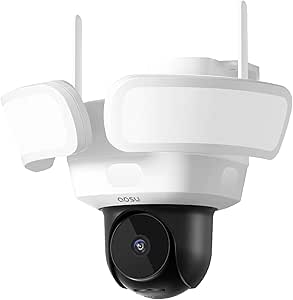 | Best for Active Monitoring | Resolution: 3K UHD (5MP) | Field of View: 360° Pan, 90° Tilt | Floodlight Brightness: 2,600 Lumens | VIEW LATEST PRICE | See Our Full Breakdown |
| REOLINK Duo Floodlight WiFi AC 4K 8MP Outdoor Security Camera |  | Best for Wide-Angle Coverage | Resolution: 4K, 8 MP | Field of View: 180° Panoramic | Floodlight Brightness: 1,800 Lumens | VIEW LATEST PRICE | See Our Full Breakdown |
| Google Nest Cam with Floodlight – Outdoor Security Camera |  | Best for Smart Home Integration | Resolution: 1080p HDR | Field of View: 130° | Connectivity: Wi-Fi, Bluetooth | VIEW LATEST PRICE | See Our Full Breakdown |
| Reolink Elite Pro Floodlight PoE Security Camera, 16MP Dual Lens |  | Best Premium Professional | Resolution: 16MP (Dual 8MP Lenses) | Field of View: 180° | Floodlight Brightness: 2,800 Lumens | VIEW LATEST PRICE | See Our Full Breakdown |
| eufy Security Floodlight Camera E30 |  | Best for Active Deterrence | Resolution: 2K HD | Coverage: 360° Pan and Tilt | Lighting: 2,000 Lumens | VIEW LATEST PRICE | See Our Full Breakdown |
| Ring Floodlight Cam 4K Plus Wired |  | Best for Zoom Detail | Resolution: Retinal 4K | Zoom: Up to 10x Enhanced Zoom | Detection: Radar-powered 3D Motion Detection | VIEW LATEST PRICE | See Our Full Breakdown |
| gdend Wired 3K UHD Outdoor Floodlight Camera |  | Best Value with Local Storage | Resolution: 3K UHD | Coverage: 270° Adjustable | Lighting: 2200 Lumens | VIEW LATEST PRICE | See Our Full Breakdown |
| Reolink Duo Floodlight PoE 4K |  | Best for Easy Installation | Resolution: 4K (8MP) | Viewing Angle: 180 Degrees | Connectivity: PoE (Ethernet) | VIEW LATEST PRICE | See Our Full Breakdown |
| REOLINK Elite Floodlight WiFi 4K |  | Best Premium Wi-Fi Option | Resolution: 4K (8MP) | Lighting: 3000 Lumens (Dimmable) | Viewing Angle: 180 Degrees | VIEW LATEST PRICE | See Our Full Breakdown |
| Ring Floodlight Cam Wired Pro |  | Best for Smart Home Ecosystem Integration | Video Quality: Retinal 2K | Light Output: 2000 lumens | Siren Volume: 110 dB | VIEW LATEST PRICE | See Our Full Breakdown |
| Wyze Cam Floodlight Pro Outdoor Security Camera |  | Best Value for Local Storage | Resolution: 2.5K HD (2560p) | Field of View: 180 degrees | Light Output: 3000 Lumens | VIEW LATEST PRICE | See Our Full Breakdown |
| floodlight cameras for loading dock | Resolution | Connectivity | Storage | Field of View |
|---|---|---|---|---|
| Tapo C720 2K+ Outdoor Wired Fl | 2K QHD (4MP) | Wi-Fi 2.4GHz | Local (Subscription-Free) | 150° |
| AOSU Wired Floodlight Camera 3 | 3K UHD (5MP) | Hardwired Ethernet, Wi-Fi 2.4GHz | — | 360° Pan, 90° Tilt |
| REOLINK Duo Floodlight WiFi AC | 4K, 8 MP | Dual-band Wi-Fi 6 | — | 180° Panoramic |
| Google Nest Cam with Floodligh | 1080p HDR | Wi-Fi, Bluetooth | Cloud (3 hours free history) | 130° |
| Reolink Elite Pro Floodlight P | 16MP (Dual 8MP Lenses) | PoE (Ethernet only) | microSD, NVR, NAS | 180° |
| eufy Security Floodlight Camer | 2K HD | 2.4GHz Wi-Fi | Local (No Monthly Fee) | — |
| Ring Floodlight Cam 4K Plus Wi | Retinal 4K | — | Cloud (Subscription Required) | — |
| gdend Wired 3K UHD Outdoor Flo | 3K UHD | — | 64GB SD Card Included | — |
| Reolink Duo Floodlight PoE 4K | 4K (8MP) | PoE (Ethernet) | — | — |
| REOLINK Elite Floodlight WiFi | 4K (8MP) | Dual-Band Wi-Fi 6 | Local (Up to 512GB SD) | — |
| Ring Floodlight Cam Wired Pro | — | Wired | — | — |
| Wyze Cam Floodlight Pro Outdoo | 2.5K HD (2560p) | Dual-band Wi-Fi (2.4 and 5.0 GHz) | MicroSD card (up to 30 days) | 180 degrees |
More Details on Our Top Picks
Tapo C720 2K+ Outdoor Wired Floodlight Security Camera
This camera strikes a balance between cost and clarity, making it Best Value for Small Docks. Compared to the Google Nest Cam, which relies on cloud subscriptions for full history, the Tapo C720 offers subscription-free local storage, a significant advantage for budget-conscious facility managers. The 2K QHD resolution provides sufficient detail for identifying license plates on closer approaches, though it lacks the panoramic coverage of the REOLINK Duo Floodlight. Its 2,800-lumen floodlight is bright enough for deterrence, but the 150° field of view may leave blind spots on wider dock faces. It is a solid entry point for basic surveillance needs without recurring fees.
Pros:- No subscription fees for local recording
- Bright 2,800-lumen adjustable floodlight
- AI detection reduces false alarms from wind or animals
- 2K resolution offers better detail than 1080p competitors
Cons:- Limited 150° field of view compared to panoramic models
- Wi-Fi connection is restricted to the 2.4GHz band
- Requires a wired power outlet near the mount
Best for: Small business owners managing narrow loading bays who want to avoid monthly cloud fees.
Not ideal for: Large warehouses needing wide-area coverage or high-zoom capabilities for distant identification.
- Resolution:2K QHD (4MP)
- Field of View:150°
- Floodlight Brightness:2,800 Lumens
- Connectivity:Wi-Fi 2.4GHz
- Storage:Local (Subscription-Free)
- Night Vision:30 feet range
Our verdict“Choose this if you need reliable, no-subscription surveillance for a single, narrow loading area.”
AOSU Wired Floodlight Camera 3K 2600 Lumen 24/7 Recording
The AOSU Wired Floodlight Camera earns the Best for Active Monitoring spot due to its 360° pan and 90° tilt capability. Unlike the fixed-lens Tapo C720, this model can physically track movement, covering a much larger area with a single unit. The 3K UHD resolution and 6× digital zoom allow operators to inspect specific vehicles without losing too much clarity. While its 2,600-lumen floodlight is slightly dimmer than the Reolink Elite Pro, the active tracking feature is invaluable for monitoring high-traffic docks where trucks move frequently. It requires hardwiring, which limits placement, but the comprehensive coverage justifies the installation effort for active security teams.
Pros:- 360° pan and 90° tilt eliminate blind spots
- 6× digital zoom allows for detailed remote inspection
- 24/7 continuous recording capability
- AI detection distinguishes people, pets, and vehicles
Cons:- Hardwired installation limits mounting flexibility
- Only supports 2.4GHz Wi-Fi, which may struggle in congested areas
- Digital zoom degrades image quality at maximum range
Best for: Security teams needing to manually track suspicious vehicles or monitor wide dock areas.
Not ideal for: Users looking for a simple, set-and-forget device with minimal setup complexity.
- Resolution:3K UHD (5MP)
- Field of View:360° Pan, 90° Tilt
- Floodlight Brightness:2,600 Lumens
- Zoom:6× Digital
- Connectivity:Hardwired Ethernet, Wi-Fi 2.4GHz
- Night Vision:Full-color up to 33 ft
Our verdict“This is the top choice for facilities requiring active, manual tracking of dock activity.”
REOLINK Duo Floodlight WiFi AC 4K 8MP Outdoor Security Camera
For docks requiring a single-camera solution for broad visibility, the REOLINK Duo Floodlight is the Best for Wide-Angle Coverage. Its 180° panoramic view captures the entire dock face, outperforming the narrower fields of the Tapo C720 and Google Nest Cam. The 4K resolution ensures that details remain sharp even across such a wide expanse, though the 1,800-lumen floodlight is less intense than the AOSU or Reolink Elite Pro. This model is ideal for wide loading bays where multiple trucks might arrive simultaneously. However, the 10× digital zoom can introduce artifacts, so it is better for situational awareness than for identifying distant license plates.
Pros:- 180° panoramic field of view covers entire dock face
- 4K resolution maintains detail across wide angles
- Dual-band Wi-Fi 6 offers more stable connections than 2.4GHz-only models
- IP67 rating ensures durability in harsh weather
Cons:- 10× zoom is digital, leading to potential image degradation
- Floodlight is dimmer (1,800 lumens) than top-tier competitors
- Requires AC power outlet for continuous operation
Best for: Facility managers with wide loading bays who need to monitor multiple trucks at once.
Not ideal for: Users needing extreme zoom capabilities for identifying distant objects clearly.
- Resolution:4K, 8 MP
- Field of View:180° Panoramic
- Floodlight Brightness:1,800 Lumens
- Connectivity:Dual-band Wi-Fi 6
- Zoom:10× Digital
Our verdict“Select this camera if your primary goal is eliminating blind spots across a wide dock area.”
Google Nest Cam with Floodlight – Outdoor Security Camera
The Google Nest Cam with Floodlight is the Best for Smart Home Integration, particularly for facilities already within the Google ecosystem. While it lacks the 4K resolution of the REOLINK Duo and the panoramic view of the AOSU, its 1080p HDR video handles high-contrast lighting conditions at loading docks effectively. The automatic floodlight activation is seamless, and the Google Home app provides a user-friendly interface for non-technical staff. However, the need for a Nest Aware subscription for advanced features like 24/7 recording is a drawback compared to the Tapo C720‘s local storage. It is best suited for smaller operations prioritizing ease of use over extensive local recording capabilities.
Pros:- Seamless integration with Google Home and smart home devices
- HDR video handles bright sunlight and shadows well
- Intelligent alerts filter out non-person activity automatically
- Two-way audio is clear for communicating with drivers
Cons:- Requires Nest Aware subscription for 24/7 recording
- 1080p resolution is lower than modern 2K/4K alternatives
- Limited 130° field of view compared to panoramic options
Best for: Operations teams heavily invested in Google Workspace who value app usability over raw specs.
Not ideal for: Facilities with poor Wi-Fi stability or those unwilling to pay for cloud subscriptions.
- Resolution:1080p HDR
- Field of View:130°
- Connectivity:Wi-Fi, Bluetooth
- Storage:Cloud (3 hours free history)
- Power:Wired
- Compatibility:Google Home, Alexa
Our verdict“This camera is ideal for Google-centric businesses prioritizing ease of use and smart integration.”
Reolink Elite Pro Floodlight PoE Security Camera, 16MP Dual Lens
The Reolink Elite Pro claims the Best Premium Professional title with its 16MP dual-lens system and PoE connectivity. Unlike the Wi-Fi-dependent REOLINK Duo or Tapo C720, this camera uses a single Ethernet cable for power and data, ensuring a stable connection critical for large industrial sites. The 2,800-lumen floodlight and 105dB siren provide active deterrence superior to the passive monitoring of the Google Nest Cam. While it requires a PoE switch or NVR, which adds to the initial setup cost and complexity, the subscription-free local storage and 180° coverage make it the most robust option for high-security loading docks. It is overkill for small businesses but essential for professional security infrastructure.
Pros:- 16MP dual-lens resolution offers exceptional detail
- PoE installation ensures stable, wired connectivity
- 105dB siren provides active deterrence against intruders
- Supports NVR and NAS for scalable, local storage
Cons:- Requires PoE switch or NVR, adding to system cost
- Power adapter is not included in the package
- Full 16MP resolution requires specific Reolink NVR hardware
Best for: Enterprise security managers needing reliable, wired, high-resolution surveillance with no cloud fees.
Not ideal for: Small businesses without existing PoE infrastructure or IT support for network configuration.
- Resolution:16MP (Dual 8MP Lenses)
- Field of View:180°
- Floodlight Brightness:2,800 Lumens
- Connectivity:PoE (Ethernet only)
- Storage:microSD, NVR, NAS
- Deterrence:105dB Siren
Our verdict“This is the definitive choice for professional security setups requiring wired reliability and maximum detail.”
eufy Security Floodlight Camera E30
This model stands out for its 360° pan-and-tilt capability, which is rare in floodlight cameras. While most competitors, like the Reolink Elite, offer static wide-angle views, the E30 actively tracks movement. This makes it ideal for loading docks where you need to follow a truck’s path or monitor a specific zone dynamically rather than just watching a fixed area. The AI auto-tracking ensures you never lose sight of a vehicle or person, providing a level of surveillance automation that static cameras cannot match.
However, this active movement comes with tradeoffs. The mechanical parts introduce potential wear over time, and the camera is limited to 2.4GHz Wi-Fi, which may struggle in areas with heavy interference compared to dual-band options. Additionally, at 2K resolution, it offers less detail than the 4K alternatives like the Ring Floodlight Cam 4K Plus. If you need to zoom in on license plates from a distance, this lower resolution might be a limiting factor. It is best suited for users who prioritize following action over capturing maximum pixel detail.
Pros:- Active 360° panning and tilting with AI auto-tracking
- No monthly subscription fees for local storage
- 2,000-lumen floodlights provide full-color night vision
Cons:- Limited to 2.4GHz Wi-Fi, which can be crowded or slow
- 2K resolution is lower than 4K competitors for fine details
Best for: Security managers who need to actively track vehicles or personnel moving through a loading dock area.
Not ideal for: Users needing high-detail license plate capture at distance due to the 2K resolution limit.
- Resolution:2K HD
- Coverage:360° Pan and Tilt
- Lighting:2,000 Lumens
- Connectivity:2.4GHz Wi-Fi
- Power:Hardwired (Corded Electric)
- Storage:Local (No Monthly Fee)
Our verdict“Choose the E30 if you want a camera that actively follows movement rather than just watching a static scene.”
Ring Floodlight Cam 4K Plus Wired
The Ring Floodlight Cam 4K Plus earns its place by offering Retinal 4K video with up to 10x Enhanced Zoom. This is critical for loading docks where identifying specific cargo, badges, or license plates from a distance is necessary. Compared to the gdend Wired 3K, which offers a fixed view, Ring’s zoom capability allows you to inspect details without physically moving the camera. The integration with the Ring ecosystem also provides robust smart home compatibility, making it easy to trigger other devices if suspicious activity is detected.
The significant drawback here is the subscription requirement. Unlike the eufy E30 or Reolink Elite, which allow local storage without fees, Ring requires a Ring Protect subscription for video history and intelligent alerts. This adds a recurring cost to your security budget. Furthermore, video quality may vary based on internet bandwidth, meaning a slow connection could degrade the 4K experience. It is a premium choice for those who value brand ecosystem integration and high-zoom digital detail over cost-effective local storage.
Pros:- Retinal 4K video with 10x Enhanced Zoom
- Radar-powered 3D Motion Detection reduces false alarms
- Strong integration with Ring smart home ecosystem
Cons:- Requires paid Ring Protect subscription for most features
- Video quality depends heavily on internet bandwidth
Best for: Users already in the Ring ecosystem who need high zoom capability for detailed identification.
Not ideal for: Budget-conscious buyers who refuse to pay monthly subscription fees for cloud storage.
- Resolution:Retinal 4K
- Zoom:Up to 10x Enhanced Zoom
- Detection:Radar-powered 3D Motion Detection
- Audio:Two-Way Talk and Siren
- Storage:Cloud (Subscription Required)
- Power:Wired
- Lighting:Motion-activated Floodlights
Our verdict“This is the go-to option if you need to zoom in on details from afar and don’t mind ongoing subscription costs.”
gdend Wired 3K UHD Outdoor Floodlight Camera
This camera offers an impressive balance of features and cost, standing out with its 3K UHD resolution and included 64GB SD card. Unlike the Ring Floodlight Cam 4K Plus, which locks core features behind a subscription, the gdend model allows for local storage without monthly fees. The 270° adjustable coverage and 2200-lumen floodlights provide substantial illumination for dark loading docks, making it a practical choice for facilities with limited security budgets. The 105dB siren is loud enough to deter intruders effectively, adding a layer of active defense.
However, the build quality feels less premium than the aluminum-bodied competitors. While the video is sharp, the app interface may lack the polish and advanced AI features found in established brands like Reolink. Additionally, the reliance on a Wi-Fi connection for continuous recording means that network drops could interrupt footage, a risk mitigated by PoE options like the Reolink Duo. It is a solid contender for those who want high specs without the brand-name price tag or subscription lock-in.
Pros:- 3K UHD video with full-color night vision
- 64GB local storage included with no subscription fees
- Bright 2200-lumen floodlights and 105dB siren
Cons:- Dependent on Wi-Fi stability for continuous recording
- App software may lack advanced AI features of premium brands
Best for: Small business owners seeking high resolution and local storage without recurring monthly fees.
Not ideal for: Users requiring robust enterprise-grade software features or extensive third-party integrations.
- Resolution:3K UHD
- Coverage:270° Adjustable
- Lighting:2200 Lumens
- Siren:105dB
- Storage:64GB SD Card Included
- Power:120V Wired
Our verdict“A cost-effective solution that delivers high-resolution video and local storage without subscription traps.”
Reolink Duo Floodlight PoE 4K
The Reolink Duo Floodlight PoE simplifies wiring significantly by using Power over Ethernet (PoE). This means a single cable handles both power and data, reducing installation complexity compared to Wi-Fi models like the eufy E30 or gdend 3K which require separate power runs. The dual-lens design creates a seamless 180° ultra-wide view, eliminating blind spots that often occur with single-lens cameras. This makes it ideal for monitoring the entire width of a loading dock bay without needing multiple cameras.
However, this convenience requires a PoE NVR or switch, which is not included. If you do not already have PoE infrastructure, you will need to purchase an injector or upgrade your network hardware, adding to the total cost. The 20 FPS frame rate is also lower than some high-end alternatives, which might result in slightly less smooth motion for fast-moving vehicles. It is the best choice for users who prioritize clean, reliable wiring and wide-angle coverage over maximum frame rates or Wi-Fi flexibility.
Pros:- Single-cable PoE installation for power and data
- Seamless 180° panoramic view with no gaps
- 4K resolution with smart human/vehicle detection
Cons:- Requires separate PoE NVR, switch, or injector
- Frame rate limited to 20 FPS
Best for: Facilities with existing PoE infrastructure or those wanting a single-cable installation for a wide view.
Not ideal for: Users without PoE switches who want to avoid buying additional network hardware.
- Resolution:4K (8MP)
- Viewing Angle:180 Degrees
- Connectivity:PoE (Ethernet)
- Frame Rate:20 FPS
- Lighting:1800 Lumens
- Power:PoE (IEEE802.3at)
- Detection:Human/Vehicle/Pet
Our verdict“The simplest way to get a wide, high-resolution view of a loading dock with minimal wiring hassle.”
REOLINK Elite Floodlight WiFi 4K
The Reolink Elite Floodlight combines the 180° panoramic view of the Duo with the connectivity of Wi-Fi, making it a powerful contender for those who want wide coverage without PoE infrastructure. Its 3000-lumen dimmable floodlights are among the brightest in this lineup, outshining the gdend 3K and eufy E30. The ability to switch between warm and cool light adds versatility, allowing you to adjust the ambiance or maximize visibility as needed. With Dual-Band Wi-Fi 6, it offers more stable and faster connections than the single-band eufy E30, ensuring smoother live streaming and uploads.
Despite its strengths, it lacks the active tracking of the eufy E30, relying instead on static wide-angle coverage. While it supports local storage and NVRs, the initial setup can be complex if integrating with other Reolink hubs. The 4K resolution is excellent, but like other high-res cameras, it demands significant storage space for continuous recording. This is the best pick for users who want premium image quality, bright customizable lighting, and reliable Wi-Fi 6 performance without the need for active camera movement.
Pros:- 3000-lumen dimmable floodlights with color temperature options
- Dual-Band Wi-Fi 6 for faster, more stable connectivity
- 180° panoramic 4K view with no subscription fees
Cons:- No active pan/tilt tracking capability
- Requires significant storage for 4K continuous recording
Best for: Users who want bright, customizable lighting and wide-angle Wi-Fi coverage without PoE.
Not ideal for: Those needing active camera tracking or who prefer simpler single-band Wi-Fi setups.
- Resolution:4K (8MP)
- Lighting:3000 Lumens (Dimmable)
- Viewing Angle:180 Degrees
- Connectivity:Dual-Band Wi-Fi 6
- Storage:Local (Up to 512GB SD)
- Power:100-240V AC Hardwired
Our verdict“A high-performance Wi-Fi camera that offers brilliant lighting and wide-angle clarity for large dock areas.”
Ring Floodlight Cam Wired Pro
This model stands out for seamless Alexa integration and Retinal 2K video clarity, making it ideal for users already invested in the Ring ecosystem. Compared to the Reolink Elite Pro Floodlight PoE, which relies on complex network configurations, the Ring Wired Pro offers a simpler setup for those comfortable with basic electrical wiring. The 3D Motion Detection is a significant upgrade over standard motion sensors, reducing false alerts from passing cars on busy loading docks. However, the mandatory subscription for cloud storage is a long-term cost that competitors like the eufy Security Floodlight Camera E30 avoid by offering local storage options. If you prioritize voice control and app convenience over data ownership, this is a strong contender.
Pros:- High-resolution Retinal 2K video with color night vision
- Powerful 2000 lumen floodlights deter intruders
- 3D Motion Detection reduces false alerts
- Seamless integration with Alexa for voice control
Cons:- Requires a compatible Ring Protect subscription for advanced features
- Wired installation may require professional help or electrical knowledge
Best for: Users deeply integrated into the Amazon Alexa and Ring ecosystem who want hands-free monitoring.
Not ideal for: Buyers who refuse to pay monthly subscription fees for cloud storage and historical footage access.
- Video Quality:Retinal 2K
- Light Output:2000 lumens
- Siren Volume:110 dB
- Key Features:Color Night Vision, Two-Way Talk, Audio+, 3D Motion Detection
- Connectivity:Wired
- Compatibility:Alexa, Ring App
Our verdict“Choose this for its superior smart home synergy and easy app interface, provided you accept the ongoing subscription cost.”
Wyze Cam Floodlight Pro Outdoor Security Camera
The Wyze Cam Floodlight Pro earns its spot as the best value pick by offering local microSD storage without forcing a monthly fee, a distinct advantage over the Ring Floodlight Cam Wired Pro. Its 180° panoramic view covers wide loading dock areas effectively, reducing the need for multiple cameras compared to narrower lenses found on models like the Tapo C720. The 3000-lumen LEDs are brighter than many competitors, providing excellent visibility at night. The tradeoff is a lower frame rate and digital-only zoom, which means fast-moving subjects may appear slightly less smooth than on higher-end 4K models. It is a pragmatic choice for budget-conscious buyers who want robust coverage without recurring costs.
Pros:- Wide 180° panoramic view eliminates blind spots
- Bright 3000-lumen LEDs provide effective deterrence
- AI-powered motion detection reduces false alarms
- Supports local storage via microSD card without mandatory subscription
Cons:- Requires hardwiring to home exterior (outdoor power adapter sold separately)
- Frame rate is limited to 20 fps
- Zoom is digital only (10x), which may reduce image quality
Best for: Budget-focused facility managers who prefer local storage and wide-angle coverage without subscriptions.
Not ideal for: Users needing smooth 30fps+ video for high-speed activity analysis or optical zoom for distant details.
- Resolution:2.5K HD (2560p)
- Field of View:180 degrees
- Light Output:3000 Lumens
- Connectivity:Dual-band Wi-Fi (2.4 and 5.0 GHz)
- Storage:MicroSD card (up to 30 days)
- Dimensions:10.2 x 9.1 x 7.8 inches
- Weight:2.9 pounds
- Control:Amazon Alexa, Wyze App
Our verdict“This is the go-to option for wide-area surveillance on a budget, especially if you want to avoid cloud storage fees.”

How We Picked
I evaluated these cameras based on their suitability for industrial environments rather than residential use. Key criteria included lumen output for illuminating large concrete surfaces, field of view to monitor wide dock doors, and connectivity reliability in areas with heavy metal interference. I prioritized models with PoE (Power over Ethernet) capabilities because they offer stable, single-cable installations that are less prone to the signal drops common with WiFi in warehouse settings. Durability ratings and resistance to dust and moisture were also weighted heavily, as loading docks are harsher environments than front porches.
The ranking reflects a balance between performance and practicality. While higher resolution is desirable, I favored cameras that maintain clarity in low-light conditions over those that simply boast high megapixel counts. Products requiring complex setups or lacking robust weather sealing were ranked lower, regardless of their feature lists. This approach ensures the recommendations serve real-world operational needs rather than just marketing specs.
Factors to Consider When Choosing Best Floodlight Cameras For Loading Docks
Selecting security hardware for a loading dock differs from home security. Here are the specific factors that influence performance in this niche.
Connectivity: PoE vs. WiFi in Industrial Settings
Loading docks are often constructed with steel beams and concrete, which block WiFi signals. If your dock is far from the router or separated by metal structures, a WiFi camera will likely suffer from constant disconnects. Power over Ethernet (PoE) cameras transmit data and power through a single cable, ensuring a stable connection regardless of wireless interference. For any commercial site, I strongly recommend prioritizing PoE models. If you must use WiFi, ensure you have a dedicated mesh node or extender near the dock, but be aware this adds another point of failure. Wired Ethernet without PoE is less convenient as it requires separate power and data lines, increasing installation complexity and cost.
Field of View and Lens Configuration
A standard camera lens often misses the edges of a wide dock door. Dual-lens or panoramic cameras provide a 180-degree view, capturing the entire truck bed and surrounding area without the distortion of ultra-wide-angle lenses. This is critical for monitoring cargo theft or verifying seal integrity across the whole door width. Single-lens cameras may require two units to achieve the same coverage, doubling your hardware and storage costs. PTZ (Pan-Tilt-Zoom) features are less useful for static dock monitoring because they can miss events while rotating. Fixed panoramic views offer consistent coverage, which is better for forensic review after an incident.
Lighting Power and Glare Management
Loading docks need bright light for workers and drivers, but excessive glare can blind security cameras and drivers alike. Look for cameras with adjustable lumen outputs or separate lighting controls. A camera with 2000+ lumens is ideal for dark docks, but it must be positioned to avoid shining directly into the camera’s own lens or the driver’s eyes. Color night vision is a significant advantage here, as it relies on ambient light and floodlights to capture license plates and clothing details in color, which is far more useful for identification than black-and-white IR footage. Check if the floodlights are motion-activated or always-on; always-on lights deter crime but increase energy costs and bulb wear.
Durability and Environmental Ratings
Standard outdoor cameras often fail in industrial settings due to dust, exhaust fumes, and temperature swings. You need a minimum IP66 rating to guarantee protection against dust ingress and powerful water jets. Loading docks are exposed to rain, snow, and cleaning sprays, so a lower IP65 rating may lead to premature failure. Additionally, look for corrosion-resistant housings if your facility is near coastal areas or uses salt for de-icing. Plastic housings may become brittle in extreme cold, so metal or reinforced polymer constructions are preferable for long-term reliability in harsh climates.
Storage Solutions and Bandwidth Impact
High-resolution cameras generate massive amounts of data. Local storage (SD card or NVR) is often more reliable for loading docks than cloud-only solutions, as it prevents footage loss during internet outages. However, if you rely on cloud storage, ensure your upload speed can handle multiple 4K streams without buffering. On-demand recording triggered by motion saves space but risks missing events if the motion sensor fails. For commercial liability, continuous recording is safer, but it requires significant storage capacity. Calculate your needs: a 4K camera can use 1-2TB of storage per month per unit. Verify if the camera supports H.265 compression to reduce bandwidth and storage requirements by up to 50% compared to H.264.
Frequently Asked Questions
Do I need a dedicated NVR for my loading dock cameras?
Not necessarily, but it is highly recommended for commercial sites. While many cameras offer local SD card storage, Network Video Recorders (NVRs) provide centralized management, larger storage capacities, and easier footage retrieval. If you have more than two cameras, an NVR simplifies the setup and prevents the need to swap out small SD cards frequently. For single-camera setups, a high-capacity SD card might suffice, but it lacks the redundancy and remote access features of a dedicated NVR. Consider an NVR if you need to retain footage for 30+ days for liability or insurance purposes.
How many lumens do I need for a standard loading dock?
For a standard residential-style dock, 1000-1500 lumens is usually sufficient. However, commercial loading docks with large concrete aprons often require 2000-3000 lumens to adequately illuminate the entire work area. It is important to balance brightness with glare; too many lumens can wash out the camera’s image if the light reflects off wet pavement. Look for models with adjustable brightness settings so you can tune the output to your specific environment. Always-on lighting deters crime but increases energy costs, so motion-activated settings with a gradual ramp-up feature are a good compromise.
Can I use residential floodlight cameras for a commercial dock?
Technically yes, but it is rarely a good idea. Residential cameras like Ring or Nest often lack the environmental hardening needed for industrial dust, vibration, and temperature extremes. They also typically rely on WiFi, which is unreliable in metal-heavy warehouse structures. Commercial-grade cameras or PoE models offer better uptime and durability. While a residential unit might work for a small, sheltered dock, it is a liability risk if it fails during a critical security event. For anything beyond a very small business, stick to units rated for heavier use.
Is 4K resolution necessary for license plate capture?
4K resolution provides more detail, but lens quality and lighting are more important for license plate capture. A 4K camera in poor lighting will produce noisy, unusable footage. For loading docks, color night vision powered by the floodlight is often more effective than high-resolution IR. If you need to read plates from a distance, look for cameras with optical zoom or specialized license plate recognition (LPR) features, which are rare in standard floodlight cameras. For most dock scenarios, 2K resolution with good low-light performance is a more practical and cost-effective choice.
How do I prevent false alarms from trucks and forklifts?
Loading docks are busy areas, so standard motion detection will trigger constantly. You need cameras with advanced AI detection that can distinguish between humans, vehicles, and irrelevant motion like swaying trees or shadows. Zone masking is also critical; you can block out areas where forklifts frequently pass to ignore their movement. Configure your system to only alert on human detection during off-hours, and switch to vehicle detection or continuous recording during operational hours. This reduces alert fatigue and ensures you only respond to genuine security threats.
Conclusion
Choosing the right floodlight camera for a loading dock depends on your infrastructure and security priorities. For most commercial facilities, the Reolink Elite Pro Floodlight PoE is the best overall choice due to its panoramic view and reliable wired connectivity. If you need maximum brightness and 24/7 recording without complex networking, the AOSU Wired Floodlight Camera is a strong value option. For smaller operations where ease of installation is paramount, the Ring Floodlight Cam 4K Plus offers a user-friendly experience, though it may require a WiFi extender for optimal performance. Prioritize PoE connectivity and IP66 durability to ensure your system remains operational in the demanding environment of a loading dock.
Evergreen bestsellers Picks

KitchenAid Artisan 5-Qt Tilt-Head Stand Mixer, Cardamom

KitchenAid Artisan 5-Quart Tilt-Head Stand Mixer, KSM150PS, Almond Cream

Breville Barista Pro Espresso Machine with Built-In Grinder, Brushed Stainless Steel
As an affiliate, we earn on qualifying purchases.