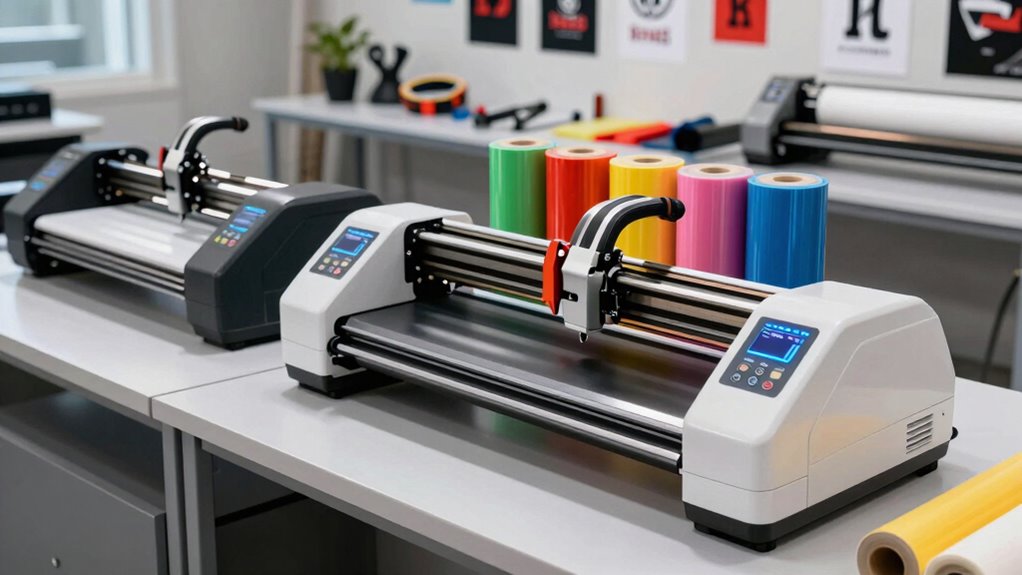

A vinyl cutter machine for merch creators should match what you sell, how large you produce, and how much setup you are willing to manage. My best overall pick is the Siser Romeo, which pairs a useful 24-inch format with a focus on detailed cutting; the USCutter MH-Series stands out for creators moving toward larger batches, while the Silhouette Cameo 5 Alpha Plus is a more approachable craft-focused option. The main tradeoff is between wide-format capacity and compact convenience, with software, workflow, and material handling shaping the choice too. A larger plotter can suit repeat production but demands more workspace, while smaller machines are easier to fit into a home studio. Continue reading for the full breakdown and buying advice tailored to merch workflows.

Get business pricing on office and shipping supplies
- Business-only prices and quantity discounts
- Tax-exempt purchasing
- Multiple users, one account, clear invoices
Key Takeaways
- The Siser Romeo is my best overall fit for creators who want a mid-size machine suited to detailed merch work without stepping up to a 28- or 53-inch plotter.
- The USCutter MH-Series and VEVOR 28-inch models suit larger graphics and longer production runs better than compact craft cutters, but they require more space and workflow setup.
- The VEVOR 53-inch cutter is a specialized choice for wide sign and banner work, not a sensible default for apparel designs that rarely exceed standard garment dimensions.
- Silhouette Cameo 5 Alpha Plus, VEVOR Smart3, and the 12-inch VEVOR favor a smaller-footprint craft workflow; they are less suited to oversized graphics or high-volume output.
- The Likcut S41 and S501 focus on compact creative tasks, with the S41’s print-then-cut capability serving sticker workflows better than a buyer focused mainly on cut-only apparel graphics.
| VEVOR 28-Inch Vinyl Cutter Machine Bundle |  | Best Value for Wide Apparel Graphics | Maximum paper feed: 28.3 in / 720 mm | Maximum cutting width: 24.8 in / 630 mm | Cutting pressure: 10–500 g | VIEW ON AMAZON | See Our Full Breakdown |
| VEVOR 53-Inch Vinyl Cutter Machine with Dual Blades and SignMaster Software |  | Best for High-Volume, Wide-Format Merch | Maximum feed width: 53 inches | Maximum material thickness: 1 mm | Adjustable force: 20–500 gf | VIEW ON AMAZON | See Our Full Breakdown |
| Likcut S501 AI Vinyl Cutter Machine, 4.5-Inch Cutting Width |  | Best for Small Custom Merch and Mini Designs | Model: S501 | Cutting width: 4.5 inches | Maximum cutting speed: 3.2 inches per second | VIEW ON AMAZON | See Our Full Breakdown |
| USCutter MH-Series 34-Inch Vinyl Cutter Plotter with Stand and VinylMaster Cut Software |  | Best for Apparel Sellers Who Also Make Signs | Feed width: 34 in | Maximum cut width: 31 in | Maximum cut length: 96 in | VIEW ON AMAZON | See Our Full Breakdown |
| Likcut S41 Vinyl Cutter with Print-Then-Cut and AI Sticker Design |  | Best Beginner Pick for Print-Then-Cut Merch | Model: S41 | Operation mode: Automatic | Maximum cutting area: 8.5 × 11 inches | VIEW ON AMAZON | See Our Full Breakdown |
| VEVOR 28-Inch Vinyl Cutter with Floor Stand and 20 Blades |  | Best for Wide Windows-Only Merch Runs | Maximum paper feed: 720 mm (28.3 in) | Maximum cutting width: 630 mm (24.8 in) | Cutting precision: ±0.01 mm | VIEW ON AMAZON | See Our Full Breakdown |
| VEVOR Smart3 12-Inch Vinyl Cutting Machine |  | Best for Multi-Function Desktop Crafting | Cutting width: 12 in | Functions: Cutting, writing/drawing, scoring | File formats: PNG, JPG, SVG, TIF | VIEW ON AMAZON | See Our Full Breakdown |
| VEVOR Automatic Vinyl Cutting Machine with Edge Detection |  | Best for Mixed-Material Windows and Mac Workflows | Maximum paper feed width: 28 in / 720 mm | Maximum cut size: 23.6 in / 600 mm | Cutting accuracy: ±0.1 mm | VIEW ON AMAZON | See Our Full Breakdown |
| Silhouette Cameo 5 Alpha Plus 15-Inch Craft and Vinyl Cutter, Black |  | Best for Registration-Sensitive Apparel Graphics | Cutting width: Up to 15 in | Active surface area: 15 in × 16 ft | Maximum material thickness: 0.5 mm | VIEW ON AMAZON | See Our Full Breakdown |
| VEVOR 12-Inch Vinyl Cutting Machine | 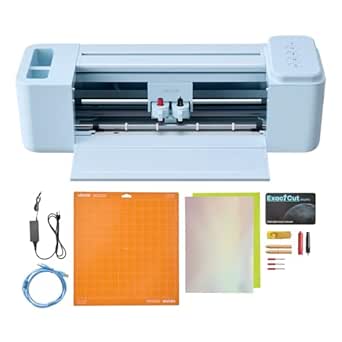 | Best Value for a Multi-Device Starter Setup | Cutting width: 12 in | Functions: Cutting, writing/drawing, scoring | File formats: PNG, JPG, SVG, TIF | VIEW ON AMAZON | See Our Full Breakdown |
| Siser Romeo 24-Inch High-Definition Cutting Machine |  | Best for Wide-Format Merch Runs | Brand: Siser | Model: SNAHDCR24 | Cutting width: 24 inches | VIEW ON AMAZON | See Our Full Breakdown |
More Details on Our Top Picks
VEVOR 28-Inch Vinyl Cutter Machine Bundle
For merch creators who need to cut larger heat-transfer designs without stepping up to a full-width sign plotter, the VEVOR 28-Inch Bundle offers a useful middle ground. Its 24.8-inch cutting width can handle sizable shirt graphics and batches of smaller designs, while the included vinyl sheets and accessories give a Windows-based maker materials for initial projects. Adjustable pressure and speed help adapt cuts to different media, including HTV, cardstock, and paint masks. Compared with the USCutter MH-Series 34-Inch, this model takes up less width but also gives you less cutting room and no stated floor stand. Its main limitation is platform support: it requires a Windows PC and does not work with Mac. Choose it for broad-format value, not a compact or Mac-friendly workflow.
Pros:- 24.8-inch maximum cutting width accommodates large apparel graphics and decal layouts.
- Adjustable pressure and speed suit several material types and project needs.
- Starter vinyl sheets and accessories let buyers begin test projects with the included kit.
- USB and COM connections provide two wired connection options.
Cons:- Not compatible with Mac, limiting its fit for mixed-platform studios.
- The 38-inch machine body and 39-pound weight call for a dedicated workspace.
- The supplied information does not specify contour cutting, a stand, or included design software.
Best for: Windows-based apparel sellers who want to cut oversized HTV graphics and receive starter vinyl with the machine.
Not ideal for: Mac users, makers with limited floor or table space, and sellers who need contour cutting or a specified stand.
- Maximum paper feed:28.3 in / 720 mm
- Maximum cutting width:24.8 in / 630 mm
- Cutting pressure:10–500 g
- Cutting speed:10–800 mm/s
- Blade accuracy:0.0004 in / 0.01 mm
- Connectivity:USB and COM
- Compatibility:Windows XP, Vista, 7, 8, 10, 11; not compatible with Mac
- Dimensions and weight:38 × 14 × 12 in; 39 lbs
- Included accessories:Five 23 × 39 in vinyl sheets, utility knife, ball pen core, two holders, one blade, and other items
Our verdict“Choose this bundle if you use Windows and want wide HTV cutting with starter materials, but skip it if you need Mac support or a compact setup.”
VEVOR 53-Inch Vinyl Cutter Machine with Dual Blades and SignMaster Software
The 53-inch feed width makes this VEVOR the lineup’s wide-format choice for merch shops cutting oversized graphics, long runs, or several designs across a sheet. Dual blades can support drawing and cutting or scoring without a manual blade swap, and the built-in test function offers a way to check a design before committing material. SignMaster, starter sticker sheets, and transfer film make the package more production-oriented than the compact Likcut S41, which is limited to letter-size material. This cutter also supports Windows and macOS, unlike the VEVOR 28-Inch Bundle. The tradeoff is a substantial 65.9-pound machine measuring over five feet long; it needs a stable, dedicated workspace. Its capacity is compelling for growing operations, but excessive for occasional small-batch shirt graphics.
Pros:- 53-inch maximum feed width supports oversized media and wider production layouts.
- Dual-blade design can handle drawing and cutting or scoring without manual blade changes.
- SignMaster software and starter materials are included.
- USB, U-disk, and serial connections plus Windows and macOS support offer flexible setup options.
Cons:- At 65.9 pounds and over five feet long, it requires substantial workspace and is difficult to relocate.
- Its wide-format capacity may be wasted by sellers who mainly make standard-size apparel graphics.
- The listed starter materials are sticker sheets and transfer film, not a dedicated HTV assortment.
Best for: Growing merch businesses that cut oversized HTV, sticker paper, or multiple graphics at once and have room for a large plotter.
Not ideal for: Apartment crafters, occasional makers, and small-batch sellers whose projects fit within a compact cutter’s work area.
- Maximum feed width:53 inches
- Maximum material thickness:1 mm
- Adjustable force:20–500 gf
- Cutting accuracy:±0.1 mm
- Blades:Dual-blade design
- Compatible operating systems:Windows 7–11 and macOS
- Connections:USB, U-disk, serial port
- Included software and materials:SignMaster; 5 sticker sheets and transfer film
- Dimensions and weight:61.42 × 17.91 × 41.34 inches; 65.9 pounds
Our verdict“Pick this VEVOR for wide, repeatable merch production in a permanent workspace; choose a smaller cutter if your orders are mostly compact designs.”
Likcut S501 AI Vinyl Cutter Machine, 4.5-Inch Cutting Width
The Likcut S501 is for creators whose merch ideas are small-format: labels, mini decals, small embellishments, and drawn details rather than full-size shirt fronts. Its 4.5-inch cutting width is far below the Likcut S41’s 8.5 × 11-inch area and nowhere near the wide VEVOR machines, but the compact 2.65 kg body is easier to fit into a craft nook or carry between workspaces. Bluetooth 5.0 and USB 2.0 give it wireless and wired connection choices, while cutting and drawing modes add flexibility for small designs. The large design library and AI voice- and text-prompt tools may help makers generate ideas, though the Design Store requires internet access. Skip it if your main product is full-size apparel graphics; its working area sets a firm limit.
Pros:- Compact 4.5-inch cutting width and 2.65 kg weight suit a small craft workspace.
- Bluetooth 5.0 and USB 2.0 provide wireless and wired connections.
- Cutting and drawing modes work across more than 50 material types.
- AI-assisted design tools and a large library can support idea generation for small projects.
Cons:- The 4.5-inch cutting width sharply limits merch size compared with the Likcut S41 and larger plotters.
- The Design Store requires internet access, which can interrupt an app-dependent design workflow.
- Manual operation may involve more hands-on steps than the S41’s automatic mode.
Best for: Sticker and accessory sellers making small decals, labels, and drawn details who value a compact cutter and app-based design tools.
Not ideal for: Creators cutting standard shirt-front HTV, large decals, or production batches that need a wider cutting area.
- Model:S501
- Cutting width:4.5 inches
- Maximum cutting speed:3.2 inches per second
- Connectivity:Bluetooth 5.0 and USB 2.0
- Functions:Cutting and drawing
- Compatible material types:Over 50
- Design library:Over 1 million designs and 1,200 fonts
- Weight and material:2.65 kg; plastic
- Included components:Cutting machine, adapter, USB-C cable, vinyl bundle
Our verdict“Buy the S501 for small-format merch and a compact, connected setup, not for full-size apparel graphics or wider production runs.”
USCutter MH-Series 34-Inch Vinyl Cutter Plotter with Stand and VinylMaster Cut Software
The USCutter MH-Series 34-Inch suits merch creators whose work extends beyond garments into banners, decals, and other long-format signage. Its stated 31-inch maximum cut width and 96-inch maximum cut length offer a broader production canvas than the VEVOR 28-Inch Bundle, while the included floor stand makes the plotter a more complete large-format workstation. Three blades, a pen adapter, VinylMaster Cut software, and lifetime phone support add practical support for a Windows-based setup. The tradeoff is that this is not a print-then-cut solution: contour cutting is not supported, so it is a weaker match for printed sticker designs that need precise cut lines. At 47 pounds, it also needs room for its stand and long media path. Choose it for cut graphics and signage, not image-registered sticker work.
Pros:- 31-inch maximum cut width and 96-inch maximum cut length support large graphics and long signage.
- Floor stand, three blades, and pen adapter are included.
- VinylMaster Cut software is included for Windows users.
- Lifetime phone support can help sellers who need assistance setting up a plotter workflow.
Cons:- No contour cutting, limiting its usefulness for printed designs that need registered cut outlines.
- Software is listed for Windows users, excluding Mac-based workflows.
- The stand and 47-pound cutter need dedicated floor space, unlike compact craft machines.
Best for: Windows-based merch sellers who also produce long decals, banners, or sign graphics and want a stand included.
Not ideal for: Sticker makers who need contour cutting, Mac users, and sellers without space for a floor-standing plotter.
- Feed width:34 in
- Maximum cut width:31 in
- Maximum cut length:96 in
- Maximum pressure:350 g
- Maximum speed:39 in/s
- Blade and motor:Roland-compatible blade; stepper motor
- Connectivity and compatibility:Serial and USB; Windows
- Contour cutting:Not supported
- Included items and weight:Floor stand, 3 blades, pen adapter, cover, VinylMaster Cut Basic Edition; 47 lb
Our verdict“Choose the MH-Series if your merch business also needs long-format sign cutting and you have a Windows workspace, but skip it for print-then-cut stickers.”
Likcut S41 Vinyl Cutter with Print-Then-Cut and AI Sticker Design
For a new merch creator focused on stickers, small apparel motifs, and paper goods, the Likcut S41 offers a more practical work area than the S501 without taking on the scale of the VEVOR or USCutter plotters. Its 8.5 × 11-inch maximum cutting area fits letter-size projects, and USB-C or Bluetooth 5.0 allows wired or wireless setup. On-device controls for loading, unloading, and starting or stopping jobs can make routine handling straightforward, while voice- or text-prompted AI design tools offer an accessible route to custom sticker artwork. The S501 is lighter and more compact, but its 4.5-inch width is a bigger constraint for merch layouts. The S41’s own limit is still clear: it cannot match a wide plotter for large shirt graphics, and its companion app is part of the design and cutting workflow.
Pros:- 8.5 × 11-inch cutting area fits letter-size sticker and small merch layouts.
- USB-C and Bluetooth 5.0 offer wired and wireless connection options.
- On-device controls handle basic loading and job operation.
- Voice- and text-prompted AI design features support sticker artwork creation.
Cons:- The letter-size maximum area is restrictive for large apparel graphics and wider production batches.
- The AI design and cutting workflow depends on the companion app.
- Plastic construction and a 3.9 kg weight make it less portable than the smaller Likcut S501.
Best for: Beginner sticker and small-merch sellers who want letter-size cutting, app-based design assistance, and both wired and wireless connections.
Not ideal for: Established apparel shops cutting oversized HTV, makers who avoid companion apps, and sellers needing a larger-than-letter work area.
- Model:S41
- Operation mode:Automatic
- Maximum cutting area:8.5 × 11 inches
- Cutting accuracy tolerance:0.2 mm
- Connectivity:USB-C and Bluetooth 5.0
- Compatible materials:Back print film, cardstock, glossy film, plain paper
- Weight and material:3.9 kg; plastic
- Included components:Cutting machine, adapter, USB-C cable, vinyl bundle
Our verdict“Pick the S41 for app-assisted, letter-size sticker and small-merch projects, but choose a wider cutter for full-size shirt graphics.”
VEVOR 28-Inch Vinyl Cutter with Floor Stand and 20 Blades
For merch creators moving beyond small-format transfers, this cutter’s 24.8-inch cutting width can handle larger graphics and batches of decals without splitting every design into smaller sections. Its floor stand and included 20 blades give a production-minded setup that the VEVOR Smart3 12-Inch does not offer; the Smart3 is the more flexible choice for drawing and scoring, but its smaller workspace limits larger apparel graphics. Adjustable pressure and speed let buyers tune settings for different vinyl jobs. The tradeoff is a more restricted workflow: this model requires a Windows PC, supports Windows only through version 10, and uses DM/PL or HP/GL languages rather than the broad craft-device compatibility of the VEVOR 12-Inch model. I’d rank it for width and included setup, not for plug-and-play simplicity.
Pros:- Wide 630 mm cutting area suits larger graphics and batch work.
- Adjustable cutting pressure and speed support tuning across materials.
- Floor stand and 20 blades are included.
- USB and COMPIM connectivity provide two connection options.
Cons:- Not compatible with Mac and requires a Windows PC.
- Windows compatibility is listed only through Windows 10.
- Its large-format workflow is less suited to small craft spaces and quick desktop projects.
Best for: Windows-based merch makers producing larger heat-transfer graphics, signs, or decal batches who want a floor-standing cutter.
Not ideal for: Mac users or creators who need a compact machine with drawing and scoring functions alongside cutting.
- Maximum paper feed:720 mm (28.3 in)
- Maximum cutting width:630 mm (24.8 in)
- Cutting precision:±0.01 mm
- Cutting pressure:10–500 g, adjustable
- Cutting speed:10–800 mm/s, adjustable
- Interfaces:USB and COMPIM
- Operating systems:Windows XP/Vista/7/8/10, 32-bit and 64-bit; not compatible with Mac
- Included components:Floor stand, vinyl cutter machine, 20 blades
Our verdict“Choose this VEVOR if your merch work needs a wide, stand-mounted cutter and your design workflow runs on Windows.”
VEVOR Smart3 12-Inch Vinyl Cutting Machine
The Smart3 earns its place for creators whose merch workflow mixes cutting, writing, and scoring, such as apparel transfers alongside packaging inserts or card-style add-ons. Its 12-inch width is a clear step down from the VEVOR 28-Inch Vinyl Cutter, so it is not the choice for oversized graphics or broad production runs. In return, it supports Mac, Windows, Android, and iOS devices, plus USB, Bluetooth, and USB-drive connections—far less restrictive than that wide-format VEVOR. The supplied software and support for PNG, JPG, SVG, and TIF files make it a flexible desktop option, though the listing does not specify cutting speed or pressure. At 18.1 pounds, it is also portable in principle but not especially light to move between workspaces.
Pros:- Combines cutting, writing, and scoring in one machine.
- Works with vinyl, heat-transfer paper, cardstock, foil, and specialty paper.
- USB, Bluetooth, and USB-drive connectivity support varied workflows.
- Compatible with Mac, Windows, Android, and iOS devices.
Cons:- The 12-inch cutting width restricts larger merch designs.
- At 18.1 pounds, it is less convenient to move than a lightweight craft cutter.
- The provided specifications do not state cutting speed or pressure.
Best for: Small merch studios and hobby sellers who use several material types and want one machine for cutting, writing, and scoring.
Not ideal for: Creators producing wide shirt graphics or high-volume runs who need a larger cutting bed and clearly specified production performance.
- Cutting width:12 in
- Functions:Cutting, writing/drawing, scoring
- File formats:PNG, JPG, SVG, TIF
- Connectivity:USB, Bluetooth, USB drive
- Compatible devices:Mac, Windows, Android 5.1+, iOS 11.0+
- Compatible materials:Vinyl, heat-transfer paper, cardstock, foil, specialty paper
- Active surface area:144 sq in
- Weight:18.1 lb
Our verdict“Pick the Smart3 for a flexible, multi-function desktop setup, but choose a wider VEVOR model for large-format merch work.”
VEVOR Automatic Vinyl Cutting Machine with Edge Detection
This VEVOR pairs a 28-inch feed width with automatic edge detection, making it a practical fit for merch creators who need more material flexibility than a basic vinyl-only plotter. It lists support for over 100 materials, including HTV, cardstock, and EVA foam, and accepts SVG, EPS, PLT, and AI files. Compared with the VEVOR 28-Inch Vinyl Cutter with Floor Stand, it adds stated Mac software access and edge detection, while that model includes a stand and 20 blades and lists a wider maximum cutting width. Its 600 mm maximum cut size is narrower than its feed width, so buyers should distinguish material capacity from usable cut area. The Windows software is Signmaster; Mac access through Signcut is described as free for one year, which may affect longer-term workflow planning.
Pros:- Supports more than 100 materials, including HTV, cardstock, and EVA foam.
- Automatic edge detection helps align material for cutting jobs.
- Accepts SVG, EPS, PLT, and AI files.
- Includes two blade types, seven materials, and design software.
Cons:- Maximum cut size is 600 mm, narrower than the 720 mm paper feed.
- The listing describes Mac Signcut access as free for one year.
- At 24.5 pounds and 35.4 inches long, it needs a substantial workspace.
Best for: Merch creators who cut varied materials and want a wide-format machine with edge detection and stated Windows and Mac software options.
Not ideal for: Buyers seeking a simple, compact starter cutter or a Mac workflow with clearly ongoing software access included.
- Maximum paper feed width:28 in / 720 mm
- Maximum cut size:23.6 in / 600 mm
- Cutting accuracy:±0.1 mm
- Cutting speed:20–400 mm/s
- Materials supported:100+ materials
- Compatible file formats:SVG, EPS, PLT, AI
- Compatible software:Signmaster for Windows; Signcut for Mac
- Weight:24.5 lb
Our verdict“Choose this model for wide, varied-material work with edge detection, provided its usable cut width and software terms fit your workflow.”
Silhouette Cameo 5 Alpha Plus 15-Inch Craft and Vinyl Cutter, Black
The Cameo 5 Alpha Plus is the lineup’s focused option for creators who prioritize repeatable alignment and a smoother desktop workflow over large-format capacity. Its 15-inch cutting width and 4-point registration system can suit detailed, aligned merch graphics, while the AutoBlade removes manual blade-depth adjustment from routine jobs. The VEVOR Smart3 12-Inch offers writing and scoring plus broader device connectivity, but this Silhouette provides a wider work area and lists a 400 mm/s maximum speed. The electrostatic mat supports material up to 0.5 mm thick, yet the listed active surface is 15 inches by 16 feet rather than an unrestricted roll capacity. There is also a notable listing mismatch: the model number references a Cameo 4 variant, so I would verify the exact machine and included accessories before choosing it.
Pros:- 15-inch cutting width offers more room than 12-inch desktop options.
- 4-point registration system supports aligned cutting jobs.
- AutoBlade adjusts blade depth automatically.
- Includes Silhouette Studio, a cutting mat, sketch pen adapter, and 100 designs.
Cons:- The listed model number refers to a Cameo 4 variant, which may not match the product title.
- Its 15-inch width is narrower than the wide-format VEVOR cutters.
- Maximum material thickness is listed as 0.5 mm, limiting thicker stock.
Best for: Small merch businesses making aligned, detailed apparel graphics who value automatic blade adjustment and a longer cutting surface.
Not ideal for: Buyers who need a confirmed model specification before ordering, or producers whose work requires a 24- to 28-inch cutting width.
- Cutting width:Up to 15 in
- Active surface area:15 in × 16 ft
- Maximum material thickness:0.5 mm
- Maximum speed:400 mm/s
- Operation mode:Automatic
- Weight:12.7 lb
- Included accessories:Standard Tack Cutting Mat, AutoBlade, Sketch Pens Adapter, AC Adapter/Power Cable Set
- Software and extras:Silhouette Studio Software, 100 designs, one-month Design Store subscription
Our verdict“Consider the Cameo 5 Alpha Plus for aligned, mid-width merch work, but confirm the model identity before buying.”
VEVOR 12-Inch Vinyl Cutting Machine
This VEVOR makes sense for merch creators who want a 12-inch entry point with cutting, drawing, and scoring rather than a machine devoted only to vinyl cuts. It handles common small-shop materials such as HTV, foil, cardstock, and specialty paper, and connects by USB, Bluetooth, or USB drive. That makes its workflow similar to the VEVOR Smart3 12-Inch, including the same listed dimensions, weight, and device compatibility; the supplied data does not establish a clear performance advantage for either model. Unlike the 28-inch VEVOR cutters, it cannot accommodate wide graphics, but it takes less room and supports Mac, Windows, Android, and iOS devices. The listing does not state cutting speed, pressure, or a maximum material thickness, so production-focused buyers have less performance detail to judge.
Pros:- Supports cutting, drawing, and scoring.
- Works with vinyl, HTV, cardstock, foil, and specialty paper.
- Offers USB, Bluetooth, and USB-drive connectivity.
- Compatible with Mac, Windows, Android, and iOS devices.
Cons:- The 12-inch cutting width limits larger shirt graphics and batch layouts.
- The provided specifications do not list cutting speed, pressure, or maximum material thickness.
- Its listed capabilities closely match the VEVOR Smart3, with no clear distinction in the supplied data.
Best for: New merch sellers creating small decals and apparel transfers who want a compact-width cutter with multiple connection options and included software.
Not ideal for: Established sellers handling large graphics, thick materials, or repeat production runs that need published speed and pressure specifications.
- Cutting width:12 in
- Functions:Cutting, writing/drawing, scoring
- File formats:PNG, JPG, SVG, TIF
- Connectivity:USB, Bluetooth, USB drive
- Compatible devices:Mac, Windows, Android 5.1+, iOS 11.0+
- Materials:Vinyl, heat-transfer paper, cardstock, foil, specialty paper
- Active surface area:144 sq in
- Dimensions and weight:7.36 × 22.8 × 6.61 in; 18.1 lb
Our verdict“Choose this VEVOR for small-format merch projects and flexible device connections, not for wide or performance-specified production work.”
Siser Romeo 24-Inch High-Definition Cutting Machine
For merch creators cutting larger graphics without stepping up to a floor-standing plotter, the Siser Romeo’s 24-inch cutting width is its clearest advantage. It gives you room for wider shirt designs and longer vinyl runs than the 12-inch VEVOR Smart3, while mat-free cutting can reduce setup friction when working with compatible materials. The touchscreen, adjustable pinch rollers, and commercial-level blades also make it better suited to repeat production than a compact craft-first machine. It handles vinyl, heat-transfer materials, cardstock, and stickers, so one machine can cover several merch workflows. The tradeoff is its 36.5-inch width: it needs a dedicated work surface, and its 10 kg listed weight makes it less convenient to move. Choose it for wide-format flexibility, not a small studio footprint.
Pros:- 24-inch cutting width accommodates wider merch graphics and larger material runs.
- Mat-free cutting supports a quicker workflow with compatible materials.
- Works with vinyl, heat-transfer materials, cardstock, and stickers.
- Touchscreen, adjustable pinch rollers, and commercial-level blades suit more production-focused work.
Cons:- The 36.5-inch machine width demands more workspace than compact cutters such as the VEVOR Smart3.
- At a listed 10 kg, it is less convenient to move between work areas.
- Only a 12 × 12-inch light-tack mat is included, so mat-based projects are limited by the supplied mat size.
Best for: Independent apparel and sticker sellers who regularly cut designs wider than a 12-inch craft machine can accommodate and have a permanent workbench.
Not ideal for: Creators working from a small desk or needing a portable cutter; its 36.5-inch width takes substantial workspace, and its listed 10 kg weight makes frequent relocation inconvenient.
- Brand:Siser
- Model:SNAHDCR24
- Cutting width:24 inches
- Active surface area:285.5 square inches
- Dimensions:7.25 × 36.5 × 7.75 inches (D × W × H)
- Weight:10 kg
- Operation mode:Automatic
- Compatible devices:Windows and Mac
- Included components:Cutting machine kit; 12 × 12-inch light-tack cutting mat
Our verdict“Choose the Romeo if your merch work benefits from a 24-inch cutting width and your studio can accommodate a wide, semi-permanent machine.”

How We Picked
I ranked these machines around the demands of merch production: usable cutting width, likely fit for apparel and sticker work, workflow flexibility, software and setup demands, and how well each format fits a small creator’s workspace. I gave more weight to a versatile production fit than to maximum width alone, since wider machines can add cost in space, material handling, and setup without helping every merch business.
The ordering separates balanced mid-size cutters from large-format plotters and compact craft machines. Models with a clear workflow advantage, such as print-then-cut for stickers, earn a place for that specific use rather than being treated as universal picks. Since needs vary by product mix and production volume, I also weigh meaningful drawbacks: width can be excessive, compact formats can limit design size, and included software or bundles may take time to learn. The role labels reflect who is most likely to benefit, not a claim that one machine suits every creator.
Factors to Consider When Choosing Vinyl Cutter Machine For Merch Creators Buyer Guide
Choosing a cutter for merch is less about finding the machine with the biggest headline spec and more about matching the whole workflow to what you plan to sell. I would make the decision in this order: product size, production pattern, material and decoration method, software comfort, then workspace and expansion plans.
Match Cutting Width to Your Actual Designs
Start with the largest graphic you expect to make regularly, not the widest project you might attempt once. Chest logos, sleeve graphics, and many sticker designs can fit a compact machine, while back prints and large signs may call for a wider cutter. A wider machine can reduce the need to split designs, but it also needs more room for the machine, roll, and material feed. Measure the intended design area on your garments and the space where the cutter will sit before choosing a format. Leave room behind and in front of the machine for feeding material smoothly. Buyers often overestimate their width needs and underestimate the practical footprint.
Plan Around Production Volume, Not Just Startup Projects
A machine that handles occasional custom orders may not be the best choice once orders become repeatable batches. Consider how often you will cut, whether designs repeat, and how much time you can spend loading material, weeding, and checking alignment. Wide plotters can make longer runs of graphics more practical, but the cutter alone does not automate every production step. Compact craft machines can be easier to fit into a home workspace, though repeated small cuts may take longer to manage. Estimate a typical weekly batch and identify the slowest step before paying for capacity you may not use. Keep a margin for growth, but base the purchase on a realistic near-term workload.
Choose the Decoration Method Before the Cutter
Vinyl cutting is one part of merch production, and the right machine depends on whether your designs use heat-transfer vinyl, adhesive vinyl, or printed-and-cut stickers. Cut-only workflows need reliable shape cutting and a sensible way to weed and apply designs. Sticker sellers may value print-then-cut alignment more than a wide working area. A cutter does not print full-color artwork by itself, so printed designs require a separate printer and a workflow for registration and cutting. Check the material types and thicknesses you expect to use rather than assuming every cutter handles every media equally well. Picking the decoration process first helps avoid buying a machine whose strongest feature does not support your main products.
Account for Software, File Prep, and Learning Time
Software affects daily work as much as cutting width does. Before choosing a machine, check which design files and operating systems fit your current setup, and whether the included software covers the tasks you need. A feature-rich program can help with production control, but it may add a learning curve if you only need simple names and logos. AI-assisted design tools can speed up idea generation, though they do not replace checking cut paths, sizing, and material settings. Build time for test cuts and file corrections into your first production runs. A familiar workflow can be a better business choice than a longer feature list if you need to fulfill orders quickly.
Compare Total Workflow Costs and Consumables
The machine is only one piece of the operating setup: blades, mats or holders where applicable, vinyl, transfer materials, tools, and failed test cuts all affect ongoing work. Bundles can provide useful startup supplies, but check whether their included materials match the projects you plan to make. Extra blades are helpful only if their type suits the cutter and your material. Think about how much scrap your typical layout creates, since efficient nesting can matter more than a small difference in machine width. For apparel, account for the heat press or other application equipment as well as the cutter. Comparing the complete workflow gives a clearer view of what you need to start producing.
Check Workspace, Noise, and Production Flow
A cutter needs a stable place to sit and enough clearance for material to move without catching on walls, shelves, or nearby equipment. Floor-stand models can make large machines easier to position, but a stand does not remove the need for a clear feed path. Think about where rolls will be stored and how you will move cut designs to weeding and application. If the machine will share a home office or studio, sound and the time it runs may affect when you can work. Sketch the full path from design file to finished merch before buying. This small planning step can prevent a capable machine from becoming awkward to use.
Frequently Asked Questions
Should I choose a 12-inch craft cutter or a 24- to 34-inch plotter for apparel merch?
Choose based on the largest graphic you expect to cut repeatedly, along with your weekly volume. A 12-inch machine can suit small logos, labels, and compact projects, but it may limit larger back graphics or require designs to be split. A wider plotter offers more room for larger work and batch layouts, at the cost of more workspace and material handling. If your product plan is still uncertain, list the dimensions of your first several designs before choosing. Do not buy extra width just for a rare project unless that work is part of your business plan.
Can a vinyl cutter make full-color merch designs on its own?
No: a vinyl cutter cuts shapes from compatible material, but it does not print full-color artwork. A cut-vinyl design can use multiple colors by layering separate pieces, which adds alignment and assembly work. Printed apparel graphics require a separate printing method and compatible application process. Printed stickers also need a printer, with print-then-cut alignment helping match the cut to the printed artwork. Decide whether your products are based on cut vinyl, printed graphics, or both before selecting a machine.
Is a wide-format cutter worthwhile if I mainly sell shirts?
It can be worthwhile if your designs are large, your order batches are substantial, or you plan to add banners and signs to your product range. For small chest graphics and simple garment designs, a very wide cutter may take up space without improving the finished product. Wider material can support efficient layouts, but only if you regularly use the added width and can handle the rolls. Consider the biggest design you sell and the number of pieces you cut per batch. A mid-size model is often a more balanced fit when apparel is the main business and oversized work is occasional.
Do I need print-then-cut if I sell stickers as well as apparel?
Print-then-cut can help when your stickers use printed artwork that needs a matching cut outline. It does not remove the need for a printer or for testing alignment and material settings. If your sticker designs are simple shapes cut from colored vinyl, a standard cut workflow may be enough. For a mixed shop, compare how much of your output is printed stickers versus apparel graphics before making this a deciding feature. If stickers are a core product, prioritize the whole print-and-cut process rather than the cutter feature alone.
What should I check before buying a cutter bundle for a small merch business?
Check the included software, blade compatibility, material types, stand or support equipment, and what supplies are actually part of the bundle. A bundle is useful when its contents match your first projects, but extra accessories do not guarantee a faster production workflow. Confirm that the machine works with your computer and preferred file formats, and find out whether the included software supports the functions you need. Also plan for essentials that may not be included, such as application tools or a heat press for apparel. A short startup checklist can help you compare complete setups rather than bundle names.
Conclusion
For a balanced merch setup, I recommend the Siser Romeo as best overall, with a mid-size format that avoids the footprint of the largest plotters. The VEVOR 28-inch models are my best value direction for creators who need a wider working area and are comfortable managing a larger machine; among them, choose based on whether the stand and blade bundle suit your setup. For a best premium or large-format fit, the VEVOR 53-inch model makes sense for shops producing wide graphics, signs, or banners, but it is more machine than many apparel sellers need. The Silhouette Cameo 5 Alpha Plus is my beginner-friendly choice for a craft-scale workflow, while the Likcut S41 is the specific pick for creators who prioritize printed stickers. Choose the USCutter MH-Series if your focus is larger-batch plotter work, and favor the compact VEVOR or Likcut options when space and smaller projects matter most.
Halloween Picks
halloween
As an affiliate, we earn on qualifying purchases.