For anyone managing expenses, a reliable receipt scanner can make a significant difference. The ScanSnap iX2500 Receipt Edition stands out as the overall best choice, thanks to its fast processing and wireless capabilities. The Epson RapidReceipt RR-620W offers excellent duplex scanning for high-volume needs, while the Epson WorkForce ES-50 is perfect for mobile use and on-the-go tracking. Each option balances ease of use, speed, and value differently, so choosing the right scanner depends on your specific expense management needs. Continue reading for a full breakdown of the top models and what makes each unique.

Get business pricing on office and shipping supplies
- Business-only prices and quantity discounts
- Tax-exempt purchasing
- Multiple users, one account, clear invoices
Key Takeaways
- Speed and duplex scanning capabilities are vital for high-volume expense tracking.
- Portability features like mobile compatibility significantly benefit small business users.
- Wireless connectivity adds convenience but may come at a higher cost or complexity.
- Price varies widely; premium models typically offer faster processing and better durability.
- Ease of setup and integration with expense management software influences overall usability.
| Plustek PS188 High-Speed Double-Sided Color Document Scanner with Automatic Document Feeder |  | Best for High-Volume Office Use | Speed: 30 pages per minute | Automatic Document Feeder: 50 sheets | Supported Paper Length: up to 200 inches | VIEW ON AMAZON | See Our Full Breakdown |
| ScanSnap iX2500 Receipt Edition Wireless and USB High-Speed Scanner, Black |  | Best for Digital Workflow Integration | Connectivity: Wi-Fi and USB | Page Capacity: 100 pages | Scanning Speed: 45 pages per minute | VIEW ON AMAZON | See Our Full Breakdown |
| Epson WorkForce ES-50 Compact & Lightweight Mobile Document Scanner for PC and Mac |  | Best for On-the-Go Portable Scanning | Scan Speed: 5.5 seconds per page | Max Document Size: 8.5 x 72 inches | Connectivity: USB 2.0 | VIEW ON AMAZON | See Our Full Breakdown |
| Epson RapidReceipt RR-60 Compact Mobile Document Scanner Receipt | Mobile Receipt Scanner for Small Business USB-Powered 10 Pages per Minute |  | Best for Small-Scale, Quick Receipt Scanning | Scan Speed: 10 pages per minute | Power: USB | Compatibility: PC | VIEW ON AMAZON | See Our Full Breakdown |
| NeatReceipts Mobile Scanner and Digital Filing System – PC |  | Best for Compact Digital Filing | Connectivity: USB | Compatibility: PC | Includes: 30-day NeatCloud trial, NeatCare support | VIEW ON AMAZON | See Our Full Breakdown |
| NeatReceipts Mobile Document Scanner and Digital Filing System for PC and Mac |  | Best for Portability and Basic Expense Management | Connectivity: USB | Compatibility: PC and Mac | Includes: NeatCloud 30-day trial, NeatCare support | VIEW ON AMAZON | See Our Full Breakdown |
| Epson RapidReceipt RR-620W Wireless & USB High-Speed Color Duplex Receipt & Document Scanner |  | Best for High-Speed, AI-Enhanced Expense Tracking | Scanning Speed: 45 ppm | Color Touchscreen: 4.3 inches | Auto Document Feeder: 100 pages | VIEW ON AMAZON | See Our Full Breakdown |
| Epson RapidReceipt RR-400W Wireless Business Scanner |  | Best for Small Business, Entry-Level Expense Digitization | Technology: ScanSmart AI PRO | Scanning Speed: up to 30 ppm | Auto Feeder Capacity: 20 pages | VIEW ON AMAZON | See Our Full Breakdown |
| Epson RapidReceipt RR-70W Compact Mobile Document Scanner |  | Best for Mobile Receipt Digitization on the Go | Technology: ScanSmart AI PRO | Weight: 11 oz | Scanning Speed: 15 pages/min | VIEW ON AMAZON | See Our Full Breakdown |
| NeatDesk Desktop Scanner and Digital Filing System for Mac | 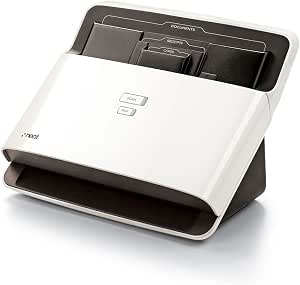 | Best for Mac Users and Small Batch Processing | Scan Capacity: Up to 10 receipts, 10 business cards, 10 documents | Compatibility: macOS | Digital Copies: IRS-accepted | VIEW ON AMAZON | See Our Full Breakdown |
| receipt scanners for expense tracking | Connectivity | Compatibility |
|---|---|---|
| Plustek PS188 High-Speed Doubl | Supports Windows 7/8/10/11 | — |
| ScanSnap iX2500 Receipt Editio | Wi-Fi and USB | Mac and PC |
| Epson WorkForce ES-50 Compact | USB 2.0 | Windows, Mac |
| Epson RapidReceipt RR-60 Compa | — | PC |
| NeatReceipts Mobile Scanner an | USB | PC |
| NeatReceipts Mobile Document S | USB | PC and Mac |
| Epson RapidReceipt RR-620W Wir | Wi-Fi, USB | — |
| Epson RapidReceipt RR-400W Wir | Wireless | — |
| Epson RapidReceipt RR-70W Comp | USB, Battery, Wireless | — |
| NeatDesk Desktop Scanner and D | — | macOS |
More Details on Our Top Picks
Plustek PS188 High-Speed Double-Sided Color Document Scanner with Automatic Document Feeder
The Plustek PS188 excels at handling large batches of receipts and documents quickly, thanks to its impressive 30 pages per minute double-sided scan speed and 50-sheet automatic feeder. Compared with the Epson RR-60, it offers higher volume capacity and customizable profiles, making it ideal for busy offices. However, its reliance on Windows limits flexibility, and the setup can be complicated for new users. Its support for a wide range of paper sizes and types ensures versatility, but the absence of wireless connectivity may hinder some workflows.
This model is best suited for small businesses or departments that need rapid, high-volume scanning without frequent mobile use.
Pros:- Fast double-sided scanning at 30 pages per minute
- Automatic document feeder with 50-sheet capacity
- Customizable scan profiles for different tasks
- Supports a wide range of paper sizes and types
Cons:- Limited to Windows operating systems
- No wireless connectivity options
- Setup can be complex for first-time users
Best for: Office environments with high document throughput needing fast, reliable double-sided scans
Not ideal for: Individuals seeking portable, wireless solutions for on-the-go scanning
- Speed:30 pages per minute
- Automatic Document Feeder:50 sheets
- Supported Paper Length:up to 200 inches
- Scan Profiles:up to 255 customizable profiles
- Connectivity:Supports Windows 7/8/10/11
Our verdict“This scanner is ideal for office users who prioritize speed and volume over mobility or cross-platform flexibility.”
ScanSnap iX2500 Receipt Edition Wireless and USB High-Speed Scanner, Black
The ScanSnap iX2500 Receipt Edition makes quick work of receipts and invoices, with a robust 45 pages per minute scanning speed and a 100-page auto feeder. Its large touchscreen simplifies operation compared to the Plustek PS188, and the ability to connect via Wi-Fi or USB offers flexible placement options. It also supports cloud integration and direct QuickBooks uploads, streamlining financial workflows. However, its price point can be steep for casual users, and setup for cloud services might be time-consuming. It’s mainly optimized for receipt and invoice scanning, so it’s less suitable for bulk document archiving or multi-page complex scans.
This pick is best for small business owners or bookkeepers who want seamless digital integration and fast processing.
Pros:- Fast double-sided scanning at 45ppm
- Large touchscreen with intuitive controls
- Supports cloud services and QuickBooks directly
- Automatic multi-feed detection and optimization
Cons:- Cost may be prohibitive for casual users
- Setup for cloud integration can be complex
- Limited to receipt and invoice scanning
Best for: Small business owners needing quick, cloud-ready receipt and invoice scans with direct financial software integration
Not ideal for: Casual users or those seeking portable, offline-only scanners for occasional use
- Connectivity:Wi-Fi and USB
- Page Capacity:100 pages
- Scanning Speed:45 pages per minute
- Compatibility:Mac and PC
- Special Features:Intelligent processing, cloud support
Our verdict“This scanner suits busy professionals who require fast, integrated digital workflows and cloud connectivity for receipts and invoices.”
Epson WorkForce ES-50 Compact & Lightweight Mobile Document Scanner for PC and Mac
The Epson WorkForce ES-50 stands out for its portability, capable of scanning a single page in just 5.5 seconds, ideal for users who need to digitize receipts or documents while traveling. It’s a straightforward, USB-powered device that works well with both Windows and Mac, but its single-sheet scanning limitation might be a drawback for those with higher volume needs. Compared with larger desktop scanners like the Plustek PS188, it sacrifices volume for compactness. Its focus on portability means it lacks wireless options, and it might struggle with thicker or very complex documents.
This model is perfect for mobile professionals or small business owners who often work remotely or need quick, on-the-spot scans.
Pros:- Lightweight and portable for travel
- Fast scan speed of 5.5 seconds per page
- Includes OCR for searchable PDFs
- No external power supply needed
Cons:- Limited to single-sheet scanning at a time
- No wireless connectivity
- May have difficulty with thick or complex documents
Best for: Travelers, freelancers, or small business owners needing portable, quick scans of receipts and IDs
Not ideal for: Users with high-volume scanning needs or those requiring wireless connectivity
- Scan Speed:5.5 seconds per page
- Max Document Size:8.5 x 72 inches
- Connectivity:USB 2.0
- Power:USB-powered
- Compatibility:Windows, Mac
- Features:OCR, cloud scanning, multi-page feeding
Our verdict“This scanner is best for mobile users who prioritize speed and portability over volume and multi-page capacity.”
Epson RapidReceipt RR-60 Compact Mobile Document Scanner Receipt | Mobile Receipt Scanner for Small Business USB-Powered 10 Pages per Minute
The Epson RR-60 offers a compact, lightweight solution for small offices or mobile professionals needing to scan receipts quickly—up to 10 pages per minute. Its AI PRO technology automates data extraction, simplifying expense tracking, and supports export to popular financial apps like QuickBooks. While its small size and USB power make it highly portable, it’s limited in speed and capacity compared to larger scanners like the ScanSnap iX2500. The device also lacks wireless connectivity, which could restrict flexibility in some work environments. It excels at straightforward receipt scanning but isn’t suited for larger document batches or complex multi-page scans.
This device is ideal for small businesses or freelancers who need quick, organized receipt scans without bulk or high-volume capacity.
Pros:- Lightweight and highly portable
- Scan speed of 10 pages per minute
- AI-enabled automatic data extraction
- Supports export to cloud and financial software
Cons:- Limited to 10 pages per minute
- No wireless connectivity
- Designed mainly for receipts, less for larger documents
Best for: Small business owners or freelancers needing fast, portable receipt capture with AI data extraction
Not ideal for: Users requiring high-volume or multi-page document scanning in a single session
- Scan Speed:10 pages per minute
- Power:USB
- Compatibility:PC
- Features:AI data extraction, cloud export
Our verdict“This scanner suits small-scale users who want quick, AI-enhanced receipt scans for expense management on the go.”
NeatReceipts Mobile Scanner and Digital Filing System – PC
The NeatReceipts Mobile Scanner offers a slim, lightweight design that connects via USB for quick receipt and document digitization. It excels in creating organized digital files and supports export to various financial and contact management apps, making it a solid choice for users who prioritize portability and easy management. Compared to the ScanSnap iX2500, it’s less feature-rich and slower, but its simplicity and compact size make it ideal for occasional or mobile use. Its reliance on a PC limits flexibility for Mac users, and limited details on resolution and scanning speed might be a concern for those needing high-quality images.
This pick is best for personal finance enthusiasts or small business owners who need straightforward, portable digitization.
Pros:- Compact and lightweight for portability
- Easy digital extraction and export options
- Includes free NeatCloud backup trial
- Supports multiple software integrations
Cons:- Requires a computer to operate
- Limited details on resolution and speed
- Less suitable for large batch or high-speed scanning
Best for: Users who want a portable, simple scanner for receipts and small documents, mainly for personal or light business use
Not ideal for: High-volume users or those needing advanced features or multi-page batch scanning
- Connectivity:USB
- Compatibility:PC
- Includes:30-day NeatCloud trial, NeatCare support
Our verdict“This scanner is best for users seeking a portable, straightforward solution for digitizing receipts and small documents on an occasional basis.”
NeatReceipts Mobile Document Scanner and Digital Filing System for PC and Mac
This scanner excels in portability, offering a slim design that easily fits into a bag, making it ideal for professionals who need to digitize receipts on the go. Compared with the NeatDesk, it lacks wireless connectivity and advanced batch processing but compensates with a straightforward USB connection and cloud backup options, which suits users prioritizing mobility over speed or bulk handling. Its limited trial period for NeatCloud means ongoing cloud storage costs aren’t included, and without specified scanning resolution, image quality may vary. This pick makes the most sense for mobile entrepreneurs or remote workers managing small volumes but not suited for high-volume environments. The primary tradeoff is that it relies on a computer for operation, so it’s less ideal for those seeking standalone functionality.Pros:- Compact and lightweight design enhances portability
- Easy data export options streamline expense report creation
- Includes cloud backup and customer support for peace of mind
Cons:- Limited to USB power, requiring a computer for operation
- No mention of scanning resolution or speed may affect image quality
Best for: Small business owners and freelancers who need a portable solution for occasional receipt scanning and expense tracking.
Not ideal for: Large teams or offices with high-volume scanning needs, as its small batch capacity and lack of wireless capabilities limit efficiency.
- Connectivity:USB
- Compatibility:PC and Mac
- Includes:NeatCloud 30-day trial, NeatCare support
Our verdict“This option is best for mobile users who prioritize convenience and basic expense digitization over bulk processing features.”
Epson RapidReceipt RR-620W Wireless & USB High-Speed Color Duplex Receipt & Document Scanner
The Epson RapidReceipt RR-620W stands out for its rapid 45 pages per minute duplex scanning, making it suitable for busy offices with high receipt volumes. Its AI-ready technology and large 4.3-inch color touchscreen differentiate it from slower, less intelligent scanners like the RR-400W, which offers more basic functionality. While setup can be complex for beginners and its AI features depend on compatible software, it significantly reduces manual data entry, speeding up expense reporting. Its dual connectivity via Wi-Fi and USB offers flexible integration, but the complexity and higher price point make it less ideal for small teams or infrequent users. The main tradeoff involves a steeper learning curve for optimal use.Pros:- High-speed scanning at 45 ppm boosts productivity
- AI-ready technology enables smarter data extraction
- Large, intuitive touchscreen simplifies operation
- Wireless and USB options for flexible setup
Cons:- Setup complexity may delay immediate use
- Full AI features depend on compatible software
Best for: Accounting teams or small businesses processing large receipts frequently and needing smart data categorization.
Not ideal for: Solo entrepreneurs or users new to scanning technology, as setup and AI features require some technical familiarity.
- Scanning Speed:45 ppm
- Color Touchscreen:4.3 inches
- Auto Document Feeder:100 pages
- Connectivity:Wi-Fi, USB
- AI Technology:AI-ready scans
Our verdict“This scanner is ideal for fast-paced environments that need high-volume, intelligent scanning with flexible connectivity.”
Epson RapidReceipt RR-400W Wireless Business Scanner
The Epson RR-400W offers a compact, wireless solution with AI-powered data extraction tailored for small businesses. Its 30 ppm speed and 20-page auto feeder strike a balance between speed and size, making it suitable for daily receipt and invoice management. Compared with the RR-620W, it has fewer features and a smaller auto feeder, limiting throughput for larger volumes. Its wireless setup can be tricky, and without advanced AI customization, it’s best for straightforward scanning needs. This device excels in office environments where space is limited but isn’t designed for high-volume or heavy-duty use. The main tradeoff is that it may require additional setup time and is less scalable for growing businesses.Pros:- AI-powered data extraction simplifies document organization
- Fast two-sided scanning saves time
- Compact design fits small office spaces
- Wireless connectivity offers convenience
Cons:- Limited auto feeder capacity for larger batches
- Setup for wireless connectivity can be challenging
Best for: Small business owners seeking a simple, wireless scanner with AI-powered data extraction for moderate volumes.
Not ideal for: High-volume or enterprise environments, as its smaller auto feeder and lower speed may hinder efficiency.
- Technology:ScanSmart AI PRO
- Scanning Speed:up to 30 ppm
- Auto Feeder Capacity:20 pages
- Connectivity:Wireless
- Document Size:various
Our verdict“This scanner suits small businesses that need a compact, wireless, AI-enabled device for everyday receipt and invoice management.”
Epson RapidReceipt RR-70W Compact Mobile Document Scanner
The Epson RR-70W prioritizes portability, weighing just 11 ounces, and offers wireless and battery-powered scanning, making it perfect for those constantly on the move. Its 15 pages per minute speed is slower than larger desktop models like the RR-620W, but its advanced AI features still enable efficient data extraction from receipts and small documents. Its compatibility with mobile devices and support for searchable PDFs add to its convenience. However, its limited maximum document size and battery life mean it’s best suited for small receipts and quick scans rather than large batches or extensive archiving. The main tradeoff is that it offers less capacity and slower throughput, which could be a constraint in busy environments.Pros:- Extremely portable and lightweight design
- Wireless connectivity for easy cloud integration
- Advanced AI features for fast data extraction
- Supports searchability and auto file naming
Cons:- Limited to small documents and receipts
- Battery life may not last through heavy use
Best for: Field agents, freelancers, or small business owners needing quick, portable receipt scans during travel or off-site work.
Not ideal for: High-volume processing or scanning large documents, as its small size and limited capacity restrict productivity.
- Technology:ScanSmart AI PRO
- Weight:11 oz
- Scanning Speed:15 pages/min
- Connectivity:USB, Battery, Wireless
- Maximum Document Size:8.5 x 72 inches
Our verdict“This scanner is best for mobile professionals who need quick, reliable scans without bulk or extensive document capacity.”
NeatDesk Desktop Scanner and Digital Filing System for Mac
The NeatDesk is designed specifically for Mac users needing a straightforward way to digitize receipts, invoices, and business cards. It automates data extraction, supporting export to Quicken, Excel, and PDF, which simplifies tax prep and expense organization. Compared with the NeatReceipts Mobile Scanner, it handles small batches more efficiently but lacks portability and wireless options. Its user interface is familiar for Mac users, yet it’s limited to relatively small scans at a time, making it less suitable for high-volume environments. The absence of wireless connectivity means it relies on wired setups, which could hinder flexible use. The main tradeoff involves handling smaller batches with a focus on ease of use for Mac-centric workflows.Pros:- Automated data extraction streamlines expense tracking
- Supports multiple export formats including PDF and Excel
- Mac-friendly interface enhances ease of use
Cons:- Limited batch capacity and no wireless connectivity
- Designed for small-scale, not high-volume scanning
Best for: Small business owners or freelancers using Mac who prefer a dedicated desktop scanner for manageable batches.
Not ideal for: Users with high-volume needs or Windows-based systems, as it’s tailored specifically for macOS and small batch processing.
- Scan Capacity:Up to 10 receipts, 10 business cards, 10 documents
- Compatibility:macOS
- Digital Copies:IRS-accepted
Our verdict“This scanner is ideal for Mac users managing small batches of receipts and documents with ease and automation.”

How We Picked
These receipt scanners were evaluated based on their scanning speed, duplex capability, portability, connectivity options, and compatibility with common expense management software. We prioritized models that balance performance with ease of use, considering maintenance and build quality. The ranking reflects a combination of these factors, aiming to recommend options suitable for a range of users from small businesses to individual freelancers. Devices that offer reliable, fast, and simple operation earned higher scores, while tradeoffs like higher price or reduced mobility were noted for premium or budget options.| receipt scanners for expense tracking | Compatibility |
|---|---|
| Plustek PS188 High-Speed Doubl | — |
| ScanSnap iX2500 Receipt Editio | Mac and PC |
| Epson WorkForce ES-50 Compact | Windows, Mac |
| Epson RapidReceipt RR-60 Compa | PC |
| NeatReceipts Mobile Scanner an | PC |
| NeatReceipts Mobile Document S | PC and Mac |
| Epson RapidReceipt RR-620W Wir | — |
| Epson RapidReceipt RR-400W Wir | — |
| Epson RapidReceipt RR-70W Comp | — |
| NeatDesk Desktop Scanner and D | macOS |
Factors to Consider When Choosing Receipt Scanners For Expense Tracking
Choosing the right receipt scanner for expense tracking involves considering several key factors. Beyond basic features, understanding how each element impacts your daily workflow can help you avoid common pitfalls like slow processing or poor compatibility. An ideal scanner should match your volume needs, fit your workspace, and integrate smoothly with your expense management tools. Here are the main factors to keep in mind:Scanning Speed and Duplex Capability
If you handle a high volume of receipts, speed becomes a top priority. Duplex scanning, which captures both sides of a receipt in a single pass, can drastically reduce processing time. Cheaper or slower models might be suitable for occasional use but could become frustrating for daily expense tracking. Investing in a high-speed, duplex-capable scanner can save hours over time, especially in busy small business settings.
Portability and Mobility
For those who need to scan receipts on the move, a lightweight, mobile scanner offers significant advantages. Devices like the Epson ES-50 are designed for portability, connecting via USB or wirelessly to smartphones or tablets. Keep in mind, however, that portable models may have limited scanning capacity or slower speeds compared to desktop units. Balance your need for mobility against your volume requirements to select the best fit.
Connectivity Options
Wireless connectivity (Wi-Fi or Bluetooth) adds convenience, allowing you to scan directly to cloud services or apps without cables. However, wireless scanners can be more complex to set up and may require ongoing maintenance or updates. USB connections tend to be more reliable but limit mobility. Consider your workflow—if you prefer quick, cable-free scanning, prioritize models with robust wireless features.
Software Compatibility and Ease of Use
Effective expense tracking depends on seamless integration with your chosen software, whether it’s QuickBooks, Excel, or dedicated expense apps. Look for scanners that come with user-friendly software or are compatible with popular programs. Avoid models that require complicated drivers or have steep learning curves, especially if you’re not tech-savvy. Ease of setup can significantly influence your daily efficiency.
Price and Long-Term Value
Price ranges widely from budget options to premium models with advanced features. While cheaper scanners may suffice for occasional use, they often lack durability and speed. Conversely, investing in a higher-end model can improve productivity and reduce maintenance costs over time. Consider your expected scanning volume and choose a device that offers the best balance of features and value for your specific needs.
Frequently Asked Questions
Can a receipt scanner automatically organize receipts into categories?
Many receipt scanners come with software that can automatically categorize receipts based on merchant, date, or expense type. However, the level of automation varies. Some models integrate well with expense management apps, providing a streamlined workflow, while others require manual tagging. Check the software features before purchasing if automatic organization is a priority, as this can save substantial time during expense reporting.
Is wireless connectivity necessary for effective expense tracking?
Wireless connectivity offers significant convenience, especially if you frequently scan receipts away from your desk or on mobile devices. It enables direct uploads to cloud storage or expense apps, reducing manual steps. However, wired models often provide more reliable, faster scans and simpler setup. Your choice should depend on where you’ll be scanning most often and whether portability or absolute reliability is more critical for your workflow.
How many receipts can a typical scanner handle before needing maintenance or cleaning?
The capacity varies by model, with high-end scanners capable of processing dozens or even hundreds of receipts before requiring maintenance. Portable models generally have smaller input trays and may need more frequent cleaning or clearing. Regular maintenance, like cleaning the rollers and sensors, extends the device’s lifespan and ensures consistent scan quality. Consider your typical volume when choosing a model to avoid unnecessary downtime.
Are mobile receipt scanners suitable for small business use?
Yes, mobile scanners like the Epson ES-50 or RR-70W are excellent for small business owners who need to scan receipts in various locations. They are lightweight, easy to carry, and often connect wirelessly, making them ideal for on-the-go expense management. However, they may lack the speed and capacity of desktop units, so assess your volume needs to determine if a mobile model will meet your requirements without slowing down your workflow.
Should I prioritize speed or portability when choosing a receipt scanner?
This depends largely on your typical use case. If you process large volumes daily, speed and duplex capability should be your focus, favoring desktop or high-capacity models. Conversely, if you frequently work outside the office or on different job sites, portability becomes more important, even if it means sacrificing some speed. With careful consideration of your workflow, you can select a device that strikes the right balance for your needs.
Conclusion
For small business owners or heavy users, the Epson RapidReceipt RR-620W offers the fastest duplex scanning with wireless convenience, making it the best overall choice. Budget-conscious users will find the Epson WorkForce ES-50 ideal for mobile scanning, providing good performance at a lower cost. Those seeking a premium, all-in-one solution might prefer the NeatDesk Desktop Scanner for its comprehensive filing system. Beginners or infrequent users should opt for simple, portable models, while high-volume users should prioritize speed and duplex features. Match your specific expense tracking needs with these options to find the best fit.
Halloween Picks
halloween
As an affiliate, we earn on qualifying purchases.