
Magnetic USB-C cables make connecting devices easier, but their detachable tips and charging limits vary widely. I’d choose the Statik MagStack Pro 100W as the best overall for its higher stated power capacity and coiled design; the Magtame 240W USB-C to USB-C suits buyers who want a straight cable with a higher stated rating, while the ZBF 100W 3-Pack offers a multi-cable setup. The main tradeoffs are charging capacity, cable shape, included tips, and whether a magnetic connector fits your device’s charging needs. Read on for how all 13 options compare and which type of buyer each one suits.

Get business pricing on office and shipping supplies
- Business-only prices and quantity discounts
- Tax-exempt purchasing
- Multiple users, one account, clear invoices
Key Takeaways
- Statik MagStack Pro 100W stands out as the overall pick for pairing a coiled format with a higher stated power rating than the 27W Statik MagStack USB-A models.
- The lineup’s 240W models are not interchangeable by design: some are USB-C to USB-C cables, while the Teslniher bundle includes six tips and two cable lengths.
- ZBF’s 3-Pack and Aripps’s 3-Pack suit buyers seeking multiple cables, while Ankndo’s 5-in-1 set emphasizes connector variety.
- Three Magtame 60W coiled listings have closely matching specifications, so buyers should check the exact listing and included contents before choosing among them.
- The Renmou 240W braided cable is not magnetic; it may fit buyers prioritizing a conventional braided USB-C cable, but it does not meet the category’s magnetic convenience.
| Statik MagStack USB-A to USB-C Magnetic Charging Cable, 27W |  | Best for Adjustable Cable Length | Connector type: USB-A to USB-C | Cable design: Magnetic coiling charging cable | Maximum wattage: 27 W | VIEW ON AMAZON | See Our Full Breakdown |
| ZBF 100W Magnetic USB-C Charging Cable, 3-Pack |  | Best Multi-Cable Set | Connector type: USB Type-C | Cable lengths: 4 ft, 6.6 ft, and 6.6 ft | Maximum charging power: Up to 100 W | VIEW ON AMAZON | See Our Full Breakdown |
| Statik MagStack USB-A to USB-C Magnetic Coiling Charging Cable, 27W | 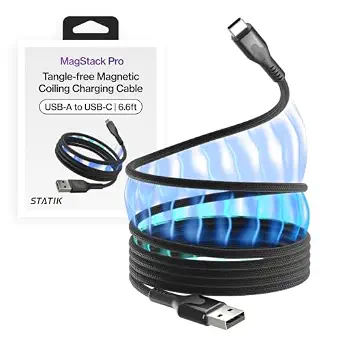 | Best for Travel Organization | Connector type: USB-A to USB-C | Maximum power: 27 W | Design: Magnetic coiling cable | VIEW ON AMAZON | See Our Full Breakdown |
| Teslniher 240W Magnetic USB-C Charging Cable, 2-Pack with 6 Tips, 3.3 ft and 5.9 ft |  | Best High-Power Magnetic Set | Connector type: USB Type-C | Maximum power: 240 W | Maximum current: 5 A | VIEW ON AMAZON | See Our Full Breakdown |
| Statik MagStack Pro 100W USB-C to USB-C Magnetic Coiling Charging Cable |  | Best USB-C MagStack Upgrade | Connector type: USB Type-C to USB Type-C | Maximum wattage: 100 W | Maximum current: 5 A | VIEW ON AMAZON | See Our Full Breakdown |
| Ankndo 5-in-1 Magnetic Charging Cable, 4-Pack |  | Best for Mixed-Device Households | Cable count: 4 | Cable lengths: 2 × 3 ft, 6 ft, and 10 ft | Connector types: USB-A, USB-C, Lightning, and Micro-USB | VIEW ON AMAZON | See Our Full Breakdown |
| Aripps USB-C Magnetic Charging Cable, 3-Pack |  | Best Multi-Cable USB-C Set | Cable count: 3 | Cable lengths: 3.3 ft and 2 × 6.6 ft | Maximum charging power: Up to 60 W | VIEW ON AMAZON | See Our Full Breakdown |
| Magtame Magnetic USB-C to USB-C Charging Cable, 240W, 3.3 ft |  | Best for a Self-Winding Desk Cable | Cable type: USB-C to USB-C | Length: 3.3 ft | Maximum power: 240 W | VIEW ON AMAZON | See Our Full Breakdown |
| 240W USB-C to USB-C Magnetic Charging Cable with 2 Detachable Tips, 6 ft |  | Best for High-Speed Data and Video | Length: 6 ft | Connector type: USB-C to USB-C | Maximum charging power: Up to 240 W | VIEW ON AMAZON | See Our Full Breakdown |
| Magtame Magnetic Coiled USB-C to USB-C Cable, 60W, 3.3 ft, Black |  | Best Compact 60W Pick | Length: 3.3 ft | Cable type: USB-C to USB-C | Maximum power: 60 W | VIEW ON AMAZON | See Our Full Breakdown |
| Magtame Magnetic USB-C to USB-C Coiled Cable, 3.3 ft, 60W |  | Best for Compact Setups | Length: 3.3 ft | Connectors: USB-C to USB-C | Maximum power: 60W | VIEW ON AMAZON | See Our Full Breakdown |
| Renmou 240W USB-C to USB-C Braided Cable, 6 ft |  | Best for High-Power Charging | Length: 6 feet | Connectors: USB-C to USB-C, male-to-male | Maximum power: 240W | VIEW ON AMAZON | See Our Full Breakdown |
| Magtame Magnetic Coiled USB-C to USB-C Cable, 60W, 3.3 ft |  | Best for Durability Details | Length: 3.3 feet | Connectors: USB-C to USB-C, male-to-male | Maximum charging power: 60W (20V/3A) | VIEW ON AMAZON | See Our Full Breakdown |
| magnetic usbc cable | Data transfer rate | Maximum voltage | Maximum current | Maximum power |
|---|---|---|---|---|
| Statik MagStack USB-A to USB-C | 480 megabytes per second (as listed) | 5 V DC | — | — |
| ZBF 100W Magnetic USB-C Chargi | 480 Mbps | 20 V | 5 A | — |
| Statik MagStack USB-A to USB-C | — | — | — | 27 W |
| Teslniher 240W Magnetic USB-C | 480 Mbps | 240 V (as listed) | 5 A | 240 W |
| Statik MagStack Pro 100W USB-C | 480 megabytes per second (as listed) | 20 V | 5 A | — |
| Ankndo 5-in-1 Magnetic Chargin | Up to 480 Mbps | 5 V | 2.4 A | 10 W |
| Aripps USB-C Magnetic Charging | — | — | — | — |
| Magtame Magnetic USB-C to USB- | Up to 480 Mbps | 48 V | 5 A | 240 W |
| 240W USB-C to USB-C Magnetic C | Up to 40 Gbps | 48 V | 5 A | — |
| Magtame Magnetic Coiled USB-C | Up to 480 Mbps | 20 V | 3 A | 60 W |
| Magtame Magnetic USB-C to USB- | 480 Mbps | 20V | 3A | 60W |
| Renmou 240W USB-C to USB-C Bra | — | — | — | 240W |
| Magtame Magnetic Coiled USB-C | 480 Mbps | — | — | — |
More Details on Our Top Picks
Statik MagStack USB-A to USB-C Magnetic Charging Cable, 27W
The MagStack’s adjustable magnetic coil makes it a practical pick for people who want to use only the cable length they need and keep the rest tidy. It supports charging and data transfer, so it can handle everyday phone or tablet connections as well as file transfers. Compared with the Statik MagStack Pro 100W, this version uses USB-A and is limited to 27W, making it a better match for existing USB-A chargers than for newer high-power USB-C setups. The nylon braid is designed for regular handling, though the listed 5 V maximum and USB-A connector limit its charging flexibility. Choose it for an organized, familiar setup; skip it if your charger and devices call for USB-C on both ends.
Pros:- Magnetic coil helps keep unused cable length organized
- Adjustable length suits different desk and travel setups
- Supports charging and data transfer
- Nylon-braided construction is designed for everyday durability
Cons:- USB-A connector may not fit USB-C-only chargers
- 27W rating and listed 5 V maximum limit charging flexibility
Best for: Phone and tablet owners who use USB-A chargers and want a cable they can shorten for a desk or travel bag
Not ideal for: Laptop users or anyone whose charger requires a USB-C-to-USB-C cable or higher listed power capacity
- Connector type:USB-A to USB-C
- Cable design:Magnetic coiling charging cable
- Maximum wattage:27 W
- Maximum voltage:5 V DC
- Data transfer rate:480 megabytes per second (as listed)
- Material:Nylon braided with magnetic material
- Color:Black
- Compatible devices:USB-C-compatible phones, tablets, and computers
Our verdict“Pick this MagStack for adjustable, tidy charging from a USB-A source; choose the MagStack Pro for USB-C charging and a higher wattage rating.”
ZBF 100W Magnetic USB-C Charging Cable, 3-Pack
The ZBF set is the lineup’s practical choice for buyers who want three cables and two magnetic tip types in one bundle. With up to 100W charging and 5A current support, it has a higher stated ceiling than the 27W Statik MagStack USB-A to USB-C, making it more suitable for compatible USB-C charging setups. Its 480 Mbps data rate is for routine transfers rather than high-speed storage work, and the magnetic connectors only work with ZBF’s 5A magnetic data cables. That brand-specific compatibility narrows future reuse, even as the included USB-C and iProduct tips cover more device connections. The braid, LED indicator, and built-in E-mark chip add practical details, but actual charging performance still depends on the device and charger.
Pros:- Three cables cover multiple charging locations
- Includes USB-C and iProduct magnetic tip types
- Supports up to 100W and 5A with compatible equipment
- LED indicator and built-in E-mark chip are included
Cons:- Magnetic connectors are limited to ZBF 5A magnetic data cables
- 480 Mbps data transfer is modest for large file transfers
- Charging speed depends on the connected device and charger
Best for: Households or desk users who want several magnetic charging leads for compatible USB-C and iProduct devices
Not ideal for: Buyers seeking a universal magnetic tip system or faster-than-480-Mbps data transfers
- Connector type:USB Type-C
- Cable lengths:4 ft, 6.6 ft, and 6.6 ft
- Maximum charging power:Up to 100 W
- Maximum current:5 A
- Maximum voltage:20 V
- Data transfer rate:480 Mbps
- Compatible tip types:USB-C and iProduct
- Quantity:3 cables
- Additional features:Magnetic connection, LED indicator, built-in E-mark chip
Our verdict“Choose the ZBF three-pack if you need several magnetic cables and can stay within its compatible tip system.”
Statik MagStack USB-A to USB-C Magnetic Coiling Charging Cable, 27W
Like the other 27W MagStack, this cable pairs a self-organizing coil with USB-A-to-USB-C charging. Its stated reinforcement against up to 30 kg of pulling force makes the durability claim more specific than the available description for the Statik MagStack 27W sibling. That may suit a bag or shared charging area where cables are handled roughly, while the adjustable coil helps prevent loose cord from bunching up. The tradeoff is a USB-A power requirement and no listed cable length, which makes it harder to judge reach before choosing it. At 27W, it also sits well below the 100W Statik MagStack Pro for compatible USB-C laptop charging. It is a tidy travel-oriented option for USB-A setups, not a high-power all-purpose lead.
Pros:- Magnetic coiling helps keep the cable from tangling
- Adjustable length lets users limit excess cord
- Nylon braid is designed for repeated daily handling
- Rated to withstand up to 30 kg of pulling force
Cons:- Requires a USB-A power source
- Cable length is not specified
- 27W maximum is below the 100W MagStack Pro rating
Best for: Travelers using USB-A chargers who want a magnetic coil and a stated pull-strength rating
Not ideal for: USB-C-only charger owners or buyers who need a specified cable length and higher-power charging
- Connector type:USB-A to USB-C
- Maximum power:27 W
- Design:Magnetic coiling cable
- Material:Nylon braided
- Pulling force:Up to 30 kg
- Cable length:Not specified
Our verdict“This MagStack suits travelers who value a tidy USB-A cable and pull-strength claim over USB-C charging or a defined length.”
Teslniher 240W Magnetic USB-C Charging Cable, 2-Pack with 6 Tips, 3.3 ft and 5.9 ft
The Teslniher set has the highest stated charging capacity in this batch: up to 240W and 5A, alongside two cable lengths and six included tips. For compatible high-power USB-C equipment, that gives it more headroom than the 100W Statik MagStack Pro. The tradeoff is that high wattage does not mean fast data: its 480 Mbps rate is suited to ordinary transfers, not demanding storage use. Buyers also need to attach magnetic tips to their devices separately, so setup involves more small parts than the MagStack’s coiling design. Nylon braid and an abrasion-resistant description support frequent handling, but compatibility and charging speed still depend on the device and charger. This is the pick for a flexible, high-power tip system, provided its magnetic connection suits your equipment.
Pros:- Supports up to 240W and 5A as specified
- Includes two cable lengths and six magnetic tips
- Nylon-braided cable is described as abrasion resistant
- Supports charging and 480 Mbps data transfer
Cons:- Magnetic tips must be attached to devices separately
- Data transfer is limited to 480 Mbps
- Charging capacity depends on compatible devices and chargers
Best for: Owners of compatible high-power USB-C laptops and devices who want two cable lengths and spare magnetic tips
Not ideal for: Buyers prioritizing fast data transfer, a simple tip-free setup, or guaranteed compatibility with every USB-C device
- Connector type:USB Type-C
- Maximum power:240 W
- Maximum current:5 A
- Maximum voltage:240 V (as listed)
- Data transfer rate:480 Mbps
- Cable lengths:3.3 ft and 5.9 ft
- Quantity:2 cables
- Included tips:6
- Cable material:Nylon braided
Our verdict“Choose Teslniher for the batch’s highest stated power capacity and included tips if you accept separate tip setup and modest data speed.”
Statik MagStack Pro 100W USB-C to USB-C Magnetic Coiling Charging Cable
The MagStack Pro keeps the range’s adjustable magnetic coil but moves to USB-C on both ends and raises the stated capacity to 100W. That makes it the more capable desk cable than either 27W USB-A MagStack: compatible laptops and phones can use a USB-C charger without the older connector bottleneck. The cable also supports data transfer, though its listed 480 megabytes per second is modest for users moving large files. Its nylon braid and magnetic material throughout favor neat indoor charging, while the indoor-use listing makes it a less natural choice for outdoor setups. Compared with the 240W Teslniher set, the Pro offers a simpler coiling format but less maximum power and no included multi-tip kit. Pick it for tidy USB-C charging rather than maximum wattage.
Pros:- USB-C-to-USB-C connection suits compatible modern chargers
- Supports up to 100W and 5A
- Magnetic coil helps manage excess cable length
- Supports charging and data transfer
Cons:- Listed for indoor use
- Lower stated power capacity than the 240W Teslniher set
- 480 megabytes per second data rate may not suit large file transfers
Best for: USB-C laptop and phone owners who want a single adjustable magnetic cable for an indoor desk
Not ideal for: Users needing outdoor-rated use, more than 100W charging, or magnetic tips for several connector types
- Connector type:USB Type-C to USB Type-C
- Maximum wattage:100 W
- Maximum current:5 A
- Maximum voltage:20 V
- Data transfer rate:480 megabytes per second (as listed)
- Number of pins:24
- Material:Nylon braided with magnetic material throughout
- Color:Black
- Usage:Indoor charging and data transfer
Our verdict“Choose the MagStack Pro for adjustable cable management with USB-C charging, and look to the Teslniher set if your compatible setup needs more stated power.”
Ankndo 5-in-1 Magnetic Charging Cable, 4-Pack
Four cables and tips for Lightning, USB-C, and Micro-USB devices make the Ankndo set the most flexible pick here for households with older and newer gear. Its rotating and bending connectors can help route a cable around a nightstand or hold a phone at a more convenient angle. Compared with the Aripps USB-C Magnetic Charging Cable, it serves more connector types, but its 10W ceiling is far below Aripps’ 60W support. Charging is capped at 2.4A, and data tops out at 480 Mbps, so this is better for everyday charging and basic syncing than for powering laptops or moving large files. I’d choose it when broad device compatibility matters more than speed; buyers with only USB-C devices can get a more focused, higher-power option elsewhere in the roundup.
Pros:- Includes magnetic tips for Lightning, USB-C, and Micro-USB devices
- Four cables in several lengths suit different charging spots
- Rotating tips and bendable connectors allow flexible positioning
- Supports basic data syncing up to 480 Mbps
Cons:- 10W maximum output is slow compared with the 60W Aripps cable
- 480 Mbps data rate is unsuitable for high-speed file transfers
Best for: Households charging a mix of Lightning, USB-C, and Micro-USB phones or accessories from USB-A or USB-C sources
Not ideal for: Laptop owners and anyone who needs fast charging, since output is limited to 10W
- Cable count:4
- Cable lengths:2 × 3 ft, 6 ft, and 10 ft
- Connector types:USB-A, USB-C, Lightning, and Micro-USB
- Maximum current:2.4 A
- Maximum voltage:5 V
- Maximum power:10 W
- Data transfer rate:Up to 480 Mbps
- Connector movement:360° tip rotation and 180° connector bend
Our verdict“Choose the Ankndo set if one magnetic cable kit needs to serve several device connector types and charging speed is secondary.”
Aripps USB-C Magnetic Charging Cable, 3-Pack
The Aripps set balances three cable lengths and USB-C charging up to 60W, making it a practical step up from low-power magnetic kits such as the Ankndo 5-in-1. Its USB-C-to-USB-C connection is the one to use for laptop charging with a suitable power adapter; the USB-A-to-USB-C connection is capped at 3A and is not a laptop-charging route. The magnetic USB-C tips make attachment convenient, though they are 9-pin specific and will not fit 1-, 5-, or 7-point magnetic cable systems. Data tops out at USB 2.0 speeds, and there is no video output, so this set suits charging and routine syncing rather than docking or display setups. Magnetic contacts can collect dust or metal particles, which means they need occasional cleaning.
Pros:- Three cables cover short and longer charging setups
- USB-C-to-USB-C supports charging up to 60W
- USB-A-to-USB-C supports charging up to 3A
- Magnetic connection allows one-handed attachment
Cons:- USB-A-to-USB-C cannot charge laptops
- No video output and data is limited to 480 Mbps
- Magnetic tips are incompatible with 1-, 5-, and 7-point systems and need cleaning
Best for: USB-C households that want multiple cable lengths for phones, tablets, and compatible laptops
Not ideal for: People who need USB-C video output, faster-than-USB-2.0 data, or compatibility with other magnetic tip standards
- Cable count:3
- Cable lengths:3.3 ft and 2 × 6.6 ft
- Maximum charging power:Up to 60 W
- USB-A-to-USB-C current:Up to 3 A
- Data transfer speed:Up to 480 Mbps (USB 2.0)
- Magnetic tip compatibility:9-pin
- Video output:Not supported
- Laptop charging:USB-C-to-USB-C required with an adapter above 45 W
Our verdict“Pick Aripps for a flexible set of USB-C charging cables when 60W is enough and display output is not needed.”
Magtame Magnetic USB-C to USB-C Charging Cable, 240W, 3.3 ft
Magnetic self-winding storage is the main reason to choose this Magtame: the cable coils together to reduce loose loops on a desk or in a bag. Its 3.3-foot USB-C-to-USB-C design supports up to 240W and 5A, which gives it a much higher stated charging ceiling than the 60W Magtame Magnetic Coiled USB-C to USB-C Cable. That capacity is useful only with a compatible charger and device, while the data rate remains 480 Mbps, far below the 40Gbps claim on the detachable-tip 240W cable in this roundup. It also does not support video output. I’d favor this one when tidy storage and high-power charging take priority over data speed or display connections; the short length and single-cable package make it less adaptable for multi-device households.
Pros:- Magnetic self-winding design helps keep the cable organized
- Supports charging up to 240W and 5A with compatible equipment
- Braided construction and E-marker chip are specified
- Works with USB-C phones, tablets, and laptops
Cons:- Data transfer is limited to 480 Mbps despite the high charging capacity
- Does not support video output
- A 3.3-foot cable may not reach distant outlets or devices
Best for: USB-C laptop and phone owners who want one high-power cable that coils neatly for a desk or bag
Not ideal for: Users needing a longer reach, video output, high-speed data, or a multi-cable kit
- Cable type:USB-C to USB-C
- Length:3.3 ft
- Maximum power:240 W
- Maximum current:5 A
- Maximum voltage:48 V
- Data transfer rate:Up to 480 Mbps
- Construction:Braided, magnetic self-winding
- Video output:Not supported
- Warranty:Lifetime
Our verdict“Choose this Magtame if a short, tidy cable with a high charging ceiling matters more than display support or fast data.”
240W USB-C to USB-C Magnetic Charging Cable with 2 Detachable Tips, 6 ft
This is the most capable choice in the batch for more than charging: it claims up to 40Gbps data transfer and 8K video output, alongside charging up to 240W. That makes it a different proposition from the Magtame 240W self-winding cable, which reaches the same stated charging power but supports only 480 Mbps and no video. The six-foot length gives more reach for a laptop, monitor, or dock, and the included two magnetic tips and removal tool make it possible to leave tips attached to compatible devices. Those headline data, video, and charging limits depend on the connected devices, ports, and charger, and the magnetic tips may need to be removed for some setups. Choose it for a capable desk connection; skip it if you only need simple charging and syncing.
Pros:- Claims up to 240W charging with compatible devices and charger
- Supports up to 40Gbps data transfer
- Supports up to 8K video output with compatible equipment
- Includes two detachable magnetic tips, an organizer, and a removal tool
Cons:- Performance depends on connected devices, ports, and power adapter
- Magnetic tips may need removal for some devices or setups
Best for: USB-C laptop and monitor users who want one cable for charging, high-speed data, and compatible video connections
Not ideal for: Buyers seeking a basic charging cable, or those whose devices and ports cannot use its claimed data and video capabilities
- Length:6 ft
- Connector type:USB-C to USB-C
- Maximum charging power:Up to 240 W
- Maximum current:5 A
- Maximum voltage:48 V
- Data transfer rate:Up to 40 Gbps
- Video output:Up to 8K
- Included components:Cable, 2 magnetic tips, organizer strap, and tip removal tool
Our verdict“Choose this cable for a compatible USB-C setup that can make use of its high-speed data and video claims as well as charging.”
Magtame Magnetic Coiled USB-C to USB-C Cable, 60W, 3.3 ft, Black
Flat, retractable coiling gives this Magtame a tidy footprint for a desk or travel pouch, while its 60W ceiling covers many phone, tablet, and USB-C laptop charging setups. Compared with the self-winding Magtame 240W cable, this model trades away power headroom but keeps the same 480 Mbps data ceiling in a compact 3.3-foot format. It also lists durability testing for 20,000 bends and plugs, a useful signal for a cable that may be repeatedly packed and repositioned. That rating does not change its reach: the short length may be awkward beside a sofa or when an outlet is far from a desk. It also lacks video output, so this is best treated as a compact charging and basic-sync cable, not a display link or fast data connection.
Pros:- Flat coiled design retracts for compact storage
- Supports charging up to 60W
- Braided cable is rated for 20,000 bending and plugging tests
- Suitable for basic USB-C data transfer up to 480 Mbps
Cons:- 3.3-foot length can limit placement flexibility
- 60W maximum is below the 240W Magtame self-winding model
- No video output and data is limited to 480 Mbps
Best for: People with USB-C phones, tablets, or moderate-power laptops who want a compact cable for a desk or travel pouch
Not ideal for: Users with high-power laptops, distant outlets, or a need for video output and faster data transfer
- Length:3.3 ft
- Cable type:USB-C to USB-C
- Maximum power:60 W
- Maximum current:3 A
- Maximum voltage:20 V
- Data transfer rate:Up to 480 Mbps
- Design and material:Magnetic, flat, coiled, retractable; nylon braiding
- Durability tests:20,000 bending tests and 20,000 plugging tests
Our verdict“Pick this compact Magtame for everyday USB-C charging in a tidy, short cable when 60W and basic data are sufficient.”
Magtame Magnetic USB-C to USB-C Coiled Cable, 3.3 ft, 60W
Magnetic coiling gives this short cable a clear advantage when desk drawers or car consoles tend to become a knot of cords. At 3.3 feet, it suits a nearby charger or laptop port, and the braided nylon adds a tougher outer layer than a basic smooth cable. Its 60W ceiling is enough for many phones, tablets, and some laptops, though it cannot match the 240W capacity of the Renmou 240W USB-C to USB-C Braided Cable. The tradeoff is reach: this cable may fall short when an outlet is under a desk or across a bedside table. Data transfer tops out at 480 Mbps, so it is a practical charging and everyday sync option, not a pick for faster transfers or high-power devices.
Pros:- Magnetic coiling helps keep the cable compact between uses
- 60W charging supports many phones, tablets, and lower-power laptops
- Braided nylon exterior is described as durable
- USB-C connectors work with a range of compatible devices
Cons:- 3.3-foot length limits placement flexibility
- 480 Mbps data transfer is modest compared with faster data cables
- Actual charging speed depends on the device and charger
Best for: Drivers and desk users who charge a USB-C device close to the power source and want a cable that coils neatly for storage
Not ideal for: Laptop owners needing more than 60W, or anyone who needs a long reach or faster data transfers
- Length:3.3 ft
- Connectors:USB-C to USB-C
- Maximum power:60W
- Maximum current:3A
- Maximum voltage:20V
- Data transfer rate:480 Mbps
- Cable material:Braided nylon
- Feature:Magnetic coiling
Our verdict“Choose it for a nearby USB-C charging spot where tidy storage matters more than extra reach or high-wattage support.”
Renmou 240W USB-C to USB-C Braided Cable, 6 ft
The 240W rating makes this the lineup’s power-focused alternative for compatible USB-C laptops and other demanding devices. Its 6-foot length also gives more room to work than the 3.3-foot Magtame magnetic cables, but it lacks their magnetic coil, so it will not gather itself for compact storage. An E-Marker 3.0 chip and stated overheating and surge safeguards accompany support for PD 3.1 EPR and QC 4.0; these features help it serve newer charging setups, provided the charger and device support the same standards. The braided nylon is rated for over 40,000 bends, and a 12-month warranty is included. This is a conventional USB-C cable with substantial power capacity, not a magnetic cable, so buyers focused on tidy coiling should choose a magnetic option instead.
Pros:- Supports charging up to 240W with compatible equipment
- Six-foot length offers more placement flexibility than the 3.3-foot magnetic cables
- Braided nylon is rated for over 40,000 bends
- E-Marker 3.0 chip and stated overheating and surge safeguards
Cons:- No magnetic coil or retractable storage feature
- USB-C connectors only, with no USB-A option
- The 240W capacity depends on compatible chargers and devices
Best for: USB-C laptop owners with compatible high-output chargers who need a longer cable and substantial power capacity
Not ideal for: Buyers specifically seeking a magnetic or self-coiling cable, or those who need a USB-A connector
- Length:6 feet
- Connectors:USB-C to USB-C, male-to-male
- Maximum power:240W
- Protocols:PD 3.1 EPR, QC 4.0
- Chip:E-Marker 3.0
- Material:Braided nylon
- Warranty:12 months
Our verdict“Pick it for high-power USB-C charging and extra reach if magnetic cable organization is not a requirement.”
Magtame Magnetic Coiled USB-C to USB-C Cable, 60W, 3.3 ft
This Magtame combines magnetic self-coiling with a stated bend rating of more than 20,000 cycles, making it a considered pick for buyers who want both tidy storage and a published durability detail. It shares the same 60W limit and 480 Mbps transfer rate as the other 3.3-foot Magtame cable, so the choice between them comes down to which product details matter: this listing specifies tensile force up to 66 lb, while the other describes a braided build without those figures. Neither has the higher charging ceiling of the Renmou 240W cable, and Renmou also offers more length, though it does not coil magnetically. At 3.3 feet, this one is best near a charger; the modest data rate and limited reach make it less suited to large file transfers or distant outlets.
Pros:- Magnetic self-coiling design helps simplify storage
- Supports up to 60W charging and 480 Mbps data transfer
- Braided nylon is tested for more than 20,000 bends
- Specifies tensile force up to 66 lb
Cons:- 3.3-foot length may not reach distant outlets
- 60W maximum is below the Renmou cable’s stated 240W capacity
- 480 Mbps transfer rate is limited for large file transfers
Best for: People who want a compact magnetic USB-C cable and value stated bend and tensile ratings when comparing options
Not ideal for: Users charging high-power laptops, needing more than 3.3 feet of reach, or moving large files frequently
- Length:3.3 feet
- Connectors:USB-C to USB-C, male-to-male
- Maximum charging power:60W (20V/3A)
- Data transfer rate:480 Mbps
- Outer material:Braided nylon
- Bend testing:20,000+ bends
- Tensile force:Up to 66 lb (30 kg)
- Color:Black
Our verdict“Choose this Magtame for compact charging with published durability figures, provided its short length and 60W ceiling fit your setup.”

How We Picked
I compared these options by the details that shape everyday use: stated charging capacity, USB connector type, cable length or coiled format, included adapters, and whether the cable is actually magnetic. A higher wattage claim can matter for devices that support faster charging, but it does not guarantee that a device will charge at that rate; the charger and device also set limits. I also weighed how much flexibility a bundle provides against the extra connectors a buyer may need to keep track of.
The ranking favors products that combine a clearly described magnetic design with useful capacity and a practical form factor. The Statik MagStack Pro leads because its 100W USB-C to USB-C specification and coiled build offer a versatile balance; 240W cables rank well for buyers with compatible high-power devices, but their value depends on device support and connector details. Multi-packs and tip bundles are ranked for versatility, while 27W USB-A models suit more modest charging needs. The Renmou braided cable ranks last for this particular roundup because its listed design is not magnetic.
Factors to Consider When Choosing Magnetic Usbc Cables
I’d choose a magnetic cable only after checking that its connector style and power path match the device, charger, and way I plan to use it. These broader checks can prevent a high wattage label or a large adapter bundle from steering me toward the wrong cable.
Match the cable to your charging setup
Start with the ports on both ends of the cable and the connector your device accepts. USB-A to USB-C cables, such as the 27W Statik options, need a USB-A charger, while USB-C to USB-C models pair with a USB-C power source. Check your device’s charging requirements and charger output together, since the cable’s listed capacity alone does not determine charging speed. A cable rated above your device’s needs can still be useful for another device, but it may add little for the one you own now. Avoid assuming that every cable advertised as USB-C supports the same power level or features. If you plan to move between devices, a USB-C to USB-C cable may cover more of your setup, provided your charger has the matching port.
Treat wattage as a ceiling, not a promise
Wattage labels such as 60W, 100W, and 240W describe stated cable capacity, not the speed every connected device will reach. Charging also depends on the charger, the device, and whether they support compatible charging modes. Paying for a high-capacity cable makes more sense when you already use equipment that can benefit from it or want headroom for a future device. For phones and other lower-power devices, connector fit and cable handling may matter more than the largest number on the package. Check product details for charging protocol support when fast charging is a priority. If the listing does not explain protocol compatibility, do not infer it from wattage alone.
Check what the magnetic connection actually includes
Magnetic cables can use detachable tips, fixed magnetic ends, or multi-tip bundles, and these designs change how many devices one cable can serve. A set like Teslniher’s includes six tips, while other cables in this lineup specify two detachable tips or no tip bundle in the product name. More tips can reduce the need to swap cables, but each connector is another small piece to keep track of. Confirm that the included tip matches your device’s port and that the listing describes how the tip attaches. Do not assume that a tip from one magnetic cable system will fit another. If you only charge one device, a simpler cable can mean fewer pieces and a clearer setup.
Choose straight or coiled based on where you charge
A coiled cable can stay compact on a desk or in a car, while a straight cable is often easier to route across a room or around furniture. The MagStack and Magtame coiled models illustrate why shape is a distinct choice from charging capacity. Coiled cables have a natural resting length, so compare that usable reach with the distance between the charger and device rather than relying only on the listed length. A cable that stretches to reach may pull on the connector or feel awkward when used at full extension. Straight cables take more room to store, but they can be simpler when you need a consistent long reach. Pick for the charging location you use most often.
Decide whether a bundle saves effort or adds clutter
Multi-packs can make sense when you want cables in several places, such as a desk, travel bag, and bedside table. Bundles like ZBF’s and Aripps’s provide several cables, while Ankndo and Teslniher emphasize multiple connector tips. Before choosing a bundle, check that its cable types, lengths, and tips match the devices you actually charge. Unneeded adapters can end up stored away, and a larger set does not guarantee better compatibility. A single cable with the right connector may be easier to manage if you have one charging spot. For shared households, label or store magnetic tips with their cable so small parts do not get mixed up.
Think through data and device compatibility
A cable described for charging should not automatically be treated as a data cable. If you need file transfers, phone-to-computer connections, or a feature such as video output, look for those capabilities stated explicitly in the product details. Magnetic tips add a connector between the cable and device, so confirm the listing’s compatibility information rather than assuming every port or feature will work through it. The same check matters for cases that partially cover a port or leave too little room for an inserted tip. When compatibility details are unclear, a conventional cable with a direct connector may be the safer choice for data tasks. Keep a direct cable available for functions the magnetic model does not explicitly support.
Frequently Asked Questions
Will a 240W magnetic USB-C cable charge my phone faster than a 60W cable?
Not by wattage alone. Your phone, charger, and cable all need to support compatible charging modes, and the phone sets the power it can accept. A 240W cable can provide headroom for higher-power devices, but it does not make a lower-power phone draw more energy. Compare the charging specifications for your phone and charger before paying extra for capacity you may not use. If you want one cable for several devices, the higher rating may still be useful for a compatible laptop or tablet.
Can I leave a magnetic tip in my device’s USB-C port?
That depends on the specific tip and device, so check the product instructions before leaving it inserted. A tip protruding from the port can affect how a case fits or catch on objects in a pocket or bag. It may also make the device incompatible with some docks or accessories. If you often connect the device to a computer or other USB-C accessory, removing the tip before those connections may be necessary. Keep spare tips somewhere secure so they do not get lost when removed.
Are magnetic USB-C cables suitable for transferring files?
Only if the listing explicitly states that the cable supports data transfer and identifies its capabilities. Charging-focused product names and power ratings do not confirm data support. The magnetic tip also adds a connection point, so check whether the manufacturer describes compatibility with the transfer task you need. For important work such as backing up a phone or connecting a peripheral, a direct USB-C cable with stated data support is a more dependable choice. You can keep a magnetic cable for routine charging if its listed use fits that job.
Should I choose a multi-tip magnetic cable or one cable for each device?
A multi-tip set can cut down on the number of full cables you carry, especially if your devices use different connector types and the included tips match them. It also means keeping track of small detachable parts and checking their fit before relying on them. Separate cables are easier to identify and can be more convenient when several devices charge at once. Consider how many compatible ports you have and whether the bundle supplies enough cables as well as tips. For a single device or a fixed charging spot, one matching cable is often simpler to manage.
Does a coiled magnetic cable work well for travel?
It can pack neatly and resist loose tangles, which may suit a travel kit or compact desk setup. The tradeoff is that its usable reach and stretch may be less convenient than a straight cable when outlets are far from a seat or bedside. Check the cable’s listed length and think about how much slack you need in the places you travel. A straight cable can be easier to route around unfamiliar rooms, while a coil can be tidier when the charger is close by. If you travel with devices that need different ports, verify the magnetic tips and charger compatibility before packing.
Conclusion
For most buyers, I’d start with the Statik MagStack Pro 100W as the best overall balance of stated capacity and coiled convenience. The ZBF 100W 3-Pack is my best value pick for people who need several cables, while the Magtame 240W USB-C to USB-C is the best premium-style choice for buyers whose devices can use its higher stated rating. Beginners may find the Statik MagStack USB-A to USB-C 27W easier to pair with a USB-A charger and modest charging needs. For a broad mix of devices, I’d look at the Teslniher 240W set with its included tips and two lengths; if magnetic convenience is not a requirement, the Renmou braided cable is the conventional alternative in this lineup.