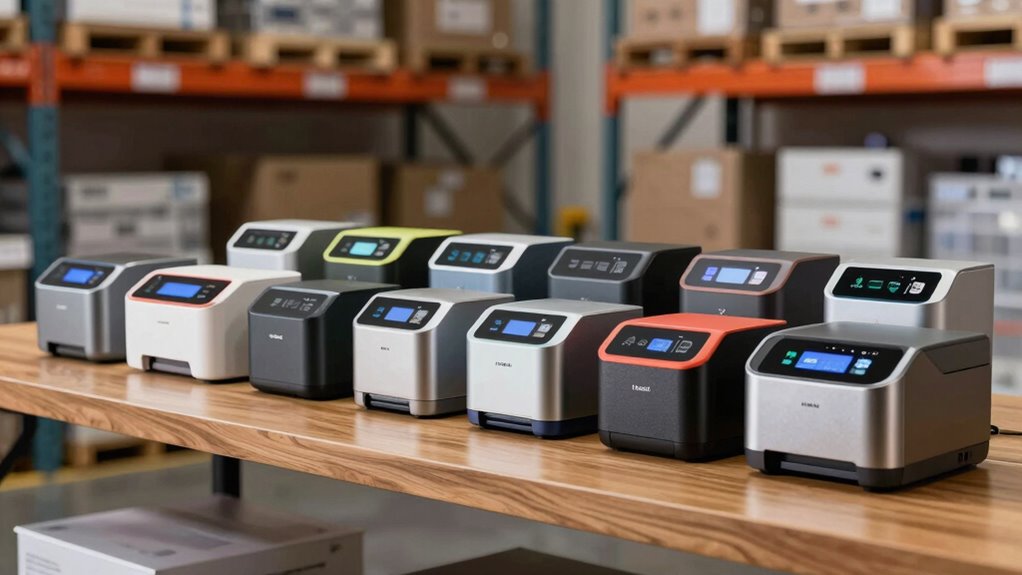
When choosing label printers for inventory, the key considerations include print speed, label versatility, connectivity options, and ease of use. The Best Overall pick, the Rollo USB Shipping Label Printer, stands out for its reliability and compatibility with most inventory systems. The iDPRT SP310 offers a high-speed option perfect for busy warehouses, while the MUNBYN Bluetooth Thermal Label Printer excels in wireless convenience. However, tradeoffs such as upfront cost, setup complexity, and label size limitations can influence your decision. Continue reading for a detailed breakdown of each model’s strengths and weaknesses.

Get business pricing on office and shipping supplies
- Business-only prices and quantity discounts
- Tax-exempt purchasing
- Multiple users, one account, clear invoices
Key Takeaways
- The top-performing models combine high print speeds with broad label size support to handle inventory needs efficiently.
- Wireless options like Bluetooth and Wi-Fi add convenience but may come with higher costs or setup complexity.
- Compatibility with different operating systems and inventory management software is essential for seamless integration.
- Durability and build quality matter for high-volume environments, with industrial-grade printers offering longer lifespan.
- Choosing the right label width and type can significantly impact workflow, especially for large or small items.


| label printers for inventory | Connectivity | Print Speed |
|---|---|---|
| Thermal Shipping Label Printer | Bluetooth, USB | 150mm/s (72 labels per minute) |
| iDPRT iD880 Industrial Thermal | USB, Ethernet | 6 inches per second |
| Bluetooth Shipping Label Print | Bluetooth, USB | 72 labels/min |
| Label Maker Machine with 3 Tap | Bluetooth, USB | 20mm/s |
| CLABEL Desktop Thermal Barcode | USB, Bluetooth | — |
| Phomemo M220 Label Maker | — | — |
| Rollo USB Shipping Label Print | — | — |
| iDPRT Label Maker Thermal Barc | — | 140pcs/min |
| iDPRT SP310 Thermal Label Prin | USB | 80 labels per minute |
| MUNBYN Bluetooth Thermal Label | Bluetooth | — |
| Rollo Direct Thermal 2×1 Barco | — | — |
More Details on Our Top Picks
Thermal Shipping Label Printer 4×6 Bluetooth Label Maker for Small Business
This compact, versatile printer excels in producing crisp, high-resolution 4×6 shipping labels without ink, making it a reliable choice for small businesses. Its Bluetooth connectivity offers convenient mobile printing, and compatibility with major platforms like Amazon and USPS streamlines workflow. Compared with the iDPRT iD880, it prioritizes simplicity over industrial-scale speed, trading off higher volume capacity and advanced features. It’s ideal for small operations that need quick, reliable label printing without fuss. However, it only prints in black and white, which may be limiting for some branding needs, and its reliance solely on thermal labels means ongoing label costs can add up.
Pros:- High-quality, crisp thermal printing with no ink or toner needed
- Wireless Bluetooth connectivity for flexible mobile printing
- Compatible with major shipping platforms like Amazon, Shopify, USPS, UPS
- Compact and durable design suitable for small business use
Cons:- Prints only in black and white, limiting visual customization
- Requires app for full customization, which has a learning curve
- Limited to thermal labels, no color printing options
Best for: Small business owners who need an easy-to-use, space-saving shipping label printer with wireless capabilities
Not ideal for: Large warehouses requiring high-volume, multi-color label printing or industrial-grade durability
- Resolution:203 DPI
- Print Speed:150mm/s (72 labels per minute)
- Connectivity:Bluetooth, USB
- Label Size Support:1.57″ to 4.3″ wide, standard 4″×6″
- Included:Power cord, USB cable, 25 sheets of 4″×6″ thermal labels
Our verdict“This model makes the most sense for small businesses prioritizing cost-effective, reliable shipping label printing with minimal fuss.”
iDPRT iD880 Industrial Thermal Printer Supports 1.18-4.09 Inch Wide Labels, USB/Ethernet, 203 DPI, High-Speed Barcode and Receipt Printing
The iDPRT iD880 offers a step up in speed and robustness, supporting a wide range of label types including barcodes and receipts at an impressive 6 inches per second. Its high-resolution 203 DPI ensures clear, professional labels, and the inclusion of USB and Ethernet makes it suitable for busy warehouses or retail counters. Compared with the CLABEL CT320D, it supports a broader media width and faster speeds, but lacks Wi-Fi, which could be inconvenient for wireless setups. While it handles high-volume tasks well, its basic feature set means it might fall short for complex industrial environments requiring advanced integration or automation.
Pros:- High-speed printing with crisp 203 DPI resolution
- Supports a wide range of label types including barcodes and receipts
- Quick setup with included accessories and driver options
- Reliable performance in demanding environments
Cons:- Limited to USB and Ethernet, no Wi-Fi connectivity
- Basic feature set may lack advanced industrial features
- Higher initial cost compared to entry-level models
Best for: Retailers, warehouses, or logistics teams needing fast, reliable, and versatile label printing in a professional setting
Not ideal for: Small businesses or home users who prefer Wi-Fi connectivity or minimal setup complexity
- Print Resolution:203 DPI
- Print Speed:6 inches per second
- Supported Media Width:1.18 to 4.09 inches
- Media Core Size:1 inch
- Maximum Roll Diameter:5 inches
- Connectivity:USB, Ethernet
Our verdict“This printer is ideal for high-volume environments seeking fast, reliable label printing with broad media support.”
Bluetooth Shipping Label Printer with Built-in Label Bin | D450BT 4×6 Thermal Label Printer
The D450BT stands out for its space-efficient design, featuring a built-in label bin that reduces clutter and saves room. It offers wireless Bluetooth and USB connectivity, making it easy to set up and operate across various operating systems, including mobile devices. Its support for up to 4×6 labels and fast speed of 72 labels per minute make it suitable for small shipping operations. Compared to the CLABEL CT320D, it is more compact but supports only 4×6 labels, limiting versatility for larger label sizes. Its thermal printing method means ongoing label costs remain, and it’s best suited for smaller volumes or occasional use.
Pros:- Compact, space-saving design with built-in label bin
- Wireless Bluetooth and USB connectivity for flexible setup
- No ink or toner required, reducing ongoing costs
- Fast print speed for quick shipping labels
Cons:- Limited to 4×6 labels, restricting larger or custom sizes
- Requires thermal labels, which may be more costly
- Less suitable for high-volume or industrial environments
Best for: Small businesses or home-based entrepreneurs needing a space-saving, reliable shipping label printer
Not ideal for: Large scale shipping centers or businesses requiring larger labels or color printing
- Dimensions:7.2 x 6.3 x 5.3 inches
- Label Size:up to 4×6 inches
- Print Resolution:203 DPI
- Print Speed:72 labels/min
- Connectivity:Bluetooth, USB
- Compatibility:Android, iOS, Windows, macOS, Linux, ChromeOS
Our verdict“This printer suits small-scale operations needing a compact, wireless solution for shipping labels without sacrificing speed or quality.”
Label Maker Machine with 3 Tapes, Portable Bluetooth Thermal Printer, 2-inch Label Printer with 6000+ Templates
This portable Bluetooth label maker offers extensive customization options, supporting over 6,000 templates, icons, and fonts. Its thermal printing technology means no ink or toner is necessary, and it produces up to 4,200 labels per charge, making it ideal for small businesses, home projects, or educational activities. Compared with the CLABEL CT320D, it is less suited for shipping labels but excels at creating personalized labels for organization or gifting. Its limited support for label sizes and inability to print larger shipping labels make it less versatile for bulk labeling. The need to download an app for mobile printing may introduce some setup time, but it offers a high degree of customization for small-scale tasks.
Pros:- Supports multiple device connectivity via Bluetooth and USB
- No ink or toner needed, reducing costs
- Large library of templates and customization options
- Fast, high-resolution printing
Cons:- Does not support printing of 4×6 shipping labels
- Limited to thermal printing, no color options
- Requires app download and setup for mobile printing
Best for: Small business owners, teachers, or hobbyists needing customizable, portable label printing
Not ideal for: Businesses requiring standard shipping labels or large-scale industrial printing
- Label Widths:1.57”, 1.96”, 3.14”
- Templates:6000+
- Connectivity:Bluetooth, USB
- Resolution:203 DPI
- Print Speed:20mm/s
- Labels per Charge:up to 4200
Our verdict“This pick is perfect for personalized, small-scale label creation where customization and portability matter most.”
CLABEL Desktop Thermal Barcode Label Printer, 2-3 Inch Bluetooth, Direct Thermal Printing
The CLABEL CT320D provides a cost-effective solution for small labeling needs, supporting USB and Bluetooth connections for easy, wireless printing. Its direct thermal technology offers fast, high-quality labels with a resolution of 203 DPI, supporting media widths from 2 to 3 inches. Compared with the iDPRT iD880, it is more affordable and simpler to operate but supports fewer label sizes and lacks higher-speed features. Its small print width makes it suitable for barcode labels, QR codes, and small tags, but it’s not ideal for larger or more complex labels, limiting its versatility. The small included roll is sufficient for light use but may be restrictive for high-volume applications.
Pros:- High-speed, efficient printing performance
- Supports wireless printing via Bluetooth and USB
- Cost-effective with no need for ink or toner
- Supports customizable templates and QR/barcodes
Cons:- Limited to thermal paper, requiring specific supplies
- Small label size may not fit all applications
- Requires compatible app for full functionality
Best for: Small businesses or home users needing affordable, wireless barcode and label printing for small labels
Not ideal for: Large-scale or high-volume labeling requiring wider labels or faster throughput
- Print Technology:Direct Thermal
- Print Resolution:203 DPI
- Print Width:2-3 inches
- Connectivity:USB, Bluetooth
- Included Roll:40x30mm label (1 roll)
Our verdict“This printer offers a simple, budget-friendly option for small labels and barcode printing needs with wireless convenience.”
Phomemo M220 Label Maker, Bluetooth Thermal Printer with 3 Labels, 2200mAh Battery, Compatible with iOS/Android
The Phomemo M220 stands out for its compact size and wireless convenience, making it ideal for small businesses or home users who need quick, on-the-go label creation. Unlike the Rollo or MUNBYN, which excel in high-volume shipping environments, the M220’s main advantage is portability, supported by a long-lasting battery and Bluetooth connectivity. However, its reliance on thermal labels means durability can be a concern, especially for outdoor or long-term storage applications. The app-driven design offers versatility in creating barcodes, QR codes, and decorative labels, but setup and pairing can be cumbersome for less tech-savvy users. This pick makes the most sense for those who prioritize mobility over bulk capacity or rugged durability.
Pros:- Compact and portable design for on-the-go labeling
- No ink or toner needed, reducing ongoing costs
- Supports multiple devices via Bluetooth and USB connectivity
- Includes a versatile app with templates and design tools
Cons:- Limited to thermal labels, which may be less durable over time
- Requires app setup and Bluetooth pairing, which can be slow or tricky
- Battery life can vary significantly depending on usage
Best for: Small business owners or home organizers needing portable, easy-to-use labeling solutions
Not ideal for: High-volume shipping operations or environments requiring highly durable labels, as thermal labels may fade or be less resistant to elements
- Dimensions:11×10×5cm
- Weight:328g
- Battery Capacity:2200mAh
- Label Width Support:0.78″ to 3.14″
- Included Labels:3 starter rolls
Our verdict“This is an excellent choice for users seeking a portable, cost-effective label printer for light-duty organization tasks.”
Rollo USB Shipping Label Printer – Commercial Grade 4×6 Thermal Printer for Small Businesses & Shipping
The Rollo USB Shipping Label Printer is designed for high-volume shipping tasks, making it a standout for e-commerce businesses that need rapid, crisp labels. Compared to the MUNBYN or iDPRT SP310, the Rollo offers faster processing speeds, reaching 150mm/sec, and supports a wide range of label sizes up to 4.1 inches wide. Its reliance on USB limits wireless flexibility, but for dedicated shipping stations, this isn’t a major drawback. The high resolution of 203 DPI ensures clear barcodes and crisp text, but the limited to print-only functions mean it can’t handle barcode scanning or label design directly. This model is best suited for businesses with steady, high-volume shipping demands, not occasional or multi-purpose labeling.
Pros:- High-speed printing at 150mm/sec for quick turnaround
- Supports a wide variety of label sizes and custom labels
- High-resolution printing for clear, scannable barcodes
- Easy setup with Windows and Mac compatibility
Cons:- Limited to print-only functions; no scanning or editing capabilities
- Requires USB connection, lacking wireless options
- Maximum of 30 labels per run, which may slow high-volume workflows
Best for: Small e-commerce or warehouse operations focused on fast, reliable shipping label production
Not ideal for: Users needing wireless connectivity or multi-functionality like barcode scanning or label design, as it’s strictly a printer
- Printer Type:Thermal
- Print Media:Labels
- Maximum Media Size:4.1 inch width
- Print Resolution:203 x 203 DPI
- Maximum Copies Per Run:30
- Power Consumption:50 watts
Our verdict“Ideal for small businesses with steady shipping needs that prioritize speed and clarity over wireless flexibility.”
iDPRT Label Maker Thermal Barcode Printer with Bluetooth & USB, No Bound Consumables, 140pcs/min, Supports 1″-3.15″ Labels
The iDPRT Label Maker excels in flexibility, supporting any thermal paper of compatible size without proprietary consumables, unlike the MUNBYN or Rollo which may tie users to specific supplies. Its impressive speed of 140pcs/min allows quick batch labeling, ideal for small businesses or home projects. However, dependence on thermal paper means durability can be an issue for labels exposed to water or UV light. The app-based interface adds versatility but introduces an extra step for setup, especially for less tech-savvy users. This model suits those who want a budget-friendly, adaptable printing solution without sacrificing speed, but not if they need long-term outdoor durability or complex design features.
Pros:- Eliminates the need for proprietary consumables, reducing ongoing costs
- Fast printing at 140pcs/min for efficient batch work
- Supports a variety of label sizes and customization options
- Bluetooth and USB connectivity for versatile use
Cons:- Limited to thermal printing, so labels are less durable outdoors
- Dependent on app and connectivity for full functionality
- Thermal paper size must be compatible, adding setup considerations
Best for: Small business owners or hobbyists seeking a flexible, cost-efficient thermal label printer
Not ideal for: Users needing weather-resistant labels or requiring advanced design and editing features directly on the device
- Connection:Bluetooth & USB
- Print Speed:140pcs/min
- Supported Label Sizes:1″-3.15″
- Consumables:No Bound Consumables
Our verdict“This printer offers a flexible, economical choice for users who prioritize speed and adaptability in small-scale labeling tasks.”
iDPRT SP310 Thermal Label Printer, Supports 1″-3.35″ Width, Fast 80ppm for Small Business Mailing and Inventory
The iDPRT SP310 offers a solid balance of speed and versatility, supporting labels from 1 to 3.35 inches wide, ideal for inventory and mailing tasks. Its high speed of 80 labels per minute improves efficiency compared to slower models like the M220, but it requires driver installation for each OS, which can slow initial setup. Unlike the MUNBYN or Rollo, it supports multiple operating systems, including Linux and Raspberry Pi, broadening its use case. The need for manual calibration after media changes can be inconvenient, but automatic calibration helps maintain accuracy once properly set. This printer suits small to medium-sized inventory operations that need flexibility across different label sizes and platforms.
Pros:- Supports a wide range of label widths for diverse inventory needs
- High-speed printing enhances workflow efficiency
- Multi-platform compatibility with Windows, macOS, Linux, and Raspberry Pi
- Automatic label calibration maintains print accuracy
Cons:- Requires driver installation and setup on each OS, which can be time-consuming
- Limited to USB connection; no wireless options
- Manual calibration needed after media replacement
Best for: Small to medium-sized businesses managing a variety of inventory labels and mailing needs across multiple OS
Not ideal for: High-volume shipping operations requiring maximum speed or wireless connectivity, as it’s limited to USB and needs calibration
- Label Width Support:1″-3.35″
- Print Speed:80 labels per minute
- Resolution:203 DPI
- Connectivity:USB
- Operating Systems:Windows, macOS, Linux, Raspberry Pi
Our verdict“This model offers a flexible, multi-platform solution for inventory and mailing labels in growing small businesses, despite some setup overhead.”
MUNBYN Bluetooth Thermal Label Printer, Wireless 4×6 Shipping Label Printer for Small Business
The MUNBYN Bluetooth Thermal Label Printer is built for streamlined shipping workflows, offering effortless wireless setup and reliable performance. Its durability, rated for up to 970,000 labels, makes it a long-term investment for busy shipping departments. Compared to the Rollo or iDPRT models, MUNBYN emphasizes quiet operation and high precision, ensuring professional-quality labels with minimal noise. Its Bluetooth connectivity allows flexible placement and reduces clutter, but it’s limited to monochrome labels, which may not suit all branding needs. The absence of a wired option might be a drawback in environments with unstable wireless networks, but for most small business shipping tasks, this printer delivers consistent, high-quality results with minimal fuss.
Pros:- Seamless Bluetooth setup for wireless operation
- Durable with a high estimated label capacity of 970,000 labels
- Quiet operation suitable for shared workspaces
- High print accuracy with professional clarity
Cons:- Limited to monochrome labels, restricting design options
- Requires Bluetooth connection—less suitable if wireless is unstable
- No wired or Ethernet options for backup connectivity
Best for: Small businesses prioritizing wireless shipping label printing with long-term durability and ease of use
Not ideal for: High-volume environments requiring multi-color or complex labels, or in settings where wireless stability is questionable
- Print Width:1.57-4.25 inches
- Connectivity:Bluetooth
- Compatibility:Android, iPhone, Windows, Mac, Chromebook
- Durability:Up to 970,000 labels
Our verdict“This printer is well-suited for small businesses seeking a durable, wireless shipping label solution that minimizes noise and setup complexity.”
Rollo Direct Thermal 2×1 Barcode Labels – Pack of 1,000
This pack of 1,000 high-quality, 2×1 inch thermal labels offers an economical choice for businesses that need to label large inventories or shipments regularly. Compared with the CLABEL Desktop Thermal Barcode Label Printer, which provides a dedicated printing device, this option relies on compatible thermal printers like Rollo or Zebra, making it more flexible but less automated. The labels feature fade-resistant printing and are designed for reliable scanning, crucial for maintaining inventory accuracy. However, since it’s a consumable product, you’ll need compatible thermal printers and roll holders, which could add to your setup costs. For organizations focused on bulk labeling at a low unit cost, this pack ticks the boxes, but it’s less suited for those who prefer integrated printers or smaller batches.
Pros:- Very economical per label when buying in bulk
- High-quality, fade-resistant printing ensures durability
- Compatible with multiple popular thermal printers like Rollo and Zebra
- Large quantity (1,000 labels) reduces frequent repurchasing
Cons:- Requires a compatible roll holder for proper use
- Limited to thermal printing—no flexibility for different label types or finishes
- Dependent on separate printer compatibility and setup
Best for: Large warehouses or e-commerce sellers seeking cost-efficient, bulk labeling supplies.
Not ideal for: Small businesses or individuals who want an all-in-one label printer without separate consumables.
- Size:2 x 1 inches
- Quantity:1,000 labels
- Material:High-quality paper
- Made in:USA
- Compatibility:Rollo, Zebra, Polono, Jadens, beeprt, iDPRT, Munbyn, Nelko
- Printing Method:Thermal
Our verdict“This product suits bulk inventory labeling needs for businesses that already have or plan to acquire compatible thermal printers and prioritize cost efficiency.”

How We Picked
In selecting these label printers for inventory, I focused on performance, usability, durability, and value. Priority was given to models that support a wide range of label sizes and types, ensuring flexibility for various inventory needs. Ease of setup and connectivity options, such as Bluetooth, Ethernet, and USB, were also key factors, as they influence how quickly a business can implement the device. Cost-effectiveness was considered alongside build quality to recommend options that offer long-term reliability without unnecessary expense. The ranking reflects a balance of these criteria, favoring models that suit small to medium-sized businesses while highlighting premium options for larger operations.| label printers for inventory | Connectivity |
|---|---|
| Thermal Shipping Label Printer | Bluetooth, USB |
| iDPRT iD880 Industrial Thermal | USB, Ethernet |
| Bluetooth Shipping Label Print | Bluetooth, USB |
| Label Maker Machine with 3 Tap | Bluetooth, USB |
| CLABEL Desktop Thermal Barcode | USB, Bluetooth |
| Phomemo M220 Label Maker | — |
| Rollo USB Shipping Label Print | — |
| iDPRT Label Maker Thermal Barc | — |
| iDPRT SP310 Thermal Label Prin | USB |
| MUNBYN Bluetooth Thermal Label | Bluetooth |
| Rollo Direct Thermal 2×1 Barco | — |
Factors to Consider When Choosing Label Printers For Inventory
Selecting the right label printer for inventory isn’t just about price or brand—it involves understanding how the device’s features align with your operational needs. Consider how much volume you handle daily, the types of labels required, and your preferred connectivity. A good printer should integrate smoothly with your existing systems and withstand the demands of frequent use. Keep in mind that investing in a slightly more expensive model with higher speed and durability can pay off over time by reducing downtime and maintenance.Print Speed and Volume Capacity
For busy inventory environments, high print speeds reduce bottlenecks, especially when printing large batches. Look for models like the iDPRT SP310, which supports 80 labels per minute, to keep pace with your workflow. However, if your volume is lower, a standard speed printer might suffice, saving costs. Always match the device’s throughput with your daily printing needs to avoid unnecessary expense or delays.Label Compatibility and Sizes
Different inventory items require different label sizes—whether small barcode labels or larger shipping labels. Ensure your chosen printer supports a broad range of widths and types. Industrial models like the iDPRT iD880 can handle wider labels, ideal for bulk or industrial use, whereas compact models are better for small items. Compatibility with your preferred label stock minimizes waste and setup hassles.Connectivity Options
Wireless connectivity (Bluetooth, Wi-Fi) offers flexibility, especially for mobile or multi-location setups. USB and Ethernet connections provide reliable options for fixed installations. Consider your environment: a warehouse with multiple devices benefits from Wi-Fi, but a small retail space may find USB sufficient. Think about future scalability and ease of access when selecting connectivity features.Durability and Maintenance
High-volume environments demand sturdy printers that can withstand constant use. Industrial-grade models like the iDPRT iD880 are built for longevity, reducing replacement costs. On the other hand, lightweight portable options are easier to move but may not last as long under heavy use. Regular maintenance and availability of consumables also impact long-term operational costs.Cost and Total Value
While budget models may seem attractive initially, they often compromise on speed, durability, or label support. Investing in a higher-end printer like the MUNBYN Bluetooth model can provide better reliability and features, saving money over time. Consider the total cost of ownership, including consumables, maintenance, and potential upgrades, to find the best value for your investment.Frequently Asked Questions
Can I use a standard thermal label printer for barcode labels in inventory?
Yes, many standard thermal label printers can produce barcode labels suitable for inventory management. It’s important to ensure the printer supports the necessary label widths and barcode printing capabilities. Most models listed here, like the Rollo and iDPRT options, support barcode printing and are widely compatible with inventory software. However, check your specific software requirements and label size needs before purchasing to avoid compatibility issues.
What is the main advantage of wireless label printers for inventory?
Wireless label printers offer significant flexibility by allowing you to print from multiple devices without cables, which is especially useful in dynamic warehouse or retail settings. They enable mobile printing directly from tablets or smartphones, streamlining workflows and reducing clutter. However, wireless models may have higher upfront costs and require proper network setup to avoid connectivity issues, so weigh these factors against your operational needs.
How important is print speed for inventory labeling?
Print speed is a key factor if you handle large volumes of labels daily. Faster printers, like the iDPRT SP310, can produce labels at high speeds, minimizing delays in processing. In low-volume scenarios, speed may be less critical, and you can prioritize other features like label versatility or connectivity. Matching the printer’s speed to your workflow ensures efficiency without overspending on unnecessary capacity.
Should I prioritize industrial-grade printers or portable models?
If your inventory operation involves high-volume printing in a demanding environment, investing in an industrial-grade printer is advisable for its durability and speed. Portable models are better suited for smaller operations or on-the-go labeling tasks, offering convenience but often sacrificing the longevity and speed of larger machines. Your choice depends on your volume, environment, and whether mobility is a priority.
Are there specific label sizes I should look for in inventory printers?
Yes, the ideal label size depends on your inventory items. Smaller labels (1-2 inches wide) are suitable for individual products or small packages, while larger labels (up to 4 inches) work well for shipping or pallet labels. Many models support adjustable widths, allowing you to handle various label sizes with a single printer. Confirm the supported label dimensions before buying to match your specific inventory needs.
Conclusion
The best overall choice for most small to medium-sized inventory operations is the Rollo USB Shipping Label Printer due to its proven reliability, broad compatibility, and high speed. For those prioritizing wireless convenience, the MUNBYN Bluetooth Thermal Label Printer offers excellent mobility but at a higher price point. Budget-conscious buyers should consider models like the Rollo Direct Thermal Labels for basic needs. Larger operations requiring industrial durability may find the iDPRT iD880 or iDPRT SP310 better suited. Beginners will benefit from simpler, plug-and-play options like the Phomemo M220, while experienced users needing high throughput should look at performance-focused models like the iDPRT series.
Halloween Picks
halloween
As an affiliate, we earn on qualifying purchases.