
For IT admins managing multiple servers and workstations, a reliable KVM switch is essential. The best models offer seamless switching, high resolutions like 4K, and sufficient ports for your setup. The Tripp Lite 16-Port 4K HDMI KVM Switch stands out as the overall top choice for its versatility and robust build. Meanwhile, the Hearvo USB 3.0 HDMI KVM Switch offers excellent dual-monitor support, and the TESmart 8×1 HDMI KVM provides a great balance of features at a competitive price. Tradeoffs often include balancing port count with resolution support and ease of use, especially for complex setups. Continue reading for a detailed breakdown of each option and how to choose the right KVM switch for your needs.

Get business pricing on office and shipping supplies
- Business-only prices and quantity discounts
- Tax-exempt purchasing
- Multiple users, one account, clear invoices
Key Takeaways
- High port counts are essential for large server rooms, but may limit resolution options or increase complexity.
- Dual-monitor support significantly improves productivity but often comes at a higher cost and larger size.
- Compatibility with different operating systems and peripherals should influence your choice—some models are more versatile than others.
- Features like remote control, EDID emulation, and LAN access add convenience but can complicate setup and increase price.
- Build quality and rack-mountability are vital for professional environments, ensuring longevity and easy integration.
| Tripp Lite 16-Port 4K HDMI KVM Switch, 2 USB 3.2 Peripheral Sharing, Rack-Mount, 4K @ 60Hz, Compatible with Windows, Mac, Linux |  | Best Overall for Large-Scale Professional Setups | Number of Ports: 16 HDMI | Resolution: 4K @ 60Hz | Audio Support: Digital audio with independent switching | VIEW ON AMAZON | See Our Full Breakdown |
| Hearvo USB 3.0 HDMI KVM Switch 2 Monitors 2 Computers 4K@60Hz Dual Monitor |  | Best for Dual-Monitor Home and Office Setups | Number of Monitors: 2 | Number of Computers: 2 | Resolution Support: 4K@60Hz | VIEW ON AMAZON | See Our Full Breakdown |
| UGREEN HDMI KVM Switch 2 Monitors 2 Computers 4K@60Hz with USB 3.0 Ports, Includes Cables and Controller |  | Best for Versatile Multi-OS Dual Monitor Use | Supports Resolution: 4K@60Hz | Number of Monitors: 2 | Number of Computers: 2 | VIEW ON AMAZON | See Our Full Breakdown |
| TESmart 8×1 HDMI KVM Switch 4K@30Hz with 8 Cables, Remote, and EDID Emulator |  | Best for Multi-Computer Control with Advanced Switching | Number of Ports: 8 HDMI inputs | Resolution Support: 4K@30Hz | Switching Methods: IR remote, front panel, hotkeys, LAN, RS232 | VIEW ON AMAZON | See Our Full Breakdown |
| Hearvo USB 3.0 HDMI KVM Switch for 2 Computers 1 Monitor, 4K@60Hz, S7232H | 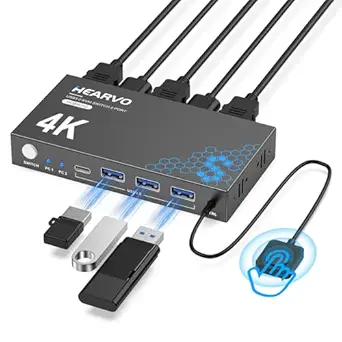 | Best Compact Single-Monitor Solution for Easy Setup | Number of HDMI Ports: 2 | Supported Resolutions: 4K@60Hz | USB Ports: 4 (3×USB-A + 1×USB-C) | VIEW ON AMAZON | See Our Full Breakdown |
| MT-VIKI 8 Port HDMI KVM Switch 4K@30Hz Rack Mount with IR Remote & Cables |  | Best for Multi-Device Control in Professional Settings | Ports: 8 HDMI | Resolution: 4K@30Hz | Rack Mount: Yes, 1U 19″ | VIEW ON AMAZON | See Our Full Breakdown |
| TESmart USB 3.0 HDMI KVM Switch 8 Port 4K@60Hz, Rackmount, EDID Emulator, Remote Control, LAN & RS232 |  | Best for High-Performance Data Centers and Enterprise Use | Number of Ports: 8 HDMI inputs / 1 HDMI output | Resolution Support: 4K@60Hz | USB Ports: 2 USB 3.0 | VIEW ON AMAZON | See Our Full Breakdown |
| JideTech 8 Port HDMI USB KVM Switch 4K@30Hz Rackmount, Control 8 PCs with One Monitor Keyboard and Mouse, USB 2.0 Hub, Hotkey Switching, Plug and Play for Windows, Mac, Linux, Server Room |  | Best for Server Rooms and Broad OS Compatibility | Number of Ports: 8 | Video Resolution: 4K@30Hz | USB Ports: 1 USB 2.0 Hub | VIEW ON AMAZON | See Our Full Breakdown |
| AV Access KVM Switch Dock for 2 Monitors and 2 Laptops, 4K Dual Monitor, 60W PD, 1G Ethernet, Plug & Play |  | Best for Dual Monitor Home and Hybrid Work Setups | Monitor Support: 2 Monitors | Max Resolution: 4K@60Hz | USB Ports: 2 USB-C, 4 USB 2.0, 2 USB 3.0 | VIEW ON AMAZON | See Our Full Breakdown |
| UGREEN 8K@60Hz HDMI KVM Switch for 4 Computers with USB 3.0 Ports and Cables |  | Best for High-Resolution Multimedia and Gaming Setups | Resolution: 8K@60Hz | USB Ports: 4 (3 USB-A + 1 USB-C) | Supported HDMI Versions: HDMI 2.0/1.4 | VIEW ON AMAZON | See Our Full Breakdown |
| StarTech 8-Port 1U USB VGA KVM Switch with OSD and Security |  | Best for Rack-Mount Control and Secure Multi-Computer Access | Ports: 8 | Form Factor: 1U rack-mountable | Connectivity: USB, VGA | VIEW ON AMAZON | See Our Full Breakdown |
| UGREEN 8K@60Hz HDMI DisplayPort KVM Switch for 3 Monitors and 2 Computers |  | Best for Multi-Monitor Power Users and Content Creators | Number of Monitors: 3 | Number of Computers: 2 | Supported Resolutions: 8K@60Hz, 4K@240Hz | VIEW ON AMAZON | See Our Full Breakdown |
| kvm switch for it admin | USB Ports |
|---|---|
| Tripp Lite 16-Port 4K HDMI KVM | — |
| Hearvo USB 3.0 HDMI KVM Switch | 4 (3×USB-A + 1×USB-C) |
| UGREEN HDMI KVM Switch 2 Monit | 4 (3 USB-A + 1 USB-C) |
| TESmart 8×1 HDMI KVM Switch 4K | — |
| Hearvo USB 3.0 HDMI KVM Switch | 4 (3×USB-A + 1×USB-C) |
| MT-VIKI 8 Port HDMI KVM Switch | 8 USB 2.0 hubs |
| TESmart USB 3.0 HDMI KVM Switc | 2 USB 3.0 |
| JideTech 8 Port HDMI USB KVM S | 1 USB 2.0 Hub |
| AV Access KVM Switch Dock for | 2 USB-C, 4 USB 2.0, 2 USB 3.0 |
| UGREEN 8K@60Hz HDMI KVM Switch | 4 (3 USB-A + 1 USB-C) |
| StarTech 8-Port 1U USB VGA KVM | — |
| UGREEN 8K@60Hz HDMI DisplayPor | — |
More Details on Our Top Picks
Tripp Lite 16-Port 4K HDMI KVM Switch, 2 USB 3.2 Peripheral Sharing, Rack-Mount, 4K @ 60Hz, Compatible with Windows, Mac, Linux
This Tripp Lite model stands out for its ability to manage up to 16 devices with 4K resolution and audio support, making it ideal for data centers or control rooms. Compared with the Hearvo USB 3.0 HDMI KVM Switch 2 Monitors 2 Computers 4K@60Hz Dual Monitor, it offers significantly more ports and centralized management, but at the cost of increased complexity and rack space requirements. Its cascade capability enables controlling up to 256 devices, which is unmatched in scale, though it demands familiarity with rack-mount installation and setup. The front-panel controls, hotkeys, and on-screen display offer flexible management options, suited for experienced IT teams. The main tradeoff is that this switch is less suited for smaller offices or users without rack infrastructure.
Pros:- Supports 16 devices with 4K resolution and digital audio
- Flexible toggling via front buttons, hotkeys, or on-screen display
- Rack-mountable design for professional environments
- Cascade capability for centralized control of up to 256 devices
Cons:- Complex setup process for users unfamiliar with rack systems
- Requires dedicated rack space and power supply
Best for: IT teams managing large server rooms or control centers with multiple computers and high-resolution demands
Not ideal for: Small offices or users seeking a simple, plug-and-play solution without rack mounting
- Number of Ports:16 HDMI
- Resolution:4K @ 60Hz
- Audio Support:Digital audio with independent switching
- Mounting:Rack-mount (1U), desktop with rubber feet
- Compatibility:Windows, Mac, Linux
- Warranty:3 years
Our verdict“This switch offers unmatched scalability and professional features for large IT infrastructures but might be overkill for smaller setups.”
Hearvo USB 3.0 HDMI KVM Switch 2 Monitors 2 Computers 4K@60Hz Dual Monitor
This Hearvo switch excels in providing seamless dual-monitor control for two computers, making it ideal for video editors, programmers, or financial analysts needing high visuals. Compared with the UGREEN HDMI KVM Switch 2 Monitors 2 Computers 4K@60Hz, it offers a more straightforward setup with a wired remote for easier toggling, but only supports two computers and monitors, limiting expansion. Its support for 4K@60Hz ensures sharp visuals, and the four USB 3.0 ports facilitate fast peripheral sharing. The remote control adds convenience, especially for users who prefer not to reach for physical buttons. However, it lacks hotkey switching, which could be a drawback for keyboard-centric workflows. This pick makes sense for users prioritizing dual displays and straightforward operation.
Pros:- Supports 4K@60Hz resolution for crisp visuals
- Includes a wired remote for easy switching
- Multiple USB 3.0 ports for fast peripherals
- Simple plug-and-play setup
Cons:- Limited to two computers and two monitors
- Requires multiple HDMI cables and space for setup
- Remote control may be lost or misplaced
Best for: Creative professionals or remote workers who need dual high-resolution monitors and simple switching
Not ideal for: Large offices or setups requiring more than two computers or multi-monitor arrays beyond two screens
- Number of Monitors:2
- Number of Computers:2
- Resolution Support:4K@60Hz
- USB Ports:4 (3×USB-A + 1×USB-C)
- HDMI Version:HDMI 2.0
- Remote Control:Wired remote included
Our verdict“This switch is perfect for dual-monitor users seeking reliable, high-quality visuals with easy remote control but lacks scalability for larger environments.”
UGREEN HDMI KVM Switch 2 Monitors 2 Computers 4K@60Hz with USB 3.0 Ports, Includes Cables and Controller
The UGREEN HDMI KVM Switch offers a flexible solution for managing two computers with dual 4K displays, especially appealing for users who need comprehensive USB peripheral sharing. Compared to the Hearvo switch, it includes four HDMI cables and a desktop controller, providing a more integrated package. Its support for HDR and HDCP 2.2 ensures high-quality media playback, making it suitable for content creators. The inclusion of cables and easy switching modes via button or controller simplifies setup for non-technical users. The main limitation is its reliance on HDMI-only connections, which may restrict compatibility with DisplayPort setups. It’s best suited for users who want high-resolution dual display support with minimal fuss.
Pros:- Supports 4K@60Hz, HDR, and HDCP 2.2 for high-quality media
- Includes four HDMI cables and a controller for convenience
- Supports multiple operating systems and device types
- Easy switching via buttons or desktop controller
Cons:- Limited to HDMI connections only
- No hotkey switching for keyboard control
- Requires external power for USB device functionality
Best for: Content creators or professionals needing flexible, high-quality dual-monitor setups with easy management
Not ideal for: Users requiring DisplayPort connections or multi-monitor arrays beyond two screens
- Supports Resolution:4K@60Hz
- Number of Monitors:2
- Number of Computers:2
- USB Ports:4 (3 USB-A + 1 USB-C)
- HDR Support:Yes
- HDCP Support:HDCP 2.2
Our verdict“This switch offers high-quality dual-monitor support with bonus accessories, ideal for multimedia professionals but with HDMI-only constraints.”
TESmart 8×1 HDMI KVM Switch 4K@30Hz with 8 Cables, Remote, and EDID Emulator
This TESmart model is a versatile choice for controlling up to 8 computers from a single station, making it suitable for server rooms or complex testing environments. Its support for 4K at 30Hz is adequate for most tasks, though it falls behind the 60Hz performance of other options like the Hearvo or UGREEN switches. Multiple switching methods—including remote, hotkeys, LAN, and RS232—offer advanced control, but require some technical understanding. The included 8 cables and EDID emulator help maintain display consistency across devices, reducing setup headaches. The main tradeoff is the lower refresh rate at 4K, which might matter for gaming or high-frame-rate workflows. It’s ideal for IT environments that prioritize control and compatibility over ultra-high refresh rates.
Pros:- Supports 8 computers with flexible switching options
- Includes 8 cables and EDID emulator for stable display settings
- Supports advanced control methods like LAN and RS232
- Compatible with multiple operating systems
Cons:- Limited to 30Hz at 4K, less ideal for fast motion
- Requires some technical knowledge for full feature use
- Bulkier setup with multiple cables
Best for: IT administrators managing multiple servers or testing setups requiring flexible, remote switching
Not ideal for: Users needing fast-paced gaming setups or high-frequency video editing at 4K
- Number of Ports:8 HDMI inputs
- Resolution Support:4K@30Hz
- Switching Methods:IR remote, front panel, hotkeys, LAN, RS232
- Includes Cables:8
- EDID Emulator:Yes
- Power:Requires AAA batteries for remote
Our verdict“This switch suits complex environments needing multiple device control and advanced switching features, accepting lower refresh rates for flexibility.”
Hearvo USB 3.0 HDMI KVM Switch for 2 Computers 1 Monitor, 4K@60Hz, S7232H
This Hearvo switch provides a straightforward way to control two computers with a single monitor, ideal for small offices or home setups. Its support for 4K@60Hz ensures sharp visuals, and the simple button or remote control makes switching effortless. Compared with dual-monitor options like the UGREEN or the dual-display Hearvo switch, it’s more compact but limited to one display, which could be restrictive for multitasking professionals. The inclusion of multiple USB ports allows peripheral sharing, and its plug-and-play design requires no drivers, easing setup. The main drawback is that it lacks external power, which might limit some USB device functionalities, and it’s constrained to two computers. It’s a clean, minimal solution for those with limited space.
Pros:- Supports 4K@60Hz for high-quality visuals
- Easy to switch via button or remote
- Plug-and-play with no external power needed
- Includes multiple USB ports for peripherals
Cons:- Limited to controlling two computers and one monitor
- No external power supply, limiting some USB device support
- Only supports a single monitor setup
Best for: Small office workers or home users needing a simple, high-resolution single-monitor switch
Not ideal for: Power users or those with multi-monitor workflows requiring more ports or higher refresh rates
- Number of HDMI Ports:2
- Supported Resolutions:4K@60Hz
- USB Ports:4 (3×USB-A + 1×USB-C)
- Switching Methods:Button, Wired remote
- EDID:Adaptive EDID
- Power Supply:None required
Our verdict“This switch offers a compact, high-resolution solution for simple single-monitor setups but lacks scalability for multi-monitor environments.”
MT-VIKI 8 Port HDMI KVM Switch 4K@30Hz Rack Mount with IR Remote & Cables
This 8-port HDMI KVM switch excels in environments where controlling multiple computers with a single set of peripherals is essential. Its support for 4K at 30Hz makes it suitable for high-resolution displays, though it falls short for high-refresh-rate applications favored by gamers or video editors. Compared to the StarTech 8-Port HDMI 2.0, it offers similar port count but lacks higher refresh rate support, limiting its use in fast-paced visual tasks. The inclusion of multiple switching options—panel button, IR remote, wire-desktop selector—adds versatility, but managing numerous cables can be cumbersome, especially in tight racks. It comes with all necessary cables, streamlining setup for enterprise use. However, its video refresh limitation and absence of audio support reduce its appeal for multimedia professionals. This pick makes sense for IT environments needing reliable multi-device management but less so for multimedia or gaming setups.
Pros:- Supports 4K resolution at 30Hz for quality visuals
- Multiple switching options for flexible control
- Includes all necessary cables and accessories
Cons:- Limited to 30Hz at 4K, not suitable for high-refresh-rate needs
- Cabling setup can be cumbersome with multiple connections
- Lacks audio support
Best for: IT departments managing multiple servers or workstations requiring 4K resolution at moderate refresh rates
Not ideal for: Graphics professionals or gamers needing higher refresh rates and advanced audio support
- Ports:8 HDMI
- Resolution:4K@30Hz
- Rack Mount:Yes, 1U 19″
- USB Ports:8 USB 2.0 hubs
- Switching Methods:Panel button, wire-desktop selector, IR remote
- Included Cables:8 HDMI KVM cables
- Compatibility:Windows, Mac OS, Linux
Our verdict“Best suited for professional environments where multi-device control at 4K@30Hz is sufficient and simplicity is valued.”
TESmart USB 3.0 HDMI KVM Switch 8 Port 4K@60Hz, Rackmount, EDID Emulator, Remote Control, LAN & RS232
This 8-port HDMI KVM switch stands out for supporting 4K at 60Hz, aligning well with professional environments that demand high visual fidelity. Its multiple control methods, including remote, hotkeys, LAN, and RS232, offer versatile management options for data centers or server rooms, unlike the more basic panel controls of the MT-VIKI. Compared to the StarTech model, it offers a higher refresh rate but requires rackmount space, which might be unsuitable for smaller setups. The inclusion of EDID emulators ensures compatibility with diverse displays, facilitating smoother operation. However, it lacks a dedicated power supply mention, relying on USB power, and remote batteries are not included, which could hinder immediate use. This device makes the most sense for IT teams needing high refresh rates and flexible control in rack-mounted environments, though it’s less ideal for casual or small office use.
Pros:- Supports 4K at 60Hz for crisp visuals
- Multiple control options including LAN and RS232
- Includes EDID emulators for broad compatibility
Cons:- Requires rackmount space, not suitable for compact setups
- Remote batteries not included, adding extra cost
- No specific mention of power supply requirements
Best for: Enterprise data centers and IT admins managing high-refresh-rate displays across multiple servers
Not ideal for: Small offices or users seeking simple, non-rackmount solutions
- Number of Ports:8 HDMI inputs / 1 HDMI output
- Resolution Support:4K@60Hz
- USB Ports:2 USB 3.0
- Control Methods:IR remote, front panel, hot keys, LAN, RS232
- Cable Length:8 x 5ft KVM cables
- Power:Requires external power or USB power
Our verdict“Ideal for high-demand enterprise environments needing flexible, high-refresh-rate control over multiple systems.”
JideTech 8 Port HDMI USB KVM Switch 4K@30Hz Rackmount, Control 8 PCs with One Monitor Keyboard and Mouse, USB 2.0 Hub, Hotkey Switching, Plug and Play for Windows, Mac, Linux, Server Room
This JideTech KVM switch offers control over 8 computers with a single monitor, keyboard, and mouse, supporting 4K at 30Hz. Its hotkey and button controls provide quick switching, while broad OS compatibility—including Windows, Mac, Linux, and Unix—makes it versatile for mixed environments. Compared to the TESmart model, it emphasizes simplicity and broad OS support rather than maximum refresh rate, which is suitable for server rooms or control centers. The rackmount design helps organize multiple systems neatly, but the 30Hz refresh rate can be limiting for video editing or gaming tasks. Its plug-and-play nature simplifies deployment, yet it requires rack space and doesn’t support higher refresh rates, which might be a drawback for multimedia professionals. This choice suits IT setups needing broad OS compatibility and straightforward operation, but it’s less ideal where high refresh rates are mandatory.
Pros:- Supports 8 computers with streamlined setup
- Broad OS compatibility across major platforms
- Plug-and-play, easy to install
Cons:- Limited to 30Hz at 4K, not suitable for high-refresh-rate tasks
- Requires rackmount space, which may not suit all environments
- No mention of audio support
Best for: Server rooms or control centers managing multiple OS environments with moderate refresh rate needs
Not ideal for: High-end multimedia editing or gaming setups requiring 60Hz or higher refresh rates
- Number of Ports:8
- Video Resolution:4K@30Hz
- USB Ports:1 USB 2.0 Hub
- Compatibility:Windows, Mac, Linux, Unix
- Mounting:Rackmount
Our verdict“Best suited for enterprise or server environments where broad OS support and straightforward control are priorities over refresh rate performance.”
AV Access KVM Switch Dock for 2 Monitors and 2 Laptops, 4K Dual Monitor, 60W PD, 1G Ethernet, Plug & Play
This docking station redefines workspace convenience, supporting two laptops with dual 4K monitors at 60Hz and full peripheral connectivity. Its plug-and-play nature simplifies setup, with USB-C connections supporting DP Alt Mode and MST, making it suitable for modern ultrabooks and workstations. Compared with single-computer KVMs like the JideTech model, this dock offers dual-monitor support for a more expansive workspace. Its 60W Power Delivery and 1G Ethernet port enhance usability for remote or hybrid workers. However, its focus on dual monitors means it’s less flexible for setups with more devices, and it requires compatible USB-C ports supporting DP Alt Mode. The high refresh rate and multiple ports make it ideal for professionals needing a seamless, high-performance dual-monitor environment, but users with non-compatible laptops may find it limited.
Pros:- Supports dual 4K monitors at 60Hz for vibrant multitasking
- Easy one-button switching between two laptops
- Includes comprehensive connectivity options including Ethernet and SD card slots
Cons:- Requires compatible USB-C ports supporting DP Alt Mode and MST
- Limited to two devices; not suitable for larger multi-device setups
- macOS display restrictions may apply for certain configurations
Best for: Home office users or hybrid workers needing dual 4K displays for multitasking
Not ideal for: Users with older laptops lacking USB-C with DP Alt Mode or requiring more than two monitors
- Monitor Support:2 Monitors
- Max Resolution:4K@60Hz
- USB Ports:2 USB-C, 4 USB 2.0, 2 USB 3.0
- Ethernet:1G Ethernet
- Power Delivery:60W
- Included Cables:2x USB-C to USB-C (1m)
Our verdict“Perfect for professionals seeking a sleek, dual-monitor solution with high refresh rates for hybrid work environments.”
UGREEN 8K@60Hz HDMI KVM Switch for 4 Computers with USB 3.0 Ports and Cables
This UGREEN HDMI KVM switch stands out for supporting 8K@60Hz resolution, making it ideal for multimedia professionals and gamers who demand crystal-clear visuals. Unlike the StarTech 8-Port KVM, which focuses on multiple computers in a rack, this model emphasizes superior video quality and USB sharing for fewer systems. Its dual switching methods—one-button and desktop controller—offer flexibility, but it doesn’t support hotkey switching, which some power users prefer for faster toggling. The requirement for external power and lack of compatibility with docking stations could be hurdles for portable or minimalist setups. Compared to the StarTech, it excels in resolution but falls short on remote access and hotkey control. Overall, this pick makes the most sense for users needing top-tier display quality and USB performance in multimedia environments, willing to handle a dedicated power source.
Pros:- Supports ultra-high resolution up to 8K@60Hz, ideal for professional content creation
- Allows sharing of multiple USB devices with fast data transfer
- Wide compatibility with various systems and devices, including gaming consoles
Cons:- Requires a power connection, adding to setup complexity
- Does not support hotkey switching, limiting quick toggling for power users
Best for: Content creators, high-end gamers, or multimedia professionals seeking ultra HD visuals and fast USB data transfer.
Not ideal for: IT admins managing multiple servers or those needing remote access, since it lacks remote control features and hotkey switching.
- Resolution:8K@60Hz
- USB Ports:4 (3 USB-A + 1 USB-C)
- Supported HDMI Versions:HDMI 2.0/1.4
- HDCP Support:2.3/2.2/1.4
- Switching Methods:One-button or desktop controller
- Compatibility:Windows, MacOS, Linux, PC, MacBook, Nintendo Switch, PS5, PS4, Xbox One
- Power Supply:Requires connection to power source
- Cable Included:4 HDMI cables, 4 USB cables
Our verdict“This switch is best suited for users prioritizing high-resolution display quality and USB performance over remote or hotkey control.”
StarTech 8-Port 1U USB VGA KVM Switch with OSD and Security
The StarTech 8-Port KVM switch is designed for server rooms and data centers where security and rack integration matter. Its 8 ports in a 1U rack-mountable form factor make it suitable for managing multiple servers or workstations, with features like password-protected on-screen display (OSD) and cascade support for expanding capacity. Compared with the UGREEN HDMI switch, it prioritizes security and scalability over high-resolution video, since it supports only VGA, limiting its use for high-end multimedia tasks. The absence of remote access and inclusion of only VGA and USB connections means it’s less suited for modern multimedia or home office environments. The need for rack space and limited display options make it more appropriate for dedicated server control rather than multimedia setups. Compared to the UGREEN model, it offers more ports and security features but sacrifices resolution and versatility for enterprise-focused control.
Pros:- Supports control of up to 8 computers from a single console
- Secure password-protected OSD enhances system security
- Cascade support allows expansion for larger setups
Cons:- Limited to VGA and USB connections, incompatible with modern HDMI/DisplayPort displays
- Requires rack space, not suitable for small or portable setups
- No remote access features available, limiting flexibility
Best for: IT professionals managing multiple servers or workstations in a data center environment requiring security and scalability.
Not ideal for: Home users or multimedia professionals seeking high-resolution display support or remote access, as it is focused on security and rack-mounting.
- Ports:8
- Form Factor:1U rack-mountable
- Connectivity:USB, VGA
- Security:Password-protected OSD
- Features:Hotkey switching, push-button, auto-scan, cascade support
- Supported Systems:Multiple servers/workstations in enterprise environments
Our verdict“This KVM switch is best for secure, scalable control of multiple servers in a rack environment, rather than multimedia or home office use.”
UGREEN 8K@60Hz HDMI DisplayPort KVM Switch for 3 Monitors and 2 Computers
This UGREEN KVM switch caters to users who need to manage two computers across three monitors, supporting resolutions up to 8K@60Hz. Unlike the single-monitor-focused HDMI models, this unit excels for multi-monitor setups typical in content creation, design, or complex productivity workflows. Its support for multiple display modes, including mirror and extend, offers flexibility not found in simpler switches like the Hearvo 2-monitor model. However, the requirement that both computers support triple-monitor output limits its applicability to high-end hardware environments. Additionally, cable length restrictions for 8K signals could pose practical challenges for some users. For those with compatible hardware, this switch provides seamless control and outstanding display quality, but it’s less suitable for standard office setups or systems without triple-monitor support. Compared to the HDMI-only options, it stands out for multi-display capacity at 8K resolution.
Pros:- Supports ultra high-definition 8K@60Hz resolution across three monitors
- Enables seamless switching between two computers with multiple display modes
- Includes comprehensive cables and accessories for easy setup
Cons:- Requires both computers to support triple-monitor output, limiting hardware options
- No EDID emulation, which could cause display issues in some configurations
- Cable length limitations may restrict placement and flexibility
Best for: IT professionals, content creators, or power users with high-end graphics hardware needing multi-monitor control and 8K resolution.
Not ideal for: Standard office setups or users with less capable graphics cards, since it demands triple-monitor support from both computers.
- Number of Monitors:3
- Number of Computers:2
- Supported Resolutions:8K@60Hz, 4K@240Hz
- Ports:2 DisplayPort 1.4, 1 HDMI 2.1, 4 USB 3.0
- Cable Lengths:Within 2 meters for 8K@60Hz
- Compatibility:Windows, MacOS, Linux
Our verdict“This switch is ideal for users with high-end hardware managing multi-monitor workflows requiring maximum resolution and flexibility.”

How We Picked
Our evaluation focused on performance, usability, build quality, and value. We prioritized products with high-resolution support, multiple port options, and compatibility across operating systems, as these are critical for IT environments. Ease of installation and management features like remote control or LAN access were also considered, along with the durability and rack-mount options for professional setups. Products were ranked based on how well they balance these factors relative to their price, making sure they serve the diverse needs of IT admins—from small offices to large data centers.Factors to Consider When Choosing Kvm Switch For It Admins
Choosing the right KVM switch involves understanding your specific needs and the environment you’ll deploy it in. While features like port count and resolution are obvious considerations, other factors can significantly influence your experience and long-term value. Proper planning ensures you avoid common pitfalls such as overpaying for unnecessary features or buying a model that doesn’t scale with your infrastructure.Number of Ports and Scalability
Determining how many computers or servers you need to connect guides your choice. While a 4-port switch may suit small setups, larger environments benefit from 8, 16, or even 32 ports. Consider future expansion—buying a switch with extra ports can save money and hassle later, but be aware that larger models may require more space and power. Balancing current needs with growth potential is key to avoiding frequent upgrades.
Resolution and Video Quality
High resolutions like 4K at 60Hz provide clearer visuals and smoother workflows, especially for graphic-intensive tasks or high-resolution dashboards. However, higher resolutions typically require more bandwidth and can increase costs. For most IT admin tasks, 1080p may suffice, but if your work involves detailed visualizations or multiple screens, prioritize switches supporting 4K or higher to future-proof your setup.
Compatibility and Peripheral Support
Ensure the switch supports your operating systems—Windows, Mac, Linux—and peripherals like USB devices, audio, or Ethernet. Some models include USB hubs or LAN access, which add convenience but can complicate setup. Compatibility issues often lead to frustration and downtime, so check for compatibility matrices or support for your specific hardware before purchasing.
Management Features and Ease of Use
Features like remote control, hotkey switching, and EDID emulation streamline operation, especially in professional or data center environments. However, these features often come at a higher cost and may require more complex setup. For smaller or less critical environments, simpler models with manual switching might be more cost-effective and easier to manage.
Build Quality and Rack Mounting
For professional settings, durability and rack-mount compatibility are essential. Sturdy metal enclosures and rack-mount kits ensure longevity and easy integration into existing infrastructure. Cheaper plastic models may be suitable for temporary or small-scale use but could fail under frequent use or harsh conditions. Consider your environment when evaluating build quality.
Frequently Asked Questions
Can a KVM switch support dual monitors with different resolutions?
Many modern KVM switches support dual monitors with different resolutions, but compatibility depends on the model. Features like EDID emulation help ensure each monitor displays correctly regardless of the connected computer. However, mismatched resolutions can sometimes cause display issues or require manual adjustments, so verifying the supported configurations before purchase is wise.
Is it better to buy a KVM switch with LAN access for IT environments?
Including LAN access in a KVM switch provides remote management capabilities, which is highly valuable for IT environments managing servers or remote data centers. It allows you to control connected devices over a network, reducing the need for physical access. However, these switches tend to be more expensive and complex to set up, so assess whether remote management is a priority for your setup.
What is the ideal port count for a small IT office?
For small offices managing a handful of servers or workstations, 4 to 8 ports typically suffice. This range balances cost and functionality without unnecessary complexity. If you anticipate growth or need to connect multiple devices, opting for a slightly larger switch with extra ports can be a cost-effective choice in the long run, but avoid overpaying for unused capacity.
Are USB 3.0 ports necessary on a KVM switch?
USB 3.0 ports are highly recommended for high-speed data transfer, especially if your peripherals include external drives or high-bandwidth devices. They also ensure compatibility with newer peripherals and reduce latency. Models with USB 2.0 may suffice for basic keyboards and mice but can cause bottlenecks with modern, data-intensive peripherals.
How important is build quality for a professional KVM switch?
Build quality directly impacts longevity and reliability, especially in demanding environments like server rooms or data centers. A well-constructed switch with metal housing and secure connections minimizes failure risk and ensures stable operation over time. Investing in durable models can save money on replacements and repairs, making it a critical factor for professional IT setups.
Conclusion
For general IT environments seeking a balance of features and affordability, the Hearvo USB 3.0 HDMI KVM Switch offers excellent value with dual-monitor support. Larger setups or data centers will benefit from the TESmart 8×1 HDMI KVM for its extensive port options and management features. For those prioritizing premium build and remote management, the StarTech 8-Port HDMI 2.0 KVM Switch stands out. Beginners or small offices should consider simpler, more straightforward models, while enterprise users need scalable, rack-mountable solutions with advanced features.
Halloween Picks
halloween
As an affiliate, we earn on qualifying purchases.