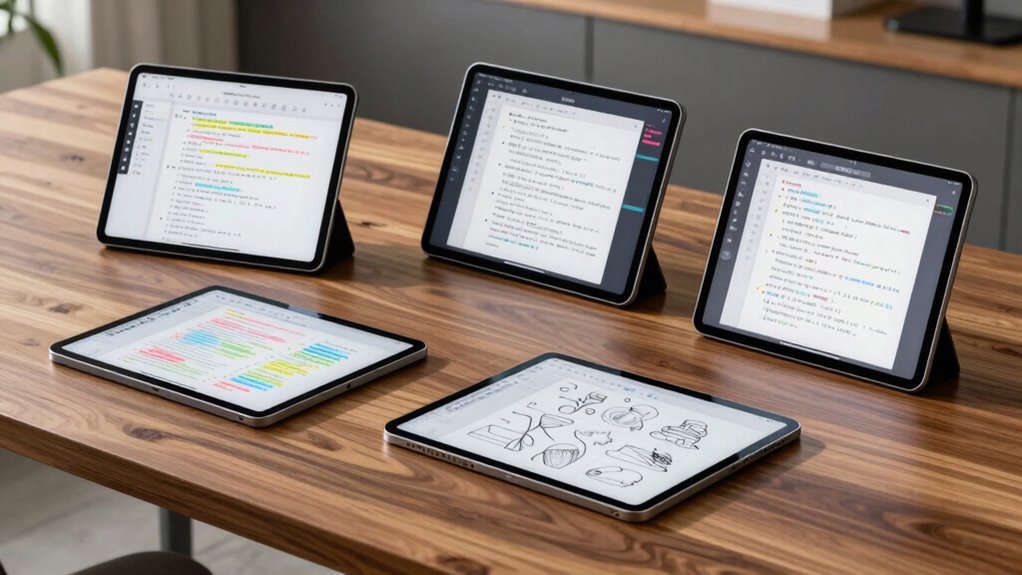

Choosing the right high-end tablet for note-taking in 2026 involves balancing display quality, device versatility, and specialized features. If I want a feature-rich device that handles both writing and multimedia, the TCL Note A1 NXTPAPER stands out with its vibrant 2.2K display and AI-powered note features. For those prioritizing a paper-like experience with minimal distraction, the reMarkable Paper Pro series offers an ultra-compact, glare-free color E Ink display. Meanwhile, the XPPen 3-in-1 provides a high-precision stylus and Android compatibility for multi-tasking on the go. Each option has distinct tradeoffs, especially around display technology, ecosystem, and price, which I’ll explore below.

Get business pricing on office and shipping supplies
- Business-only prices and quantity discounts
- Tax-exempt purchasing
- Multiple users, one account, clear invoices
Key Takeaways
- High-resolution color displays excel for reading and sketching, but can come at a premium price.
- E Ink devices prioritize paper-like experience and portability but may lack multimedia support.
- Android-based tablets offer flexibility and app support but can be more complex and less optimized for note-taking.
- Stylus sensitivity and pressure levels are vital for a natural writing experience—look for at least 16K levels.
- Battery life varies significantly; larger screens and powerful features often consume more power.
| TCL Note A1 NXTPAPER Paper Tablet, 11.5″ 2.2K Display, 8GB RAM, 256GB Storage, Stylus & Case Included |  | Best Overall High-End Note-Taking Tablet | Display: 11.5-inch 2.2K NXTPAPER PURE | Refresh Rate: 120Hz | Storage: 256GB | VIEW ON AMAZON | See Our Full Breakdown |
| reMarkable Paper Pro with Marker Plus and Black Leather Book Folio 11.8” Color E Ink Paper Tablet |  | Best for Distraction-Free, Paper-Like Experience | Display: 11.8-inch color E Ink | Included Accessories: Marker Plus, leather folio | Features: Adjustable reading light, handwriting-to-text | VIEW ON AMAZON | See Our Full Breakdown |
| XPPen 3-in-1 Color Digital Notebook 10.95” with 16,384 Pressure Levels |  | Best for Android Power Users and Precise Note Taking | Display: 10.95-inch LCD with TCL NXTPAPER 3.0 | Pressure Levels: 16,384 | Storage: 6GB RAM + 128GB | VIEW ON AMAZON | See Our Full Breakdown |
| reMarkable Paper Pro Move 7.3″ Color E Ink Digital Notebook |  | Best for Ultra-Portable Distraction-Free Note Taking | Display: 7.3-inch Canvas Color E Ink | Included: Marker Plus, spare tips | Features: Handwriting-to-text, cloud sync | VIEW ON AMAZON | See Our Full Breakdown |
| reMarkable Paper Pro with Marker Plus | 11.8” Color E Ink Paper Tablet |  | Best for Large-Format, Reading & Note-Taking | Display: 11.8-inch Canvas Color E Ink | Included Items: Marker Plus, accessories | Features: Reading light, low-glare screen | VIEW ON AMAZON | See Our Full Breakdown |
| high end pro tablet for note taking | Display | Battery | Weight | Features |
|---|---|---|---|---|
| TCL Note A1 NXTPAPER Paper Tab | 11.5-inch 2.2K NXTPAPER PURE | 8000mAh | — | — |
| reMarkable Paper Pro with Mark | 11.8-inch color E Ink | Not specified | Approx. 350g | Adjustable reading light, handwriting-to-text |
| XPPen 3-in-1 Color Digital Not | 10.95-inch LCD with TCL NXTPAPER 3.0 | — | 495g | — |
| reMarkable Paper Pro Move 7.3" | 7.3-inch Canvas Color E Ink | Not specified | Approx. 150g | Handwriting-to-text, cloud sync |
| reMarkable Paper Pro with Mark | 11.8-inch Canvas Color E Ink | Not specified | Approx. 370g | Reading light, low-glare screen |
More Details on Our Top Picks
TCL Note A1 NXTPAPER Paper Tablet, 11.5″ 2.2K Display, 8GB RAM, 256GB Storage, Stylus & Case Included
The TCL Note A1 NXTPAPER excels with its vibrant 11.5-inch 2.2K display that brings color and clarity to note-taking and reading. Its 120Hz refresh rate ensures smooth writing and scrolling, making it feel natural. The included stylus with 8192 pressure sensitivity provides high precision, while AI features help convert handwriting to text and generate summaries, adding productivity layers. Compared to the reMarkable, it offers more multimedia capabilities, but it doesn’t match the paper-like feel of E Ink devices. Its Android ecosystem is versatile but may require updates for optimal use.
Pros:- Vivid 2.2K display with accurate color reproduction
- High-pressure stylus with low latency
- AI-powered note processing and translation
- Long battery life with fast charging
Cons:- Requires software updates for best performance
- Limited desktop-like features in Android ecosystem
- Stylus and accessories are sold separately
Best for: Professionals seeking a versatile, multimedia-capable device that doubles as a digital notebook.
Not ideal for: Users who prefer distraction-free, paper-like writing without multimedia support.
- Display:11.5-inch 2.2K NXTPAPER PURE
- Refresh Rate:120Hz
- Storage:256GB
- RAM:8GB
- Battery:8000mAh
- Stylus Sensitivity:8192 levels
Our verdict“A well-rounded device for professionals who want color, power, and versatility in note-taking.”
reMarkable Paper Pro with Marker Plus and Black Leather Book Folio 11.8” Color E Ink Paper Tablet
The reMarkable Paper Pro offers a large 11.8-inch color E Ink display that feels remarkably like paper, making it ideal for focused reading and writing. Its low-glare screen and adjustable reading light support outdoor use and long sessions without eye strain. The included Marker Plus stylus provides a natural feel, and handwriting-to-text conversion streamlines note organization. However, this device’s reliance on E Ink means it’s less suitable for multimedia or fast-paced tasks, and the price can be high relative to its limited feature set. It’s best suited for users who prioritize distraction-free writing and reading over multimedia capabilities.
Pros:- Large, color E Ink display mimics real paper
- Low-glare screen perfect for outdoor use
- Stylus with responsive writing experience
- Includes protective leather folio
Cons:- Limited to e-ink display, no multimedia support
- Price may be high for features offered
- Battery life not specified
Best for: Writers and readers who want a distraction-free, paper-like device with color for notes and sketches.
Not ideal for: Those needing multimedia, video, or app-heavy workflows.
- Display:11.8-inch color E Ink
- Included Accessories:Marker Plus, leather folio
- Features:Adjustable reading light, handwriting-to-text
- Battery:Not specified
- Weight:Approx. 350g
- Color Coverage:Full color
Our verdict“An excellent choice for writers and students seeking a paper-like, portable device with color support.”
XPPen 3-in-1 Color Digital Notebook 10.95” with 16,384 Pressure Levels
The XPPen 3-in-1 features a 10.95-inch LCD with TCL NXTPAPER 3.0 tech that offers a paper-like texture and vibrant colors. Its 16,384 pressure levels and battery-free X3 Pro stylus provide exceptional precision, making it a favorite for detailed notes and sketches. Running Android 14, it supports a wide range of productivity apps, and its compact size makes it suitable for on-the-go use. The device’s narrower viewing angles and the need for system updates are drawbacks, but it stands out as a flexible, high-performance option for those who want a portable Android tablet with stylus precision.
Pros:- Vibrant, paper-like LCD display reduces eye strain
- 16K pressure sensitivity for detailed annotations
- Supports a wide array of Android productivity apps
- Lightweight and portable
Cons:- Narrow viewing angles may limit visibility
- Requires system updates for advanced AI features
- Performance may lag with multiple apps
Best for: Creative professionals and note-takers who need high stylus sensitivity and Android app support.
Not ideal for: Users who require a larger screen for detailed work or multimedia consumption.
- Display:10.95-inch LCD with TCL NXTPAPER 3.0
- Pressure Levels:16,384
- Storage:6GB RAM + 128GB
- Operating System:Android 14
- Front Camera:13 MP
- Weight:495g
Our verdict“Ideal for creative professionals who need high precision and Android flexibility in a portable form factor.”
reMarkable Paper Pro Move 7.3″ Color E Ink Digital Notebook
The reMarkable Paper Pro Move provides a compact 7.3-inch color E Ink display that’s perfect for quick notes and reading on the go. Its small size makes it highly portable, fitting easily into pockets or small bags. The device supports handwriting-to-text conversion, cloud sync, and simple organization, making it suitable for those who want a minimal, distraction-free experience. Its smaller display limits detailed sketches or extensive note-taking, and the need for a subscription to unlock full features can add to the cost. This device is best for users who value simplicity and portability above all.
Pros:- Ultra-portable 7.3-inch size
- Color display with paper-like feel
- Supports handwriting to text and cloud sync
- Simple, distraction-free interface
Cons:- Small display limits extensive note-taking
- Subscription required for full features
- Limited contrast compared to monochrome e-ink
Best for: Frequent travelers or students seeking a lightweight, distraction-free device for quick notes.
Not ideal for: Users needing a larger screen or multimedia capabilities.
- Display:7.3-inch Canvas Color E Ink
- Included:Marker Plus, spare tips
- Features:Handwriting-to-text, cloud sync
- Battery:Not specified
- Weight:Approx. 150g
- Color Coverage:Full color
Our verdict“A practical choice for those prioritizing portability and basic note functions without extra distractions.”
reMarkable Paper Pro with Marker Plus | 11.8” Color E Ink Paper Tablet
The reMarkable Paper Pro with its 11.8-inch color E Ink display offers an expansive, paper-like experience for reading, drawing, and note-taking. Its adjustable reading light and low-glare screen support prolonged use in various lighting conditions. The device’s handwriting-to-text feature and organizational tools make it a solid choice for professionals managing large volumes of notes and documents. However, its premium price and E Ink’s limitations in multimedia support mean it’s best for users focused on reading and annotation rather than entertainment or video. Its large size makes it less portable than smaller models, but ideal for stationary workstations or dedicated note areas.
Pros:- Large 11.8-inch color E Ink display
- Adjustable reading light for various lighting conditions
- Paper-like writing and reading experience
- Supports handwriting to text and document organization
Cons:- High price point
- Limited multimedia capabilities
- Less portable due to size
Best for: Professionals and students needing a large, distraction-free device for reading and note management.
Not ideal for: Those seeking multimedia features or compact portability.
- Display:11.8-inch Canvas Color E Ink
- Included Items:Marker Plus, accessories
- Features:Reading light, low-glare screen
- Battery:Not specified
- Weight:Approx. 370g
- Color Coverage:Full color
Our verdict“A premium device suited for those who need a large, focused reading and note-taking platform in a portable format.”

How We Picked
Our selection process focused on high-end devices explicitly designed or optimized for note-taking, considering display quality, stylus performance, ecosystem, and portability. We evaluated each device’s core features like screen size, pressure sensitivity, storage, and battery life. Price and accessory inclusion, such as stylus and cases, also influenced our choices. Our goal was to find options suited for professionals and serious enthusiasts who need reliability, precision, and versatility in a premium package.
| high end pro tablet for note taking | Features |
|---|---|
| TCL Note A1 NXTPAPER Paper Tab | — |
| reMarkable Paper Pro with Mark | Adjustable reading light, handwriting-to-text |
| XPPen 3-in-1 Color Digital Not | — |
| reMarkable Paper Pro Move 7.3" | Handwriting-to-text, cloud sync |
| reMarkable Paper Pro with Mark | Reading light, low-glare screen |
Factors to Consider When Choosing High End Pro Tablet For Note Taking
When selecting a high-end tablet for note-taking, I focus on display quality, stylus performance, ecosystem, and portability. The ideal device depends on your primary use—whether it’s detailed sketching, distraction-free reading, or multimedia integration. I’ll walk you through key considerations for each type of user to help you make a confident choice.
Display Technology and Size
High-resolution, color displays are excellent for detailed sketches and vibrant notes, but they often consume more power and come at a higher cost. E Ink screens excel for reading and writing in bright environments, providing a paper-like experience with minimal eye strain. Size matters too: larger screens boost productivity but reduce portability, while compact devices favor mobility but may limit some tasks.
Stylus Sensitivity and Compatibility
Look for styluses with at least 16K pressure levels for a natural feel. Compatibility with the device’s OS and software ecosystem impacts functionality—Android devices support a wide range of apps, while dedicated e-ink tablets focus on handwriting and basic note features. Consider whether you need pressure sensitivity for sketches or just for writing.
Ecosystem and Software
Android tablets offer flexibility but may require more setup and updates. E Ink devices prioritize simplicity and focus but lack multimedia support. The choice hinges on whether you need multitasking, app support, or a distraction-free writing environment.
Portability and Battery Life
Larger screens and powerful features typically mean shorter battery life. Smaller devices excel for quick notes and travel, while larger models suit stationary use. Balance your need for portability against the device’s endurance for extended work sessions.
Frequently Asked Questions
What is the best display type for note-taking?
For detailed, vibrant notes or sketches, high-resolution LCD or OLED screens, like those on the TCL Note A1, are ideal due to their color accuracy and responsiveness. If you prefer a paper-like experience with minimal eye strain, E Ink displays such as the reMarkable series provide a natural feel, especially suited for reading and long writing sessions.
How important is stylus sensitivity for note-taking?
Stylus sensitivity significantly impacts your writing experience; higher pressure levels (16K or above) allow for precise control and natural strokes, especially for detailed sketches or calligraphy. Cheaper styluses or those with fewer pressure levels can feel less responsive, reducing overall accuracy and comfort.
Are these devices suitable for multitasking?
Android-based tablets like the XPPen or TCL Note A1 support multiple apps simultaneously, making them versatile for note-taking alongside other tasks. In contrast, e-ink devices like the reMarkable focus on distraction-free writing and have limited multitasking capabilities. Your workflow determines the best fit.
How does battery life vary among these tablets?
Battery life depends largely on display technology and usage. LCD devices with large, high-res screens tend to consume more power, especially during multimedia use. E Ink devices like the reMarkable generally last much longer—often days or weeks—since their displays only draw power when updating. Consider your typical usage pattern when choosing.
Is a larger screen always better for note-taking?
Not necessarily. While larger screens provide more space for detailed notes and sketches, they are less portable and may have shorter battery life. Smaller devices excel for quick notes and portability but can limit the scope of detailed work. Your specific needs should guide your choice.
Conclusion
If I need a highly versatile device for professional use, the TCL Note A1 NXTPAPER offers a compelling combination of color, power, and features. For those focused on distraction-free writing or reading, the reMarkable Paper Pro series provides an excellent paper-like experience with excellent portability. Creative users requiring precise stylus input and Android app support will find the XPPen 3-in-1 a powerful option. Ultimately, your choice depends on whether you prioritize display quality, ecosystem, portability, or a distraction-free environment.