If your Fire Stick remote control is not working, a compatible replacement can restore navigation and voice control—but compatibility matters more than appearance. My best overall pick is the Amazon Fire TV Alexa Voice Remote Pro, while the SZILBZ L5B83H and PUPINGPIG remotes are alternatives for shoppers comparing replacement options. The main tradeoff is between Amazon-branded features and the lower-complexity appeal of third-party replacements, which may support fewer Fire TV models or functions. Before ordering, check your device model and whether you need TV power and volume controls as well as streaming navigation. Read on for the full breakdown and a guide to choosing the right fit.

Get business pricing on office and shipping supplies
- Business-only prices and quantity discounts
- Tax-exempt purchasing
- Multiple users, one account, clear invoices
Key Takeaways
- The Amazon Fire TV Alexa Voice Remote Pro is the premium pick because it is the lineup’s Amazon-branded option; buyers seeking a basic replacement may not need its extra features.
- The SZILBZ L5B83H and PUPINGPIG are third-party alternatives, but a remote’s listed compatibility matters more than a broad claim that it works with Fire TV.
- Several products have near-identical replacement-focused names, so shoppers should compare supported device models and button functions rather than rely on the listing title.
- A replacement remote may restore control, but it will not fix a Fire TV device that has lost power, a faulty HDMI connection, or an underlying software issue.
- TV power, volume, and voice functions are not safe assumptions across replacement remotes; verify each desired control before choosing.
| Voice Replacement Remote for Fire TV Devices |  | Best Straightforward Replacement | Control type: Voice control | Maximum range: 10 feet | Maximum supported devices: 1 | VIEW ON AMAZON | See Our Full Breakdown |
| PUPINGPIG Voice Remote Control for Compatible Fire TV Devices |  | Best for Buyers Who Want a Defined Warranty | Brand: PUPINGPIG | Model: 2nd Gen Remote | Compatible devices: Select AMZ Smart TVs (3rd Gen), TV Sticks (2nd/3rd Gen), Stick 4K (1st/2nd Gen), Stick 4K Max (1st Gen), Stick Lite, and TV Cubes (1st–3rd Gen) | VIEW ON AMAZON | See Our Full Breakdown |
| Voice Remote Replacement for Fire TV Stick, Cube, and Compatible Smart TVs |  | Best for Longer-Room Range | Brand: WOLAOYNN | Compatible devices: Select Fire TV Stick, Fire TV Cube, Fire TV, Insignia, Toshiba, and Pioneer models | Voice search: Yes | VIEW ON AMAZON | See Our Full Breakdown |
| Amazon Fire TV Alexa Voice Remote Pro | 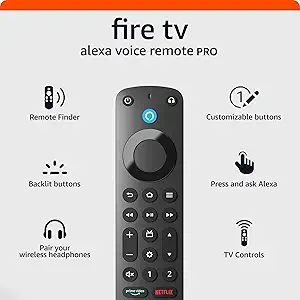 | Best Premium Replacement | Size: 38 × 148 × 18 mm | Weight: 54 g without batteries | Batteries: 2 AAA included | VIEW ON AMAZON | See Our Full Breakdown |
| Replacement Voice Remote for Fire TV Stick, TV Cube, and Compatible Smart TVs |  | Best for Multi-Brand TV Compatibility | Compatible streaming devices: Fire TV Stick (3rd Gen); Stick 4K (1st/2nd Gen, Select, Plus); Stick 4K Max (1st/2nd Gen); Cube (2nd/3rd Gen); Stick Lite (1st/2nd Gen) | Compatible TV brands: Supported Omni, Ember, Insignia, Toshiba, and Pioneer models | Voice control: Yes | VIEW ON AMAZON | See Our Full Breakdown |
| SZILBZ L5B83H Replacement Voice Remote for Fire TV Devices |  | Best for Multi-Device Setups | Model: L5B83H | Control: Voice control with voice search | Maximum supported devices: 5 | VIEW ON AMAZON | See Our Full Breakdown |
| LoLaSta Replacement Voice Remote for Fire TV and Fire TV Stick |  | Best for Straightforward Replacement | Model: 25112402 | Connectivity: Infrared | Maximum range: 10 feet | VIEW ON AMAZON | See Our Full Breakdown |
| Voice Replacement Remote for Fire TV Stick, Fire TV Cube, and Compatible Fire TVs |  | Best for Shortcut-Button Access | Brand: Hazieoo | Color: Navy black | Control type: Button control with voice search | VIEW ON AMAZON | See Our Full Breakdown |
| B BraiNice Voice Remote for Fire TV Stick and Cube |  | Best for Longer-Range Control | Connectivity: Bluetooth and infrared | Voice control: Built-in microphone | Shortcut buttons: 4 | VIEW ON AMAZON | See Our Full Breakdown |
| Replacement Voice Remote for Fire TV |  | Best for Custom Button Setup | Connectivity: Infrared | Control type: Voice control | Maximum range: 30 feet | VIEW ON AMAZON | See Our Full Breakdown |
| Voice Remote Replacement for Compatible Fire TV Devices |  | Best for Simple Replacement | Brand: Koepluoo | Compatible devices: Select Fire TV Stick, Stick Lite, 4K, 4K Max, Cube, and TV models | Connectivity: Bluetooth | VIEW ON AMAZON | See Our Full Breakdown |
| Replacement Voice Remote for Fire TV Streaming Devices and Compatible Smart TVs |  | Best for App Shortcuts | Compatible streaming devices: Select Fire TV Stick, 4K, 4K Max, Lite, and Cube models | Compatible smart TVs: Select Insignia, Toshiba, Omni, 2-Series, and 4-Series models | Voice control: Search content, launch apps, and adjust volume | VIEW ON AMAZON | See Our Full Breakdown |
| fire stick remote control not working | Maximum range | Compatible devices | Batteries | Warranty |
|---|---|---|---|---|
| Voice Replacement Remote for F | 10 feet | Select Fire TV Sticks (2nd/3rd Gen, 4K, 4K Max, Lite), Cubes (1st–3rd Gen), and Omni/Omni QLED TVs | Not included | — |
| PUPINGPIG Voice Remote Control | 10 feet | Select AMZ Smart TVs (3rd Gen), TV Sticks (2nd/3rd Gen), Stick 4K (1st/2nd Gen), Stick 4K Max (1st Gen), Stick Lite, and TV Cubes (1st–3rd Gen) | 2 AAA alkaline batteries required; not included | 1 year |
| Voice Remote Replacement for F | 40 feet | Select Fire TV Stick, Fire TV Cube, Fire TV, Insignia, Toshiba, and Pioneer models | Not included | 1 year |
| Amazon Fire TV Alexa Voice Rem | — | — | 2 AAA included | 90-day limited warranty |
| Replacement Voice Remote for F | — | — | 2 AAA required; not included | — |
| SZILBZ L5B83H Replacement Voic | 10 meters | TV Stick Lite, 2020 TV Stick, TV Stick 4K, second-generation TV Stick, first- and second-generation TV Cube, and third-generation smart TVs | — | 1 year |
| LoLaSta Replacement Voice Remo | 10 feet | Select third-generation smart TVs, Fire TV Stick (2nd and 3rd Gen), Fire TV Stick Lite, Fire TV Stick 4K and 4K Max, and Fire TV Cube (1st–3rd Gen) | — | — |
| Voice Replacement Remote for F | 10 meters | Select Fire TV Stick, Fire TV Stick 4K and 4K Max, Fire TV Stick Lite and HD, Fire TV Cube, and compatible smart TVs | — | — |
| B BraiNice Voice Remote for Fi | 40 feet (12 meters) | — | — | 1 year |
| Replacement Voice Remote for F | 30 feet | Select Fire TV Sticks, Fire TV Cubes, and Fire TV smart TVs | — | — |
| Voice Remote Replacement for C | 10 meters | Select Fire TV Stick, Stick Lite, 4K, 4K Max, Cube, and TV models | Not included | 1 year |
| Replacement Voice Remote for F | — | — | 2 AAA required; not included | — |
More Details on Our Top Picks
Voice Replacement Remote for Fire TV Devices
If your Fire TV remote has stopped responding and you want a familiar voice-enabled replacement, this model keeps the choice simple: it supports voice search, playback control, and shortcut buttons across a range of Fire TV sticks, cubes, and Omni televisions. Pairing starts with holding Home for 10–15 seconds, followed by a short wait, so the setup steps are clearly defined. Compared with the Amazon Fire TV Alexa Voice Remote Pro, it lacks a remote finder and backlit buttons, but it also avoids those extra features if you only need everyday control. Its 10-foot range is a limit to keep in mind, and batteries are not included. Check the exact device generation before ordering; this remote excludes several older Fire TV and smart TV models.
Pros:- Voice search and playback control support everyday Fire TV use
- Shortcut buttons provide quick access to apps
- Works with select Fire TV sticks, cubes, and Omni or Omni QLED TVs
- Pairing steps are provided in the instructions
Cons:- Batteries are not included
- 10-foot maximum range may limit use across larger rooms
- Does not support several older Fire TV and smart TV models
Best for: Fire TV Stick, Cube, or Omni TV owners replacing a lost or faulty remote who want voice search and a simple pairing process.
Not ideal for: Owners of first-generation Fire TV Sticks or unsupported older smart TVs, and anyone who wants a remote finder or illuminated buttons.
- Control type:Voice control
- Maximum range:10 feet
- Maximum supported devices:1
- Voice search:Supported
- Compatible devices:Select Fire TV Sticks (2nd/3rd Gen, 4K, 4K Max, Lite), Cubes (1st–3rd Gen), and Omni/Omni QLED TVs
- Batteries:Not included
- Package contents:1 replacement remote and 1 user manual
Our verdict“Choose this for a direct voice-remote replacement on a supported Fire TV device, but skip it if you need backlighting or a finder.”
PUPINGPIG Voice Remote Control for Compatible Fire TV Devices
The PUPINGPIG is a practical pick if your remote has failed and you want a replacement with a stated one-year warranty and compatibility details covering several Stick, Cube, and third-generation AMZ Smart TV models. Voice search and control are included, while pairing uses the familiar Home-button hold described for other replacements here. Compared with the Voice Replacement Remote for Fire TV Devices, this model spells out its battery type and warranty, but its listed range is still just 10 feet and it requires two AAA batteries that are not supplied. The product data lists three buttons, so buyers seeking lots of direct app shortcuts may prefer the WOLAOYNN remote with four. Check compatibility carefully: first-generation Sticks and older smart TVs are excluded.
Pros:- Voice search and control are supported
- Compatibility list covers several Fire TV Stick and Cube generations
- One-year warranty is specified
- Pairing uses a straightforward Home-button hold
Cons:- Two AAA batteries are required but not included
- Maximum range is 10 feet
- Only three buttons are listed, fewer than the WOLAOYNN remote’s four shortcuts
Best for: Owners of listed Fire TV Stick or Cube generations who want a replacement with a stated one-year warranty and clear battery requirements.
Not ideal for: People with first-generation Fire TV devices, older smart TVs, or a viewing setup where the remote needs to work beyond 10 feet.
- Brand:PUPINGPIG
- Model:2nd Gen Remote
- Compatible devices:Select AMZ Smart TVs (3rd Gen), TV Sticks (2nd/3rd Gen), Stick 4K (1st/2nd Gen), Stick 4K Max (1st Gen), Stick Lite, and TV Cubes (1st–3rd Gen)
- Voice function:Voice search and control
- Connectivity:Infrared
- Maximum range:10 feet
- Buttons:3
- Batteries:2 AAA alkaline batteries required; not included
- Warranty:1 year
Our verdict“Pick the PUPINGPIG if your device is on its compatibility list and a stated warranty matters more than extended range or extra shortcuts.”
Voice Remote Replacement for Fire TV Stick, Cube, and Compatible Smart TVs
Among these replacement remotes, the WOLAOYNN stands out for a listed 40-foot maximum range, well beyond the 10 feet specified for the PUPINGPIG and the Voice Replacement Remote for Fire TV Devices. That extra reach may suit a room where the TV is farther from the seating area, though the product data does not establish performance in every home. It also offers voice search and four app shortcut buttons, giving it more direct app access than the PUPINGPIG’s three listed buttons. Compatibility spans select Fire TV, Insignia, Toshiba, and Pioneer models, but the broad brand names are not a guarantee that every set works. Batteries are not included, and first-generation Fire TV Stick and older smart TV models are excluded, so confirm your exact model before choosing it.
Pros:- Listed maximum range of 40 feet exceeds the 10-foot range of several alternatives here
- Four app shortcut buttons provide quick access
- Voice search is supported
- Compatibility includes select Fire TV, Insignia, Toshiba, and Pioneer models
Cons:- Batteries are not included
- Compatibility is limited to select models, with older devices excluded
- The 40-foot figure is a listed maximum, not a guarantee for every room
Best for: Viewers with a supported Fire TV, Insignia, Toshiba, or Pioneer model who want a longer stated range and four app shortcuts.
Not ideal for: Owners of first-generation Fire TV Sticks or first- and second-generation smart TVs, and buyers who need batteries included.
- Brand:WOLAOYNN
- Compatible devices:Select Fire TV Stick, Fire TV Cube, Fire TV, Insignia, Toshiba, and Pioneer models
- Voice search:Yes
- Shortcut buttons:4
- Maximum supported devices:1
- Maximum range:40 feet
- Batteries:Not included
- Warranty:1 year
- Color:Green
Our verdict“Choose the WOLAOYNN when its compatibility list matches your TV and you value stated range and app shortcuts over included batteries.”
Amazon Fire TV Alexa Voice Remote Pro
When a failed remote is also a chance to solve recurring annoyances, the Alexa Voice Remote Pro offers the most added convenience in this group. Its remote finder can ring when activated, while motion-activated backlighting helps locate buttons in a dark room. Two customizable shortcuts, dedicated TV controls, and a headphone-pairing shortcut go beyond the simpler replacements, including the Voice Replacement Remote for Fire TV Devices. That extra functionality comes with a compatibility check: it works with most Fire TV streaming players and Fire TV smart TVs, but not every older device or select TV model. Unlike most alternatives here, two AAA batteries are included. It uses Bluetooth and infrared, and its 90-day limited warranty is shorter than the one-year warranty listed for the PUPINGPIG and WOLAOYNN models.
Pros:- Remote finder rings to help locate a misplaced remote
- Motion-activated backlighting aids button use in dim rooms
- Two customizable shortcuts and dedicated TV controls
- Two AAA batteries are included
Cons:- Compatibility excludes some older Fire TV devices and select TV models
- 90-day limited warranty is shorter than the one-year terms listed for some alternatives
- Extra controls may be unnecessary for buyers who only need a basic replacement
Best for: Fire TV households that often misplace the remote, watch in dim rooms, or want dedicated TV and headphone controls.
Not ideal for: Owners of unsupported older Fire TV devices or anyone seeking a basic replacement without extra controls and features.
- Size:38 × 148 × 18 mm
- Weight:54 g without batteries
- Batteries:2 AAA included
- Technology:Bluetooth and IR
- Voice control:Yes
- Warranty:90-day limited warranty
- Compatibility:Most Fire TV streaming media players, Amazon Fire TV smart TVs, and smart TVs with Fire TV built in
Our verdict“Choose the Alexa Voice Remote Pro if finding and using your remote in low light matter more than keeping the replacement simple.”
Replacement Voice Remote for Fire TV Stick, TV Cube, and Compatible Smart TVs
This replacement is a strong match for buyers whose Fire TV setup is spread across streaming devices and supported smart TVs: its listed compatibility includes selected Stick and Cube generations plus Omni, Ember, Insignia, Toshiba, and Pioneer models. That range across device types gives it a different role from the Amazon Fire TV Alexa Voice Remote Pro, which brings more convenience features but does not list these same TV brands. Voice control helps with content searches, and a manual is included; however, pairing methods vary by device, so setup may take more checking than the simple Home-button instructions supplied with the first two remotes. Two AAA batteries are required and not included. It also omits several older models, including first-generation Cubes and Fire TV Boxes, so verify the exact device before buying.
Pros:- Compatibility list spans selected Fire TV Sticks, Cubes, and multiple smart TV brands
- Voice control supports content searches
- User manual is included
- Works with specified newer Stick and Cube generations
Cons:- Two AAA batteries are not included
- Pairing methods vary by device
- Several older Fire TV Stick, Cube, and Box models are excluded
Best for: Households with a supported Fire TV Stick or Cube, or a compatible Omni, Ember, Insignia, Toshiba, or Pioneer smart TV.
Not ideal for: Owners of first- or second-generation Fire TV Sticks, first-generation Cubes, Fire TV Boxes, or buyers who want one universal pairing procedure.
- Compatible streaming devices:Fire TV Stick (3rd Gen); Stick 4K (1st/2nd Gen, Select, Plus); Stick 4K Max (1st/2nd Gen); Cube (2nd/3rd Gen); Stick Lite (1st/2nd Gen)
- Compatible TV brands:Supported Omni, Ember, Insignia, Toshiba, and Pioneer models
- Voice control:Yes
- Batteries:2 AAA required; not included
- Package contents:1 replacement voice remote and 1 user manual
- Not compatible with:Fire TV Stick (1st/2nd Gen), Fire TV Cube (1st Gen), and Fire TV Box (1st/2nd/3rd Gen)
Our verdict“Choose this model if your exact device appears on its broad compatibility list and you can accommodate model-specific pairing steps.”
SZILBZ L5B83H Replacement Voice Remote for Fire TV Devices
If your Fire TV remote has stopped responding and you need one replacement to control several compatible devices, the SZILBZ L5B83H is a flexible choice. It supports up to five devices, more than the LoLaSta remote, which is limited to one. Voice search and a stated 10-meter range can make everyday control easier once the remote is paired. The pairing process requires holding the Home button, so it is not a plug-and-play fix; check your exact device model before ordering, especially if you own an older smart TV. Two AAA batteries are also needed and are not included. I would choose this over LoLaSta when multi-device support matters, but not when compatibility with older TV models is the priority.
Pros:- Supports up to five devices
- Voice search and control can reduce button-by-button browsing
- Stated maximum range of 10 meters
- Ergonomic design
Cons:- Requires manual pairing using the Home button
- Two AAA batteries are not included
- Does not support several older smart TV models
Best for: Households with several compatible Fire TV devices that want one replacement remote to support up to five devices.
Not ideal for: Owners of first- or second-generation smart TVs or first-generation Smart TV Edition models, which are listed as incompatible.
- Model:L5B83H
- Control:Voice control with voice search
- Maximum supported devices:5
- Maximum range:10 meters
- Battery:2 AAA batteries; not included
- Compatible devices:TV Stick Lite, 2020 TV Stick, TV Stick 4K, second-generation TV Stick, first- and second-generation TV Cube, and third-generation smart TVs
- Incompatible devices:First- and second-generation smart TVs; first-generation Smart TV Edition
- Warranty:1 year
Our verdict“Choose the SZILBZ if you need voice control across several compatible Fire TV devices and have confirmed your model is supported.”
LoLaSta Replacement Voice Remote for Fire TV and Fire TV Stick
The LoLaSta is a practical pick when a lost or unresponsive Fire TV remote needs a simple replacement, and the included user manual gives pairing steps some buyers may appreciate. Hold the Home button for 10–15 seconds to pair it with a supported device. Its compatibility list covers selected Fire TV sticks, Cubes, and third-generation smart TVs, but it supports only one device—a clear limitation beside the SZILBZ L5B83H, which supports up to five. The listed 10-foot range is also shorter than the ranges claimed by several other options in this group. Batteries are not supplied, and older Fire TV sticks and smart TV editions are excluded, so confirm your model before treating it as a fix.
Pros:- Supports voice search and playback controls
- Includes a user manual with the remote
- Compatibility list includes several Fire TV sticks, Cubes, and third-generation smart TVs
- Pairing steps specify how long to hold the Home button
Cons:- Supports only one device
- Stated maximum range is 10 feet
- Batteries are not included and older models are excluded
Best for: Buyers replacing one compatible Fire TV remote who want a manual with pairing guidance and do not need multi-device support.
Not ideal for: People with multiple Fire TV devices or older Fire TV Stick and smart TV edition models that fall outside the compatibility list.
- Model:25112402
- Connectivity:Infrared
- Maximum range:10 feet
- Maximum supported devices:1
- Voice search:Supported
- Battery:Alkaline batteries; not included
- Compatible devices:Select third-generation smart TVs, Fire TV Stick (2nd and 3rd Gen), Fire TV Stick Lite, Fire TV Stick 4K and 4K Max, and Fire TV Cube (1st–3rd Gen)
- Not compatible with:Smart TVs (1st and 2nd Gen), Fire TV Stick (1st Gen), and smart TV edition TVs
- Package contents:Remote and user manual
Our verdict“Pick LoLaSta for a single compatible device when clear pairing instructions matter more than extended range or multi-device support.”
Voice Replacement Remote for Fire TV Stick, Fire TV Cube, and Compatible Fire TVs
If your current remote’s failure has made app navigation tedious, this Hazieoo replacement adds four preset shortcut buttons alongside voice search. Those shortcuts offer a quicker route to supported apps than the more basic LoLaSta layout, though the product data does not identify which services the buttons launch. The remote lists a 10-meter range and compatibility with select Fire TV sticks, Cubes, and smart TVs, but it supports just one device. Pairing involves holding the Home button, and the required two AAA batteries are not included. This makes it a useful feature-led alternative for a supported setup, not a universal cure for pairing trouble: check the compatibility list first, particularly if your TV or streamer is an older model.
Pros:- Four preset shortcut buttons provide quick app access
- Includes voice search
- Stated maximum range of 10 meters
- Package includes a user manual
Cons:- Supports only one device
- Two AAA batteries are not included
- Compatibility excludes some older smart TV and streaming device models
Best for: Fire TV viewers who regularly use app shortcuts and want voice search on one supported streamer or smart TV.
Not ideal for: Owners seeking multi-device control, or anyone who needs confirmation that a specific older TV or streaming model is supported.
- Brand:Hazieoo
- Color:Navy black
- Control type:Button control with voice search
- Shortcut buttons:4 preset buttons
- Maximum range:10 meters
- Maximum supported devices:1
- Battery:2 AAA batteries required; not included
- Compatible devices:Select Fire TV Stick, Fire TV Stick 4K and 4K Max, Fire TV Stick Lite and HD, Fire TV Cube, and compatible smart TVs
- In the box:Remote control and user manual
Our verdict“Choose the Hazieoo when four app shortcuts matter more than multi-device support, after checking that your exact Fire TV model is compatible.”
B BraiNice Voice Remote for Fire TV Stick and Cube
When a remote seems unreliable from across the room, the B BraiNice stands out for its stated 40-foot range, the longest specified in this group. Bluetooth and infrared connectivity, plus a built-in microphone, give it a different profile from LoLaSta’s infrared-only listing and its shorter 10-foot range. Four shortcut buttons also speed up access to apps, while the listed 1.44-ounce weight keeps the remote light. The tradeoff is model-specific compatibility: the listing covers select Fire TV sticks, Cubes, and smart TVs, not every Fire TV device or Fire TV Edition television. Two AAA batteries are not included, and the range claim alone will not solve a pairing or compatibility problem. I’d check the device generation before choosing it for a nonresponsive remote.
Pros:- Stated maximum range of 40 feet
- Bluetooth and infrared connectivity
- Built-in microphone and four shortcut buttons
- Lightweight at 1.44 ounces
Cons:- Two AAA batteries are not included
- Compatibility excludes several older devices and Fire TV Edition smart TVs
- The broad compatibility description does not name every supported model
Best for: Viewers who control a compatible Fire TV from farther away and want Bluetooth, infrared, voice search, and app shortcuts.
Not ideal for: Owners of older Fire TV devices or Fire TV Edition smart TVs not included in the compatibility list.
- Connectivity:Bluetooth and infrared
- Voice control:Built-in microphone
- Shortcut buttons:4
- Maximum range:40 feet (12 meters)
- Battery:2 AAA batteries; not included
- Weight:1.44 ounces
- Dimensions:5.55 × 1.73 × 0.75 inches
- Warranty:1 year
- Compatibility:Select Fire TV Stick, Fire TV Cube, and Fire TV smart TV models
Our verdict“Choose B BraiNice if longer stated range and dual connectivity suit your setup, but verify device compatibility before ordering.”
Replacement Voice Remote for Fire TV
This replacement makes the most sense for buyers who want to tailor a remote rather than simply restore basic control. Alongside four shortcut buttons, it has two programmable buttons, giving it more customization than the fixed-shortcut Hazieoo. Voice search and a stated 30-foot range add everyday convenience, but the listing identifies infrared connectivity and does not name the exact supported Fire TV models. That leaves more compatibility checking to the buyer than the LoLaSta listing, which spells out several generations. Two AAA batteries are not included, and the supplied data specifically rules out Roku and several TV brands without naming them. If your immediate problem is a dead remote, confirm the device match and pairing instructions before buying; extra buttons cannot compensate for an incompatible model.
Pros:- Two programmable buttons allow a more customized layout
- Four additional shortcut buttons
- Voice search and voice control
- Stated maximum range of 30 feet
Cons:- Two AAA batteries are not included
- Compatibility is described broadly rather than by exact model
- Not compatible with Roku devices or several TV brands listed in the description
Best for: Fire TV owners who want voice search and customizable buttons and can confirm their specific device is supported.
Not ideal for: Buyers who need a clearly enumerated compatibility list, or anyone trying to control a Roku device or an unsupported TV brand.
- Connectivity:Infrared
- Control type:Voice control
- Maximum range:30 feet
- Button quantity:27
- Shortcut buttons:4
- Customizable buttons:2
- Battery:2 AAA batteries; not included
- Weight:50 g
- Compatible devices:Select Fire TV Sticks, Fire TV Cubes, and Fire TV smart TVs
Our verdict“Choose this remote for programmable buttons and voice control only after confirming compatibility with your exact Fire TV model.”
Voice Remote Replacement for Compatible Fire TV Devices
If your Fire TV remote has stopped responding, this Koepluoo replacement offers a straightforward path back to voice search and basic control. It works with select Fire TV Sticks, Lite, 4K and 4K Max models, Cubes, and some TVs; after restarting the device, hold Home to pair. Compared with the B0DL56XG5H replacement, it has fewer specified convenience features: the other remote lists four app shortcuts and volume control, while this one focuses on voice control and a simpler six-button layout. That may suit someone replacing a basic remote, but it gives less detail about dedicated controls. Check the exact device match before ordering, since older models may not work. Batteries are not included, and setup depends on following the pairing steps; the listed one-year warranty offers some additional support.
Pros:- Voice search can help locate shows without typing.
- Compatible with select Sticks, Cubes, and Fire TV models.
- Pairing procedure is described: restart the device and hold Home.
- Includes a listed one-year warranty.
Cons:- Compatibility excludes some older Fire TV models.
- Batteries are not included.
- Six buttons may offer fewer quick-access controls than the B0DL56XG5H remote’s four listed shortcuts.
Best for: Fire TV Stick or Cube owners replacing a basic voice remote who want a simple layout and can verify their model’s compatibility.
Not ideal for: Owners of older Fire TV devices or shoppers who want dedicated app shortcuts and clearly specified volume controls.
- Brand:Koepluoo
- Compatible devices:Select Fire TV Stick, Stick Lite, 4K, 4K Max, Cube, and TV models
- Connectivity:Bluetooth
- Control:Voice control with voice search
- Button quantity:6
- Maximum range:10 meters
- Batteries:Not included
- Warranty:1 year
Our verdict“Choose this Koepluoo remote for a basic compatible Fire TV replacement, but pick the B0DL56XG5H if dedicated app shortcuts and volume control matter more.”
Replacement Voice Remote for Fire TV Streaming Devices and Compatible Smart TVs
When a failed remote leaves you repeatedly navigating menus, this replacement stands out for combining voice search, app launches, and volume control. Its four preset shortcut buttons can reduce the number of steps to reach supported streaming apps, a useful difference from the more basic Koepluoo B0GNMPJ2CF, which lists voice search but no dedicated shortcuts. Automatic syncing is intended to simplify setup, and the compatibility list spans select Fire TV streaming devices plus certain Insignia, Toshiba, Omni, 2-Series, and 4-Series TVs. The tradeoff is a narrower fit than the broad wording may suggest: it does not work with first- or second-generation Fire TV Sticks, soundbars, or other receivers. Two AAA batteries are required but not included, so check compatibility and have batteries ready before replacing a nonworking remote.
Pros:- Four preset shortcut buttons provide quicker access to supported apps.
- Voice control supports content search, app launches, and volume adjustment.
- Automatic syncing is intended to simplify setup.
- Compatibility includes select Fire TV devices and several listed smart TV families.
Cons:- Two AAA batteries are required and not included.
- Does not support first- or second-generation Fire TV Sticks.
- Not compatible with soundbars or other receivers.
Best for: Owners of a listed Fire TV device or compatible Insignia, Toshiba, Omni, 2-Series, or 4-Series TV who want app shortcuts and volume control.
Not ideal for: People with first- or second-generation Fire TV Sticks, or anyone seeking a remote to control a soundbar or other receiver.
- Compatible streaming devices:Select Fire TV Stick, 4K, 4K Max, Lite, and Cube models
- Compatible smart TVs:Select Insignia, Toshiba, Omni, 2-Series, and 4-Series models
- Voice control:Search content, launch apps, and adjust volume
- Shortcut buttons:4 pre-programmed buttons
- Setup:Automatically syncs with compatible devices
- Package includes:1 replacement remote and 1 user manual
- Batteries:2 AAA required; not included
- Incompatible devices:Fire TV Stick 1st and 2nd Gen, soundbars, and other receivers
Our verdict“Pick this remote if your device is on its compatibility list and app shortcuts and volume control are priorities; choose the Koepluoo B0GNMPJ2CF for a simpler basic replacement.”

How We Picked
I ranked these remotes by how directly they address a failed Fire TV remote while reducing the chance of a mismatched purchase. The main criteria were stated device compatibility, the usefulness of voice and TV-control functions, ease of identifying the right model, and whether the option serves a distinct need such as a premium upgrade or a basic replacement. Product names alone do not establish compatibility, so buyers should confirm their exact Fire TV model and the seller’s supported-device list before ordering.
The Amazon Fire TV Alexa Voice Remote Pro takes the top position as the clearest premium choice, while third-party options follow according to their potential role as replacement alternatives and the need for model-by-model verification. The supplied product information does not establish a detailed feature advantage for every similarly named remote, so I do not treat those listings as interchangeable or claim unverified functions. That makes the ranking useful as a shortlist, but compatibility checks should decide between close alternatives.
Factors to Consider When Choosing Fire Stick Remote Control Not Working
Replacing a remote is only one possible fix when Fire TV controls stop responding. I would first separate a remote problem from a device, power, or connection problem, then choose a replacement based on the controls and model support I actually need.
Confirm the remote is the problem
Before buying anything, try fresh batteries and check that they sit in the correct orientation. Restart the Fire TV device by unplugging it briefly, then reconnect power and test the remote nearby. If the screen is frozen or the device has no power, a new remote will not solve the underlying fault. A phone-based Fire TV remote app may also help you test whether the streaming device still responds to commands. Replacing a remote makes sense when the device works but physical buttons remain unresponsive after basic checks.
Match the exact Fire TV model
“Compatible with Fire TV” can cover different generations and device types, so do not treat it as universal support. Check the model name or generation in your device settings, packaging, or Amazon account before selecting a replacement. A remote intended for a Stick may not support every Cube or Fire TV television feature. When two listings appear similar, the supported-device list is more useful than a broad title or product photo. If your device is older or less common, prioritize a listing that names it directly.
Decide which controls you need
Some buyers only need directional, select, home, and playback buttons to regain basic navigation. Others rely on voice search or want the remote to control TV power and volume as well. Those functions can vary between replacement models, so check each one instead of assuming it comes with the word “voice” in the name. Extra buttons are useful only if they work with your particular television and Fire TV setup. A simpler remote can be the better fit when dependable basic control matters more than added functions.
Compare third-party and Amazon-branded options
An Amazon-branded remote such as the Voice Remote Pro is the more direct choice for shoppers who want a premium option from the device maker. Third-party replacements may suit buyers looking for a straightforward alternative, but their compatibility and supported features need closer attention. A lower-complexity replacement can be sufficient if you only need to restore everyday navigation. Do not pay for features you will not use, but do not choose a basic option if you depend on voice or TV controls. Check the return policy and the listing’s model details before committing to a less familiar brand.
Treat pairing and setup as part of the purchase
A compatible replacement may still need to be paired with the Fire TV device before it works. Keep the device powered and follow the manufacturer’s pairing instructions, including any required button press or hold. If pairing fails, move closer to the device, replace the batteries, and restart the Fire TV before assuming the remote is defective. A phone remote app can be a useful temporary way to reach settings while you troubleshoot. Buyers who are not comfortable with setup should favor clear instructions and an easy way to contact the seller.
Check the cost of choosing the wrong model
The main avoidable expense is buying a remote that fits the product category but not the exact device. Compare the supported models, included functions, and return terms before placing an order. If you have multiple Fire TV devices, check whether one remote can serve the specific device you intend to control rather than assuming it will work across the household. A premium model makes more sense when its extra controls match your routine; otherwise, a compatible basic replacement may be enough. Keep your old remote until the replacement is paired and working, so you retain a fallback during setup.
Frequently Asked Questions
Should I replace my Fire TV remote if the device still responds to the phone app?
If the Fire TV app controls the device but the physical remote does not, the remote or its batteries are more likely to be the issue. Try fresh batteries and the device’s pairing steps before shopping. If the remote remains unresponsive, a replacement is a reasonable next step. Confirm that the new model supports your exact Fire TV device and any TV-control features you use. The app can keep you connected while you pair the replacement.
Will any of these replacement remotes work with every Fire TV Stick?
No; the product names and broad compatibility wording do not prove that every model works with every Fire TV Stick. Device generations can differ, and some remotes also list support for Cubes or smart TVs without covering every model in those groups. Check the replacement’s supported-device list against your Fire TV model before ordering. If your model is not named, ask the seller rather than relying on a similar-looking remote. This check is more reliable than choosing by appearance.
Can a replacement remote fix a Fire TV that is frozen or not showing a picture?
Usually not. A remote can send commands, but it cannot repair a device that has lost power, a frozen operating system, or a disconnected HDMI path. Restart the Fire TV and check its power and HDMI connections before buying a remote. If the device responds to an app but not to button presses, the remote becomes a more likely cause. This distinction can prevent an unnecessary replacement purchase.
Is the Amazon Fire TV Alexa Voice Remote Pro worth choosing over a third-party replacement?
It is the clearest fit in this roundup for buyers who specifically want the premium Amazon-branded option. A third-party replacement may be enough if your goal is to restore basic control and its compatibility listing matches your device. Compare the functions you will use, especially voice, TV power, and volume, rather than assuming every model offers the same controls. If you do not need extra features, the Pro may be more remote than your setup requires. Check supported devices before buying either type.
What should I do if a new replacement remote will not pair?
Start with fresh batteries and follow the pairing instructions supplied for that remote; button combinations can vary. Keep the remote near the Fire TV and restart the device before trying again. If you can, use the Fire TV app to check settings or continue controlling the device during setup. Confirm that the remote is listed as compatible with your exact model, since pairing steps cannot overcome a mismatch. If the model is supported and pairing still fails, contact the seller or use the return option.
Conclusion
My best overall recommendation is the Amazon Fire TV Alexa Voice Remote Pro for shoppers who want the premium, Amazon-branded choice. For best value, compare the third-party replacement options—such as SZILBZ L5B83H and PUPINGPIG—only after confirming the exact device and functions, since the available product details do not establish a definitive value winner. The Pro is also my best premium pick, while beginners should start with the replacement whose compatibility listing names their model clearly and whose setup instructions are easy to follow. If you need a specific feature such as TV volume or power control, choose based on verified support for that function rather than the remote’s general category. Keep your old remote until the replacement pairs successfully, and remember that a frozen or unpowered Fire TV needs troubleshooting beyond a new remote.
Columbus Day / Indigenous Peoples' Day Picks
long weekend sales
As an affiliate, we earn on qualifying purchases.