The best embroidery machine for a small business overall is the Smartstitch S-1201 Plus, whose 12 needles suit shops that need more production capacity and fewer thread changes. For larger designs on a single-needle setup, the Poolin EOC06 offers a generous 11 × 7.9-inch area, while the Brother SE700 is a more approachable choice for businesses that also need sewing functions. The central tradeoff is between commercial throughput and a lower-cost, simpler workflow: more needles and a larger embroidery field can support broader order types, but they also demand more space, setup, and operating skill. Single-needle and combo models can fit a careful startup, though frequent color changes may slow repeat production. Read on for the full comparison and guidance on matching a machine to your order volume and products.

Get business pricing on office and shipping supplies
- Business-only prices and quantity discounts
- Tax-exempt purchasing
- Multiple users, one account, clear invoices
Key Takeaways
- Multi-needle models are the clearest production step-up: the Smartstitch S-1201 Plus and S-1001, plus the Poolin EOM-15 models, are aimed at businesses that want more efficient color changes than single-needle machines offer.
- Hoop area shapes the jobs you can accept: the Poolin EOC06 models list an 11 × 7.9-inch field, while several Brother entry and combo machines are built around a 4 × 4-inch hoop.
- Single-needle does not mean one-size-fits-all: the PooLin EOC03 adds a 4 × 9.25-inch area alongside its 4 × 4-inch option, while the Brother PE535, PE545, and PE800 focus on smaller embroidery work.
- Sewing-and-embroidery combos trade embroidery specialization for flexibility: the Brother SE600 and SE700 models can suit shops that also sew, but a dedicated embroidery machine may fit better when embroidery orders dominate.
- Bundles and included designs are not substitutes for workflow capacity: thread, bobbins, hoops, and built-in patterns can help with setup, but buyers should still match needle count, field size, and support needs to their actual orders.
| PooLin EOC03 Embroidery Machine with 4×4 & 4×9.25″ Areas, Beginner Friendly, 130 Designs, WiFi Transfer, Starter Kit |  | Best for New Small-Business Sellers | Model: EOC03 | Embroidery areas: 4 × 4 inches and 4 × 9.25 inches | Built-in designs: 130 | VIEW ON AMAZON | See Our Full Breakdown |
| Brother Skitch PP1 Single-Needle Embroidery Machine |  | Best Compact Option for Simple Personalization | Machine type: Single-needle embroidery-only machine | Maximum embroidery area: 4 × 4 inches | Maximum speed: 400 stitches per minute | VIEW ON AMAZON | See Our Full Breakdown |
| Smartstitch S-1201 Plus 12-Needle Commercial Embroidery Machine | 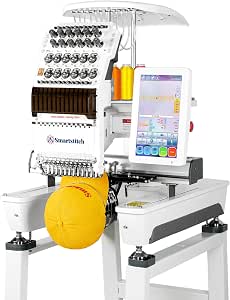 | Best for Established, Higher-Volume Shops | Needles: 12 | Maximum speed: 1,200 stitches per minute | Embroidery area: 12 × 16 inches | VIEW ON AMAZON | See Our Full Breakdown |
| Brother PE535 Embroidery Machine with 80 Built-in Designs |  | Best for Straightforward, Screen-Based Setup | Machine type: Embroidery-only machine | Embroidery area: 4 × 4 inches | Built-in designs: 80 | VIEW ON AMAZON | See Our Full Breakdown |
| Brother SE600 Sewing and Embroidery Machine, 80 Designs, 103 Built-In Stitches, Computerized, 4″ x 4″ Hoop Area, 3.2″ LCD Touchscreen Display, 7 Included Feet |  | Best Sewing-and-Embroidery Combo | Embroidery area: 4 × 4 inches | Built-in embroidery designs: 80 | Embroidery lettering fonts: 6 | VIEW ON AMAZON | See Our Full Breakdown |
| Smartstitch S-1001 10-Needle Commercial Embroidery Machine |  | Best for Multi-Color Small-Batch Production | Needles: 10 | Maximum speed: 1,200 stitches per minute | Embroidery area: 9.5 × 14.2 inches | VIEW ON AMAZON | See Our Full Breakdown |
| Poolin EOC07 Computerized Embroidery Machine with 15 × 7.9-Inch Embroidery Area and 4 Hoops |  | Best for Long, Wide Designs | Maximum embroidery area: 15 × 7.9 inches | Included hoops: 2 × 5.5 × 5.5 inches; 1 × 7.9 × 7.9 inches; 1 × 7.9 × 15 inches | Display: 7-inch color touchscreen | VIEW ON AMAZON | See Our Full Breakdown |
| Poolin EOC06 Embroidery Machine Bundle, 7.9 x 11 Inch, with 80 Thread Colors and 144 Bobbins |  | Best Starter-Supply Bundle | Brand and model: Poolin EOC06 | Embroidery area: 7.9 × 11 inches | Touchscreen: 7 inches | VIEW ON AMAZON | See Our Full Breakdown |
| Brother SE700 Combo Sewing & Embroidery Machine Bundle with Hoops, Thread, and Accessories |  | Best for Mixed Sewing and Embroidery | Brand and model: Brother SE700 | Embroidery area: 4 × 4 inches | Built-in embroidery designs: 135 | VIEW ON AMAZON | See Our Full Breakdown |
| Poolin EOC06 Large Hoop Embroidery Machine, 11 x 7.9 in Embroidery Area |  | Best for Beginners Scaling Up | Brand and model: Poolin EOC06 | Embroidery area: 11 × 7.9 inches | Touchscreen: 7-inch color LCD | VIEW ON AMAZON | See Our Full Breakdown |
| Brother PE800 Embroidery Machine with 138 Built-In Designs |  | Best for Larger Single-Needle Designs | Machine type: Embroidery-only | Embroidery field: 5 × 7 inches | Built-in designs: 138 | VIEW ON AMAZON | See Our Full Breakdown |
| Brother PE545 Wireless Embroidery Machine with 4 x 4-Inch Hoop and LCD Touchscreen |  | Best for Wireless Entry-Level Personalization | Machine type: Embroidery-only | Embroidery area: 4 × 4 inches | Built-in designs: 135 | VIEW ON AMAZON | See Our Full Breakdown |
| Poolin EOM-15 15-Needle Commercial Embroidery Machine |  | Best for Multicolor Small-Business Production | Needles: 15 | Flat embroidery speed: Up to 1,200 SPM | Cap embroidery speed: Up to 850 SPM | VIEW ON AMAZON | See Our Full Breakdown |
| Poolin EOM 15-Needle Embroidery Machine Starter Bundle |  | Best Starter Bundle for a Commercial Workflow | Needles: 15 | Touchscreen: 9 inches | Embroidery area: 14.2 × 9.5 inches | VIEW ON AMAZON | See Our Full Breakdown |
| Brother SE700 Sewing & Embroidery Machine with Ultimate Embroidery Package |  | Best Combo Machine for Sewing-Based Businesses | Machine type: Sewing and embroidery | Built-in embroidery designs: 135 | Built-in sewing stitches: 103 | VIEW ON AMAZON | See Our Full Breakdown |
| embroidery machine for small businesse | Embroidery area |
|---|---|
| PooLin EOC03 Embroidery Machin | — |
| Brother Skitch PP1 Single-Need | — |
| Smartstitch S-1201 Plus 12-Nee | 12 × 16 inches |
| Brother PE535 Embroidery Machi | 4 × 4 inches |
| Brother SE600 Sewing and Embro | 4 × 4 inches |
| Smartstitch S-1001 10-Needle C | 9.5 × 14.2 inches |
| Poolin EOC07 Computerized Embr | — |
| Poolin EOC06 Embroidery Machin | 7.9 × 11 inches |
| Brother SE700 Combo Sewing & E | 4 × 4 inches |
| Poolin EOC06 Large Hoop Embroi | 11 × 7.9 inches |
| Brother PE800 Embroidery Machi | — |
| Brother PE545 Wireless Embroid | 4 × 4 inches |
| Poolin EOM-15 15-Needle Commer | 14.2 × 9.5 inches |
| Poolin EOM 15-Needle Embroider | 14.2 × 9.5 inches |
| Brother SE700 Sewing & Embroid | — |
More Details on Our Top Picks
PooLin EOC03 Embroidery Machine with 4×4 & 4×9.25″ Areas, Beginner Friendly, 130 Designs, WiFi Transfer, Starter Kit
For a seller learning to produce personalized items in small batches, the PooLin EOC03 offers more room to grow than a basic 4 × 4-inch machine. Its two embroidery areas, including a 4 × 9.25-inch option, accommodate some longer designs without stepping up to a commercial unit like the Smartstitch S-1201 Plus. Wi-Fi transfer and included starter supplies help reduce the number of separate setup purchases, while tutorials and one-on-one support give beginners a path through early projects. The tradeoff is production capacity: this is not the multi-needle, high-speed choice for a shop handling frequent large orders. Its 130 built-in designs may also feel limited as a business develops, so custom design access matters. I’d choose it for a modest launch, not a high-volume operation.
Pros:- Two embroidery areas, including a 4 × 9.25-inch option, support more layouts than a 4 × 4-inch-only machine.
- Wi-Fi design transfer supports custom work without relying solely on the built-in library.
- Starter kit includes threads, stabilizers, pre-wound bobbins, and tools.
- Tutorials, community support, and one-on-one engineer assistance can help beginners get started.
Cons:- A single-needle beginner-focused setup is less suited to fast, high-volume production than the Smartstitch S-1201 Plus.
- The 130 built-in designs may not cover a shop’s full catalog without custom or additional designs.
- The product information does not specify a maximum embroidery speed.
Best for: New embroidery sellers making personalized gifts, apparel details, or short-run products who want a starter bundle and a longer-than-4-inch work area.
Not ideal for: Established shops with steady bulk orders or customers requesting large, complex designs; a 12-needle commercial machine offers a better fit for that workload.
- Model:EOC03
- Embroidery areas:4 × 4 inches and 4 × 9.25 inches
- Built-in designs:130
- Fonts:8
- Connectivity:Wi-Fi design transfer
- Included supplies:6 embroidery threads, 20 stabilizers, 25 pre-wound bobbins, and tool kit
- Dimensions:15.35 × 18.11 × 16.54 inches
- Weight:15 pounds
- Input voltage:110 volts
Our verdict“Choose the EOC03 to start a small personalized-products business with useful starter supplies and flexible hoop areas, but not for commercial-scale order volume.”
Brother Skitch PP1 Single-Needle Embroidery Machine
The Brother Skitch PP1 is best viewed as a compact personalization station, not a broad production machine. Its 4 × 4-inch area suits names, small logos, and accents on ready-made garments, while Bluetooth transfer through the required Artspira app avoids a USB workflow. Compared with the Brother PE535, the Skitch leans more heavily on a phone-based process; the PE535 instead has a built-in touchscreen and USB import. That makes the Skitch appealing to sellers who already manage designs on a mobile device, but less appealing to those who want to work independently of an app. At up to 400 stitches per minute, it also lacks the speed and multi-needle convenience of the Smartstitch S-1201 Plus. Its narrow work area and app limits keep it to small, straightforward products.
Pros:- Bluetooth design transfer removes the need for USB-based transfer.
- Compact format can fit a home craft workspace.
- Includes 100 artist designs after machine registration.
- Supports PES, PHC, PHX, and DST files.
Cons:- The 4 × 4-inch embroidery area limits the size of logos and other saleable designs.
- Artspira is required, and some advanced features require a paid subscription.
- Embroidery-only operation and a single needle limit its usefulness and production pace compared with the Brother SE600 or commercial machines.
Best for: Home-based sellers personalizing caps, pockets, towels, and ready-made clothing with small names or logos who prefer managing designs from a phone.
Not ideal for: Businesses that need larger embroidery areas, multi-needle color changes, or a workflow that does not depend on a mobile app.
- Machine type:Single-needle embroidery-only machine
- Maximum embroidery area:4 × 4 inches
- Maximum speed:400 stitches per minute
- Connectivity:Bluetooth via Artspira mobile app
- Supported file formats:PES, PHC, PHX, DST
- Free app design storage:Up to 20 imported designs
- Included designs:100 artist designs after machine registration
- Power compatibility:120 V, US use
Our verdict“Pick the Skitch PP1 for phone-centered, small-format personalization in a compact workspace, and skip it if your business needs larger or faster production.”
Smartstitch S-1201 Plus 12-Needle Commercial Embroidery Machine
For a small business already receiving enough orders to justify commercial equipment, the Smartstitch S-1201 Plus is the strongest production-oriented choice in this group. Its 12 needles reduce interruptions between thread colors, and automatic trimming and color changes help streamline repeated jobs. The 12 × 16-inch area also opens up larger projects that the PooLin EOC03 and its 4 × 9.25-inch maximum cannot handle. At up to 1,200 stitches per minute, it is built for a different workload from the domestic Brother machines, though advertised speed alone does not remove setup or learning time. Wi-Fi, laser positioning, and support for caps, bags, denim, and leather broaden the product mix. The cost of that capacity is a steeper learning curve and a larger commitment to installation, training, and storage.
Pros:- Twelve needles reduce manual thread changes across multi-color designs.
- 12 × 16-inch embroidery area accommodates projects beyond the domestic machines’ 4 × 4-inch formats.
- Automatic thread trimming and color changes can simplify repeated production.
- Supports materials including caps, bags, denim, and leather, with training materials and technical support available.
Cons:- Commercial setup and operation present a steeper learning curve than the Brother PE535 or PooLin EOC03.
- The larger work area and 12-needle capability may be unnecessary for low-volume personalization.
- Product information says the original pallet and packaging must be retained for potential returns.
Best for: Established embroidery businesses producing recurring apparel, cap, bag, or larger-format orders that can make use of multi-needle production.
Not ideal for: First-time hobby sellers, occasional customizers, or businesses without space and time for commercial-machine setup and training.
- Needles:12
- Maximum speed:1,200 stitches per minute
- Embroidery area:12 × 16 inches
- Touchscreen:10 inches
- Connectivity:Wi-Fi
- Stitch memory:Up to 100 million stitches
- Materials supported:Includes denim, leather, caps, and bags
- Included components:Machine, embroidery threads, stabilizers, and bobbin threads
Our verdict“Choose the S-1201 Plus when recurring orders justify a 12-needle commercial workflow; for a new or occasional seller, it may be more machine than the business needs.”
Brother PE535 Embroidery Machine with 80 Built-in Designs
The Brother PE535 makes sense for a small seller whose products rely on short names, monograms, and compact motifs rather than larger artwork. Its 3.2-inch color touchscreen lets users preview and position designs on the machine, while USB import provides a direct route to custom files. That screen-based workflow is a useful contrast with the Brother Skitch PP1, which depends on the Artspira mobile app for design transfer. The PE535 also includes nine lettering fonts, giving a new shop ready-made options for personalized orders. Its limits are clear: the 4 × 4-inch field restricts product scale, and this is embroidery-only, unlike the Brother SE600, which also handles regular sewing. I’d favor the PE535 for a focused embroidery station, but not as the sole machine for a shop needing larger or varied production.
Pros:- Touchscreen previews and drag-and-drop positioning support on-machine design placement.
- USB port allows custom design imports without requiring a mobile app.
- Nine built-in lettering fonts offer useful options for personalized work.
- Includes an embroidery hoop, arm, foot, and instructional materials.
Cons:- The 4 × 4-inch area limits the scale of designs the business can offer.
- Embroidery-only operation means it cannot replace a standard sewing machine.
- Its 80 built-in designs are fewer than the PooLin EOC03’s 130, though USB import expands the available selection.
Best for: New sellers specializing in small monograms, names, and compact custom designs who want on-machine previews and USB file import.
Not ideal for: Businesses that need a sewing machine as well, larger embroidery designs, or production features for recurring high-volume orders.
- Machine type:Embroidery-only machine
- Embroidery area:4 × 4 inches
- Built-in designs:80
- Built-in fonts:9 (6 English, 3 Japanese)
- Frame patterns:10
- Display:3.2-inch color LCD touchscreen
- Design import:USB port
- Included components:4 × 4-inch hoop, embroidery arm, and embroidery foot
- Voltage:120 V
Our verdict“Choose the PE535 for a focused small-format embroidery business that values direct touchscreen control and USB imports over sewing capability or a larger work area.”
Brother SE600 Sewing and Embroidery Machine, 80 Designs, 103 Built-In Stitches, Computerized, 4″ x 4″ Hoop Area, 3.2″ LCD Touchscreen Display, 7 Included Feet
The Brother SE600 earns its place for businesses where embroidery is only part of the work. Alongside a 4 × 4-inch embroidery area and 80 built-in designs, it offers 103 sewing stitches and seven sewing feet, letting a seller sew and decorate products on one machine. That versatility separates it from the embroidery-only Brother PE535, which may suit a dedicated embroidery station better but cannot handle general sewing. The SE600’s touchscreen, automatic needle threader, and drop-in bobbin support a relatively approachable workflow, though its feature set may take time to learn. The main business constraint is still the small embroidery field: it cannot match the larger work areas of the PooLin EOC03, much less the Smartstitch commercial model. Its 26.2-pound weight also makes it less convenient to move between workspaces.
Pros:- Combines embroidery with 103 built-in sewing stitches, supporting a wider range of products than embroidery-only models.
- Includes seven sewing feet for varied sewing tasks.
- Color touchscreen supports design preview and editing.
- Automatic needle threader and drop-in bobbin simplify routine setup.
Cons:- The 4 × 4-inch embroidery area restricts the size of business designs.
- At 26.2 pounds, it is less portable than the 15-pound PooLin EOC03.
- A feature-rich interface can take time to learn, and the combo format may be less focused than a dedicated embroidery machine.
Best for: One-person businesses making sewn goods such as bags, garments, or home textiles that need occasional small-format embroidery on the same machine.
Not ideal for: Embroidery-first shops taking larger logo orders or frequent production runs; the 4 × 4-inch field and single-needle domestic setup are limiting.
- Embroidery area:4 × 4 inches
- Built-in embroidery designs:80
- Embroidery lettering fonts:6
- Maximum embroidery speed:400 stitches per minute
- Built-in sewing stitches:103
- Maximum sewing speed:710 stitches per minute
- Display:3.2-inch LCD touchscreen
- Included feet:7
- Weight:26.2 pounds
Our verdict“Pick the SE600 if your small business needs one machine for sewing products and adding small embroidered details, not for embroidery-heavy production.”
Smartstitch S-1001 10-Needle Commercial Embroidery Machine
For a small business taking repeat orders in several thread colors, the Smartstitch S-1001’s 10 needles and automatic color changes reduce the stops needed between colors. Its 9.5 × 14.2-inch embroidery area also gives it more room for larger designs than the Brother SE700’s 4 × 4-inch field. Support for denim, leather, canvas, caps, shoes, and bags makes it a stronger fit for varied product lines than a home-focused combo machine.
The tradeoff is its 93-pound commercial build: this is better installed in a dedicated work area than moved between jobs. It also requires DST or DSB files, so businesses relying on other formats may need a conversion step. Starter supplies, training videos, and technical support add useful help for getting a production workflow set up, but this is a larger commitment than the Poolin EOC06 models.
Pros:- 10-needle setup with automatic thread trimming and color changes suits repeated multi-color jobs.
- Large 9.5 × 14.2-inch embroidery area accommodates designs beyond the Brother SE700’s small field.
- Supports materials including denim, leather, canvas, caps, shoes, and bags.
- Includes starter supplies, training videos, and technical support.
Cons:- At 93 pounds, it is difficult to move or store between jobs.
- Requires compatible DST or DSB design files.
- Commercial-focused setup may be more machine than a low-volume or mixed sewing-and-embroidery business needs.
Best for: Small embroidery businesses producing repeat, multi-color orders on garments, caps, bags, or other supported materials from a fixed workspace.
Not ideal for: Part-time sellers who need a lightweight machine, primarily sew as well as embroider, or depend on design files outside DST and DSB.
- Needles:10
- Maximum speed:1,200 stitches per minute
- Embroidery area:9.5 × 14.2 inches
- Screen:7-inch touchscreen
- Connectivity:USB and Wi-Fi
- Supported file formats:DST, DSB
- Dimensions:25 × 34 × 33 inches
- Weight:93 pounds
Our verdict“Choose the S-1001 for a fixed small-business workspace where frequent multi-color orders and material range matter more than portability.”
Poolin EOC07 Computerized Embroidery Machine with 15 × 7.9-Inch Embroidery Area and 4 Hoops
The Poolin EOC07 stands out for businesses whose work includes long placements, such as lettering across garments or extended decorative layouts. Its 15 × 7.9-inch embroidery area and included 7.9 × 15-inch hoop provide more length than the Poolin EOC06’s 11 × 7.9-inch field, which can reduce the need to split a design into sections. Four hoops, wireless LAN and USB transfers, and a 7-inch touchscreen give buyers several ways to handle designs and project setup.
Its 200 built-in patterns and eight fonts can help with straightforward personalization, while one-on-one after-sales support may be useful for a newer operator. This is not the same production proposition as the 10-needle Smartstitch S-1001: the EOC07’s description does not specify embroidery speed or multi-needle operation. Some workflows also require separate digitizing software, so it is a better fit for businesses with prepared files than those expecting the machine to create every design from scratch.
Pros:- 15 × 7.9-inch maximum area and a 7.9 × 15-inch hoop suit elongated designs.
- Four included hoops provide options for different project sizes.
- Supports design transfer by wireless LAN or USB.
- Includes 200 patterns, eight fonts, starter supplies, and one-on-one after-sales support.
Cons:- Embroidery speed is not specified in the product information.
- Some design workflows require separate digitizing software.
- Its single-machine workflow is less clearly suited to high-volume multi-color production than the 10-needle Smartstitch S-1001.
Best for: Small shops producing long, single-hoop designs or personalized work that benefits from a large field, multiple hoop options, and wireless file transfer.
Not ideal for: Businesses needing documented high-speed or multi-needle production, or owners who need bundled digitizing software for creating custom designs.
- Maximum embroidery area:15 × 7.9 inches
- Included hoops:2 × 5.5 × 5.5 inches; 1 × 7.9 × 7.9 inches; 1 × 7.9 × 15 inches
- Display:7-inch color touchscreen
- Built-in patterns:200
- Fonts:8
- Languages:10
- Design transfer:Wireless LAN or USB flash drive
- Supported file formats:DST, DSB
Our verdict“Pick the EOC07 if long designs and flexible hooping matter more to your shop than specified production speed or bundled digitizing tools.”
Poolin EOC06 Embroidery Machine Bundle, 7.9 x 11 Inch, with 80 Thread Colors and 144 Bobbins
The EOC06 bundle is aimed at a small shop that wants a broad thread palette on hand before taking varied personalization orders. Its standout advantage is the included 80 thread colors and 144 prewound Class 15 bobbins, paired with automatic trimming, thread-break alerts, and electronic tension adjustment. Those features can reduce some routine interruptions and make it easier to keep supplies ready for jobs with different color requirements. The 7.9 × 11-inch area is also larger than the Brother SE700’s 4 × 4-inch embroidery field.
Compared with the Poolin EOC06 version listed with an 11 × 7.9-inch area and Doodle software, this bundle’s supplied data emphasizes thread inventory rather than a design-software package. It supports Wi-Fi and USB transfers for DST and DSB files, but it is embroidery-only, not a substitute for a general-purpose sewing machine. Businesses needing documented production speed or multi-needle color changes should look at the Smartstitch S-1001 instead.
Pros:- Includes 80 thread colors and 144 prewound Class 15 bobbins.
- 7.9 × 11-inch embroidery area handles larger work than the Brother SE700’s 4 × 4-inch field.
- Automatic trimming, thread-break alerts, and electronic tension adjustment support a smoother embroidery workflow.
- Transfers DST and DSB designs by Wi-Fi or USB.
Cons:- Embroidery-only design does not provide general-purpose sewing functions.
- Product information does not specify embroidery speed or needle count.
- The supplied file formats may require conversion if a shop uses other design formats.
Best for: New embroidery sellers who expect varied color requests and want substantial thread and bobbin supplies included with a roomy single-needle-style workflow.
Not ideal for: Businesses that need sewing functions, multi-needle production, or included digitizing software as part of their design workflow.
- Brand and model:Poolin EOC06
- Embroidery area:7.9 × 11 inches
- Touchscreen:7 inches
- Design file formats:DST, DSB
- Design transfer:Wi-Fi, USB
- Thread included:80 colors, 800 m
- Bobbins included:144 prewound Class 15 bobbins
- Machine material:Plastic
Our verdict“Choose this EOC06 bundle when included thread variety and bobbin stock are a priority for a growing embroidery-only business.”
Brother SE700 Combo Sewing & Embroidery Machine Bundle with Hoops, Thread, and Accessories
The Brother SE700 fits a small business that sells sewn goods as well as personalized embroidery, rather than one focused on larger embroidery runs. Its 103 sewing stitches make it more versatile than the embroidery-only Poolin EOC06 models, and the bundle adds four hoops, 40 polyester thread spools, presser feet, and tools. Wireless LAN, USB, and Artspira compatibility offer several routes for moving designs into a workflow, while the on-screen editing controls support basic adjustments.
The main limit is the 4 × 4-inch embroidery area. Compared with the EOC07’s 15 × 7.9-inch field, it is much less suited to large logos or long layouts, so jobs may need smaller designs or another machine. The wireless features also depend on network setup for full use. I’d choose it for a mixed-product shop with modest embroidery placements, not as a substitute for a commercial machine built around larger or repeated embroidery jobs.
Pros:- Combines embroidery with 103 built-in sewing stitches.
- Bundle includes four hoops, 40 polyester thread spools, presser feet, and tools.
- Wireless LAN and USB provide design-transfer options.
- Compatible with the Artspira app and includes an LCD color touchscreen.
Cons:- 4 × 4-inch embroidery area is substantially smaller than the Poolin EOC07’s field.
- Wireless feature use calls for network setup.
- Small embroidery capacity limits its role in businesses centered on larger designs or higher-volume embroidery.
Best for: One-person makers and small shops that sew products in-house and add small embroidered names, labels, or motifs.
Not ideal for: Embroidery businesses taking frequent large-logo orders or needing a wide work area for production-sized designs.
- Brand and model:Brother SE700
- Embroidery area:4 × 4 inches
- Built-in embroidery designs:135
- Built-in sewing stitches:103
- Display:3.2 × 1.8-inch LCD color touchscreen
- Connectivity:Wireless LAN, USB
- Included hoops:4 × 4 inches (2); 4 × 6.75 inches (1); 1 × 2.5 inches (1)
- Included thread:40 polyester spools, 500 m each
Our verdict“Choose the SE700 if sewing versatility is as important as small-scale embroidery, but pass if larger embroidered designs are central to your orders.”
Poolin EOC06 Large Hoop Embroidery Machine, 11 x 7.9 in Embroidery Area
This Poolin EOC06 makes a practical middle ground for a new embroidery business that has outgrown small placements but is not ready for a commercial multi-needle machine. Its 11 × 7.9-inch work area and four hoops accommodate larger projects than the Brother SE700, while the 7-inch touchscreen, 200 built-in designs, and Doodle digitizing software give beginners several ways to start preparing work. Wi-Fi and USB transfer add flexibility when moving files from a computer or networked device.
It is not equivalent to the Smartstitch S-1001 for repeated multi-color orders: the provided information does not list a 10-needle system or automatic color changes. The included supplies help with initial setup, but the standard 90/14 needle may call for an optional coarse needle on thick materials. Its 200 built-in designs may also be limiting for an established shop with specialized artwork. Compared with the EOC07, it offers a shorter maximum field but includes Doodle software in the supplied description.
Pros:- 11 × 7.9-inch embroidery area and four hoops support a range of project sizes.
- 7-inch color touchscreen and 200 built-in designs provide an accessible starting workflow.
- Includes Doodle digitizing software, plus Wi-Fi and USB file transfer.
- Starter package includes threads, bobbins, stabilizers, and accessories.
Cons:- A 90/14 needle may need to be replaced with an optional coarse needle for thick fabrics.
- The 200 built-in designs may not satisfy shops needing a broad specialized library.
- Lacks the specified 10-needle, automatic color-change setup of the Smartstitch S-1001.
Best for: New or growing sellers who want a large hoop, guided controls, and included design software for learning and handling varied small-batch projects.
Not ideal for: Established shops focused on fast, repeated multi-color production or frequent embroidery on thick materials without additional needle purchases.
- Brand and model:Poolin EOC06
- Embroidery area:11 × 7.9 inches
- Touchscreen:7-inch color LCD
- Built-in designs:200 patterns, 8 fonts, 10 languages
- Included hoops:4: two 5.5 × 5.5-inch, one 7.9 × 7.9-inch, one 7.9 × 11-inch
- Connectivity:Wi-Fi, USB
- Needle size:90/14; optional coarse needle for thick fabrics
- Warranty:1 year
Our verdict“Pick this EOC06 to start taking larger embroidery jobs with approachable controls, but plan on another solution if multi-color throughput becomes the priority.”
Brother PE800 Embroidery Machine with 138 Built-In Designs
The Brother PE800 suits a small business that personalizes individual garments or accessories and needs more room per design than a basic 4-by-4-inch machine allows. Its 5-by-7-inch field can reduce the need to reposition some larger designs, while the touchscreen lets operators preview and edit patterns before stitching. USB import and 11 built-in fonts provide a practical path from ready-made lettering to custom artwork. Compared with the Brother PE545, the PE800 gives you a larger embroidery field, but it lacks the PE545’s wireless transfer. It is also embroidery-only, unlike the Brother SE700, so sewing work requires another machine. This is a capable step-up for modest, single-head production, not a substitute for the multi-needle Poolin machines when frequent color changes or higher throughput matter.
Pros:- 5-by-7-inch embroidery field accommodates larger designs than the PE545’s 4-by-4-inch area.
- USB import supports adding custom designs beyond the built-in library.
- Color touchscreen provides design preview, editing, and tutorials.
- 138 built-in designs and 11 fonts offer useful starting options for personalization.
Cons:- Single-needle embroidery-only operation makes frequent thread changes slower than on the 15-needle Poolin EOM-15.
- No wireless design transfer is listed, unlike the PE545.
- 120-volt use is intended for the US market.
Best for: Small apparel and gift businesses that mainly stitch one item at a time and need a larger field for names, logos, or medium-sized designs.
Not ideal for: Businesses handling frequent multicolor orders, needing sewing capability in the same machine, or producing designs larger than the 5-by-7-inch field.
- Machine type:Embroidery-only
- Embroidery field:5 × 7 inches
- Built-in designs:138
- Built-in fonts:11 (7 English, 3 Japanese, 1 Cyrillic)
- Display:3.2-inch color LCD touchscreen
- Design transfer:USB
- Power:120 volts; intended for sale in the US
- Warranty:25-year limited warranty
Our verdict“Choose the PE800 if you want a larger single-needle embroidery field for custom orders and can accept manual color changes and embroidery-only operation.”
Brother PE545 Wireless Embroidery Machine with 4 x 4-Inch Hoop and LCD Touchscreen
The Brother PE545 is a sensible first step for a small business testing personalized products, especially when most orders call for compact logos, initials, or short names. Its wireless and USB transfer options make bringing in designs flexible, and the 3.7-inch color screen helps with placement and preview before stitching. The 4-by-4-inch field is the main boundary: compared with the Brother PE800, it limits the size of designs you can stitch without repositioning, while the PE800 also offers a larger field. The PE545 is still a single-needle, embroidery-only machine, so it cannot handle sewing tasks and frequent color changes will take more operator time than on the Poolin EOM-15. It makes more sense for a compact, lower-volume personalization station than for a shop already facing varied, high-throughput orders.
Pros:- Wireless LAN and USB provide two options for transferring embroidery files.
- 3.7-inch color touchscreen supports pattern positioning and preview.
- 135 built-in designs and 10 fonts offer ready-to-stitch choices for simple custom orders.
- Tutorials and included accessories support a beginner’s setup.
Cons:- 4-by-4-inch embroidery area restricts larger logos and designs compared with the PE800.
- Embroidery-only design means sewing work requires separate equipment.
- Single-needle stitching requires manual attention to color changes, unlike the Poolin EOM-15.
Best for: New small-business owners producing monograms, small logos, and other compact designs who value wireless file transfer and a straightforward touchscreen workflow.
Not ideal for: Shops whose typical designs exceed 4-by-4 inches, need a sewing machine as well, or rely on rapid multicolor production.
- Machine type:Embroidery-only
- Embroidery area:4 × 4 inches
- Built-in designs:135
- Built-in fonts:10 (7 English and 3 Japanese)
- Touchscreen:3.7-inch color LCD
- Connectivity:Wireless LAN and USB
- Power compatibility:120 volts; intended for use in the US
- Warranty:Limited warranty; terms vary by component
Our verdict“Pick the PE545 for compact, lower-volume custom work when wireless file transfer matters more than a large stitching field or multi-needle speed.”
Poolin EOM-15 15-Needle Commercial Embroidery Machine
For a shop where multicolor orders are routine, the Poolin EOM-15 offers a more production-oriented setup than the single-needle Brother PE800 and PE545. Its 15 needles allow multiple thread colors to stay loaded, and automatic color changes and trimming can reduce hands-on interruptions between stages of a design. The 14.2-by-9.5-inch field, cap station, and 270-degree cap capability also open up work on larger flat items and hats that the Brother machines are not designed to handle at this scale. A 9-inch touchscreen, laser positioning, and Wi-Fi or USB transfer support setup and file handling. The tradeoff is a larger operational commitment: it is built for a studio or small business, has a one-year warranty, and does not match the scale implied by larger industrial production. Keep its pallet and packing materials for return shipping.
Pros:- 15 needles with automatic color changes and trimming reduce manual interruptions on multicolor jobs.
- 14.2-by-9.5-inch embroidery area supports larger flat designs than the Brother PE800.
- 270-degree cap embroidery and included cap hoops support hat orders.
- Laser positioning and Wi-Fi or USB transfer aid placement and file handling.
Cons:- Commercial-machine setup and operation require more space and learning than the Brother PE545.
- One-year warranty is shorter than the Brother PE800’s listed 25-year limited warranty.
- Return shipping depends on retaining the pallet and packing materials.
Best for: Small embroidery shops taking recurring multicolor apparel, cap, patch, and flat-goods orders that need a 15-needle workflow without moving to larger industrial production.
Not ideal for: Hobby-scale sellers, businesses with limited workspace or no capacity to learn commercial-machine setup, and operations requiring industrial production volume.
- Needles:15
- Flat embroidery speed:Up to 1,200 SPM
- Cap embroidery speed:Up to 850 SPM
- Embroidery area:14.2 × 9.5 inches
- Cap embroidery:270°
- Display:9-inch touchscreen
- File transfer:Wi-Fi and USB
- Supported file formats:DST, DSB
- Warranty:1 year
Our verdict“Choose the EOM-15 if recurring multicolor and cap orders justify a 15-needle commercial setup, and skip it if your workload is still occasional or compact.”
Poolin EOM 15-Needle Embroidery Machine Starter Bundle
The Poolin EOM 15-Needle Starter Bundle is aimed at a newer business that wants to begin with commercial-style embroidery and have core consumables on hand. Its 15 needles, automatic color changes, and trimming give it a production advantage over the Brother PE545 for multicolor orders, while the 14.2-by-9.5-inch field allows larger work than that home-focused machine. The bundle’s 15 thread colors, 144 pre-wound bobbins, and tear-away stabilizer reduce the number of separate supplies a buyer needs to source at the outset. Wi-Fi and USB transfer add flexibility, and tutorials and technical support offer a learning resource. Compared with the Poolin EOM-15, this listing emphasizes included startup supplies, but its supplied details do not specify cap capability or embroidery speeds. Beginners should expect a learning curve: the commercial features offer capacity, not the simplicity of a basic single-needle machine.
Pros:- 15-needle setup with automatic color changes and trimming suits multicolor production.
- 14.2-by-9.5-inch embroidery area accommodates larger designs than the Brother PE545.
- Bundle includes 15 thread colors, 144 pre-wound bobbins, and tear-away stabilizer.
- Wi-Fi and USB transfer, tutorials, and technical support provide file-transfer and learning options.
Cons:- Commercial controls and workflow may take time for beginners to learn.
- The supplied product details do not state stitching speeds or cap-embroidery capability.
- Larger commercial-style equipment is more than occasional or very low-volume sellers may need.
Best for: New small-business operators ready to learn a 15-needle workflow who want thread, bobbins, and stabilizer included for initial production.
Not ideal for: Occasional hobby users who want a simple machine, or cap-focused businesses that need clearly specified cap capability and accessories before buying.
- Needles:15
- Touchscreen:9 inches
- Embroidery area:14.2 × 9.5 inches
- Design transfer:Wi-Fi and USB
- Included thread:15 colors; 4,000 m per cone
- Included bobbins:144 pre-wound bobbins
- Included stabilizer:12-inch × 25-yard tear-away roll, 2.0 oz
Our verdict“Choose this bundle if you are starting a small shop and want multi-needle capacity plus core supplies, but verify any cap or speed requirements before purchase.”
Brother SE700 Sewing & Embroidery Machine with Ultimate Embroidery Package
The Brother SE700 is the most versatile pick here for a small business that needs both sewing and embroidery, rather than a dedicated embroidery production machine. Its 103 sewing stitches, 135 embroidery designs, Wi-Fi transfer, and 3.7-inch touchscreen make it useful for shops that sew products or handle alterations alongside personalization. The included three hoops, 20 threads, and stabilizers give a new operator supplies for varied starter projects. Compared with the embroidery-only Brother PE800, it adds everyday sewing capability, but its listed hoops top out at 4-by-6.75 inches, below the PE800’s 5-by-7-inch field. It also lacks the 15-needle throughput of the Poolin EOM-15, so frequent multicolor embroidery will demand more manual attention. This is a flexible one-machine workspace choice, not a commercial embroidery line.
Pros:- Combines sewing and embroidery, unlike the Brother PE800 and PE545.
- 103 built-in sewing stitches support garment and sewn-product work beyond embroidery.
- Wi-Fi transfer and a color touchscreen support file handling and on-screen editing.
- Includes three hoops, 20 polyester threads, and multiple stabilizer types.
Cons:- Largest listed hoop is 4-by-6.75 inches, smaller than the PE800’s 5-by-7-inch field.
- Single-needle operation is less suited to frequent multicolor orders than the Poolin EOM-15.
- The included setup cannot match a dedicated commercial machine’s broader production workflow.
Best for: Sewing studios, alteration services, and makers selling sewn goods with occasional or moderate embroidery personalization.
Not ideal for: Embroidery-first businesses with frequent multicolor orders, larger-than-hoop designs, or a need for commercial multi-needle throughput.
- Machine type:Sewing and embroidery
- Built-in embroidery designs:135
- Built-in sewing stitches:103
- Hoops included:3 (4 × 6.75 inches, 4 × 4 inches, 1 × 2.5 inches)
- Premium threads included:20
- Stabilizers included:Cut-away, tear-away, and water-soluble
- LCD screen:3.7-inch color touchscreen
- Wireless connectivity:Wi-Fi LAN
- Dimensions:16.5 × 7.76 × 12.09 inches (D × W × H)
Our verdict“Pick the SE700 if sewing is part of your business and embroidery is an added service, but choose a multi-needle machine for embroidery-heavy production.”
How We Picked
I compared these machines for the work a small business must handle: repeat orders, varied garment sizes, color changes, design dimensions, and the operator time available for setup. The main criteria were needle count and production workflow, embroidery field and hoop options, ease of learning, sewing versatility, and the practical value of included accessories. I also treated maintenance, workspace demands, and the distinction between a home-oriented machine and a commercial-style unit as buying factors rather than assuming that more features always make a better business choice.
The ranking gives priority to machines that appear better suited to sustained business production, then weighs flexibility and accessibility for newer or lower-volume shops. That puts the Smartstitch S-1201 Plus first for its 12-needle commercial orientation, while larger-field single-needle options and other commercial models follow for buyers with different workflow needs. Brother’s 4 × 4-inch and combo models remain relevant for smaller designs, sewing needs, and simpler starts, but they rank lower for businesses expecting frequent, higher-volume embroidery. Product names and listed features establish the comparison; I do not treat a bundle or built-in design count as proof of production speed or long-term service quality.
Factors to Consider When Choosing Embroidery Machine For Small Businesses
Before choosing a machine, I would start with the orders you expect to fulfill, not the longest feature list. The right setup depends on the size and fabric of your products, the number of colors in typical designs, and how many finished pieces you need to produce during a workday. These broader decisions can prevent buying a machine that either limits the work you can accept or takes more space and upkeep than your business can support.
Match Needle Count to Your Color-Changing Work
A multi-needle machine can keep several thread colors ready, reducing the manual rethreading interruptions common with single-needle workflows. That advantage matters most when orders repeat, designs use many colors, or several pieces need the same design. It may matter less for simple logos, occasional personalization, or a shop still learning which products sell. Buyers sometimes focus on needle count without planning for the machine’s larger footprint, setup, and operator learning curve. Compare the time spent changing colors today with the investment in a more production-oriented workflow. If color changes are not a real bottleneck, a single-needle machine may leave more room in the budget for supplies and business setup.
Choose an Embroidery Field Around Your Actual Products
The listed hoop or embroidery area sets a practical limit on the design size you can stitch in one placement. A 4 × 4-inch field can work for small chest logos, patches, and personalization, but it can rule out larger jacket backs or wide designs. Larger fields add flexibility, yet a bigger field does not automatically mean every garment will fit easily or be simple to hoop. Measure the finished design and the usable embroidery area, then check whether the garment can be secured without seams, pockets, or bulky areas interfering. A common mistake is buying based on the maximum dimension alone without checking the shape and hoop options. When your orders vary widely, hoop availability and ease of repositioning can matter as much as the headline field size.
Plan for Your Order Mix, Not Just Your First Product
A machine that works well for caps, shirts, and small patches may not suit larger flat goods or bulky garments. Before buying, list the products you expect to sell most often and note their fabric, thickness, and embroidery placement. Then check that the machine’s included hoops and compatible accessories fit those jobs. New businesses often buy for a single launch product and later discover that the machine or hoop selection limits expansion. The reverse mistake is paying for commercial capacity before there is steady demand to keep it productive. A sensible choice leaves room for the products you genuinely plan to add without making speculative features the main reason to buy.
Decide Whether a Sewing Combo Helps or Adds Complexity
A sewing-and-embroidery combo can make sense when the business also alters, constructs, or finishes items with the same machine. It can consolidate equipment and serve varied custom orders, which is useful in a compact workspace. If embroidery is the main revenue source, the sewing function may add features you rarely use without addressing the production limits that matter most. Consider whether switching between sewing and embroidery will interrupt your workflow, and whether a separate sewing machine would keep both tasks available at once. Bundled accessories can make a combo appealing at startup, but they do not replace a plan for hoops, stabilizers, needles, thread, and design preparation. Choose a combo for genuine sewing demand, not simply because it offers two functions.
Budget for the Full Production Setup
The machine is only one part of the cost and effort of producing embroidered goods. Businesses also need thread, bobbins, stabilizers, needles, suitable hoops, design files, and a way to prepare or adjust artwork. A large bundle may reduce early shopping, but included supplies may not match the colors, fabrics, or output volume your orders require. Check which accessories are included and which must be bought separately before comparing packages. Also account for workspace, power, maintenance, and time spent learning the machine. A lower-priced entry setup can be a sound choice for testing demand, while a production machine can make more sense once repeat orders justify its added operating demands.
Check Training, Service, and Downtime Plans
When a machine supports business orders, a learning problem or repair can affect delivery commitments. Before purchase, find out what training materials, technical support, warranty coverage, and replacement parts are available for the exact model and seller. Do not assume that a machine with more automated features will be easier to troubleshoot. New operators benefit from straightforward setup guidance, while shops with commercial equipment should plan who will handle routine cleaning and maintenance. Ask how you would manage a rush order if the machine needed service, including whether another machine or a local repair option is available. Support and downtime planning are easy to overlook when comparing specifications, but they can shape the reliability of the whole business.
Frequently Asked Questions
Should I start with a single-needle or multi-needle embroidery machine?
I would base that choice on how often your designs change thread colors and how many pieces you need to finish in a work session. A single-needle model can be a practical starting point for simple designs, occasional orders, or a business still testing demand. Multi-needle machines are better suited to repeated or multicolor work because several threads can remain set up, though they require more space and operator preparation. Consider a short production estimate using your expected design colors and order quantity rather than relying on machine labels alone. If color changes repeatedly interrupt paid work, multi-needle capacity may be easier to justify.
Is a 4 × 4-inch embroidery area enough for a small business?
It can be enough if your planned work centers on small logos, monograms, patches, or personalization that fits within that field. It will restrict larger designs, so it may rule out some jacket backs, tote layouts, and broad garment decoration. Before deciding, measure the design customers are likely to request and check the actual usable area and hoop shape. Think about whether you can divide a design into placements without making alignment or production too difficult. If large designs are part of your intended product range, a larger field may prevent lost orders later.
Do included thread, bobbins, and designs make a bundle the better business purchase?
A bundle can simplify startup by putting useful supplies in one purchase, but its value depends on whether those items fit your workflow. Check the quantity and type of thread, the bobbin compatibility, the included hoops, and whether designs are suitable for products you plan to sell. Built-in patterns may be useful for samples or practice, but they do not replace custom artwork or digitizing needs. A bundle also does not add needle capacity or enlarge the embroidery field. I would compare the contents against a list of supplies you would otherwise need, then judge the machine itself on its production fit.
Should I choose a sewing-and-embroidery combo for a new shop?
A combo is a reasonable fit when sewing work is part of your business plan, such as making products, doing alterations, or finishing custom pieces. It can save workspace compared with buying separate machines, especially in a small studio. If most income will come from embroidery, a dedicated machine may be a better use of your budget and attention. Consider whether changing modes will slow jobs and whether you need both functions available at once. Base the decision on expected paid sewing work, not on the appeal of having extra functions available.
What should I verify before accepting business orders with a new embroidery machine?
Run sample jobs on the fabrics and garment placements you intend to sell before promising production times. Confirm that the hoop can hold each item securely, that the design fits the field, and that the result is consistent across multiple pieces. Test the full setup, including stabilizer, thread, bobbin, and any design software, rather than judging a machine from a built-in sample alone. Learn the maintenance routine and identify where to get support or replacement parts. These checks help you set realistic turnaround times and avoid treating first-day results as evidence of a stable production workflow.
Conclusion
For a business expecting regular multicolor orders, I would choose the Smartstitch S-1201 Plus as the best overall because its 12-needle format is the strongest match here for production-oriented work. The Poolin EOC06 is my best value direction for larger designs when a generous embroidery area matters more than multi-needle throughput, while the Poolin EOM-15 or EOM 15-Needle Starter Bundle suits buyers seeking a more production-focused 15-needle setup. For beginners with modest order volume, the PooLin EOC03 offers a more approachable single-needle route with two listed embroidery areas; the Brother PE535 or PE545 may suit businesses focused on smaller designs. Choose the Brother SE700 or SE600 for specific sewing-and-embroidery needs, rather than as a substitute for a dedicated production machine. Match the final choice to the work you can already describe and sell: needle count for repeated color work, field size for design dimensions, and support and supplies for dependable operation.
Halloween Picks
halloween
As an affiliate, we earn on qualifying purchases.