Finding the right business laser printer for a small office involves balancing performance, cost, and features. The HP LaserJet Pro MFP 3105sdw stands out as the best overall choice for its reliable all-in-one functionality and user-friendly design. The Brother DCP-L2640DW offers excellent value with fast printing and multifunction features, making it a strong contender for budget-conscious buyers. However, many options in this category trade off print speed, cost of supplies, or multifunction versatility. Continue reading for a detailed comparison that will help you identify the best fit for your small office needs.
Key Takeaways
- The best overall printers combine fast speeds, reliable connectivity, and multifunction capabilities in a compact design.
- Cost of toner and maintenance remains a common tradeoff, with some models offering lower upfront costs but higher long-term expenses.
- Wireless and mobile printing features significantly enhance usability for small offices with diverse device ecosystems.
- Higher print speeds are often found in premium models, but they may come with increased complexity or higher price tags.
- Choosing a multifunction printer that includes fax and duplex printing can save space and streamline workflows in small offices.
| HP LaserJet Pro MFP 3105sdw Wireless Printer |  | Best Overall for Small Office Environments | Print Speed: up to 33 pages per minute | Functions: Print, scan, copy | Connectivity: Wi-Fi | VIEW LATEST PRICE | See Our Full Breakdown |
| Brother DCP-L2640DW Wireless Monochrome Multi-Function Laser Printer with Copy and Scan |  | Best Compact Multi-Function for Small Spaces | Print Speed: up to 36 ppm | Scan Speed: up to 23.6/7.9 ipm | Auto Document Feeder: 50 pages | VIEW LATEST PRICE | See Our Full Breakdown |
| HP LaserJet Pro MFP 3101sdw Wireless Black and White All-in-One Laser Printer |  | Best for Small Teams with High-Volume Workloads | Print Speed: up to 35 ppm | Input Tray Capacity: 250 sheets | Auto Document Feeder: 50 sheets | VIEW LATEST PRICE | See Our Full Breakdown |
| Brother MFC-L2820DW Wireless Monochrome All-in-One Laser Printer with Copy, Scan, Fax | 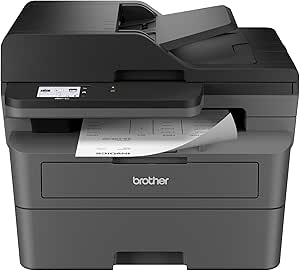 | Best for Small Offices Requiring Fax and User-Friendly Interface | Print Speed: up to 36 ppm | Functions: Print, scan, copy, fax | Connectivity: Wireless, Ethernet, USB | VIEW LATEST PRICE | See Our Full Breakdown |
| Brother HL-L2480DW Wireless Monochrome Multi-Function Laser Printer with Copy and Scan |  | Best Budget-Friendly Multi-Function for Small Spaces | Printer Type: Laser | Color: Black & White | Functions: Print, scan, copy | VIEW LATEST PRICE | See Our Full Breakdown |
| Brother HL-L2405W Wireless Monochrome Laser Printer with Mobile Printing |  | Best Compact & Cost-Effective for Small Offices | Print Speed: 30 pages per minute | Connectivity: Wireless (dual-band 2.4GHz/5GHz), USB | Paper Capacity: 250 sheets | VIEW LATEST PRICE | See Our Full Breakdown |
| Canon imageCLASS MF287dw Monochrome Wireless Laser Printer All-in-One |  | Best for Multifunction Office Needs with Fast Speed | Print Speed: 35 PPM | First Print Out Time: Less than 4.9 seconds | Connectivity: Wireless, Canon Print App, AirPrint, Mopria | VIEW LATEST PRICE | See Our Full Breakdown |
| HP Color LaserJet Pro MFP 3301sdw Wireless All-in-One Color Laser Printer |  | Best for Color-Quality Business Documents | Print Speed: 26 ppm | Functions: Print, Scan, Copy | Automatic Duplex: Yes | VIEW LATEST PRICE | See Our Full Breakdown |
| Canon imageCLASS MF465dw II Monochrome Wireless Duplex Laser Printer with Print, Copy, Scan, Fax, Expandable Paper Capacity, 42 PPM |  | Best for High-Speed, Heavy-Duty Small Office Environments | Printer Type: Monochrome Laser | Wireless: Yes | Duplex Printing: Yes | VIEW LATEST PRICE | See Our Full Breakdown |
| Business laser printer for small office | Print Speed | Functions | Connectivity |
|---|---|---|---|
| HP LaserJet Pro MFP 3105sdw Wi | up to 33 pages per minute | Print, scan, copy | Wi-Fi |
| Brother DCP-L2640DW Wireless M | up to 36 ppm | Print, scan, copy | Wi-Fi (dual-band), Ethernet, USB |
| HP LaserJet Pro MFP 3101sdw Wi | up to 35 ppm | Print, scan, copy | Wireless |
| Brother MFC-L2820DW Wireless M | up to 36 ppm | Print, scan, copy, fax | Wireless, Ethernet, USB |
| Brother HL-L2480DW Wireless Mo | 36 ppm | Print, scan, copy | Wi-Fi, Ethernet, USB |
| Brother HL-L2405W Wireless Mon | 30 pages per minute | — | Wireless (dual-band 2.4GHz/5GHz), USB |
| Canon imageCLASS MF287dw Monoc | 35 PPM | Print, Copy, Scan, Fax | Wireless, Canon Print App, AirPrint, Mopria |
| HP Color LaserJet Pro MFP 3301 | 26 ppm | Print, Scan, Copy | Wireless |
| Canon imageCLASS MF465dw II Mo | 42 PPM | Print, Copy, Scan, Fax | — |
More Details on Our Top Picks
HP LaserJet Pro MFP 3105sdw Wireless Printer
This all-in-one model shines with a balance of speed, security, and ease of use, making it a standout choice for busy office settings. Its fast print rate of 33 ppm and auto duplexing boost productivity, while security features like HP Wolf Pro Security protect sensitive data. Compared with the Brother MFC-L2820DW, it offers more streamlined mobile setup and smart scanning features, though it relies solely on original HP cartridges, which can be costly. Its focus on black-and-white printing limits versatility but aligns well with typical office tasks. This printer is best suited for offices needing reliable, secure, and straightforward multi-functionality.
Pros:- Fast printing speeds up to 33 ppm and auto duplex for efficiency
- Easy setup via the HP app and seamless mobile printing
- Enhanced security features to protect sensitive documents
- Smart scanning to email with AI capabilities
Cons:- Works exclusively with original HP cartridges with chips, which can be costly
- Limited to monochrome printing, reducing flexibility for color needs
Best for: Small offices requiring secure, fast, all-in-one printing with easy integration into existing workflows
Not ideal for: Workplaces that need color printing or high-volume output without ongoing cartridge costs
- Print Speed:up to 33 pages per minute
- Functions:Print, scan, copy
- Connectivity:Wi-Fi
- Auto Duplex:Yes
- Maximum Users:7
- Security:HP Wolf Pro Security
Our verdict“This model is ideal for small offices prioritizing secure, fast, and reliable multi-function printing with minimal fuss.”
Brother DCP-L2640DW Wireless Monochrome Multi-Function Laser Printer with Copy and Scan
This printer stands out for its compact design, making it perfect for small offices or tight spaces where desk real estate is limited. Its 36 ppm speed keeps workflow moving, and the inclusion of wireless, Ethernet, and USB connectivity offers versatile setup options. Unlike the HP LaserJet Pro 3101sdw, it does not include a fax function, which might be a drawback for some small businesses. While its monochrome-only output limits color versatility, it excels at straightforward printing, copying, and scanning tasks. The need for frequent toner replacements can be a tradeoff for those with high-volume demands, but overall, it provides excellent value for space-conscious environments.
Pros:- Compact and space-efficient design fits small offices
- Fast print and scan speeds keep productivity high
- Multiple connectivity options including wireless and Ethernet
- Supports mobile printing and scanning
Cons:- Monochrome only, not suitable for color printing needs
- Toner replacement may be frequent with high usage
Best for: Small offices needing a space-saving, reliable multi-function printer with flexible connectivity
Not ideal for: Businesses requiring color printing or fax capabilities
- Print Speed:up to 36 ppm
- Scan Speed:up to 23.6/7.9 ipm
- Auto Document Feeder:50 pages
- Connectivity:Wi-Fi (dual-band), Ethernet, USB
- Compatible Toner:TN830, TN830XL
- Functions:Print, scan, copy
Our verdict“This model makes the most sense for small offices needing an efficient, space-saving mono printer with versatile connectivity.”
HP LaserJet Pro MFP 3101sdw Wireless Black and White All-in-One Laser Printer
This model is tailored for small teams that need a dependable, high-capacity all-in-one printer. Its 35 ppm speed and 250-sheet input tray support larger print jobs without constant refilling, contrasting with the Brother HL-L2480DW, which has a smaller paper capacity. The auto document feeder streamlines multi-page tasks, while wireless connectivity simplifies setup. However, it still relies on HP cartridges with chips, and its monochrome-only output limits flexibility. Firmware updates can sometimes be necessary, but for teams focused on speed and volume, this printer offers a solid balance of features and reliability.
Pros:- Fast printing up to 35 ppm; suitable for high-volume tasks
- Large 250-sheet input tray reduces refilling frequency
- Auto duplex printing saves paper
- Reliable wireless connectivity
Cons:- Limited to black-and-white printing, lacking color versatility
- Cartridges with HP chips may add to ongoing costs and complexity
- Firmware updates might be required for optimal performance
Best for: Small teams that require high-volume, reliable black-and-white printing with minimal interruptions
Not ideal for: Offices needing color printing or multifunction devices with fax capabilities
- Print Speed:up to 35 ppm
- Input Tray Capacity:250 sheets
- Auto Document Feeder:50 sheets
- Connectivity:Wireless
- Functions:Print, scan, copy
- Color:Black and White
Our verdict“This printer is best suited for small teams that need dependable, high-speed monochrome output with large capacity features.”
Brother MFC-L2820DW Wireless Monochrome All-in-One Laser Printer with Copy, Scan, Fax
The Brother MFC-L2820DW is notable for its multifunctionality, including fax, which sets it apart from similar models like the Brother HL-L2480DW. Its 36 ppm speed ensures efficient handling of high-volume workloads, and its 2.7-inch touchscreen makes operation straightforward. While its monochrome-only output limits color options, the inclusion of fax functionality caters to small offices that still require this feature. Its multiple connection options, including wireless and Ethernet, provide flexible setup. The absence of automatic duplex printing is a weak point, but the device’s user-friendly interface and integrated fax make it a compelling choice for small businesses needing comprehensive functionality.
Pros:- Compact and space-efficient design
- Fast printing and scanning speeds
- Includes fax functionality for small business needs
- Easy-to-use 2.7-inch touchscreen interface
Cons:- Limited to monochrome printing, no color option
- No automatic duplex printing mentioned, which may affect efficiency
- Requires compatible toner cartridges, adding ongoing costs
Best for: Small offices that need a multifunction device with fax capabilities and easy-to-use controls
Not ideal for: Workplaces that do not require fax or need color printing capabilities
- Print Speed:up to 36 ppm
- Functions:Print, scan, copy, fax
- Connectivity:Wireless, Ethernet, USB
- Touchscreen:2.7 inches
- Auto Document Feeder:50 pages
- Color:Black and White
Our verdict“This model is well-suited for small offices needing a multifunction device that covers printing, scanning, copying, and fax with user-friendly features.”
Brother HL-L2480DW Wireless Monochrome Multi-Function Laser Printer with Copy and Scan
While the Brother HL-L2480DW offers a straightforward, compact solution, it falls behind in some features compared to the Brother MFC-L2820DW, notably lacking a fax function and automatic duplex printing. Its 36 ppm speed makes it suitable for moderate workloads, and its wireless and Ethernet support ensures flexible setup options. Its primary appeal lies in affordability and space-saving design, making it ideal for small offices with basic monochrome printing needs. However, the absence of fax and potentially higher toner replacement frequency for high-volume use are tradeoffs that users should consider, especially if multifunctionality beyond printing, copying, and scanning isn’t needed.
Pros:- Compact design fits small office spaces
- Wireless and Ethernet connectivity for flexible setup
- Automatic duplex printing saves time and paper
- Supports cloud printing and scanning
Cons:- No fax functionality included
- Limited to monochrome output, no color options
- Toner may need frequent replacement for high-volume use
Best for: Small offices seeking a cost-effective, space-efficient mono printer with core functions
Not ideal for: Businesses that need fax functionality or automatic duplex printing as standard
- Printer Type:Laser
- Color:Black & White
- Functions:Print, scan, copy
- Connectivity:Wi-Fi, Ethernet, USB
- Print Speed:36 ppm
- Paper Capacity:250 sheets
Our verdict“This model works well for budget-conscious small offices that need reliable mono printing with essential features.”
Brother HL-L2405W Wireless Monochrome Laser Printer with Mobile Printing
This Brother model stands out for its affordability and straightforward wireless connectivity, making it a great choice for small offices that prioritize budget and simplicity. Compared with the Canon MF287dw, it offers a slightly lower print speed but excels with a larger paper tray of 250 sheets, reducing the need for frequent refills. Its monochrome-only output keeps costs predictable, but this limits flexibility for offices needing color. The lack of automatic duplexing means double-sided printing must be manual, which could slow down higher-volume workflows. Overall, this printer suits environments where monochrome printing suffices and space is limited.
Pros:- Fast printing speed of 30 pages per minute
- Wireless and USB connectivity options for flexible setup
- Large 250-sheet paper tray reduces refills
Cons:- Limited to monochrome printing, no color support
- Requires toner replacement for ongoing use
Best for: Small offices with basic black-and-white printing needs and limited space
Not ideal for: Offices requiring color printing or high-volume document handling
- Print Speed:30 pages per minute
- Connectivity:Wireless (dual-band 2.4GHz/5GHz), USB
- Paper Capacity:250 sheets
- Printer Type:Monochrome laser
- Included:Refresh subscription trial
Our verdict“This pick is ideal for small, budget-conscious offices needing reliable monochrome printing without the bells and whistles.”
Canon imageCLASS MF287dw Monochrome Wireless Laser Printer All-in-One
The Canon MF287dw is a versatile all-in-one monochrome laser printer that’s better suited for offices needing copying, scanning, and occasional faxing alongside printing. Its faster print speed of 35 ppm outpaces the Brother HL-L2405W, and the auto document feeder streamlines multi-page tasks. It supports multiple mobile printing options like Apple AirPrint and Mopria, making it convenient for users with diverse devices. However, being monochrome-only, it won’t serve offices that require color output. The higher toner replacement costs may also impact ongoing expenses. This model is a strong choice for busy workgroups needing multifunction capabilities without sacrificing speed.
Pros:- Fast printing speed of 35 pages per minute
- Supports wireless, mobile printing, and multifunction functions
- Duplex printing to save paper
Cons:- Limited to monochrome printing, no color option
- Potentially higher toner costs with frequent use
Best for: Small teams requiring a multifunction device with fast monochrome printing
Not ideal for: Offices needing color printing or minimal multifunction features
- Print Speed:35 PPM
- First Print Out Time:Less than 4.9 seconds
- Connectivity:Wireless, Canon Print App, AirPrint, Mopria
- Functions:Print, Copy, Scan, Fax
- Auto Document Feeder:Yes
- Warranty:1 Year Limited
Our verdict“This printer is well-suited for small offices demanding speed and multifunctionality in monochrome output.”
HP Color LaserJet Pro MFP 3301sdw Wireless All-in-One Color Laser Printer
The HP Color LaserJet Pro 3301sdw is designed for offices that need vibrant color output along with multifunction capabilities. With a decent print speed of 26 ppm, it balances color quality with productivity, making it suitable for marketing materials or colorful reports. Its automatic duplex printing and 250-sheet input tray support high-volume workloads efficiently. Compared to the monochrome options, it offers richer document presentation, but this comes with the tradeoff of requiring original HP toner cartridges with chips, which can be more costly and limit third-party options. This model is ideal for small offices prioritizing color and visual impact.
Pros:- Fast color printing at 26 ppm
- All-in-one functionality with scan and copy
- Automatic duplex saves paper
Cons:- Requires proprietary HP toner cartridges with chips
- Limited to HP cartridges, potentially more expensive
Best for: Small offices needing professional-quality color documents and vibrant output
Not ideal for: Offices on tight budgets or with primarily text-based printing needs
- Print Speed:26 ppm
- Functions:Print, Scan, Copy
- Automatic Duplex:Yes
- Input Tray Capacity:250 sheets
- Connectivity:Wireless
Our verdict“A solid choice for offices that value color accuracy and high-quality visuals in their documents.”
Canon imageCLASS MF465dw II Monochrome Wireless Duplex Laser Printer with Print, Copy, Scan, Fax, Expandable Paper Capacity, 42 PPM
This Canon model outpaces the others with a high print speed of 42 ppm and a 5-inch touchscreen interface, making it a robust solution for busy offices. Its wireless capabilities and support for mobile printing add convenience for a range of users. The inclusion of fax and expandable paper capacity makes it suitable for larger workloads and more complex document management. Compared with the MF287dw, it offers a faster output and more advanced features, but its setup can be complex for less experienced users, and it remains monochrome-only. This model is best for offices with high-volume needs and a focus on speed and multitasking.
Pros:- High print speed of 42 pages per minute
- Wireless and mobile device printing
- Includes fax and expandable paper capacity
Cons:- Limited to monochrome printing
- Setup may be complex for some users
Best for: High-volume, fast-paced small offices needing a multifunction monochrome printer
Not ideal for: Offices that require color printing or simple, plug-and-play setup
- Printer Type:Monochrome Laser
- Wireless:Yes
- Duplex Printing:Yes
- Functions:Print, Copy, Scan, Fax
- Print Speed:42 PPM
- Touchscreen:5-inch
Our verdict“This printer is ideal for busy offices that demand speed, multifunctionality, and expandability in monochrome printing.”

How We Picked
The printers in this roundup were evaluated based on performance, ease of use, build quality, maintenance costs, and value for small office environments. We prioritized models that deliver reliable, high-quality output without excessive complexity or expense. Devices with versatile connectivity options and energy efficiency also scored higher, as these features are vital in busy small offices. The ranking reflects a balance between initial investment and ongoing operational costs, ensuring that each option offers a practical solution tailored to small business needs.| Business laser printer for small office | Functions |
|---|---|
| HP LaserJet Pro MFP 3105sdw Wi | Print, scan, copy |
| Brother DCP-L2640DW Wireless M | Print, scan, copy |
| HP LaserJet Pro MFP 3101sdw Wi | Print, scan, copy |
| Brother MFC-L2820DW Wireless M | Print, scan, copy, fax |
| Brother HL-L2480DW Wireless Mo | Print, scan, copy |
| Brother HL-L2405W Wireless Mon | — |
| Canon imageCLASS MF287dw Monoc | Print, Copy, Scan, Fax |
| HP Color LaserJet Pro MFP 3301 | Print, Scan, Copy |
| Canon imageCLASS MF465dw II Mo | Print, Copy, Scan, Fax |
Factors to Consider When Choosing Business Laser Printer For Small Office
When choosing a business laser printer for a small office, there are several key factors to consider beyond just the initial price. Understanding these can help you avoid common pitfalls and select a model that fits your workflow, budget, and future growth plans. From print speed to connectivity, each feature impacts your daily productivity and long-term costs. Let’s explore the most important considerations to keep in mind.Performance and Speed
In a small office, the ability to print quickly and reliably can significantly impact productivity. Look for printers with a high pages-per-minute (PPM) rate, especially if your team regularly produces large documents. However, don’t prioritize speed alone; consider how the printer handles high-volume tasks over time, as some models may slow down or require frequent maintenance. A balanced approach ensures your workflow remains smooth without unnecessary delays.
Cost of Supplies and Maintenance
Initial purchase price is just part of the story. Toner cartridges and maintenance supplies often constitute the bulk of long-term costs. Models with high-yield toner options can reduce the frequency of replacements, lowering operational expenses. Additionally, check the availability and price of consumables for each model, as cheaper toner can sometimes be less reliable, leading to more frequent issues or replacements. This consideration helps prevent surprises down the line.
Connectivity and Mobile Printing
Wireless connectivity is nearly a necessity for small offices, allowing multiple devices to print without cluttered cables. Features like Wi-Fi, Ethernet, and mobile printing support (Apple AirPrint, Google Cloud Print) enhance flexibility. Be cautious, though: some models advertise wireless support but have complicated setup processes or limited compatibility. Prioritize printers with straightforward networking options to avoid frustration.
Multifunction Capabilities
Many small offices benefit from all-in-one printers that combine printing, scanning, copying, and sometimes faxing. These models save space and reduce the need for separate devices. However, multifunction units can be more complex and potentially more prone to breakdowns. Decide which functions are essential for your workflow to avoid paying for features you won’t use and to simplify maintenance.
Size and Design
Compact design matters in small office settings where space is limited. Look for models that offer a good balance between size and functionality. Some multifunction printers are large but pack more features, while others prioritize a small footprint at the expense of certain capabilities. Consider your office layout and future expansion when selecting a model to ensure it fits comfortably and remains accessible.
Additional Features and Future Proofing
Features like duplex printing, high paper capacity, and expandable memory can extend the usefulness of your printer as your office grows. Think about your current needs but also consider potential future demands to avoid needing an upgrade soon. Extra features may increase initial costs but can offer significant efficiency benefits in the long run.
Frequently Asked Questions
How do I determine the right print speed for my small office?
Assess your typical daily print volume and document complexity. For small offices with moderate needs, a printer offering 20-30 pages per minute (PPM) generally suffices. If your team prints large volumes or detailed graphics, consider models with higher speeds to prevent bottlenecks. Remember, higher speeds can sometimes lead to increased noise or higher costs, so balance speed with overall efficiency and budget.
Are multifunction printers worth the extra cost for a small office?
Multifunction printers can significantly streamline workflows by combining printing, copying, scanning, and sometimes faxing in a single device. For small offices with limited space, this reduces clutter and simplifies maintenance. However, they tend to be more complex and potentially more costly to repair. If your office frequently uses multiple functions, investing in a good all-in-one model can improve productivity and save space, justifying the higher initial expense.
Is wireless connectivity reliable enough for small office use?
Most modern laser printers offer reliable wireless options, especially when connected via a stable Wi-Fi network. However, setup quality and network stability matter; poorly configured wireless setups can cause printing delays or failures. For small offices with multiple devices, a printer with straightforward, robust wireless support and compatibility with common mobile printing standards ensures smoother operation and fewer frustrations.
How important is duplex (double-sided) printing for small offices?
Duplex printing can save significant time and paper costs, especially if your office produces large documents or reports. While some entry-level models lack this feature, choosing a duplex-capable printer can cut down on manual intervention and reduce environmental impact. Consider your typical document types and volume; in many cases, duplexing is a worthwhile investment that pays off over time.
Should I prioritize print resolution or speed?
For most small office needs, standard print resolution (600 dpi) provides clear text and graphics. Higher resolutions are beneficial for detailed images or professional-quality presentations but may slow down printing or increase costs. If your work involves a lot of graphic design or high-quality color printing, prioritize resolution. Otherwise, focusing on speed and reliability generally yields better everyday results.
Conclusion
For most small office environments, the HP LaserJet Pro MFP 3105sdw offers a balanced blend of performance, ease of use, and cost-effectiveness, making it the best overall choice. Budget-conscious buyers should consider the Brother DCP-L2640DW for its combination of multifunction features and low operational costs. If you need a premium, feature-rich model, the Canon imageCLASS MF465dw II provides high speed, expandability, and advanced capabilities. Beginners or small teams just starting out might prefer a simpler, more affordable option like the Brother HL-L2405W. For offices with specific needs like color printing or high-volume duplex tasks, models like the HP Color LaserJet Pro MFP 3301sdw or Canon imageCLASS MF287dw are ideal. Consider your workflow, space, and long-term costs to select the printer that best fits your office’s unique demands.