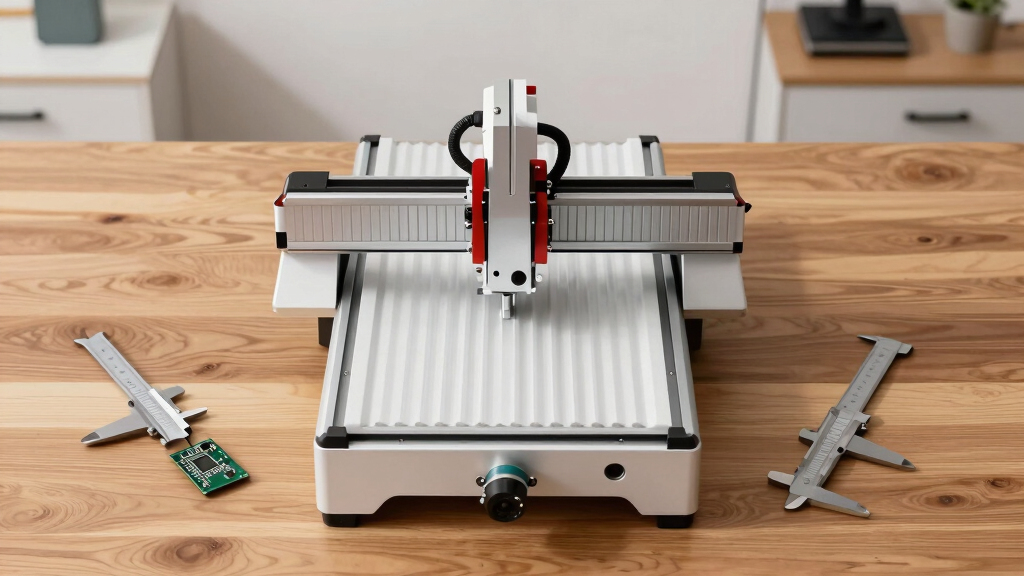

Finding the best desktop CNC routers for prototype labs involves balancing precision, size, ease of use, and budget. The FoxAlien Masuter Pro MAX stands out as the top overall choice thanks to its combination of build quality and versatility. For those prioritizing affordability, the Genmitsu 4040-PRO offers solid performance at a lower price point, while the FoxAlien XE-Ultra provides a larger working area for bigger prototypes. These options reflect common tradeoffs: higher precision often means higher cost, and larger work areas can complicate setup and calibration. Continue reading for a detailed breakdown of each model’s strengths and tradeoffs.

Get business pricing on office and shipping supplies
- Business-only prices and quantity discounts
- Tax-exempt purchasing
- Multiple users, one account, clear invoices
Key Takeaways
- The top-tier models combine precision and build quality, but come at a higher cost.
- Larger work areas generally require more advanced stabilization and calibration efforts.
- Ease of use and software compatibility remain key considerations for prototype labs with varying skill levels.
- Budget-friendly options often sacrifice some precision or speed but still deliver reliable results for early-stage prototypes.
- Material compatibility varies, with some models better suited for softer materials like plastics and woods, while others handle metals better.
| FoxAlien Masuter Pro MAX Desktop CNC Router |  | Best Overall for Versatile and Large-Scale Prototyping | Spindle power: 500 W brushless | Work area: 600 × 600 mm (23.6 × 23.6 in) | Z-axis pass height: 100 mm (3.94 in) | VIEW LATEST PRICE | See Our Full Breakdown |
| Genmitsu 4040-PRO CNC Router Machine |  | Best Value for Stable, Precise Small-to-Medium Projects | Working area: 435 × 400 × 80 mm (17.13 × 15.75 × 3.15 in) | Axes: 3 | Control: GRBL | VIEW LATEST PRICE | See Our Full Breakdown |
| Genmitsu Cubiko Desktop CNC Router with Enclosure |  | Best for Enclosed, Light-Duty Prototyping | Assembly: Pre-assembled | Supported materials: Wood, acrylic, PCB, plastics, soft metals | Features: Auto Z-probing, surface mapping, enclosure | VIEW LATEST PRICE | See Our Full Breakdown |
| FoxAlien Masuter Pro 3-Axis CNC Router Machine |  | Best for Compact, All-Aluminum Precision Milling | Axes: 3 | Work area: 400 × 400 × 60 mm (15.75 × 15.75 × 2.36 in) | Frame material: Aluminum | VIEW LATEST PRICE | See Our Full Breakdown |
| FoxAlien XE-Ultra 8080 CNC Router Machine |  | Best for Large-Prototyping and Heavy-Duty Use | Work area: 33 × 33 × 4.72 in | Pass height: 5.3 in | Frame material: Aluminum | VIEW LATEST PRICE | See Our Full Breakdown |
| LUNYEE 3020 Nova CNC Router with 800W Spindle |  | Best Overall for Precision and Material Flexibility | Brand: LUNYEE | Model: 3020 Nova | Spindle power: 800W | VIEW LATEST PRICE | See Our Full Breakdown |
| Twotrees TTC450 Pro All-Metal CNC Router with NEMA 57 Stepper Motor |  | Best for Versatile Upgrades and Larger Work Area | Working area: 460 × 460 × 80 mm | Positioning accuracy: Up to 0.0025 mm | Stepper motor: NEMA 57 | VIEW LATEST PRICE | See Our Full Breakdown |
| LUNYEE 4040 Pro Max CNC Router with 800W Router |  | Best for Compact, Heavy-Duty Routing with Easy Setup | Work area: 400 × 400 mm | Z travel: 90 mm | Router power: 800 W | VIEW LATEST PRICE | See Our Full Breakdown |
| desktop CNC routers for prototype lab | Work area |
|---|---|
| FoxAlien Masuter Pro MAX Deskt | 600 × 600 mm (23.6 × 23.6 in) |
| Genmitsu 4040-PRO CNC Router M | — |
| Genmitsu Cubiko Desktop CNC Ro | — |
| FoxAlien Masuter Pro 3-Axis CN | 400 × 400 × 60 mm (15.75 × 15.75 × 2.36 in) |
| FoxAlien XE-Ultra 8080 CNC Rou | 33 × 33 × 4.72 in |
| LUNYEE 3020 Nova CNC Router wi | — |
| Twotrees TTC450 Pro All-Metal | — |
| LUNYEE 4040 Pro Max CNC Router | 400 × 400 mm |
More Details on Our Top Picks
FoxAlien Masuter Pro MAX Desktop CNC Router
The FoxAlien Masuter Pro MAX stands out for its impressive 600 × 600 mm work area, making it ideal for larger prototypes and projects. Its 500W brushless spindle offers quieter, more efficient operation compared to typical brushed motors, supporting extended sessions without overheating. The reinforced X-axis reduces vibration, ensuring better precision during milling and engraving. Additionally, the dedicated A-axis port simplifies rotary work without needing extra wiring, a feature that sets it apart from models like the Genmitsu 4040-PRO, which has a smaller work area and less robust spindle options. However, the unit is limited to 110 V power, which may require a converter in some labs, and the closed-loop motor upgrade is future-oriented rather than immediate. Overall, this pick excels for labs needing a capable, large-format CNC with room for future expansion.
Pros:- Large 600 × 600 mm work area supports bigger projects
- Quiet, efficient 500W brushless spindle extends tool life
- Reinforced X-axis reduces vibration for better accuracy
- Dedicated rotary port simplifies multi-axis work
Cons:- Limited to 110 V power, potentially requiring a converter
- Closed-loop motors are a future upgrade, not standard
Best for: Labs requiring high-capacity, large-format milling with room for rotary and future upgrades.
Not ideal for: Small workshops or those with 220 V power setups, as it is only listed for 110 V operation.
- Spindle power:500 W brushless
- Work area:600 × 600 mm (23.6 × 23.6 in)
- Z-axis pass height:100 mm (3.94 in)
- Control:3-axis GRBL
- Voltage:110 V
- Dimensions:37 × 17 in (W × H)
- Weight:26 kg
- Material:Aluminum
Our verdict“This router is best for labs that need large-format capabilities with room for expansion and rotary work.”
Genmitsu 4040-PRO CNC Router Machine
The Genmitsu 4040-PRO offers a balanced combination of rigidity and ease of use, making it well-suited for prototype labs with limited space. Its reinforced spoilboard and dual steel tubes on each axis provide stability that rivals more expensive units like the FoxAlien Masuter Pro MAX, even with a smaller 435 × 400 mm work area. The pre-assembled modules simplify setup, allowing labs to start milling quickly. Its GRBL control system supports a range of G-code workflows and accessories, though users must ensure they select appropriate bits and settings for each material, unlike the more versatile Masuter Pro MAX. The main tradeoff is the limited work area, which might restrict larger prototypes, but for detailed, accurate work on smaller materials, it’s a cost-effective choice.
Pros:- Reinforced spoilboard and center support for accuracy
- Rigid motion system supports precise machining
- Pre-assembled modules enable faster setup
- Supports a variety of materials including wood and acrylic
Cons:- Limited work area may restrict larger prototypes
- Additional purchases needed for compatible spindles and accessories
Best for: Small to medium prototype labs focusing on precision and quick setup for diverse materials.
Not ideal for: Labs needing large-format work or heavy-duty milling of soft metals and composites, due to its smaller work area and limited spindle options.
- Working area:435 × 400 × 80 mm (17.13 × 15.75 × 3.15 in)
- Axes:3
- Control:GRBL
- Drive:Lead screw
- Controller:32-bit with Toshiba drivers
- Voltage:240 V
- Material:Aluminum, acrylic
Our verdict“Ideal for labs prioritizing precision and quick deployment on small to medium projects.”
Genmitsu Cubiko Desktop CNC Router with Enclosure
The Genmitsu Cubiko is designed for ease of use and noise reduction, making it an excellent choice for labs that prioritize safety and a cleaner environment. Its pre-assembled build speeds up deployment, while the enclosure contains dust and reduces noise during operation. It supports engraving and light carving on wood, acrylic, and plastics, with software compatibility across popular platforms like Fusion 360 and Easel. Its auto Z-probing and surface mapping features support more accurate setups, though calibration and proper probe connection are necessary for best results, especially when working on delicate prototypes. The limited metal work capability restricts its use for heavy-duty or soft metal projects, but for small, detailed prototypes, its enclosed design provides a clear advantage.
Pros:- Pre-assembled for quick start-up
- Enclosure contains dust and reduces noise
- Supports auto Z-probing and surface mapping
- Compatible with multiple popular CNC software
Cons:- Probing requires careful calibration and proper connection
- Limited to soft metals and light-duty applications
Best for: Labs focused on safe, quiet, and dust-contained light-duty prototyping on soft materials.
Not ideal for: Heavy-metal or large-scale projects requiring significant material removal or larger work areas.
- Assembly:Pre-assembled
- Supported materials:Wood, acrylic, PCB, plastics, soft metals
- Features:Auto Z-probing, surface mapping, enclosure
- Frame:Reinforced one-piece
- Enclosure:Protective dust and noise containment
- Compatible software:Fusion 360, Candle, Easel, Carveco
Our verdict“Perfect for labs needing a safe, enclosed environment for small-scale, detailed prototyping.”
FoxAlien Masuter Pro 3-Axis CNC Router Machine
The FoxAlien Masuter Pro is a compact, all-aluminum CNC router suited for precision engraving and light milling on smaller projects. Its 400 × 400 × 60 mm work area is more modest, but the all-metal frame and linear-rail Z-axis deliver excellent stability and accuracy comparable to larger models like the Masuter Pro MAX. Its quick assembly—taking only 10–15 minutes—makes it appealing for labs with limited setup time. The 60 W spindle provides enough power for soft materials such as wood and plastics, with support for upgrades. While it lacks the large work area of the Masuter Pro MAX, its sturdy construction and ease of setup make it suitable for precise, detailed prototypes where space is limited.
Pros:- All-aluminum frame ensures durability and precision
- Linear-rail Z-axis supports accurate, stable milling
- Pre-wired, quick to assemble
- Supports spindle upgrades for versatility
Cons:- Limited work area may restrict larger prototypes
- Spindle clamp sold separately, adding cost
Best for: Labs needing a compact, stable machine for detailed engraving and small-scale milling.
Not ideal for: Large prototypes or projects involving hard metals and extensive material removal, due to its size and spindle power.
- Axes:3
- Work area:400 × 400 × 60 mm (15.75 × 15.75 × 2.36 in)
- Frame material:Aluminum
- Spindle power:60 W
- Maximum rotational speed:10,000 rpm
- Item weight:13 kg
- Assembly time:10–15 minutes
Our verdict“Ideal for precise, small-scale milling in limited space environments requiring quick setup.”
FoxAlien XE-Ultra 8080 CNC Router Machine
The FoxAlien XE-Ultra 8080 offers a substantial 33 × 33 inch work area, making it suitable for oversized prototypes and batch production. Its heavy-duty aluminum frame, combined with ball screws and linear rails on all axes, ensures high rigidity and accurate machining of large parts. The closed-loop stepper motors with 2.6 N·m torque deliver reliable step synchronization, critical for complex, high-precision work. Unlike smaller desktop models such as the Cubiko, the XE-Ultra can handle larger, more demanding projects, though it requires a dedicated space due to its weight of 40 kg and higher power needs. The absence of a spindle included allows for customization, but this also means additional investment. It’s a powerful choice for labs that need size and robustness, though it’s less suitable for tight spaces or quick setups.
Pros:- Massive 33 × 33 inch work area supports large prototypes
- Heavy-duty aluminum frame with ball screws and linear rails
- Closed-loop motors prevent step loss during intensive milling
- Supports a variety of spindles and engraving modules
Cons:- Spindle not included, increasing initial cost
- Heavy at 40 kg, requiring dedicated space and setup
Best for: Prototyping labs handling large components or requiring heavy-duty, high-precision milling.
Not ideal for: Small, lightweight, or portable setups where space and weight are constraints.
- Work area:33 × 33 × 4.72 in
- Pass height:5.3 in
- Frame material:Aluminum
- Linear rails:HG-15 on all axes
- Stepper torque:2.6 N·m
- Maximum speed:5,000 mm/min
- Weight:40 kg
Our verdict“Best suited for large-scale, heavy-duty prototyping where size and precision are priorities over portability.”
LUNYEE 3020 Nova CNC Router with 800W Spindle
The LUNYEE 3020 Nova stands out for its all-metal construction, which provides exceptional rigidity and accuracy for prototype labs demanding precision. Equipped with 1204 ball screws and HG-15 linear guides on all axes, it surpasses many competitors like the Twotrees TTC450 Pro in stability, though it requires a bit more setup, such as installing the Z-axis module before operation. Its powerful 800W spindle supports a wide range of materials from wood to metals, making it highly versatile for prototyping diverse components. Fully assembled with pre-wired connections, it minimizes initial setup time—an advantage over the TTC450’s assembly requirements. However, its dimensions are only specified in width and height, which might limit spatial planning. Overall, this model is best suited for labs needing a reliable, high-precision machine capable of handling heavier materials with ease, but it involves a moderate installation step.
Pros:- All-metal frame with high rigidity for precise cuts
- Supports a wide material range, including metals
- Fully assembled with wiring pre-connected for quick startup
Cons:- Requires installing the Z-axis module before use, adding setup time
- Limited dimension details may challenge spatial planning
Best for: Medium-sized prototype labs focusing on high-precision metal and plastic parts
Not ideal for: Small teams or hobbyists seeking a plug-and-play solution with minimal setup
- Brand:LUNYEE
- Model:3020 Nova
- Spindle power:800W
- Maximum rotational speed:30,000 rpm
- Axis drive:1204 ball screws
- Linear guides:HG-15
- Accuracy:±0.05 mm
- Dimensions:16.1 in W × 20.4 in H
- Material:Metal
Our verdict“This CNC router is ideal for labs that prioritize precision, material versatility, and reliable build quality over immediate plug-and-play convenience.”
Twotrees TTC450 Pro All-Metal CNC Router with NEMA 57 Stepper Motor
The Twotrees TTC450 Pro excels with its sizable 460 × 460 × 80 mm working area, making it a strong choice for projects requiring larger panels or signage. Its support for optional 4th-axis and laser upgrades, along with compatibility across Windows, macOS, and Linux, offers adaptability that surpasses the more fixed configurations of the LUNYEE 4040 Pro Max. The inclusion of a 3.5-inch capacitive touchscreen simplifies operation, but its assembly process and driver installation, especially for Windows 11 users, are less streamlined than fully pre-assembled options. Its NEMA 57 stepper motor enables precise positioning up to 0.0025 mm, ideal for detailed work, though the need for driver setup can be a barrier for some newcomers. This pick is best for users who want a flexible, upgradeable platform for larger projects, but are prepared for some initial setup complexity.
Pros:- Large working area suitable for panels and signage
- Supports optional 4th-axis and laser attachments
- Compatible with multiple operating systems and design software
Cons:- Requires assembly and driver installation, adding setup complexity
- Windows 11 users need a separate CH341 driver, which can be inconvenient
Best for: Prototyping teams needing a larger working area with upgrade potential for laser and additional axes
Not ideal for: Hobbyists or small startups seeking a simple, quick-start machine with minimal setup
- Working area:460 × 460 × 80 mm
- Positioning accuracy:Up to 0.0025 mm
- Stepper motor:NEMA 57
- Control system:GRBL
- Display:3.5-inch IPS capacitive touchscreen
- Supported OS:Windows, macOS, Linux
Our verdict“This CNC router offers expanding capability and larger workspace for labs willing to handle initial setup, making it suitable for growing prototyping needs.”
LUNYEE 4040 Pro Max CNC Router with 800W Router
The LUNYEE 4040 Pro Max is designed for users needing a stable, heavy-duty machine within a compact footprint. Its 400 × 400 mm work area limits projects to smaller panels, but the reinforced frame, dual linear-guide Z axis, and ball screw drive ensure consistent results, especially when working with materials like MDF, plastics, and light aluminum. Dust protection helps maintain smooth motion over time, and pre-assembled modules reduce setup complexity, making it accessible for labs that prefer quick deployment. Compared to the larger Twotrees TTC450 Pro, this model sacrifices workspace size for enhanced stability and ease of use. However, its limited size may restrict some prototyping tasks involving bigger components or multiple parts. This router is a solid choice for labs prioritizing reliability and ease of setup over maximum workspace.
Pros:- Supports a range of materials, including plastics and light aluminum
- Reinforced frame with dual linear guides for stability
- Dust protection keeps motion components cleaner
Cons:- Limited to a 400 × 400 mm work area, restricting project size
- May not be suitable for heavier or larger metal parts due to size constraints
Best for: Small to medium prototype labs focused on rapid, stable routing of small to medium parts
Not ideal for: Labs working on large panels or needing to cut heavier metals that exceed the 400 mm width
- Work area:400 × 400 mm
- Z travel:90 mm
- Router power:800 W
- Drive:Ball screw
- Linear guides:Dual
- Material compatibility:Wood, plastics, light aluminum
Our verdict“This CNC router offers a balance of stability and ease of use for small to medium projects, but its size limits larger or heavier material processing.”

How We Picked
I evaluated these CNC routers based on a combination of performance, build quality, ease of setup, user interface, and value for the prototype lab environment. Products were selected for their ability to handle common lab materials, their precision, and their expandability. The ranking reflects a balance between price and capability, favoring models that deliver consistent results with manageable complexity. I also considered user feedback on long-term reliability and maintenance ease, ensuring these options are practical for ongoing lab use.Factors to Consider When Choosing Best Desktop CNC Routers For Prototype Labs
Choosing the right desktop CNC router for a prototype lab requires understanding several key factors. Beyond initial features, consider how the machine’s size, material compatibility, and software support align with your project needs. Proper calibration and maintenance can significantly impact accuracy, especially in a lab setting where precision matters. Budgeting for future upgrades and understanding the learning curve are also critical for making a sustainable choice.Size and Work Area
The size of the CNC router determines what prototypes you can create and how comfortably it fits into your workspace. Larger work areas enable bigger or multiple parts but often come with increased complexity and cost. Small, compact models are easier to set up and move but may limit the scope of your projects. Consider your typical project size and available space when selecting a machine.
Material Compatibility and Power
Not all CNC routers handle the same materials equally well. Some are optimized for soft materials like plastics and woods, while others can cut metals or harder composites. Power ratings and spindle types influence this capability—higher wattage usually means better performance on tougher materials. Matching the machine’s capabilities with your prototype materials is essential to avoid frustration and ensure quality results.
Ease of Use and Software
A user-friendly interface and reliable software support can accelerate your learning curve and reduce setup errors. Some models come with proprietary software, while others support popular open-source options. Consider your team’s technical skill level—more intuitive software benefits beginners, while advanced options suit experienced users aiming for high precision. Compatibility with design tools is also a significant factor.
Maintenance and Reliability
Regular maintenance is vital for maintaining accuracy and prolonging machine lifespan. Look for models with accessible parts and clear maintenance routines. Machines with robust construction tend to require less frequent adjustments and repairs. Reading user reviews helps identify common issues that could affect your lab’s productivity over time.
Budget and Future Expansion
While it might be tempting to choose the most affordable model, investing a bit more can unlock better accuracy, larger work areas, or stronger build quality. Consider your long-term needs—will your projects require upgrades or additional features? Balancing initial cost with potential growth ensures the machine remains useful as your lab’s capabilities evolve.
Frequently Asked Questions
Can these desktop CNC routers handle metal work?
Most desktop CNC routers in this category are primarily designed for softer materials like plastics and woods. Some models with higher power spindles and rigid frames, such as certain larger units, can cut metals, but it often requires specific configurations and slower feed rates. Always verify the material specifications and build robustness before attempting metalwork to avoid damaging the machine or compromising safety.
What software do I need to operate these CNC routers?
Many of these machines come with proprietary software tailored to their hardware, which is often user-friendly for beginners. Additionally, most support popular open-source or industry-standard CAD/CAM programs, giving you flexibility in design. Compatibility with your existing design tools and ease of learning are key factors—look for models that integrate well with your preferred workflows.
How much space do I need for these CNC routers?
The space required varies significantly depending on the work area and machine size. Compact models may fit on a standard desk or benchtop, while larger units need dedicated space and clearance for operation. Consider not just the machine footprint but also room for material storage and movement during setup. Planning your workspace around these dimensions helps prevent clutter and ensures safety.
Are these machines suitable for beginner users?
Many of these CNC routers are designed with beginners in mind, offering straightforward setup and user-friendly software. However, some larger or more complex models may require more technical knowledge for calibration and maintenance. If you’re new to CNC machining, look for options with good documentation, community support, and simple interfaces—these features facilitate learning and reduce frustration.
What is the typical maintenance required?
Routine maintenance includes cleaning the rails, checking calibration, lubricating moving parts, and inspecting electrical connections. Machines with modular parts and accessible components tend to be easier to maintain. Regular upkeep ensures consistent accuracy and prolongs the lifespan of your CNC router, especially in a busy prototype lab environment.
Conclusion
For labs seeking a reliable, all-around performer, the FoxAlien Masuter Pro MAX makes the most sense thanks to its balance of precision and versatility. Budget-conscious teams will find the Genmitsu 4040-PRO offers excellent value without sacrificing core capabilities. Beginners should consider models with intuitive software and straightforward setup, such as the Genmitsu Cubiko. Larger or more capable labs aiming for high precision and bigger projects might prefer the FoxAlien XE-Ultra or the LUNYEE 4040 Pro Max. Each choice aligns with different priorities—size, budget, ease of use, or material handling—so consider your specific needs when making a selection.
Halloween Picks

Vexalify 11-Inch Halloween Pumpkin Fog Machine with 12-Color Lights

10 ft Halloween Inflatable Archway with Built-in LEDs

8.5 Foot Halloween Inflatable Haunted House Castle with Skeleton, Ghost & Skulls
As an affiliate, we earn on qualifying purchases.