Choosing the right conference webcam for a startup office can significantly improve remote meetings, but balancing quality, price, and ease of setup remains a challenge. The Logitech C920e stands out as the best overall pick for its reliable HD quality and compatibility, while the WYRESTORM 4K AI Tracking Webcam offers impressive auto-framing for dynamic presentations. Budget-conscious startups may prefer the NexiGo N60 for its affordability, but it sacrifices some advanced features found in pricier models. These options reflect tradeoffs between video clarity, tracking capabilities, and ease of use. Continue reading for a detailed breakdown of each product and what makes them suitable for startup teams.
Key Takeaways
- Higher-end models like the Logitech Brio 4K and WYRESTORM offer advanced features such as auto-tracking and 4K resolution, ideal for professional presentations.
- Most affordable webcams like the NexiGo N60 provide decent HD quality but lack sophisticated features like AI auto-framing, suitable for small teams or casual meetings.
- Built-in microphones and auto light correction are common features that significantly improve meeting clarity without extra equipment.
- Auto-framing and AI tracking are game-changers for dynamic meetings but come at a higher price point, making them better suited for larger or more active teams.
- Compatibility with popular platforms (Zoom, Teams, etc.) is nearly universal but double-check for specific integrations or regional compliance needs like TAA.






More Details on Our Top Picks
Logitech C920e HD 1080p Mic-Enabled Webcam, Certified for Zoom, Microsoft Teams Compatible, TAA Compliant
This webcam stands out for its balanced 78° fixed field of view, which effectively frames individual users while allowing room to share projects—a key advantage over narrower views like the Logitech Brio 101. Its two omnidirectional microphones and automatic light correction ensure clear audio and consistent visuals, making it reliable in varied lighting conditions. The sturdy adjustable clip and tripod threads provide versatile mounting options, suitable for both office setups and remote work environments. Compared to simpler models like the EMEET C960, the C920e offers better build quality and certified compatibility with Zoom and Teams, though it lacks advanced features like AI auto-tracking. Its tradeoff is a slightly higher price for added durability and seamless software integration. This pick makes the most sense for teams needing a dependable, plug-and-play solution that guarantees compatibility and professional quality.
Pros:- Reliable 1080p HD video with automatic light correction
- Dual omnidirectional microphones for clear audio
- Sturdy adjustable clip and tripod compatibility
Cons:- Fixed 78° field of view may be limiting for wide room coverage
- Lacks AI auto-tracking or zoom features found in higher-end models
Best for: Startup teams and remote workers who prioritize reliable, high-quality video and audio with seamless platform compatibility.
Not ideal for: Users seeking ultra-wide-angle views or AI auto-tracking, as this model is optimized for well-balanced framing and straightforward use.
- Field of View:78°
- Microphones:2 omnidirectional
- Compatibility:Zoom, Teams, all major platforms
- Mounting:Sturdy adjustable clip, tripod threads
- Light Correction:Automatic
- Resolution:Full HD 1080p
Bottom line: A dependable choice for startups demanding consistent, professional-quality video and audio in a straightforward package.
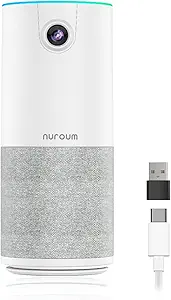
NUROUM C10(2nd Gen) 1080P Conference Webcam with Microphone Speaker, Portable All-in-One Computer Camera for Video Conference, AI Noise Cancellation & AGC, USB Plug&Play for PC/Desktop Zoom/Teams
The Nuroum C10 excels for its all-in-one design, combining a 90° wide-angle lens, noise-canceling microphones, and a high-fidelity speaker—ideal for small teams in huddle or focus rooms. Its plug-and-play USB-C setup and compact weight make it highly portable, surpassing bulkier options like the Logitech Brio 101 for mobile use. The AI noise cancellation and automatic gain control (AGC) ensure crystal-clear audio even at distances up to 10 feet, making it perfect for hybrid meetings where in-room and remote participants collaborate seamlessly. Compared to the more traditional Logitech C920e, the C10’s portable design and integrated audio features provide a more flexible, space-efficient setup. The tradeoff is a narrower focus on small-room environments and some limitations in advanced camera controls. It makes the most sense for teams that need a portable, all-in-one device for quick, high-quality hybrid meetings without complex setup.
Pros:- All-in-one compact design with integrated microphone and speaker
- AI noise cancellation and automatic gain control for clear audio
- Portable with USB-C plug-and-play setup
Cons:- Limited camera controls and no auto-tracking
- 90° FOV may be restrictive for larger rooms or multiple participants
Best for: Small teams or individuals needing a portable, integrated conference camera with audio for quick setup in shared or home offices.
Not ideal for: Large conference rooms or users requiring AI auto-framing or extensive camera controls, as this device is optimized for small spaces and mobility.
- Field of View:90°
- Microphone:4-element noise-canceling array
- Speaker:High-fidelity
- Connectivity:USB-C, plug-and-play
- Audio Features:AI noise cancellation, AGC
- Weight:384g
Bottom line: A versatile, portable conference webcam ideal for small teams seeking quick, high-quality hybrid collaboration.
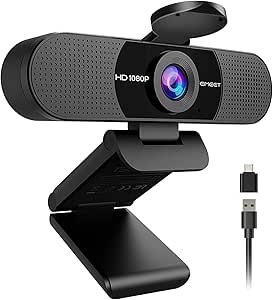
EMEET C960 1080P Webcam with Microphone, 2 Mics, 90° FOV, USB Type-A & A-to-C Adapter, Fixed Focus, Plug&Play Computer Camera for Zoom/Teams/Facetime/YouTube/Google Meet/Switch 2 Camera, 2025 Version
The EMEET C960 offers solid 1080p video quality with a 90° wide-angle lens, making it suitable for small team meetings or personal streaming. Its dual omnidirectional microphones provide clear audio, comparable to more expensive models like the Logitech C920e, though it lacks some advanced auto-focus features. The plug-and-play USB connectivity with both Type-A and Type-C adapters makes setup straightforward, especially for those on a budget or with limited hardware options. Its automatic light adjustment ensures decent visuals in typical office lighting, but it falls short in low-light conditions compared to premium webcams. Compared to the Logitech Brio 101, the C960 is less feature-rich but offers excellent value for small-office or home use where budget constraints matter. The main tradeoff is its fixed focus and limited advanced controls, making it less ideal for content creators or larger rooms.
Pros:- Full HD 1080p video with automatic light adjustment
- Dual omnidirectional microphones for clear sound
- Wide 90° field of view
Cons:- Fixed focus limits flexibility in close-up or varied distances
- No advanced auto-tracking or zoom features
Best for: Budget-conscious startups and remote workers wanting reliable HD video in small spaces without complex features.
Not ideal for: Users needing auto-tracking, zoom, or extensive camera controls for larger or more dynamic environments.
- Resolution:1080p
- Field of View:90°
- Microphones:2 omnidirectional
- Connectivity:USB Type-A & A-to-C
- Focus:Fixed
- Light Adjustment:Automatic
Bottom line: A cost-effective webcam offering dependable HD video and audio perfect for small teams or home offices on a budget.
Logitech Brio 101 Full HD 1080p Webcam for Meetings, Streaming, Desktop, Laptop, PC – Built-in Mic, Shutter, Works with Zoom, Microsoft Teams, Nintendo Switch 2’s new GameChat Mode, USB-A,-Black
The Logitech Brio 101 offers stellar 1080p resolution with RightLight 3 and autofocus, making it one of the most versatile webcams for professional and casual use. Its built-in privacy shutter enhances security, while the dual microphones ensure clear audio. The wide compatibility with platforms like Zoom, Teams, and even Nintendo Switch’s GameChat Mode broadens its appeal across different scenarios. Its sleek design and use of over 77% recycled plastic reflect eco-conscious manufacturing, ideal for environmentally-minded startups. Compared to the more basic C920e, the Brio 101 provides enhanced auto-light correction and broader platform support, though it comes at a higher price point. The tradeoff is less portability and more features than some small-team setups require, but it’s perfect for those seeking a premium, all-in-one solution for various use cases.
Pros:- 1080p resolution with RightLight 3 auto-light correction
- Built-in privacy shutter and dual mics
- Wide platform compatibility including Nintendo Switch GameChat
Cons:- Higher price compared to basic webcams
- Less portable due to larger size
Best for: Startups and professionals needing a premium, flexible webcam for video calls, streaming, and gaming on multiple devices.
Not ideal for: Users with tight budgets or those requiring an ultra-wide view, as this model emphasizes quality and versatility over room coverage.
- Resolution:1080p
- Autofocus:Yes
- Light Correction:RightLight 3
- Privacy Cover:Yes
- Microphones:Dual
- Platform Compatibility:Zoom, Teams, Nintendo Switch
Bottom line: A premium webcam suited for startups that want a high-quality, adaptable device across multiple platforms and use cases.
Logitech C920x HD Pro PC Webcam, Full HD 1080p/30fps Video, Clear Audio, HD Light Correction, Works with Microsoft Teams, Google Meet, Zoom, Nintendo Switch 2’s new GameChat Mode, Mac/Tablet- Black
The Logitech C920x combines excellent 1080p video quality at 30 fps with automatic light correction, making it a versatile choice for professional video calls and content creation. Its dual microphones provide clear stereo audio, comparable to higher-end models like the Brio 101, but at a more accessible price point. The plug-and-play setup ensures easy integration with platforms like Zoom, Teams, and Google Meet. While it does not have advanced auto-focus or AI auto-tracking, its fixed focus and wide 78° FOV make it suitable for most small to medium-sized setups. It’s a balanced option that offers substantial features without the premium cost, though it may lack some of the auto-framing or zoom capabilities found in higher-tier webcams. This makes it an ideal choice for startups seeking reliable, high-quality video without overpaying.
Pros:- Full HD 1080p/30fps video with HD light correction
- Stereo audio with dual microphones
- Easy plug-and-play setup for multiple platforms
Cons:- No auto-focus or AI auto-tracking capabilities
- 78° fixed field of view may be limiting for larger groups
Best for: Startups and remote teams looking for a reliable, high-quality webcam with good audio in a mid-range price point.
Not ideal for: Teams requiring auto-tracking, zoom, or ultra-wide views for larger or dynamic rooms, as this is more suited for standard desktop use.
- Resolution:1080p/30fps
- Light Correction:HD
- Microphones:Dual stereo
- Field of View:78°
- Connectivity:USB
- Platform Compatibility:Zoom, Teams, Google Meet
Bottom line: A well-rounded, mid-priced webcam delivering dependable HD video and audio for everyday startup meetings.
4K Webcam Conference Call TV Room Web Camera with Dual Microphones &Speaker, | All-in-One USB Video Camera, 116° Wide Angle, AI Auto Framing | Compatible with Zoom, OBS
This webcam excels at capturing expansive views in larger or TV-mounted conference settings, thanks to its 116° wide-angle lens and 4K resolution. Compared with the Logitech Brio, it offers a broader field of view, making it ideal for long rooms hosting multiple participants. Its plug-and-play USB-C setup simplifies deployment in environments where quick setup is crucial, but it might be less suited to small, personal offices due to its size and focus on room coverage. The dual microphones and built-in speaker deliver crisp audio, reducing the need for external equipment. The AI auto-framing ensures everyone remains centered, even as participants move, providing a seamless experience. The model’s main tradeoff is its bulkiness, which can be less convenient for desktop use, but it compensates with high-quality video and audio performance. Perfect for enterprise or shared office use where room coverage and ease of installation are priorities.
Pros:- Ultra-wide 116° field of view captures entire rooms
- 4K resolution ensures sharp, professional-quality video
- AI auto-framing keeps all participants centered
Cons:- Bulky size may hinder desktop or portable use
- Lack of advanced manual controls for fine-tuning framing
Best for: Startups or organizations needing to equip medium-to-large conference rooms with a simple, high-quality camera solution.
Not ideal for: Solo professionals or small home offices where space is limited and portability is a priority.
- Video Resolution:4K Ultra HD
- Field of View:116°
- Microphones:Dual Noise-Reducing Omnidirectional
- Connectivity:USB-C
- Compatibility:Zoom, OBS, WebEx, Teams
- Mounting Options:Monitor, Tripod, Laptop
Bottom line: This model is best suited for startups requiring comprehensive room coverage with minimal setup effort.
TONGVEO 3-in-1 4K Webcam with Microphones and Speaker, AI Auto-Tracking 5X Digital Zoom Webcam 4K Adjustable Field of View Remote Control Works with Microsoft Teams, Zoom, Google Meet, PC Mac Laptop
This webcam offers impressive AI auto-tracking and 5X digital zoom, making it a top choice for engaging presentations or meetings where the speaker or participants move around. Unlike the Logitech Brio, which focuses on auto light correction and high-resolution static framing, this model’s AI tracking and remote control make it ideal for interactive sessions. Its multiple FOV modes (narrow, medium, wide) provide versatility for different room sizes, but the reliance on remote controls may be less ideal for hands-free operation. The crisp 4K video combined with dual microphones and a 3W speaker ensures clear audio-visual communication. The tradeoff is that its auto-tracking can sometimes be overly sensitive, leading to jittery framing if not calibrated properly. It suits startups that value dynamic engagement and flexibility in smaller conference or presentation rooms.
Pros:- AI auto-tracking follows active speakers smoothly
- Supports 5X digital zoom and 3 adjustable FOV modes
- Includes remote control for easy adjustments
Cons:- Auto-tracking can be overly sensitive, causing jitter
- Remote control may be lost or require manual operation during meetings
Best for: Startups conducting interactive webinars, training, or presentations in small to medium rooms with active movement.
Not ideal for: Teams needing fixed, static framing or those in large conference environments.
- Video Resolution:4K
- FOV Modes:118°, 100°, 88°
- Zoom:5x Digital
- Microphones:Dual Microphones
- Speaker:3W
- Connectivity:USB
Bottom line: Ideal for startups that require flexible, auto-tracking features for engaging small group presentations.
WYRESTORM 4K AI Tracking Conference Webcam, Auto Framing & Presenter Tracking, 120° Wide Angle, Dual Noise Cancelling Mics, Privacy Cover, USB Plug & Play, Zoom Certified for Teams Meeting Rooms
This webcam is tailored for small conference rooms, offering a 120° wide angle that captures the entire space without repositioning. It features AI auto-framing and presenter tracking, similar to the TONGVEO, but with a focus on professional business environments. Its dual noise-cancelling microphones ensure clear voice pickup across the table, making it suitable for hybrid meetings. Unlike the Logitech Brio, which excels at individual clarity, this model emphasizes room coverage and presenter tracking, but it might lack the high-resolution detail some users desire for large-scale webinars. The plug-and-play USB interface simplifies deployment, and the included privacy cover adds security. Its main drawback is that it may not provide as sharp a video image as some higher-end models, but it compensates with effective room management features. Perfect for startups wanting to upgrade their small meeting spaces with AI-driven automation.
Pros:- 120° wide-angle captures entire room
- AI auto-framing and presenter tracking
- Plug-and-play USB connection with privacy cover
Cons:- Video resolution may be lower than 4K models
- Auto-tracking sensitivity may need calibration
Best for: Startups with small, dedicated meeting rooms needing automatic framing and presenter follow-up.
Not ideal for: Solo remote workers or large conference rooms requiring higher resolution and more extensive coverage.
- Video Resolution:4K
- Wide Angle:120°
- Microphones:Dual Noise Cancelling
- Connectivity:USB
- Privacy Cover:Yes
- Compatibility:Zoom, Teams
Bottom line: Designed for small team rooms seeking AI-driven auto framing and presenter tracking for seamless meetings.
Logitech Brio 4K Webcam, Video Calling, Noise-Cancelling mic, HD Auto Light Correction, Wide Field of View, Windows Hello Works with Microsoft Teams, Zoom, Google Meet, PC/Mac/Laptop/MacBook/Tablet
The Logitech Brio 4K stands out for its superb video quality and versatility, making it a go-to choice for individuals who need a professional-grade webcam for personal or small team use. Unlike the room-focused models like the WYRESTORM, it’s optimized for personal desktops, offering a wide field of view with three zoom presets, auto light correction, and Windows Hello facial recognition. Its dual omnidirectional microphones deliver clear, natural audio, comparable to the high-end models in this roundup. The main advantage over the others is its compact size and advanced software controls via Logi Options+, allowing customization of framing and color settings. However, its narrower focus on individual use means it’s less suitable for larger rooms or multi-participant coverage. It’s a perfect fit for remote workers or solo professionals seeking clarity and ease of use.
Pros:- Exceptional 4K video quality with auto light correction
- Supports Windows Hello for quick login
- Attachable privacy shutter for security
Cons:- Limited room coverage, not ideal for group meetings
- Higher price point for personal use compared to basic webcams
Best for: Remote professionals or individuals who need high-quality, personal webcams for video calls and streaming.
Not ideal for: Large teams or conference rooms requiring broader coverage or auto-tracking features.
- Video Resolution:4K UHD
- Field of View:78°, 90°, or 65°
- Microphones:Dual Omnidirectional
- Connectivity:USB-A & USB-C
- Auto Light Correction:Yes
- Windows Hello:Yes
Bottom line: Perfect for individual professionals needing premium video quality and security features for daily remote meetings.
Logitech BCC950 Desktop Conferencing Solution, Full HD 1080p B23 Calling, Hi-Definition Webcam, Speakerphone with Noise-Reducing Mic, for Skype, WebEx, Zoom PC/Mac/Laptop/MacBook – Black
This all-in-one solution stands out for combining business-grade video quality with a professional microphone and speaker setup, making it ideal for small teams or conference rooms. Unlike the JVCU360 which offers 360-degree coverage, the BCC950’s pan, tilt, and zoom (controlled via remote) provide more precise framing, especially in formal meetings. Its plug-and-play USB connection and certifications for platforms like Skype for Business and WebEx simplify deployment. The noise-cancelling microphone ensures clear communication up to 8 feet, and the dedicated remote allows easy adjustments without software fuss. However, its bulkier design and reliance on a fixed camera position limit flexibility for more dynamic setups. This pick makes the most sense for startups needing dependable, high-quality audio-visual communication with minimal setup effort.
Pros:- Business-class 1080p HD video with smooth 30 fps
- Built-in noise-cancelling microphone and full duplex speakerphone
- Remote control for pan, tilt, and zoom for precise framing
- Certified for major conferencing platforms
Cons:- Relatively bulky and less portable
- Requires desktop setup, limiting flexibility
Best for: Startup teams and small offices that prioritize reliable, professional video and audio quality for frequent meetings.
Not ideal for: Teams seeking a portable, lightweight webcam for on-the-go use or larger conference rooms requiring multiple camera angles.
- Video Resolution:1080p HD at 30 fps
- Connectivity:USB
- Microphone:Noise-cancelling, full duplex
- Camera Control:Remote pan, tilt, zoom
- Compatibility:Skype, WebEx, Zoom, Mac/PC
- Weight:2.6 pounds
Bottom line: Best suited for startups that need a reliable, all-in-one conference solution with high-quality audio and video.
j5create 360 Degree All Around Meeting Webcam – 1080P HD Video Conference Camera with High Fidelity Microphone, USB-C | for Video Conferencing, Online Classes, and Collaboration (JVCU360)
This webcam offers the unique ability to capture a full 360-degree view, making it ideal for informal or collaborative startup environments where flexibility is key. Compared with the Logitech C920x, which provides a fixed angle, the JVCU360’s omnidirectional lens and multiple display modes deliver exceptional versatility. Its plug-and-play USB-C connection simplifies setup, and the built-in microphone with noise reduction handles indoor environments well. Although it lacks auto-framing or speaker features, the ability to switch modes and manually aim the camera via the locator bar provides a hands-on approach to managing different meeting scenarios. The mic’s pattern, elongated for a conference table, works better when facing participants at various angles, but it doesn’t automatically zoom or track speakers. This pick is perfect for startups that want a flexible, all-in-one camera for varied meeting styles and environments.
Pros:- Full 360-degree video coverage with multiple modes
- Plug-and-play USB-C connectivity
- Adjustable viewing modes (90°/120° options)
- Decent microphone with noise reduction for indoor use
Cons:- No auto-framing or speaker tracking features
- Microphone pickup pattern is directional, not omnidirectional
Best for: Startups and remote teams needing a wide-angle camera for collaborative meetings or casual group discussions.
Not ideal for: Teams requiring auto-framing, speaker tracking, or high-end audio quality in large, formal conference rooms.
- Video Resolution:1080p Full HD
- Viewing Angle:360 degrees
- Connectivity:USB-C
- Microphone:High fidelity, noise reduction
- Display Modes:Multiple, including wide-angle
- Weight:0.01 ounces
Bottom line: Great for startups seeking a versatile, easy-to-use camera that covers a broad area for casual or collaborative meetings.
NexiGo N60 1080P Webcam with Microphone, Software Control & Privacy Cover, USB HD Computer Web Camera, Plug and Play, for Zoom/Skype/Teams, Conferencing and Video Calling
The NexiGo N60 is a solid choice for startups wanting reliable HD video at an affordable price. It delivers crisp 1080p resolution with a fixed focus lens optimized for distances from about 20 inches to 13 feet, making it suitable for most indoor environments. Unlike the higher-end Logitech C920x, which offers adjustable focus and light correction, the NexiGo is straightforward to set up—just plug and play—and works across multiple operating systems including Linux and Chrome OS. Its built-in noise-canceling microphone enhances sound quality, though it may not match premium models in noisy environments. The included privacy cover addresses security concerns, and the compact design makes it easy to store or mount. While it lacks advanced features like auto-focus or wide-angle views, it provides reliable, clear video suitable for daily meetings and calls on a tight budget. This makes it ideal for startups starting out or for those who need a dependable secondary camera.
Pros:- Full HD 1080p video with 30fps
- Built-in noise-canceling microphone
- Privacy cover for security
- Compatibility across Windows, macOS, Linux, Android, Chrome OS
Cons:- Fixed focus lens limits flexibility
- No adjustable field of view or auto-light correction
Best for: Budget-conscious startups and small teams needing a straightforward, reliable webcam for daily video calls.
Not ideal for: Teams requiring advanced features like auto-focus, wide-angle views, or professional-grade audio for large or high-stakes meetings.
- Video Resolution:1080p Full HD
- Frame Rate:30 fps
- Microphone:Noise-canceling built-in
- Focus:Fixed
- Connectivity:USB
- Privacy Cover:Included
- Compatibility:Windows, macOS, Linux, Android, Chrome OS
Bottom line: A dependable, budget-friendly webcam suitable for daily startup meetings and casual conferencing needs.
How We Picked
To assemble this list, I focused on products that meet the core needs of startup offices: reliable video quality, ease of setup, compatibility with major conferencing platforms, and value for money. Performance factors like resolution, frame rate, and microphone quality were prioritized, along with usability features such as auto light correction and auto-tracking. Build quality and user reviews also guided the ranking, ensuring each product offers a balance between affordability and professional-grade features. Products were ordered based on overall versatility, feature set, and how well they address common startup meeting scenarios—whether casual check-ins or formal client presentations.Factors to Consider When Choosing Conference Webcam For Startup Office
When selecting a conference webcam for a startup office, it’s vital to consider how the device will fit into your daily operations. Beyond raw specs, factors like ease of use, platform compatibility, and future-proof features can influence your overall satisfaction. Startups need a solution that balances quality and cost without sacrificing reliability, especially as remote work continues to dominate. This guide highlights key considerations to help you make an informed decision and avoid common pitfalls.Video Quality and Resolution
High-resolution video ensures your team looks sharp and professional during meetings. While 1080p is the standard for most startups, investing in 4K models can future-proof your setup and provide better clarity on larger screens. However, higher resolution often means higher costs and more demanding bandwidth. Consider your typical meeting environment—if you mostly join calls from small rooms or laptops, 1080p may suffice, but for larger conference rooms, 4K can make a noticeable difference.
Auto-Tracking and Framing Features
Auto-tracking cameras that follow speakers or auto-framing can add a dynamic element to your meetings, especially if your team frequently moves around or hosts presentations. These features help maintain focus on the active speaker without manual adjustments, a real time-saver. However, they tend to come with a higher price tag and may require more setup. For small, static meetings, simpler fixed-focus webcams are often enough and more cost-effective.
Platform Compatibility and Connectivity
Most webcams now support major platforms like Zoom, Microsoft Teams, and Google Meet, but it’s worth verifying compatibility, especially if you use niche or regional conferencing tools. USB plug-and-play connectivity is the standard, but ensure your chosen model supports your device’s ports, whether USB-A or USB-C. Also, check if the webcam offers features like privacy covers or driver-free operation to streamline your setup process.
Audio Quality and Microphones
Clear audio is just as important as video in effective communication. Many webcams feature built-in microphones, but their quality varies. Dual omnidirectional or noise-canceling mics can drastically improve sound clarity, reducing background noise and echo. If your startup hosts frequent large meetings or client calls, investing in a dedicated microphone or speakerphone might be worthwhile, even if the webcam has decent built-in audio.
Ease of Use and Setup
Startups benefit from plug-and-play devices that require minimal setup and configuration. Simple interfaces, auto light correction, and minimal driver dependencies speed up deployment. Conversely, more advanced features like AI auto-tracking or multiple camera controls often require additional software or firmware updates, which might introduce complexity or delays. Prioritize models that align with your team’s technical comfort level and setup time constraints.
Future-proofing and Price Considerations
While it’s tempting to opt for cheaper models, investing slightly more in a feature-rich webcam can pay off over time. Consider your growth trajectory—an auto-tracking 4K camera might be overkill now but could become invaluable as your team expands or your presentation needs become more sophisticated. Balance your current budget with potential future requirements to avoid frequent upgrades and ensure longevity.
Frequently Asked Questions
Should I prioritize resolution or auto-tracking features for my startup office?
Choosing between resolution and auto-tracking depends on your primary needs. If your team mainly hosts static meetings with minimal movement, a high-resolution 1080p or 4K webcam will deliver sharp images, making resolution the priority. However, if your meetings involve dynamic presentations or team movement, auto-tracking adds a layer of professionalism by maintaining focus automatically. For many startups, a balanced approach with decent resolution and basic auto-framing offers the best overall experience.Is it worth investing in a 4K webcam for my startup office?
Investing in a 4K webcam can future-proof your setup, especially if your meetings often feature detailed visuals or large display screens. However, 4K models generally cost more, require higher bandwidth, and may demand more processing power. For most startup teams conducting regular video calls or simple meetings, 1080p webcams provide sufficient clarity at a lower cost. Reserve 4K options for teams that frequently showcase high-detail content or plan to upgrade their display hardware soon.How important is microphone quality in choosing a conference webcam?
Microphone quality directly impacts communication clarity, making it a crucial consideration. Built-in microphones vary widely—some offer basic stereo sound, while others include noise cancellation and omnidirectional pickup. For smaller teams or casual meetings, a decent integrated mic may suffice, but if your startup hosts large client calls or presentations, investing in a dedicated microphone or choosing a webcam with advanced audio features becomes worthwhile. Clear audio reduces misunderstandings and improves overall meeting productivity.Can I use a consumer webcam for professional startup meetings?
Many consumer-grade webcams can work well for startup offices, especially models with 1080p resolution and good microphone quality. However, they often lack advanced features like auto-tracking, auto framing, or high-quality audio, which can limit their effectiveness in more dynamic or professional settings. For occasional or smaller meetings, a consumer webcam might be enough, but if your startup aims for a polished, professional look, investing in business-grade models with added features is advisable.What should I consider if my startup plans to grow and expand remote collaboration?
Planning for growth means selecting a webcam that can handle increased demands, such as higher resolution, auto-tracking, and compatibility with larger conference rooms or multiple platforms. Features like AI auto-framing or speaker tracking can support larger or more active teams, reducing the need for frequent hardware upgrades. Additionally, consider scalability—choosing a model with software updates and support options ensures your setup remains relevant as your remote collaboration needs evolve.Conclusion
For startups seeking a reliable, all-around solution, the Logitech C920e offers excellent video quality and compatibility at a reasonable price, making it the best overall pick. Budget-conscious teams or those just starting out will find the NexiGo N60 sufficient for everyday meetings without breaking the bank. For those who frequently host dynamic presentations or larger groups, investing in a premium option like the WYRESTORM 4K AI Tracking Webcam provides advanced auto-framing and high resolution. Beginners and small teams should prioritize ease of setup, while growing companies might consider future-proof features like auto-tracking and 4K resolution. Tailor your choice to your team’s size, meeting style, and growth plans to ensure your remote collaboration remains seamless.