Searching for a Business Laser Printer means balancing speed, print quality, and cost efficiency. The Brother MFC-L5915DW stands out as the best overall choice, offering fast monochrome printing with versatile all-in-one features. For smaller teams or budget-conscious offices, the HP LaserJet Pro MFP 3101sdw provides reliable performance with excellent connectivity. Meanwhile, for color printing needs, the Brother MFC-L8930CDW combines low-cost color output with security features. Each of these options highlights different tradeoffs—speed vs. color, security vs. simplicity. Keep reading for an in-depth comparison to find the perfect fit for your business.
Key Takeaways
- Speed and volume capacity are key factors for larger offices, with models like the Brother MFC-L5915DW leading in high ppm rates.
- Color printing options often come at a premium; the Brother MFC-L8930CDW balances low-cost color with robust security features.
- Wireless and mobile connectivity are common, but their implementation varies—look for models with dual-band WiFi or multiple device support.
- Multifunction capabilities (scan, copy, fax) are essential for most offices, yet some compact models omit fax to save space and cost.
- Total cost of ownership depends heavily on toner efficiency and subscription plans, which can significantly reduce ongoing expenses.




More Details on Our Top Picks
Brother Professional Laser Printer All-in-One with Scanner and Copier, High-Speed 50 ppm Monochrome Printing, Wireless Network Ready, Dual-Band WiFi, Auto 2-Sided Print (MFC-L5915DW)
This Brother MFC-L5915DW stands out for its impressive speed of up to 50 ppm, making it ideal for busy office environments where rapid document processing is crucial. Compared with the Brother HL-L6210DW, it offers similar high-volume capacity but adds all-in-one functionality—scan, copy, and a user-friendly 5″ touchscreen—streamlining workflow. The auto duplex printing and expandable paper capacity ensure sustained productivity, though its weight of nearly 40 pounds makes it less suited for small, space-constrained setups. The ultra high-yield toner reduces running costs significantly, a key advantage over less efficient models. However, the initial price point over $900 can be steep for small businesses on a tight budget. This pick makes the most sense for offices needing fast, reliable, high-capacity printing with comprehensive security features.
Pros:- Exceptional print and copy speeds of up to 50 ppm
- High paper capacity expandable over 1100 pages
- All-in-one with scanning, copying, and duplex printing
Cons:- Heavy and bulky design complicates setup in small spaces
- High upfront cost may be prohibitive for smaller businesses
Best for: Large offices or workgroups with high-volume monochrome printing needs who prioritize speed and security.
Not ideal for: Small home offices or users with limited space, due to its size and weight.
- Print Speed:50 ppm
- Paper Capacity:250 sheets standard, expandable
- Connectivity:Ethernet, Wi-Fi, USB
- Toner Yield:Up to 18,000 pages
- Display:5″ Touchscreen
- Dimensions:18.6 x 19.5 x 19.1 inches
- Weight:38.3 pounds
Bottom line: This model is best suited for busy offices that need fast, secure monochrome printing with high-volume capacity.
Brother Professional Laser Printer with High-Speed 50 ppm Output, Advanced Security Features, and Wireless Networking for Business, Monochrome Printing with Duplex Capability (HL-6210DW)
This HL-6210DW offers reliable monochrome output at a brisk 50 ppm, comparable to the Brother MFC-L5915DW but with a focus on maximum efficiency for black-and-white documents. It features a robust 520-sheet tray, reducing the need for frequent refills, and supports optional trays expanding to 1,660 sheets—ideal for demanding environments. Its dual-band wireless and Ethernet connections make setup simple across networks, and the ultra high-yield toner keeps cost per page low. While it excels in high-volume printing, its monochrome-only output limits versatility, and its design focuses more on capacity than advanced features like a touchscreen or scanning. It’s a cost-effective choice for offices primarily printing in black and white, especially for those prioritizing volume and security.
Pros:- High-speed 50 ppm monochrome printing
- Massive paper capacity expandable to 1,660 sheets
- Advanced security with triple-layer protection
Cons:- Limited to monochrome output, no color printing
- Lacks a touchscreen; more manual operation
Best for: Small to medium-sized businesses needing high-capacity monochrome printing with strong security.
Not ideal for: Offices requiring color printing or integrated scanning features.
- Print Speed:50 ppm
- Paper Capacity:520 sheets expandable
- Connectivity:Ethernet, Wi-Fi
- Toner Yield:Up to 18,000 pages
- Security:Triple Layer Security
- Dimensions:15.3 x 14.7 x 11.4 inches
- Weight:29.8 pounds
Bottom line: Ideal for high-volume monochrome printing with security features, best for budget-conscious offices.
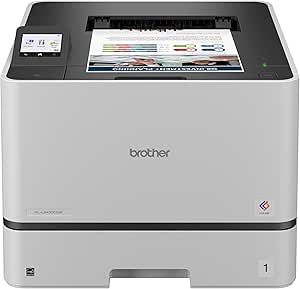
Brother MFC-L8930CDW Business Color Laser All-in-One Printer with Duplex Print, Scan, Copy, Low-Cost Printing, and Advanced Security Features
The MFC-L8930CDW is tailored for offices that demand vibrant color output along with multifunction capabilities. It boasts a solid 33 ppm speed in both printing and copying, with high-quality 2400 x 600 dpi resolution, surpassing many monochrome models like the HP LaserJet Pro 3101sdw. Its 7″ color touchscreen simplifies operation and shortcuts, while the automatic duplex and large 80-page document feeder boost productivity. The device supports cloud scanning, searchable PDFs, and secure printing, making it suitable for sensitive documents. Its price is higher, but the included standard toner yields 3,000 pages in black and 1,800 in color, with optional super high-yield cartridges reducing long-term costs. It’s a versatile, security-minded choice for color-focused small offices needing high efficiency and advanced features.
Pros:- High-quality color and black printing at 33 ppm
- 7″ touchscreen with customizable shortcuts
- Advanced security with secure print and cloud scanning
Cons:- Higher purchase price compared to monochrome-only printers
- Bulkier and heavier than basic models
Best for: Small to mid-sized offices requiring color printing, scanning, and security features.
Not ideal for: Budget-conscious users who only need monochrome printing or have space constraints.
- Print Speed:33 ppm
- Resolution:2400 x 600 dpi
- Print Volume:Standard yield cartridges for 3,000 pages black, 1,800 color
- Connectivity:Wi-Fi, Ethernet, NFC, Mobile
- Scanner:High-speed, 80-page ADF, scan to cloud
- Display:7″ color touchscreen
- Dimensions:16.1 x 17.5 x 15.8 inches
Bottom line: Best suited for offices needing vibrant color output combined with security and multifunctional capabilities.
HP LaserJet Pro MFP 3101sdw Wireless All-in-One Laser Printer, Office Printer, Duplex, Best-for-Small Teams (9D2X4F)
This HP LaserJet Pro 3101sdw offers dependable monochrome printing at 35 ppm, ideal for small teams focused on standard document output. It’s similar in speed to the Brother HL-L2460DW but with slightly more advanced connectivity options, including wireless and Ethernet. Its compact design fits well into small office spaces, and automatic duplex printing helps save paper. While it does not include scanning or copying functions, it’s a straightforward, reliable machine that excels at high-volume black-and-white printing. Its affordable price point and simple setup make it appealing for small offices, but users needing multi-functionality will find it limiting. Overall, a reliable, space-efficient choice for basic monochrome printing tasks.
Pros:- Reliable 35 ppm monochrome printing
- Compact size fits small office spaces
- Automatic duplex printing saves paper
Cons:- Limited to print-only functionality
- No scanning or copying features
Best for: Small teams or offices needing fast, reliable monochrome printing in a compact footprint.
Not ideal for: Offices requiring scanning, copying, or color printing capabilities.
- Print Speed:35 ppm
- Paper Capacity:250 sheets
- Connectivity:Wi-Fi, Ethernet, USB
- Dimensions:15.7 x 16.5 x 12.3 inches
- Weight:23.1 pounds
- Resolution:1200 x 1200 dpi
Bottom line: A dependable monochrome printer ideal for small teams focused on high-volume black-and-white output with limited space.
Brother MFC-L3720CDW Wireless Color Laser Printer with Scanner, Copier and Fax | Auto Duplex and 250-Sheet Capacity | Includes Refresh Subscription Trial
The Brother MFC-L3720CDW is a versatile all-in-one color laser printer designed for small offices that need reliable printing along with scanning, copying, and fax. It features a respectable 19 ppm speed in both color and monochrome modes, with sharp 2400 x 600 dpi resolution for professional-quality documents. Its 250-sheet paper capacity and auto duplex help maintain productivity, while the 3.5″ color touchscreen simplifies navigation and shortcuts. It supports mobile printing and cloud services, making it flexible for modern workflows. Though it doesn’t match the speed of larger office models, its combination of functionality, security, and cost-effective toner options make it suitable for small teams. Its weight of 44 pounds suggests a more permanent setup, not ideal for frequent relocation.
Pros:- Color printing at 19 ppm with high resolution
- Auto duplex and 250-sheet tray for efficiency
- Includes security features and cloud connectivity
Cons:- Bulkier and heavier than monochrome models
- Color printing speed is moderate, not high-volume
Best for: Small office teams requiring color printing, scanning, and multifunction features in a space-efficient device.
Not ideal for: Large offices or users needing exceptionally fast output or extensive document handling.
- Print Speed:19 ppm color and black
- Resolution:2400 x 600 dpi
- Paper Capacity:250 sheets
- Connectivity:Wi-Fi, Ethernet, USB, mobile
- Display:3.5″ color touchscreen
- Functions:Print, scan, copy, fax
- Weight:44 pounds
Bottom line: Best for small offices that need versatile, color-capable multifunction printing with security features.
Brother HL-L2460DW Wireless Compact Monochrome Laser Printer with Duplex, Mobile Printing, Black & White Output | Includes Refresh Subscription Trial(1), Works with Alexa
This Brother model stands out for its combination of affordability, compact size, and reliable performance, making it ideal for smaller workspaces. Unlike larger, more feature-rich printers like the HP 3301sdw, it focuses on simplicity and efficiency, which is perfect for users who mainly need black-and-white printing without fuss. Its automatic duplex printing saves paper and time, while the wireless connectivity supports mobile printing via the Brother Mobile Connect App—an advantage over non-wireless models. The setup, guided by the app, is straightforward, and the 250-sheet paper tray reduces refill interruptions. However, its lack of color printing limits its use for marketing or presentation materials. The toner subscription service adds convenience but comes with ongoing costs, which some may find limiting. If you prioritize speed, reliability, and low operational costs in a small office, this printer makes a compelling choice.
Pros:- Compact size fits small workspaces easily
- Fast printing speed up to 36 ppm
- Automatic duplex reduces paper use
Cons:- Black-and-white only, limited for marketing materials
- Toner costs can add up over time
Best for: Small home offices or small teams that need fast, reliable monochrome printing without complex features.
Not ideal for: Offices needing color printing or multifunction capabilities like scanning and copying.
- Print Speed:36 ppm
- Paper Capacity:250 sheets
- Connectivity:Wireless, Ethernet, USB
- Duplex Printing:Automatic
- Maximum Media Size:8.5 x 14 inch
- Weight:15.6 pounds
Bottom line: Ideal for budget-conscious users who need dependable monochrome printing in limited space.
HP Color LaserJet Pro MFP 3301sdw Wireless All-in-One Color Laser Printer, Office Printer, Scanner, Copier, ADF, Duplex, Best-for-Office (499Q3F)
This HP all-in-one excels in delivering vibrant color and professional results, making it suitable for small offices needing versatile document handling. Compared to the Brother HL-L2460DW, it offers color printing, scanning, and copying, which is ideal for marketing materials or colorful reports. Its 26 ppm speed is slightly slower but still efficient for typical office workflows. The built-in automatic document feeder and duplex printing enhance productivity, while the security features and network options provide peace of mind for sensitive data. Setup is straightforward, especially with wireless connectivity, and compatibility with multiple devices is seamless. However, its higher initial cost and ongoing toner expenses are notable tradeoffs, especially since color toner can be costly. Overall, if color capability and multifunctionality are priorities for your team, this HP model justifies its premium price.
Pros:- Vivid color output for professional documents
- All-in-one functionality (print, scan, copy, fax)
- Auto duplex and ADF improve workflow
Cons:- Higher purchase and toner replacement costs
- Slower than some monochrome models
Best for: Small to medium-sized offices that require high-quality color printing, scanning, and copying.
Not ideal for: Offices primarily needing monochrome printing or with tight budget constraints.
- Print Speed:26 ppm
- Maximum Sheet Capacity:250 sheets
- Connectivity:Wireless, Ethernet, USB
- Maximum Media Size:8.5 x 14 inch
- Resolution:2400 x 600 dpi
- Automatic Document Feeder:Yes
Bottom line: Best suited for offices that need vibrant color output and multi-function capabilities, accepting higher operational costs.
Brother HL-L8430CDW Business Color Laser Printer with Low-Cost Printing and Wireless Networking
This Brother model emphasizes high-volume productivity with reliable color laser printing at a cost-effective rate. It features fast print speeds of up to 33 ppm for both color and black-and-white, making it suitable for busy offices. The included toner cartridges yield up to 3,000 pages in black and 1,800 in color, with optional high-yield options that significantly lower cost per page compared to many competitors. Its expandable paper capacity up to 1,340 sheets supports large print jobs, ideal for small businesses with frequent printing needs. The 2.7-inch color touchscreen simplifies operation, and wireless plus Ethernet connectivity provide versatile setup options. While it offers excellent value for high-volume printing, its larger footprint and higher initial investment may be drawbacks for very small or space-constrained offices. If your business prioritizes low-cost, high-volume color printing, this Brother model is a smart choice.
Pros:- High print speeds up to 33 ppm
- Large toner yields for lower cost per page
- Expandable paper capacity supports big jobs
Cons:- Size and weight may be too large for tight spaces
- Initial cost is higher than basic models
Best for: Small businesses with high-volume color printing needs and space to accommodate a larger printer.
Not ideal for: Very small offices or users primarily printing in monochrome on a tight budget.
- Print Speed:33 ppm
- Maximum Paper Capacity:1340 sheets
- Connectivity:Wireless, Ethernet
- Maximum Media Size:Legal (8.5×14)
- Toner Yield:3,000 black, 1,800 color
- Security Features:Triple layer security
Bottom line: Designed for high-volume, budget-conscious businesses needing reliable color output with low running costs.
HP LaserJet Pro MFP 3101fdw Wireless Black & White All-in-One Laser Printer, Scanner, Copier, Fax, Best-for-Office (3G628F)
This HP LaserJet Pro MFP combines fast monochrome printing with multifunction features, making it ideal for small teams that print, scan, copy, and fax regularly. It matches well against the Brother DCP-L2640DW, offering similar print speeds of up to 35 ppm and additional fax capabilities. The automatic duplex printing and 50-sheet auto document feeder streamline document handling, while its wireless and Ethernet options provide flexible network integration. Its security features, including HP Wolf Pro Security, ensure sensitive data stays protected, a key advantage over less secure models. Setup is user-friendly, and compatibility with multiple devices makes it accessible for all users. However, the initial cost and toner expenses should be considered, especially for offices with heavy printing volumes. For small teams requiring a comprehensive, secure, monochrome MFP, this model offers balanced performance and security.
Pros:- Fast printing speeds up to 35 ppm
- Includes fax, scan, copy features
- Auto 2-sided and document feeder enhance productivity
Cons:- Higher initial purchase price
- Toner costs for high-volume use may be substantial
Best for: Small teams needing a reliable, all-in-one monochrome laser printer with fax and security features.
Not ideal for: Offices needing color printing or with very limited space.
- Print Speed:35 ppm
- Maximum Sheet Capacity:250 sheets
- Connectivity:Wireless, Ethernet, USB
- Maximum Media Size:Legal (8.5×14)
- Resolution:2400 x 600 dpi
- Auto Document Feeder:Yes
Bottom line: Ideal for small teams seeking a secure, multifunction monochrome laser printer that balances speed and productivity.
Brother DCP-L2640DW Wireless Compact Monochrome Multi-Function Laser Printer with Copy and Scan, Duplex, Mobile, Black & White | Includes Refresh Subscription Trial(1), Works with Alexa
This Brother model combines laser printing, scanning, and copying into a compact footprint, making it ideal for small business environments. It offers print speeds of up to 36 ppm and scan speeds up to 23.6 ipm, ensuring quick turnaround for daily tasks. The 50-page auto document feeder simplifies multi-page scanning and copying, while the dual-band wireless and Ethernet options provide flexible connectivity. Its compatibility with the Brother Mobile Connect App and Alexa voice commands adds convenience for mobile and voice control. Setup is straightforward, and the optional toner refresh service helps manage ongoing costs. Its main tradeoff is that, despite its advanced features, it still has a relatively basic display and lacks the color printing capability of larger multifunction devices. For small businesses seeking a reliable, all-in-one monochrome solution, this Brother model fits perfectly.
Pros:- Fast print speeds and efficient scanning
- Compact design fits small spaces
- Supports mobile printing and voice control
Cons:- Limited to monochrome printing
- Basic display and interface
Best for: Small businesses or work-from-home offices needing an all-in-one monochrome laser printer with mobile support.
Not ideal for: Offices that require color printing or high-end finishing features.
- Print Speed:36 ppm
- Scan Speed:23.6 ipm
- Paper Capacity:50 sheets
- Connectivity:Wireless, Ethernet, USB
- Maximum Media Size:8.5 x 14 inch
- Additional Features:Alexa compatible, Mobile Connect app
Bottom line: Best for small business teams needing dependable monochrome multifunctionality with mobile and voice integration.
How We Picked
These printers were selected based on a combination of performance, durability, user-friendly features, and value for business use. Priority was given to models that offer high-speed monochrome or color output suitable for busy office environments, along with reliable connectivity options. Security features and multifunction capabilities were also considered, ensuring the printers could handle diverse office tasks. I ranked the options by balancing upfront cost, ongoing maintenance, and feature set, aiming to highlight choices that cater to different business sizes and needs.Factors to Consider When Choosing Business Laser Printer
Choosing the right business laser printer requires more than just looking at specs. It’s important to consider your office’s volume, whether color printing is necessary, and how much you value features like security, connectivity, and multifunctionality. Making a mistake—such as selecting a model with insufficient speed or high running costs—can lead to frustration and additional expenses. A thoughtful approach ensures you get a printer that fits your current needs and scales with your business growth.Print Speed and Volume Capacity
For busy offices, high ppm (pages per minute) ratings are vital to keep workflows smooth. However, prioritize volume capacity—larger paper trays reduce refill frequency, saving time. Low-volume printers may seem cheaper initially but can cause delays and increase downtime in high-demand environments. Match the printer’s speed and capacity to your typical monthly print volume to avoid bottlenecks.
Color vs. Monochrome Printing
Color laser printers offer more versatility but often come with higher purchase and maintenance costs. If your business primarily prints text documents, monochrome models deliver faster, cheaper, and more reliable output. For marketing materials or client presentations, color is essential, but weigh the added expense against your actual color printing needs to avoid overspending.
Connectivity and Mobile Support
Wireless features like dual-band WiFi, Ethernet, and mobile printing support enhance convenience—allowing multiple users to print from various devices. Beware of models with limited connectivity options, as this can hinder seamless integration into your office network. Verify compatibility with your existing systems and consider future scalability when evaluating these features.
Multifunction Capabilities
All-in-one printers that include scanning, copying, and faxing can streamline office workflows. However, some compact models omit fax functions, which may be a mistake for businesses still relying on fax communication. Weigh whether multifunctionality is worth the added cost and size, especially if your office has limited space.
Cost of Ownership and Maintenance
Initial price isn’t the whole story—consider toner yield, maintenance costs, and subscription plans for ongoing savings. Some printers offer toner recycling programs or subscription services that lower long-term expenses. Be wary of models with frequent need for toner replacements or high consumable costs, which can quickly inflate total ownership costs.
Frequently Asked Questions
How do I determine the right print speed for my office?
The ideal print speed depends on your office’s daily volume. For small teams printing under 1,000 pages per month, a model with 20-30 ppm may suffice. Larger offices with higher output needs should look for devices offering 40 ppm or more to prevent delays. Consider your peak workload periods and choose a printer that can comfortably handle the busiest times without slowing down operations.
Is color printing worth the extra cost for my business?
If your business relies heavily on visual presentations, marketing materials, or branding, color printing can be a valuable investment. However, for most routine documents, monochrome printers offer faster speeds and lower costs. Assess your typical print jobs and decide whether the benefits of color justify the added expense, or if a monochrome model will meet your needs.
Can I use a laser printer with my mobile devices?
Most modern laser printers support mobile printing via WiFi, AirPrint, or other proprietary apps. Confirm that the model you select is compatible with your devices—whether iOS, Android, or Windows—and offers straightforward setup. This feature enhances convenience, especially in dynamic office environments where multiple users need quick access to printing from smartphones and tablets.
What’s the difference between single-function and multifunction laser printers?
Single-function printers focus solely on printing, often at a lower cost and smaller footprint. Multifunction models include scanning, copying, and sometimes faxing, offering a complete office solution. The tradeoff is that multifunction printers tend to be larger and more expensive upfront, but they can reduce clutter and hardware costs in the long run. Choose based on your need for versatility versus simplicity.
How can I reduce ongoing toner and maintenance costs?
Look for models with high-yield toner cartridges and consider subscription plans that provide regular replacements at a lower cost. Toner efficiency varies widely; some printers use less toner per page, drastically lowering per-page costs. Regularly maintaining your printer—such as cleaning and updating firmware—also helps prevent issues that lead to costly repairs or consumable waste.
Conclusion
For most offices, the Brother MFC-L5915DW offers the best overall balance of speed, features, and durability, making it ideal for larger teams or high-volume environments. Smaller teams or budget-conscious buyers will find the HP LaserJet Pro MFP 3101sdw to be a reliable, cost-effective choice. For those prioritizing color output, the Brother MFC-L8930CDW delivers low-cost color printing with security. Beginners or users with limited space should consider the compact options like the Brother HL-L2460DW. Ultimately, your choice depends on your specific volume, color needs, and budget—match the features to your office size and workflow to get the best value.