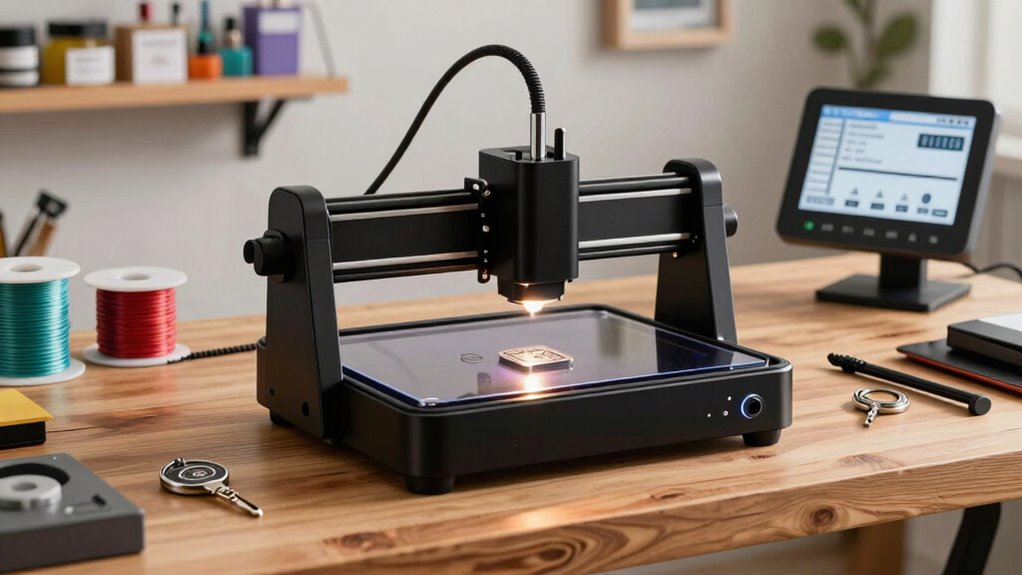

Choosing the right laser engraver for a small business involves balancing power, size, ease of use, and budget. The LONGER Ray5 stands out as the best overall for its portability and versatility, while the ACMER K1 12000mW offers high power for more demanding jobs. For newcomers, models like the LaserPecker LP1 Plus are simple and affordable, but may lack the power needed for larger tasks. Small business owners must weigh tradeoffs like size versus functionality and initial cost versus long-term performance. Continue reading for a detailed breakdown of these options and what makes each stand out.

Get business pricing on office and shipping supplies
- Business-only prices and quantity discounts
- Tax-exempt purchasing
- Multiple users, one account, clear invoices
Key Takeaways
- Power output varies widely, with higher wattage models like the ACMER K1 suitable for more intensive engraving tasks.
- Size and portability are significant; compact models are easier to store but may have smaller work areas.
- Ease of use, especially with app control or touchscreen interfaces, benefits small business owners with limited technical skills.
- Build quality and safety features differ, with enclosed designs providing safer operation for busy shops.
- Pricing ranges from budget-friendly options to premium models, reflecting differences in power, features, and durability.


| laser engravers for small business | Laser Power | Working Area |
|---|---|---|
| LONGER Ray5 Laser Engraver | 5500mW | 130x130mm |
| ACMER S1 6W Laser Engraver for | 6W | 130x130mm |
| AlgoLaser Pixi 3W Portable Sma | 3W | — |
| Twotrees TTS-55 Pro Laser Engr | 5500mW | — |
| ACMER S1 Laser Engraver Machin | 2500mW | 130x130mm |
| ACMER K1 12000mW Laser Engrave | 12W | 150×150mm |
| Artilume Laser Engraver 7000mW | 7W | — |
| LaserPecker LP1 Plus Mini Lase | — | — |
| Twotrees TS1 Mini 3000mW Laser | 3W (adjustable) | — |
| Artilume U1 Laser Engraver 300 | 3,000mW | 150x200mm |
More Details on Our Top Picks
LONGER Ray5 Laser Engraver, 5500mW Portable Laser Cutter for Wood, Acrylic, Glass & Leather, 130x130mm Work Area
The LONGER Ray5 stands out as the most versatile option in this lineup, combining portability with high-precision engraving on a variety of materials. Its 5.5W diode laser offers excellent detail, rivaling the accuracy of the ACMER S1 6W, but with a smaller 130x130mm workspace that may limit larger projects. Compared to the Twotrees TTS-55 Pro, it’s less powerful for heavy cutting but excels in ease of use and safety features, making it ideal for small-scale production or hobbyist use within a business. The main tradeoff is its limited work area and lower cutting capacity, which could restrict larger or denser projects. This model is best suited for small businesses needing reliable, precise engraving in a compact form.
Pros:- High-precision engraving with a 0.04×0.04mm spot size
- Portable design with versatile connectivity options including WiFi and mobile app
- Multiple safety protections for user security
Cons:- Limited work area of 130x130mm restricts larger projects
- Laser power insufficient for cutting thicker or dense materials
Best for: Small business owners who prioritize precision, safety, and portability for diverse small-scale projects
Not ideal for: Businesses requiring large working areas or heavy cutting of dense materials
- Laser Power:5500mW
- Working Area:130x130mm
- Max Speed:12000mm/min
- Compatibility:macOS, Windows, Linux
- Supported File Formats:NC, DXF, BMP, JPG, PNG
Our verdict“This engraver offers a balanced mix of accuracy and portability, ideal for small businesses focused on detailed work within limited space.”
ACMER S1 6W Laser Engraver for Beginners, 130x130mm Working Area, Supports Wood, Acrylic, Leather, DIY Crafts & Small Business
The ACMER S1 6W is tailored for newcomers and small-scale makers, offering high precision with a 0.04mm laser spot and a 130x130mm workspace that suits delicate engraving on thin materials. Its preassembled design simplifies setup compared to the more complex Twotrees TTS-55 Pro, but its laser power limits cutting to light tasks, similar to the LONGER Ray5. The Class 4 certification demands careful handling, which might be daunting for absolute beginners. While it supports multiple operating systems and software, its lower power makes it less suitable for projects requiring thicker or harder materials. This model fits well for hobbyists and small businesses focusing on detailed, small-scale engraving without heavy cutting needs.
Pros:- High-precision engraving with fine detail
- Supports multiple software including LightBurn and LaserGRBL
- Easy setup with preassembled parts
Cons:- Limited to light cutting and engraving
- Requires careful handling due to Class 4 laser certification
Best for: Hobbyists or small business owners starting with detailed engraving on thin materials
Not ideal for: Businesses needing to cut or engrave thicker, denser materials regularly
- Laser Power:6W
- Working Area:130x130mm
- Laser Spot:0.04mm
- Wavelength:455±5nm
- Speed:up to 10,000mm/min
- Repeatability:0.01mm
Our verdict“This engraver is perfect for beginners and small-scale artists focused on detailed work with manageable safety considerations.”
AlgoLaser Pixi 3W Portable Smart Laser Engraver with 3.5-inch Touchscreen
The AlgoLaser Pixi 3W offers an excellent blend of portability and user-friendliness, featuring a built-in touchscreen and a compact design that makes it easy to operate anywhere. Its 3W laser provides high-precision engraving on materials like wood and leather, making it suitable for detailed artwork or small production runs. Compared to the ACMER S1 6W, it’s less powerful but more portable and easier to operate without a PC, thanks to the integrated touchscreen. Its main limitation is the 3W laser, which restricts cutting thicker or harder materials such as metal or deep engravings. The safety features and enclosed design make it ideal for small businesses that need mobility and straightforward operation. This pick is best for artists, crafters, and small makers who need a portable solution for detailed work.
Pros:- Portable and lightweight for easy transport
- Built-in 3.5-inch touchscreen for intuitive operation
- High-precision laser suitable for detailed artwork
Cons:- Limited to non-metallic, thin materials
- Power of 3W not suitable for thick or hard materials
Best for: Artists and small-scale makers needing portable, detailed engraving with simple controls
Not ideal for: Businesses requiring heavy-duty cutting or working with thick, dense materials
- Laser Power:3W
- Laser Spot Size:0.02 × 0.04mm
- Screen Size:3.5 inches
- Weight:3 kg
- Compatibility:LightBurn, LaserGRBL
- Design:Class 1 enclosed
Our verdict“Ideal for artists and hobbyists seeking a portable, easy-to-use laser engraver for detailed projects on lightweight materials.”
Twotrees TTS-55 Pro Laser Engraver 5500mW, 300x300mm Work Area
The Twotrees TTS-55 Pro excels with its substantial 300x300mm workspace and 5500mW laser power, making it well-suited for small businesses that handle a variety of materials including thicker wood, acrylic, and even stainless steel. Its advanced compression laser technology ensures detailed engraving and efficient cutting, outperforming smaller models like the ACMER S1 in scale and power. Wireless control options via Wi-Fi and compatibility with popular software like LightBurn and LaserGRBL offer convenience, but the setup process can be complex for those new to laser systems. Its larger size and higher power come with increased safety considerations and a steeper learning curve, but it’s a clear choice for businesses needing bigger projects or more aggressive cutting. This model suits small businesses that require a larger work area combined with high power for versatile applications.
Pros:- Large 300x300mm work area supports bigger projects
- High-power 5500mW laser for cutting and engraving on various materials
- Wireless control via Wi-Fi and multiple software support
Cons:- Setup can be complex for beginners
- Requires strict safety measures due to powerful laser
Best for: Small businesses that need to handle larger projects or thicker materials regularly
Not ideal for: Solo hobbyists or startups with limited space and no experience with laser safety protocols
- Laser Power:5500mW
- Work Area:300 x 300 mm
- Laser Spot Size:0.08mm
- Material Compatibility:Wood, Leather, Acrylic, Paper, Stainless Steel, Glass
- Engraving Accuracy:0.1mm
- Max Cutting Thickness:5mm plywood, 3mm acrylic, 0.7mm leather
Our verdict“Best suited for small businesses seeking a powerful, large-area laser for diverse and demanding projects.”
ACMER S1 Laser Engraver Machine, 2500mW Laser Cutter for Wood and Acrylic, 130x130mm Working Area, Compact Desktop Design
The ACMER S1 2500mW offers a compact, budget-friendly option for small-scale engraving and light cutting, with a 130x130mm workspace that’s perfect for detailed work on wood, acrylic, and leather. Its lightweight design and user-friendly interface make it accessible for hobbyists and small business owners just starting out. While its 2500mW laser isn’t capable of cutting thicker or denser materials, it excels in producing fine, intricate engravings, especially when paired with software like LightBurn. Compared to the LONGER Ray5, it’s smaller and less powerful but may be more affordable and easier to handle for beginners. The main drawback is its limited work area and lower power, which restricts larger or more ambitious projects. This machine fits best for small, detailed projects and those new to laser engraving.
Pros:- High-precision engraving with detailed results
- Compact and lightweight for portability
- Preassembled parts and simple setup
Cons:- Limited to small projects due to 130x130mm workspace
- Lower power limits cutting ability on thick or dense materials
Best for: Hobbyists or small businesses focusing on detailed, small-scale engraving projects
Not ideal for: Businesses needing to cut or engrave larger or thicker materials frequently
- Laser Power:2500mW
- Wavelength:455±5nm
- Working Area:130x130mm
- Machine Size:250×250×162mm
- Weight:2kg
- Compatibility:macOS, Windows, Linux
Our verdict“This engraver is well-suited for small, detailed work and beginners prioritizing ease of use and portability.”
ACMER K1 12000mW Laser Engraver Machine, 150×150mm Desktop Laser Cutter
The ACMER K1 stands out for its high precision and compact design, making it an excellent choice for small businesses starting with laser engraving. Its 12W blue diode laser and fine spot size enable detailed work on materials like wood, acrylic, and leather, rivaling larger models like the Artilume U1 but with a smaller working area. The enclosed design with an exhaust fan enhances safety, though it limits the size of projects to 150×150mm. While it offers compatibility with multiple operating systems and file formats, it requires some familiarity with laser software, which could be a hurdle for absolute beginners. Compared to the LaserPecker LP1 Plus, it provides more power and precision, but at the cost of portability and ease of use. Overall, this model is ideal for small-scale production and those prioritizing accuracy over workspace size.Pros:- High precision with a 0.08mm laser spot for detailed work
- Compact, lightweight design for portability
- Supports multiple software and file formats
Cons:- Limited engraving area restricts larger projects
- Requires some familiarity with laser engraving software
- Power options may limit cutting thicker materials
Best for: Small business owners or hobbyists needing precise, small-area engraving on a budget
Not ideal for: Users who need to work on larger projects or require plug-and-play simplicity without technical setup
- Laser Power:12W
- Laser Spot Size:0.08mm x 0.08mm
- Working Area:150×150mm
- Material Compatibility:Wood, plywood, acrylic, leather, paper
- Max Cutting Depth:8mm
- Repeat Positioning Accuracy:0.01mm
Our verdict“This engraver is best suited for small-scale, detailed projects and users comfortable with software setup.”
Artilume Laser Engraver 7000mW APP-Control Foldable Laser Cutter and Engraver Machine
The Artilume Laser Engraver offers a generous 200x150mm working area, making it more suitable for small businesses with larger or multiple items to engrave compared to the ACER K1’s limited space. Its 7W laser provides high precision, comparable to the other models, but with an emphasis on ease of use thanks to wireless app control and foldable design—ideal for on-the-go setup. The safety features, including emergency shutdown and a protective cover, add confidence for less experienced users. However, its laser power may struggle with very thick materials, and the need for well-ventilated environments is a consideration. Compared to the Twotrees TS1, it offers a larger workspace but at a similar power level, making it better for versatility rather than deep cutting. This model is perfect for small businesses that want a portable, larger-area solution without sacrificing detail.Pros:- Large engraving area suitable for multiple or larger items
- Wireless app control simplifies operation
- Foldable and portable design for easy transport
Cons:- Limited laser power for cutting thicker materials
- Requires a well-ventilated workspace due to fumes
- Material restrictions for toxic fumes
Best for: Small business owners needing larger engraving areas with portable, user-friendly controls
Not ideal for: Users primarily working on very thick or heavy materials requiring higher laser wattage
- Laser Power:7W
- Engraving Area:200x150mm
- Laser Spot Size:0.04*0.04mm
- Material Compatibility:wood, leather, acrylic, ceramics, stone
- Laser Module Lifespan:> 10,000 hours
- Power Options:3W, 7W diode lasers
Our verdict“Ideal for small businesses needing a larger, portable engraver with smart control features.”
LaserPecker LP1 Plus Mini Laser Engraver for Beginners
The LaserPecker LP1 Plus prioritizes portability and ease of use, making it ideal for absolute beginners or those who want to create personalized items on the go. Weighing just 720g, its pocket-sized design far surpasses larger units like the Artilume in convenience, though it also limits the size of projects. Its simple app interface and quick setup make it accessible, even for those unfamiliar with laser technology. The device supports multiple materials, including wood, leather, and paper, but is best suited for small-scale, detailed work. Unlike the ACER K1 and Artilume, it lacks power for deep cuts or large projects, which is a tradeoff for its ultra-portability. This model makes sense for hobbyists, crafters, or small business owners focusing on personalized, small items with mobility as a priority.Pros:- Extremely portable and lightweight for easy transport
- Quick setup with beginner-friendly app
- Versatile material compatibility for small projects
Cons:- Power bank not included, additional purchase needed
- Limited to small projects due to size
- Learning curve for mastering the device and app
Best for: Beginners, crafters, or mobile small business owners needing portable, simple engraving solutions
Not ideal for: Users requiring larger work areas or more power for cutting and deep engraving
- Weight:720g
- Material Compatibility:wood, leather, acrylic, paper, fruit, felt, bamboo
- Power Source:Power bank (not included)
- Engraving Speed:Start in under 2 minutes
Our verdict“This engraver is perfect for beginners and mobile users focused on small, detailed projects.”
Twotrees TS1 Mini 3000mW Laser Engraver, Fully Enclosed Safe Design, Bluetooth APP Control, 80x80mm Work Area
The Twotrees TS1 Mini combines safety and precision in a compact, enclosed design, making it particularly suitable for families, schools, or DIY enthusiasts concerned about safety. Its 80x80mm workspace is smaller than the Artilume or Artilume U1, but the fully enclosed case and included goggles make it a standout choice for environments where safety cannot be compromised. Its Bluetooth app control simplifies operation, comparable to the Artilume, though the limited work area restricts larger projects. The 3W laser is adequate for detailed engraving on softer materials but may struggle with thicker or harder materials. Compared to the LaserPecker LP1 Plus, it offers a safer environment but less versatility in project size. This model suits educational settings or home use where safety and precision are priorities.Pros:- Fully enclosed, safe design with safety goggles included
- Wireless Bluetooth control for ease of use
- Compact, portable size ideal for small spaces
Cons:- Limited work area of 80x80mm restricts project size
- Laser power may not cut thicker materials effectively
- Requires adult supervision in family or educational settings
Best for: Educational institutions, family workshops, or hobbyists needing safe, small-area engravers
Not ideal for: Users with larger projects or those requiring deep cuts on thick materials
- Laser Power:3W (adjustable)
- Work Area:80x80mm
- Weight:1 kg
- Dimensions:157x157x167mm
- Laser Class:4
- Positioning Accuracy:0.1mm
Our verdict“This engraver offers a safe, precise option for small projects and educational environments focused on safety.”
Artilume U1 Laser Engraver 3000mW with APP Control & USB, 0.01mm Precision, Large 150x200mm Working Area
The Artilume U1 offers a combination of high precision and a sizable working area, making it a versatile choice for small businesses aiming for detailed work on larger items. Its 150x200mm workspace surpasses most in this roundup, and with 0.01mm accuracy, it rivals the precision of the LaserPecker LP1 Plus. Its multiple connectivity options, including WiFi and app control, make operation flexible and accessible, especially compared to the more basic models like the TTS-55 Pro. The 3000mW laser is sufficient for detailed engraving and light cutting on various materials, including metals, but may not handle very deep cuts without multiple passes. It’s a solid pick for entrepreneurs seeking a balance of size, precision, and connectivity, though setup and software configuration could be complex for newcomers.Pros:- High engraving precision of 0.01mm for detailed work
- Large work area suitable for bigger projects
- Multiple connection options including WiFi and app control
Cons:- Limited laser power for deep cuts on heavy materials
- Setup and software configuration may be challenging for beginners
- Safety gear and protective covers are necessary for safe operation
Best for: Small business owners who need large-area, high-precision engraving with multiple connectivity options
Not ideal for: Users requiring deep cutting or working on very thick materials, or those seeking a plug-and-play experience
- Laser Power:3,000mW
- Working Area:150x200mm
- Precision:0.01mm
- Materials:wood, leather, acrylic, ceramics, stone, metals
- Connectivity:USB, TF card, WiFi, App
- Supported File Formats:NC, DXF, BMP, SVG, JPG, JPEG, PNG
Our verdict“This engraver balances high precision and a large workspace, making it suitable for small businesses with diverse project needs.”

How We Picked
This list was curated based on performance, usability, build quality, and value for small business owners. We prioritized models with reliable engraving quality, versatile material support, and user-friendly features like touchscreen controls or app connectivity. Durability and safety were also key factors, especially for small operations that need consistent results. The rankings reflect a balance between cost and capability, aiming to recommend options suitable for various budgets and business sizes. Models that excelled across these criteria earned higher positions, while tradeoffs like size or initial cost influenced placement within the list.Factors to Consider When Choosing Laser Engravers For Small Business
When selecting a laser engraver for your small business, it’s important to consider more than just power or size. Understanding your specific needs, material types, and workflow can help you choose a model that provides the best long-term value. The following factors will guide you through key considerations to make an informed decision.Power and Material Compatibility
Power output directly impacts engraving speed and depth. Higher wattage lasers, like the ACMER K1, can cut through tougher materials and handle larger jobs efficiently. However, they also tend to be more expensive and require more maintenance. For small-scale projects or delicate work, a lower wattage model such as the LaserPecker LP1 Plus may suffice. Always verify material compatibility, especially if you plan to work with glass or metals, as not all lasers support these materials equally.
Work Area Size
The size of the engraving bed determines what projects you can undertake without repositioning your material. Smaller models like the Twotrees TS1 Mini are ideal for jewelry or small crafts but limit larger designs. Conversely, models such as the Twotrees TTS-55 Pro offer larger work areas, increasing productivity. Consider your typical project size and future needs when choosing a work area — investing in a larger space may pay off if you plan to scale up.
Ease of Use and Connectivity
Intuitive controls, whether via touchscreen or app, can significantly reduce setup time and improve workflow efficiency. Models like the AlgoLaser Pixi and Artilume U1 provide app-based control, enabling remote operation and simple adjustments. Avoid overly complex interfaces if you lack technical experience, as this can lead to frustration and errors. Also, check for compatibility with your existing hardware and software ecosystems to streamline your process.
Build Quality and Safety Features
Durability and safety are crucial, especially in a busy small business environment. Enclosed or foldable models, such as the Artilume Laser Engraver, offer enhanced safety by containing fumes and laser emissions. Metal frames tend to be sturdier and last longer, reducing downtime. Prioritize models with safety certifications and features like emergency stop buttons, protective covers, and proper ventilation to ensure a safe working environment.
Budget and Long-Term Value
While budget models can be tempting, they often compromise on power, durability, or ease of use. Investing a bit more upfront in a higher-quality laser like the ACMER K1 can reduce maintenance costs and improve results over time. Consider your expected workload and whether a more capable machine will accelerate your business growth. Remember that cheaper models may require frequent replacements or upgrades sooner, impacting overall value.
Frequently Asked Questions
Can I engrave metals with these laser engravers?
Most small CO2 laser engravers, including those in this list, are primarily designed for non-metal materials like wood, acrylic, and leather. While some models can mark certain metals with special coatings or by using additional techniques, they typically can’t cut or engrave bare metals effectively. If engraving metals is a priority, look for a fiber laser engraver, which is specifically designed for metal applications, though these tend to be more expensive and larger.
How much maintenance does a small laser engraver require?
Maintenance needs vary based on the model and usage frequency. Generally, regular cleaning of lenses, mirrors, and the laser head is necessary to maintain engraving quality. Some models with enclosed designs and air assist systems require additional upkeep, such as replacing filters or checking ventilation. Following manufacturer guidelines and performing routine checks can extend the lifespan of your machine and ensure consistent results, especially in a busy small business setting.
Is a higher wattage laser always better for small business?
Not necessarily. While higher wattage lasers can cut and engrave faster and handle thicker materials, they also come with higher costs, larger size, and increased maintenance. For small businesses focusing on jewelry, signage, or small crafts, a lower wattage model might be more cost-effective and easier to operate. It’s about matching the machine’s capabilities to your typical projects rather than just chasing maximum power.
What safety precautions should I take when using a laser engraver?
Always operate your laser in a well-ventilated area or with proper fume extraction systems. Use safety goggles designed for laser protection and ensure the machine has safety features like emergency stops and protective covers. Never leave the machine unattended during operation, and keep flammable materials away from the work area. Regularly inspecting safety features and following manufacturer instructions will help prevent accidents and ensure a safe working environment.
How do I choose between a portable and a desktop laser engraver?
Portable models are ideal if you need mobility or limited workspace, but they often have smaller work areas and lower power. Desktop engravers typically offer larger beds and higher power options, better suited for consistent small business production. Consider your workspace size, the types of projects you’ll do, and whether you require portability or maximum capacity. The right choice depends on balancing your operational needs with available space and budget.
Conclusion
For small business owners who need a versatile, reliable machine with a good balance of power and ease of use, the LONGER Ray5 stands out as the best overall choice. If budget is your primary concern, the LaserPecker LP1 Plus offers simplicity and affordability for entry-level use. For those seeking maximum power and durability, the ACMER K1 12000mW is ideal, especially for demanding jobs. Beginners should consider models with intuitive controls like app connectivity, while more experienced users may prioritize larger work areas and higher wattage. Your ideal pick depends on your specific project scope, space, and budget constraints.
Halloween Picks

Vexalify 11-Inch Halloween Pumpkin Fog Machine with 12-Color Lights

Max Fun 10-Foot Halloween Dragon and Pumpkin Inflatable Archway with LED Lights

Thuodo 8 FT Tall Halloween Inflatable Three-Headed Dragon with LEDs
As an affiliate, we earn on qualifying purchases.