For large-format 3D printing prototypes, I’d start with the Anycubic Kobra S1 Max Combo as the best overall balance of build volume, enclosure, and multicolor capability. The Anycubic Kobra 3 Max stands out when sheer part size matters, while the Phrozen Sonic Mega 8K S is a different kind of pick for detailed resin prototypes rather than oversized FDM parts. The main tradeoffs are build area versus detail, open versus enclosed printing, and whether multicolor or multi-material features help your design work enough to justify added complexity. A large build volume can reduce assembly, but it also makes print time, material use, and machine footprint more consequential. Read on for the full breakdown and a guide to matching each printer type to your prototype needs.

Get business pricing on office and shipping supplies
- Business-only prices and quantity discounts
- Tax-exempt purchasing
- Multiple users, one account, clear invoices
Complete the kit


Key Takeaways
- The Kobra S1 Max Combo leads for balanced FDM prototyping because it pairs a large-format workflow with an enclosure and multicolor capability; the Kobra 3 Max is the more direct choice when maximum part size matters more.
- Build volume is not the only measure of usable part size: the LONGER LK10 Plus lists a 320 × 320 × 400 mm volume, while design orientation, support needs, and machine access can affect what fits in practice.
- Enclosed CoreXY options suit functional prototypes that need steadier conditions, while open-frame large printers can be simpler choices for oversized parts made from less demanding materials.
- The Phrozen Sonic Mega 8K S fills a separate niche: resin printing favors fine surface detail, but it does not replace large-format FDM for durable, full-size engineering mockups.
- Several Kobra X and Kobra S1 Max listings describe overlapping printer families or configurations, so buyers should verify the exact bundle, included accessories, and feature set before choosing between them.
| Anycubic Kobra 3 Max 3D Printer |  | Best for the Largest Prototypes | Build volume: 420 × 420 × 500 mm (16.5 × 16.5 × 19.7 in) | Maximum print speed: 600 mm/s | Maximum acceleration: 10,000 mm/s² | VIEW ON AMAZON | See Our Full Breakdown |
| Anycubic Kobra S1 Max Combo Enclosed CoreXY 3D Printer |  | Best for Enclosed Engineering-Material Prototypes | Build volume: 350 × 350 × 350 mm | Printer structure: Enclosed CoreXY | Maximum print speed: 600 mm/s | VIEW ON AMAZON | See Our Full Breakdown |
| Snapmaker U1 3D Printer with Four Toolheads and 5-Second Tool Changing |  | Best for Multi-Material Prototype Iteration | Build volume: 270 × 270 × 270 mm | Toolheads: 4 independent toolheads | Tool change time: About 5 seconds | VIEW ON AMAZON | See Our Full Breakdown |
| Anycubic Kobra S1 Max Combo Large-Format FDM 3D Printer |  | Best for Color-Ready Large Prototypes | Build volume: 350 × 350 × 350 mm | Printer type: Enclosed CoreXY FDM | Maximum printing speed: 600 mm/s | VIEW ON AMAZON | See Our Full Breakdown |
| Creality K2 Pro Combo 3D Printer with CFS |  | Best for Compact Engineering Prototypes | Build volume: 300 × 300 × 300 mm | Maximum print speed: 600 mm/s | Maximum acceleration: 20,000 mm/s² | VIEW ON AMAZON | See Our Full Breakdown |
| Anycubic Kobra X FDM 3D Printer |  | Best for Managed Multicolor Prototyping | Printing technology: FDM | Build volume: 260 × 260 × 260 mm | Native color printing: 4 colors | VIEW ON AMAZON | See Our Full Breakdown |
| LONGER New LK10 Plus 3D Printer, 320×320×400mm Large Printer Volume |  | Best for Tall, Single-Piece Prototypes | Printing technology: FDM | Build volume: 320 × 320 × 400 mm | Maximum printing speed: Up to 500 mm/s | VIEW ON AMAZON | See Our Full Breakdown |
| Anycubic Kobra X Multicolor FDM 3D Printer |  | Best for Fast, Material-Flexible Iterations | Printing technology: FDM | Build volume: 260 × 260 × 260 mm | Maximum speed: 600 mm/s | VIEW ON AMAZON | See Our Full Breakdown |
| Phrozen Sonic Mega 8K S Resin 3D Printer | 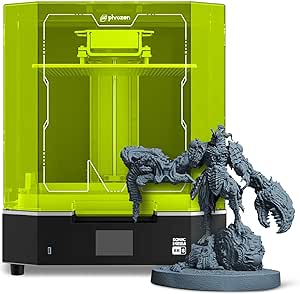 | Best for High-Detail Resin Prototype Batches | Printing technology: LCD/MSLA resin | LCD screen: 15-inch 8K monochrome | XY resolution: 43 µm | VIEW ON AMAZON | See Our Full Breakdown |
| Anycubic Kobra X Multicolor 3D Printer, Easy Setup, Native 4-Color |  | Best for Beginner-Friendly Multicolor Prototypes | Printing technology: FDM | Build volume: 260 × 260 × 260 mm | Native color printing: 4 colors | VIEW ON AMAZON | See Our Full Breakdown |
| large format 3d printers for prototype | Build volume | Printing technology |
|---|---|---|
| Anycubic Kobra 3 Max 3D Printe | 420 × 420 × 500 mm (16.5 × 16.5 × 19.7 in) | — |
| Anycubic Kobra S1 Max Combo En | 350 × 350 × 350 mm | — |
| Snapmaker U1 3D Printer with F | 270 × 270 × 270 mm | — |
| Anycubic Kobra S1 Max Combo La | 350 × 350 × 350 mm | — |
| Creality K2 Pro Combo 3D Print | 300 × 300 × 300 mm | — |
| Anycubic Kobra X FDM 3D Printe | 260 × 260 × 260 mm | FDM |
| LONGER New LK10 Plus 3D Printe | 320 × 320 × 400 mm | FDM |
| Anycubic Kobra X Multicolor FD | 260 × 260 × 260 mm | FDM |
| Phrozen Sonic Mega 8K S Resin | 33 × 18.5 × 30 cm | LCD/MSLA resin |
| Anycubic Kobra X Multicolor 3D | 260 × 260 × 260 mm | FDM |
More Details on Our Top Picks
Anycubic Kobra 3 Max 3D Printer
I’d pick the Kobra 3 Max when a prototype’s physical scale matters more than having an enclosed build area. Its 420 × 420 × 500 mm build volume is the largest among these five, giving you room for tall housings, display forms, or parts that would need splitting on the Kobra S1 Max Combo. The stated 600 mm/s top speed is appealing for iteration, though speed alone does not establish how quickly a large, detailed part will finish.
It can also add 4- or 8-color printing with ACE Pro units, and AI monitoring can pause a print after detecting problems. The tradeoff is that those color units are separate accessories, and this model lacks the S1 Max’s enclosed, heated chamber. I’d choose it for oversized PLA-focused prototypes, not for buyers who need chamber-controlled material handling out of the box.
Pros:- Largest listed build volume in this group, suitable for oversized one-piece prototypes.
- Stated maximum speed of 600 mm/s and acceleration of 10,000 mm/s².
- Can support 4- or 8-color printing with one or two ACE Pro units.
- AI monitoring can detect print issues and pause the job.
Cons:- ACE Pro units for multicolor printing are separate accessories.
- Open printer design lacks the heated chamber found on the Kobra S1 Max Combo.
- Its large footprint and 48 lb weight call for a dedicated, stable work area.
Best for: Prototype teams making oversized or tall parts in an open-format workflow, especially when a single-piece print matters more than an enclosed heated chamber.
Not ideal for: Buyers who need a heated enclosure for engineering-material prototypes or want multicolor printing without purchasing separate ACE Pro units.
- Build volume:420 × 420 × 500 mm (16.5 × 16.5 × 19.7 in)
- Maximum print speed:600 mm/s
- Maximum acceleration:10,000 mm/s²
- Multicolor printing:4 or 8 colors with 1 or 2 ACE Pro units
- Product dimensions:29.5 × 32.25 × 7.25 in
- Item weight:48 lb
- AI print monitoring:Detects print issues and can pause printing
- Warranty:1 year; 3–6 months on select parts
Our verdict“Choose the Kobra 3 Max when you need the biggest listed build area for large prototypes and can work without an enclosed heated chamber.”
Anycubic Kobra S1 Max Combo Enclosed CoreXY 3D Printer
For prototypes that need a controlled print environment, I’d put the Kobra S1 Max Combo ahead of the open Kobra 3 Max. Its 65°C heated chamber and 350°C hotend are the standout combination here, while the 350 mm cube build area still accommodates substantial functional parts. That is a more balanced fit for chamber-friendly materials than the larger Kobra 3 Max, though the latter remains the better choice when a prototype simply will not fit inside this printer.
The included ACE 2 Pro enables four-color printing, with expansion to 16 colors for buyers willing to add more units. LeviQ 3.0 49-point auto-leveling is aimed at simplifying setup across the broad build plate. At 77.8 pounds, this is a heavy machine to place or relocate, and its color expansion adds hardware. I’d favor it for a fixed workshop over a frequently moved prototyping station.
Pros:- 65°C heated chamber and 350°C hotend suit a wider range of listed materials than an open printer.
- Enclosed CoreXY design combines a sizable build area with a stated maximum speed of 600 mm/s.
- ACE 2 Pro is included for four-color printing, with expansion available up to 16 colors.
- 49-point LeviQ 3.0 auto-leveling covers the build plate.
Cons:- At 77.8 pounds, it is difficult to reposition once installed.
- Expanding beyond four colors requires additional ACE 2 Pro boxes.
- Its 350 mm build height is substantially shorter than the Kobra 3 Max’s 500 mm height.
Best for: Engineering teams with a permanent workshop who need a heated enclosure, a 350 mm cube build area, and included four-color capability.
Not ideal for: Makers who need the tallest possible prototype, a lightweight machine to move between locations, or 16-color printing without additional ACE 2 Pro units.
- Build volume:350 × 350 × 350 mm
- Printer structure:Enclosed CoreXY
- Maximum print speed:600 mm/s
- Maximum acceleration:20,000 mm/s²
- Heated chamber:65°C
- Maximum hotend temperature:350°C
- Multicolor printing:4 colors included; expandable to 16 colors
- Auto-leveling:LeviQ 3.0, 49-point
- Dimensions and weight:21 × 23 × 19 in; 77.8 lb
Our verdict“Pick the Kobra S1 Max Combo if your prototypes benefit from a heated enclosure and you can dedicate space to a heavy printer.”
Snapmaker U1 3D Printer with Four Toolheads and 5-Second Tool Changing
The Snapmaker U1 is the specialist pick for prototypes that need multiple materials or colors in one job, rather than the largest possible single part. Its four independent toolheads switch in about five seconds, and the listed design can reduce filament waste by up to 5×. That makes it a more targeted option than the Kobra S1 Max Combo’s filament-system approach when a prototype combines rigid and flexible sections or uses soluble support. Its 270 mm cube build volume, however, is notably smaller than either Anycubic Max model.
Automatic calibration, print monitoring, a touchscreen, and remote app control support a more guided workflow. The listed material range includes PLA, TPU, ABS, ASA, PA, and PC, which broadens prototyping options. I’d shortlist it for material-switching experiments and skip it for large housings. The product information gives limited detail about setup and ongoing maintenance, so buyers should not assume those tasks are hands-off.
Pros:- Four independent toolheads support multi-color and multi-material prototypes.
- About five-second tool changes and claimed filament-waste reduction can make material-rich iterations less wasteful.
- Automatic calibration, print monitoring, touchscreen, and remote app control are included.
- Listed compatibility includes flexible and engineering filaments such as TPU, PA, and PC.
Cons:- Its 270 mm cube build volume is much smaller than the Kobra 3 Max and Kobra S1 Max Combo.
- The product information does not detail setup requirements or ongoing maintenance.
- The listed maximum speed of 500 mm/s is below the 600 mm/s stated for the Anycubic Max models.
Best for: Product designers and small engineering teams making moderate-sized prototypes that combine rigid, flexible, or soluble-support materials in one print.
Not ideal for: Teams whose main requirement is a large one-piece prototype, or buyers who want detailed guidance on setup and maintenance before choosing a printer.
- Build volume:270 × 270 × 270 mm
- Toolheads:4 independent toolheads
- Tool change time:About 5 seconds
- Maximum print speed:500 mm/s
- Motion system:CoreXY
- X-axis rails:Carbon fiber
- Compatible materials:PLA, PVA, TPU, PETG, PCTG, ABS, ASA, PA, PC, and more
- Display and warranty:3.5-inch touchscreen; 1 year
Our verdict“Choose the U1 for multi-material prototype work where fast tool changes matter more than a large build envelope.”
Anycubic Kobra S1 Max Combo Large-Format FDM 3D Printer
I’d choose this Kobra S1 Max Combo for sizable prototypes that need color presentation as well as a heated enclosure. Its 350 × 350 × 350 mm build volume is smaller than the Kobra 3 Max’s, but the enclosed CoreXY layout, chamber rated up to 65°C, and 350°C hotend make it the more material-focused option. Four-color printing is supported out of the box, so it offers a more ready-to-use color path than the Kobra 3 Max, whose ACE Pro units are separate accessories.
Auto leveling, filament runout detection, and power-loss recovery speak to longer prototype jobs where interruptions can waste time and material. Expansion to 16 colors requires four ACE 2 Pro units, so that capability comes with added hardware. Compared with the Kobra S1 Max Combo listing that specifies LeviQ 3.0’s 49-point leveling, this listing provides fewer leveling details. I’d favor it for enclosed, color-capable functional models, not for very tall parts or easy relocation.
Pros:- Enclosed 350 mm cube build area provides room for sizable prototypes.
- Four-color printing is supported out of the box, with expansion available to 16 colors.
- Heated chamber and 350°C hotend support the listed range of filament types.
- Auto leveling, filament runout detection, and power-loss recovery support longer print jobs.
Cons:- At 78.8 pounds, it is a heavy printer to install or relocate.
- Expanding to 16 colors requires four ACE 2 Pro units.
- The build volume is smaller than the Kobra 3 Max, particularly for tall prototypes.
Best for: Design studios and prototype teams seeking an enclosed 350 mm cube printer with four-color printing ready for use and recovery features for longer jobs.
Not ideal for: Buyers who need the Kobra 3 Max’s 500 mm build height, a light machine to move often, or 16-color capability without extra ACE 2 Pro units.
- Build volume:350 × 350 × 350 mm
- Printer type:Enclosed CoreXY FDM
- Maximum printing speed:600 mm/s
- Color printing:4 colors; expandable to 16 with 4 ACE 2 Pro units
- Chamber temperature:Up to 65°C
- Hotend temperature:Up to 350°C
- Supported filaments:PLA, PETG, TPU, ABS, ASA, PVA
- Dimensions and weight:21 × 23 × 19 in; 78.8 lb
- Auto leveling:LeviQ 3.0
Our verdict“Choose this Kobra S1 Max Combo for enclosed, color-ready prototypes when its 350 mm cube build area is large enough.”
Creality K2 Pro Combo 3D Printer with CFS
The Creality K2 Pro Combo makes sense when engineering-material capability and a smaller footprint matter more than maximum build size. Its 300 mm cube build volume is below the two Kobra S1 Max options, so it is less suitable for large enclosures; in return, active chamber heating, a hardened steel direct-drive extruder, and listed support for materials such as PPA-CF and PET-CF point toward demanding functional prototypes. It also reaches a stated maximum speed of 600 mm/s, though speed is only one part of iteration time.
The included CFS supports up to 16 colors, while dual AI cameras provide print monitoring, failure detection, and flow-rate tuning. Compared with the Snapmaker U1, it has a larger build area, but the U1’s four independent toolheads are specifically described for quick material changes and reduced waste. This Creality weighs 61.6 pounds, and its warranty details are not provided in the listing. I’d pick it for compact, material-focused prototyping, not oversized parts.
Pros:- Active chamber heating and hardened steel direct-drive extruder support listed engineering materials.
- CFS supports up to 16 colors and is included with the combo.
- Dual AI cameras support monitoring, failure detection, and flow-rate tuning.
- 300 mm cube build volume and 600 mm/s stated maximum speed suit compact prototype batches.
Cons:- Its 300 mm cube build area is smaller than the 350 mm cube Kobra S1 Max models.
- At 61.6 pounds, it is not a lightweight printer to move.
- The product information does not specify warranty details.
Best for: Engineering teams prototyping compact functional components with listed composite materials and wanting chamber heating, monitoring, and multicolor capability.
Not ideal for: Buyers building large one-piece housings or fixtures, or those who need published warranty details before selecting a printer.
- Build volume:300 × 300 × 300 mm
- Maximum print speed:600 mm/s
- Maximum acceleration:20,000 mm/s²
- Maximum chamber temperature:60°C
- Maximum filament flow:40 mm³/s
- Color printing:Up to 16 colors with CFS
- Supported materials:PLA, ABS, ASA, PPA, PPA-CF, PET-CF
- Dimensions and weight:17 × 20 × 18 in; 61.6 lb
- Connectivity:Wi-Fi and LAN
Our verdict“Pick the K2 Pro Combo for compact engineering prototypes that benefit from chamber heating and composite-material support, rather than maximum part size.”
Anycubic Kobra X FDM 3D Printer
I’d choose this Kobra X when a prototype needs clear color-coded parts or visual variants, but I’d keep expectations focused on desktop-scale work: its 260 × 260 × 260 mm build volume is useful, not as expansive as the LONGER LK10 Plus’s taller 320 × 320 × 400 mm area. Native four-color printing can make assemblies and design iterations easier to communicate, while expansion to up to 19 colors is an option for teams willing to add four ACE 2 Pro units. Its 49-point leveling and AI camera monitoring also suit shared workspaces where setup and print oversight matter. The tradeoff is that the provided details omit a maximum printing speed, making cycle-time comparisons harder; the expanded color setup also adds equipment and workflow complexity. I’d favor this over the Phrozen Sonic Mega 8K S for functional filament prototypes, not fine resin detail.
Pros:- Native four-color printing supports clear visual variants and part identification.
- 260 mm cubed build volume accommodates many desktop-scale prototype parts.
- 49-point automatic leveling reduces manual bed setup.
- AI camera monitoring includes spaghetti and object detection.
Cons:- The listed information does not specify maximum printing speed, limiting throughput comparisons.
- Expansion to 19 colors requires four additional ACE 2 Pro units.
- Build volume is smaller than the LONGER LK10 Plus, especially for tall prototypes.
Best for: Design teams and makerspaces producing desktop-sized, color-coded FDM prototypes that benefit from remote print monitoring.
Not ideal for: Engineers needing very large single-piece prototypes, documented print-speed figures, or 19-color output without buying additional ACE 2 Pro units.
- Printing technology:FDM
- Build volume:260 × 260 × 260 mm
- Native color printing:4 colors
- Maximum color expansion:Up to 19 colors with 4 ACE 2 Pro units
- Auto-leveling:LeviQ 3.0, 49-point mesh
- Camera:720p with AI monitoring
- Dimensions:17.93 × 17.53 × 18.16 inches
- Weight:20.9 pounds
Our verdict“Choose this Kobra X for monitored, multicolor desktop FDM prototypes, but pick the LONGER LK10 Plus when part size matters more than color capability.”
LONGER New LK10 Plus 3D Printer, 320×320×400mm Large Printer Volume
The LK10 Plus earns its place by prioritizing usable part size over multicolor features. Its 320 × 320 × 400 mm build volume can fit taller prototypes or several smaller components in one job, reducing the need to split a design and join sections. That is a more direct fit for physical engineering checks than either Anycubic Kobra X, whose build volume is 260 mm cubed, or the Phrozen Sonic Mega 8K S, which uses resin and favors detailed batch parts. Klipper-based speed is listed up to 500 mm/s, with a high-flow direct-drive extruder and compatibility with materials including TPU and Nylon. Eddy-current bed sensing, automatic Z offset, runout detection, and power-loss recovery support longer jobs. The tradeoff: the provided specs do not state the printer’s dimensions, weight, or a detailed material-temperature range, so workspace planning and material limits need verification.
Pros:- 320 × 320 × 400 mm build area supports tall parts and larger batches.
- Advertised speed up to 500 mm/s can shorten iteration waits when print conditions allow.
- Direct-drive extrusion and listed filament compatibility cover flexible and engineering-oriented materials.
- Automatic leveling, Z offset, runout detection, and power-loss recovery support longer prints.
Cons:- No multicolor system is specified, unlike the Anycubic Kobra X models.
- The provided product data omits printer dimensions and weight for workspace planning.
- The advertised maximum speed does not by itself establish real-world speed for large, detailed prototypes.
Best for: Prototype shops and experienced makers who need to print tall functional parts or multiple components in one FDM job.
Not ideal for: Buyers who need native multicolor printing, resin-level fine detail, or clearly documented footprint and material limits before selecting a machine.
- Printing technology:FDM
- Build volume:320 × 320 × 400 mm
- Maximum printing speed:Up to 500 mm/s
- Acceleration:10,000 mm/s²
- Firmware:Klipper
- Extruder:High-flow dual-gear direct drive
- Bed sensing:Eddy-current automatic leveling and automatic Z offset
- Connectivity:Dual-band Wi-Fi, 2.4 GHz and 5 GHz
Our verdict“Pick the LK10 Plus when large, tall FDM prototypes matter more than multicolor output or a fully documented machine footprint.”
Anycubic Kobra X Multicolor FDM 3D Printer
This Kobra X is the more technically specified choice for teams that value quick iteration across different filament types. The listed 600 mm/s maximum speed, 300°C nozzle, and support for PLA, PETG, TPU, PVA, and ASA give it a broader prototype-material brief than the Phrozen Sonic Mega 8K S, which is a resin machine for fine detail rather than functional thermoplastic parts. The 260 mm cubed build volume is ample for many desktop prototypes, though it falls short of the LONGER LK10 Plus when a design needs greater height or multiple large components. Four-color printing is built in, with expansion to 19 colors through four ACE 2 Pro units. I’d treat speed as a listed ceiling, not a guarantee for every geometry or material. The main tradeoff is that extensive color expansion brings extra hardware and filament-management demands.
Pros:- Listed maximum speed of 600 mm/s supports a fast-iteration workflow.
- Material compatibility includes flexible TPU and ASA as well as common PLA and PETG.
- 300°C maximum nozzle temperature expands material options.
- Automatic leveling and a 720p camera with AI alerts assist with unattended jobs.
Cons:- The 260 mm cubed build area is smaller than the LONGER LK10 Plus’s build volume.
- Up to 19-color printing requires four ACE 2 Pro units.
- The listed maximum speed does not specify expected speed for different prototype geometries or materials.
Best for: Makers and product teams iterating quickly on desktop-sized prototypes that may use flexible or higher-temperature filament and benefit from color coding.
Not ideal for: Buyers whose main need is a very large one-piece build, fine resin surface detail, or expanded multicolor printing without extra equipment.
- Printing technology:FDM
- Build volume:260 × 260 × 260 mm
- Maximum speed:600 mm/s
- Color support:4 colors built in; up to 19 with 4 ACE 2 Pro units
- Supported materials:PLA, PETG, TPU, PVA, ASA
- Maximum nozzle temperature:300°C
- Bed leveling:LeviQ 3.0, 49-point automatic leveling
- Noise level:≤48 dB
Our verdict“Choose this Kobra X for fast, material-flexible desktop FDM iterations, and choose the LK10 Plus instead when taller prototypes are the priority.”
Phrozen Sonic Mega 8K S Resin 3D Printer
The Sonic Mega 8K S serves a different prototype need from the FDM machines here: it trades thermoplastic versatility for detailed resin output across a broad build area. Its 15-inch 8K monochrome LCD and 43 µm XY resolution suit batches of small, finely featured components, while the 33 × 18.5 × 30 cm volume gives those parts room to print together. That makes it a stronger detail-oriented alternative to the Anycubic Kobra X, but a weaker choice for functional prototypes that need TPU, Nylon, or other listed FDM materials. The lift-up lid helps access the vat in constrained spaces, and the metal drip hanger supports resin recovery. High-speed batch performance is advertised with compatible ACF film and TR300 resin, so it depends on specific consumables. At 57.3 pounds, it is also less convenient to relocate than the desktop FDM options.
Pros:- 43 µm XY resolution supports fine features in detailed prototype parts.
- Large resin build volume allows multiple smaller components in one batch.
- Lift-up lid eases access where a hinged lid would need more clearance.
- Built-in metal drip hanger helps recover excess resin.
Cons:- Resin workflow is a poor match for testing the FDM materials supported by the Kobra X models.
- Advertised high-speed batch printing depends on compatible ACF film and TR300 resin.
- At 57.3 pounds, the machine is less convenient to move than the listed desktop FDM printers.
Best for: Product designers and model shops producing batches of small, intricate visual prototypes where surface detail matters more than thermoplastic material testing.
Not ideal for: Engineering teams testing flexible or functional FDM materials, buyers needing a wide rectangular build area, or users who need a lightweight machine to move frequently.
- Printing technology:LCD/MSLA resin
- LCD screen:15-inch 8K monochrome
- XY resolution:43 µm
- Build volume:33 × 18.5 × 30 cm
- Product dimensions:18.6 × 15 × 22.3 inches
- Item weight:57.3 pounds
- Model number:MEGA8KS000US
- First available:November 13, 2023
Our verdict“Choose the Sonic Mega 8K S for detailed resin batches, but select an FDM option such as the Kobra X for functional filament prototypes.”
Anycubic Kobra X Multicolor 3D Printer, Easy Setup, Native 4-Color
I’d give this Kobra X the beginner-focused role because the listing pairs native four-color printing with a guided setup story: 49-point LeviQ 3.0 leveling, app control, and AI alerts can reduce routine setup and monitoring work for a first-time prototype maker. Its 260 mm cubed build volume handles many desktop parts, while the hardened steel nozzle, vibration compensation, and stated 600 mm/s maximum speed target repeat iteration rather than only display models. Compared with the LONGER LK10 Plus, it offers built-in multicolor capability but gives up build volume; compared with the Phrozen Sonic Mega 8K S, it is better suited to filament-based functional prototypes than fine resin detail. The color system can expand to 19 colors, but that requires four ACE 2 Pro units, and filament is not included. I’d also treat the advertised speed and setup claims as manufacturer specifications, not a promise for every print.
Pros:- Four-color printing is built in, with a stated path to as many as 19 colors.
- 49-point automatic leveling supports a less manual first-layer setup.
- AI camera alerts and app control help users monitor prints remotely.
- Hardened steel nozzle and listed material compatibility broaden prototype use.
Cons:- Expansion to 19 colors requires four ACE 2 Pro units, which are not included in the described setup.
- The 260 mm cubed build volume is smaller than the LONGER LK10 Plus.
- Filament is not included, and advertised maximum speed may not apply to every print.
Best for: New makers, schools, and small design teams that want guided setup and color-coded FDM prototypes within a desktop-sized build area.
Not ideal for: Beginners seeking the simplest single-color workflow, teams needing LK10 Plus-scale parts, or buyers expecting the expanded color system and filament to be included.
- Printing technology:FDM
- Build volume:260 × 260 × 260 mm
- Native color printing:4 colors
- Maximum color expansion:Up to 19 colors with 4 ACE 2 Pro units
- Maximum printing speed:600 mm/s
- Bed leveling:LeviQ 3.0, 49-point automatic leveling
- Nozzle:Hardened steel; maximum temperature 300°C
- Connectivity:Dual-band Wi-Fi and LAN
Our verdict“Choose this version for guided entry into multicolor desktop FDM prototyping, but move to the LONGER LK10 Plus if prototype size is your main constraint.”

How We Picked
I ranked these printers by how well their stated capabilities map to prototype work: usable build volume, print approach, enclosure or motion design, material and color workflow, setup demands, and the practical value of features beyond headline specifications. For prototypes, repeatable dimensions and a manageable path from CAD to part matter more than a long feature list, so a printer with a useful balance of size and workflow ranked ahead of one that excels only in a narrower task.
The order reflects distinct roles rather than treating every machine as interchangeable. The Kobra S1 Max Combo ranks first for its balance of large-format FDM and enclosed, multicolor functionality; the Kobra 3 Max follows for buyers who prioritize size. The Snapmaker U1 and Creality K2 Pro Combo offer different tool-changing or material-handling approaches, while the LONGER LK10 Plus emphasizes a clearly stated large build volume. I place the Phrozen resin printer in a specialized detail role, not as a direct substitute for FDM. Where product names appear in multiple configurations, I treat bundle details as something buyers must confirm rather than assume.
| large format 3d printers for prototype | Printing technology |
|---|---|
| Anycubic Kobra 3 Max 3D Printe | — |
| Anycubic Kobra S1 Max Combo En | — |
| Snapmaker U1 3D Printer with F | — |
| Anycubic Kobra S1 Max Combo La | — |
| Creality K2 Pro Combo 3D Print | — |
| Anycubic Kobra X FDM 3D Printe | FDM |
| LONGER New LK10 Plus 3D Printe | FDM |
| Anycubic Kobra X Multicolor FD | FDM |
| Phrozen Sonic Mega 8K S Resin | LCD/MSLA resin |
| Anycubic Kobra X Multicolor 3D | FDM |
Factors to Consider When Choosing Large Format 3d Printers For Prototypes
Choosing a prototype printer starts with the part and the decision the prototype needs to support. I’d work backward from the largest critical dimension, the material behavior required, and how quickly the team needs to revise the design. These broader checks can prevent a common mistake: buying the printer with the biggest advertised volume when a smaller, more controlled workflow would produce more useful iterations.
Match Build Volume to the Prototype You Actually Need
Measure the finished part in its likely print orientation, then account for supports, brims, and any clearance required near the build plate edges. A part that technically fits may still be awkward to print if its footprint leaves little room for adhesion or if the tall orientation makes it vulnerable to failure. Large parts also consume more filament and tie up the machine longer, so splitting a model into joined sections can sometimes produce faster, easier-to-revise prototypes. Keep a small allowance between the part’s dimensions and the printer’s stated limits rather than planning around a perfect fit. If prototypes change often, a slightly smaller printer that can run more iterations may serve the project better than a maximum-volume machine used for occasional oversized builds.
Choose FDM or Resin by the Question the Prototype Must Answer
FDM is usually the more practical route for large housings, brackets, ergonomic mockups, and parts that need a robust physical form. Resin can capture fine surface features and small geometry, making it useful for visual models or detailed components, but its workflow includes resin handling, washing, and curing. A high-resolution resin printer does not automatically make sense for a large functional prototype, since material behavior and part dimensions may matter more than surface detail. Before choosing, identify whether the model is meant to check fit, strength, appearance, or fine detail. Teams that need both full-size form checks and tiny visual details may benefit more from separate workflows than from asking one printer to do both jobs.
Decide When an Enclosure Is Worth the Space
An enclosure can help manage drafts and temperature changes around a print, which may matter for larger parts or materials prone to warping. It also adds to the machine’s footprint and can make access, ventilation, or maintenance less convenient in a crowded workshop. Open-frame printers may be easier to approach and better suited to basic prototype materials, but they expose prints to more room variation. Think about the materials your team intends to use and the stability of the room before paying for enclosure features. An enclosure is not a substitute for material-specific settings, good bed preparation, or sensible part orientation. For a shared workspace, check where the printer will sit and how users will reach the bed and service points.
Treat Multicolor and Tool-Changing Features as Workflow Decisions
Multicolor printing can make concept models easier to explain, while multiple toolheads can support combinations such as different materials or colors within a project. Those features also add setup steps, more parts to maintain, and possible material waste during changes. For a prototype used mainly to confirm shape and fit, a single-material print may be more direct and easier to repeat. Ask whether color coding or material changes will answer a real design question, such as separating components for a review or testing a flexible interface. If the answer is no, prioritize reliable single-material output and use labels, paint, or separate printed pieces instead. Compare the exact bundle contents, since similar product names may refer to different combinations of printer and accessories.
Account for Iteration Speed, Not Just Print Speed
A prototype workflow includes slicing, setup, failed-print recovery, cleanup, and design revisions, not only the time the machine is moving. A printer that is straightforward to prepare can support more useful design cycles than a faster machine with a complicated changeover. Large parts magnify the cost of a failure because they consume more material and machine time, so build adhesion and a dependable first layer deserve attention. Consider who will operate the printer and whether the team can handle routine maintenance without delaying design work. For early-stage projects, frequent smaller test prints can reveal fit problems before a full-size version begins. Reserve the large build for questions that genuinely require a complete part.
Plan for the Full Workshop Footprint and Material Path
The listed build volume does not describe the space needed to operate the printer. Leave room for opening doors, removing large parts, feeding filament, and reaching service areas, then check that the route into the room can accommodate the machine. Material storage matters too: a large prototype may use several spools, and moisture-sensitive filament may need controlled storage. Resin workflows call for a separate plan for handling, washing, curing, and cleanup. Before buying, map the printer’s location against power, ventilation, and nearby work surfaces. A machine that fits the part but disrupts the rest of the workshop can slow prototyping rather than improve it.
Frequently Asked Questions
Should I choose the Kobra 3 Max or the Kobra S1 Max Combo for large prototypes?
I’d choose the Kobra 3 Max when the deciding factor is fitting a very large FDM part on one build plate. The Kobra S1 Max Combo makes more sense when an enclosed workflow and multicolor capability are useful to the prototype process. Neither choice is automatically better for every large part: material needs, room conditions, and whether color changes matter should guide the decision. Compare the exact specifications and bundle contents for the listing you plan to buy, since similar names can cover different configurations. If you rarely need multicolor output, a simpler setup may be easier to run.
Is a resin printer a good choice for a large functional prototype?
A resin printer can suit a detailed visual model or small component where fine features and surface appearance are the main goals. For a large housing, fit check, or functional mockup, FDM is often the more practical format because the workflow is better aligned with full-size parts. Resin also brings additional handling, washing, and curing steps that need dedicated space and care. Decide what the prototype must prove before comparing resolution claims. If the part is both large and mechanically useful, consider whether FDM can answer the design question more directly.
Does a larger build volume always reduce prototype cost or turnaround time?
No. A bigger build area can reduce the need to split a part, but a large print can take longer, use more material, and carry a higher cost if it fails late. Printing a prototype in sections may allow faster changes and lower-risk testing, especially when only a few interfaces need validation. Large single-piece prints are most useful when seams would affect fit, strength, appearance, or the design review. I’d compare the total iteration plan rather than assume one-piece printing is always the efficient route. A large machine is valuable when the part itself requires that scale.
When does an enclosed printer matter for prototype work?
An enclosure matters most when the materials or part geometry benefit from a more stable environment and reduced exposure to drafts. It can be less consequential for simpler prototypes printed with materials that behave well in an open setup. The enclosure also affects access, room layout, and maintenance, so it should solve a specific workflow problem rather than serve as a box to check. Consider the material range your team expects to use over the life of the printer. If your prototypes are mainly basic fit models, build volume and ease of iteration may deserve higher priority.
How should I compare listings when the same printer name appears with different bundles?
Check the full model designation and confirm which accessories are included rather than relying on the headline name. Look for the stated build volume, enclosure status, color or tool-changing system, and any required components sold separately. This is particularly relevant when a product family appears in several configurations, as the printer alone may not include the workflow features implied by a bundle name. Compare manuals or manufacturer specifications when listing details are unclear. For a prototype team, the right bundle is the one that supports the intended materials and iteration process, not the one with the longest feature list.
Conclusion
For most buyers seeking a large-format FDM machine for prototype work, I’d start with the Anycubic Kobra S1 Max Combo as the best overall balance of size and workflow features. The Anycubic Kobra 3 Max is my pick for buyers who put maximum part size ahead of enclosure and multicolor extras, while the LONGER LK10 Plus is the value-focused option to examine when its 320 × 320 × 400 mm volume matches the work. For a premium, specialized workflow, consider the Snapmaker U1 if its four-toolhead approach serves your prototype needs, or the Phrozen Sonic Mega 8K S for detailed resin models rather than large functional FDM parts. Beginners should prioritize a configuration with a clear setup and maintenance path, then verify exactly what the listing includes; the Kobra X options may suit those looking for accessible multicolor workflows. For material variety, compare the Creality K2 Pro Combo and its CFS setup against the tool-changing alternatives. Match the printer to the question your prototype needs to answer, and confirm the exact model and bundle before purchasing.
Halloween Picks
halloween
As an affiliate, we earn on qualifying purchases.