
For business projectors in daylight rooms, brightness and room control matter more than headline resolution alone. I rank the Epson Pro EX11000 as the best overall for its Full HD picture and laser light source, while the ViewSonic LS741HD is a strong choice when extra brightness is the priority and the Epson Pro EX9270 suits wireless presentations. The main tradeoff is between brighter output for ambient light and lower cost, portability, or short-throw flexibility. Even a bright projector can struggle in direct sunlight or against a washed-out screen, so room conditions remain part of the decision. Read on for the full comparison, buyer-specific picks, and guidance on matching a projector to your space.

Get business pricing on office and shipping supplies
- Business-only prices and quantity discounts
- Tax-exempt purchasing
- Multiple users, one account, clear invoices
Key Takeaways
- The Epson Pro EX11000 and ViewSonic LS741HD lead for bright rooms: their laser light sources and high stated brightness make them the clearest candidates when ambient light cannot be reduced.
- Resolution separates meeting use from detailed content: Full HD models such as the EX11000, LS741HD, and Optoma EH412 give text and diagrams more detail than WXGA options.
- Short throw solves placement problems, not daylight: the BenQ MW632ST can produce a large image from close to the screen, but room brightness still affects visibility.
- WXGA models favor routine presentations over fine detail: the Epson EX3290, ViewSonic PA503W, BenQ MW560C, and BenQ MW632ST suit slides and basic office content better than dense spreadsheets or small text.
- Portable and lesser-known models require closer feature checks: the Wi-Fi 6 portable projector and Exingxiu may appeal for flexibility, but buyers should verify brightness measurement methods, connectivity, and support before relying on them for a sunlit conference room.
| Epson Pro EX9270 Wireless 1080p 3LCD Projector |  | Best Overall for Daylight Rooms | Native resolution: 1920 × 1080 | Brightness: 4,100 lumens | Display technology: 3LCD | VIEW ON AMAZON | See Our Full Breakdown |
| Epson EX3290 WXGA 3LCD Video Projector |  | Best Value for Everyday Slides | Native resolution: 1280 × 800 | Brightness: 4,000 lumens | Display technology: 3-chip 3LCD | VIEW ON AMAZON | See Our Full Breakdown |
| ViewSonic PA503W WXGA DLP Projector, 4,000 Lumens |  | Best for Flexible Room Placement | Native resolution: WXGA (1280 × 800) | Brightness: 4,000 ANSI lumens | Display technology: DLP | VIEW ON AMAZON | See Our Full Breakdown |
| BenQ MW560C WXGA Business Projector |  | Best for Simple Meeting-Room Setup | Native resolution: 1920 × 1080 (listed) | Maximum display resolution: 1980 × 1080 (listed) | Brightness: 4,000 lumens | VIEW ON AMAZON | See Our Full Breakdown |
| Portable 1080p Projector with Wi-Fi 6, Bluetooth 5.1, and 4K Decoding |  | Best Connectivity for Mixed Use | Native resolution: 1920 × 1080 | 4K support: 4K decoding | Brightness: Listed as up to 4,500 ANSI lumens in title and 3,500 ANSI lumens in product information | VIEW ON AMAZON | See Our Full Breakdown |
| ViewSonic LS741HD 1080p Laser Projector, 5,000 ANSI Lumens |  | Best for Large Daylight Rooms | Native resolution: 1920 × 1080 | Brightness: 5,000 ANSI lumens | Light source life: Up to 30,000 hours | VIEW ON AMAZON | See Our Full Breakdown |
| Optoma EH412 Full HD DLP Projector with 4K HDR Input |  | Best Portable Business Pick | Native resolution: 1920 × 1080 | Display technology: DLP | Brightness: 4,500 lumens | VIEW ON AMAZON | See Our Full Breakdown |
| Exingxiu DLP Business Projector, 3300 Lumens |  | Best for Basic, Budget-Conscious Presentations | Technology: DLP | Brightness: 3,300 lumens | Native resolution: 1024 × 768 | VIEW ON AMAZON | See Our Full Breakdown |
| BenQ MW632ST WXGA Short-Throw Projector | 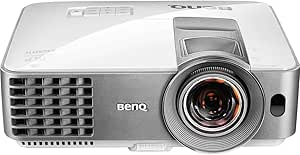 | Best Short-Throw Pick for Compact Rooms | Resolution: WXGA (1280 × 800) | Brightness: 3,200 ANSI lumens | Display technology: DLP | VIEW ON AMAZON | See Our Full Breakdown |
| Epson Pro EX11000 Full HD 1080p Wireless Laser Projector |  | Best for Wireless Presentations | Native resolution: 1920 × 1080 | Brightness: 4,600 lumens | Display technology: 3-chip 3LCD | VIEW ON AMAZON | See Our Full Breakdown |
| business projectors for daylight room | Brightness | Native resolution | Connectivity | Display technology |
|---|---|---|---|---|
| Epson Pro EX9270 Wireless 1080 | 4,100 lumens | 1920 × 1080 | HDMI, USB, Wi-Fi | 3LCD |
| Epson EX3290 WXGA 3LCD Video P | 4,000 lumens | 1280 × 800 | HDMI, USB | 3-chip 3LCD |
| ViewSonic PA503W WXGA DLP Proj | 4,000 ANSI lumens | WXGA (1280 × 800) | HDMI, mini USB, VGA, composite video, audio in/out | DLP |
| BenQ MW560C WXGA Business Proj | 4,000 lumens | 1920 × 1080 (listed) | HDMI, VGA | — |
| Portable 1080p Projector with | Listed as up to 4,500 ANSI lumens in title and 3,500 ANSI lumens in product information | 1920 × 1080 | Wi-Fi 6, Bluetooth 5.1, 2 × HDMI, 2 × USB, VGA, AV | — |
| ViewSonic LS741HD 1080p Laser | 5,000 ANSI lumens | 1920 × 1080 | Ethernet, HDMI, USB, 3.5 mm jack | — |
| Optoma EH412 Full HD DLP Proje | 4,500 lumens | 1920 × 1080 | — | DLP |
| Exingxiu DLP Business Projecto | 3,300 lumens | 1024 × 768 | Wired | — |
| BenQ MW632ST WXGA Short-Throw | 3,200 ANSI lumens | — | — | DLP |
| Epson Pro EX11000 Full HD 1080 | 4,600 lumens | 1920 × 1080 | Ethernet, HDMI, USB, VGA, Wi-Fi, Miracast | 3-chip 3LCD |
More Details on Our Top Picks
Epson Pro EX9270 Wireless 1080p 3LCD Projector
The EX9270 is my strongest all-round pick here for business rooms with daylight because it combines 4,100 lumens with native 1080p and 3LCD color. That resolution gives spreadsheets, presentation text, and video calls more detail than the WXGA Epson EX3290 or ViewSonic PA503W, while its brightness is close to those models. Its AirPlay and Miracast support also makes laptop and mobile sharing easier when a cable is inconvenient. The tradeoff is that the listed maximum throw distance is only 9 feet, which can constrain placement in a larger room, and the lamp life is 5,500 hours. I’d choose it over the EX3290 when sharper Full HD content and wireless sharing matter more than a longer listed throw range.
Pros:- 4,100 lumens of color and white brightness for presentations with some room light
- Native 1920 × 1080 resolution keeps fine slide text sharper than WXGA alternatives
- Apple AirPlay and Miracast support provide convenient wireless sharing
- Two HDMI ports, USB, and a built-in speaker cover common meeting-room needs
Cons:- Maximum throw distance is listed as 9 feet, limiting placement in larger rooms
- 5,500-hour light-source life is shorter than the ViewSonic PA503W’s stated SuperEco lamp life
- Weight is not specified, making portability harder to judge
Best for: Teams presenting detailed slides, video, and screen-shared content in moderately bright meeting rooms who want native Full HD and wireless options.
Not ideal for: Organizations needing a projector for a deep room or extended daily use without lamp replacement; its listed throw distance is limited and lamp life is 5,500 hours.
- Native resolution:1920 × 1080
- Brightness:4,100 lumens
- Display technology:3LCD
- Maximum image size:304 inches
- Connectivity:HDMI, USB, Wi-Fi
- Wireless streaming:Apple AirPlay and Miracast
- Optical zoom:1.6×
- Light-source life:5,500 hours
Our verdict“Choose the EX9270 if your daylight-room presentations need Full HD detail and wireless sharing more than long-throw flexibility.”
Epson EX3290 WXGA 3LCD Video Projector
The EX3290 suits buyers who prioritize bright, readable everyday presentations over Full HD sharpness. Its 4,000 lumens and 3-chip 3LCD design put it in similar daylight-room territory to the ViewSonic PA503W, while two HDMI ports and a built-in speaker make it simple to connect a laptop and another source. The main compromise is WXGA resolution: text and detailed visuals won’t look as crisp as they do on the Epson Pro EX9270, which is the better fit for Full HD video or dense design work. The EX3290’s listed image-size range reaches 375 inches, but that maximum should not be mistaken for a guarantee of strong visibility in bright light at that size. Wireless streaming also depends on a sufficiently fast network.
Pros:- 4,000 lumens of color and white brightness suit rooms with some ambient light
- 3-chip 3LCD technology supports vivid color presentation
- Two HDMI ports and a built-in speaker simplify basic meeting setups
- Lightweight, portable design is suited to moving between rooms
Cons:- 1280 × 800 native resolution is less detailed than the Epson Pro EX9270’s Full HD image
- Wireless streaming requires a network connection of at least 5 Mbps
- The stated maximum image size does not indicate how well a very large image will hold up in daylight
Best for: Small businesses and training teams that mostly show slides, documents, or video calls and want bright 3LCD output with straightforward HDMI connections.
Not ideal for: Teams presenting detailed Full HD video, intricate diagrams, or small text; the EX9270 offers native 1080p for sharper detail.
- Native resolution:1280 × 800
- Brightness:4,000 lumens
- Display technology:3-chip 3LCD
- Maximum image size:375 inches
- Connectivity:HDMI, USB
- HDMI ports:2
- Maximum throw distance:10 feet
- Built-in speaker:Yes
Our verdict“Pick the EX3290 for bright, routine slide presentations where portability and simple connections matter more than Full HD detail.”
ViewSonic PA503W WXGA DLP Projector, 4,000 Lumens
The PA503W is the practical choice when a meeting room needs flexible installation and legacy connections as much as brightness. Its 4,000 ANSI lumens match the BenQ MW560C and sit just below the Epson EX9270, while the ViewSonic adds VGA and composite video alongside HDMI for older office equipment. A stated maximum throw distance of 38.02 feet also gives it more placement reach than the Epson EX9270’s 9-foot listing. The tradeoff is WXGA resolution: it’s fine for standard slides, but the EX9270’s native 1080p is a better match for fine text and detailed video. This is also a lamp-based design, and its 1.1× zoom offers less framing flexibility than the Epson’s 1.6× optical zoom.
Pros:- 4,000 ANSI lumens help keep standard presentation content visible with some ambient light
- HDMI, VGA, and composite video support a wide range of source equipment
- Long listed maximum throw distance offers placement options in larger rooms
- SuperEco lamp life is stated at up to 10,000 hours
Cons:- WXGA resolution is less sharp than the Epson Pro EX9270’s native 1080p
- Lamp-based light source requires eventual lamp replacement
- 1.1× optical zoom provides limited adjustment when positioning the projector
Best for: Schools and small businesses connecting a mix of newer laptops and older VGA or composite-video equipment in rooms where the projector may need to sit far from the screen.
Not ideal for: Teams that need native Full HD detail or broad zoom flexibility; the Epson Pro EX9270 is sharper and has a wider optical zoom range.
- Native resolution:WXGA (1280 × 800)
- Brightness:4,000 ANSI lumens
- Display technology:DLP
- Contrast ratio:22,000:1
- Connectivity:HDMI, mini USB, VGA, composite video, audio in/out
- Optical zoom:1.1×
- Image size:30–300 inches
- Lamp life:Up to 10,000 hours with SuperEco
Our verdict“Choose the PA503W when room placement and older connections take priority over Full HD resolution.”
BenQ MW560C WXGA Business Projector
The MW560C makes sense for a fixed tabletop setup where quick positioning and familiar inputs matter more than wireless features. Its 4,000 lumens put it in the same brightness class as the ViewSonic PA503W, and automatic vertical keystone correction can tidy a tilted image without manual adjustment. HDMI and VGA cover common modern and older office sources, while SmartEco mode can reduce lamp power use. The listed throw range, however, tops out at 8.2 feet, so this is less adaptable to a deep room than the ViewSonic. The specification data also conflicts: native resolution is listed as 1920 × 1080, while maximum display resolution is given as 1980 × 1080. I’d verify the resolution details before choosing it over the clearly specified Full HD Epson EX9270.
Pros:- 4,000 lumens suit presentation use in rooms with some ambient light
- Automatic vertical keystone correction can speed up basic alignment
- HDMI and VGA support common office equipment
- SmartEco mode can reduce lamp power use by up to 70%
Cons:- Listed maximum throw distance of 8.2 feet limits placement in larger rooms
- Resolution information is inconsistent between the native and maximum display specifications
- No Wi-Fi connectivity is listed for wireless presentation
Best for: Teams setting up a tabletop projector in a compact meeting room who value automatic vertical image correction and need HDMI plus VGA.
Not ideal for: Buyers who need dependable resolution documentation, wireless screen sharing, or placement at the back of a large room; its listed throw distance is short and resolution figures conflict.
- Native resolution:1920 × 1080 (listed)
- Maximum display resolution:1980 × 1080 (listed)
- Brightness:4,000 lumens
- Display type:DLP
- Contrast ratio:20,000:1
- Connectivity:HDMI, VGA
- Throw distance:4–8.2 feet
- Maximum image size:300 inches
Our verdict“Choose the MW560C for a compact, cable-connected meeting room where automatic vertical correction is more useful than wireless sharing.”
Portable 1080p Projector with Wi-Fi 6, Bluetooth 5.1, and 4K Decoding
This portable projector offers the broadest connection mix in this group: Wi-Fi 6, Bluetooth 5.1, HDMI, USB, VGA, and AV make it adaptable for presentations, screen mirroring, and occasional entertainment. Native 1080p also gives it a resolution advantage over the WXGA BenQ MW560C and ViewSonic PA503W. For daylight rooms, though, I’m more cautious: its brightness is variously listed as up to 4,500 or 3,500 ANSI lumens, and the contrast figures conflict too. That uncertainty makes it harder to compare with the consistently specified 4,000-lumen Epson EX9270. The claimed 450-inch maximum image is also better treated as a sizing ceiling, not a promise of clear business slides in bright conditions. I’d favor it for connection flexibility, not for dependable daylight performance.
Pros:- Native 1920 × 1080 resolution supports detailed presentation content
- Wide selection of wireless and wired connections, including VGA and AV
- Dual 10 W stereo speakers provide built-in audio
- Multiple mounting options include ceiling, tripod, or desktop
Cons:- Brightness is listed inconsistently as up to 4,500 or 3,500 ANSI lumens
- Contrast ratio is also inconsistent across the supplied specifications
- No real-world performance feedback is provided to clarify daylight visibility
Best for: Small teams and presenters who need native 1080p, wireless mirroring, Bluetooth audio, and legacy wired inputs in one portable unit.
Not ideal for: Buyers whose first requirement is predictable brightness in a sunlit meeting room; the brightness and contrast specifications conflict, unlike the Epson Pro EX9270’s listed figures.
- Native resolution:1920 × 1080
- 4K support:4K decoding
- Brightness:Listed as up to 4,500 ANSI lumens in title and 3,500 ANSI lumens in product information
- Display type:LCD
- Connectivity:Wi-Fi 6, Bluetooth 5.1, 2 × HDMI, 2 × USB, VGA, AV
- Projection size:39–450 inches
- Speakers:Dual 10 W stereo speakers
- Mounting options:Ceiling, tripod, or desktop
Our verdict“Pick this model for broad connectivity and portable mixed use, but choose the EX9270 if verified brightness matters most in a daylight room.”
ViewSonic LS741HD 1080p Laser Projector, 5,000 ANSI Lumens
For a large meeting hall or classroom where window light is hard to control, I’d put the ViewSonic LS741HD near the top of this group. Its 5,000 ANSI lumens lead the listed brightness figures here, giving presentations more visibility in ambient light than the Epson Pro EX11000, while its native 1080p resolution keeps text and slides crisp. The 1.6x optical zoom, image correction, and 360-degree projection give installers room to adapt it to ceiling placement and unusual layouts. That flexibility comes with a fixed-installation feel: it is ceiling-mount oriented, and the listed connections do not include Wi-Fi or Miracast. I’d choose it over the more portable Optoma EH412 when brightness and installation range matter more than carrying the projector between rooms.
Pros:- 5,000 ANSI lumens offer the strongest listed brightness in this group for rooms with ambient light
- Native 1080p resolution keeps presentation text and graphics sharp
- Laser light source is rated for up to 30,000 hours
- 1.6x optical zoom, image correction, and 360-degree projection support flexible installation
Cons:- Ceiling-mount-oriented design is less convenient for frequent room-to-room transport
- No wireless connectivity is listed
- Its brightness and installation features may be unnecessary for smaller rooms
Best for: Schools, training centers, and businesses installing a bright Full HD projector in a large room with persistent ambient light
Not ideal for: Presenters who need a portable unit or built-in wireless presentation, since this model is suited to fixed installation and lists wired connections
- Native resolution:1920 × 1080
- Brightness:5,000 ANSI lumens
- Light source life:Up to 30,000 hours
- Optical zoom:1.6x
- Throw ratio:1.4–2.2
- Maximum image size:300 inches
- Connectivity:Ethernet, HDMI, USB, 3.5 mm jack
- Mounting type:Ceiling mount
Our verdict“Choose the LS741HD for a fixed, large-room installation where high brightness and placement flexibility take priority over portability and wireless sharing.”
Optoma EH412 Full HD DLP Projector with 4K HDR Input
The Optoma EH412 is a strong fit for presenters who need a bright Full HD image but move between rooms. At 4,500 lumens, it sits below the ViewSonic LS741HD’s 5,000 ANSI lumens, yet its weight of less than 8 pounds makes it easier to carry and set up. The 1.3x zoom and vertical keystone correction help accommodate imperfect placement, while VGA, RS232, and two HDMI ports suit mixed-age meeting-room equipment. Its 4K HDR input support does not make the projected image 4K: native output remains 1920 × 1080. The built-in 10-watt speaker can cover basic spoken presentations, though this is not a replacement for room audio. Compared with the Epson Pro EX11000, it gives up wireless features and a laser light source for a more connection-focused portable option.
Pros:- 4,500 lumens support presentations in rooms with some ambient light
- Portable design weighs less than 8 pounds
- 1.3x zoom and vertical keystone correction help with flexible setup
- Two HDMI ports, VGA, RS232, USB-A, and a 10-watt speaker cover varied presentation needs
Cons:- Native resolution is Full HD; 4K HDR is input support, not 4K projection
- Lamp life is rated up to 15,000 hours, shorter than the laser options in this group
- Wireless connectivity is not listed
Best for: Consultants, trainers, and school staff who carry a projector between bright meeting rooms and need both HDMI and VGA connections
Not ideal for: Buyers who require native 4K projection, wireless presentation, or the longer service life of a laser light source
- Native resolution:1920 × 1080
- Display technology:DLP
- Brightness:4,500 lumens
- Contrast ratio:50,000:1
- HDR input:4K HDR
- Zoom:1.3x
- Lamp life:Up to 15,000 hours
- Weight:Less than 8 lbs
Our verdict“Pick the EH412 if you need a carryable, bright Full HD projector with broad wired connections and can do without wireless sharing.”
Exingxiu DLP Business Projector, 3300 Lumens
The Exingxiu DLP Business Projector takes a simpler route than the Full HD ViewSonic LS741HD and Optoma EH412: it offers 3,300 lumens, quick startup, and a portable tabletop format for straightforward office slides. That brightness can help in an indoor room with moderate ambient light, but it is a less convincing choice for strong daylight than the brighter models in this roundup. Its 1024 × 768 native resolution is the main compromise. It can handle basic charts and text, but fine detail and widescreen slide layouts will not look as clean or spacious as they do at 1080p. Wired-only connectivity also means no listed wireless sharing. I’d consider it for occasional training or a secondary presentation room, not as the primary projector for a large, bright conference space.
Pros:- 3,300 lumens provide usable output for indoor presentations with moderate ambient light
- Quick startup reduces waiting before a meeting
- Portable tabletop form is convenient for occasional room changes
- Simple wired setup avoids dependence on wireless networks
Cons:- 1024 × 768 native resolution is lower than the Full HD models in this roundup
- Wired-only connectivity limits cable-free presenting
- Brightness is below the ViewSonic LS741HD and Optoma EH412 for demanding daylight conditions
Best for: Small offices or training rooms needing a portable, quick-start projector for basic slides and wired presentation sources
Not ideal for: Teams presenting detailed spreadsheets, widescreen video, or fine text in bright rooms, where the lower resolution and brightness lag behind the Optoma EH412 and ViewSonic LS741HD
- Technology:DLP
- Brightness:3,300 lumens
- Native resolution:1024 × 768
- Connectivity:Wired
- Form factor:Portable
- Mounting type:Tabletop
Our verdict“Choose the Exingxiu for basic wired presentations in smaller indoor rooms, but choose a brighter Full HD model for detailed content or strong daylight.”
BenQ MW632ST WXGA Short-Throw Projector
When a room is too shallow for a projector mounted far from the screen, the BenQ MW632ST solves a different problem from brighter long-throw choices like the ViewSonic LS741HD. Its 0.72–0.87 short-throw ratio can produce a large image from a closer position, reducing the chance that a presenter or ceiling fixture blocks the beam. The 3,200 ANSI lumens suit presentations in a room with some ambient light, though they leave less headroom for daylight than the Epson Pro EX11000 or Optoma EH412. Resolution is WXGA (1280 × 800), not Full HD, so it is better matched to slides than detailed video or dense data. Two HDMI ports and a built-in 10-watt speaker add practical flexibility, while the lamp light source needs more upkeep than the laser models.
Pros:- Short-throw lens creates a large image from a close position
- 3,200 ANSI lumens suit presentations in moderately lit rooms
- Two HDMI ports support convenient switching between wired sources
- Built-in 10-watt speaker handles basic spoken content
Cons:- WXGA resolution is below the Full HD options in this roundup
- Brightness trails the Epson Pro EX11000, Optoma EH412, and ViewSonic LS741HD
- Lamp light source is rated for up to 10,000 hours, less than the listed laser models
Best for: Small meeting rooms, classrooms, and training spaces where a projector must sit close to the screen
Not ideal for: Buyers needing Full HD detail, strong daylight performance, or a long-life laser source for frequent daily use
- Resolution:WXGA (1280 × 800)
- Brightness:3,200 ANSI lumens
- Display technology:DLP
- Throw ratio:0.72–0.87
- Zoom:1.2×
- Lamp life:Up to 10,000 hours
- Image size:30–300 inches
- Weight:Approximately 2.6 kg
Our verdict“Choose the MW632ST when close placement matters more than Full HD resolution or the extra brightness of larger-room alternatives.”
Epson Pro EX11000 Full HD 1080p Wireless Laser Projector
The Epson Pro EX11000 is the most flexible choice here for teams that want a bright image and several ways to present without relying on a single cable. Its 4,600 lumens of color and white brightness suit well-lit rooms, while 3-chip 3LCD and native 1080p make it a strong fit for colorful slides and detailed business content. Unlike the brighter ViewSonic LS741HD, it adds Wi-Fi and Miracast for compatible wireless sharing, along with two HDMI ports and a 16-watt speaker. Its laser source is rated for up to 20,000 hours, shorter than the ViewSonic’s listed 30,000 hours but longer than the lamp-based Optoma EH412 and BenQ MW632ST. Wireless features depend on a network for Miracast and streaming, and some streaming apps require paid subscriptions; this is a presentation projector, not a way around those services.
Pros:- 4,600 lumens of color and white brightness support use in well-lit rooms
- Native 1080p resolution and 3-chip 3LCD technology suit detailed, colorful presentations
- Wi-Fi, Miracast, Ethernet, VGA, USB, and two HDMI ports offer varied connection options
- Laser light source is rated for up to 20,000 hours
Cons:- Brightness is below the ViewSonic LS741HD’s 5,000 ANSI lumens
- Miracast and streaming features require a wireless network connection
- Some streaming apps require paid subscriptions
Best for: Hybrid teams and mobile presenters who need Full HD in bright rooms plus wireless sharing, HDMI, and a built-in speaker
Not ideal for: Buyers who prioritize the highest listed brightness or longest laser life over wireless features, or who expect streaming apps to work without subscriptions
- Native resolution:1920 × 1080
- Brightness:4,600 lumens
- Display technology:3-chip 3LCD
- Light source:Laser
- Light source life:Up to 20,000 hours
- Maximum image size:310 inches
- Connectivity:Ethernet, HDMI, USB, VGA, Wi-Fi, Miracast
- Built-in speaker:16 W
Our verdict“Choose the EX11000 if wireless presentation flexibility and Full HD brightness matter more than the ViewSonic LS741HD’s higher output and longer listed laser life.”

How We Picked
I ranked these projectors around the problems that matter in daylight rooms: whether the image can remain legible with ambient light present, whether resolution suits business content, and whether setup fits a real meeting space. Stated brightness and light-source type informed the comparison, but I treated lumen figures cautiously because measurement standards and real-room results can differ. I also weighed connectivity, placement flexibility, maintenance needs, and how easily each model fits common presentation workflows.
The order favors models that combine useful brightness with business-ready resolution and practical operation. The Epson Pro EX11000 ranks first as a balanced Full HD laser pick; the ViewSonic LS741HD moves ahead for buyers who put brightness first. More affordable WXGA units sit lower because their resolution and light output make them less adaptable to detailed content or strongly lit rooms. Portable and short-throw designs earn their place for specific constraints, not as automatic substitutes for a bright, fixed-room projector.
Factors to Consider When Choosing Business Projectors For Daylight Rooms
Choosing a projector for daylight use starts with the room, not the product label. I would map the viewing distance, screen size, window light, and presentation content before comparing feature lists. These broader checks help avoid paying for brightness you cannot use—or buying a compact model that looks washed out in your actual meeting space.
Match Brightness to the Light You Cannot Control
Ask how much daylight reaches the screen during the hours you present, rather than describing the whole room as bright or dim. Indirect window light is easier to manage than sunlight landing on the screen, which can overwhelm even a powerful projector. A higher brightness rating can preserve legibility, but it does not replace blinds, a suitable screen, or careful placement. Compare figures only when their measurement standards are clear, and leave headroom if the room will host larger audiences or bigger images. A common mistake is choosing by lumen count alone while ignoring screen size and light direction. If the screen is small and the room can be shaded, a midrange model may be a better fit than a high-output unit.
Choose Resolution for the Smallest Text You Present
Slides with large headings can remain readable at WXGA, while dense spreadsheets, CAD drawings, and small-font documents benefit from Full HD. Think about the content viewers must read from the back of the room, not just the source video resolution. A sharper image cannot compensate for a washed-out screen, so brightness and resolution need to be balanced against each other. If presentations are mostly text and charts, prioritize legibility at your planned image size. Buyers sometimes pay extra for resolution that their content and audience distance will not reveal. Conversely, a low-resolution choice can make fine labels frustrating even when the projector is bright enough.
Plan the Screen and Room Alongside the Projector
Screen surface, image size, and ambient light work together; a projector’s output is only one part of the result. A larger projected image spreads the available light over more area, which can make it appear less vivid. In rooms with unavoidable daylight, a screen designed for the viewing angle and light conditions may help, though it cannot correct direct sunlight on the image. Check that the screen is positioned away from windows and that seats do not force viewers to look into glare. A frequent misstep is buying a brighter projector without checking whether the room layout allows the screen to be placed sensibly. If you can control blinds and image size, you may avoid stepping up to a more powerful model.
Treat Throw Distance as a Room-Fit Question
Before choosing a standard or short-throw projector, measure the distance from the intended mount or table position to the screen. Short throw can prevent presenters from blocking the image and can fit rooms where a projector cannot sit far back. It does not inherently make an image more visible in daylight, so do not confuse placement flexibility with extra brightness. Check the manufacturer’s projection calculator for the image size you need, then confirm the lens range supports the exact room dimensions. Buyers often discover too late that a projector placed close to a screen cannot produce the desired image size. Ceiling mounts, keystone correction, and available zoom can affect installation choices, but digital correction may reduce image quality.
Compare Light-Source Life and Maintenance
Lamp and laser designs can differ in upkeep, replacement planning, and how brightness changes over time. A laser model may suit frequent presentations where reducing lamp changes is valuable, while a lamp projector can make sense for occasional use or tighter equipment budgets. Check the specified light-source life and the conditions behind that figure, including operating mode. Also look for accessible filters, cleaning guidance, and warranty terms rather than assuming every projector requires the same care. A common buying error is focusing on initial hardware features while overlooking the labor and downtime of routine maintenance. For a shared meeting room, simpler upkeep can matter as much as a small difference in image specifications.
Verify Business Connectivity Before Ordering
List the laptops and meeting-room devices presenters actually bring, then confirm the projector supports the required connections and wireless workflow. HDMI availability, audio output, network features, and compatibility with presentation systems can determine whether setup takes minutes or requires adapters and troubleshooting. Wireless claims deserve a closer check: find out whether screen mirroring works with your devices and whether a network connection is needed. Built-in speakers may be adequate for a small room, but larger meetings often need a separate audio system. Avoid paying for connections your team will not use, but do not assume a portable model supports every office workflow. If several presenters share the room, simple input switching and predictable setup can outweigh niche features.
Frequently Asked Questions
Can a business projector make presentations clear in a room with open blinds?
It can, if daylight is indirect, the screen is appropriately sized, and the projector has enough output for the room. Direct sun on the screen is a different problem and can wash out the image regardless of the model. I would first move the screen away from windows or add blinds, then size the projected image for the audience. A bright laser option such as the Epson Pro EX11000 or ViewSonic LS741HD is a stronger starting point than a basic WXGA unit, but room control still matters. Test with the actual presentation content and lighting conditions before committing to a permanent installation.
Is Full HD necessary for business presentations, or is WXGA enough?
WXGA can work well for ordinary slide decks with large text, basic charts, and a modest image size. Full HD is the safer choice when viewers need to read dense spreadsheets, small labels, or detailed diagrams. Resolution also has less practical value if ambient light makes the image hard to see, so do not choose it at the expense of needed brightness. Consider what appears on screen during a typical meeting and how far the audience sits from it. If content varies across teams, Full HD offers more flexibility; if it is consistently simple, WXGA may meet the need.
Should I choose a laser projector for a meeting room used every day?
A laser model can be appealing for frequent use because it avoids routine lamp replacement and often suits installations where dependable operation matters. Check the stated light-source life, warranty, and maintenance instructions rather than treating the word “laser” as a guarantee of zero upkeep. It may be less attractive for a room used only occasionally if a lamp model already meets the brightness and image requirements. Also compare the projector’s actual resolution and placement options, since light source alone does not determine picture quality. For daily use, weigh maintenance savings against the needs of your room and the content you present.
Will a short-throw projector solve glare and washed-out images?
No. Short throw changes how close the projector can sit to the screen and can reduce presenter shadows, but it does not remove ambient light from the image. Glare and washed-out colors are more closely tied to light reaching the screen, brightness, image size, and screen choice. A short-throw model is useful when the room is shallow or the projector must sit near the presenter. If daylight is the main challenge, deal with window light and choose suitable brightness before paying extra for a particular throw distance. Confirm the supported image size at your measured distance before purchase.
What should I verify before buying a portable projector for office presentations?
Check brightness figures and how they were measured, since portable models can be difficult to compare with established business projectors. Confirm the projector has the physical inputs your team needs, supports the devices used for wireless mirroring, and can produce a readable image at the intended screen size. Review audio options, power requirements, setup steps, and available support as well. A compact design may be useful for travel or small rooms but can fall short in a daylight-filled conference space. If presentations are mission-critical, compare it with a business-focused model and test it under the room’s actual lighting before relying on it.
Conclusion
For a reliable all-around choice, I would start with the Epson Pro EX11000: its Full HD resolution and laser light source make it the strongest balance for regular daylight-room presentations. The ViewSonic LS741HD is my pick for buyers whose main concern is stronger stated brightness, while the Epson Pro EX9270 makes sense for teams that value wireless presentation features. For a value-minded buyer, I would compare the ViewSonic PA503W or BenQ MW560C if WXGA is enough and the room can be managed; neither is my first choice for difficult daylight. Beginners with straightforward slides should favor an easy-to-fit, familiar business setup over extra resolution they will not use. For a shallow room, choose the BenQ MW632ST; for portable use, investigate the compact Wi-Fi model only after confirming its real-world brightness and connectivity. My final choice depends on the room: control sunlight where possible, then match brightness, resolution, and throw to the presentation you need to deliver.
Halloween Picks
halloween
As an affiliate, we earn on qualifying purchases.