🔍 Read the full analysis: 10 Ultrawide Monitors For A More Flexible Gaming And Productivity Setup on ThorstenMeyerAI.com

Get business pricing on office and shipping supplies
- Business-only prices and quantity discounts
- Tax-exempt purchasing
- Multiple users, one account, clear invoices
TL;DR
ThorstenMeyerAI.com’s buying guide compares 10 ultrawide monitors for gaming and productivity, highlighting the Samsung 34-inch ViewFinity S50GC as its best overall pick. The guide contrasts compact 34-inch WQHD displays with larger 49-inch DQHD models and notes tradeoffs in GPU demands, desk space, refresh rates and USB-C features.
ThorstenMeyerAI.com has published a guide to 10 ultrawide monitors aimed at people choosing a display for gaming, work or both, as detailed in the original analysis. It names the Samsung 34-inch ViewFinity S50GC its best overall option, while presenting the 49-inch Samsung Odyssey G9 as its choice for a wider, more immersive gaming view. The recommendations reflect the guide’s stated priorities and are not independently verified product test results in the supplied material.
The guide’s main distinction is between 34-inch WQHD displays and 49-inch DQHD models. It describes 34-inch screens, including the Samsung ViewFinity and Dell S3425DW, as a practical balance for productivity: they provide a wide workspace while being less demanding to run than the larger format. The 49-inch models offer more horizontal screen area, but take up more room and can require a more capable graphics card, particularly for high-refresh-rate gaming.
For buyers who need to connect a laptop, the guide calls out USB-C with power delivery as a useful differentiator. It identifies the Dell S3425DW and Deco Gear 49-inch as options that can carry video and power over one cable. The guide also says KVM support can help people switch between two computers using one keyboard and mouse, though the supplied material does not specify which of the 10 models include it.
Gaming-oriented models such as the SANSUI 34-inch and CRUA 49-inch are described as offering refresh rates of at least 144Hz. The guide cautions that high refresh rates are only useful when a computer can render games at the required resolution and frame rate. It also points to possible tradeoffs in color performance and stand ergonomics on some gaming-focused options.
The 10 picks
- 1
 Samsung 49-Inch Odyssey G9 Curved DQHD Gaming Monitor, 144HzView on Amazon →
 - 2
 CRUA 49-Inch DQHD Curved Gaming Monitor, 165HzView on Amazon →
 - 3
 Deco Gear 49-Inch Curved Ultrawide Monitor, 5120 × 1440, 120 Hz, USB-C 65 WView on Amazon →
 - 4
 Dell S3425DW 34-inch Curved WQHD USB-C MonitorView on Amazon →
 - 5
 Kado by Sceptre 2-Pack 34-Inch Curved Ultrawide Gaming MonitorsView on Amazon →
 - 6
 Samsung 34-inch ViewFinity S50GC Ultra-WQHD MonitorView on Amazon →
 - 7
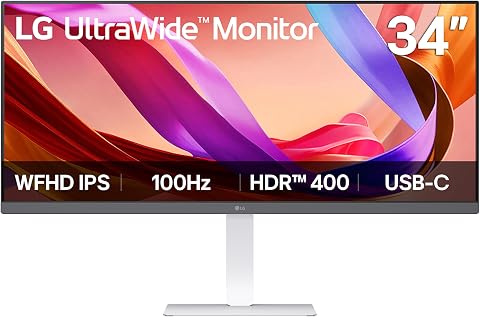 LG 34U530A-W 34-Inch UltraWide WFHD IPS MonitorView on Amazon →
 - 8
 SANSUI 34-Inch Curved Gaming Monitor UWQHD 3440 x 1440P Up to 200Hz 165Hz Cur…View on Amazon →
 - 9
 Sceptre 34-Inch Curved Ultrawide WQHD Gaming Monitor (C345B-QUT168 Series)View on Amazon →
 - 10
 Sceptre 34-Inch Curved Ultrawide WQHD Gaming Monitor (C345B-QUT168)View on Amazon →
Matching Screen Size to Your Setup
The guide’s recommendations underline that ultrawide monitors are not interchangeable: screen area, sharpness and hardware demands all change with size and resolution. A 49-inch screen can make games feel more expansive and place multiple work windows side by side, but its physical footprint and pixel load may be unsuitable for a shallow desk or a midrange gaming PC.
For work involving text, spreadsheets or code, resolution relative to panel size matters. The guide recommends WQHD at 34 inches and DQHD at 49 inches to maintain readable detail. USB-C can also reduce cable clutter for laptop users. These considerations make the guide relevant to buyers weighing one display for both a workstation and a gaming setup, though individual needs and prices may differ.
How the Guide Ranks Displays
ThorstenMeyerAI.com says it assessed the monitors across visual fidelity, ergonomic practicality and connectivity. Its stated ranking approach favors balanced products over displays that excel in a single feature, such as refresh rate, while lacking other capabilities. The material does not provide test methods, measured results or prices, so the ranking should be read as the publisher’s assessment rather than a documented laboratory comparison.
The supplied guide names five products in its overview: the Samsung ViewFinity S50GC, Samsung Odyssey G9, Deco Gear 49-inch, Dell S3425DW, SANSUI 34-inch and CRUA 49-inch. It also discusses curvature, including a 1000R curve on the Odyssey G9 and gentler curves in the 1500R-to-1800R range. The source excerpt does not identify all 10 picks or provide a complete model-by-model specification table.
“The Samsung 34-inch ViewFinity S50GC stands out as the best overall choice.”
— ThorstenMeyerAI.com buying guide
Missing Models and Test Evidence
The supplied source material does not list all 10 monitor picks, their full specifications, current prices or availability. It also does not give independent measurements for color accuracy, response time, brightness or power delivery, or explain the testing conditions behind the rankings. Those omissions make it difficult to compare every listed product or assess whether the recommendations remain current.
The guide’s reference to 2027 does not establish when it was published or whether its product information was recently checked. Performance also varies by computer, game and settings; the source offers broad GPU guidance but no specific graphics-card benchmarks. Readers should verify specifications, warranty terms and compatibility with the manufacturer or retailer before buying.
Verify Specs Before Buying
The next step for readers is to compare the full model list against their desk dimensions, computer hardware and connection needs. Check the exact resolution and refresh rate, USB-C power output, stand adjustments, VESA mounting support and current price for each model. For gaming, confirm that the graphics card can handle the chosen resolution at the desired frame rate.
No follow-up testing or updated ranking is identified in the supplied material. Availability, pricing and specifications may change, so the guide’s recommendations should be checked against current product listings before purchase.
Key Questions
Which monitor does the guide recommend overall?
ThorstenMeyerAI.com names the Samsung 34-inch ViewFinity S50GC its best overall pick, citing its WQHD resolution and connectivity. That is the publisher’s assessment, not an independently verified verdict.
What is the advantage of a 49-inch ultrawide?
A 49-inch DQHD display offers substantially more horizontal workspace and a more enveloping gaming view. It also needs more desk space and can place greater demands on a graphics card.
Why does USB-C matter for a monitor?
On compatible models, USB-C can carry video and power to a laptop through one cable. The guide identifies the Dell S3425DW and Deco Gear 49-inch as examples, but buyers should check the precise power-delivery specification.
Does the source provide all 10 monitor names?
No. The supplied excerpt identifies six products but does not include the complete 10-item list or full specifications for every pick.
Source: ThorstenMeyerAI.com
Fall Picks
fall essentials
As an affiliate, we earn on qualifying purchases.