

Choosing the right business plan software involves balancing ease of use, customization, features, and cost. LivePlan is known for its intuitive design and step-by-step guidance, making it ideal for entrepreneurs new to planning. Bizplan, on the other hand, caters to users who want more control and flexibility, often favored by startups and growth-stage companies. This comparison highlights the core differences, helping you decide which aligns better with your experience level, project complexity, and budget.

Get business pricing on office and shipping supplies
- Business-only prices and quantity discounts
- Tax-exempt purchasing
- Multiple users, one account, clear invoices
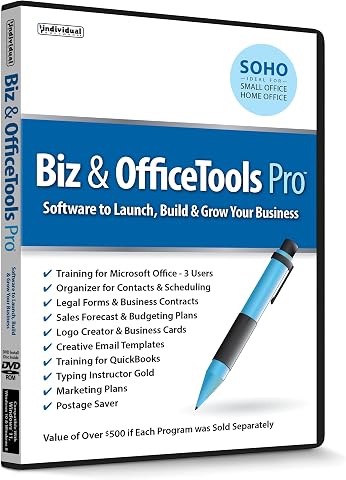
Biz & Office Tools Pro – Business, Marketing, and Office Software Collection
- ✔ Legal Forms: Included
- ✔ Business Contracts: Included
- ✔ User License: 3-User

Business Plan Workbook: Ultimate Business Planning Writing Guide with Prompts
- ✔ Content Type: Prompts and guidance
- ✔ Format: Workbook
- ✔ Intended Audience: Startups and existing businesses

How to Write a Business Plan With No Experience: A Simple Guide With Business Plan Examples to Achieve Success and Profitability
- ✔ Contents: Business plan writing tips and examples
- ✔ Audience: First-time entrepreneurs
- ✔ Format: Book
At a Glance
| Criteria | LivePlan | Bizplan | Winner |
|---|---|---|---|
| Ease of Use | Very user-friendly, guided setup, ideal for beginners | Moderate learning curve, more flexible | A |
| Features & Customization | Limited customization, straightforward workflows | Highly customizable, modular features | B |
| Template Quality | Professional, pre-designed templates | Flexible layouts, user-designed templates | A |
| Pricing & Value | Moderate, subscription-based with tier options | Higher cost but more control, tiered pricing | B |
| Collaboration & Sharing | Easy sharing via export, limited real-time collaboration | Supports team collaboration, real-time editing | B |
| Scalability & Integration | Suitable for small to medium projects, basic integrations | Designed for growth, integrates with various tools | B |
| Customer Support | Responsive support, extensive online resources | Dedicated support for premium tiers | A |
| Platform Compatibility | Web-based, accessible on any device | Web and mobile apps, platform-agnostic | A |
Biz & Office Tools Pro – Business, Marketing, and Office Software Collection
<p><strong>Biz & Office Tools Pro</strong> stands out for its comprehensive approach, bundling essential business, marketing, and office tools valued at over $500. It offers a wide range of templates, legal forms, and training licenses for Microsoft Office and QuickBooks, making it ideal for entrepreneurs who want an integrated platform. Compared with simpler tools, this collection requires activation and might be overwhelming for those seeking straightforward planning. However, its extensive features make it perfect for small businesses needing both planning and management resources in one package.</p>
Pros:
- Includes a wide range of business and marketing tools
- Valued at over $500, offering significant value
- 3-user license for training on popular software
Cons:
- Requires activation code for use
- No specific system requirements listed
- Some tools may be basic for advanced users
Best for: Small business owners who want a broad toolkit for management, marketing, and planning.
Not ideal for: Entrepreneurs seeking a lightweight, purely digital planning software without additional tools.
Bottom line: A versatile, all-in-one collection best suited for entrepreneurs who need a comprehensive set of business tools and training resources.
“A versatile, all-in-one collection best suited for entrepreneurs who need a comprehensive set of business tools and training resources.”
Business Plan Workbook: Ultimate Business Planning Writing Guide with Prompts
<p><strong>The Business Plan Workbook</strong> provides structured prompts and guidance designed to help entrepreneurs organize their ideas and develop detailed business plans. Unlike digital tools, this workbook is ideal for those who prefer writing and outlining over software interfaces. Compared with software collections, it lacks digital templates and automation, which can slow down planning for those who want quick results. Nonetheless, its detailed prompts make it a valuable resource for startups and entrepreneurs who want to build their plan step-by-step.</p>
Pros:
- Provides structured prompts for effective planning
- Suitable for startups and existing businesses
- Helps organize ideas in a clear, systematic way
Cons:
- Lacks detailed digital features or templates
- No included software tools or automation
- Limited information on content depth
Best for: Entrepreneurs who prefer structured, guided planning and idea organization.
Not ideal for: Those seeking digital tools, automation, or quick templates for business plans.
Bottom line: A great choice for those who prefer hands-on, guided planning but may not suit users seeking digital automation.
“A great choice for those who prefer hands-on, guided planning but may not suit users seeking digital automation.”
How to Write a Business Plan With No Experience: A Simple Guide With Business Plan Examples to Achieve Success and Profitability
<p><strong>This guide</strong> offers straightforward, beginner-friendly advice for creating effective business plans. With numerous examples, it helps first-time entrepreneurs understand the essentials of planning without overwhelming them with technical details or complex software. Compared to digital tools or workbooks, it lacks step-by-step instructions or templates, relying instead on examples and simple explanations. It’s best for those just starting out and wanting a clear, accessible introduction to business planning.</p>
Pros:
- Easy-to-follow guidance for beginners
- Includes practical business plan examples
- Focuses on success and profitability
Cons:
- Lacks detailed step-by-step instructions
- No digital tools or templates included
- Limited scope for advanced planning needs
Best for: First-time entrepreneurs or those with minimal planning experience.
Not ideal for: Experienced entrepreneurs or those needing detailed digital tools or templates.
Bottom line: A straightforward, accessible guide perfect for beginners but not suited for those seeking comprehensive digital planning solutions.
“A straightforward, accessible guide perfect for beginners but not suited for those seeking comprehensive digital planning solutions.”
As an Amazon Associate we earn from qualifying purchases.
Key Differences
LivePlan excels in simplicity and guidance, making it well-suited for users seeking quick, straightforward business plans without the need to customize extensively. Its templates and step-by-step process reduce the learning curve, allowing entrepreneurs to produce professional plans rapidly. In contrast, Bizplan offers more granular control over layout and content, appealing to users who require detailed customization or have more complex business models. The tradeoff is that Bizplan’s interface can be less intuitive initially, but it rewards experienced users with greater flexibility and integration options.
Pricing also reflects these differences: LivePlan is more accessible for startups and small businesses with its tiered subscription, while Bizplan’s higher cost may be justified by larger teams or those needing advanced features. Additionally, collaboration capabilities are stronger in Bizplan, making it suitable for teams, but LivePlan remains effective for solo entrepreneurs or small groups. In practice, the choice hinges on whether ease of use or customization takes priority for your planning process.
Detailed Comparison
Ease of Use (LivePlan wins — major)
LivePlan offers a guided, user-friendly interface with step-by-step instructions, reducing the learning curve for new users. Bizplan requires a bit more time to master, offering greater flexibility once familiar, but initially more complex.
Features & Customization (Bizplan wins — moderate)
Bizplan provides extensive customization options, allowing users to tailor every aspect of their plan, from layout to content modules, which is ideal for detailed and tailored business planning. LivePlan, while offering a good set of features, emphasizes ease of use and standardized templates, making it less flexible but more straightforward for quick deployment. For users with complex business models or specific branding needs, Bizplan’s granular control is a significant advantage. Conversely, entrepreneurs seeking simplicity will find LivePlan’s approach more aligned with their needs.
Template Quality (LivePlan wins — minor)
Both platforms offer professional, business-oriented templates. LivePlan’s templates are highly polished, with a focus on clarity and ease of adaptation, making them suitable for quick, professional presentations. Bizplan’s templates are more flexible and customizable, allowing users to design layouts from scratch or heavily modify existing ones, which can be advantageous for unique branding or complex visual requirements. However, this flexibility may require more time and design skills, making it less suitable for users seeking rapid results.
Pricing & Value (LivePlan wins — moderate)
LivePlan’s subscription model is generally more affordable, especially for startups and solo entrepreneurs, offering a balance of features and cost. Bizplan’s higher price point reflects its advanced customization and collaboration features, making it a better investment for larger teams or businesses with complex planning needs. When evaluating value, consider not just upfront cost but also the time saved or gained through customization and collaboration capabilities.
Collaboration & Sharing (Bizplan wins — moderate)
Bizplan’s real-time collaboration tools enable team members to work simultaneously on the same plan, with commenting, version control, and task assignments, making it highly suitable for collaborative environments. LivePlan primarily supports exporting static files and has limited live collaboration features, which may be enough for solo entrepreneurs or small teams but less effective for larger, distributed groups. For organizations emphasizing teamwork and iterative editing, Bizplan’s collaboration features are a decisive advantage.
Scalability & Integration (Bizplan wins — moderate)
Bizplan is designed with growth in mind, offering integrations with popular tools like QuickBooks, Slack, and Zapier, enabling seamless workflows and data synchronization across platforms. Its modular structure allows users to expand and customize their plans as their business evolves. LivePlan, while offering basic integrations, is more suited for small to medium projects and does not provide the same level of extensibility. For startups planning to scale or requiring complex data integrations, Bizplan presents a more future-proof option.
Customer Support (LivePlan wins — minor)
Both platforms provide reliable customer support, but Bizplan’s premium tiers include dedicated account managers and priority assistance, which can be critical for complex or time-sensitive projects. LivePlan offers extensive online resources, tutorials, and email support suitable for most users. For organizations needing personalized, immediate support, Bizplan’s premium options are advantageous.
Platform Compatibility (LivePlan wins — minor)
Both software solutions are web-based, ensuring accessibility across devices and operating systems. Bizplan additionally offers mobile apps, providing greater flexibility for on-the-go editing and review. LivePlan’s web-only approach still provides compatibility on any device with internet access, but lacks dedicated mobile applications. Overall, both are highly compatible, with Bizplan’s mobile apps adding a slight edge for mobile-centric users.
LivePlan: Pros and Cons
Pros:
- Very intuitive and easy for beginners
- Professional, ready-made templates
- Affordable for startups
- Reliable customer support
- Accessible on any device
Cons:
- Limited customization options
- Less suitable for complex or detailed plans
- Fewer collaboration features
Bizplan: Pros and Cons
Pros:
- Highly customizable and flexible
- Supports team collaboration and real-time editing
- Scalable for growth-stage businesses
- Integrates with various tools
Cons:
- Steeper learning curve
- Higher price point
- More complex interface for beginners
Who Should Choose What
Choose LivePlan if:
- You are new to business planning and need clear guidance
- You prefer simplicity over extensive customization
- Your project is straightforward or small-scale
- Budget is a major concern
Choose Bizplan if:
- You require detailed customization and control
- Your team needs real-time collaboration
- Your business plan involves complex structures or integrations
- You have experience with similar software or are willing to invest time
Value for Money
LivePlan offers good value for startups and solo entrepreneurs seeking quick, professional plans without complexity. Bizplan justifies its higher cost for users who need extensive customization, team collaboration, and scalable features, making it more suitable for growth-stage companies or those planning detailed, complex projects.Final Verdict
For most early-stage entrepreneurs and small businesses prioritizing ease of use, affordability, and speed, LivePlan remains the better choice. It simplifies the planning process without sacrificing professionalism. However, for teams or users needing advanced customization, real-time collaboration, and scalable features, Bizplan justifies its higher price. The key deciding factor is your experience level and project complexity—choose LivePlan if you want quick, guided planning, and Bizplan if you need control and collaboration capabilities.
Frequently Asked Questions
Which software is better for beginners?
LivePlan is clearly easier for beginners due to its guided interface and straightforward templates.
Can Bizplan handle complex business models?
Yes, Bizplan’s customization and integration options make it suitable for detailed and complex plans.
Is the higher cost of Bizplan justified?
Only if you need advanced features, team collaboration, or plan to scale your business; otherwise, LivePlan offers better value for small projects.
Halloween Picks
halloween
As an affiliate, we earn on qualifying purchases.