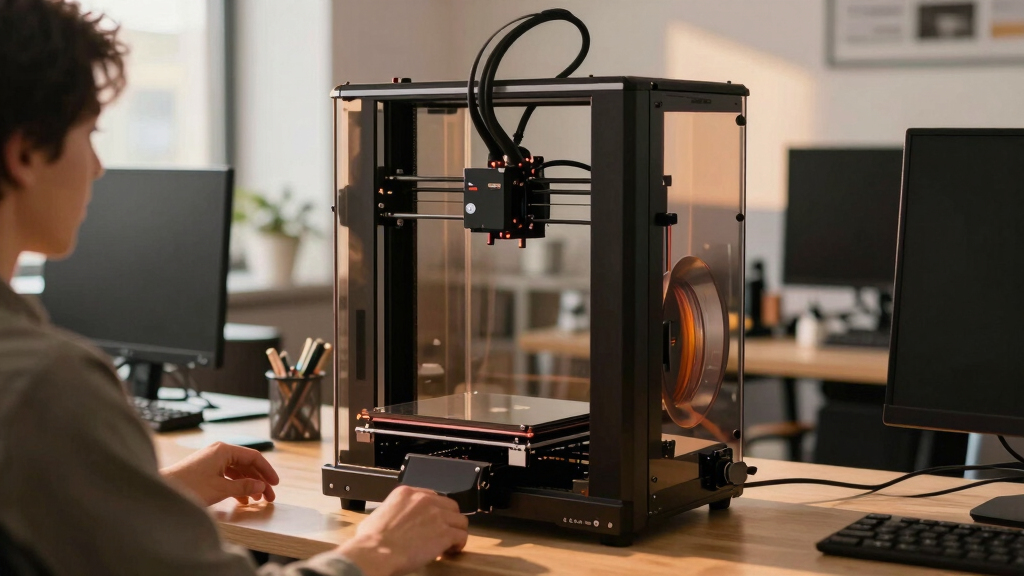

Choosing an enclosed 3D printer for office use requires balancing safety, print quality, and ease of operation. The Creality K2 Combo stands out as the best overall thanks to its multi-color capability and AI features. For those prioritizing high-speed printing, the ELEGOO Centauri Carbon offers impressive performance, while the FlashForge AD5M provides excellent multi-material support. However, tradeoffs exist: higher-end models come with a bigger price tag, and some compact options might sacrifice build volume or advanced features. Continue reading for a detailed breakdown to find the right fit for your office environment.

Get business pricing on office and shipping supplies
- Business-only prices and quantity discounts
- Tax-exempt purchasing
- Multiple users, one account, clear invoices
Complete the kit


Key Takeaways
- Top picks are distinguished by a mix of safety features, print quality, and ease of maintenance suitable for office environments.
- Models with auto-calibration and auto-leveling tend to reduce setup time and user errors, making them ideal for busy workspaces.
- Higher speeds and larger build volumes are often associated with premium models, but they can come with increased complexity or cost.
- Multi-material and multi-color capabilities are valuable for diverse office projects but may add to the machine’s cost and maintenance needs.
- Budget-friendly options generally trade some advanced features for simpler operation and lower upfront costs.


More Details on Our Top Picks
Creality K2 Combo 3D Printer with Multicolor Printing, Auto Leveling, and AI Camera
The Creality K2 Combo stands out for its ability to support up to 16 colors using four CFS units, making it ideal for complex prototypes or detailed visualizations in an office setting. Compared to the Anycubic Kobra X, which offers multi-material support but fewer color options, the K2 excels in multicolor workflows. Its pre-assembled design reduces setup time, but adding extra CFS units can become technically demanding, requiring a level of familiarity with multi-head configurations. The built-in AI camera enhances monitoring, which is a significant advantage over simpler models, though software compatibility details are less clear. This pick makes the most sense for offices that need vibrant, detailed prints combined with real-time oversight, accepting some complexity for higher color fidelity.
Pros:- Supports multicolor printing with up to 16 colors for detailed visualizations
- Pre-assembled for quick setup and deployment
- Quiet operation enhances office environment
Cons:- Complex setup for additional CFS units can be technical
- Limited software compatibility information
Best for: Offices requiring complex, multicolor prototypes with integrated monitoring
Not ideal for: Small teams or users seeking plug-and-play simplicity without multi-head configurations
- Build Volume:260×260×260 mm
- Color Capabilities:Up to 16 colors with 4 CFS units
- Printing Speed:600mm/s
- Auto Leveling:Smart auto leveling with AI camera
- Pre-Assembly:95% pre-assembled
- Supported Materials:PLA, PETG, ABS, PLA-CF
Our verdict“This is ideal for office environments that prioritize rich color detail and real-time monitoring, despite setup complexities.”
ELEGOO Centauri Carbon 3D Printer, CoreXY, 500mm/s High Speed, Auto Calibration, 320°C Nozzle, Built-in Camera, 256x256x256mm Build Volume
The ELEGOO Centauri Carbon offers a combination of high-speed printing—up to 500 mm/s—and a robust CoreXY design, making it suited for rapid prototyping in an office. Its auto calibration and high-temperature nozzle support advanced materials like carbon fiber, setting it apart from the more general-purpose FlashForge AD5M Pro. While its speed enables quick iterations, achieving optimal quality at 500 mm/s demands careful calibration, which might challenge beginners. The enclosed, sturdy die-cast frame ensures stability but can limit accessibility during maintenance. This model appeals to offices that prioritize speed and precision, especially when working with high-performance filaments, though it requires some technical know-how to fully leverage its capabilities.
Pros:- High-speed printing up to 500 mm/s accelerates workflow
- Supports high-temperature, advanced filaments like carbon fiber
- Built-in camera for remote monitoring
Cons:- High speed may require meticulous calibration for best results
- Enclosed chamber can complicate maintenance
Best for: Design teams and professionals needing rapid, high-precision prototypes with advanced material options
Not ideal for: Casual users or beginners who prefer more straightforward, open-frame printers
- Build Volume:256x256x256mm
- Max Nozzle Temperature:320°C
- Print Speed:up to 500 mm/s
- Frame:Die-cast aluminum
- Features:Auto bed leveling, built-in camera, touchscreen
- Supported Materials:Standard filaments plus carbon fiber reinforced
Our verdict“Ideal for offices focused on rapid, detailed prototyping with advanced materials, provided users are comfortable with calibration challenges.”
FlashForge AD5M Pro 3D Printer with Auto-Leveling and Multi-Material Support
The FlashForge AD5M Pro provides a versatile, enclosed environment with auto-leveling and support for multiple filament types, including high-temp materials like ABS and PETG. Its 600mm/s speed makes it suitable for quick office projects, and the air filtration system adds a layer of safety and cleanliness. Compared with the Anycubic Kobra X, which emphasizes multicolor capability, the AD5M Pro excels in multi-material support and quieter operation. However, its complex feature set can be daunting for newcomers, and the enclosure, while beneficial for safety, can limit access during maintenance. It’s best for offices where multi-material versatility and noise control are priorities over simplicity.
Pros:- Supports a wide range of filament types and high-temperature materials
- Auto bed leveling simplifies setup
- Quiet operation maintains a peaceful office environment
Cons:- Complex features may require a learning curve
- Enclosed design limits accessibility during maintenance
Best for: Creative offices needing multi-material flexibility with quiet, enclosed operation
Not ideal for: Users seeking straightforward, open-frame printers or simple single-material setups
- Print Speed:600mm/s
- Nozzle Sizes:0.25/0.4/0.6/0.8mm
- Max Extruder Temperature:280°C
- Filament Compatibility:TPU, ASA, PLA, ABS, PETG, PLA-CF, PETG-CF
- Noise Level:≤50 dB
- Auto-Leveling:Yes
Our verdict“This is suitable for offices that prioritize multi-material, quiet operation with reliable auto-leveling, accepting some complexity.”
3D Printer for Kids, AI-Powered, Fully Assembled, STEM Gift
The 3D Printer for Kids combines safety with creativity, featuring a fully enclosed chamber, magnetic build plate, and a built-in camera for time-lapse recording. Its simple WiFi operation and large library of over 8,000 toy models make it perfect for educational or family environments, bridging office use with STEM learning. Unlike the more advanced ELEGOO Centauri Carbon, it sacrifices some technical complexity for ease of use and safety, making it suitable for younger users or educational settings. The limited build volume and lower print resolution mean it’s less suited for professional prototyping but excellent for creative projects and demonstrations. It’s best for offices that integrate educational outreach or kid-friendly activities alongside their main operations.
Pros:- Child-safe enclosed design and cool-touch exterior
- Large model library and AI design tools
- Easy setup with no manual assembly required
Cons:- Limited build volume details provided
- Lower print resolution and precision
Best for: Offices with educational or family-friendly components needing safe, easy-to-use 3D printing
Not ideal for: Professional offices requiring high-precision or large-volume manufacturing
- Speed:400mm/s
- Build Volume:Not specified
- Filament Type:Non-toxic PLA
- Connectivity:WiFi
- Included Filament:White PLA
- Model Library:8,000+ toy models
Our verdict“This printer is ideal for offices blending creative education with safe, hassle-free 3D printing for children and beginners.”
Anycubic Kobra X Multicolor 3D Printer, Easy Setup, Native 4-Color, Up to 19 Colors, 600mm/s Fast Printing, AI Camera, Quiet 45dB, 260mm³ Build Volume
The Anycubic Kobra X excels in multicolor printing, supporting up to 19 colors with native 4-color capability, making it highly versatile for detailed office projects. Its impressive 600 mm/s speed outpaces many competitors like the ELEGOO Centauri, enabling rapid iteration, although maintaining quality at such speeds demands careful calibration. The auto bed leveling with LeviQ 3.0 simplifies setup, and its quiet operation at 45dB minimizes office noise distraction. The limited build volume (260mm³) can be restrictive for larger parts but is suitable for most prototyping needs. This model is best suited for offices that require quick, multicolor output with minimal fuss, but less so for those working with more complex filaments or large parts.
Pros:- Supports up to 19 colors for detailed multicolor printing
- Fast print speeds of 600 mm/s for quick iterations
- Auto bed leveling with LeviQ 3.0 for reliable first layers
- Quiet operation maintains a peaceful office environment
Cons:- Limited build volume may restrict larger projects
- Setup can be complex for beginners
Best for: Offices needing fast, multicolor prototypes with ease of use and minimal noise
Not ideal for: Large-scale production or users needing extensive material support
- Build Volume:260mm x 260mm x 260mm
- Color Capabilities:Native 4-color, expandable to 19 colors
- Max Speed:600mm/s
- Nozzle Temperature:300°C
- Connectivity:Wi-Fi, LAN
- Noise Level:45dB
Our verdict“This is a strong choice for offices that prioritize speed, multi-color versatility, and quiet operation, provided size constraints are acceptable.”
FlashForge Adventurer 5M Pro 3D Printer with Auto Printing System, 600mm/s High-Speed, Detachable Nozzle, 220x220x220mm Build Volume
This model stands out for its exceptional print speed, reaching up to 600mm/s, which makes it ideal for rapid prototyping and production environments. Compared with the FlashForge Adventurer 5M Pro with Camera & Light, it offers similar speed but lacks the integrated monitoring features, making it better suited for users prioritizing raw speed over remote supervision. The absence of an enclosed chamber means temperature stability is less controlled, potentially affecting print quality with sensitive materials. Its simple auto-leveling and broad filament compatibility support efficient workflows, but the high-speed capabilities can introduce vibrations and require more maintenance. This pick makes the most sense for teams needing quick turnarounds and who are comfortable managing a slightly more complex machine.
Pros:- Exceptional print speed of up to 600mm/s enables fast production
- Auto leveling simplifies setup for experienced users
- Supports a wide array of filament types for versatile applications
- Full-metal Core XY frame ensures stability during high-speed printing
Cons:- Lacks an enclosed chamber, risking temperature fluctuations
- Potentially complex for newcomers unfamiliar with high-speed 3D printers
- Regular maintenance needed due to high operational speeds
Best for: Designers and engineers in small offices needing rapid iteration and high throughput
Not ideal for: Beginners or those printing temperature-sensitive materials who need an enclosed environment for stability
Our verdict“Best suited for professionals who need quick, high-quality prototypes in a compact, open frame.”
FlashForge Adventurer 5M Pro 3D Printer with Camera & Light
This version emphasizes stability and remote oversight, making it ideal for environments where monitoring from a distance is important. Its fully enclosed design reduces noise and temperature fluctuations, providing a safer workspace, especially in shared office spaces. The 4.3-inch touchscreen and remote monitoring via app streamline operation, but the maximum print size remains 220x220x220mm, limiting larger projects compared to the ANYCUBIC Kobra X. The auto bed leveling and support for multiple filament types enhance reliability, but initial calibration of auto-leveling can be tricky for some users. This model is perfect for teams that value quiet, enclosed operation with the convenience of remote supervision.
Pros:- Fully enclosed and quiet operation (≤50dB) suited for shared spaces
- Remote monitoring via app enhances supervision and troubleshooting
- Supports multiple filament types with auto bed leveling
- Quick setup with a user-friendly touchscreen
Cons:- Limited print volume may restrict larger projects
- Auto-leveling calibration can be complex initially
- No significant speed advantage over open-frame models
Best for: Small offices or classrooms needing quiet, enclosed printing with remote access
Not ideal for: Users requiring larger build volumes or high-speed production where speed is the priority
Our verdict“Designed for office environments where quiet, enclosed operation and remote monitoring are prioritized over large build volume.”
Anycubic Kobra S1 Combo Multi-Color 3D Printer with Active Filament Drying
This printer is tailored for multi-color printing, supporting up to 8 colors with connected units, making it suitable for complex, vibrant models. Compared to the ANYCUBIC Kobra X, it emphasizes color versatility and includes an integrated filament drying function, which improves success with moisture-sensitive filaments. However, the lack of a specified build volume and the inability to use multiple ACE Pro units simultaneously might limit some workflows. Its automatic calibration and smart app control reduce setup time, but the multi-color process adds a learning curve for new users. This choice makes the most sense for creative teams or educators who want to produce colorful, detailed projects in a controlled environment.
Pros:- Supports up to 8 colors with easy switching and multi-unit setup
- Automatic calibration simplifies setup for beginners
- Built-in filament drying improves print quality with moisture-sensitive filaments
- Smart app control offers convenient remote operation
Cons:- Limited build volume details, potentially restricting larger models
- Inability to use multiple ACE Pro units simultaneously limits multi-unit expansion
- Features may be complex for new users to master quickly
Best for: Design studios, educational institutions, or hobbyists focusing on multi-color, detailed models
Not ideal for: Those needing large-scale or high-speed single-color printing without multi-color capabilities
Our verdict“Ideal for users aiming to produce vibrant, multi-color projects with reliable filament management.”
AOSEED AI 3D Printer for Kids, Fast 400mm/s, Enclosed Safe, WiFi Control, 8 PLA Filaments, STEM Toy Gift
This printer is engineered specifically for children, offering fast, safe, and easy-to-use features like an enclosed design and leveling-free platform that minimizes risks. Compared with the FlashForge Adventurer 5M Pro, it prioritizes safety and simplicity over high-speed performance, making it perfect for classroom or home use. Its AI tools and real-time camera enable creative projects and supervision, but it supports only single-color printing, limiting complexity. The build volume details are not specified, which could restrict larger projects. It’s best for educators and parents seeking a secure, educational tool that fosters creativity in young learners without requiring extensive technical knowledge.
Pros:- Enclosed, pinch-resistant design for safe use by children
- One-click app control simplifies operation
- Includes AI-powered tools for creative and educational projects
- Supports real-time camera and time-lapse videos for monitoring progress
Cons:- Supports only single-color printing, limiting project complexity
- Some features require internet access and app familiarity
- Build volume not specified, possibly limiting larger models
Best for: Schools or parents wanting a safe, easy-to-operate 3D printer for kids’ STEM projects
Not ideal for: Professional designers or advanced hobbyists needing multi-color or high-volume production
Our verdict“A great educational tool for young learners that emphasizes safety and ease of use over multi-color or large-scale printing.”
ANYCUBIC Kobra X Fast 3D Printer, Native 4-Color, High Speed, Auto Leveling, Large Build Volume
This model combines large build volume with multi-color capabilities, supporting up to four colors natively, making it ideal for vibrant, complex projects. Unlike the AOSEED AI, it offers a significantly larger workspace at 260x260x260mm, accommodating bigger models. The LeviQ 3.0 auto-leveling and quiet operation make it accessible for both beginners and experienced users, yet the 4-color limit and additional setup for more colors may be restrictive for advanced multi-color printing. The large size means it requires ample space, and the advanced features can be intimidating for users unfamiliar with multi-color workflows. It’s best for offices needing sizable, colorful prototypes or display pieces without sacrificing ease of use.
Pros:- Large build volume (260x260x260mm) supports bigger projects
- Native 4-color printing with potential for up to 19 colors with extra models
- Auto-leveling and quiet operation enhance ease of use
- 720P AI-powered camera for real-time monitoring
Cons:- Limited to 4 native colors, additional colors need extra setup
- Large footprint requires significant space and setup planning
- Features may overwhelm users new to multi-color, large-format printers
Best for: Small businesses or creative teams needing large, colorful models with easy setup
Not ideal for: Individuals with limited space or those who require more than 4 native colors without additional modifications
Our verdict“Perfect for offices requiring large, vibrant, multi-color prototypes with straightforward operation.”
FLASHFORGE Adventurer 5M 3D Printer with Auto Leveling and High-Speed Printing
The FLASHFORGE Adventurer 5M stands out for its impressive combination of speed and automation, making it well-suited for busy office environments that need quick turnaround times. Its automatic bed leveling ensures consistent quality without manual adjustments, a step above more manual systems like some budget models. The high-speed capacity of up to 600mm/s significantly cuts down production time, although this might generate more noise, which could be disruptive in quieter office settings. The remote monitoring feature via a mobile app adds convenience, but the setup complexity and need for routine maintenance could pose challenges for teams without dedicated technical staff. Compared to the Creality K2 Combo, which offers multicolor printing, the Adventurer 5M is more streamlined for high-speed, single-material production rather than multi-color effects. This pick is ideal for offices prioritizing rapid, consistent output over intricate multi-material projects.
Pros:- Automatic bed leveling guarantees consistent print quality and reduces setup time
- Exceptional high-speed printing minimizes production cycle times
- Remote monitoring via mobile app enhances workflow management
- Quick nozzle change feature supports efficient print adjustments
Cons:- Requires regular maintenance to sustain performance and prevent issues
- High-speed operation can generate increased noise levels, potentially disruptive in quiet office environments
- Complex initial setup might be daunting for less experienced users
Best for: Offices that require fast, high-quality prototyping or small-scale manufacturing without extensive manual setup.
Not ideal for: Teams seeking multi-material or multi-color printing, or those with limited technical support, due to its setup complexity and maintenance needs.
- Print Size:220x220x220mm
- Max Speed:600mm/s
- Extruder Temperature:280°C
- Nozzle Sizes:0.25-0.8mm
- Nozzle Flow Rate:32mm³/s
- Warm-up Time:35 seconds
Our verdict“This printer is best for offices that prioritize rapid, reliable production and have the technical capacity to handle its setup and maintenance demands.”

How We Picked
Our evaluation process focused on performance, safety, usability, build quality, and value specifically for office settings. We prioritized enclosed designs that improve safety, reduce fumes, and contain noise, making them suitable for shared workspaces. Devices with automatic calibration and intuitive interfaces were favored to minimize training and setup time. We also considered build volume, speed, and material versatility, weighing these against cost to identify options suitable for various office needs. The ranking reflects a balance between features, reliability, and affordability, ensuring each product fits a specific office use case.Factors to Consider When Choosing Enclosed 3D Printer For Office Use
When selecting an enclosed 3D printer for office use, several factors should influence your decision. Safety is paramount in shared environments, so look for features like enclosed chambers, fume filtration, and low noise levels. Usability matters too; machines with auto-leveling, simple interfaces, and minimal maintenance reduce downtime and training needs. Consider the print volume and speed to ensure the printer can handle your typical workload without bottlenecks. Material support and multi-color capabilities add versatility but often increase complexity and cost. Balancing these factors based on your office’s specific demands leads to the best purchase.Safety and Containment
An enclosed design helps contain fumes, noise, and moving parts, creating a safer environment for office staff. Look for features like HEPA filters or activated carbon filters if you’re working with materials that emit fumes. Noise levels are also important; quieter models reduce disruption during work hours. Avoid open-frame printers for shared spaces unless additional safety measures are in place. Proper containment not only protects staff but also minimizes distractions, making it easier to integrate 3D printing into daily operations.
Ease of Use and Maintenance
Office 3D printers should be straightforward to operate, with features like auto-calibration and touchscreen interfaces. Machines that support quick filament changes and have accessible maintenance points save time and reduce errors. Automatic bed leveling is especially beneficial in a busy environment, preventing failed prints. Regular maintenance should be simple, with clear instructions or automated routines. The goal is to select a model that minimizes the need for technical intervention, allowing staff to focus on their core tasks.
Print Volume and Speed
Matching the printer’s build volume to your typical project size is crucial. Larger volumes enable printing bigger prototypes or multiple parts simultaneously, but they often come with increased costs. Speed is also a key factor; faster printers improve throughput but may compromise some print quality if not well-engineered. In an office setting, a balance between speed and quality usually makes the most sense, avoiding overly long print times that delay project completion. Consider whether your workflow demands high-volume batch printing or smaller, more detailed pieces.
Material Compatibility and Versatility
The ability to handle various filaments like PLA, ABS, PETG, or specialty materials increases a printer’s usefulness in an office. Multi-material support allows for complex projects, but also raises the machine’s complexity and maintenance requirements. Ensure the printer’s enclosure is compatible with the materials you plan to use, especially if working with heat-sensitive or specialty filaments. Investing in a versatile machine can reduce the need for multiple printers, but also warrants a higher initial investment and more careful operation.
Cost and Total Value
While budget models are tempting, they often lack advanced safety, speed, or versatility features vital for continuous office use. Premium options typically offer better reliability, faster speeds, and larger build volumes but come with higher costs. Consider total cost of ownership—including maintenance, filament expenses, and potential upgrades—when making your choice. The most cost-effective model balances features, reliability, and price, delivering value over the long term without unnecessary extras that inflate the initial investment.
Frequently Asked Questions
How important is a HEPA filter in an enclosed 3D printer for office use?
A HEPA filter significantly improves safety by capturing ultrafine particles and fumes emitted during printing, especially when working with ABS or other odorous materials. In shared office spaces, this reduces health risks and odor issues, making the environment more comfortable. Not all enclosed printers come with built-in filters, so consider this feature if air quality and safety are priorities. Regular filter replacement is necessary to maintain effectiveness, which should be factored into maintenance routines.
Can I use any filament in an enclosed 3D printer designed for office use?
Most enclosed 3D printers support common filaments like PLA, PETG, and ABS, but compatibility varies between models. Check the printer’s maximum temperature and chamber conditions to ensure it can handle the specific filament you plan to use. Some machines support specialty filaments like TPU or composite materials, which can expand project possibilities. Using incompatible filaments may cause print failures or damage the machine, so always verify compatibility before purchasing or switching materials.
Is auto-calibration necessary for an office 3D printer?
Auto-calibration simplifies setup and ensures consistent print quality, which is especially valuable in an office setting where quick turnaround matters. Manual calibration can be time-consuming and prone to errors, leading to failed prints or surface issues. Auto-calibration features reduce the need for technical expertise and keep the workflow smooth. While some high-end models include this feature, it might add to the cost, so weigh its importance against your team’s skill level and the frequency of use.
How do I choose between high-speed and high-precision 3D printers for office use?
High-speed printers are ideal for rapid prototyping and high-volume production, but they may sacrifice some detail and surface finish quality. Conversely, high-precision models focus on detailed, accurate prints but tend to be slower, which could bottleneck workflows. Your choice depends on your primary use case—if speed is critical, prioritize a machine with higher travel speeds and efficient motion systems. For detailed prototypes or parts needing fine resolution, a precision-oriented printer is better, even if it takes longer per print.
What features are most important in an enclosed 3D printer for a busy office?
Key features include auto-leveling for quick setup, effective safety enclosures, low noise operation, and reliable filament management. A built-in camera can facilitate remote monitoring, saving time and reducing the need for physical supervision. Speed and build volume also matter, depending on your project needs. Prioritizing these features helps ensure consistent, safe, and efficient office operation, reducing downtime and technical issues.
Conclusion
For most offices, the Creality K2 Combo offers a well-rounded choice with multi-color capabilities and user-friendly automation, making it ideal for teams seeking versatility and ease. The ELEGOO Centauri Carbon stands out for high-speed printing and large projects, suitable for fast-paced environments with demanding output needs. Beginners or smaller teams should consider more budget-friendly options with auto-calibration, like the FlashForge Adventurer 5M. For offices prioritizing safety and quiet operation, models with comprehensive filtration and soundproofing are best. Ultimately, the right pick depends on your specific project scope, safety requirements, and budget constraints, but each of these options provides a reliable foundation for office 3D printing.
Halloween Picks

HOPOCO Halloween Pumpkin Fog Machine with 12 LED Colors and 4 Light Modes

Vexalify 11-Inch Halloween Pumpkin Fog Machine with 12-Color Lights

MGparty 14.5 ft Halloween Inflatable Walk-In Pumpkin House with LED Lights
As an affiliate, we earn on qualifying purchases.