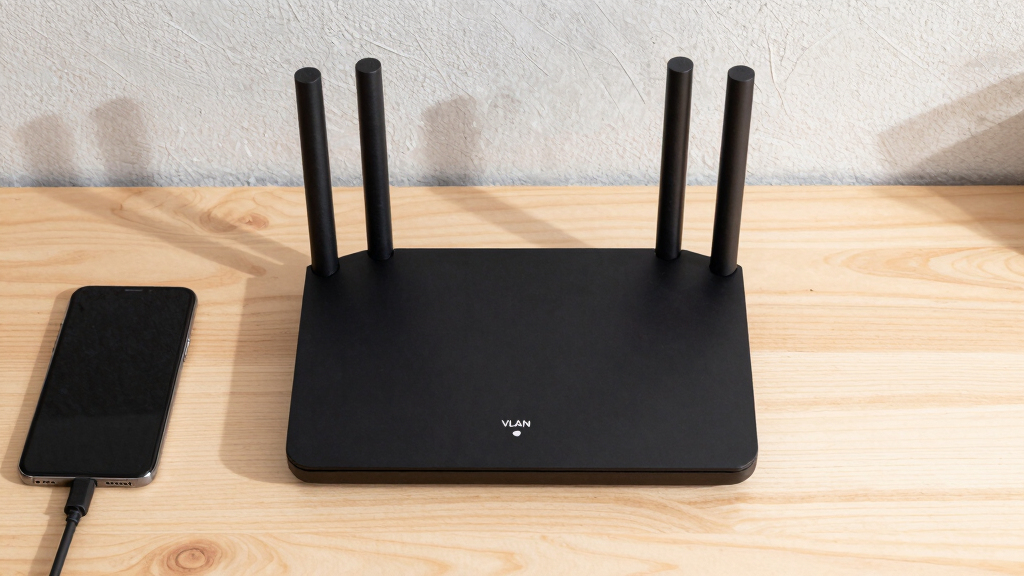

Starting a new business often means managing multiple network segments securely and efficiently. A router with VLAN support becomes essential for startups that need to isolate devices, improve security, and optimize network traffic. The ideal pick balances performance, ease of setup, and scalability, but tradeoffs exist—like cost versus features or complexity versus simplicity. Among the options, the NETGEAR Nighthawk RS140 stands out as the overall best for its robust features, while the Synology RT6600ax offers excellent security and flexibility. For startups on a tighter budget, the PW-AX1800 provides VLAN support at a compelling price point. Continue reading for a detailed breakdown of these picks and what makes each suitable for your needs.

Get business pricing on office and shipping supplies
- Business-only prices and quantity discounts
- Tax-exempt purchasing
- Multiple users, one account, clear invoices
Key Takeaways
- The most important aspect for startups is balancing VLAN features with ease of setup and management.
- High-performance routers with multi-Gig Ethernet ports tend to come at a premium but offer better future-proofing.
- Security features like VPN and integrated firewalls are common among the top picks, highlighting their importance.
- Some routers offer advanced VLAN segmentation but may require more technical knowledge to configure properly.
- Value varies widely; the best budget options combine VLAN support with straightforward setup, while premium models add enterprise features.
| NETGEAR Nighthawk Dual-Band WiFi 7 Router (RS140) |  | Best Overall for Large Homes with High-Speed Needs | WiFi Speed: up to 5.0 Gbps | Coverage: up to 2,250 sq. ft. | Devices Supported: up to 80 devices | VIEW LATEST PRICE | See Our Full Breakdown |
| Synology RT6600ax Tri-Band Wi-Fi Router | 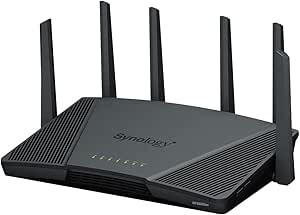 | Best for Secure, Multi-Network Management | Wi-Fi Bands: Tri-Band | MIMO: 4×4 | Channel Width: 160MHz | VIEW LATEST PRICE | See Our Full Breakdown |
| GL.iNet GL-MT6000 Flint 2 Wi-Fi 6 Gaming Router with Dual 2.5G Ports |  | Best for High-Speed Gaming and Streaming in Small to Medium Startups | Wi-Fi Standard: Wi-Fi 6 | Max Speed: 6 Gbps | RAM: 1GB DDR4 | VIEW LATEST PRICE | See Our Full Breakdown |
| TP-Link ER7206 Multi-WAN Professional Wired Gigabit VPN Router |  | Best for High-Capacity, Multi-Location Networks | WAN Ports: 1 Gbps SFP, 1 Gbps WAN, 2 Gbps WAN/LAN, 1 Gbps LAN | Max Client Devices: 150,000 | Max Clients: 700 | VIEW LATEST PRICE | See Our Full Breakdown |
| TP-Link ER605 V2 Wired Gigabit VPN Router |  | Best for Small, Secure, Wired-First Networks | VIEW LATEST PRICE | See Our Full Breakdown | |||
| Omada ER706W Gigabit AX3000 WiFi 6 VPN Router |  | Best Overall for High-Performance Business Networks | WiFi Standard: AX3000 WiFi 6 | Max Speed: 2402 Mbps on 5 GHz, 574 Mbps on 2.4 GHz | Ports: 1x Gigabit SFP, 5 Gigabit RJ45 | VIEW LATEST PRICE | See Our Full Breakdown |
| TP-Link Dual-Band AX3000 Wi-Fi 6 Wireless Gigabit Internet Router for Home |  | Best for Small Offices and Home Use | Wi-Fi Speed: 2402 Mbps on 5 GHz, 574 Mbps on 2.4 GHz | Antennas: 4 high-gain external antennas | Technology: Beamforming, OFDMA | VIEW LATEST PRICE | See Our Full Breakdown |
| PW-AX1800 WiFi 6 Dual-Band Router with VLAN Support, VPN, Parental Controls, and Ad Blocking |  | Best for Secure, Managed Networks with VLAN and VPN | VLAN Support: Yes, five preconfigured VLANs | VPN Support: OpenVPN, IPsec, WireGuard | WiFi Bands: Dual-band 2.4GHz and 5GHz | VIEW LATEST PRICE | See Our Full Breakdown |
| NETGEAR Nighthawk Dual-Band WiFi 7 Router (RS90) |  | Best for High-Speed, Large Coverage in Large Spaces | WiFi Speed: up to 3.6 Gbps | Frequency Bands: Dual-Band 2.4 GHz + 5 GHz | Coverage Area: up to 2,000 sq. ft. | VIEW LATEST PRICE | See Our Full Breakdown |
| Synology WRX560 Dual-Band Wi-Fi 6 Router with 2.5Gbps Ethernet and Security Features |  | Best for Secure, Managed Wireless Networking | Wi-Fi Standard: Wi-Fi 6 | Frequency: Dual-band 2.4 GHz and 5.9 GHz | Ethernet: 2.5Gbps WAN/LAN port | VIEW LATEST PRICE | See Our Full Breakdown |
More Details on Our Top Picks
NETGEAR Nighthawk Dual-Band WiFi 7 Router (RS140)
The NETGEAR Nighthawk RS140 stands out for delivering cutting-edge WiFi 7 speeds up to 5.0 Gbps, making it ideal for startups that require fast, reliable connectivity across multiple devices. Its coverage of up to 2,250 sq. ft. and support for up to 80 devices ensure seamless performance in busy environments. Compared to the Synology RT6600ax, it offers higher peak speeds but relies on a separate modem and requires an additional security subscription, which adds complexity and cost. This router is perfect for startups with high bandwidth demands but who are prepared for extra setup steps and ongoing subscriptions.
Pros:- Supports WiFi 7 for maximum speed and future-proofing
- Wide coverage suitable for large spaces
- Multiple wired ports for stable device connections
- Easy management via mobile app
Cons:- Requires a separate modem or ISP gateway
- Additional subscription needed for advanced security features
Best for: Startups needing fast, extensive WiFi coverage with many connected devices in a large office or workspace.
Not ideal for: Small teams or offices that prefer integrated security or simplified setup without extra costs.
- WiFi Speed:up to 5.0 Gbps
- Coverage:up to 2,250 sq. ft.
- Devices Supported:up to 80 devices
- WAN Port:2.5 Gig
- LAN Ports:3 x 1 Gig Ethernet
- Compatibility:WiFi 6 and earlier
Our verdict“This is a strong choice for startups prioritizing speed and coverage but willing to handle extra setup and costs.”
Synology RT6600ax Tri-Band Wi-Fi Router
The Synology RT6600ax is tailored for startups that need multiple network segments and advanced security features, supporting VLAN segmentation, multiple SSIDs, and threat prevention. Its tri-band design with 4×4 MIMO and 160MHz channels delivers robust speeds, and the built-in VPN makes it easy to keep internal communications secure. Compared with the GL.iNet Flint 2, which excels in gaming performance, the RT6600ax leans toward security and network flexibility, though setup is more complex and the price is higher. This router makes sense for tech-savvy teams managing sensitive data or requiring segmented networks for different departments.
Pros:- Supports multiple SSIDs and VLANs for network segmentation
- Robust security features including threat prevention and VPN
- High-speed tri-band WiFi with 160MHz channels
- 2.5Gbps Ethernet port for fast wired connections
Cons:- Setup can be complex for non-technical users
- Premium pricing may deter budget-conscious startups
Best for: Startups that need secure, segmented networks with high customization and security features.
Not ideal for: Small startups or those with limited technical expertise who prefer plug-and-play solutions without intricate configuration.
- Wi-Fi Bands:Tri-Band
- MIMO:4×4
- Channel Width:160MHz
- Ethernet:2.5Gbps
- Features:VLAN segmentation, Multiple SSIDs, Parental controls
Our verdict“Ideal for startups needing secure, segmented networks with advanced security, provided they are comfortable with a more involved setup.”
GL.iNet GL-MT6000 Flint 2 Wi-Fi 6 Gaming Router with Dual 2.5G Ports
The GL.iNet Flint 2 offers impressive Wi-Fi 6 speeds up to 6 Gbps, making it suitable for startups focused on gaming, streaming, or data-heavy applications. Its support for over 100 devices and built-in VPN with AdGuard Home enhances privacy and network control. Compared to the TP-Link ER7206, which emphasizes wired security, the Flint 2 balances wireless speed and device capacity, though it requires firmware updates for optimal performance and may be challenging for less technical teams. This router is best for startups prioritizing wireless performance and VPN integration, especially for remote or hybrid teams.
Pros:- High-speed Wi-Fi 6 performance for gaming and streaming
- Supports a large number of connected devices
- Built-in VPN with impressive throughput
- AdGuard Home for ad and tracker blocking
Cons:- Requires firmware updates for best performance
- Setup complexity may be high for beginners
Best for: Startups that need fast, reliable wireless connectivity with VPN and ad-blocking for dynamic teams and gaming setups.
Not ideal for: Teams seeking a simple plug-and-play router without the need for firmware tweaks or those without technical expertise.
- Wi-Fi Standard:Wi-Fi 6
- Max Speed:6 Gbps
- RAM:1GB DDR4
- Storage:8GB eMMC
- Ports:Dual 2.5G Ethernet ports
Our verdict“A solid pick for startups needing high wireless speeds and VPN support, especially if gaming or streaming is a priority.”
TP-Link ER7206 Multi-WAN Professional Wired Gigabit VPN Router
The TP-Link ER7206 is designed for startups with complex, high-capacity networks requiring multiple WAN connections and extensive device support. Its multiple WAN ports, including SFP, facilitate load balancing and redundancy, making it suitable for larger teams or multi-office setups. Compared with the ER605, which has fewer WAN ports, the ER7206 caters to more demanding environments, but its setup can be intimidating for those unfamiliar with enterprise-grade hardware. This router excels in scenarios where bandwidth optimization and remote management are priorities, though it’s less suited for small teams seeking simple WiFi solutions.
Pros:- Multiple WAN ports for load balancing and redundancy
- Supports large number of devices and clients
- Cloud management for remote control
- Extensive VPN support for secure connections
Cons:- Complex setup requiring technical knowledge
- No built-in WiFi, focusing solely on wired networking
Best for: Startups with multi-site operations or high device counts needing robust bandwidth management and VPN security.
Not ideal for: Small startups with limited IT support or those primarily looking for WiFi coverage instead of wired, multi-WAN setups.
- WAN Ports:1 Gbps SFP, 1 Gbps WAN, 2 Gbps WAN/LAN, 1 Gbps LAN
- Max Client Devices:150,000
- Max Clients:700
- VPN Support:Up to 100 LAN-to-LAN IPsec, 50 OpenVPN, 50 L2TP, 50 PPTP
Our verdict“Best suited for startups with demanding network infrastructure needs and technical resources to manage it.”
TP-Link ER605 V2 Wired Gigabit VPN Router
The TP-Link ER605 V2 offers a straightforward, wired-focused solution with five gigabit ports, making it a practical choice for startups prioritizing secure, wired connectivity. Its support for multiple VPN protocols and advanced security features like firewalls and DoS defense provides peace of mind in protecting sensitive data. Compared to the ER7206, which offers more WAN ports, the ER605 V2 is simpler but less flexible for high-traffic environments. It’s an excellent fit for smaller teams that rely on wired connections and need reliable VPN support but don’t require WiFi capability.
Pros:- Multiple gigabit ports for flexible LAN/WAN configurations
- Supports various VPN protocols for secure remote access
- Built-in firewall and security features
- USB port for mobile broadband backup
Cons:- No wireless capabilities included
- Setup can be challenging for beginners
Best for: Startups that want a secure, wired, VPN-capable router for small offices or server rooms.
Not ideal for: Startups needing wireless coverage or with high device counts that would benefit from WiFi support.
Our verdict“Ideal for small, security-conscious startups with wired infrastructure needs and VPN requirements.”
Omada ER706W Gigabit AX3000 WiFi 6 VPN Router
The Omada ER706W stands out for its high-speed WiFi 6 support and versatile connectivity options, making it ideal for startups needing robust network performance. Compared with the TP-Link AX3000 Home Router, it offers multiple gigabit ports and a dedicated SFP slot, enabling more complex network setups. Its mesh capabilities extend coverage seamlessly, but its setup process can be daunting for those unfamiliar with enterprise-grade equipment. Unlike consumer-focused routers, it emphasizes security and scalability, which can be overkill for small teams with simple needs. The limited user interface details might also slow initial configuration.
Pros:- Supports AX3000 WiFi 6 speeds for fast, reliable connectivity
- Multiple gigabit ports and SFP for flexible network design
- Mesh support for extended WiFi coverage
- Advanced VPN features for secure remote access
Cons:- Setup can be complex for users without technical expertise
- Lacks built-in modem functionality, requiring separate equipment
Best for: Startups with growing networks needing high-speed, secure, and scalable infrastructure
Not ideal for: Small teams with basic internet needs or those seeking plug-and-play simplicity
- WiFi Standard:AX3000 WiFi 6
- Max Speed:2402 Mbps on 5 GHz, 574 Mbps on 2.4 GHz
- Ports:1x Gigabit SFP, 5 Gigabit RJ45
- VPN Support:SSL, IPSec, GRE, WireGuard, PPTP, L2TP, OpenVPN
- Mesh Compatibility:Yes
- Load Balancing:Up to 5 WAN ports
Our verdict“This router suits startups that prioritize performance, security, and scalability over simplicity.”
TP-Link Dual-Band AX3000 Wi-Fi 6 Wireless Gigabit Internet Router for Home
The TP-Link AX3000 Router offers reliable dual-band Wi-Fi 6 speeds and broad coverage, making it a solid choice for startups with straightforward needs. Compared to the Omada ER706W, it emphasizes ease of use and integrated security, including Alexa compatibility, but requires a modem for most ISPs, adding extra setup steps. Its four external antennas and beamforming technology improve coverage, yet setup complexity may challenge less tech-savvy users. While it has VPN support and security features, it lacks the advanced VPN options found in enterprise models, limiting customization for complex networks.
Pros:- Fast Wi-Fi speeds suitable for streaming and daily operations
- Extended coverage with multiple antennas and Beamforming
- Built-in security with TP-Link HomeShield
- Voice control compatibility with Alexa
Cons:- Requires a separate modem for most ISPs
- Setup may be challenging for beginners unfamiliar with network configurations
Best for: Startups seeking reliable Wi-Fi with minimal configuration for a small team or remote office
Not ideal for: Businesses needing extensive VLAN or VPN customization beyond basic security
- Wi-Fi Speed:2402 Mbps on 5 GHz, 574 Mbps on 2.4 GHz
- Antennas:4 high-gain external antennas
- Technology:Beamforming, OFDMA
- Security:TP-Link HomeShield
- Compatibility:Works with all major ISPs
- Additional Features:VPN support, Alexa control, improved cooling
Our verdict“This router makes sense for startups wanting reliable Wi-Fi with simple security, but not for those needing advanced network segmentation or VPN flexibility.”
PW-AX1800 WiFi 6 Dual-Band Router with VLAN Support, VPN, Parental Controls, and Ad Blocking
The PW-AX1800 offers a compelling package with VLAN support, VPN options, and parental controls, making it ideal for startups prioritizing security and network segmentation. Its hardware, including a quad-core processor and 256MB RAM, supports smooth multitasking, but the mesh capability requires a firmware update, adding a step for full functionality. Compared to the Netgear Nighthawk RS90, it provides more granular VLAN configuration and built-in parental controls, however, its setup can be complex for those unfamiliar with advanced networking features. It lacks subscription-based security features, which could be a downside for highly security-conscious teams.
Pros:- Supports multiple VLANs for network segmentation
- Robust VPN support with OpenVPN, IPsec, WireGuard
- Mesh capability for broader coverage after firmware update
- Powerful hardware architecture for multitasking
Cons:- Mesh feature requires a firmware update, which can be inconvenient
- Setup may be complex for non-technical users
Best for: Startups needing flexible VLAN, VPN, and parental controls for secure and managed remote access
Not ideal for: Teams seeking a plug-and-play setup without technical configuration or firmware updates
- VLAN Support:Yes, five preconfigured VLANs
- VPN Support:OpenVPN, IPsec, WireGuard
- WiFi Bands:Dual-band 2.4GHz and 5GHz
- Processor:IPQ6000 quad-core ARM at 1.2GHz
- Flash Memory:128MB
- RAM:256MB
Our verdict“This router fits startups needing detailed VLAN and VPN control, but it demands technical know-how for setup and updates.”
NETGEAR Nighthawk Dual-Band WiFi 7 Router (RS90)
The NETGEAR Nighthawk RS90 leverages WiFi 7 technology to deliver speeds up to 3.6 Gbps, ideal for startups with many connected devices or high-bandwidth needs. Its quick setup via the Nighthawk app makes it accessible, but it’s a standalone router that requires a separate modem, which could be an additional expense. While its coverage of up to 2,000 sq. ft. is suitable for many offices, larger or multi-story spaces may require a mesh system to avoid dead zones. Compared to the Synology WRX560, it prioritizes speed and ease of setup but lacks direct VLAN support built-in, which is important for segmented networks.
Pros:- Fast WiFi 7 speeds for demanding applications
- Easy setup with mobile app or web interface
- Supports multiple devices with WPA3 security
- Good coverage for medium-sized offices
Cons:- Requires a separate modem, adding to cost and setup complexity
- Limited coverage in very large or multi-story environments without additional mesh units
Best for: Startups focused on high-speed connectivity for gaming, streaming, and smart devices in medium-sized spaces
Not ideal for: Organizations needing comprehensive VLAN segmentation or integrated security features without extra hardware
- WiFi Speed:up to 3.6 Gbps
- Frequency Bands:Dual-Band 2.4 GHz + 5 GHz
- Coverage Area:up to 2,000 sq. ft.
- WAN Port:2.5 Gigabit
- LAN Ports:4 Gigabit Ethernet
- Security:WPA3, SPI firewall, auto firmware updates
Our verdict“Ideal for startups seeking blazing-fast WiFi in a single space but not suited for complex VLAN segmentation without additional hardware.”
Synology WRX560 Dual-Band Wi-Fi 6 Router with 2.5Gbps Ethernet and Security Features
The Synology WRX560 combines WiFi 6 performance with strong security features like Threat Prevention and VLAN segmentation, making it highly suitable for startups focused on security and network management. Its 2.5Gbps Ethernet port supports fast wired connections, and the DS router app simplifies management. Compared with the PW-AX1800, it offers more comprehensive security and easier integration with Synology’s ecosystem, though it might require additional mesh units for full coverage in larger spaces. Its limited coverage details suggest it’s best suited for small to medium offices with clear layout planning.
Pros:- Supports fast Wi-Fi 6 with 5.9 GHz band
- Includes advanced security features like Threat Prevention and VLAN
- Easy setup with Synology’s DS router app
- Configurable WAN and LAN ports for flexible network topology
Cons:- Standalone router may need additional units for full coverage
- Limited details on maximum range or coverage area
Best for: Startups prioritizing security, network management, and flexible wired/wireless setup
Not ideal for: Large or multi-floor setups without additional mesh infrastructure or those needing extensive coverage info
- Wi-Fi Standard:Wi-Fi 6
- Frequency:Dual-band 2.4 GHz and 5.9 GHz
- Ethernet:2.5Gbps WAN/LAN port
- Security:Threat Prevention, VLAN, WPA3
- Parental Controls:Yes
- App Support:DS router app
Our verdict“This router makes a strong case for startups that need secure, manageable, and high-speed wireless networks with VLAN capabilities.”

How We Picked
This lineup was curated based on how well each router supports VLAN segmentation, ease of deployment, network performance, and security features. We prioritized models suitable for startup environments where reliable segmentation and management are critical, but user-friendliness remains important. Devices were ranked considering their hardware capabilities, software flexibility, and value for money. We also factored in user interface design, firmware stability, and scalability, ensuring these options can grow with a startup’s evolving needs.Factors to Consider When Choosing Router With VLAN Support For Startups
When selecting a router with VLAN support for a startup, it’s essential to consider both current needs and future growth. A comprehensive evaluation involves understanding the complexity of VLAN configuration, performance capabilities, and security features. Startups should also weigh the importance of ease-of-use versus advanced control, depending on internal technical expertise. Budget constraints often influence choices, but sacrificing essential features can hinder scalability or network security. This guide highlights key factors to help you make an informed decision beyond just the specifications.Performance and Throughput
For startups, network speed and stability are vital. Routers with multi-Gig Ethernet ports and Wi-Fi 6 or Wi-Fi 7 support tend to deliver faster, more reliable connections. Consider your current internet plan and future bandwidth needs; investing in higher throughput hardware now can prevent costly upgrades later. However, higher performance models usually come at a higher price, so balance your requirements with your budget.
Ease of VLAN Configuration
While VLAN support is essential, how straightforward it is to configure varies. Some routers offer intuitive interfaces and guided setup wizards, ideal for teams without deep networking expertise. Others provide advanced options but can be complex to set up correctly. Mistakes in VLAN configuration can compromise network security or cause connectivity issues, so understanding your team’s technical skills is key.
Security and Management Features
Security features like VPN, firewall, and intrusion detection are often integrated in routers supporting VLANs, adding layers of protection for sensitive data. Look for models that receive regular firmware updates and offer easy management tools. If your startup handles sensitive information, investing in routers with robust security options is a wise choice, even if it costs more upfront.
Scalability and Future-Proofing
Startups grow quickly, so selecting a router that can handle increased device counts and higher traffic levels is prudent. Models with multiple Ethernet ports, support for Wi-Fi 6/7, and expandable features ensure your network remains reliable as your team expands. However, these features often come with higher costs and complexity, so evaluate whether your current setup justifies future-proofing investments.
Budget and Total Cost of Ownership
While budget is a decisive factor, it’s important not to cut corners on critical network features. Cheaper models may lack VLAN support or have limited security options, which can be problematic. Consider the total cost, including potential upgrades or additional hardware, to ensure your investment supports your startup’s growth without compromising security or performance.
Frequently Asked Questions
Can a budget router support VLANs effectively for a startup?
Some budget routers do support VLANs, but their capabilities and ease of configuration often are limited. They may lack advanced management tools or security features necessary for a growing startup. If VLAN segmentation is critical, investing in a slightly higher-priced model with dedicated VLAN support and better management options can prevent headaches and security issues down the line.
How difficult is it to set up VLANs on a typical startup router?
The complexity varies widely. Entry-level models often have user-friendly interfaces with step-by-step guides, making VLAN setup manageable for non-experts. More advanced routers provide extensive customization but require networking knowledge. Choosing a device with clear documentation and manageable configuration options can save time and reduce errors.
Is Wi-Fi 6 or Wi-Fi 7 necessary for VLAN support in startups?
While VLAN support is independent of Wi-Fi standards, higher Wi-Fi versions like Wi-Fi 6 or Wi-Fi 7 offer better performance and capacity, which support the needs of busy startup environments. These standards improve network efficiency and reduce latency, especially important when multiple VLANs are used to segment traffic for different teams or applications.
Should I prioritize security features or ease of setup?
Both are important, but the decision depends on your team’s expertise. If your team has networking experience, a more complex router with advanced security features can be beneficial. For startups without dedicated IT staff, choosing a model with straightforward security management and auto-updates can provide peace of mind while reducing setup time.
How often should I upgrade my router for VLAN support?
Startups should monitor their network needs regularly, especially as they grow. Upgrades might be needed every 2-3 years to keep pace with increasing device counts, security threats, and bandwidth demands. Investing in a device with scalable features now can delay the need for an immediate upgrade, saving costs and minimizing disruptions.
Conclusion
For startups seeking the best overall balance of features, NETGEAR Nighthawk RS140 offers robust VLAN capabilities paired with high performance and ease of use. Those prioritizing security and flexibility might prefer the Synology RT6600ax, especially if future expansion and advanced management are key. Budget-conscious teams should consider the PW-AX1800 for its value-packed VLAN support. For beginners or less technical teams, models with intuitive interfaces like certain TP-Link routers can make VLAN setup manageable. Ultimately, your choice depends on your current needs and growth plans—select the device that best aligns with your technical capacity and scalability expectations.Fall Picks

Samsung Essential S3 27-Inch Curved FHD Monitor
As an affiliate, we earn on qualifying purchases.