Finding the right conference webcam for a startup office means balancing quality, affordability, and ease of setup. The AV Access 4K Conference Room Camera stands out for its AI auto framing and gesture control, ideal for dynamic meetings. The Logitech Brio Ultra 4K HD Webcam offers stunning video clarity, perfect for high-quality presentations. Most options face tradeoffs between price, features, and complexity—more advanced systems can be costly and require technical setup, while simpler webcams might lack professional features. Keep reading to see how these options compare and which one fits your startup’s needs best.

Get business pricing on office and shipping supplies
- Business-only prices and quantity discounts
- Tax-exempt purchasing
- Multiple users, one account, clear invoices
Key Takeaways
- Advanced features like AI auto framing and tracking significantly improve meeting engagement but often come with higher costs.
- 4K resolution webcams deliver better image quality, but may require more bandwidth and powerful hardware.
- All-in-one conference systems simplify setup by combining camera and audio, yet tend to be pricier than standalone webcams.
- Ease of use and compatibility with common collaboration tools are critical for startup teams on tight schedules.
- Budget options like 1080p webcams still offer decent quality for smaller teams or less formal meetings, but sacrifice some clarity and features.
| AV Access 4K Conference Room Camera with AI Auto Framing and Gesture Control |  | Best for Professional-Grade Meetings with Advanced Features | Sensor: 1/1.8″ CMOS | Video Resolution: 4K Ultra HD at 30fps | Field of View: 120° | VIEW LATEST PRICE | See Our Full Breakdown |
| Logitech Brio Ultra 4K HD Webcam for Streaming and Meetings – Black |  | Best for Versatile, High-Quality Video with Security Features | Resolution: 4K at 30 fps | Field of View: 65°, 78°, 90° | Microphones: Dual omnidirectional with noise cancellation | VIEW LATEST PRICE | See Our Full Breakdown |
| All-in-One Conference System: 4K Dual-Lens Webcam + Bluetooth Speakerphone with AI Framing & Tracking |  | Best for Small to Medium Meeting Rooms with Integrated Audio and Video | Camera Resolution: 4K | Zoom: 15x digital, 3x optical | Field of View: 110° (camera), 120° (panoramic lens) | VIEW LATEST PRICE | See Our Full Breakdown |
| j5create 360 Degree All Around Meeting Webcam 1080P HD with Microphone |  | Best for 360° Coverage in Versatile Meeting Environments | Video Resolution: 1080P HD | Field of View: 360° | Microphone: High Fidelity Omnidirectional | VIEW LATEST PRICE | See Our Full Breakdown |
| Logitech BCC950 Desktop Video Conferencing Webcam & Speakerphone – Black |  | Best for Small, Focused Meetings of 1-4 Participants | Resolution: 1080p HD at 30 fps | Lens: Carl Zeiss | Microphone: Noise-cancelling, full duplex | VIEW LATEST PRICE | See Our Full Breakdown |
| Logitech MeetUp Video Conferencing System with 4K Camera and Microphones |  | Best Overall for Small Conference Rooms | Resolution: 4K Ultra HD | Field of View: 120° (expandable to 170° with pan/tilt) | Microphones: 3 beamforming microphones (expandable with optional mic) | VIEW LATEST PRICE | See Our Full Breakdown |
| TOUCAN 360-Degree Video Conference Camera, 1080p HD Webcam with Noise Reduction Mics, AI Tracking, Compatible with Zoom and Teams |  | Best for 360-Degree Coverage and Broad Meetings | Video Resolution: 1080p HD | Microphone: Noise Reduction Mics | Field of View: 360 degrees | VIEW LATEST PRICE | See Our Full Breakdown |
| Logitech C920x HD Pro PC Webcam 1080p/30fps with Light Correction and Stereo Audio |  | Best for Budget-Conscious Remote Teams | Resolution: 1080p at 30fps | Light Correction: Yes | Autofocus: Yes | VIEW LATEST PRICE | See Our Full Breakdown |
| WYRESTORM 4K AI-Powered Conference Webcam with Auto Framing and Presenter Tracking |  | Best for Professional Small Meeting Rooms | Resolution: 4K | Field of View: 120° | Microphones: Dual noise-canceling | VIEW LATEST PRICE | See Our Full Breakdown |
| Logitech Brio 101 Full HD 1080p Webcam for Streaming and Meetings |  | Best for Eco-Friendly, Versatile Use | Resolution: 1080p Full HD | Auto-Light Correction: Yes | Built-in Microphone: Yes | VIEW LATEST PRICE | See Our Full Breakdown |
| Anker PowerConf C200 2K Webcam for PC and Mac | 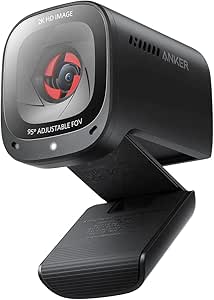 | Best Overall Conference Webcam for Startup Offices | Resolution: 2K Ultra-Clear | Microphone: Dual mics with AI Noise Cancellation | Low-Light Performance: Superior | VIEW LATEST PRICE | See Our Full Breakdown |
| NUROUM C10 1080P Conference Webcam with Microphone and Speaker | 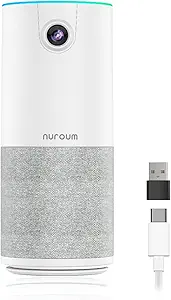 | Best Compact All-in-One Conference Webcam for Small Teams | Resolution: 1080P@30fps | Field of View: 90° | Microphone: 4 noise-canceling MEMS microphones | VIEW LATEST PRICE | See Our Full Breakdown |
| Conference webcam for startup office | Compatibility | Field of View | Resolution | Microphone |
|---|---|---|---|---|
| AV Access 4K Conference Room C | Windows, macOS, Zoom, Teams, OBS, Webex | 120° | — | Built-in noise-reducing microphone |
| Logitech Brio Ultra 4K HD Webc | Windows, Mac, ChromeOS | 65°, 78°, 90° | 4K at 30 fps | — |
| All-in-One Conference System: | Windows 10/11, macOS, Android, iOS | 110° (camera), 120° (panoramic lens) | — | — |
| j5create 360 Degree All Around | Skype, Teams, Meet, Cisco, Zoom, and more | 360° | — | High Fidelity Omnidirectional |
| Logitech BCC950 Desktop Video | — | — | 1080p HD at 30 fps | Noise-cancelling, full duplex |
| Logitech MeetUp Video Conferen | PC, Mac, laptop, MacBook, tablet | 120° (expandable to 170° with pan/tilt) | 4K Ultra HD | — |
| TOUCAN 360-Degree Video Confer | Zoom, Google Voice, Microsoft Teams, PC, Mac, Tablet | 360 degrees | — | Noise Reduction Mics |
| Logitech C920x HD Pro PC Webca | Windows 11, Teams, Meet, Zoom, Nintendo Switch, Mac, Tablet | — | 1080p at 30fps | — |
| WYRESTORM 4K AI-Powered Confer | — | 120° | 4K | — |
| Logitech Brio 101 Full HD 1080 | — | — | 1080p Full HD | — |
| Anker PowerConf C200 2K Webcam | Windows 7 or later, macOS 10.11 or later | — | 2K Ultra-Clear | Dual mics with AI Noise Cancellation |
| NUROUM C10 1080P Conference We | Windows, MacOS, Linux | 90° | 1080P@30fps | 4 noise-canceling MEMS microphones |
More Details on Our Top Picks
AV Access 4K Conference Room Camera with AI Auto Framing and Gesture Control
This camera stands out for its exceptional 4K resolution and AI-powered auto framing, making it ideal for small conference rooms where image clarity and smart tracking are priorities. Compared to the Logitech Brio, it offers more advanced AI features like gesture control, but requires a firmware update for full functionality. The wide 120° field of view provides comprehensive coverage, though it might be unnecessary for smaller setups or casual calls. Its flexible mounting options make it adaptable to various environments, but the dependence on USB power and updates could introduce setup delays. Overall, this system is best suited for startups seeking professional-quality video with smart automation and willing to handle some technical setup.
Pros:- Sharp 4K video with excellent detail and dynamic range
- AI auto framing and gesture control for hands-free operation
- 120° wide-angle lens suitable for small meeting rooms
- Flexible mounting options for various configurations
Cons:- Requires firmware update for gesture control functionality
- May be overkill for casual or infrequent video calls
Best for: Startups with small to medium conference rooms aiming for high-quality, AI-enabled video meetings.
Not ideal for: Teams looking for a plug-and-play, low-maintenance webcam without the need for firmware updates or extensive setup.
- Sensor:1/1.8″ CMOS
- Video Resolution:4K Ultra HD at 30fps
- Field of View:120°
- Zoom:5X digital zoom
- Microphone:Built-in noise-reducing microphone
- Compatibility:Windows, macOS, Zoom, Teams, OBS, Webex
Our verdict“This pick is perfect for startups that prioritize professional video quality and smart features but are prepared for some technical setup.”
Logitech Brio Ultra 4K HD Webcam for Streaming and Meetings – Black
The Logitech Brio makes this list for its stellar 4K resolution combined with adjustable field of view and automatic light correction. It surpasses many competitors like the j5create 360° webcam in image quality and security, thanks to its privacy shutter and Windows Hello support. While it offers flexible viewing angles (65°, 78°, 90°), it requires a USB 3.0 port for optimal performance, which might limit compatibility on older machines. Its dual noise-canceling microphones enhance audio clarity, but the higher price point may be a deterrent for budget-conscious startups. Overall, this webcam suits startups prioritizing crisp video, security, and facial recognition in a professional setting.
Pros:- Excellent 4K video with automatic light correction
- Multiple field of view presets for flexible framing
- Built-in privacy shutter for security
- Supports Windows Hello for secure login
Cons:- Requires USB 3.0 for best performance
- Higher price compared to standard webcams
Best for: Startups that need high-quality video, security features, and flexible framing for streaming and meetings.
Not ideal for: Teams with older hardware or limited budgets seeking a more affordable webcam option.
- Resolution:4K at 30 fps
- Field of View:65°, 78°, 90°
- Microphones:Dual omnidirectional with noise cancellation
- Light Correction:RightLight 3
- Compatibility:Windows, Mac, ChromeOS
- Windows Hello:Yes
Our verdict“Ideal for startups that want high-resolution, secure, and flexible video options for professional meetings and streaming.”
All-in-One Conference System: 4K Dual-Lens Webcam + Bluetooth Speakerphone with AI Framing & Tracking
This all-in-one system excels in offering high-quality 4K video combined with AI-powered auto framing and presenter tracking. Compared with the Logitech BCC950, which is more limited in scope, this system provides a comprehensive solution for small to medium rooms, supporting up to 8 participants. Its dual-lens PTZ camera with 15x digital zoom and 3x optical zoom delivers versatile framing, while the 360° microphone ensures clear audio coverage. The device’s plug-and-play nature and compatibility with multiple platforms make setup straightforward, but it’s less suited for very large conference spaces. The long battery life of the speakerphone adds portability, though additional accessories might be necessary for some configurations. This pick is ideal for startups seeking all-in-one, high-quality video and audio for engaging remote meetings.
Pros:- High-quality 4K video with AI auto framing and presenter tracking
- Integrated dual-lens PTZ camera with zoom capabilities
- Comprehensive 360° microphone coverage
- Portable, long-lasting speakerphone with versatile controls
Cons:- Designed primarily for small to medium rooms, not large spaces
- May require additional accessories for some setups
Best for: Startups with small to medium conference rooms that need a portable, integrated video and audio solution.
Not ideal for: Large enterprises or teams that require extensive room coverage and multiple camera angles.
- Camera Resolution:4K
- Zoom:15x digital, 3x optical
- Field of View:110° (camera), 120° (panoramic lens)
- Microphone Coverage:360°
- Battery Life:Up to 10 hours
- Compatibility:Windows 10/11, macOS, Android, iOS
Our verdict“Best for startups wanting a portable, all-in-one conference system that covers both video and audio needs effectively.”
j5create 360 Degree All Around Meeting Webcam 1080P HD with Microphone
The j5create 360 Degree Webcam provides a comprehensive full HD view suitable for online classes, collaborative work, or small team meetings. Its unique 360° field of view outperforms standard webcams like the Logitech C920x in providing a complete room perspective. The plug-and-play setup with USB-C makes it accessible, but users should be aware that app permissions and firmware updates are often necessary to unlock full functionality. Its high-fidelity omnidirectional microphone makes it versatile for various environments, though the need for compatible conferencing apps could limit flexibility. This webcam is best for startups that value full-room visibility and simple setup without complex configurations.
Pros:- Complete 360° view for versatile room coverage
- Full HD 1080p resolution delivers clear video
- Plug-and-play USB-C connectivity for easy setup
- Omnidirectional microphone enhances audio pickup
Cons:- May require firmware updates and app permissions for full performance
- Limited to 1080p resolution, less sharp than 4K options
Best for: Startups or educational teams needing a wide-angle, full-room view for dynamic collaboration.
Not ideal for: Teams requiring high-resolution video or specific framing, as 1080p may be insufficient for detailed presentations.
- Video Resolution:1080P HD
- Field of View:360°
- Microphone:High Fidelity Omnidirectional
- Connectivity:USB-C
- Display Modes:Six modes
- Compatibility:Skype, Teams, Meet, Cisco, Zoom, and more
Our verdict“Excellent for startups needing full-room visibility and simple, versatile video conferencing capabilities.”
Logitech BCC950 Desktop Video Conferencing Webcam & Speakerphone – Black
The Logitech BCC950 combines a 1080p HD webcam with a built-in noise-cancelling speakerphone, making it ideal for small, focused meetings. Its plug-and-play USB connection and remote control streamline setup, especially for startups with limited IT resources. Compared to systems like the All-in-One Conference System, it offers a more compact, dedicated solution for small groups. The Carl Zeiss lens ensures sharp video, and the noise-cancelling microphone improves audio clarity in quiet environments. However, it’s limited to 1-4 participants and not suitable for larger teams or expansive rooms. Its straightforward approach makes it a practical choice for startups that need reliable, high-quality video and audio for small meetings.
Pros:- 1080p HD video with smooth 30 fps
- Noise-cancelling, full duplex microphone
- Easy USB plug-and-play setup with remote control
- Professional-grade certifications for compatibility
Cons:- Limited to small rooms with 1-4 participants
- Not suitable for large or open conference spaces
Best for: Startups with small teams needing a simple, reliable video and audio setup for frequent small meetings.
Not ideal for: Larger organizations or teams that require more extensive room coverage or multiple camera angles.
- Resolution:1080p HD at 30 fps
- Lens:Carl Zeiss
- Microphone:Noise-cancelling, full duplex
- Connectivity:USB
- Certifications:Microsoft Lync, Skype for Business, Cisco Jabber, WebEx
Our verdict“A reliable, straightforward webcam and speakerphone combo perfect for small startup teams needing quick setup and clear communication.”
Logitech MeetUp Video Conferencing System with 4K Camera and Microphones
The Logitech MeetUp stands out for its exceptional 4K resolution and ultra-wide 120° field of view, making it ideal for small huddle rooms where capturing the entire team is critical. Unlike the Logitech Brio, which offers high-quality 4K but lacks integrated microphones, the MeetUp combines clear video with beamforming mics that improve audio pickup. Its motorized pan/tilt adds flexibility, yet this feature may require occasional calibration, and the system depends on external speakers for sound. Its seamless compatibility with various devices and flexible mounting options make setup straightforward, although expansion microphones are sold separately, adding to the cost.
Pros:- High-quality 4K video with wide 120° field of view
- Clear audio via beamforming microphones
- Flexible mounting options and straightforward setup
- Compatible with multiple devices and room configurations
Cons:- Expansion microphone sold separately increases total cost
- Motorized pan/tilt may need calibration over time
- No built-in speaker, relies on external audio devices
Best for: Startups with small meeting spaces seeking a reliable, all-in-one video and audio solution.
Not ideal for: Larger conference rooms or remote teams needing extensive coverage, where this system might fall short in scale.
- Resolution:4K Ultra HD
- Field of View:120° (expandable to 170° with pan/tilt)
- Microphones:3 beamforming microphones (expandable with optional mic)
- Compatibility:PC, Mac, laptop, MacBook, tablet
- Mounting Options:Wall, credenza, TV mount
- Connectivity:USB plug-and-play
Our verdict“This system is best suited for small startup offices that prioritize integrated video and audio in a compact setup.”
TOUCAN 360-Degree Video Conference Camera, 1080p HD Webcam with Noise Reduction Mics, AI Tracking, Compatible with Zoom and Teams
The TOUCAN camera offers true 360-degree coverage with 1080p HD clarity, making it ideal for startups that want everyone in the room to be visible without multiple cameras. Its AI tracking and auto-framing features distinguish it from the Logitech C920x, which provides only fixed views, but the TOUCAN’s reliance on space for optimal AI function means it’s less suitable for cramped environments. Setup is simple, thanks to plug-and-play connectivity, and broad platform compatibility ensures easy integration. However, it doesn’t specify the price or whether additional accessories are included, which could influence overall value.
Pros:- Complete 360-degree video coverage for inclusive meetings
- High-definition 1080p image quality
- Easy plug-and-play setup
- Compatible with Zoom, Teams, and other platforms
Cons:- Requires adequate room space for optimal AI tracking
- No detailed zoom or close-up features
- Price and accessories not clearly specified
Best for: Startups with flexible spaces needing comprehensive room coverage for remote and hybrid meetings.
Not ideal for: Teams with limited space or those requiring detailed close-up shots since the camera’s broad coverage might reduce focus on individual speakers.
- Video Resolution:1080p HD
- Microphone:Noise Reduction Mics
- Field of View:360 degrees
- Compatibility:Zoom, Google Voice, Microsoft Teams, PC, Mac, Tablet
- Features:AI Tracking, Plug-and-Play
Our verdict“Ideal for startups seeking a simple, all-encompassing camera for small to medium meeting rooms with a focus on inclusivity.”
Logitech C920x HD Pro PC Webcam 1080p/30fps with Light Correction and Stereo Audio
The Logitech C920x offers solid 1080p video at 30fps, with automatic light correction that helps maintain clarity in variable lighting conditions—an advantage over webcams with fixed settings. Its stereo dual microphones deliver decent audio, suitable for basic meetings. Compared to higher-end models like the WYRESTORM, the C920x is more affordable and widely compatible, but it lacks advanced features such as auto-framing or AI tracking. The absence of a privacy shutter and reliance on software for background effects are minor tradeoffs for its price point and simplicity.
Pros:- 1080p video with automatic light correction
- Stereo microphones for clear audio
- Compatible with many platforms including gaming consoles
- Includes background removal software
Cons:- No built-in privacy shutter
- Limited to 30fps, which may impact smoothness for fast motion
- Basic feature set compared to premium webcams
Best for: Small startups or remote teams needing reliable, straightforward video quality without complex features.
Not ideal for: Teams requiring auto-framing, AI tracking, or high frame rates, which this webcam doesn’t support.
- Resolution:1080p at 30fps
- Light Correction:Yes
- Autofocus:Yes
- Microphones:Stereo dual mics
- Compatibility:Windows 11, Teams, Meet, Zoom, Nintendo Switch, Mac, Tablet
- Includes:3-month XSplit VCam license
Our verdict“A reliable, budget-friendly webcam perfect for startups starting with basic video conferencing needs.”
WYRESTORM 4K AI-Powered Conference Webcam with Auto Framing and Presenter Tracking
The WYRESTORM webcam excels with 4K resolution and AI-powered auto framing and presenter tracking, making it suitable for professional environments where capturing the entire room is essential. Its dual noise-canceling microphones and privacy cover add to its appeal, especially compared to the Logitech MeetUp which lacks AI tracking. However, its primary focus on small rooms limits its scalability for larger spaces, and the price is not specified, which may be a concern for startups with tight budgets. Its plug-and-play USB connectivity simplifies installation, but software compatibility could be an obstacle for some users.
Pros:- 4K video quality with wide 120° coverage
- AI auto-framing and presenter tracking
- Dual noise-canceling microphones
- Plug-and-play USB connectivity
Cons:- Designed mainly for small rooms, less suited for large spaces
- Price not listed, may be expensive for startups
- Requires compatible conferencing software
Best for: Startups with small, professional meeting rooms that need advanced AI features for remote collaboration.
Not ideal for: Larger conference spaces or startups on a tight budget without clear pricing, as the cost may be prohibitive.
- Resolution:4K
- Field of View:120°
- Microphones:Dual noise-canceling
- Connectivity:USB plug-and-play
- Features:Auto Framing, Presenter Tracking
- Suitable for:Small conference rooms
Our verdict“This webcam is geared toward professional startups needing high-quality video and AI features for small rooms, with some cost considerations.”
Logitech Brio 101 Full HD 1080p Webcam for Streaming and Meetings
The Logitech Brio 101 provides 1080p video with auto-light correction and a built-in microphone, making it a versatile choice for startups that need a straightforward webcam for various tasks. Its privacy shutter enhances security, and being made with 77% recycled plastic aligns with eco-conscious values. Compared to the more feature-rich C920x, it offers fewer advanced features but makes up for it with environmental friendliness and a range of colors. Its reliance on USB-A may pose compatibility issues with newer devices without adapters, and it doesn’t support 4K or higher resolutions.
Pros:- 1080p video with auto-light correction
- Built-in microphone for clear audio
- Privacy shutter for security
- Made with recycled plastic and available in multiple colors
Cons:- Limited to USB-A connection, may require adapters
- No 4K support or high frame rate options
- Basic feature set compared to premium webcams
Best for: Startups prioritizing environmentally conscious products and versatile, simple video solutions for remote work or streaming.
Not ideal for: Teams needing advanced features like auto-framing or 4K resolution, where this webcam’s capabilities are limited.
- Resolution:1080p Full HD
- Auto-Light Correction:Yes
- Built-in Microphone:Yes
- Privacy Shutter:Yes
- Connection:USB-A
- Material:77% recycled plastic
Our verdict“A practical, eco-friendly webcam best suited for startups seeking reliable 1080p video with security features on a budget.”
Anker PowerConf C200 2K Webcam for PC and Mac
The Anker PowerConf C200 stands out for delivering professional-quality 2K resolution, making it ideal for startups that want sharp, clear video during client calls or team meetings. Its advanced AI noise-canceling microphones ensure audio clarity that rivals dedicated audio setups, setting it apart from more basic webcams like the NUROUM C10. While the C200’s high resolution is a major advantage, it’s overkill for casual or internal team meetings where 1080p would suffice, and it lacks built-in speakers, meaning you’ll need external audio solutions. Its adjustable viewing angles and privacy cover enhance security and flexibility, yet software is needed for some features, which might complicate setup for less tech-savvy users. Compared to the NUROUM C10, which offers a simpler plug-and-play experience, the C200 is better suited to serious remote professionals who prioritize image quality and privacy security. The tradeoff is that it’s more expensive and requires a bit more setup effort.
Pros:- High-resolution 2K video for sharp, professional image quality
- Effective AI noise-canceling microphones ensure clear audio
- Superior low-light performance adapts well to varied environments
- Privacy cover adds security during not-in-use periods
Cons:- No built-in speakers, requiring external audio solutions
- Requires software for angle adjustments, adding complexity
- Higher price point may be overkill for basic needs
Best for: Startups or professionals who need high-resolution video with excellent noise suppression for client-facing meetings
Not ideal for: Casual teams or small startups on a tight budget who prioritize simplicity over ultra-high quality, as it involves more setup and higher cost
- Resolution:2K Ultra-Clear
- Microphone:Dual mics with AI Noise Cancellation
- Low-Light Performance:Superior
- Viewing Angles:65°, 78°, 95°
- Privacy Cover:Yes
- Compatibility:Windows 7 or later, macOS 10.11 or later
Our verdict“This webcam is ideal for startups seeking professional-grade video quality and security, willing to invest in setup and cost for top-tier performance.”
NUROUM C10 1080P Conference Webcam with Microphone and Speaker
The NUROUM C10 offers a streamlined, all-in-one solution with 1080P resolution and a 90° wide-angle lens, making it perfect for small teams or startups needing a portable, plug-and-play device. Its built-in noise-canceling microphones and high-fidelity speaker create a balanced audio environment, comparable to more elaborate setups like the All-in-One Conference System, but with less bulk and complexity. While its 1080p resolution is lower than the Anker PowerConf C200, it still provides crisp video suitable for most virtual meetings. The limited cable length (2.2ft) may require extension in larger rooms, and firmware updates depend on official software, which could be an inconvenience for some users. Compared to the Logitech C920x, the C10’s integrated microphone and speaker save space, but it doesn’t match the image detail of 4K models. Overall, this pick makes sense for startups prioritizing portability, ease of use, and a clean all-in-one design.
Pros:- High-quality 1080P video with a wide 90° field of view
- Built-in noise-canceling microphones and high-fidelity speaker
- Plug-and-play setup for quick deployment
- Compact and portable design ideal for small offices or remote work
Cons:- Limited cable length may require extensions for bigger rooms
- No built-in battery, relies solely on USB power
- Firmware updates require official software, which may be inconvenient
Best for: Small startup teams or remote workers seeking a portable, easy-to-set-up conference camera with integrated audio
Not ideal for: Larger conference rooms or teams needing extensive cable length or higher resolution, as its 1080p and short cable may limit flexibility
- Resolution:1080P@30fps
- Field of View:90°
- Microphone:4 noise-canceling MEMS microphones
- Sensor:2MP CMOS
- Weight:384g
- Cable:USB C (2.2ft/0.7m)
- Compatibility:Windows, MacOS, Linux
Our verdict“This webcam suits small startups or remote teams looking for a simple, portable all-in-one video and audio solution without sacrificing decent quality.”

How We Picked
These webcams were evaluated based on performance in video quality, ease of setup and use, build quality, compatibility with popular conferencing platforms, and overall value for startups. We prioritized products that balance professional features with affordability, recognizing that startup teams often need reliable yet budget-conscious solutions. The ranking reflects a combination of image clarity, smart features like AI tracking, audio quality, and user-friendliness, ensuring each pick serves a distinct role for different startup needs.Factors to Consider When Choosing Conference Webcam For Startup Office
When choosing a conference webcam for a startup office, several key factors should influence your decision. The right balance between video quality, ease of setup, and audio integration can make or break your meeting experience. Startups often face the challenge of limited budgets while still needing professional-grade tools. Understanding these factors helps ensure you select a webcam that scales with your team and fits your specific use case.Video Quality and Resolution
High resolution webcams, like 4K models, provide sharper images that appear more professional. However, they demand better internet bandwidth and more powerful computers to handle the data. For small teams or less formal meetings, 1080p webcams can suffice and are more budget-friendly. Consider your typical meeting content—if you often present detailed visuals or need to appear highly professional, investing in higher resolution makes sense.
Smart Features and Automation
Features like AI auto framing, speaker tracking, and gesture controls can create a more engaging and seamless experience, especially in larger or dynamic meetings. These capabilities often come at a premium but can reduce the need for manual camera adjustments. For startups with frequent video presentations or hybrid meetings, these features help maintain a professional appearance without additional effort.
Audio Quality and Integration
Clear audio is just as vital as good video. Many webcams include built-in microphones, but quality varies widely. All-in-one systems with speakerphones or dedicated microphones tend to deliver better sound and simplify setup. If your startup relies heavily on crisp communication, choosing a webcam with integrated, noise-reducing microphones or pairing it with a dedicated speakerphone is wise.
Ease of Use and Compatibility
Startup teams benefit from plug-and-play webcams that are compatible with common platforms like Zoom, Teams, and Google Meet. User-friendly setups, with minimal configuration, save time and reduce frustration. Consider models with automatic focus, simple mounting options, and straightforward software integration to ensure quick deployment in daily routines.
Budget and Future Scalability
While budget constraints are common, investing slightly more in a versatile, feature-rich webcam can pay off long-term, especially as your team grows. Conversely, extremely inexpensive webcams may lack necessary features or durability, leading to frequent replacements. Think about your growth plans and whether a more capable model might serve your startup better over time, balancing immediate needs with future expansion.
Frequently Asked Questions
Is 4K resolution necessary for startup meetings?
While 4K resolution offers sharper images, it is not always essential for startup meetings, especially if bandwidth or hardware is limited. 1080p webcams are generally sufficient for most remote interactions, providing clear enough visuals while conserving resources. If your team frequently presents detailed visuals or high-quality branding, investing in 4K can enhance professionalism, but for everyday meetings, 1080p often suffices.
Should I prioritize AI auto framing or audio quality?
Both features improve the meeting experience, but their importance depends on your specific needs. AI auto framing helps keep presenters in view automatically, which is useful if the speaker moves around. Good audio quality is vital for clear communication, especially in noisy environments. For most startups, a balanced approach—selecting a webcam with decent video and audio—is best, but if your team moves a lot during calls, auto framing becomes a higher priority.
Can I use a single webcam for both streaming and video calls?
Yes, most webcams designed for conferencing are versatile enough for streaming and video calls, provided they are compatible with your software. Features like high resolution and good microphone quality enhance both use cases. However, if you plan to stream content regularly, looking for models with higher resolutions and better image stabilization can make a noticeable difference. Ensure your hardware meets the webcam’s requirements for smooth performance.
Are all-in-one conference systems worth the extra cost?
All-in-one systems simplify setup by combining camera, microphone, and speakerphone in a single package, which can be a big time-saver for busy startups. They tend to be more expensive but often deliver a more integrated experience with fewer compatibility issues. If your team frequently hosts large or high-stakes meetings, the investment can be justified. For smaller or infrequent use, a good standalone webcam with external microphone might be more cost-effective.
How important is compatibility with collaboration tools?
Compatibility with platforms like Zoom, Teams, or Google Meet is essential for smooth operation. Most modern webcams are plug-and-play and work seamlessly with these tools, but it’s worth verifying before purchase. Some models include dedicated software that simplifies adjustments and settings, which can save time. Ensuring compatibility helps avoid technical glitches and keeps your startup’s meetings running smoothly.
Conclusion
For startups seeking the best overall experience, the AV Access 4K Conference Room Camera offers advanced AI features and excellent video quality, ideal for dynamic, professional meetings. The Logitech Brio Ultra 4K HD Webcam is perfect for teams prioritizing stunning clarity without additional complexity. For those new to video conferencing or on tighter budgets, the Logitech C920x provides reliable performance at a lower price point. Larger teams or those with a focus on seamless audio and integrated systems might consider all-in-one options like the All-in-One Conference System. Ultimately, choosing the right webcam depends on your team’s size, meeting style, and budget—these picks cover a broad range to match your startup’s unique needs.
Fall Picks
fall essentials
As an affiliate, we earn on qualifying purchases.