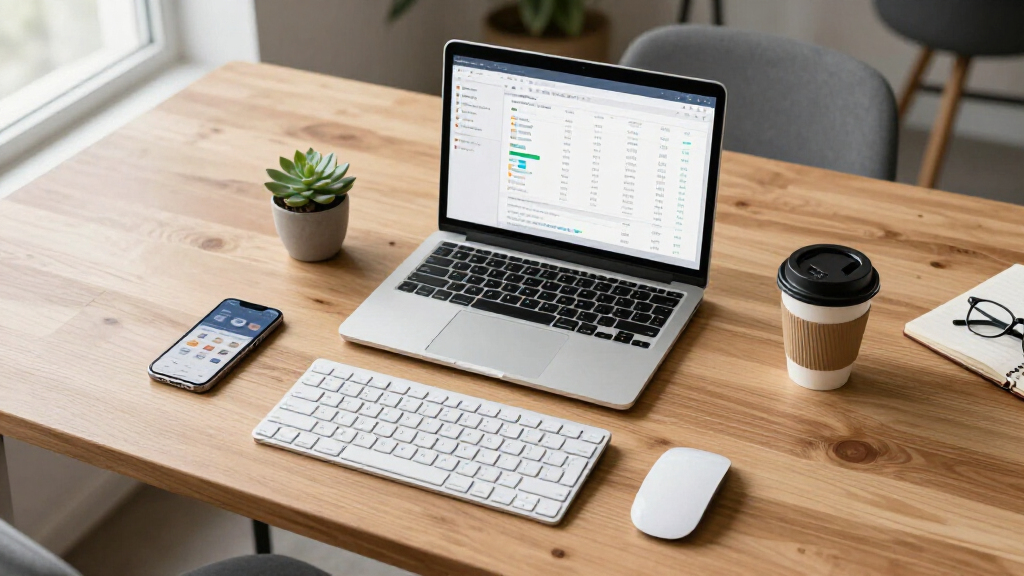

Starting a new business means equipping your office with the right tools and furniture. Whether you’re setting up a home office or a dedicated commercial space, having a well-curated checklist helps ensure you don’t overlook essential items. This guide is designed for entrepreneurs and small business owners who want reliable, functional, and comfortable office equipment without the hassle of overbuying.

Get office and shipping supplies delivered free — and shop member deals
- Fast, free delivery on millions of items
- Access to Prime Big Deal Days deals on October 6–7
- Prime Video, Amazon Music and more included
The list is organized into key categories: office furniture, computers, printing, networking, supplies, and presentation gear. Each section offers practical insights into selecting the best products for your needs, along with tips on what to look for and common pitfalls to avoid. Use this as a reference to make confident purchasing decisions that set your startup up for success.
To get the most out of this checklist, consider your specific workspace size, team size, and operational needs. Think about future growth and how each item can adapt as your business evolves. Cross-reference your priorities with the recommendations here to build a streamlined, efficient office environment that promotes productivity and comfort.
Office Furniture
Choosing the right office furniture is crucial for creating a productive and comfortable workspace. The X100 Ergonomic Mesh Office Chair with Footrest offers excellent support for long work hours, helping to prevent discomfort and fatigue. It’s designed with adjustable features to cater to various body types, making it suitable for most users. The Big and Tall Desk Chair provides additional durability and comfort for larger users or those who prefer more spacious seating. When shopping for office furniture, focus on ergonomics, adjustability, and durability. Avoid furniture that looks appealing but lacks proper support, as it can lead to discomfort and health issues over time.
When selecting desks, prioritize a size that fits your space and accommodates your equipment comfortably. Consider adjustable desks if you plan to alternate between sitting and standing. Compatibility with your office layout and existing decor is also important. Make sure to measure your space carefully and choose items that won’t overcrowd the room. Think about future needs—opting for modular or flexible furniture can save you from costly replacements down the line.
What to look for:
- Ergonomic design and adjustable features
- Durability and quality materials
- Appropriate size for your workspace
- Compatibility with existing decor
- Supportive and comfortable seating
X100 Ergonomic Mesh Office Chair with Footrest, Big and Tall Desk Chair with 5D

The X100 ergonomic mesh office chair offers all-day comfort with adjustable lumbar support, flip-up armrests, and a 3D breathable headrest. Designed for versatility, it features a footrest, advanced adjustability, and breathable mesh for both work and gaming environments, supporting users up to 300 lbs.
Pros:
- Highly adjustable with flip-up armrests and extendable footrest for personalized comfort
- Breathable mesh design enhances airflow and reduces heat buildup
- Supports up to 300 lbs with a sturdy, BIFMA-certified structure
- Suitable for both office work and gaming with versatile features
Cons:
- Assembly may require some time to adjust all features
- May be bulky for small spaces
- Price not specified in the description
Best for: Long hours of comfortable seating
Not ideal for: Limited adjustability or poor build quality
Bottom line: Prioritize ergonomic, durable furniture for lasting comfort.
Computers & Laptops
Investing in a reliable computer is fundamental for any startup. The Lenovo 16-inch IPS FHD+ i7-13620H Laptop with Office 365 and 16GB DDR5 RAM offers a powerful combination of speed and efficiency. Its large display and fast processor make multitasking seamless, which is essential in fast-paced business environments. When choosing a laptop, consider your typical workload—whether you need high processing power for design work or simpler specs for administrative tasks. Compatibility with your existing software and peripherals is also key. Avoid models that are underpowered or lack essential features like a good display or sufficient RAM, which can hamper productivity and lead to frustration.
Size and portability matter depending on your work style. A 16-inch screen strikes a good balance between usability and portability, but if you’re frequently on the go, a lighter, more compact model might be preferable. Ensure your chosen device has the necessary ports and connectivity options for your peripherals. Regularly update your software and drivers to keep your machine running smoothly. Remember, investing in a future-proof device with ample RAM and storage can save you from upgrading too soon.
What to look for:
- Powerful processor (e.g., i7 or higher)
- Adequate RAM (16GB or more)
- Large, clear display
- Good battery life and portability
- Compatibility with essential software
Lenovo 16-inch IPS FHD+ i7-13620H Laptop with Office 365, 16GB DDR5, 1TB SSD, Wi

This Lenovo laptop features a 16-inch IPS FHD+ display, Intel Core i7-13620H processor, 16GB DDR5 RAM, and a 1TB SSD, making it suitable for multitasking, content creation, and professional use. It offers comprehensive connectivity options, a sleek design, and all-day battery life for business and entertainment on the go.
Pros:
- Powerful Intel Core i7 processor with hybrid cores for efficient multitasking
- Vivid 16-inch IPS display with anti-glare coating and good brightness
- Fast 16GB DDR5 RAM and 1TB SSD for smooth performance and ample storage
- Lightweight and portable design suitable for on-the-go use
Cons:
- Limited to Windows 11 Home, which may lack some enterprise features
- HDMI 1.4 may not support 4K at high refresh rates
- Battery life details are not specified
Best for: Daily business operations and multitasking
Not ideal for: Limited storage or outdated specs
Bottom line: Choose a high-performance laptop to keep your business moving.
Printing & Scanning
A high-quality printer is a must-have for any startup needing professional documents and quick scans. The Brother MFC-L3720CDW Wireless Color Laser Printer combines color printing, copying, and scanning in one device, making it a versatile addition to your office. Wireless connectivity allows for easy sharing across multiple devices, which is perfect for team environments. When selecting a printer, focus on print speed, color accuracy, and the availability of scanning features. Avoid low-capacity models that require frequent refilling or those with limited connectivity options, as they can slow down your workflow.
Size and functionality should match your volume of printing. For frequent use, opt for models with higher page yields and faster print speeds. Compatibility with your operating system and network setup is essential for seamless integration. Consider the cost of consumables like toner and ink, as these can add up over time. A multifunction printer reduces clutter by combining several functions into one device, saving space and money. Regular maintenance and driver updates will ensure your printer remains reliable and efficient.
What to look for:
- Wireless connectivity options
- High print and scan speeds
- Color accuracy and clarity
- Multifunction capabilities
- Compatibility with your network
Brother MFC-L3720CDW Wireless Color Laser Printer with Scanner, Copier, and Fax

The Brother MFC-L3720CDW is a versatile color laser printer designed for business use, offering fast print speeds up to 19 ppm and high-quality output. It features advanced connectivity options, automatic duplex printing, a large paper capacity, and a user-friendly touchscreen for easy operation and cloud integration.
Pros:
- Fast print speeds with high-quality output
- Multiple connectivity options including wireless and USB
- Automatic duplex printing for efficiency
- Large paper capacity reduces refilling frequency
Cons:
- May be complex for casual users
- Higher initial cost for business features
Best for: Small to medium-sized office use
Not ideal for: Limited connectivity or slow speeds
Bottom line: A multifunction laser printer streamlines your document workflow.
Networking & Wi-Fi
A fast and stable internet connection is the backbone of any startup. The NETGEAR Nighthawk Dual-Band WiFi 7 Router (RS200) – BE6500 provides the latest in WiFi technology, ensuring your team stays connected with minimal lag. This router supports dual-band connectivity, which helps reduce congestion and improve overall network performance, especially in busy office environments. When choosing a router, look for features like high throughput, multiple Ethernet ports, and advanced security options. Avoid models that lack sufficient coverage or have outdated standards, as they can cause frustrating connectivity issues and slowdowns.
Placement is key—position your router in a central location away from interference sources. Consider your office size and layout when selecting a device, and opt for models with mesh capabilities if your space is large or has multiple floors. Regular firmware updates and network security checks are essential to keep your data safe. Also, ensure your network supports the number of devices your team will use, to avoid bottlenecks that can hinder productivity.
What to look for:
- WiFi 6 or WiFi 7 support
- High data throughput
- Multiple Ethernet ports
- Strong security features
- Good coverage for your space
NETGEAR Nighthawk Dual-Band WiFi 7 Router (RS200) – BE6500

The NETGEAR Nighthawk RS200 is a dual-band WiFi 7 router offering speeds up to 6.5Gbps, ideal for gaming, streaming, and video conferencing. It covers up to 2,500 sq.
Pros:
- Fast WiFi 7 speeds ideal for gaming and streaming
- Wide coverage area of up to 2,500 sq. ft.
- Supports multiple devices simultaneously
Cons:
- Requires a separate modem for internet access
- No built-in modem included
- May need a compatible modem for multi-gig internet plans
Best for: High-bandwidth office needs
Not ideal for: Limited coverage or outdated standards
Bottom line: Invest in a high-performance router for seamless connectivity.
Office Supplies
Having the right office supplies keeps your workspace organized and inspires creativity. The Harry Potter Stationery Set for Kids, Teens & Adults with wand pens adds a fun, whimsical touch while providing practical items like pens, pencils, and notepads. Quality stationery can boost productivity and make meetings or brainstorming sessions more enjoyable. When shopping for supplies, consider durability, refillability, and the variety of items included. Avoid cheap, poorly made products that can break easily or cause frustration during daily use. Instead, look for sets that combine style with function to keep your workspace both organized and inspiring.
Keep a stock of essentials such as pens, highlighters, sticky notes, and paper. Organizing your supplies in a dedicated space helps streamline workflow and reduces clutter. For creative or client-facing tasks, unique stationery can also make a positive impression. Regularly review your inventory to replenish items before they run out, ensuring your team always has what they need to stay productive and motivated.
What to look for:
- Durable and high-quality materials
- A variety of writing and organizational tools
- Refillable pens and markers
- Fun, inspiring designs
- Adequate quantity for team size
Harry Potter Stationery Set for Kids, Teens & Adults with Wand Pens, Notebook, S
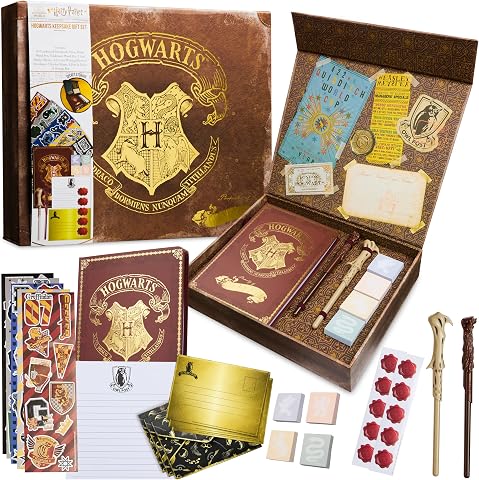
This Harry Potter stationery set includes wand pens, an A5 notebook, stickers, sticky notes, and writing paper, perfect for journaling and creative projects. The set features a collector’s keepsake box with Hogwarts crest, making it an ideal gift for fans of all ages for various occasions.
Pros:
- Includes a variety of stationery items for creative writing and journaling
- Beautiful collector’s box with hidden compartments and Hogwarts crest
- Suitable for kids, teens, and adults who love Harry Potter
Cons:
- Limited to Harry Potter-themed stationery, may not appeal to non-fans
- Some items may be small or fragile for young children
- No specific price information available
Best for: Creative and engaging work environments
Not ideal for: Low-quality materials or limited variety
Bottom line: Choose reliable, stylish supplies to enhance your workspace.
Conference & Presentation
Effective presentation equipment is vital for communicating your ideas clearly and professionally. The Epson Pro EX11000 3-Chip 3LCD Full HD 1080p Wireless Laser Projector offers high-quality visuals and wireless connectivity, making it ideal for meetings, pitches, and collaborative sessions. When selecting a projector, consider brightness levels, resolution, and connectivity options to ensure it performs well in your typical environment. Avoid models with limited brightness or outdated interfaces, which can hinder your presentation experience. Wireless capabilities allow for quick setup and easy sharing of content from multiple devices, saving time and reducing clutter.
Size and portability might matter if you frequently present in different locations. Compatibility with your laptop or mobile devices is essential for smooth operation. Additionally, invest in quality projection screens or a blank wall that provides a clear, unobstructed view. Regular calibration and maintenance of your projector will help preserve image quality over time. Pair your projector with quality audio equipment for impactful presentations that engage your audience effectively.
What to look for:
- High resolution (Full HD or better)
- Wireless connectivity
- Brightness suitable for room size
- Multiple input options
- Ease of setup and portability
Epson Pro EX11000 3-Chip 3LCD Full HD 1080p Wireless Laser Projector, 4,600 Lume
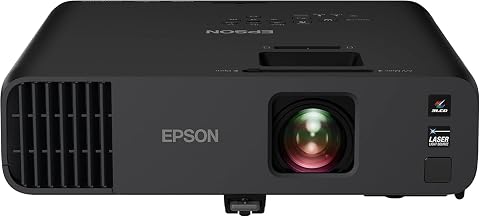
The Epson Pro EX11000 is a high-brightness 1080p laser projector with 4,600 lumens, suitable for large presentations and video conferences in well-lit rooms. It features a maintenance-free laser light source, versatile connectivity options including Miracast and HDMI, and a built-in speaker for audio.
Pros:
- High brightness suitable for well-lit environments
- Long-lasting laser light source with minimal maintenance
- Excellent color accuracy with 3LCD technology
- Versatile connectivity options for streaming and conferencing
Cons:
- Large size may require significant installation space
- No mention of 4K resolution
- Potentially high cost compared to lower-end projectors
Best for: Meetings and client pitches
Not ideal for: Limited resolution or connectivity features
Bottom line: A reliable projector enhances your presentation quality.
Building your startup office doesn’t have to be overwhelming. Start with the essentials, focusing on quality and functionality to create a workspace that fosters productivity and growth. Prioritize your purchases based on your immediate needs, then expand as your team and operations grow.
Remember, investing thoughtfully in reliable equipment now sets a solid foundation for your business’s future. Happy shopping, and here’s to a successful, well-equipped startup journey!
Halloween Picks
halloween
As an affiliate, we earn on qualifying purchases.