For most creator studios, I’d start with the Amazon eero Pro 7 4-Pack: its tri-band design and four nodes offer a practical mix of wireless capacity and coverage. The Deco 7 Pro stands out for creators who want tri-band performance and multi-gig connectivity, while the NETGEAR Orbi 970 is the premium choice for demanding, large-scale setups. The main tradeoff is whether to prioritize extra wireless capacity, broad coverage, or a lower-complexity system—and Wi-Fi 7 cannot compensate for a slow internet plan or a weak link between mesh nodes. I compare all nine options for studio layouts, wired gear, device loads, and setup needs. Read on for the full breakdown and the pick that best fits your workspace.

Get business pricing on office and shipping supplies
- Business-only prices and quantity discounts
- Tax-exempt purchasing
- Multiple users, one account, clear invoices
Key Takeaways
- The eero Pro 7 4-Pack is my best overall fit: four tri-band nodes give it a useful balance for studios spread across several rooms, though it may be more system than a small workspace needs.
- The Deco 7 Pro and Orbi 970 lead for demanding setups: both suit creators prioritizing high-end capacity and multi-gig connections, with the Orbi positioned for buyers willing to build around a premium system.
- Node count and radio design solve different problems: the four-pack eero 7 and Orbi 370 can extend coverage across more rooms, while tri-band systems offer a different advantage for wireless mesh traffic.
- The eero Max 7 is the standout for very large spaces and device-heavy studios: its stated coverage and device capacity are compelling, but a creator should verify that the actual layout and wired ports match their needs.
- The BE25, Orbi 360, and other less expansive systems can make sense for simpler studios: a small workspace with a wired workstation may benefit more from sensible placement and Ethernet than from paying for the highest tier.
| Amazon eero Pro 7 Tri-Band Mesh Wi-Fi 7 Router, 4-Pack |  | Best for Large Creator Studios | Wi-Fi standard: Wi-Fi 7 | Pack size: 4 routers | Frequency bands: 2.4 GHz, 5 GHz, and 6 GHz | VIEW ON AMAZON | See Our Full Breakdown |
| Amazon eero Max 7 mesh wifi system (newest model) – Supports internet plans up to 10 Gbps, Coverage up to 7,500 sq. ft., Connect 750+ devices, 3-pack |  | Best for Multi-Gig Creator Workflows | Wi-Fi standard: Wi-Fi 7 | Pack size: 3 routers | Frequency bands: 2.4 GHz, 5 GHz, and 6 GHz | VIEW ON AMAZON | See Our Full Breakdown |
| Deco 7 BE25 Dual-Band BE5000 WiFi 7 Mesh Wi-Fi System 5 Gbps, 240 Mhz |  | Best Value for Compact Studios | Wi-Fi standard: Wi-Fi 7 | Pack size: 2 units | Frequency bands: Dual-band | VIEW ON AMAZON | See Our Full Breakdown |
| Deco 7 Pro Tri-Band WiFi 7 BE10000 Whole Home Mesh System 6-Stream 10 Gbps |  | Best for Dense, High-Throughput Studios | Wi-Fi standard: Wi-Fi 7 | Pack size: 3 units | Frequency bands: 2.4 GHz, 5 GHz, and 6 GHz | VIEW ON AMAZON | See Our Full Breakdown |
| NETGEAR Orbi 770 Series WiFi 7 Mesh System, Up to 8,000 sq ft., 3 Pack |  | Best for Broad Coverage with Simple Expansion | Wi-Fi standard: Wi-Fi 7 | Pack configuration: Router plus 2 satellites | Frequency bands: Tri-band | VIEW ON AMAZON | See Our Full Breakdown |
| NETGEAR Orbi 970 Series WiFi 7 Mesh System, 3-Pack | 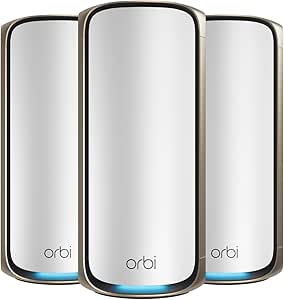 | Best for Large, Data-Heavy Studios | Wi-Fi standard: Wi-Fi 7 | System configuration: 1 router and 2 satellites | Maximum coverage: Up to 10,000 sq. ft. | VIEW ON AMAZON | See Our Full Breakdown |
| NETGEAR Orbi 370 Series WiFi 7 Mesh System, 4-Pack |  | Best for Broad Coverage on a Simpler Setup | Wi-Fi generation: Wi-Fi 7 | System configuration: 1 router and 3 satellites | Frequency band: Dual-band | VIEW ON AMAZON | See Our Full Breakdown |
| Amazon eero 7 Dual-Band Wi-Fi 7 Mesh Router, 4-Pack |  | Best for Smart-Home-Integrated Studios | Model and pack size: eero 7; 4 routers | Wi-Fi standard: Wi-Fi 7 (IEEE 802.11a/b/g/n/ac/ax/be) | Bands: Dual-band 2.4 GHz and 5 GHz | VIEW ON AMAZON | See Our Full Breakdown |
| NETGEAR Orbi 360 Series WiFi 7 Mesh System, 3-Pack |  | Best for Smaller Multi-Room Studios | Wi-Fi generation: Wi-Fi 7 | Frequency band: Dual-band | Maximum data transfer rate: Up to 5 Gbps | VIEW ON AMAZON | See Our Full Breakdown |
| wi fi 7 mesh system for creator studios on amazon | Coverage | Wi-Fi standard | Device capacity | Frequency bands |
|---|---|---|---|---|
| Amazon eero Pro 7 Tri-Band Mes | Up to 8,000 sq. ft. | Wi-Fi 7 | More than 800 devices | 2.4 GHz, 5 GHz, and 6 GHz |
| Amazon eero Max 7 mesh wifi sy | Up to 7,500 sq. ft. | Wi-Fi 7 | 750-plus devices | 2.4 GHz, 5 GHz, and 6 GHz |
| Deco 7 BE25 Dual-Band BE5000 W | Up to 4,600 sq. ft. | Wi-Fi 7 | More than 150 devices | Dual-band |
| Deco 7 Pro Tri-Band WiFi 7 BE1 | Up to 7,600 sq. ft. | Wi-Fi 7 | More than 200 devices | 2.4 GHz, 5 GHz, and 6 GHz |
| NETGEAR Orbi 770 Series WiFi 7 | Up to 8,000 sq. ft. | Wi-Fi 7 | Up to 100 devices | Tri-band |
| NETGEAR Orbi 970 Series WiFi 7 | — | Wi-Fi 7 | — | — |
| NETGEAR Orbi 370 Series WiFi 7 | Up to 8,000 sq. ft. | — | — | — |
| Amazon eero 7 Dual-Band Wi-Fi | Up to 8,000 sq. ft. | Wi-Fi 7 (IEEE 802.11a/b/g/n/ac/ax/be) | 120+ devices | — |
| NETGEAR Orbi 360 Series WiFi 7 | Up to 6,000 sq. ft. | — | — | — |
More Details on Our Top Picks
Amazon eero Pro 7 Tri-Band Mesh Wi-Fi 7 Router, 4-Pack
I rank the eero Pro 7 four-pack first for a spread-out studio because its stated 8,000-square-foot coverage comes with four nodes, giving a creator more placement options than the three-unit eero Max 7 or Deco 7 Pro. Tri-band Wi-Fi 7 and two 5 GbE ports per router give wired editing workstations, NAS devices, or a multi-gig internet connection room to connect without relying entirely on wireless links. It also supports more than 800 devices, far beyond what most studios need, but useful in a mixed workspace with cameras, smart devices, and guest equipment. The tradeoff is that its listed wireless speed and port capacity are below the Max 7’s headline figures, and this is a substantial four-node setup. I’d choose the Max 7 for higher-speed wired infrastructure; this pack makes more sense when coverage and node placement lead.
Pros:- Four routers offer flexible placement across a stated coverage area of up to 8,000 sq. ft.
- Tri-band Wi-Fi 7 supports 2.4 GHz, 5 GHz, and 6 GHz connections.
- Two auto-sensing 5 GbE ports on each router support fast wired devices and connections.
- Supports more than 800 devices and includes a three-year limited warranty.
Cons:- Its stated wireless speed of up to 3.9 Gbps is lower than the eero Max 7’s up to 4.3 Gbps.
- Four nodes can be excessive for a compact creator space and require careful placement.
- Setup requires a supported iOS or Android device and internet service; some extra services require a subscription.
Best for: Creators with a large or multi-room studio who need several mesh nodes and multi-gig wired connections for workstations, storage, and access points.
Not ideal for: A small studio or creators prioritizing the highest listed throughput and 10 GbE ports; the eero Max 7 has stronger wired specifications, while four nodes may be more than needed.
- Wi-Fi standard:Wi-Fi 7
- Pack size:4 routers
- Frequency bands:2.4 GHz, 5 GHz, and 6 GHz
- Coverage:Up to 8,000 sq. ft.
- Wireless speed:Up to 3.9 Gbps
- Supported internet plan speed:Up to 5 Gbps
- Ethernet ports:Two auto-sensing 5 GbE ports per router
- Device capacity:More than 800 devices
- Warranty:Three-year limited warranty
Our verdict“Choose the eero Pro 7 four-pack when a large studio needs broad, flexible coverage and several multi-gig wired connection points.”
Amazon eero Max 7 mesh wifi system (newest model) – Supports internet plans up to 10 Gbps, Coverage up to 7,500 sq. ft., Connect 750+ devices, 3-pack
For a studio built around fast wired transfers, the eero Max 7 three-pack has the strongest port selection here: each node includes two 10 GbE and two 2.5 GbE ports. That gives a creator more ways to connect a workstation, NAS, or multi-gig internet feed than the eero Pro 7’s two 5 GbE ports per node. Its stated wireless speed reaches 4.3 Gbps, with coverage up to 7,500 sq. ft.; the Orbi 770 lists a higher combined speed figure and greater coverage, but the Max 7’s 10 GbE ports make its wired side more compelling for studio equipment. The compromise is a three-node layout rather than the Pro 7’s four, and its larger units need room. I’d pick it for wired throughput, not simply because a studio has many connected devices.
Pros:- Two auto-sensing 10 GbE ports and two 2.5 GbE ports on each router.
- Supports internet plans up to 10 Gbps and wireless speeds up to 4.3 Gbps.
- Tri-band Wi-Fi 7 includes the 6 GHz band and supports multi-gigabit backhaul.
- Three-pack coverage is stated at up to 7,500 sq. ft., with support for 750-plus devices.
Cons:- Three units provide fewer placement options than the four-node eero Pro 7 pack.
- The stated coverage is below the 8,000 sq. ft. listed for the eero Pro 7 and Orbi 770.
- Some security features require a separate eero Plus subscription.
Best for: Creators with a multi-gig internet plan, wired editing systems, and network storage who want 10 GbE ports across a three-node mesh.
Not ideal for: Creators who need four nodes for extensive coverage or prefer a lower-complexity setup with fewer high-speed wired ports; the eero Pro 7 four-pack offers more units.
- Wi-Fi standard:Wi-Fi 7
- Pack size:3 routers
- Frequency bands:2.4 GHz, 5 GHz, and 6 GHz
- Coverage:Up to 7,500 sq. ft.
- Wireless speed:Up to 4.3 Gbps
- Supported internet plan speed:Up to 10 Gbps
- Ethernet ports:Two 10 GbE and two 2.5 GbE ports per router
- Device capacity:750-plus devices
- Warranty:Three-year limited warranty
Our verdict“Pick the eero Max 7 if your creator studio can make practical use of its 10 GbE ports and multi-gig internet support.”
Deco 7 BE25 Dual-Band BE5000 WiFi 7 Mesh Wi-Fi System 5 Gbps, 240 Mhz
The Deco BE25 two-pack is the practical choice when a creator needs Wi-Fi 7 and wired backhaul without covering a whole building. Its two 2.5 GbE ports per unit can connect a workstation or link the Deco nodes by Ethernet, helping keep mesh traffic off the wireless connection when cable runs are available. The system is dual-band, unlike the tri-band eero Pro 7 and Deco 7 Pro, so it does not have a separate 6 GHz band; that matters if many nearby wireless devices compete for airtime. Its stated reach of 4,600 sq. ft. and support for more than 150 devices suit a smaller studio better than the broad-coverage four-node eero pack. VPN client and server support also adds flexibility. I’d skip it for a large, dense studio where tri-band capacity and additional nodes matter more.
Pros:- Two 2.5 GbE WAN/LAN ports per unit support wired devices and backhaul.
- Wi-Fi 7 features include Multi-Link Operation and 240 MHz channels.
- Two-unit coverage is stated at up to 4,600 sq. ft. with support for more than 150 devices.
- Supports VPN clients and servers alongside app-based network management.
Cons:- Dual-band design lacks the 6 GHz band available on tri-band alternatives.
- Two included units may not cover a large or multi-floor creator studio reliably.
- The stated capacity and coverage are below the eero Pro 7 four-pack and Orbi 770 three-pack.
Best for: Independent creators in a home studio or compact workspace who want a two-node Wi-Fi 7 mesh, 2.5 GbE wired backhaul, and VPN support.
Not ideal for: Teams with a large studio, many simultaneous wireless production devices, or a specific need for 6 GHz; tri-band systems such as the Deco 7 Pro are a better fit.
- Wi-Fi standard:Wi-Fi 7
- Pack size:2 units
- Frequency bands:Dual-band
- Coverage:Up to 4,600 sq. ft.
- Maximum channel width:240 MHz
- Ethernet ports:Two 2.5 GbE WAN/LAN ports per unit
- Device capacity:More than 150 devices
- VPN support:VPN client and server
Our verdict“Choose the Deco BE25 for a compact studio that benefits from 2.5 GbE backhaul but does not need tri-band Wi-Fi or a large node count.”
Deco 7 Pro Tri-Band WiFi 7 BE10000 Whole Home Mesh System 6-Stream 10 Gbps
The Deco 7 Pro three-pack is my pick for a busy studio that needs more wireless capacity than the dual-band BE25 can offer. Its tri-band Wi-Fi 7 includes 6 GHz, and the listed band rates add up to a BE10000-class system; that extra band gives compatible devices another route through a crowded workspace. Each unit has four 2.5 GbE WAN/LAN ports plus USB 3.0, so creators can wire several devices at a node, although there are no listed 10 GbE ports. Compared with the eero Max 7, its wired ports are slower, but its stated coverage reaches 7,600 sq. ft. and it supports more than 200 devices. This is a strong middle ground for a distributed studio, with the tradeoff that premium HomeShield features may require a service plan and actual coverage depends on layout.
Pros:- Tri-band Wi-Fi 7 includes 6 GHz, 5 GHz, and 2.4 GHz.
- Three-pack coverage is stated at up to 7,600 sq. ft. with support for more than 200 devices.
- Four 2.5 GbE WAN/LAN ports per unit provide multiple wired connection options.
- Includes a USB 3.0 port per unit and VPN client/server support.
Cons:- Its 2.5 GbE ports do not match the eero Max 7’s 10 GbE wired capacity.
- Tri-band performance and coverage still depend on node placement, building materials, and client compatibility.
- Some HomeShield security features are part of a premium service.
Best for: Creator teams with multiple rooms, many connected devices, and compatible 6 GHz clients who want a three-node tri-band mesh with several wired ports.
Not ideal for: Studios relying on 10 GbE connections for a NAS or editing workstation; the eero Max 7 has 10 GbE ports, while this Deco lists 2.5 GbE ports.
- Wi-Fi standard:Wi-Fi 7
- Pack size:3 units
- Frequency bands:2.4 GHz, 5 GHz, and 6 GHz
- Coverage:Up to 7,600 sq. ft.
- Device capacity:More than 200 devices
- Ethernet ports:Four 2.5 GbE WAN/LAN ports per unit
- USB port:USB 3.0
- Wireless streams:6-stream
Our verdict“Choose the Deco 7 Pro for a dense, multi-room studio that needs tri-band Wi-Fi and multiple 2.5 GbE connections at each node.”
NETGEAR Orbi 770 Series WiFi 7 Mesh System, Up to 8,000 sq ft., 3 Pack
The NETGEAR Orbi 770 three-pack suits a creator who needs one mesh across a large home studio, office, and adjacent work areas without assembling a larger node count. It lists up to 8,000 sq. ft. of coverage, support for 100 devices, and tri-band Wi-Fi 7 with enhanced backhaul between router and satellites. That dedicated backhaul approach is useful when nodes communicate wirelessly, though the source does not specify a separate wired-backhaul port layout. The Orbi’s stated speed reaches 11 Gbps, but that figure is not directly comparable to the eero Max 7’s wireless-speed figure; the Orbi is ready for internet plans up to 2.5 Gbps, while the Max 7 supports plans up to 10 Gbps and has 10 GbE ports. I’d favor Orbi for reach and straightforward satellite expansion, not for the fastest wired studio network.
Pros:- Router and two satellites provide stated coverage of up to 8,000 sq. ft.
- Tri-band Wi-Fi 7 includes enhanced backhaul between the router and satellites.
- Supports up to 100 devices and internet plans up to 2.5 Gbps.
- Additional Orbi 770 satellites can extend the stated coverage area.
Cons:- Internet plan support is capped at 2.5 Gbps, below the eero Max 7’s stated 10 Gbps.
- Device capacity is lower than the eero Pro 7 and eero Max 7 listings.
- NETGEAR Armor security after its 30-day trial requires a separate subscription.
Best for: Creators covering a large home or multi-room studio who want a router-and-two-satellite mesh, broad stated coverage, and the option to add another satellite.
Not ideal for: Studios with multi-gig internet above 2.5 Gbps or workflows that depend on 10 GbE wired links; the eero Max 7 is better equipped for those connections.
- Wi-Fi standard:Wi-Fi 7
- Pack configuration:Router plus 2 satellites
- Frequency bands:Tri-band
- Coverage:Up to 8,000 sq. ft.
- Listed maximum speed:Up to 11 Gbps
- Supported internet plan speed:Up to 2.5 Gbps
- Device capacity:Up to 100 devices
- Ethernet port bandwidth:2.5 Gbps
- Security:Advanced Router Protection and automatic firmware updates; Armor trial included
Our verdict“Pick the Orbi 770 when broad coverage and satellite expansion matter more than 10 GbE ports or internet service above 2.5 Gbps.”
NETGEAR Orbi 970 Series WiFi 7 Mesh System, 3-Pack
For a creator studio spread across a large building, the Orbi 970’s 10,000-square-foot claimed coverage and quad-band dedicated backhaul make it the most ambitious option in this group. That extra backhaul capacity can help keep traffic between the router and satellites from competing as heavily with client connections—a useful distinction when a studio has multiple rooms and many connected devices. Its 10 Gig and 2.5 Gig ports also give wired workstations and storage more headroom than the Orbi 370 or Orbi 360 provide in their listed specs. The tradeoff is scale: a smaller studio may not benefit from its coverage or device capacity, and the listed top speed is not a guarantee of faster internet. NETGEAR Armor is a 30-day trial, then requires a separate subscription; this system is also specified for US use only.
Pros:- Up to 10,000 sq. ft. of stated coverage from the three-piece system
- Quad-band dedicated backhaul supports mesh links without relying only on client-facing bands
- 10 Gig internet and 10 Gig and 2.5 Gig LAN ports suit multi-gig wired equipment
- Supports up to 200 devices and works with older Wi-Fi generations
Cons:- Its large coverage and high device capacity may be unnecessary for a small studio
- NETGEAR Armor becomes a separate subscription after the 30-day trial
- Designed for use in the United States only; actual speeds and coverage vary by setup
Best for: Creators running a large, multi-room studio with many connected devices, multi-gig internet, and wired workstations or storage.
Not ideal for: Solo creators or compact studios who do not need extensive coverage, quad-band backhaul, or multi-gig wired connections.
- Wi-Fi standard:Wi-Fi 7
- System configuration:1 router and 2 satellites
- Maximum coverage:Up to 10,000 sq. ft.
- Maximum speed:Up to 27 Gbps
- Maximum connected devices:Up to 200
- Ports:10 Gig internet port; 10 Gig and 2.5 Gig LAN ports
- Backhaul:Quad-band with Enhanced Dedicated Backhaul
- Internet compatibility:Cable and fiber
- Regional use:United States only
Our verdict“Choose the Orbi 970 when a large creator studio needs extensive mesh coverage, dedicated backhaul, and high-speed wired connections.”
NETGEAR Orbi 370 Series WiFi 7 Mesh System, 4-Pack
The Orbi 370 is a practical fit when a creator needs satellites distributed across a broad space but does not need the Orbi 970’s premium backhaul and 10 Gig connectivity. Its router-and-three-satellite layout is the largest included node count in this batch, with stated coverage up to 8,000 sq. ft.; that can make it easier to place a node near a distant editing room or studio corner. The system supports Wi-Fi 7 up to 5 Gbps, but its dual-band design and 70-device limit put it below the Orbi 970 for dense, data-heavy environments. Compared with the eero 7 four-pack, it has a lower listed device capacity, while the eero offers two 2.5 GbE ports per router. Choose the Orbi for app-guided setup and coverage; skip it if your work depends on extensive multi-gig wired options.
Pros:- Four-piece system with stated coverage up to 8,000 sq. ft.
- Wi-Fi 7 with a listed maximum data rate of 5 Gbps
- Supports Wi-Fi 6 and Wi-Fi 5 devices
- App-guided setup and WPA3 security
Cons:- Dual-band design offers less backhaul separation than the quad-band Orbi 970
- Listed device capacity is limited to 70
- NETGEAR Armor requires a separate subscription after its 30-day trial, and the system is US-only
Best for: Creators with a large home studio or several separated work areas who want four mesh units and straightforward app-guided setup.
Not ideal for: Studios with more than 70 connected devices or users who need the Orbi 970’s quad-band backhaul and listed 10 Gig ports.
- Wi-Fi generation:Wi-Fi 7
- System configuration:1 router and 3 satellites
- Frequency band:Dual-band
- Maximum data transfer rate:Up to 5 Gbps
- Coverage:Up to 8,000 sq. ft.
- Maximum connected devices:Up to 70
- LAN port bandwidth:2,500 Mbps
- Security protocol:WPA3
- Setup and control:NETGEAR Orbi app
Our verdict“Pick the Orbi 370 if you want four nodes for wide coverage more than premium backhaul or high-capacity wired networking.”
Amazon eero 7 Dual-Band Wi-Fi 7 Mesh Router, 4-Pack
The eero 7 four-pack stands out for creator studios that combine networked computers with a growing set of smart-home devices. Each router includes two auto-sensing 2.5 GbE ports, while built-in Thread, Zigbee, Bluetooth LE, Matter, and Alexa compatibility can reduce the need for separate smart-home hubs. Its 120+ device capacity is higher than the Orbi 370 and Orbi 360 listings, though the Orbi 970 is better suited to studios seeking quad-band dedicated backhaul and greater stated coverage. The eero’s wireless speed is listed up to 1.8 Gbps, so its Wi-Fi performance claim is more modest than the Orbi systems’ listed 5 Gbps or 27 Gbps figures. The four-unit coverage claim reaches 8,000 sq. ft., but setup requires a supported iOS or Android device and internet service. Some smart-home functions operate only as a controller.
Pros:- Four routers with stated coverage up to 8,000 sq. ft.
- Two auto-sensing 2.5 GbE ports on each router
- Supports 120+ devices and includes Thread, Zigbee, Matter, and Alexa compatibility
- Three-year limited warranty
Cons:- Listed wireless speed is up to 1.8 Gbps, below the Orbi 370 and Orbi 360’s stated 5 Gbps
- Setup requires a supported iOS or Android device and active internet service
- Some smart-home features work only as a controller
Best for: Creators who want a four-node Wi-Fi 7 network, multiple 2.5 GbE connections, and smart-home hub features in the same system.
Not ideal for: Studios prioritizing the highest listed wireless speed or a dedicated multi-band backhaul for heavy traffic between mesh nodes.
- Model and pack size:eero 7; 4 routers
- Wi-Fi standard:Wi-Fi 7 (IEEE 802.11a/b/g/n/ac/ax/be)
- Bands:Dual-band 2.4 GHz and 5 GHz
- Internet plan support:Up to 2.5 Gbps
- Wireless speed:Up to 1.8 Gbps
- Coverage:Up to 8,000 sq. ft.
- Device capacity:120+ devices
- Ethernet:Two auto-sensing 2.5 Gigabit Ethernet ports per router
- Warranty:3-year limited warranty
Our verdict“Choose the eero 7 four-pack if smart-home integration and several 2.5 GbE ports matter more than the highest listed Wi-Fi speed.”
NETGEAR Orbi 360 Series WiFi 7 Mesh System, 3-Pack
The Orbi 360 suits creators who need mesh coverage across a modest multi-room studio without stepping up to a four-piece kit. Its router-and-two-satellite configuration is rated for up to 6,000 sq. ft. and 70 devices, with Wi-Fi 7 speeds listed up to 5 Gbps. That makes it a more restrained choice than the Orbi 370, which includes three satellites and claims coverage up to 8,000 sq. ft.; for a compact workspace, fewer nodes can be easier to place without buying capacity you may not use. The tradeoff is that this is dual-band Wi-Fi, not the Orbi 970’s quad-band system, and its listed cable or fiber plan support tops out at 2.5 Gbps. It includes app-guided setup and a 30-day Armor trial, but the subscription continues separately and the system is specified for US use.
Pros:- Three-piece system covers up to 6,000 sq. ft. as specified
- Wi-Fi 7 with listed speeds up to 5 Gbps
- Supports up to 70 devices and older Wi-Fi 6 and Wi-Fi 5 clients
- App-guided setup with WPA2 and WPA3 security
Cons:- Dual-band design has less backhaul capacity separation than the quad-band Orbi 970
- Cable or fiber plan compatibility is listed up to 2.5 Gbps
- NETGEAR Armor requires a separate subscription after its 30-day trial; US use only
Best for: Solo creators or small teams working across a few rooms who want a three-piece mesh system and do not need coverage beyond the listed 6,000 sq. ft.
Not ideal for: Large studios needing extra satellite coverage, more than 70 connected devices, or the quad-band dedicated backhaul and 10 Gig ports of the Orbi 970.
- Wi-Fi generation:Wi-Fi 7
- Frequency band:Dual-band
- Maximum data transfer rate:Up to 5 Gbps
- Coverage:Up to 6,000 sq. ft.
- Supported devices:Up to 70
- Included components:Router and two satellites
- LAN port bandwidth:2,500 Mbps
- Internet compatibility:Cable or fiber; plans up to 2.5 Gbps
- Security protocols:WPA2 and WPA3
Our verdict“The Orbi 360 is a sensible fit for a smaller multi-room studio that needs three mesh units but not the Orbi 370’s extra satellite or the Orbi 970’s higher-end network capacity.”

How We Picked
I ranked these systems around the jobs a creator studio asks of a network: moving large project files, supporting video calls and cloud backups, keeping wireless devices connected, and reaching rooms where a workstation or camera may sit. I weighed stated Wi-Fi band configuration, claimed speed and coverage, mesh node count, multi-gig support where specified, and how much flexibility each system appears to offer for wired equipment. I treated advertised coverage and device capacity as comparison points rather than guarantees; walls, interference, node placement, and client hardware can change real results.
The order favors a balance of studio-ready capacity, coverage options, and usefulness across different layouts, rather than the biggest headline specification alone. Tri-band and high-capacity models rank well for wireless-heavy or larger studios, while dual-band and more basic series are better matches for compact spaces or tighter requirements. A four-pack does not automatically outrank a three-pack: fewer well-placed nodes can perform better than extra nodes placed too close together, and wired backhaul can change the calculation. I also considered setup demands and whether a product’s strengths justify choosing it over another option in this lineup.
| wi fi 7 mesh system for creator studios on amazon | Wi-Fi standard | Coverage |
|---|---|---|
| Amazon eero Pro 7 Tri-Band Mes | Wi-Fi 7 | Up to 8,000 sq. ft. |
| Amazon eero Max 7 mesh wifi sy | Wi-Fi 7 | Up to 7,500 sq. ft. |
| Deco 7 BE25 Dual-Band BE5000 W | Wi-Fi 7 | Up to 4,600 sq. ft. |
| Deco 7 Pro Tri-Band WiFi 7 BE1 | Wi-Fi 7 | Up to 7,600 sq. ft. |
| NETGEAR Orbi 770 Series WiFi 7 | Wi-Fi 7 | Up to 8,000 sq. ft. |
| NETGEAR Orbi 970 Series WiFi 7 | Wi-Fi 7 | — |
| NETGEAR Orbi 370 Series WiFi 7 | — | Up to 8,000 sq. ft. |
| Amazon eero 7 Dual-Band Wi-Fi | Wi-Fi 7 (IEEE 802.11a/b/g/n/ac/ax/be) | Up to 8,000 sq. ft. |
| NETGEAR Orbi 360 Series WiFi 7 | — | Up to 6,000 sq. ft. |
Factors to Consider When Choosing Wi Fi 7 Mesh System For Creator Studios On Amazon
Choosing a mesh kit for a studio starts with the shape of your workflow, not the Wi-Fi generation printed on the box. I’d map where the modem, editing workstation, NAS, cameras, and call setup will sit, then decide which connections need Ethernet and which can rely on wireless. These factors help avoid paying for capacity your devices cannot use—or buying extra nodes that do not fix the actual bottleneck.
Map the studio before choosing node count
Measure the working area and note the walls, floors, and long hallways between the router and the rooms that need coverage. A studio in one open room may need fewer nodes than a smaller space split by dense walls or spread across floors. More nodes are useful only when they can be placed far enough apart to cover gaps while still maintaining a strong connection to the rest of the mesh. Putting a node beside the workstation that already gets a weak signal can simply extend a weak link. If you can place nodes near the center of their coverage areas and away from major obstructions, a three-pack may outperform a poorly arranged four-pack. Match the kit to the layout you have, not an advertised square-foot figure alone.
Decide which studio devices need Ethernet
Desktop workstations, NAS units, shared storage, and some access points can benefit from wired Ethernet, especially during large file transfers. A fast mesh system does not make every device wireless, and a lack of suitable ports can force workarounds that complicate a production space. Check the speed and number of Ethernet ports on each unit, then count the devices you expect to wire at the primary node and any satellite. A small Ethernet switch can add ports, but it does not add internet bandwidth or improve a weak wireless backhaul. If you can wire mesh nodes to each other, that connection may free wireless capacity for laptops, tablets, and cameras. Pay for higher wireless specifications only when they solve a real connection constraint.
Treat internet speed and local network speed separately
Your internet plan sets the ceiling for downloads and uploads that leave the studio, while transfers between local devices depend on the home network and each device’s connection. A creator moving footage to a local NAS may care more about wired multi-gig links and local Wi-Fi performance than a headline internet-plan figure. Cloud backups and remote collaboration, by contrast, can be limited by your provider’s upload speed even with a new Wi-Fi 7 mesh. Check the modem or gateway, service plan, workstation adapter, and storage connection as a chain; the slowest part can set the pace. Buying a system advertised for very high internet speeds will not raise a lower-tier plan. Match network capability to both your local workflow and your actual service.
Choose bands with mesh traffic in mind
Tri-band systems add another radio band that can help handle mesh communication and connected devices, depending on the system design and traffic. That can be useful when satellites communicate wirelessly and the studio has several active clients. Dual-band systems may be a sensible fit when the studio is compact, the node link is reliable, or the important devices use Ethernet. Do not assume that every Wi-Fi 7 client can use every feature a router advertises; client hardware and software support matter. A creator with older laptops and cameras may see less benefit from newer wireless capabilities than the box suggests. Consider what connects today, what you expect to replace, and whether wired backhaul can address the same pressure more directly.
Plan for interference and reliable placement
Studios can contain dense electronics, metal shelving, sound equipment, and neighboring networks that affect wireless performance. Mesh nodes need open, practical locations rather than being hidden in cabinets or placed behind large equipment. Keep them away from obvious sources of interference where possible, and avoid positioning every satellite at the edge of the signal it needs to relay. Before buying more hardware, test whether relocating the main router or using a wired connection to a fixed workstation addresses the problem. A mesh system improves coverage, but it cannot remove congestion from a crowded environment or make a poor internet connection stable. For time-sensitive calls and uploads, a direct Ethernet connection remains a useful reliability measure.
Weigh setup simplicity against network control
Some buyers want a guided app setup and a network that needs little attention; others want finer control over wired devices, traffic, and network settings. Decide which approach suits the person who will maintain the studio network, not just the person purchasing it. A simpler interface can make it easier to add nodes or check connection status, while advanced requirements may call for settings and tools that a streamlined system does not emphasize. Also check whether a system’s management features or security services require an account or an ongoing subscription. For a small team, straightforward administration may be more valuable than rarely used controls. For a shared production space, confirm that the available management options suit how you separate work equipment and guest devices.
Frequently Asked Questions
Is a Wi-Fi 7 mesh system worthwhile if my editing workstation has Ethernet?
It can be, but the benefit may be coverage and capacity for the rest of the studio rather than faster workstation transfers. A wired workstation can avoid wireless variability for large local file moves, while laptops, cameras, phones, and guests still rely on Wi-Fi. If your main computer and storage are wired and the studio is small, a simpler mesh kit may meet your needs. If wireless clients are numerous or spread across rooms, tri-band or higher-capacity options may justify the step up. I’d check your wired ports and local network speeds before choosing based on a Wi-Fi headline alone.
Should I pick a four-pack over a three-pack for a studio?
Not automatically. A fourth node helps when the studio has a real coverage gap, such as a separate floor, a distant room, or walls that weaken the mesh link. In a compact or open layout, extra nodes can add setup work without a meaningful improvement, especially if they are clustered too close together. Start by identifying where coverage drops and whether a wired access point or backhaul is possible. Compare the kit’s node count with the available placement locations, not just the total area listed by the manufacturer. A well-positioned three-pack can be a better fit than a four-pack with awkward placement.
Will Wi-Fi 7 improve uploads to cloud storage and remote clients?
Only if the current bottleneck is your local wireless connection and the devices at both ends can take advantage of the system. Cloud uploads also depend on your internet plan’s upload speed, the service provider, and the remote platform. A faster mesh cannot increase a capped connection from your internet provider. For recurring footage uploads, check the upload rate you actually receive and consider scheduling backups outside busy work periods. Wi-Fi 7 may help local wireless performance, but a wired computer and an adequate upload plan often matter more to the final transfer time.
What should I check before ordering a mesh system for a NAS-heavy studio?
Count the Ethernet connections needed at the main router and satellites, then verify the port speeds on the exact system. Check whether your NAS, workstation, and any switches support the same link speeds; one slower connection can limit transfers. Consider whether you can wire mesh nodes together, since wired backhaul can keep local storage traffic from competing with wireless mesh links. Also confirm that the NAS sits on the same local network as the devices that need access and that your backup plan does not depend on internet speed alone. If the kit lacks enough ports, a switch may help, but it will not upgrade the speed of the ports or links it connects.
Can I mix mesh nodes from different brands or product lines?
Do not assume that systems from different brands—or even every generation within one brand—will form a single mesh. Compatibility depends on the maker’s supported ecosystem and specific models, so check the manufacturer’s documentation before planning an expansion. A node that works as a separate access point may not share the same management, roaming, or mesh functions. Mixing equipment can also make troubleshooting harder in a studio where stable connections matter. If you may expand later, choose a system with clearly supported add-on nodes and confirm which models can join the same network.
Conclusion
For a creator who wants one broadly capable system for a multi-room workspace, I’d choose the Amazon eero Pro 7 4-Pack as the best overall balance of tri-band design and node count. The Deco 7 BE25 is my value-minded pick for a simpler studio that does not need the higher-tier radio setup, while the NETGEAR Orbi 970 is the best premium choice for buyers building a demanding, high-capacity network. For beginners, the Amazon eero 7 4-Pack is a more straightforward starting point than a flagship system, provided its dual-band design fits the layout and traffic. Choose the eero Max 7 when broad stated coverage and a large connected-device load are your main needs; choose the Deco 7 Pro if tri-band capacity and multi-gig connectivity are higher priorities. Before deciding, match the kit to your floor plan, wired devices, internet upload speed, and node-placement options.