A tablet kiosk stand for self-serve signups has to do three jobs at once: hold a tablet at a comfortable height for standing customers, keep it locked down against tampering, and survive hours of daily public use. After comparing 14 leading options, the Mount-It! Anti-Theft Universal Tablet Floor Kiosk Stand, Height Adjustable stands out as the best overall pick because it balances a locked steel enclosure, height adjustment, and a wide tablet fit at a sensible price. If counter space is your constraint, the Mount-It! Anti-Theft Tablet Kiosk Countertop Stand delivers similar security without the floor footprint, while the AboveTEK Anti-Theft iPad Kiosk Stand with 360° swivel is the better fit when you need customers and staff to share one screen. The main tradeoff in this category is flexibility versus lockdown: rotating stands are friendlier for signups but easier to misuse, while fully enclosed stands are tougher but lock you into specific tablet sizes. Read on for the full breakdown.

Get business pricing on office and shipping supplies
- Business-only prices and quantity discounts
- Tax-exempt purchasing
- Multiple users, one account, clear invoices
Key Takeaways
- Height-adjustable floor stands consistently outperformed fixed-height models for self-serve signups because standing customers, wheelchair users, and seated visitors all interact with the same screen.
- Brands matter less than enclosure type: the three Mount-It! and two AboveTEK floor kiosks that made my top tier all share fully locking steel enclosures, while the open cradle models ranked lower for unattended signup use.
- Countertop stands only made sense when a staff member was nearby; for truly unattended signups, every floor stand in this lineup offered better theft protection and visibility.
- Rotating and tilting mechanisms (AboveTEK‘s 360° swivel, 75° tilt) added real value for portrait-versus-landscape signup forms, but they introduced wobble that fixed mounts avoided.
- White and silver finishes showed scratches and grime faster than black powder-coat across every matching model pair — a small but real factor for high-traffic signup areas.
| Anti-Theft iPad Kiosk Floor Stand, Adjustable Tablet Stand for POS Checkout |  | Best Overall for High-Traffic Self-Serve Signups | Compatible Device Size: 10–14 inches | Max Device Thickness: 0.39 inches | Height Range: 29.53–45.28 inches | VIEW ON AMAZON | See Our Full Breakdown |
| Secure Tablet Kiosk Stand for 10–14-Inch Tablets |  | Best Value Countertop Kiosk | Compatible Display Size: 10–14 inches | Max Tablet Thickness: 0.39 inches (10 mm) | VESA Pattern: 75 × 75 mm | VIEW ON AMAZON | See Our Full Breakdown |
| AboveTEK Rotating Retail Kiosk Stand for 6–13-Inch Tablets |  | Best for Shared Screens and Frequent Repositioning | Compatibility: 6–13 inch tablets; width or height 6.6–9.6 inches | Max Case Thickness: Under 0.5 inch | Rotation: 360 degrees | VIEW ON AMAZON | See Our Full Breakdown |
| Mount-It! Universal Tablet Countertop Stand and Secure Kiosk Mount, Black | 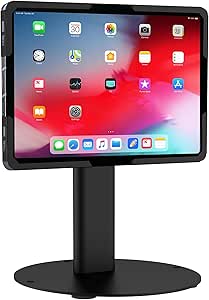 | Most Flexible Mounting Options | Tablet Compatibility: 9.7–13.1 inches, bare tablets only | Load Capacity: Up to 15 lbs | Material: Cold-rolled steel | VIEW ON AMAZON | See Our Full Breakdown |
| Mount-It! Anti-Theft Universal Tablet Floor Stand Kiosk for POS, Silver |  | Best for Card-Reader Signup Stations | Tablet Compatibility: 7.9″ to 11″ tablets, 5.3″–7.8″ wide | Rotation / Tilt: 360° rotation, ±90° tool-free tilt | Base: 13.6″ × 17.4″ triangular, freestanding or floor-bolt | VIEW ON AMAZON | See Our Full Breakdown |
| AboveTEK Anti-Theft iPad Kiosk Stand – Locking POS Tablet Holder with 360° Swivel & 75° Tilt |  | Best for Compact iPad Counters | Brand: AboveTEK | Tablet compatibility: Select iPad, iPad Air, and iPad Pro models up to 10.5 inches | Maximum tablet size: 10.5 inches | VIEW ON AMAZON | See Our Full Breakdown |
| Mount-It! Anti-Theft Tablet Kiosk Countertop Stand, Universal Retail, Black |  | Best for Adjustable Countertop Signups | Tablet compatibility: 7.9- to 11-inch tablets | Clamp width range: 5 to 7.125 inches | Clamp height range: 7.87 to 9.68 inches | VIEW ON AMAZON | See Our Full Breakdown |
| Mount-It! Anti-Theft iPad Floor Stand with Locking Kiosk Enclosure, White |  | Best for Unstaffed Floor Signups | Tablet compatibility: Select iPad 7-11, A16, Air, and Pro models; bare tablets only | Weight: 33 pounds | Base dimensions: 13.4 x 11.8 inches | VIEW ON AMAZON | See Our Full Breakdown |
| Mount-It! Anti-Theft iPad Kiosk Stand, Steel Countertop Enclosure, Black |  | Best for Fixed iPad Signup Counters | Material: Steel with rubber-padded base | Tablet compatibility: Select iPad 7-11, A16, Pro, and Air models | Lock: Keyed lock; two keys included | VIEW ON AMAZON | See Our Full Breakdown |
| AboveTEK Anti-Theft Adjustable Floor Stand for 10.9–11-Inch Tablets |  | Best for Height-Adjustable Floor Signups | Compatible tablet sizes: 10.9 to 11 inches | Compatible models: Select iPad Pro, iPad Air, iPad, and Samsung Galaxy Tab S and A series | Height adjustment: 27.6 to 45.3 inches | VIEW ON AMAZON | See Our Full Breakdown |
| Mount-It! Anti-Theft Universal Tablet Floor Kiosk Stand, Height Adjustable, Black |  | Best Overall Floor Kiosk | Compatible Devices: 9.7″-13.1″ tablets (iPad, Galaxy Tab, Surface Pro, and others) | Height Adjustment: 27.5″ – 47″ | Mounting Type: Freestanding or floor bolt-down | VIEW ON AMAZON | See Our Full Breakdown |
| Mount-It! Anti-Theft Tablet Kiosk Stand for 10.2″–11″ iPad & Samsung Tablets, Black |  | Best Countertop Signup Station | Compatible Devices: iPad 10th Gen, iPad Air M2/M3, iPad Pro 11″ (1st-4th Gen), Galaxy Tab S8-S11 and A8/A9+ | Form Factor: Desk stand (countertop or wall mount) | Enclosure Material: High-strength powder-coated steel | VIEW ON AMAZON | See Our Full Breakdown |
| AboveTEK Security iPad Kiosk Floor Stand, Anti-Theft Height Adjustable Tablet Stand for Retail POS |  | Best Viewing-Angle Flexibility | Height Range: 29.5″ – 45.3″ | Tablet Compatibility: 9.7″ – 13″, up to 0.4″ thick | Rotation: 360° | VIEW ON AMAZON | See Our Full Breakdown |
| AboveTEK Height-Adjustable Anti-Theft Tablet Floor Stand |  | Best for Smaller Tablets | Compatible Tablet Size: 7.9″ – 11″, up to 0.55″ thick | Height Adjustment: 30″ – 47.2″ | Rotation: 360° | VIEW ON AMAZON | See Our Full Breakdown |
| tablet kiosk stand for self serve signup | Tablet Compatibility |
|---|---|
| Anti-Theft iPad Kiosk Floor St | — |
| Secure Tablet Kiosk Stand for | — |
| AboveTEK Rotating Retail Kiosk | — |
| Mount-It! Universal Tablet Cou | 9.7–13.1 inches, bare tablets only |
| Mount-It! Anti-Theft Universal | 7.9" to 11" tablets, 5.3"–7.8" wide |
| AboveTEK Anti-Theft iPad Kiosk | Select iPad, iPad Air, and iPad Pro models up to 10.5 inches |
| Mount-It! Anti-Theft Tablet Ki | 7.9- to 11-inch tablets |
| Mount-It! Anti-Theft iPad Floo | Select iPad 7-11, A16, Air, and Pro models; bare tablets only |
| Mount-It! Anti-Theft iPad Kios | Select iPad 7-11, A16, Pro, and Air models |
| AboveTEK Anti-Theft Adjustable | — |
| Mount-It! Anti-Theft Universal | — |
| Mount-It! Anti-Theft Tablet Ki | — |
| AboveTEK Security iPad Kiosk F | 9.7" – 13", up to 0.4" thick |
| AboveTEK Height-Adjustable Ant | — |
More Details on Our Top Picks
Anti-Theft iPad Kiosk Floor Stand, Adjustable Tablet Stand for POS Checkout
For a self-serve signup station that lives unattended in a lobby or storefront, theft deterrence and stability matter more than anything else, and this floor stand delivers both better than anything else here. The solid steel bolt-down base paired with specialized security screws means the tablet stays put even when dozens of strangers interact with it daily, while the 29.53–45.28 inch height range accommodates both standing adults and wheelchair users — an accessibility edge the shorter Secure Tablet Kiosk Stand (B0G6T912JL) can’t match. The hidden cable routing through the hollow pole also keeps cords out of reach, which reduces both tampering and trip hazards compared to the external clips on the Mount-It! silver floor stand. The tradeoff is permanence: getting full anti-theft value means drilling into your floor, and the proprietary wrench means slower staff access when a tablet needs swapping or charging.
Pros:- Bolt-down solid steel base offers the strongest anti-theft and anti-tip security in this lineup
- Height range of nearly 16 inches suits standing and seated users alike
- Fits larger 10–14 inch tablets including iPad Pro and Surface Pro
- Internal cable routing through the hollow pole keeps cords tamper-proof and tidy
Cons:- Maximum stability requires permanent floor drilling
- Security screws and custom wrench slow down legitimate device access by staff
- 0.39-inch thickness limit rules out ruggedized cases
Best for: Businesses deploying unattended signup kiosks in high-traffic public areas like retail entrances, clinics, or event venues who can permanently mount hardware
Not ideal for: Pop-up events, trade shows, or renters who can’t drill into floors — the bolt-down requirement makes this a poor portable option
- Compatible Device Size:10–14 inches
- Max Device Thickness:0.39 inches
- Height Range:29.53–45.28 inches
- Rotation / Tilt:360° rotation, 180° tilt
- Base:13.78-inch solid steel, bolt-down with pre-drilled holes
- Cable Management:Hidden routing through hollow center pole
Our verdict“This is the pick for a permanent, theft-resistant signup kiosk where stability and accessibility outweigh flexibility.”
Secure Tablet Kiosk Stand for 10–14-Inch Tablets
Not every signup station needs a floor stand — if your tablet lives on a reception counter or sign-in desk, this model gives you the same anti-theft hardware as pricier options at a smaller footprint. The VESA 75×75 compatibility is the quiet differentiator here: unlike the fixed clamps on the Mount-It! countertop stand (B0CXRYZHBS), you can pair this with a VESA monitor arm or enclosure later, which makes it a smarter long-term investment for a growing signup workflow. At just 5.38 lbs with a 7.87-inch base, it’s easy to relocate between counters, though that lighter weight means bolting it down is strongly recommended — it won’t survive a determined pull otherwise. The 10.43–15.94 inch height range works fine for seated check-ins but feels cramped for standing signups, so match it to your counter setup, not a floor-style deployment.
Pros:- VESA 75×75 mount opens up compatibility with arms and enclosures
- Anti-theft screws and bolt-down base at a countertop size and weight
- Full 360° rotation and 180° tilt rival larger floor models
- Silicone grip pads protect the tablet from scratches
Cons:- Light 5.38 lb base is easy to knock over or walk off with unless bolted down
- Thickness limit of 0.39 inches excludes most protective cases
Best for: Small businesses setting up tablet signups on a fixed counter who want VESA flexibility and security screws without a floor-stand footprint
Not ideal for: Standing-height signup stations — the short pole and light base make it a poor substitute for a true floor kiosk
- Compatible Display Size:10–14 inches
- Max Tablet Thickness:0.39 inches (10 mm)
- VESA Pattern:75 × 75 mm
- Height Adjustment:10.43–15.94 inches
- Rotation / Tilt:360° rotation, -90° to +90° tilt
- Weight / Base:5.38 lbs, 7.87-inch steel base, bolt-down
Our verdict“A sensible budget-friendly countertop choice for seated or counter-height signups where VESA expandability adds future value.”
AboveTEK Rotating Retail Kiosk Stand for 6–13-Inch Tablets
Where most stands here lock a tablet into a fixed kiosk posture, this AboveTEK model is built for interaction rather than security. The 360-degree rotating base lets a staff member spin the screen toward a customer mid-conversation — genuinely useful at a signup desk where someone helps walk users through a form — and the folding arm plus detachable padded brackets make portrait/landscape swaps tool-free. Compared to the Mount-It! silver floor stand (B07R3TN1TG), which needs a key for every adjustment, this one trades theft protection for agility. It also accepts tablets in cases up to half an inch thick, a rare courtesy among kiosk stands that demand bare devices. The catch: there’s no locking mechanism at all, so it’s the wrong choice for unattended lobbies. Sizing is by device dimensions rather than screen size, so measure your tablet before ordering.
Pros:- Smooth 360° rotation makes customer handoffs and co-browsing easy
- Folding arm and detachable brackets allow quick orientation changes
- Accepts tablets in cases up to 0.5 inch thick
- Weighted base stays stable during daily adjustments
Cons:- No anti-theft locking features whatsoever
- Fit depends on device width and height (6.6–9.6 inches), so screen size alone can mislead buyers
Best for: Staffed signup or check-in desks where employees guide customers through forms and need to rotate or hand over the screen frequently
Not ideal for: Unattended self-serve stations — with no lock or anti-theft hardware, the tablet is fully removable
- Compatibility:6–13 inch tablets; width or height 6.6–9.6 inches
- Max Case Thickness:Under 0.5 inch
- Rotation:360 degrees
- Adjustability:Folding arm, portrait or landscape
- Extras:Detachable padded brackets, charging cord space
Our verdict“Choose this when a human works alongside the signup tablet; skip it if the kiosk runs unattended.”
Mount-It! Universal Tablet Countertop Stand and Secure Kiosk Mount, Black
This Mount-It! countertop stand earns its place through mounting versatility: freestanding, screw-secured, or grommet-mounted through a quarter-inch desk hole. That third option is the standout for signup desks — a grommet mount eliminates any chance of the stand being lifted off the counter, something the freestanding AboveTEK rotating stand (B073WHV11Z) can’t claim. The 15-pound load capacity is far beyond anything else in this group, so it handles oversized tablets or even small monitors for digital signage between signup sessions. A lifetime warranty with US-based support backs the cold-rolled steel build. Two honest caveats: it accepts bare tablets only, so a cased iPad is out, and rotation is limited to 90 degrees — fine for choosing portrait or landscape, but less fluid than the 360-degree spinning bases elsewhere in this lineup.
Pros:- Three mounting modes including a theft-resistant grommet option
- 15 lb load capacity supports large tablets and small displays
- Integrated cable management keeps counter setups tidy
- Lifetime warranty with US-based technical support
Cons:- No case compatibility — bare tablets only
- 90° rotation is more limited than the 360° bases on competing stands
- Grommet mounting requires drilling a hole in the desk
Best for: Offices and reception desks that want a secure, warranty-backed countertop signup station with the option to grommet-lock it in place
Not ideal for: Anyone running a cased tablet — the bare-device requirement means removing protection every time you dock it
- Tablet Compatibility:9.7–13.1 inches, bare tablets only
- Load Capacity:Up to 15 lbs
- Material:Cold-rolled steel
- Tilt / Rotation:Up to 180° tilt, 90° rotation
- Height:7.1 inches; 11.57 inches extended
- Mounting Options:Freestanding, screw-secured, or grommet (¼-inch hole)
- Warranty:Lifetime
Our verdict“The best pick when mounting flexibility and warranty support matter more than full rotation or theft locks.”
Mount-It! Anti-Theft Universal Tablet Floor Stand Kiosk for POS, Silver
If your self-serve signup flow includes payment — think membership registrations or paid event check-in — this stand solves a problem most competitors ignore: the open clamp keeps the audio jack and charging port accessible, so a Square or PayPal Here reader plugs straight in while the tablet stays locked. The keyed locking clamp delivers real theft protection without the floor-drilling commitment of the Anti-Theft iPad Kiosk Floor Stand (B0G6TRV8D3), since the triangular base works freestanding at 9.4 lbs or bolts down through pre-drilled holes if you want extra assurance. Tool-free tilt and 360° rotation let staff flip between portrait signup forms and landscape payment screens in seconds. The limitations are size and access: it tops out at 11-inch tablets, far below the 14-inch ceiling of the two kiosk stands above, and shipping with only one key means a lost key becomes an operational headache.
Pros:- Keyed locking clamp secures the tablet in high-traffic public spaces
- Open clamp design leaves ports free for card readers and continuous charging
- Freestanding triangular base works without drilling, with bolt-down option for permanence
- Lifetime warranty with US-based phone and email support
Cons:- Limited to 7.9–11 inch bare tablets — no cases, no larger iPads
- Only one key included, creating a single point of failure
Best for: Retailers, gyms, and event organizers running signup flows that take payments via an audio-jack card reader on an unattended floor kiosk
Not ideal for: Businesses standardizing on large-format tablets or iPads in cases — the 7.9–11 inch bare-device limit is restrictive
- Tablet Compatibility:7.9″ to 11″ tablets, 5.3″–7.8″ wide
- Rotation / Tilt:360° rotation, ±90° tool-free tilt
- Base:13.6″ × 17.4″ triangular, freestanding or floor-bolt
- Weight:9.4 lbs
- Security:Keyed locking clamp, 1 key included
- Card Readers:Square, PayPal Here, and other audio jack readers
- Warranty:Lifetime
Our verdict“The clear choice when your signup kiosk doubles as a payment terminal and you need ports accessible yet the tablet locked.”
AboveTEK Anti-Theft iPad Kiosk Stand – Locking POS Tablet Holder with 360° Swivel & 75° Tilt
For a signup station that needs to stay on a counter, this AboveTEK stand pairs a keyed lock with a heavy-duty metal base and built-in cable management. Its 360-degree swivel makes it easy to turn the screen toward a guest or staff member, while the 75-degree tilt helps set a readable angle for signing or entering details. Compared with Mount-It!’s Anti-Theft Tablet Kiosk Countertop Stand, it offers simpler compatibility focused on iPads up to 10.5 inches; that can suit an established small-tablet setup, but gives less flexibility if you change devices. The main tradeoff is installation: the predrilled base is intended for countertop drilling, so it is less convenient for a movable signup desk. I’d skip it for newer, larger iPads.
Pros:- Keyed enclosure helps deter casual tablet theft
- 360-degree rotation supports portrait or landscape signup screens
- 75-degree tilt helps adjust the screen for seated or standing visitors
- Built-in cable management keeps the counter setup neater
Cons:- Does not fit tablets larger than 10.5 inches
- Secure installation requires drilling into the countertop
Best for: Retail and hospitality teams using a compatible iPad up to 10.5 inches at a fixed signup counter
Not ideal for: Businesses using an 11-inch or larger tablet, or those that need to move the stand between counters
- Brand:AboveTEK
- Tablet compatibility:Select iPad, iPad Air, and iPad Pro models up to 10.5 inches
- Maximum tablet size:10.5 inches
- Rotation:360 degrees
- Tilt:75 degrees
- Base material:Metal
- Security:Lock-and-key system
- Installation and cable management:Countertop mount with predrilled holes; built-in cable management
Our verdict“Choose this for a fixed counter with a compatible smaller iPad and a need for straightforward keyed security.”
Mount-It! Anti-Theft Tablet Kiosk Countertop Stand, Universal Retail, Black
The Mount-It! countertop stand is a good match for signup counters where visitors and staff need the screen at different angles. Its 130-degree tilt gives more adjustment than the 75-degree tilt on the AboveTEK Anti-Theft iPad Kiosk Stand, and the universal clamp accommodates compatible 7.9- to 11-inch tablets. TORX-secured connections add a layer of deterrence, while an optional bolt-down base lets a business choose between a freestanding setup and a more fixed station. That flexibility depends on checking measurements carefully: the clamp has defined width and height ranges, and tablets in cases are not supported. I’d favor this over the AboveTEK for a mixed-device counter, but the clamp fit needs more attention before ordering.
Pros:- Fits a range of tablet sizes when their dimensions match the clamp
- 130-degree tilt and 360-degree rotation offer flexible screen positioning
- TORX-secured connections and optional bolt-down mounting suit public counters
- Integrated cable routing and lifetime warranty
Cons:- Does not accommodate tablets in cases
- Buyers must measure tablet dimensions against the clamp ranges
- Maximum supported tablet weight is 2.2 pounds
Best for: Businesses running staffed check-in or self-service signup counters with bare tablets from 7.9 to 11 inches
Not ideal for: Teams that need to keep tablets in protective cases or cannot confirm the device dimensions
- Tablet compatibility:7.9- to 11-inch tablets
- Clamp width range:5 to 7.125 inches
- Clamp height range:7.87 to 9.68 inches
- Maximum tablet weight:2.2 pounds
- Tilt range:130 degrees total (+20°/-110°)
- Rotation:360 degrees
- Mounting options:Freestanding countertop or bolt-down
- Warranty and support:Lifetime warranty; US-based support
Our verdict“Pick this for a public countertop signup station when adjustable viewing and support for multiple bare-tablet sizes matter.”
Mount-It! Anti-Theft iPad Floor Stand with Locking Kiosk Enclosure, White
When signups happen away from a reception desk, this floor stand creates a dedicated public kiosk with a lockable steel enclosure and a separate lockable power cabinet. At 33 pounds, it has a wide base designed to stand without floor bolts, making it a more substantial floor option than the 6.6-pound AboveTEK Anti-Theft Adjustable Floor Stand. Four interchangeable mounting plates support different iPad layouts, and the stand permits up to 75 degrees of tilt plus portrait or landscape positioning. The weight and enclosure favor a stable, permanent-feeling station, but also make it less convenient to relocate. Compatibility is limited to listed iPads used without cases, so it is a poor fit for mixed tablet fleets or 12.9-inch iPads.
Pros:- 33-pound steel stand provides a stable floor base without required floor bolting
- Lockable tablet enclosure and power cabinet help protect equipment and wiring
- Four interchangeable plates accommodate supported iPad configurations
- Lifetime warranty
Cons:- Requires a bare tablet without a case
- Does not fit 12.9-inch iPad models
- Its 33-pound construction is cumbersome to move between signup locations
Best for: Hotels, event venues, and institutions that want a stable, self-guided iPad signup point on the floor
Not ideal for: Businesses needing a portable stand, case-compatible mounting, or support for 12.9-inch iPads
- Tablet compatibility:Select iPad 7-11, A16, Air, and Pro models; bare tablets only
- Weight:33 pounds
- Base dimensions:13.4 x 11.8 inches
- Material:Powder-coated high-strength steel
- Tilt:Up to 75 degrees
- Rotation:90 degrees for portrait or landscape
- Mounting plates:Four interchangeable plates
- Security and warranty:Lockable enclosure and power cabinet; lifetime warranty
Our verdict“Choose this for a stable, unattended iPad signup kiosk where enclosure security matters more than portability.”
Mount-It! Anti-Theft iPad Kiosk Stand, Steel Countertop Enclosure, Black
This steel enclosure makes sense when a countertop signup station needs a keyed iPad holder and the option to remain freestanding or bolt down. Its 360-degree rotating base can turn toward a visitor or employee, while the head adds 90-degree portrait-to-landscape rotation and up to 75 degrees of tilt. Compared with the Mount-It! Anti-Theft Tablet Kiosk Countertop Stand, this model is built around select iPad generations and enclosure plates rather than a universal tablet clamp. That focused fit supports specific button and camera arrangements, but means a buyer must verify the exact iPad model before committing. The rubber-padded base offers a countertop option, though a busy public location may call for using the included bolt-down hardware. It excludes iPad mini models and tablets in cases.
Pros:- Keyed steel enclosure includes two keys
- Can be freestanding or bolted to the counter
- Rotating base and adjustable head allow flexible screen orientation
- Four mounting plates support different button and camera configurations
Cons:- Does not fit iPad mini or tablets in cases
- Exact iPad generation and model must be checked for compatibility
- Maximum tablet weight is 2.2 pounds
Best for: Businesses with a known compatible iPad model that need a keyed, configurable counter enclosure for visitor signups
Not ideal for: Organizations using iPad mini, tablets in cases, or a changing mix of non-iPad devices
- Material:Steel with rubber-padded base
- Tablet compatibility:Select iPad 7-11, A16, Pro, and Air models
- Lock:Keyed lock; two keys included
- Base dimensions:11.8 x 7.9 inches
- Base rotation:360 degrees with thumb-screw lock
- Head adjustment:90-degree rotation and up to 75-degree tilt
- Mounting options:Freestanding or bolt-down; hardware included
- Warranty and support:Lifetime warranty; US-based phone and email support
Our verdict“Choose this for a fixed signup counter when you can verify the iPad fit and want a keyed steel enclosure with mounting options.”
AboveTEK Anti-Theft Adjustable Floor Stand for 10.9–11-Inch Tablets
For a signup station that needs to work for both standing visitors and seated guests, the AboveTEK floor stand adjusts from 27.6 to 45.3 inches and tilts through a full 180-degree range. Its aluminum and steel frame is much lighter than the 33-pound Mount-It! Anti-Theft iPad Floor Stand, so it may be easier to reposition, though that heavier stand is the more substantial choice for a fixed public kiosk. A lock-and-key mechanism, anti-slip pad, and base screw holes support a more secure installation, and integrated cable management keeps the power lead tidy. The tradeoff is narrow compatibility: it is specified for 10.9- to 11-inch tablets and selected iPad and Samsung models. Businesses should confirm their device is listed and plan for floor mounting if added security is needed.
Pros:- Height adjusts across a broad range for different visitor postures
- Full tilt range helps position the screen for signup interaction
- Lock and key, anti-slip pad, and base screw holes support public-space setup
- Integrated cable management keeps wiring organized
Cons:- Compatibility is restricted to specified sizes and models
- Added security requires floor mounting
- At 6.6 pounds, it is lighter than the 33-pound Mount-It! floor stand
Best for: Clinics, event venues, and service desks that need an adjustable-height signup screen for standing and seated visitors
Not ideal for: Teams using tablets outside the specified 10.9- to 11-inch sizes or those seeking a heavy, freestanding floor kiosk
- Compatible tablet sizes:10.9 to 11 inches
- Compatible models:Select iPad Pro, iPad Air, iPad, and Samsung Galaxy Tab S and A series
- Height adjustment:27.6 to 45.3 inches
- Tilt range:-90° to 90°
- Materials:Aluminum and steel
- Weight:6.6 pounds
- Security:Lock-and-key mechanism; base screw holes
- Cable management:Integrated
Our verdict“Pick this for a height-adjustable signup station when its device fit is confirmed and repositioning matters.”
Mount-It! Anti-Theft Universal Tablet Floor Kiosk Stand, Height Adjustable, Black
For a freestanding self-serve signup station, this Mount-It! floor kiosk hits the widest sweet spot in the lineup. It accepts bare tablets from 9.7″ up to 13.1″ — including iPad Pros and the Surface Pro — which means you can standardize on one stand even if your hardware changes next year. That device flexibility is what separates it from the Mount-It! 10.2″–11″ countertop model (B0H13FLY62), which locks you into a specific tablet generation.
The 27.5″–47″ height range comfortably covers both seated and standing visitors, and the option to bolt the base to the floor matters in unsupervised lobbies where a freestanding stand like the AboveTEK B0D9N9BMF1 (with its lighter 5.3 lb base) could simply be carried off. The tradeoff is weight and permanence: at 22.5 lbs, this is not a stand you shuttle between events, and bolt-down installation requires a drill and a decision about your floor.
Pros:- Universal fit for 9.7″-13.1″ tablets across iPad, Samsung, and Microsoft brands
- Freestanding or floor bolt-down installation for high-security deployments
- Concealed cable routing keeps tablets continuously charged without exposed wiring
- Lifetime warranty with US-based phone and email support
Cons:- Bare tablets only — cases must be removed before mounting
- Tablet removal requires the included Allen key, which must be tracked down every time
- Floor bolt-down installation requires a drill and a semi-permanent commitment to one spot
Best for: Businesses installing a permanent self-serve signup station in a lobby, clinic, or retail entrance who want one stand that survives future tablet upgrades
Not ideal for: Trade show exhibitors or pop-up events — at 22.5 lbs and best secured by bolting down, it’s a hassle to move and less useful freestanding
- Compatible Devices:9.7″-13.1″ tablets (iPad, Galaxy Tab, Surface Pro, and others)
- Height Adjustment:27.5″ – 47″
- Mounting Type:Freestanding or floor bolt-down
- Tilt / Rotation:180° tilt, 90° rotation (portrait/landscape)
- Base Diameter:14.5″
- Weight:22.5 lbs
- Setup Time:Under 30 minutes
- Warranty:Lifetime
Our verdict“Buy this if you want a set-and-forget signup kiosk that outlives your current tablet; skip it if you need portability.”
Mount-It! Anti-Theft Tablet Kiosk Stand for 10.2″–11″ iPad & Samsung Tablets, Black
Not every signup desk has room for a floor stand, and this steel countertop enclosure is the strongest argument for going small. Compared with the Mount-It! Universal Floor Kiosk (B082WNPXXR), it trades height adjustment and device universality for a tamper-proof full enclosure — the tablet disappears inside locked steel rather than sitting in brackets, eliminating the Kensington-cable clutter you’d otherwise need at a front counter.
The 360° swivel base is genuinely useful for self-serve signups: staff can turn the screen toward themselves to help a customer, then spin it back. The fixed 45° tilt is the compromise — unlike the AboveTEK B0D9N9BMF1’s -90° to 90° range, you can’t flatten the screen for signature capture or steepen it for a tall visitor. Device coverage is also narrower and generation-specific, so a future tablet upgrade may mean a new enclosure.
Pros:- Fully enclosed tamper-proof steel design is more secure than bracket-style mounts
- Mounts to either a countertop or wall with included hardware
- 360° swivel base lets staff and customers share the same screen easily
- Lifetime warranty with US-based support
Cons:- Fixed 45° tilt cannot be adjusted for different viewing heights or tasks
- Only fits a specific list of 10.2″-11″ iPad and Samsung models, case-free
Best for: Reception desks, checkout counters, and service counters running a current 10.2″–11″ iPad or Galaxy Tab where theft deterrence and a clean look matter
Not ideal for: Anyone with a tablet larger than 11 inches, in a case, or planning hardware upgrades — the enclosure fit is strict and case-free
- Compatible Devices:iPad 10th Gen, iPad Air M2/M3, iPad Pro 11″ (1st-4th Gen), Galaxy Tab S8-S11 and A8/A9+
- Form Factor:Desk stand (countertop or wall mount)
- Enclosure Material:High-strength powder-coated steel
- Swivel / Tilt:360° swivel base, fixed 45° tilt
- Weight Capacity:20 lbs
- Security:Tamper-proof locking enclosure
- Warranty:Lifetime
Our verdict“This is the pick for counter-based signup workflows where security and footprint matter more than flexibility.”
AboveTEK Security iPad Kiosk Floor Stand, Anti-Theft Height Adjustable Tablet Stand for Retail POS
This AboveTEK floor stand earns its place on angle control alone. The combination of 360° rotation and -90° to 90° tilt means you can go from near-vertical for a standing signup form to flat for signature capture or a demo video — flexibility neither the Mount-It! floor kiosk (B082WNPXXR) nor the fixed-tilt Mount-It! countertop enclosure (B0H13FLY62) can match.
It also accepts tablets up to 13″ and 0.4″ thick, so a large iPad Pro driving a waiver or consent form fits fine. The catch is stability: the base weighs only 5.3 lbs, so while the anti-theft screw protects the tablet itself, the whole assembly is more vulnerable to being knocked or walked off with compared with the 22.5 lb Mount-It! stand. There’s no bolt-down option listed, so I’d treat this as a supervised-space kiosk — think retail counter-adjacent or staffed check-in — rather than an unattended lobby installation.
Pros:- Widest angle range in this batch: 360° rotation plus -90° to 90° tilt
- Fits tablets up to 13″ including iPad Pro and iPad Air
- Height adjusts from 29.5″ to 45.3″ for seated or standing visitors
- Hidden cable management keeps charging cables out of sight
Cons:- 5.3 lb base with no bolt-down option is the least stable floor stand here
- Specialized wrench required for tablet removal is inconvenient if you rotate devices between stations
Best for: Staffed check-in areas and retail counters where you want maximum flexibility in screen angle and can rotate the stand between uses
Not ideal for: Unattended or overnight-accessible spaces — the light base can’t be anchored to the floor, so the whole unit can be moved or tipped
- Height Range:29.5″ – 45.3″
- Tablet Compatibility:9.7″ – 13″, up to 0.4″ thick
- Rotation:360°
- Tilt:-90° to 90°
- Material:Heavy-duty steel
- Base Weight:5.3 lbs (2.4 kg)
- Security:Anti-theft screw with specialized wrench
Our verdict“Choose this when screen angle flexibility and large-tablet support matter more than maximum physical security.”
AboveTEK Height-Adjustable Anti-Theft Tablet Floor Stand
If your signup station runs on a standard iPad or a smaller 7.9″–11″ tablet, this stand covers that range at a sensible size, and it’s the only model in this batch that accommodates tablets up to 0.55″ thick — noticeably more forgiving than the 0.4″ limit on the AboveTEK B0D9N9BMF1. It shares that model’s 360° rotation and hidden cable routing, but adds a pre-drilled base, giving you the option to anchor it where the taller AboveTEK can’t be.
The tilt range is narrower at -60° to 60°, which is plenty for a typical form-filling angle but limits the flat signature-capture position its sibling offers. At 10.6 lbs total, it sits between the lightweight B0D9N9BMF1 and the heavy Mount-It! floor kiosk — portable enough to reposition during setup, substantial enough to feel planted once in place. Anti-scuff pads are a small touch that matters on finished floors.
Pros:- Accepts tablets up to 0.55″ thick, the most forgiving depth in this batch
- Pre-drilled base allows optional anchoring for added security
- Weighted 5.8 lb base plus anti-scuff pads protect floors and add stability
- Full 360° rotation with adjustable height from 30″ to 47.2″
Cons:- Caps out at 11-inch tablets, excluding large-format devices
- Tilt range of -60° to 60° limits extreme viewing angles compared with rival stands
- 10.6 lbs total weight makes frequent repositioning awkward
Best for: Cafés, salons, and small businesses running a standard-size tablet at a signup or waitlist station with mixed flooring
Not ideal for: Anyone using an iPad Pro 12.9″ or 13″ tablet — the 11-inch cap rules out larger screens entirely
- Compatible Tablet Size:7.9″ – 11″, up to 0.55″ thick
- Height Adjustment:30″ – 47.2″
- Rotation:360°
- Tilt:-60° to 60°
- Material:Steel
- Base Weight:5.8 lbs (2.62 kg)
- Total Weight:10.6 lbs
- Security:Locking mount with anti-theft screw and wrench
Our verdict“A well-rounded mid-size stand for standard tablets that balances portability, stability, and optional anchoring.”

How We Picked
I ranked these stands against the realities of self-serve signup deployments rather than raw specs alone. The first filter was physical security: for an unattended tablet collecting customer data, a lockable steel enclosure with concealed cabling beats a clamp-style holder every time. The second was ergonomic fit — the ideal stand puts the screen between roughly 40 and 55 inches from the floor, tilts to cut glare, and adjusts for different visitor heights. Third, I weighed tablet compatibility and mounting orientation, because signup forms are usually portrait, and a stand that only grips landscape is a dealbreaker. Finally, I judged build quality and deployment flexibility: base stability on uneven floors, cable management for charging, weight for moving between locations, and finish durability.
The ranking order follows a simple logic: floor stands with locking enclosures and height adjustment sit at the top because they handle the widest range of unattended signup scenarios. Countertop locking models come next — nearly as secure, but dependent on placement. Rotating and open-holder stands rank lower despite their convenience, since flexibility and tamper resistance pull in opposite directions in this category.
Factors to Consider When Choosing Tablet Kiosk Stand For Self Serve Signups
Choosing a kiosk stand for signups involves more than picking the sturdiest option. The mistakes buyers make usually show up weeks after installation — a tablet that dies mid-shift, a stand nobody can reach, or an enclosure that fits today’s iPad but not next year’s model.Unattended Versus Semi-Attended Placement
Before comparing models, decide whether your signup tablet will be truly unattended or watched by nearby staff. This single decision should drive everything else. An unattended lobby kiosk demands a full steel enclosure with keyed or combination locks, a weighted or bolt-down base, and no exposed buttons or ports a curious visitor can poke. A staffed checkout counter can tolerate a lighter locking cradle, because the human presence is part of the security system. Buyers who overbuy security for staffed stations pay for weight and bulk they never benefit from, while those who underbuy for unattended setups are the ones replacing stolen tablets. Map your floor plan honestly before you open a single product page.
Height Range and ADA Considerations
Self-serve signups serve everyone, including wheelchair users and shorter visitors, which makes height adjustability more than a convenience feature. A fixed stand set at 55 inches works for standing adults but puts the screen above eye level for seated users, and reachable-range guidelines for accessible design generally call for interactive screens below 48 inches. Fixed-height stands are cheaper and have fewer moving parts to loosen over time, so they suit single-audience deployments like an employee-only check-in. But for public-facing signups, an adjustable column earns back its higher cost quickly. Check the actual adjusted range, not just the marketing word ‘adjustable’ — some models only shift a few inches.
Tablet Fit, Future Devices, and Enclosure Rigidity
The most expensive mistake in this category is buying an enclosure cut for one specific tablet generation. Universal adjustable enclosures trade a slightly less tidy look for the ability to swap in a new iPad or Samsung device without replacing the whole stand. Model-specific enclosures fit more precisely and block more of the tablet’s edges, which improves both security and aesthetics. If your organization refreshes tablets every two to three years, lean universal. If you standardize on one device for five-plus years, a fitted enclosure is the stronger choice. Also confirm the enclosure leaves camera access if your signup flow uses QR scanning — several locking models cover the camera entirely.
Rotation, Tilt, and Screen Orientation
Signup forms are almost always built in portrait orientation, yet many stands default to landscape or lock into one position. A 360° rotating mount lets you switch between portrait forms, landscape signature capture, and staff-facing admin views on the same hardware. The tradeoff is mechanical: every rotation joint is a potential wobble point and a wear item that loosens after thousands of customer adjustments. Tilt matters just as much for glare — a static vertical screen near a window can become unreadable by mid-afternoon. If your location has controlled lighting, fixed tilt saves money and stability; near windows or under skylights, insist on adjustable tilt of at least 45 degrees.
Cable Management and Power Strategy
A signup tablet that dies at 3 p.m. is worse than no kiosk at all, so cable management deserves as much attention as locks. Look for internal cable routing through the stand column, a covered access panel at the base, and enough interior room for a slim power bank if no outlet is nearby. External charging cables are the number-one failure point in public deployments — they get yanked, walked off with, or unplugged as a prank. Some floor models also support a small router or LTE hotspot mounted inside the base, which is worth planning for if your signup area has weak Wi-Fi. Measure your power outlet distance before ordering, because most stands include a short routing path, not a long charging cable.
Base Stability and Floor Protection
Base design determines whether your kiosk survives a crowded room. A wide, weighted base keeps the stand upright when bags, strollers, and leaning visitors collide with it, while narrow bases turn tall stands into tipping hazards. If the stand will sit in permanent high-traffic spots, look for bolt-down or wall-anchor options that most Mount-It! floor models include. For temporary events and trade shows, a lighter base with a carry-friendly design beats maximum stability, since you’ll be moving it constantly. One often-missed detail: check whether the base includes a felt or rubber pad, because bare steel bases scratch tile and hardwood floors within days of shifting.
Frequently Asked Questions
Do I need a floor stand or a countertop stand for self-serve signups?
It comes down to traffic flow and supervision. Floor stands work best for unattended lobbies, waiting rooms, and event entrances because they’re visible from a distance, adjustable to different visitor heights, and typically have heavier theft protection. Countertop stands make sense at reception desks or checkout counters where staff are steps away and floor space is limited. A countertop model can still lock, but it’s easier to walk off with the entire stand and tablet together unless it’s bolted down. If you expect more than roughly 30 signups a day, a floor stand’s ergonomics also reduce the queue friction of people bending over a counter.
Will an anti-theft kiosk stand work with a case on my tablet?
Almost never with a locking enclosure. Full kiosk enclosures are designed to grip the tablet’s bare frame precisely, so you’ll need to remove any case before mounting — plan on a naked tablet with a screen protector only. Open cradle and clamp-style stands, like some of the AboveTEK models in this lineup, can accommodate slim cases but sacrifice the security of a closed enclosure. If your tablets double as staff devices between signup shifts, that swapping friction matters. The cleanest setup is dedicating one tablet permanently to the kiosk and fitting it bare inside the lockable enclosure.
How important is height adjustment really — is it worth paying extra for?
For public-facing signups, yes, and here’s why: fixed stands are usually built for a standing adult around 5’8″ to 6′ tall, which leaves shorter visitors, children, and wheelchair users reaching up at an uncomfortable angle. Height adjustment typically adds a modest cost premium but dramatically widens who can comfortably complete a signup without staff help. It matters less in controlled environments — an employee check-in kiosk or a single-audience event. One caution: check whether the height mechanism locks with a key or tool, because a tool-free adjustment on an unattended stand invites visitors to fiddle with it.
Can customers rotate or tilt the tablet themselves on a swivel kiosk stand?
On most rotating models, yes — and that’s a double-edged sword. A 360° swivel like the AboveTEK locking stand is genuinely useful when the same screen serves both customer signups and staff review, since it spins smoothly between portrait and landscape. The downside is that public users will spin it constantly, and mechanical rotation joints loosen over months of that treatment, developing wobble that makes typing feel unstable. If rotation is purely for your initial setup orientation, a fixed-position stand with the correct mount orientation will feel more solid for years. Reserve swivel stands for genuinely shared two-sided workflows.
What’s the best way to keep the tablet charged in an unattended kiosk?
Plan for continuous charging through the stand’s internal cable routing rather than relying on battery swaps. Nearly every floor stand in this roundup routes power through the hollow column, so you run a charging cable from an outlet to the tablet with nothing exposed to grab. The failure mode to avoid is a loose cable draped outside the stand — it gets unplugged accidentally or deliberately within days in public spaces. If your signup spot is far from an outlet, choose a stand with enough base interior for a slim power bank, or budget for a longer floor-rated extension run. Also enable a kiosk-mode app with a persistent brightness schedule, since screens left at full brightness drain and heat faster than a fixed tablet needs.
Conclusion
After comparing all 14 stands, the right choice depends less on brand loyalty than on where your signups happen and who’s watching the tablet. For best overall, the Mount-It! Anti-Theft Universal Tablet Floor Kiosk Stand with height adjustment covers the widest range of public signup scenarios — locked enclosure, adjustable column, and broad tablet fit in one package. The best value pick is the Mount-It! Anti-Theft Tablet Kiosk Countertop Stand, which delivers real locking security at a lower price for desks and counters where staff are nearby. On the premium side, the AboveTEK Security iPad Kiosk Floor Stand justifies its price with the sturdiest height-adjustable column and retail-grade finish for high-traffic deployments. Beginners setting up a first kiosk should start with the Mount-It! Universal Tablet Countertop Stand and Secure Kiosk Mount — simple, forgiving, and easy to reposition while you learn your traffic patterns. For specific needs: the AboveTEK Anti-Theft iPad Kiosk Stand with 360° swivel handles shared staff-and-customer screens, the Mount-It! White iPad Floor Stand blends into healthcare and hospitality interiors, and the AboveTEK Rotating Retail Kiosk Stand suits events where you swap between portrait signups and landscape content. Match the stand to your floor, your foot traffic, and your tablet roadmap, and the rest of the decision falls into place.
Halloween Picks
halloween
As an affiliate, we earn on qualifying purchases.