
For client meetings, I’d start with the Yealink SP96 for its six microphones, AI noise cancellation, and daisy-chain support, which make it a flexible fit for more demanding rooms. The Yamaha YVC-330 is a strong alternative when portable USB and Bluetooth connectivity matter, while the Jabra Speak 410 keeps setup simple for small, wired meeting spaces. The main tradeoffs are room coverage, connection options, and how much setup a team wants to manage. A speakerphone that works well for a small desk may not capture voices evenly around a larger table. Read on for the full comparison and picks by meeting style.

Get business pricing on office and shipping supplies
- Business-only prices and quantity discounts
- Tax-exempt purchasing
- Multiple users, one account, clear invoices
Complete the kit



Key Takeaways
The Yealink SP96 is the most adaptable large-room pick in this lineup, pairing six microphones and noise cancellation with daisy-chain support.
The Jabra Speak 410 favors simplicity over flexibility: its wired USB setup suits small rooms where reliable plug-in use matters more than wireless connections.
Microphone count alone does not settle room fit. The EMEET model with 8+1 microphones is aimed at groups of 14–25, while placement and table shape still affect who gets heard.
Portable models serve different meeting habits. The Yamaha YVC-330 offers USB and Bluetooth, while the Anker PowerConf emphasizes a six-microphone array in a Bluetooth design.
Certified and bundled connection options can reduce setup friction. Several Yealink and Lenovo models carry Microsoft Teams certification, while options such as the EMEET M0 Plus include multiple microphones for shared-room pickup.
| EMEET M0 Plus Conference Speaker and Microphone with 4 Mics, 360° Voice Pickup | 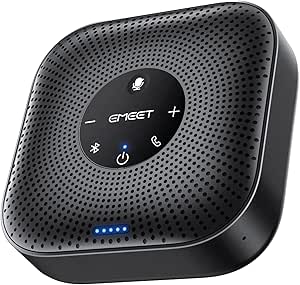 | Best Value for Expandable Small Meetings | Microphones: 4-mic array with 360° pickup | Noise handling: VoiceIA noise reduction and echo cancellation | Speaker power: 3W | VIEW ON AMAZON | See Our Full Breakdown |
| Conference Speaker and Microphone with Built-in USB Hub, 360° Omnidirectional USB Speakerphone |  | Best for a Fixed USB Desk Setup | Microphone pattern: Omnidirectional | Voice pickup range: Up to 3 meters | Connectivity: Wired USB 2.0 | VIEW ON AMAZON | See Our Full Breakdown |
| Yealink SP92 Conference Speakerphone with AI Noise Cancellation, Microsoft Teams Certified |  | Best Compact Wireless Pick | Weight: 276g | Dimensions: 5.04 × 5.04 × 1.37 inches | Speaker: 50mm; mono output | VIEW ON AMAZON | See Our Full Breakdown |
| EMEET Conference Speaker and Microphone with 8+1 Mics, 360° Voice Pickup, Noise Reduction, Bluetooth/USB/Dongle, for 14-25 People, 2025 Version |  | Best for Larger Client Meeting Rooms | Microphones: 8 omnidirectional microphones plus 1 dedicated satellite microphone | Voice pickup: 360° | Coverage: Up to 14 people; expandable to 25 with daisy chaining | VIEW ON AMAZON | See Our Full Breakdown |
| Yamaha YVC-330 Portable USB & Bluetooth Conference Phone with SoundCap Technology |  | Best for Noisy Small Offices | Noise reduction: Yamaha SoundCap technology | Microphones: 3 unidirectional microphones with voice activity detection | Participant capacity: 5–8 people | VIEW ON AMAZON | See Our Full Breakdown |
| Jabra Speak 410 USB Speakerphone |  | Best for Simple Desk Setups | Model: Speak 410 | Connectivity: USB | Compatibility: All PCs, UC systems, and VoIP clients | VIEW ON AMAZON | See Our Full Breakdown |
| SP325 Professional Wired Speakerphone |  | Best for Wired Group Calls | Connectivity: USB | Compatibility: Windows, macOS, and major UC platforms | Microphone: 360° omnidirectional with noise suppression | VIEW ON AMAZON | See Our Full Breakdown |
| Jabra Speak 710 UC Wireless Bluetooth Speakerphone with Link 370 USB Adapter |  | Best for Portable Presentation Calls | Model: Speak 710 UC | Weight: 195.4 g | Connectivity: USB and Bluetooth | VIEW ON AMAZON | See Our Full Breakdown |
| Lenovo Wireless Speakerphone 6000, Microsoft Teams Certified Bluetooth Conference Speaker |  | Best for Teams Client Meetings | Microphones: 8 beamforming microphones | Noise cancellation: AI-powered | Pickup range: Up to 5 meters | VIEW ON AMAZON | See Our Full Breakdown |
| Anker PowerConf Bluetooth Speakerphone with 6 Microphones |  | Best for Long Wireless Meetings | Microphones: 6 in a 360° array | Connectivity: Bluetooth 5.3 and USB-C | Battery life: Up to 24 hours | VIEW ON AMAZON | See Our Full Breakdown |
| EMEET Luna Conference Speaker and Microphone with 360° Voice Pickup |  | Best for Flexible Setup | Voice pickup: 360° | Microphone array: 3 microphones | Recommended users: Up to 8; up to 16 with two units | VIEW ON AMAZON | See Our Full Breakdown |
| AVer FONE540 Bluetooth Conference Speakerphone |  | Best for AVer Camera Setups | Microphones: 1 | Audio output mode: Stereo | Connectivity: Bluetooth, USB | VIEW ON AMAZON | See Our Full Breakdown |
| Anker PowerConf S330 USB Speakerphone |  | Best for Simple USB Meetings | Connection: USB-C; USB-A adapter included | Microphones: 4 | Voice coverage range: Up to 3 meters | VIEW ON AMAZON | See Our Full Breakdown |
| RayBit POD4 Conference Speaker and Microphone |  | Best Expansion Kit | Connectivity: Bluetooth, USB, wireless dongle, daisy chain | Audio output mode: Stereo | Microphone pickup: 360°; 3–5-meter radius | VIEW ON AMAZON | See Our Full Breakdown |
| Yealink SP96 Bluetooth Conference Speakerphone |  | Best for Mid-Size Teams | Microphones: 6 | Voice pickup radius: 5 meters | Talk time: Up to 26 hours | VIEW ON AMAZON | See Our Full Breakdown |
| professional conference speakerphone for client meeting | Connectivity | Microphones |
|---|---|---|
| EMEET M0 Plus Conference Speak | USB-C, USB-C-to-A adapter, Bluetooth 5.0 | 4-mic array with 360° pickup |
| Conference Speaker and Microph | Wired USB 2.0 | — |
| Yealink SP92 Conference Speake | Bluetooth 5.3, USB-C with C-to-A adapter, optional BT51C dongle | — |
| EMEET Conference Speaker and M | Bluetooth 5.3 and USB 2.0 | 8 omnidirectional microphones plus 1 dedicated satellite microphone |
| Yamaha YVC-330 Portable USB & | USB 3.0, NFC, and Bluetooth | 3 unidirectional microphones with voice activity detection |
| Jabra Speak 410 USB Speakerpho | USB | — |
| SP325 Professional Wired Speak | USB | — |
| Jabra Speak 710 UC Wireless Bl | USB and Bluetooth | — |
| Lenovo Wireless Speakerphone 6 | Bluetooth 5.3, USB-C, and USB-A | 8 beamforming microphones |
| Anker PowerConf Bluetooth Spea | Bluetooth 5.3 and USB-C | 6 in a 360° array |
| EMEET Luna Conference Speaker | USB, Bluetooth, AUX, dongle | — |
| AVer FONE540 Bluetooth Confere | Bluetooth, USB | 1 |
| Anker PowerConf S330 USB Speak | — | 4 |
| RayBit POD4 Conference Speaker | Bluetooth, USB, wireless dongle, daisy chain | — |
| Yealink SP96 Bluetooth Confere | Bluetooth, USB-C, USB-A adapter | 6 |
More Details on Our Top Picks
EMEET M0 Plus Conference Speaker and Microphone with 4 Mics, 360° Voice Pickup
The EMEET M0 Plus makes sense for client calls where a compact speakerphone needs to cover more than one seat without requiring a complicated setup. Its four-microphone, 360° array and echo cancellation help remote clients follow contributions from around a small table, while USB-C and Bluetooth make it easy to move between a laptop and a phone. Compared with the Yealink SP92, it has shorter stated battery life and older Bluetooth, but it can link with a second unit to extend coverage for up to 16 attendees. That flexibility comes with a catch: the 3W speaker may struggle in a large room, and expansion means buying another unit. I’d choose it for a modest meeting space that may occasionally need wider microphone coverage, rather than for a room that needs powerful audio every day.
Pros:- Four microphones provide 360° pickup around a small meeting table.
- USB-C and Bluetooth 5.0 support wired or wireless laptop and phone connections.
- Can link a second unit to cover meetings with up to 16 attendees.
- More than 10 hours of stated talk time supports extended meeting days.
Cons:- The 3W speaker may be underpowered in a large conference room.
- Larger group coverage requires purchasing a second unit.
- Bluetooth 5.0 is an older version than the Yealink SP92’s Bluetooth 5.3.
Best for: Small client-facing teams that want a portable speakerphone now and the option to link a second unit for occasional larger meetings.
Not ideal for: Teams presenting to large rooms every day, where the 3W speaker may not provide enough volume.
- Microphones:4-mic array with 360° pickup
- Noise handling:VoiceIA noise reduction and echo cancellation
- Speaker power:3W
- Audio mode:Full duplex
- Connectivity:USB-C, USB-C-to-A adapter, Bluetooth 5.0
- Expansion:Supports linking two units for up to 16 attendees
- Battery life:More than 10 hours of talk time
- Setup and compatibility:Plug and play; supports Zoom, Teams, Slack, Webex, and other conferencing platforms
Our verdict“Choose the M0 Plus for a small client meeting room that values flexible connections and optional expansion over high speaker output.”
Conference Speaker and Microphone with Built-in USB Hub, 360° Omnidirectional USB Speakerphone
The Q95mini suits a client meeting station that stays wired to one computer. Its 3-meter USB cable allows flexible tabletop placement, and the built-in hub can keep a peripheral connected without using another computer port. The stated pickup range reaches 3 meters, with DSP echo cancellation and noise suppression intended to keep conversation clear. Compared with the wireless EMEET M0 Plus, the Q95mini gives up portable placement and battery operation; in return, it offers a straightforward, corded setup and a physical mute button. That button mutes the microphone only, so it does not silence incoming audio. The plastic enclosure and wired-only connection also make it less suited to a polished, frequently rearranged conference room. I’d pick it for a dedicated desk where USB convenience matters more than mobility.
Pros:- Omnidirectional microphone has a stated pickup range of up to 3 meters.
- Three-meter USB cable allows tabletop placement away from the computer.
- Built-in USB hub can connect a peripheral while the speakerphone is in use.
- DSP processing includes echo cancellation and noise suppression.
Cons:- Wired-only USB connectivity limits placement flexibility.
- The mute button silences the microphone but not the speaker.
- Plastic enclosure is less suited to a premium conference-room setup.
Best for: Office administrators setting up a fixed Windows or Mac client-call desk who want a long USB cable and an extra peripheral connection.
Not ideal for: Teams that move between rooms or need wireless placement, since it is corded and has no stated battery operation.
- Microphone pattern:Omnidirectional
- Voice pickup range:Up to 3 meters
- Connectivity:Wired USB 2.0
- Cable length:3 meters (9.8 feet)
- Audio processing:DSP echo cancellation and noise suppression
- Special feature:Built-in USB hub
- Compatibility:Windows 7–10 and macOS; works with Zoom, Teams, Skype, Webex, and other conferencing platforms
- Enclosure:Plastic
Our verdict“Choose the Q95mini for a permanent USB-connected meeting desk where its hub and long cable are more useful than wireless mobility.”
Yealink SP92 Conference Speakerphone with AI Noise Cancellation, Microsoft Teams Certified
The Yealink SP92 is the strongest fit here for professionals who carry a speakerphone between client rooms or travel with one. At 276g, it is easy to pack, while its stated 20-hour battery life reduces the need to find a charger during a full meeting day. Yealink lists 360° coverage within a 13-foot radius and AI noise cancellation that filters more than 1,000 noise types; together, those features target busy rooms where clear conversation matters. Compared with the EMEET M0 Plus, the SP92 offers newer Bluetooth and longer stated battery life, but its expansion options are less clearly suited to scaling up a larger room. It also outputs mono audio, and the optional Bluetooth dongle is sold separately. I’d choose it for small, mobile client meetings rather than a large fixed boardroom.
Pros:- Lightweight 276g design and included carrying case suit mobile work.
- Stated 20-hour battery life supports long meeting days between charges.
- Bluetooth 5.3 and USB-C offer current wireless and wired connection options.
- Microsoft Teams certification and support for Zoom, Meet, and Webex fit common client-call platforms.
Cons:- Audio output is mono.
- The optional BT51C Bluetooth dongle is sold separately.
- Less suited to large groups than the expandable EMEET M0 Plus.
Best for: Consultants and client-facing professionals who need a light speakerphone for small rooms and travel, especially in Teams-based setups.
Not ideal for: Teams that need stereo audio, included Bluetooth dongle connectivity, or a speakerphone designed to expand across a large room.
- Weight:276g
- Dimensions:5.04 × 5.04 × 1.37 inches
- Speaker:50mm; mono output
- Battery life:Up to 20 hours; 2.5-hour recharge
- Standby time:Up to 20 days
- Connectivity:Bluetooth 5.3, USB-C with C-to-A adapter, optional BT51C dongle
- Audio pickup:360° coverage within a 13-foot (4-meter) radius
- Certification and compatibility:Microsoft Teams Certified; supports Zoom, Google Meet, Cisco Webex, Windows, macOS, and Android
Our verdict“Choose the SP92 when portability, long battery life, and Teams compatibility matter more than stereo output or large-room expansion.”
EMEET Conference Speaker and Microphone with 8+1 Mics, 360° Voice Pickup, Noise Reduction, Bluetooth/USB/Dongle, for 14-25 People, 2025 Version
The EMEET Luna Plus is the room-oriented choice in this group. Its eight microphones and dedicated satellite mic are designed to capture voices around a larger table, with listed coverage for up to 14 people and expansion to 25 through daisy chaining. Full duplex audio supports natural interruptions and back-and-forth discussion, which can matter more in a client meeting than a basic laptop-style call. Compared with the compact Yealink SP92, the Luna Plus is built for broader group coverage, but it is less compelling for someone who needs a light, travel-ready device. Its 10-hour battery life is shorter than the SP92’s stated 20 hours, and the cable needed to daisy-chain units is sold separately. I’d choose it when the room size justifies the extra microphones and setup.
Pros:- Eight microphones plus a dedicated satellite mic are designed for 360° room pickup.
- Listed coverage reaches up to 14 attendees and can expand to 25 with daisy chaining.
- Full duplex audio supports simultaneous conversation.
- Bluetooth 5.3 and USB 2.0 support wireless and wired connections.
Cons:- The daisy-chain cable is sold separately.
- Expanding to the maximum stated coverage requires extra equipment and setup.
- Ten-hour battery life is shorter than the Yealink SP92’s stated 20 hours.
Best for: Client-facing teams that regularly host meetings around a larger table and need coverage for more attendees than a compact speakerphone is designed to handle.
Not ideal for: Solo professionals or small teams who prioritize light travel gear and do not need multi-unit room coverage.
- Microphones:8 omnidirectional microphones plus 1 dedicated satellite microphone
- Voice pickup:360°
- Coverage:Up to 14 people; expandable to 25 with daisy chaining
- Audio processing:Noise reduction and echo cancellation
- Audio mode:Full duplex
- Speaker:5W; maximum volume 89 dB
- Battery:2600mAh; up to 10 hours
- Connectivity:Bluetooth 5.3 and USB 2.0
Our verdict“Choose the Luna Plus for regular, larger client meetings where room coverage matters more than compact size or maximum battery life.”
Yamaha YVC-330 Portable USB & Bluetooth Conference Phone with SoundCap Technology
The Yamaha YVC-330 targets client calls in open offices and other spaces where background noise can compete with speech. Its SoundCap noise reduction works alongside three unidirectional microphones with voice activity detection, a different approach from the broad omnidirectional pickup of the EMEET M0 Plus. Yamaha lists capacity for five to eight participants, making this a more focused small-room option than the larger EMEET Luna Plus. USB, NFC, and Bluetooth offer several ways to connect, and the included six-foot USB cable supports a simple wired setup. The tradeoff is room scale: it is not aimed at large groups, and the supplied product data lists no power adapter. I’d consider it when noise control and flexible pairing matter more than expanding coverage.
Pros:- SoundCap noise reduction is designed for meetings in open or noisy spaces.
- Three unidirectional microphones use voice activity detection.
- USB, NFC, and Bluetooth provide multiple connection options.
- Listed capacity of five to eight participants suits small-group discussions.
Cons:- The stated five-to-eight-person capacity is too limited for larger client meetings.
- No power adapter is included, according to the supplied product data.
- The EMEET M0 Plus offers a clearer expansion path through daisy chaining.
Best for: Small client teams meeting in open offices or other shared spaces who want noise reduction and several connection methods.
Not ideal for: Businesses hosting large conference-room meetings or buyers who need a supplied power adapter.
- Noise reduction:Yamaha SoundCap technology
- Microphones:3 unidirectional microphones with voice activity detection
- Participant capacity:5–8 people
- Connectivity:USB 3.0, NFC, and Bluetooth
- Setup:Plug and play
- Included cable:6-foot USB cable
Our verdict“Choose the Yamaha YVC-330 for small client meetings in noisy shared spaces when noise reduction and flexible pairing take priority over room expansion.”
Jabra Speak 410 USB Speakerphone
The Speak 410 is a straightforward fit for client calls at a fixed desk: connect it over USB and use it with a PC, UC system, or VoIP client. Its appeal is simplicity, especially for teams that do not need wireless pairing or a battery. Compared with the Jabra Speak 710 UC, it gives up Bluetooth and portable wireless use, but it also avoids making those features part of the setup. The product information describes sound quality as a strength, though it does not specify microphone coverage, battery life, or noise suppression. That leaves less evidence for choosing it for larger rooms or noisy spaces. I’d pick it for one-person or small-room calls where dependable USB connection matters more than moving around.
Pros:- Plug-and-play USB setup
- Works with PCs, UC systems, and VoIP clients
- Portable form factor for moving between desk spaces
Cons:- USB is the only listed connection, limiting placement away from the computer
- No battery or wireless operation is specified
- Microphone coverage and noise handling are not detailed
Best for: Desk-based professionals who take client calls from a PC using USB-compatible UC or VoIP software
Not ideal for: People who need Bluetooth, wireless placement, or documented microphone performance for a larger meeting room
- Model:Speak 410
- Connectivity:USB
- Compatibility:All PCs, UC systems, and VoIP clients
- Design:Portable speakerphone
- Setup:Plug and play
- Audio:Sound quality described as suitable for conference calls
Our verdict“Choose the Speak 410 for uncomplicated USB calls at a desk; choose the Speak 710 UC if wireless connectivity is a priority.”
SP325 Professional Wired Speakerphone
The SP325 makes a stronger case for shared-room conversation than the Jabra Speak 410: its 360° omnidirectional microphone is specified with noise suppression, and full-duplex audio lets participants speak over one another more naturally. Wideband speaker audio and call controls cover the basics for client meetings across Windows, macOS, and major UC platforms. Its compact, durable design suits a conference table that stays near a computer. The tradeoff is the cable: unlike the Lenovo Wireless Speakerphone 6000, it offers no listed Bluetooth connection or battery, so placement depends on USB reach. The product data also gives no pickup distance, which makes it harder to judge room size. I’d favor it for small fixed rooms where wired reliability and clear group pickup matter.
Pros:- 360° microphone with noise suppression
- Full-duplex wideband audio supports more natural conversation
- Volume, mute, and call-handling controls are included
- Compatible with Windows, macOS, and major UC platforms
Cons:- USB cable limits placement around the meeting table
- No battery-powered or wireless use is listed
- Pickup distance and supported room size are unspecified
Best for: Small teams holding client calls in a fixed meeting room with a nearby Windows or Mac computer
Not ideal for: Mobile professionals or teams that need wireless placement, battery operation, or a stated pickup range
- Connectivity:USB
- Compatibility:Windows, macOS, and major UC platforms
- Microphone:360° omnidirectional with noise suppression
- Audio:Full-duplex, wideband
- Controls:Volume, mute, and call handling
- Design:Compact and durable
Our verdict“Pick the SP325 for a compact wired conference table setup with specified 360° pickup and full-duplex audio.”
Jabra Speak 710 UC Wireless Bluetooth Speakerphone with Link 370 USB Adapter
The Jabra Speak 710 UC is the portable pick for professionals who move between rooms and want one speakerphone for calls and music. USB and Bluetooth provide more placement flexibility than the wired SP325, while the included Link 370 adapter supports a USB connection. Its 195.4 g weight and travel pouch make it easy to carry between client sites. The stated coverage is only up to six people, so it is better suited to a small huddle than a larger boardroom; the Lenovo Speakerphone 6000 lists an up-to-five-meter pickup range and more detailed microphone information. There is also a meaningful limitation in the supplied data: it says the 710 has no built-in battery and relies on external power, which undercuts its portability for meetings without an outlet. I’d choose it when compact size and flexible connections matter most.
Pros:- USB and Bluetooth connectivity
- Lightweight at 195.4 g
- Protective travel pouch is included
- Designed for calls and music
Cons:- Listed in-room coverage is limited to up to six people
- No built-in battery is specified, so external power is required
- Compatibility depends on a Bluetooth or USB connection supported by the device
Best for: Consultants and client-facing professionals who carry a speakerphone between small meeting rooms with access to power
Not ideal for: Larger teams or people who need battery-powered operation away from an outlet
- Model:Speak 710 UC
- Weight:195.4 g
- Connectivity:USB and Bluetooth
- Included adapter:Link 370 USB adapter
- Platform compatibility:Zoom, Google Meet, Skype for Business, and GoTo Meeting
- Stated room coverage:Up to 6 people
- Power:External power required; no built-in battery specified
- Included accessory:Protective travel pouch
Our verdict“Choose the Speak 710 UC for compact, flexible small-room calls when you can provide external power.”
Lenovo Wireless Speakerphone 6000, Microsoft Teams Certified Bluetooth Conference Speaker
The Lenovo Wireless Speakerphone 6000 is the most purpose-built option here for Teams calls that also need flexible device connections. Its eight beamforming microphones, AI noise cancellation, and stated pickup range of up to five meters give buyers more room-performance detail than the Jabra Speak 710 UC provides. Bluetooth 5.3, USB-C, and USB-A cover newer and older devices, and it can connect to two devices at once. Up to 12 hours of talk time, IP54 protection, and a carrying case help when meetings move beyond a permanent desk. The main caveat is that Teams certification is specified for USB connection, so buyers should not assume the same certification applies over Bluetooth. Compared with the Anker PowerConf, its shorter stated talk time and lack of reverse charging make it less suited to all-day mobile use, but its microphone array and Teams focus make it a compelling client-call choice.
Pros:- Eight beamforming microphones with AI noise cancellation
- Pickup range specified up to five meters
- Bluetooth 5.3, USB-C, and USB-A connectivity
- Up to 12 hours of talk time with IP54 dust and splash resistance
Cons:- Teams certification is specified for USB connection
- Talk time is shorter than the Anker PowerConf’s stated 24 hours
- No reverse charging feature is listed
Best for: Microsoft Teams users who host small-to-medium client meetings and need both USB and Bluetooth connections
Not ideal for: People who need the longest stated battery runtime or want Teams certification explicitly specified over Bluetooth
- Microphones:8 beamforming microphones
- Noise cancellation:AI-powered
- Pickup range:Up to 5 meters
- Speaker driver:50 mm
- Connectivity:Bluetooth 5.3, USB-C, and USB-A
- Bluetooth connections:Connects to 2 devices at once; pairs with up to 8 devices
- Talk time:Up to 12 hours
- Certification:Microsoft Teams certified for USB connection
- Protection and accessory:IP54 dust and splash resistance; carrying case included
Our verdict“Choose the Lenovo 6000 for Teams-focused meetings where detailed microphone coverage and multiple connection options matter.”
Anker PowerConf Bluetooth Speakerphone with 6 Microphones
The Anker PowerConf is the battery-first choice for client meetings that may run long or shift between rooms. Its six-microphone 360° array and real-time DSP are designed to keep voices clear from different seats, while Bluetooth 5.3 and USB-C let it serve both mobile devices and computers. The stated 24-hour call time is twice the Lenovo 6000’s listed talk time, and PowerIQ reverse charging can help keep another device running during a travel day. Zoom certification is a useful fit for teams centered on that platform, with compatibility also listed for major conferencing services. Compared with the more Teams-focused Lenovo, the PowerConf prioritizes endurance and charging utility over a detailed pickup-range claim or IP54 protection. Its plastic enclosure is less premium, and it is not waterproof, so it suits indoor portability rather than rough outdoor use.
Pros:- Six microphones arranged for 360° voice pickup
- Up to 24 hours of call time
- PowerIQ reverse charging can power other devices
- Bluetooth 5.3 and USB-C connections with Zoom certification
Cons:- Not waterproof, limiting use in damp or outdoor settings
- Plastic enclosure may feel less premium
- No microphone pickup distance is specified
Best for: Mobile consultants and small client-facing teams that need long battery life, 360° pickup, and Zoom compatibility
Not ideal for: Buyers who need water resistance, a premium enclosure, or a specified pickup range for a larger room
- Microphones:6 in a 360° array
- Connectivity:Bluetooth 5.3 and USB-C
- Battery life:Up to 24 hours
- Battery capacity:6,700 mAh
- Battery charge time:4 hours
- Weight:12 ounces
- Dimensions:4.84 in D × 4.88 in W × 1.18 in H
- Bluetooth range:10 meters
- Certification and compatibility:Zoom certified; compatible with smartphones, desktops, laptops, and major conferencing platforms
Our verdict“Pick the PowerConf for portable client calls where long battery life and device charging matter more than water resistance.”
EMEET Luna Conference Speaker and Microphone with 360° Voice Pickup
The Luna suits client meetings where the room layout or host’s device may change from one call to the next. Its USB, Bluetooth, AUX, and dongle connections give it more ways to connect than the USB-only Anker PowerConf S330, while three microphones and 360° pickup are specified for groups of up to eight. VoiceIA noise reduction and full-duplex audio are aimed at keeping speech clear when people talk over one another or office sounds intrude. For a larger table, two units can be linked to cover up to 16 attendees. That expansion comes with a catch: the daisy-chain cable is sold separately, and the connection between units is wired. I’d choose the Luna for teams that value adaptable connections, while the newer Yealink SP96 offers a longer stated pickup radius and battery operation.
Pros:- USB, Bluetooth, AUX, and dongle connections suit varied meeting setups.
- Three-microphone array provides 360° voice pickup for groups of up to eight.
- VoiceIA noise reduction targets office sounds such as keyboards and air conditioning.
- Two units can be daisy-chained for meetings of up to 16 attendees.
Cons:- The daisy-chain cable is sold separately.
- The wired link between units adds cable management for expanded rooms.
Best for: Small client-facing teams that switch between laptops, phones, and meeting rooms and want the option to expand coverage.
Not ideal for: Teams that need to expand immediately without buying extra accessories, or want a wireless link between daisy-chained units.
- Voice pickup:360°
- Microphone array:3 microphones
- Recommended users:Up to 8; up to 16 with two units
- Connectivity:USB, Bluetooth, AUX, dongle
- Noise reduction:VoiceIA technology
- Audio mode:Full-duplex
- Maximum volume:85 dB
- Casing:Full-metal, sandblasted matte finish
Our verdict“Choose the Luna if connection flexibility matters more than a wireless expansion setup or a longer specified pickup radius.”
AVer FONE540 Bluetooth Conference Speakerphone
The FONE540 has a distinct advantage for businesses already using AVer conference cameras: it is designed to work with or without an AVer camera, so teams can add speakerphone audio without rebuilding their setup. Double-talk detection is intended to help preserve speech when participants speak at the same time, and noise suppression targets distracting room sound. That makes it a plausible fit for structured client calls where clear turn-taking matters. The product data lists one microphone, though, which gives less documented pickup coverage than the EMEET Luna’s three-microphone array or the Yealink SP96’s six. Its audio features sound more compelling than its coverage details, and the listing does not specify a pickup radius or battery life. I’d shortlist it for AVer-centered rooms, but choose a model with defined microphone coverage for broader tables.
Pros:- Works with or without AVer cameras, fitting existing AVer room systems.
- Double-talk detection is designed for conversations with overlapping speech.
- Noise suppression supports clearer calls in rooms with background sound.
- Bluetooth and USB provide two connection options.
Cons:- The listed single microphone offers less documented room coverage than the Luna or SP96 arrays.
- The supplied product data does not state a pickup radius or battery life.
- The listing’s compatibility details are less specific than the SP96’s named platform support.
Best for: Organizations with AVer conference cameras that want a tabletop speakerphone for client calls and multi-call use.
Not ideal for: Teams with large or spread-out tables that need a stated 360° pickup radius or several microphones for room coverage.
- Microphones:1
- Audio output mode:Stereo
- Connectivity:Bluetooth, USB
- Additional audio features:Double-talk detection, multi-call, noise suppression
- Mounting type:Tabletop
- Audio driver:Dynamic driver
- USB ports:1 USB 2.0 port
Our verdict“Pick the FONE540 for an AVer-based meeting room, but look to the Luna or SP96 when microphone coverage is the deciding factor.”
Anker PowerConf S330 USB Speakerphone
The S330 is the straightforward choice for a small client-meeting setup centered on a computer: connect it over USB-C, or use the included USB-A adapter, and the speakerphone is ready without pairing. Its four microphones cover voices from up to 3 meters, while smart voice enhancement aims to reduce background noise. Compared with the Bluetooth-capable EMEET Luna, the S330 trades connection flexibility for a simpler wired workflow. That tradeoff also limits where it can sit relative to the host computer. The 1.75-inch driver and passive bass radiators add a practical bonus for listening to media between calls, though music playback is secondary to the meeting use case. I’d favor this model for a personal office or compact table, not a room that needs cable-free placement or room expansion.
Pros:- USB-C connection and included USB-A adapter simplify setup with computers.
- Four microphones provide 360° voice coverage from up to 3 meters.
- Smart voice enhancement is designed to reduce background noise.
- Stereo speaker supports calls and music playback.
Cons:- Wired USB connection restricts placement relative to the computer.
- The supplied data gives no daisy-chain option for larger meetings.
Best for: Solo professionals and small client teams who hold computer-based calls at a fixed desk and prefer a plug-and-play wired connection.
Not ideal for: Meeting hosts who need Bluetooth placement flexibility, a stated expansion option, or coverage beyond the specified 3-meter range.
- Connection:USB-C; USB-A adapter included
- Microphones:4
- Voice coverage range:Up to 3 meters
- Driver size:1.75 inches
- Audio output mode:Stereo
- Mounting type:Tabletop
- Weight:8 ounces
- Included adapter:USB-C to USB-A
Our verdict“Choose the S330 for a compact, computer-based meeting setup where a cable is acceptable and uncomplicated connection matters most.”
RayBit POD4 Conference Speaker and Microphone
The POD4 is packaged for teams that may need to extend their room audio: the kit includes an expansion microphone, wireless dongle, and 3-meter daisy-chain cable. Its stated 3–5-meter radius with 360° pickup gives buyers a useful coverage range to compare with the EMEET Luna’s recommendation for groups of up to eight, although the supplied details do not specify an attendee limit. AI-based echo cancellation, voice enhancement, and full-duplex audio target intelligible conversation when clients and colleagues speak naturally. The kit also connects by Bluetooth or USB, and it names support for common meeting platforms. Against the Yealink SP96, the POD4 emphasizes included expansion accessories; the SP96 instead lists six microphones, Teams certification, and a 5-meter pickup radius. The POD4’s plastic enclosure may feel less suited to a premium boardroom.
Pros:- Includes an expansion microphone, wireless dongle, and 3-meter daisy-chain cable.
- Bluetooth, USB, and dongle connections support different host setups.
- Specified 360° pickup radius is 3–5 meters.
- AI noise and echo cancellation, voice enhancement, and full-duplex audio target clear conversation.
Cons:- Plastic enclosure may feel less premium in a formal client room.
- The supplied data does not state an attendee capacity or platform certification.
- Not waterproof.
Best for: Client-facing teams that want expansion accessories included and expect to adapt audio coverage for different room sizes.
Not ideal for: Buyers seeking a premium-feeling enclosure, a specified attendee capacity, or formal Microsoft Teams certification.
- Connectivity:Bluetooth, USB, wireless dongle, daisy chain
- Audio output mode:Stereo
- Microphone pickup:360°; 3–5-meter radius
- Expansion microphone:1.8 meters
- Daisy-chain cable:3 meters
- USB cable:1.5-meter USB-C to USB-A
- Enclosure material:Plastic
- Audio driver:Dynamic driver
Our verdict“Choose the POD4 if included expansion hardware matters more than a premium finish or a documented attendee limit.”
Yealink SP96 Bluetooth Conference Speakerphone
For a client-facing room with roughly 8–12 people, the SP96 offers the clearest stated coverage target in this group: six microphones with a 5-meter pickup radius, plus daisy-chain support to expand coverage from 20 to 40 square meters. AI noise cancellation is described as filtering more than 1,000 ambient sounds, and full-duplex audio is designed to keep two-way conversation flowing. It also brings Microsoft Teams certification and compatibility with Zoom, Google Meet, and Webex. Compared with the EMEET Luna, it specifies a larger pickup radius and longer battery operation; the Luna offers AUX and a dongle connection, which the SP96 listing does not. The SP96’s 26-hour talk time suits mobile room setups, but its Bluetooth dongle is not included, so teams relying on a dongle connection need to source one separately.
Pros:- Six microphones provide 360° pickup with a stated 5-meter radius.
- Microsoft Teams certified and compatible with Zoom, Google Meet, and Webex.
- Up to 26 hours of talk time with a stated 2.5-hour recharge.
- Daisy-chain capability expands listed coverage from 20 to 40 square meters.
Cons:- The BT51C Bluetooth dongle is not included.
- The stated fit is for 8–12 people and coverage up to 40 square meters with daisy chaining.
- Not waterproof.
Best for: Teams holding client meetings in small or mid-size rooms who want Teams certification, long battery life, and an expansion path.
Not ideal for: Buyers who need a Bluetooth dongle in the box, waterproofing, or a solution specified for larger rooms from the outset.
- Microphones:6
- Voice pickup radius:5 meters
- Talk time:Up to 26 hours
- Recharge time:2.5 hours
- Bluetooth:Version 5.3; up to 30 meters
- Connectivity:Bluetooth, USB-C, USB-A adapter
- Audio mode:Full-duplex
- Daisy-chain coverage:20 to 40 square meters
Our verdict“Pick the SP96 for a mid-size client room that benefits from long battery life and Teams certification, provided the missing dongle is not a blocker.”

How We Picked
I ranked these speakerphones around the needs of client meetings: clear, even voice pickup; control of background noise; dependable connections; and straightforward setup. Room size matters because a compact unit can work well for a few people but leave voices at the far end of a table sounding distant. I also weighed whether a model supports wired USB, Bluetooth, a wireless dongle, or expansion, since those choices affect compatibility and how easily a team can move between rooms.
The ranking favors models that balance those needs for a broad range of professional conversations. A model aimed at larger groups can rank highly for coverage but may be more than a small team needs; a wired unit can be a better choice when simplicity is the priority. I treated certifications and stated features as selection signals, not proof of performance in every room or meeting app. Each pick has a tradeoff, so the right fit depends on group size, room acoustics, and how people join calls.
Factors to Consider When Choosing Professional Conference Speakerphone For Client Meetings
Choosing a speakerphone for client calls starts with the way meetings happen in your rooms, not with the longest feature list. I’d check the practical limits around seating, connection habits, and room noise before deciding which capabilities merit a higher priority.
Match microphone coverage to the room
Estimate how far the quietest speaker will sit from the unit, then think about whether people sit around one table or spread across a room. A microphone array may help cover several directions, but the number of microphones alone does not tell you how evenly voices will come through. Large conference tables, glass walls, and hard surfaces can make pickup more difficult. A common mistake is buying for the biggest meeting size on paper when most calls involve only a few people. If attendance changes often, prioritize flexible placement or expansion. For a small, predictable room, a simpler unit may be easier to position and manage.
Treat room noise and echo as separate problems
Noise cancellation can reduce distractions such as typing, ventilation, or nearby conversation, while echo control deals with sound from the speaker feeding back into the microphones. These are related but distinct needs. If calls often take place in an open office, background noise handling deserves more weight. In a glass-walled room, speaker placement and echo management may matter just as much. Avoid assuming an AI label guarantees clean audio in every space; furnishings and microphone distance still shape the call. A quiet room with soft surfaces may need less processing than a busy shared room. Think about the actual sound environment before paying extra for features your meetings rarely need.
Choose connections that fit your meeting routine
USB is a direct option for a laptop-based room, while Bluetooth can make a speakerphone easier to share across devices or carry between spaces. A wireless dongle may simplify pairing for a team that frequently changes rooms, though it adds another item to keep track of. Before choosing, check whether calls typically run from a computer, a phone, or both. Confirm compatibility with the conferencing software and operating systems your team uses. Certification can be a useful sign of platform alignment, but it does not replace checking your own setup. Buying every connection type can add complexity if the team uses only one.
Decide whether portability is a real need
A portable speakerphone helps when people move between home offices, client sites, and shared meeting rooms. That convenience matters less when a device will stay connected to one conference-room computer. Frequent travel makes weight, charging, and storage part of the decision, while a fixed installation can favor a wired connection that is always ready. Do not assume a compact unit will cover a large table just because it is easy to carry. Likewise, a larger group model may be cumbersome for one person who takes calls on the move. Consider who will own, store, and charge the device between meetings.
Pay for expansion when meeting size can grow
Daisy-chain support can help extend coverage across a larger table or support changing room layouts. It is useful when a business expects group size to grow, but unnecessary for a room with a stable small team. Check what expansion requires, including compatible companion units and additional cables or setup steps. A model with extensive group coverage can cost the team more time to configure even when its features sound attractive. If client meetings are usually one-to-one or involve a few colleagues, prioritize clear pickup and quick setup. Spend more on expansion when it solves a recurring coverage problem.
Plan for the whole call, not just the speakerphone
A speakerphone is only one part of a reliable client meeting setup. Laptop placement, call software, network stability, and the room’s acoustics all affect whether participants can follow the discussion. Teams often focus on microphone specs and overlook who is responsible for connecting, muting, and updating the device. A simple operating routine can prevent delays at the start of a meeting. If different employees share a room, choose controls and connections they can use without special instructions. For recurring client calls, a short pre-call check can catch compatibility or placement issues before guests join.
Frequently Asked Questions
Which type of speakerphone makes sense for a small client meeting room?
For a small room with a few people seated near one table, a straightforward wired USB model such as the Jabra Speak 410 can keep setup uncomplicated. If people need to connect phones as well as laptops, a Bluetooth option may fit better. Judge the room by the distance between the speakerphone and the farthest participant, not just by its headcount. Hard surfaces or a noisy office can reduce clarity even in a small space. Choose for the room you use most often, then confirm compatibility with the devices and call software used there.
Is a speakerphone with more microphones always better for a client call?
No. More microphones may support broader pickup, but placement, room shape, and noise handling also affect what remote participants hear. A unit designed for a larger group can be a sensible choice for a long table, yet unnecessary for a few people gathered close together. Check the intended meeting size and consider where the device can sit without blocking conversation or being crowded by laptops. A well-positioned model suited to the room can serve better than a higher microphone count chosen without regard to layout.
Should I choose Bluetooth or a wired USB speakerphone for a shared office?
Wired USB is a good fit when the speakerphone stays with one computer and people want a direct connection. Bluetooth is more convenient when employees need to move it between rooms or connect different devices. Shared offices can benefit from a dongle if it makes pairing consistent, but the team must keep track of it. Consider how often the device changes hands and whether calls commonly start from phones or laptops. If simplicity matters most, standardize on the connection method your team already uses.
When is daisy-chain support worth choosing?
Daisy-chain support is most useful when a single speakerphone may not cover a long table or when group size varies enough to justify extending coverage. It can help a meeting space adapt without replacing the core device. The feature adds little for a small room where participants sit close to one unit. Check which companion devices are compatible and how expansion affects setup before committing. If the room has a stable layout, buying for present coverage may be easier to manage.
Does Microsoft Teams certification mean a speakerphone will work with my setup?
Certification indicates alignment with Microsoft Teams requirements, which can make the device a more considered choice for Teams-focused rooms. It does not automatically confirm that every feature works with every computer, operating system, or call configuration. Check the connection method and the platform support details for your specific setup. If your team also uses other meeting services, verify those needs too. A certified model still needs suitable room placement and a connection that matches how calls are run.
Conclusion
For a broad range of client meetings, I’d choose the Yealink SP96 as best overall, particularly when room size may change or daisy-chain expansion could help. The Jabra Speak 410 is my value and beginner pick for a small room where a wired USB setup keeps calls simple. For buyers who prioritize a portable USB and Bluetooth option, I’d look at the Yamaha YVC-330 as the premium-leaning choice in this lineup. Larger groups should compare the EMEET 8+1 microphone model and the expandable Yealink, while frequent travelers may prefer a compact Bluetooth speakerphone. Choose by the room you use most, the devices your team connects, and how many voices need to be heard.
Columbus Day / Indigenous Peoples' Day Picks
long weekend sales
As an affiliate, we earn on qualifying purchases.