For a premium tablet kiosk stand for event lead capture, I’d start with the Mount-It! Anti-Theft Universal Tablet Floor Kiosk, Height Adjustable, Black as the best overall pick: its height adjustment and theft-resistant design suit changing event layouts and steady visitor use. The SPROCKET T Print B15 stands out when on-site badge or receipt printing is part of the workflow, while the Mount-It! Universal Tablet POS Stand with Key Lock and Bolt-Down Base fits venues that prioritize a fixed, secured installation. The main tradeoffs are mobility versus tamper resistance, broad tablet compatibility versus a tighter device fit, and a simple scanning station versus a printer-equipped setup. I compare all 13 options below so you can match the stand to your space, staffing, and lead-capture process.

Get business pricing on office and shipping supplies
- Business-only prices and quantity discounts
- Tax-exempt purchasing
- Multiple users, one account, clear invoices
Key Takeaways
- Height adjustment separates flexible event setups from fixed stations: the Mount-It! Height Adjustable Black Floor Kiosk is the strongest all-around fit when guests and booth layouts vary.
- Printing changes the job of the stand: the SPROCKET T Print B15 and Sprocket T Print iPad Kiosk with Brother QL Printer Support suit workflows that need an on-site printout, not just a captured form.
- Anchoring and locking are not interchangeable: the Mount-It! POS stand combines a key lock with a bolt-down base, while other anti-theft models focus on securing the tablet within the enclosure.
- Special-purpose features come with workflow tradeoffs: CTA Digital’s sanitizing station and automatic dispenser may suit high-contact venues, but add equipment and upkeep beyond lead capture.
- Not every event needs a floor stand: the Mount-It! Universal Tablet Countertop Stand can make sense for a staffed desk, while its placement is less flexible than a freestanding kiosk.
| Anti-Theft Adjustable Tablet Floor Stand for POS Checkout |  | Best Overall for Flexible Event Lead Capture | Mounting type: Floor stand | Compatible tablet size: 10–14 inches | Maximum tablet thickness: 0.39 inches (10 mm) | VIEW ON AMAZON | See Our Full Breakdown |
| SPROCKET T Print B15 Secure iPad Floor Kiosk Stand |  | Best for Check-In and Printed Follow-Ups | Model: SPROCKET T Print B15 | Mounting type: Floor stand | Compatible tablets: Apple iPad 10.2-inch and 10.9-inch | VIEW ON AMAZON | See Our Full Breakdown |
| Mount-It! Universal Tablet POS Stand with Key Lock and Bolt-Down Base |  | Best for Countertop Lead Capture | Compatible tablet size: 7.9–11 inches | Supported tablet dimensions: 5.3–7.8 inches wide and 7.8–10.6 inches long | Maximum tablet weight: 2.2 lbs | VIEW ON AMAZON | See Our Full Breakdown |
| CTA Digital Heavy-Duty Gooseneck Floor Stand with Sanitizing Station and Automatic Dispenser for 7–13-Inch Tablets |  | Best for Hygiene-Focused Event Entry | Compatible tablet size: 7–13 inches | Pole adjustment range: 21–35 inches | Gooseneck length: 12 inches | VIEW ON AMAZON | See Our Full Breakdown |
| Mount-It! Anti-Theft Universal Tablet Floor Stand, Silver |  | Best for Anchored Retail-Style Events | Compatible tablet size: 7.9–11 inches | Compatible tablet dimensions: 5.3–7.8 inches wide and 7.7–10.6 inches tall | Material and weight: Steel; 9.4 lbs | VIEW ON AMAZON | See Our Full Breakdown |
| CTA Digital 45-Inch Rotating Floor Stand for Tablets with Lock and Charger Access |  | Best for Flexible Screen Orientation | Mounting type: Floor stand | Height: 45 inches | Rotation: 360 degrees | VIEW ON AMAZON | See Our Full Breakdown |
| Sprocket T Print iPad Kiosk Stand with Brother QL Printer Support |  | Best for On-Site Badge Printing | Mounting type: Floor stand | Compatible tablet: iPad 11-inch (A16) | Compatible printers: Brother QL-810W, QL-820NWB, QL-820NWBc | VIEW ON AMAZON | See Our Full Breakdown |
| Mount-It! Anti-Theft Universal Tablet Floor Kiosk, Height Adjustable, Black |  | Best for Adjustable Visitor Stations | Compatible tablet size: 9.7–13.1 inches | Compatible device dimensions: 6.67–8.68 inches wide; 9.45–12.04 inches tall | Height adjustment: 27.5–47 inches | VIEW ON AMAZON | See Our Full Breakdown |
| Mount-It! Secure iPad and Tablet Kiosk Stand with 360° Swivel |  | Best for Counter or Wall Check-In | Mounting type: Tabletop or wall mount | Compatible tablet size: 10.2–11 inches | Compatible devices: Selected iPad and Samsung Galaxy Tab models | VIEW ON AMAZON | See Our Full Breakdown |
| Mount-It! Anti-Theft iPad Floor Stand Kiosk with Literature Holder |  | Best for Brochure-and-Form Lead Capture | Compatible tablets: Specified iPad Pro 10.5-inch and 11-inch, iPad Air 10.5-inch and 10.9-inch, iPad A16 11-inch, and iPad 7–10 models | Compatibility requirements: Bare tablets only; cases and iPad Pro 12.9-inch are not supported | Stand height: 41.5 inches | VIEW ON AMAZON | See Our Full Breakdown |
| Mount-It! Universal Tablet Countertop Stand, Black | 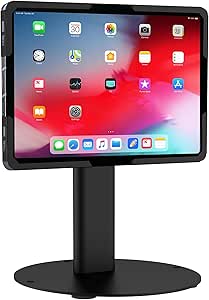 | Best for Flexible Countertop Lead Capture | Compatible tablet size: 9.7–13.1 inches | Material: Alloy steel | Mounting options: Freestanding, bolt-down, or grommet | VIEW ON AMAZON | See Our Full Breakdown |
| CTA Digital Heavy-Duty Locking Floor Stand for 9–11-Inch Tablets, White |  | Best for Heavy-Duty, Model-Specific Security | Mounting type: Floor mount | Tablet compatibility: Select 9–11-inch iPad, Samsung Galaxy Tab, Lenovo Tab 4, and Surface Go models | Enclosure material: Alloy steel | VIEW ON AMAZON | See Our Full Breakdown |
| Mount-It! Anti-Theft Locking iPad Floor Stand, Black |  | Best for Secure iPad Lead-Capture Stations | Compatible devices: iPad Pro 10.5-inch and 11-inch; iPad Air 10.5-inch and 10.9-inch; iPad 11 (A16); iPad 7–10 (10.2–10.9-inch) | Tablet requirement: Bare tablet only; cases are not supported | Incompatible device: iPad Pro 12.9-inch | VIEW ON AMAZON | See Our Full Breakdown |
| premium tablet kiosk stand for event lead capture | Warranty | Compatible tablet size |
|---|---|---|
| Anti-Theft Adjustable Tablet F | — | 10–14 inches |
| SPROCKET T Print B15 Secure iP | — | — |
| Mount-It! Universal Tablet POS | — | 7.9–11 inches |
| CTA Digital Heavy-Duty Goosene | — | 7–13 inches |
| Mount-It! Anti-Theft Universal | Lifetime | 7.9–11 inches |
| CTA Digital 45-Inch Rotating F | 1 year | — |
| Sprocket T Print iPad Kiosk St | 1 year | — |
| Mount-It! Anti-Theft Universal | Lifetime limited warranty against defects in materials and workmanship | 9.7–13.1 inches |
| Mount-It! Secure iPad and Tabl | Lifetime | 10.2–11 inches |
| Mount-It! Anti-Theft iPad Floo | Lifetime | — |
| Mount-It! Universal Tablet Cou | Lifetime | 9.7–13.1 inches |
| CTA Digital Heavy-Duty Locking | — | — |
| Mount-It! Anti-Theft Locking i | Lifetime | — |
More Details on Our Top Picks
Anti-Theft Adjustable Tablet Floor Stand for POS Checkout
For lead capture that needs to work for both standing visitors and seated staff, this stand pairs a 29.53–45.28-inch height range with 360-degree rotation and 180-degree tilt. That flexibility makes it easier to switch between guest-facing sign-ups and staff-assisted registration than with the shorter Mount-It! Universal Tablet POS Stand, which is designed for countertops. Security screws, a custom wrench, and a steel base with hidden cable routing give it a more finished fit for a busy event floor. Its broad 10–14-inch tablet range is useful when an event team already owns hardware, but case-free fit and the 0.39-inch thickness limit narrow that compatibility. The base can be floor-mounted, though installation takes extra work; left freestanding, it is less fixed in place than a bolted kiosk.
Pros:- Broad compatibility with 10–14-inch tablets up to 0.39 inches thick
- Height, rotation, and tilt adjustments suit varied visitor heights and kiosk positions
- Security screws and custom wrench deter casual tablet removal
- Hollow-pole cable routing and a solid steel base keep the setup tidy
Cons:- Rugged cases or tablets over the thickness limit can prevent a proper fit
- Floor mounting requires separate installation
- The freestanding base is not as fixed as a permanently bolted kiosk
Best for: Event teams that need a height-adjustable, secured stand for compatible 10–14-inch tablets and a mix of guest-facing and staff-assisted sign-ups.
Not ideal for: Teams using tablets in rugged cases, devices thicker than 0.39 inches, or a stand that must be permanently anchored without installation.
- Mounting type:Floor stand
- Compatible tablet size:10–14 inches
- Maximum tablet thickness:0.39 inches (10 mm)
- Adjustable height:29.53–45.28 inches
- Rotation and tilt:360-degree rotation; 180-degree tilt
- Base:13.78-inch solid steel base with pre-drilled holes for optional floor mounting
- Security:Security screws and custom wrench
- Cable management:Routing through hollow pole and base
Our verdict“Choose this for a versatile event sign-up station when your tablet fits the case-free holder and adjustable positioning matters.”
SPROCKET T Print B15 Secure iPad Floor Kiosk Stand
This tower is the lineup’s specialist pick for events where a sign-up can lead directly to a printed label or other Brother QL printer output. Its printer bracket, internal power supply, and enclosed cable routing make a more integrated station than the Anti-Theft Adjustable Tablet Floor Stand, which focuses on tablet positioning rather than printing. A key-locked aluminum enclosure and 15-inch base suit a fixed check-in point, while the 0–90-degree adjustment lets organizers set the iPad for visitor interaction. The tradeoff is a narrow hardware ecosystem: it supports specified 10.2- and 10.9-inch iPads and named Brother QL models, not a broad range of tablets and printers. The iPad and printer are also separate purchases, so this is best for teams already committed to compatible Apple and Brother equipment.
Pros:- Printer bracket supports specific Brother QL models for an integrated check-in workflow
- Key lock and enclosed cable routing help protect hardware and keep the station orderly
- Internal power supply and included 2 m charging cable support a cleaner installation
- Aluminum tower and 15-inch base suit a dedicated floor kiosk
Cons:- Compatible only with specified iPad sizes and Brother QL printer models
- The iPad and printer are sold separately
- Less adaptable to changing hardware than the 10–14-inch Anti-Theft Adjustable Tablet Floor Stand
Best for: Event organizers running staffed or self-service check-in who need an iPad kiosk paired with a compatible Brother QL label printer.
Not ideal for: Teams with Android tablets, unsupported iPad sizes, other printer brands, or a simple lead form that does not need on-site printing.
- Model:SPROCKET T Print B15
- Mounting type:Floor stand
- Compatible tablets:Apple iPad 10.2-inch and 10.9-inch
- Compatible printers:Brother QL-810W, QL-820NWB, and QL-820NWBc
- Adjustment range:0–90 degrees
- Base size:15 inches
- Enclosure and security:Aluminum; key-locked
- Included components:Printer bracket, internal power supply, and 2 m charging cable
Our verdict“Pick this tower when your event workflow benefits from printing and you already use its supported iPad and Brother printer hardware.”
Mount-It! Universal Tablet POS Stand with Key Lock and Bolt-Down Base
When an event has a registration desk rather than an open-floor kiosk, this compact 8.5-inch countertop stand keeps a tablet accessible without claiming the space of a floor model. The keyed clamp and option to bolt the base to wood or concrete add useful security at a staffed check-in point. Compared with the taller Mount-It! Anti-Theft Universal Tablet Floor Stand, it is easier to place on a table but cannot serve visitors at standing height. Its 360-degree rotation and wide tilt range help staff turn the screen toward a guest or adjust it to reduce glare. Compatibility is more restrictive than the 10–14-inch Anti-Theft Adjustable Tablet Floor Stand: this one accepts bare 7.9–11-inch tablets within set dimensions and weight. Tablets in cases will not fit, so confirm the device measurements before choosing it.
Pros:- Compact tabletop form suits registration counters and staffed check-in desks
- Keyed clamp and bolt-down option help secure the tablet
- 360-degree rotation and +80/-65-degree tilt support guest and staff viewing
- Clamp leaves ports and cameras accessible
Cons:- Does not provide the standing-height access of a floor kiosk
- Bare tablets only; cases are not compatible
- Tablet size, dimensions, and weight must all fall within the specified limits
Best for: Event teams collecting leads at a staffed tabletop registration desk with a bare 7.9–11-inch tablet that meets the clamp measurements.
Not ideal for: Unstaffed floor kiosks, tablets outside the stated size or weight limits, and devices kept in protective cases.
- Compatible tablet size:7.9–11 inches
- Supported tablet dimensions:5.3–7.8 inches wide and 7.8–10.6 inches long
- Maximum tablet weight:2.2 lbs
- Mounting:Clamp mount; tabletop; bolt-down
- Stand height:8.5 inches
- Tilt and rotation:+80/-65-degree tilt; 360-degree rotation
- Lock:Keyed locking clamp; 1 key included
- Materials:Alloy steel and aluminum
Our verdict“Choose this for a secured, adjustable registration-desk tablet, not a visitor-facing floor station.”
CTA Digital Heavy-Duty Gooseneck Floor Stand with Sanitizing Station and Automatic Dispenser for 7–13-Inch Tablets
This stand suits event entrances where visitors need a hand-cleaning station alongside the lead form. The automatic dispenser and secured glove and mask station add a hygiene function that the simpler Mount-It! Anti-Theft Universal Tablet Floor Stand does not provide. A 12-inch gooseneck, adjustable pole, and locking tablet holder allow the screen to be positioned for different users, while five swivel casters make it possible to roll the unit between nearby areas. That mobility comes with a 25-inch-diameter base, which takes more floor space than a conventional kiosk and can complicate crowded booth layouts. Its combined dispenser and tablet setup is more specialized than a dedicated registration stand, and the supplied information does not identify tablet security beyond the locking holder. Choose it for health-conscious entry or check-in workflows, not a compact exhibit footprint.
Pros:- Automatic dispenser and secured glove and mask station add hygiene support at entry
- Flexible gooseneck and adjustable pole help position the tablet for visitors
- Holder tilts, rotates 360 degrees, and includes a lock and key
- Five swivel casters allow movement between nearby event areas
Cons:- Large 25-inch-diameter base uses substantial floor space
- At 14.15 lbs, it may be cumbersome to relocate frequently
- The combined hygiene station is less focused on straightforward lead capture than a dedicated kiosk
Best for: Event venues, clinics, and conference check-in teams that want a tablet sign-up point with hand sanitizer and stored protective supplies.
Not ideal for: Small booths or narrow entrances where the 25-inch base would obstruct visitor flow, or teams needing a compact, easily stored kiosk.
- Compatible tablet size:7–13 inches
- Pole adjustment range:21–35 inches
- Gooseneck length:12 inches
- Maximum height:58 inches
- Tablet holder:Tilts and rotates 360 degrees; lock and key
- Base:25-inch diameter
- Mobility:5 swivel casters
- Weight:14.15 lbs
Our verdict“Select this when hygiene supplies are part of the event entry experience and there is enough room for its wide rolling base.”
Mount-It! Anti-Theft Universal Tablet Floor Stand, Silver
For a fixed event station where tablet security matters more than broad device flexibility, this steel floor stand offers a keyed locking clamp and pre-drilled holes for bolting it down. Its 360-degree swivel and +/-90-degree tilt make it adaptable to portrait or landscape lead forms, while the accessible charging port helps keep a device powered through a long event day. Compared with the Anti-Theft Adjustable Tablet Floor Stand, this model is restricted to bare 7.9–11-inch tablets and has no stated height-adjustment range. In return, it offers a lifetime warranty and a substantial triangular base that can be freestanding or floor-mounted. The case-free requirement is a real limitation for teams using ruggedized tablets, and the tablet is not included. I would choose it for a stable, repeat-use venue setup rather than a fast-changing equipment pool.
Pros:- Keyed locking clamp helps protect a shared-use tablet
- Can stand freestanding or be bolted down through pre-drilled base holes
- 360-degree rotation and +/-90-degree tilt support portrait and landscape use
- Charging port and audio jack remain accessible; lifetime warranty is specified
Cons:- Accepts bare tablets only and is not compatible with cases
- Limited to 7.9–11-inch tablets within the stated dimensions
- No height-adjustment range is specified, unlike the Anti-Theft Adjustable Tablet Floor Stand
Best for: Retail, hospitality, and event teams setting up a repeat-use floor kiosk with a bare 7.9–11-inch tablet and an option to bolt it down.
Not ideal for: Teams that need a stated adjustable-height range, use tablets in cases, or rotate among tablet sizes larger than 11 inches.
- Compatible tablet size:7.9–11 inches
- Compatible tablet dimensions:5.3–7.8 inches wide and 7.7–10.6 inches tall
- Material and weight:Steel; 9.4 lbs
- Base dimensions:13.6 x 17.4 inches
- Mounting:Floor stand with pre-drilled holes for floor mounting
- Rotation and tilt:360-degree rotation; +/-90-degree tilt
- Locking mechanism:Keyed locking clamp; 1 key included
- Warranty:Lifetime
Our verdict“Choose this for a secured, semi-permanent event kiosk when your bare tablet fits and adjustable height is not a requirement.”
CTA Digital 45-Inch Rotating Floor Stand for Tablets with Lock and Charger Access
For event lead capture that may need to serve both walk-up visitors and staff, the 360-degree rotating enclosure makes it easy to switch between portrait and landscape without changing the stand’s position. At 45 inches tall, it gives visitors a dedicated floor-level check-in point, while the key lock and charger access support a secured, continuously powered setup. Compared with the Mount-It! Anti-Theft Universal Tablet Floor Kiosk, this CTA Digital model is less adjustable in height and tablet fit is limited to listed models, but its rotation offers more orientation freedom than a fixed-position kiosk. The 18-pound build is substantial enough for a freestanding event station, though it can be awkward to reposition between sessions. I’d shortlist it when display orientation matters more than fine height adjustment or broad tablet sizing.
Pros:- 360-degree rotation supports portrait or landscape lead-capture forms.
- Key-locked enclosure helps protect the tablet in public event areas.
- Charger access supports a powered kiosk setup.
- Compatible with select iPad, Samsung Galaxy Tab, and Microsoft Surface Go models.
Cons:- At 18 pounds, it can be cumbersome to reposition often.
- Compatibility is limited to the listed tablet models.
- Its height is fixed at 45 inches.
Best for: Event teams using a compatible iPad, Galaxy Tab, or Surface Go who need a lockable floor kiosk that can switch screen orientation.
Not ideal for: Teams that frequently move kiosks between rooms or use a tablet outside the listed compatible models; its 18-pound weight and model-specific fit may be limiting.
- Mounting type:Floor stand
- Height:45 inches
- Rotation:360 degrees
- Dimensions:12 x 16 x 45 inches
- Weight:18 pounds
- Material:Aluminum and metal
- Security and power:Key lock and charger access
- Warranty:1 year
Our verdict“Choose this CTA Digital stand when flexible screen orientation and a lockable floor enclosure matter more than adjustable height or frequent portability.”
Sprocket T Print iPad Kiosk Stand with Brother QL Printer Support
When event check-in needs to produce a physical label or badge, the Sprocket T Print is the most workflow-specific choice here: it is built around an 11-inch iPad (A16) and compatible Brother QL printers. That makes it a better fit for staffed registration desks and visitor check-in than the CTA Digital 45-Inch Rotating Floor Stand, which secures and powers a tablet but does not provide a printer-oriented setup. A key-locked enclosure and internal cable management help keep the station tidy and reduce exposed wiring in a busy venue. The tradeoff is a narrow equipment match: the tablet, printer, and power supply are not included, and this is not a general-purpose stand for a range of tablets. I’d choose it when badge printing is part of the lead-capture process, not merely an occasional add-on.
Pros:- Designed to support compatible Brother QL printers for on-demand badge printing.
- Key-locked kiosk and enclosed cable management suit public check-in areas.
- Internal space accommodates a power supply.
- Floor-standing tower format creates a dedicated registration point.
Cons:- Tablet, printer, and power supply are not included.
- Compatible only with the specified 11-inch iPad and Brother QL printer models.
- Its printer-focused design is excessive for tablet-only lead capture.
Best for: Event organizers running iPad-based registration who need a dedicated kiosk setup for compatible Brother QL badge or label printers.
Not ideal for: Teams seeking a ready-to-use tablet stand, using a different tablet size, or not planning to print labels; key equipment is not included.
- Mounting type:Floor stand
- Compatible tablet:iPad 11-inch (A16)
- Compatible printers:Brother QL-810W, QL-820NWB, QL-820NWBc
- Dimensions:15 x 15 x 47 inches
- Weight:12.38 kg
- Materials:Aluminum and steel
- Security and cable management:Key lock and enclosed cable routing
- Warranty:1 year
Our verdict“Pick the Sprocket T Print when printing visitor badges is central to check-in and your team already plans around its supported iPad and Brother printer models.”
Mount-It! Anti-Theft Universal Tablet Floor Kiosk, Height Adjustable, Black
The 27.5-to-47-inch height range is the main reason I’d favor this kiosk for events with varied visitor needs or changing room layouts. Its holder also tilts 180 degrees and rotates 90 degrees, giving more positioning control than the fixed-height CTA Digital 45-Inch Rotating Floor Stand. Support for bare tablets from 9.7 to 13.1 inches broadens the device options, while concealed cable routing keeps a charging lead out of the way. The stand can remain freestanding or be bolted down for a more permanent venue installation. That versatility comes with setup constraints: tablets must be used without cases, removal requires the included Allen key, and a bolt-down installation calls for a drill. At 22.5 pounds, it is also better suited to a planned station than frequent carrying between event spaces.
Pros:- Height adjusts from 27.5 to 47 inches for different users and venue layouts.
- Holder tilts and rotates to position the screen for visitor interaction.
- Fits bare tablets from 9.7 to 13.1 inches.
- Concealed cable routing and freestanding or bolt-down installation support flexible deployment.
Cons:- Does not accommodate tablets in cases.
- Removing the tablet requires the included Allen key.
- Bolt-down installation requires a standard drill, and the stand weighs 22.5 pounds.
Best for: Event teams using different bare tablets or accommodating visitors at varying heights who want an adjustable, charge-ready floor kiosk.
Not ideal for: Teams whose tablets stay in protective cases, or who need a lightweight kiosk that can be moved repeatedly without tools.
- Compatible tablet size:9.7–13.1 inches
- Compatible device dimensions:6.67–8.68 inches wide; 9.45–12.04 inches tall
- Height adjustment:27.5–47 inches
- Tilt:180 degrees
- Rotation:90 degrees
- Mounting:Freestanding or floor bolt-down
- Cable management:Concealed routing through pole
- Weight:22.5 pounds
- Warranty:Lifetime limited warranty against defects in materials and workmanship
Our verdict“Choose this Mount-It! when tablet-size flexibility and adjustable visitor positioning outweigh case compatibility and easy relocation.”
Mount-It! Secure iPad and Tablet Kiosk Stand with 360° Swivel
Not every lead-capture station needs a floor tower. This tabletop-or-wall-mounted kiosk is a better match for an event registration counter, a venue wall, or a fixed check-in point where floor space is scarce. Its tamper-resistant steel enclosure and cable-management channel help keep a public-facing tablet secured and wiring orderly. Compared with the freestanding Mount-It! Anti-Theft Universal Tablet Floor Kiosk, it offers a 360-degree swivel but no height adjustment, and its 45-degree tilt is fixed. That angle can work well for a stable counter interaction, but it gives less flexibility when the stand must serve visitors from different positions. Fit is also limited to selected 10.2–11-inch iPads and Samsung tablets without cases. I’d select it for a compact, anchored check-in point rather than an adaptable open-floor station.
Pros:- Tabletop or wall mounting suits compact, fixed check-in locations.
- High-strength steel enclosure helps resist tampering.
- 360-degree swivel lets staff or visitors reposition the screen.
- Cable-management channel and mounting hardware support a tidy installation.
Cons:- Compatible tablets must be used without cases.
- The 45-degree tilt is fixed.
- Limited to selected 10.2–11-inch iPad and Samsung tablet models.
Best for: Event venues with a fixed counter or wall location that need a lockable kiosk for compatible 10.2–11-inch iPads or Samsung tablets.
Not ideal for: Teams that need a freestanding floor station, adjustable screen tilt, or tablet compatibility beyond the specified size and models.
- Mounting type:Tabletop or wall mount
- Compatible tablet size:10.2–11 inches
- Compatible devices:Selected iPad and Samsung Galaxy Tab models
- Rotation:360-degree swivel
- Tilt:Fixed 45 degrees
- Enclosure material:High-strength steel
- Finish:Powder coated
- Warranty:Lifetime
Our verdict“Choose this model for a secured, swivel-ready check-in tablet on a counter or wall, not for a height-adjustable floor kiosk.”
Mount-It! Anti-Theft iPad Floor Stand Kiosk with Literature Holder
For events where visitors need both a digital form and printed information, this kiosk’s adjustable, removable literature holder gives it a distinct role. It pairs a lockable iPad enclosure with a separate place for brochures, while the tablet mount rotates 90 degrees and tilts up to 75 degrees to suit different viewing positions. A lockable power cabinet and concealed cable routing help keep charging equipment out of sight—an advantage over the Mount-It! Secure iPad and Tablet Kiosk Stand with 360° Swivel, which is designed for countertop or wall mounting rather than a complete floor station. The tradeoffs are its iPad-specific fit, bare-tablet requirement, and 24.45-pound weight. Floor bolting also requires a drill. I’d pick it when handouts support the lead-capture flow; for a form-only station, the literature holder may be unnecessary.
Pros:- Adjustable, removable holder keeps brochures or pamphlets beside the lead form.
- Lockable tablet enclosure and power cabinet help protect equipment.
- Tablet mount rotates 90 degrees and tilts up to 75 degrees.
- Concealed cable routing supports a cleaner public-facing station.
Cons:- Supports specified bare iPad models only; cases and 12.9-inch iPad Pro models are not supported.
- Tablet is not included.
- At 24.45 pounds, it is a substantial stand, and bolt-down installation requires a drill.
Best for: Exhibitors pairing iPad lead forms with brochures, pamphlets, or other printed material at a staffed or walk-up floor station.
Not ideal for: Teams using Android tablets, tablets in cases, or events that need only a simple form kiosk without a literature display.
- Compatible tablets:Specified iPad Pro 10.5-inch and 11-inch, iPad Air 10.5-inch and 10.9-inch, iPad A16 11-inch, and iPad 7–10 models
- Compatibility requirements:Bare tablets only; cases and iPad Pro 12.9-inch are not supported
- Stand height:41.5 inches
- Base dimensions:15.7 x 11.8 inches
- Stand weight:24.45 pounds
- Rotation and tilt:90-degree rotation; tilt up to 75 degrees
- Security:Lockable tablet enclosure and power cabinet; two keys included
- Mounting:Freestanding or bolt-down; hardware included
- Warranty:Lifetime
Our verdict“Choose this kiosk when printed literature is part of your event lead-capture setup and your team uses a compatible bare iPad.”
Mount-It! Universal Tablet Countertop Stand, Black
For event teams collecting leads at a staffed counter, this stand offers more placement flexibility than the floor kiosks in this roundup. Its freestanding, bolt-down, and grommet mounting options let me match the setup to a temporary registration table or a permanent check-in desk, while cable management keeps the charging lead from cluttering the visitor area. The 180-degree tilt and 90-degree rotation make it easier to set a comfortable signing or survey angle. Compared with the Mount-It! Anti-Theft Locking iPad Floor Stand, this is the better fit when a counter-height footprint matters more than a dedicated floor kiosk and locked power-adapter cabinet. The tradeoff is security: the listed description does not specify a locking tablet enclosure. It also supports bare tablets only, so teams must verify fit before ordering.
Pros:- Three mounting choices suit temporary counters and more permanent desk installations.
- Broad stated compatibility with bare tablets measuring 9.7–13.1 inches.
- Wide tilt range and screen rotation help tailor the display for forms or sign-in.
- Integrated cable management, lifetime warranty, and US-based technical support.
Cons:- No locking tablet enclosure is specified for unattended public access.
- Tablet cases are not compatible, and fit should be checked before purchase.
- Countertop placement is less visible and accessible than a dedicated floor stand.
Best for: Event organizers running staffed lead-capture stations on counters or registration desks who need flexible mounting and adjustable screen positioning.
Not ideal for: Unattended public booths or teams using tablets in protective cases; the listed features do not include a locking enclosure, and cases are incompatible.
- Compatible tablet size:9.7–13.1 inches
- Material:Alloy steel
- Mounting options:Freestanding, bolt-down, or grommet
- Tilt:Up to 180°
- Screen rotation:90°
- Base diameter:7.87 inches
- Height:7.1 inches; 11.57 inches fully extended
- Warranty:Lifetime
Our verdict“Choose this for an attended event counter that needs adaptable mounting and screen positioning, but choose a locking floor kiosk for unattended lead capture.”
CTA Digital Heavy-Duty Locking Floor Stand for 9–11-Inch Tablets, White
This CTA Digital stand is aimed at event teams that prioritize a secured floor kiosk over quick changes between tablet models. Its two-lock enclosure and internal cable routing help protect the device and keep charging wires out of reach, useful for unattended sign-up points. The stand also leaves access to the camera and home button, which can matter for workflows that use those controls. Compared with the Mount-It! Anti-Theft Locking iPad Floor Stand, this model names support for select iPad, Galaxy Tab, Lenovo Tab 4, and Surface Go tablets, while the Mount-It! option is limited to specified iPad models. That breadth is useful only if the exact tablet is on the compatibility list: this is not a universal fit for every 9–11-inch device. Its substantial weight can help it feel planted, but makes transport and repositioning less convenient.
Pros:- Two key locks secure the tablet inside its enclosure.
- Hollow stand routes charging cables internally.
- Camera and home button remain accessible.
- Compatibility includes select tablets from several named manufacturers.
Cons:- Heavy construction makes transport and frequent repositioning difficult.
- Compatibility is limited to select models, so exact device verification is necessary.
- The floor tower takes more event-floor space than a countertop stand.
Best for: Event operators using a confirmed compatible 9–11-inch tablet at a semi-permanent, unattended lead-capture station where enclosure security matters.
Not ideal for: Teams that frequently move kiosks between venues or need broad, model-agnostic tablet compatibility; this stand is heavy and fits select models only.
- Mounting type:Floor mount
- Tablet compatibility:Select 9–11-inch iPad, Samsung Galaxy Tab, Lenovo Tab 4, and Surface Go models
- Enclosure material:Alloy steel
- Security:Two key locks
- Cable management:Interior cable routing
- Dimensions:52.8 x 16.9 x 15.0 inches
- Weight:50.7 lbs in description; 58.5 lbs in product information
- Color and finish:White, glossy
Our verdict“Pick this for a fixed, security-focused floor station when your tablet is confirmed compatible and the stand will not need frequent moving.”
Mount-It! Anti-Theft Locking iPad Floor Stand, Black
For an event using a supported iPad in an unattended public area, this stand combines a lockable tablet enclosure with a separate cabinet for the power adapter. Concealed cable routing helps keep the setup tidy and reduces exposed wires around visitors. Its lockable 90-degree rotation and up-to-75-degree tilt let staff set the screen for portrait forms or a more comfortable interaction angle, then secure that position. Compared with the CTA Digital Heavy-Duty Locking Floor Stand, this Mount-It! is lighter and has a defined iPad compatibility list, while CTA Digital names select tablets across several brands. The limitation is equally clear: this is not a universal kiosk, cases are unsupported, and 12.9-inch iPad Pro models do not fit. Its 33-pound steel construction supports freestanding use but still calls for planned transport between venues.
Pros:- Lockable enclosure and separate power-adapter cabinet protect key components.
- Concealed cable routing keeps the public-facing setup orderly.
- Tilt and rotation adjustments can be locked in position.
- Four interchangeable mounting plates and lifetime warranty are included.
Cons:- Fits only the listed iPad models and does not support tablet cases.
- Does not fit 12.9-inch iPad Pro models.
- At 33 lbs, it is less convenient to transport than a countertop option.
Best for: Event teams deploying a compatible bare iPad as a freestanding, unattended lead-capture kiosk and wanting concealed power storage and adjustable screen positioning.
Not ideal for: Organizations using Android tablets, 12.9-inch iPad Pro models, or tablets in cases, or teams that need a lightweight stand for frequent venue changes.
- Compatible devices:iPad Pro 10.5-inch and 11-inch; iPad Air 10.5-inch and 10.9-inch; iPad 11 (A16); iPad 7–10 (10.2–10.9-inch)
- Tablet requirement:Bare tablet only; cases are not supported
- Incompatible device:iPad Pro 12.9-inch
- Material and finish:Alloy steel, powder coated
- Rotation:90°, lockable
- Tilt:Up to 75°, lockable
- Dimensions and weight:13.4 x 11.8 x 42.3 inches; 33 lbs
- Security and cable management:Lockable enclosure, power-adapter cabinet, and internal cable management
- Warranty:Lifetime
Our verdict“Choose this for a secure, polished floor kiosk built around a supported bare iPad, but skip it if your event uses another tablet platform or needs frequent portability.”

How We Picked
I ranked these stands around the job they need to do at an event: keep a tablet accessible for visitors, support a smooth form-filling interaction, and hold up to public use. I weighed tablet security, mounting stability, height and viewing flexibility, charging access, device-size fit, and setup practicality. I also considered whether added functions—such as a printer, literature holder, swivel mount, or sanitizing station—support a specific lead-capture workflow or create extra setup and maintenance demands.
The order reflects how broadly each stand can serve event lead capture, not a claim that every option suits every booth. Flexible height, useful security, and straightforward visitor access rank ahead of niche features; specialized models rise when their added function matches a clear need. I treat product names and listed features as the basis for comparison, and I do not assume unlisted materials, compatibility, or installation details.
Factors to Consider When Choosing Premium Tablet Kiosk Stand For Event Lead Capture
Choosing a kiosk for lead capture means planning the whole visitor interaction, not just picking a tablet holder. I’d start with how people approach the station, what happens after they submit a form, and how the hardware will be secured and maintained during the event.
Match the Stand to the Visitor Flow
Think through where a visitor stands, whether they need room to type, and whether staff must reach the same screen during a conversation. A floor stand can draw attention and work for self-service, while a countertop model may fit a staffed registration point better. Crowded aisles can make a wide base or a queue around a kiosk awkward, even if the stand itself is sturdy. A common mistake is choosing placement based on an empty booth rather than the space once people gather. Map the approach, signing area, and exit path before settling on a stand style. If guests will use the tablet without staff, prioritize a clear screen angle and a natural typing height.
Check Tablet Fit Beyond the Screen Size
A stated tablet size range does not tell the whole story: case dimensions, button locations, camera openings, and charging-port position can affect whether a device sits securely. Before ordering, compare the exact tablet model and any protective case against the holder’s supported dimensions and access points. Universal mounts offer flexibility for device changes, but a close-fitting enclosure may be more secure or visually tidy for a dedicated tablet. Avoid assuming that a stand labeled for iPads will fit every generation or that a universal holder exposes every connector. For a multi-event program, device replacement is more likely, so a flexible mount may save a full stand replacement later. For a fixed installation, a confirmed fit can matter more than broad compatibility.
Treat Security as a Full Setup
A locking enclosure protects the tablet from casual removal, but it does not automatically secure the entire kiosk to the venue. Consider who can access keys, whether the base can be anchored, and how the stand will be stored between events. Bolt-down mounting can add confidence in a permanent or semi-permanent location, but it limits fast relocation and may require venue approval. A floor stand that only secures the device may still be movable by an unattended passerby. Set a practical security plan that includes staff sightlines, cable routing, and a check-in procedure for keys and equipment. Avoid paying for a fixed installation approach if your team needs to rearrange the booth at each event.
Plan Charging and Connectivity Before Setup
Lead capture depends on a working tablet throughout the event, so decide how power will reach the kiosk before choosing its position. A visible cable can create a trip hazard, invite tampering, or make the display look improvised; a concealed route may need access to a nearby outlet. Check whether the stand’s design leaves room for the tablet’s charging connector and whether staff can reach it without dismantling the mount. Also account for Wi-Fi or cellular signal at the intended spot, since a secure stand cannot fix unreliable form submission. Test the complete path—power, network, form, and confirmation screen—at the venue or in a similar layout. A battery plan can help at temporary booths, but it adds a charging and replacement task for staff.
Pay for Workflow Features You Will Use
Added hardware earns its place when it removes a real step from the visitor journey. A printer can support badges, receipts, or follow-up slips, while a literature holder can keep supporting material close to the sign-up point. A sanitizing station may suit environments with frequent shared-device use, but it adds supplies, refills, and another component to set up. Each accessory can increase the station’s footprint and the number of things staff must troubleshoot. Before paying for extras, write down what the visitor receives after submitting details and who maintains that process. If the answer is simply a digital confirmation, a straightforward secure stand may be easier to deploy and manage.
Balance Adjustability Against Setup Time
Adjustable height and swivel can help accommodate different visitors, staff demonstrations, and changing booth layouts. They also introduce more positions to set and may need periodic checks so the screen remains easy to use. A fixed-height stand can be simpler when the tablet always serves the same audience from the same spot. Think about whether the kiosk is operated standing up, used from a seated position, or shared between both; accessibility should shape the mounting height and angle. A frequent mistake is choosing the most adjustable option without deciding who will reset it after each move. For touring events, favor adjustments your team can make quickly and repeat consistently.
Frequently Asked Questions
Should I choose a printer-ready kiosk if my event only captures contact details?
Not automatically. A printer is useful when the visitor needs an immediate badge, receipt, coupon, or printed next step, but it adds supplies, setup, and potential troubleshooting. If your lead form ends with a digital confirmation or staff follow-up, a simpler locked stand may be easier to run. Check whether printing is part of the event’s actual process rather than a feature that merely sounds useful. I’d choose a printer-supported model only when the printed output improves the visitor experience or saves staff time.
Is a locking tablet enclosure enough to secure a kiosk at a busy show?
A lock helps protect the tablet, but it may not stop someone from moving the stand or interfering with exposed cables. Security depends on the venue, booth staffing, stand weight, anchoring options, and how closely the kiosk is monitored. For a staffed booth, a locking enclosure and clear sightlines may be adequate; an unattended station may call for a base that can be fixed in place. Ask the venue before planning a bolt-down installation, since floor modifications may be restricted. Treat tablet security and stand security as separate parts of the setup.
How do I know whether a universal stand will fit my tablet and case?
Use the tablet’s exact dimensions, including its case, rather than relying only on screen size or a broad compatibility label. Confirm that the holder can grip the device without covering buttons, cameras, or the charging connector needed for event use. If the tablet will stay in the stand for a long time, verify that staff can charge or remove it without a complicated reset. A universal mount is appealing when devices may change, but a dedicated fit can be neater for a fixed fleet. When specifications leave room for doubt, ask the seller to confirm fit for the precise model and case.
For a temporary booth, should I prioritize a movable stand or a bolt-down base?
For a booth that changes location or layout, mobility usually makes setup and teardown easier. A bolt-down base can make more sense in a permanent registration area or a venue that allows a fixed kiosk installation. The choice also depends on whether the stand will be supervised and how much risk comes from someone moving it. Confirm event rules, floor access, and storage plans before selecting an anchoring method. If you need both flexibility and stronger security, plan for staff supervision and a controlled setup rather than expecting one stand feature to solve every risk.
When is a countertop stand a better lead-capture choice than a floor kiosk?
A countertop stand is often a better fit when staff already work at a registration desk or when booth space is too limited for a floor base. It can keep the tablet within reach for guided sign-ups, but it may be less visible to visitors and offers fewer placement options. Floor kiosks can signal self-service more clearly, though they need clear floor space and a safe approach path. Think about whether guests should complete the form independently or with staff help. Choose the format that supports the intended interaction, not simply the one that occupies less space.
Conclusion
For most event teams, I’d choose the Mount-It! Anti-Theft Universal Tablet Floor Kiosk, Height Adjustable, Black as the best overall option because it balances security and placement flexibility. The Mount-It! Universal Tablet POS Stand with Key Lock and Bolt-Down Base is my best value-style pick for buyers who want a secured, fixed station without printer or sanitation extras. For a premium workflow with on-site printing, choose the SPROCKET T Print B15; for beginners, a straightforward anti-theft floor stand such as the Mount-It! Anti-Theft Universal Tablet Floor Stand, Silver is easier to match to a basic sign-up station. For specific needs, the Sprocket T Print iPad Kiosk with Brother QL Printer Support suits print-dependent workflows, the CTA Digital sanitizing-station model fits high-contact settings, and the Mount-It! Universal Tablet Countertop Stand works for staffed desks. Pick based on the visitor journey and venue setup first, then pay for only the security and accessories your event will use.
Fall Picks

Samsung Essential S3 27-Inch Curved FHD Monitor
As an affiliate, we earn on qualifying purchases.