If you’re looking for the best premium business-grade routers for small offices in 2026, I recommend models like the ASUS RT-BE58U with WiFi 7, expert-focused options like the ASUS ExpertWiFi EBG15, and TP-Link’s BE3600. NETGEAR’s Nighthawk RS90 offers top speeds and device support, while others combine mesh capability and enterprise security. Keep in mind, features like multi-gig ports, mesh compatibility, and security are key—stick around to see which fits your needs best.
Key Takeaways
- Top models include ASUS RT-BE58U, ASUS ExpertWiFi EBG15, TP-Link BE3600, ASUS AX3000, and NETGEAR Nighthawk RS90.
- Features like WiFi 7, multi-link operation, multi-gig ports, and mesh support ensure high performance and scalability.
- Advanced security options include NETGEAR Armor, VPN, VLAN, and enterprise-grade threat detection.
- Reliable network coverage and connection stability are achieved through beamforming, external antennas, and load balancing.
- Easy management via apps or cloud platforms, future-proof technology, and support for multiple devices make them ideal for small offices.
| ASUS RT-BE58U WiFi 7 Router with AiMesh |  | Top Performance | Wi-Fi Standard: Wi-Fi 7 (802.11be) | Multi-Gig Ports: 2.5G port + four 1G ports | Security Features: AiProtection Pro, Safe Browsing | VIEW LATEST PRICE | See Our Full Breakdown |
| ASUS ExpertWiFi EBG15 Gigabit VPN Router |  | Business Security | Wi-Fi Standard: Wi-Fi 6 (ax) | Multi-Gig Ports: 1G WAN + 2G/1G LAN ports | Security Features: AiProtection Pro, IPS, DPI, VPN | VIEW LATEST PRICE | See Our Full Breakdown |
| TP-Link BE3600 Wi-Fi 7 Router with 4 Antennas |  | Seamless Coverage | Wi-Fi Standard: Wi-Fi 7 (802.11be) | Multi-Gig Ports: 2.5G port + 3×1G LAN ports | Security Features: TP-Link HomeShield, parental controls | VIEW LATEST PRICE | See Our Full Breakdown |
| ASUS ExpertWiFi AX3000 Business WiFi Router | 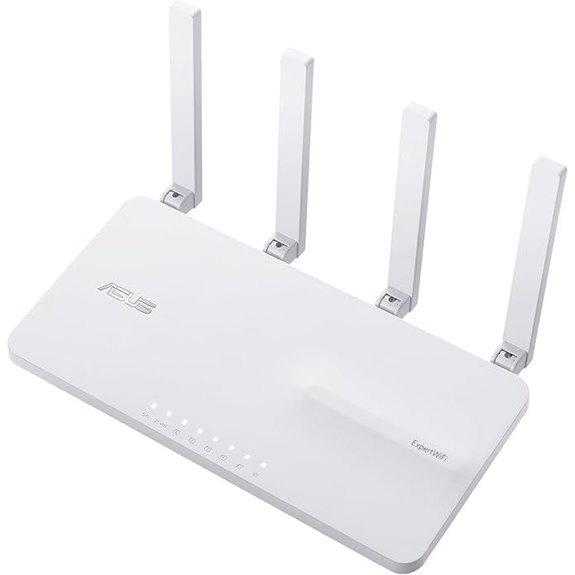 | Enterprise Features | Wi-Fi Standard: Wi-Fi 6 (ax) | Multi-Gig Ports: 1×2.5G WAN + 1×2.5G LAN + 3×1G LAN | Security Features: AiProtection Pro, safe browsing | VIEW LATEST PRICE | See Our Full Breakdown |
| NETGEAR Nighthawk WiFi 7 Router (RS90) | 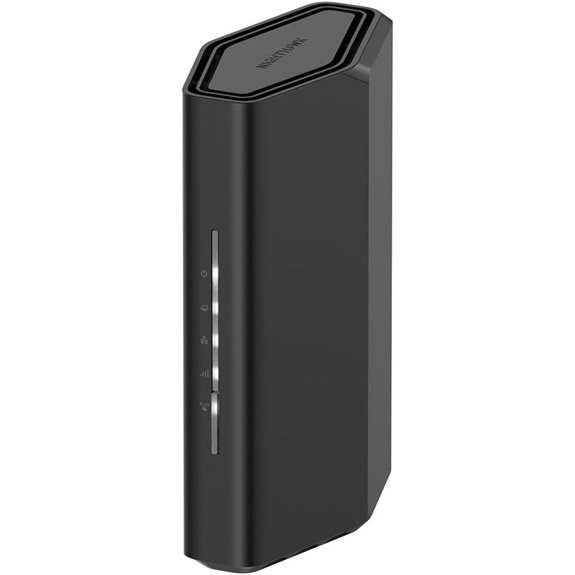 | Future-Ready Speed | Wi-Fi Standard: Wi-Fi 7 (802.11be) | Multi-Gig Ports: 2.5G port + 4×1G ports | Security Features: Built-in security, Armor trial | VIEW LATEST PRICE | See Our Full Breakdown |
| TP-Link WiFi 7 Router Archer BE260 (BE5000) |  | Next-Gen Connectivity | Wi-Fi Standard: Wi-Fi 7 (802.11be) | Multi-Gig Ports: 2.5G port + 3×1G ports | Security Features: VPN support, security features | VIEW LATEST PRICE | See Our Full Breakdown |
| NETGEAR Nighthawk WiFi 6 Router (RAX36) |  | Reliable Performance | Wi-Fi Standard: Wi-Fi 6 (ax) | Multi-Gig Ports: 1G Ethernet ports (4) | Security Features: Security updates, malware protection | VIEW LATEST PRICE | See Our Full Breakdown |

More Details on Our Top Picks
-

ASUS ExpertWiFi EBG15 Gigabit VPN Wired Router, up to 3 WAN ethernet Ports + 1 USB WAN, IPS Intrusion Prevention, Layer 7 Firewall, Commercial-Grade Network Security, Remote Management with App
Easier-Than-Ever Setup — Convenient and easy router management via web browser or the ASUS ExpertWiFi mobile app through...
As an affiliate, we earn on qualifying purchases.
ASUS RT-BE58U WiFi 7 Router with AiMesh
If you’re looking for a router that can handle the demanding needs of a small office, the ASUS RT-BE58U WiFi 7 Router with AiMesh is an excellent choice. It delivers dual-band speeds up to 3600 Mbps, with advanced features like 4096-QAM modulation and 160MHz bandwidth for smooth, reliable connections. Its Multi-link operation (MLO) ensures stability even with multiple devices. The router supports flexible WAN options, including AI WAN detection and a USB port for 4G/5G tethering. Plus, it offers robust security with AiProtection Pro, parental controls, and IoT segmentation. Compact and feature-rich, it’s designed to meet advanced network demands effortlessly.
- Wi-Fi Standard:Wi-Fi 7 (802.11be)
- Multi-Gig Ports:2.5G port + four 1G ports
- Security Features:AiProtection Pro, Safe Browsing
- Management Interface:ASUS Router App, Web GUI
- Mesh or Extensibility:AiMesh support
- Suitable for Business:Yes, enterprise features
- Additional Feature:2.5G high-speed port
- Additional Feature:AiProtection Pro security
- Additional Feature:Parental controls and Kid’s Network
-

TP-Link Dual-Band BE3600 Wi-Fi 7 Router Archer BE230 | 4-Stream | 2×2.5G + 3×1G Ports, USB 3.0, 2.0 GHz Quad Core, 4 Antennas | VPN, EasyMesh, HomeShield, MLO, Private IOT | Free Expert Support
𝐅𝐮𝐭𝐮𝐫𝐞-𝐏𝐫𝐨𝐨𝐟 𝐘𝐨𝐮𝐫 𝐇𝐨𝐦𝐞 𝐖𝐢𝐭𝐡 𝐖𝐢-𝐅𝐢 𝟕: Powered by Wi-Fi 7 technology, enjoy faster speeds with Multi-Link Operation, increased...
As an affiliate, we earn on qualifying purchases.
ASUS ExpertWiFi EBG15 Gigabit VPN Router
The ASUS ExpertWiFi EBG15 Gigabit VPN Router stands out as an ideal choice for small offices that require robust security and flexible network management. Setup is straightforward via a web browser or the ASUS ExpertWiFi app using Bluetooth, and remote management makes controlling the network easy from anywhere. It offers up to three WAN ports with load balancing, ensuring maximum multi-line broadband use, and a USB port for backup internet via mobile hotspots. Security features are top-tier, with a Layer 7 firewall, ASUS AiProtection Pro, VLAN support, and VPN capabilities for secure remote access. Designed for business, it combines ease of use with enterprise-grade security.
- Wi-Fi Standard:Wi-Fi 6 (ax)
- Multi-Gig Ports:1G WAN + 2G/1G LAN ports
- Security Features:AiProtection Pro, IPS, DPI, VPN
- Management Interface:ASUS ExpertWiFi App, Web management
- Mesh or Extensibility:No direct mesh, VLAN support
- Suitable for Business:Yes, business security
- Additional Feature:Built-in VPN support
- Additional Feature:VLAN on Ethernet ports
- Additional Feature:Remote management capability
-

ASUS ExpertWiFi EBR63 AX3000 WiFi 6 Business Router - Custom Guest Portal & SDN, Easy Setup & Remote Management, Scalable with ExpertWiFi AIMesh, Free Commercial-Grade Security, VPN, VLAN
Separate and Secure Usage – Up to five SSIDs to separate and prioritize devices for different business scenarios.
As an affiliate, we earn on qualifying purchases.
TP-Link BE3600 Wi-Fi 7 Router with 4 Antennas
For small offices seeking a reliable, high-performance Wi-Fi 7 solution, the TP-Link BE3600 with 4 antennas stands out thanks to its advanced Multi-Link Operation and multi-RU support, which deliver 120% more data capacity. It offers total speeds up to 3.6 Gbps, with 2882 Mbps on 5 GHz and 688 Mbps on 2.4 GHz. Equipped with a 2.0 GHz Quad-Core processor, it ensures minimal latency and efficient data handling. The four external antennas with beamforming improve coverage and signal strength, while support for EasyMesh enables seamless mesh integration. Plus, TP-Link HomeShield provides robust security, and setup via the Tether app is simple and straightforward.
- Wi-Fi Standard:Wi-Fi 7 (802.11be)
- Multi-Gig Ports:2.5G port + 3×1G LAN ports
- Security Features:TP-Link HomeShield, parental controls
- Management Interface:Tether App, Web interface
- Mesh or Extensibility:EasyMesh support
- Suitable for Business:Yes, high-performance Wi-Fi 7
- Additional Feature:Supports EasyMesh system
- Additional Feature:4 external beamforming antennas
- Additional Feature:Multi-gig wired ports
ASUS ExpertWiFi AX3000 Business WiFi Router
Designed for small offices that demand robust security and reliable connectivity, the ASUS ExpertWiFi AX3000 Business WiFi Router stands out with its support for up to five SSIDs, enabling network segmentation and device prioritization. It offers enterprise-grade security through a free ASUS AiProtection Pro subscription and safe browsing features, keeping your network safe. The customizable guest portal allows branding customization, while the backup WAN feature via USB ensures continuous internet during primary connection failures. Managing the network is simple with the ASUS ExpertWiFi app, and scalability is easy with ASUS AiMesh. Supporting WiFi 6, VPN, VLAN, and SDN, it’s a versatile, future-proof choice for small offices.
- Wi-Fi Standard:Wi-Fi 6 (ax)
- Multi-Gig Ports:1×2.5G WAN + 1×2.5G LAN + 3×1G LAN
- Security Features:AiProtection Pro, safe browsing
- Management Interface:ASUS ExpertWiFi App
- Mesh or Extensibility:AIMesh support
- Suitable for Business:Yes, enterprise-grade security
- Additional Feature:Customizable guest portal
- Additional Feature:Supports SDN (Software Defined Networking)
- Additional Feature:Scalable with AiMesh
NETGEAR Nighthawk WiFi 7 Router (RS90)
If your small office needs a router that delivers blazing-fast speeds and reliable coverage, the NETGEAR Nighthawk WiFi 7 Router (RS90) is an excellent choice. It offers wireless speeds up to 3.6 Gbps, perfect for gaming, streaming, and video calls. Compatible with any ISP, it’s a router-only model that requires a separate modem. With WiFi 7 technology, it’s 20% faster than WiFi 6, supporting up to 50 devices within 2,000 sq. ft. The router features a 2.5 Gigabit Ethernet port for multi-gig speeds and includes built-in security with NETGEAR Armor. Setup is quick via the Nighthawk app, making it ideal for busy offices.
- Wi-Fi Standard:Wi-Fi 7 (802.11be)
- Multi-Gig Ports:2.5G port + 4×1G ports
- Security Features:Built-in security, Armor trial
- Management Interface:Nighthawk App, Web setup
- Mesh or Extensibility:No mesh, router-only
- Suitable for Business:Yes, high-speed gaming & business
- Additional Feature:Sleek, compact design
- Additional Feature:Supports up to 50 devices
- Additional Feature:2.5 Gbps WAN port
TP-Link WiFi 7 Router Archer BE260 (BE5000)
The TP-Link WiFi 7 Router Archer BE260 (BE5000) stands out for small offices seeking lightning-fast, reliable connectivity that can handle multiple high-demand devices simultaneously. With Wi-Fi 7 technology, it offers speeds up to 4324 Mbps on 5GHz and 688 Mbps on 2.4GHz, supporting seamless 4K/8K streaming, gaming, and fast downloads. Its coverage extends up to 2,400 sq. ft., thanks to five external antennas and Beamforming. The router includes multi-gig ports for high-speed wired connections and supports easy expansion with Mesh-compatible devices. Security features like TP-Link HomeShield and VPN support ensure a safe, flexible, and future-proof network for even the busiest small offices.
- Wi-Fi Standard:Wi-Fi 7 (802.11be)
- Multi-Gig Ports:2.5G port + 3×1G ports
- Security Features:VPN support, security features
- Management Interface:Tether App, Web interface
- Mesh or Extensibility:EasyMesh support
- Suitable for Business:Yes, security & future-proof
- Additional Feature:Supports private IoT
- Additional Feature:Advanced encryption security
- Additional Feature:Voice control with Alexa/Google
NETGEAR Nighthawk WiFi 6 Router (RAX36)
Business owners seeking reliable, high-speed WiFi for small offices will find the NETGEAR Nighthawk WiFi 6 Router (RAX36) to be an excellent choice, especially since it supports up to 25 devices simultaneously. With AX3000 speeds reaching 3Gbps, it handles seamless streaming, HD gaming, and web conferencing effortlessly. Covering 2,000 sq. ft., it’s ideal for small spaces. Note that it doesn’t include a built-in modem, so you’ll need a separate one. Four gigabit Ethernet ports ensure fast wired connections. Its WiFi 6 technology guarantees reliable performance, while NETGEAR Armor adds robust security, making it a solid, future-proof option.
- Wi-Fi Standard:Wi-Fi 6 (ax)
- Multi-Gig Ports:1G Ethernet ports (4)
- Security Features:Security updates, malware protection
- Management Interface:Nighthawk App, Web setup
- Mesh or Extensibility:No mesh, router-only
- Suitable for Business:Yes, designed for multiple devices
- Additional Feature:Supports WiFi 6
- Additional Feature:Four 1G Ethernet ports
- Additional Feature:Compatible with all ISPs
Factors to Consider When Choosing a Premium Business-Grade Router for Small Offices

When selecting a business-grade router, I focus on key factors like security features, network scalability, and connection reliability to guarantee smooth operations. Speed capabilities and management ease also matter, helping me keep the network fast and simple to control. Considering these points helps me find a router that’s both powerful and easy to manage for my small office.
Security Features
Security features are critical when selecting a premium business-grade router for small offices, as they safeguard sensitive data and ensure smooth operations. I look for routers with advanced capabilities like intrusion prevention systems (IPS) and deep packet inspection (DPI), which actively detect and block malicious traffic. Support for VLANs and network segmentation is essential to isolate sensitive information and separate user groups. Built-in VPN features enable secure remote access, protecting data in transit over public networks. Additionally, enterprise-grade security services like AiProtection Pro provide real-time threat detection and automatic updates, keeping defenses current. Multi-layered security measures, including parental controls, safe browsing, and IoT device protection, help maintain a safe, monitored network environment. These features give me confidence that my network stays secure against evolving threats.
Network Scalability
As your small office grows, guaranteeing your router can keep up with increasing demands becomes essential. A scalable business-grade router should support multiple SSIDs and VLANs, allowing you to segment network traffic efficiently as your organization expands. It also needs multiple high-speed WAN ports and load balancing features to handle rising internet bandwidth requirements seamlessly. Compatibility with mesh or extender systems like AiMesh or EasyMesh is crucial for expanding coverage without replacing hardware. Additionally, advanced management protocols and remote configuration capabilities enable easy network adjustments over time. Future-proof features such as WiFi 6 or WiFi 7, multi-gig ports, and high device capacity are vital for accommodating new devices and growth. Planning for scalability now saves headaches later and guarantees your network remains robust.
Connection Reliability
Ensuring a reliable internet connection is crucial for small offices relying on premium business-grade routers. These routers support multiple WAN connections and load balancing, which keep your network running smoothly during outages or bandwidth spikes. Features like automatic failover and backup options, such as mobile hotspots via USB ports, guarantee continuous connectivity. High-quality routers employ technologies like Multi-Link Operation (MLO) and beamforming to improve signal stability and minimize interference. Additionally, enterprise security features like Layer 7 firewalls and network segmentation help prevent disruptions caused by cyber threats. Proper placement of antennas and support for mesh networking greatly enhance coverage stability, reducing dead zones across your office space. These factors combine to deliver a dependable, resilient connection crucial for day-to-day operations.
Management Ease
Choosing a business-grade router that’s easy to manage can save you time and reduce frustration. Look for models with intuitive setup processes, like dedicated mobile apps or user-friendly web interfaces, which speed up deployment. Remote management capabilities are essential, allowing you to monitor and adjust your network from anywhere, quickly resolving issues. Support for multiple SSIDs and VLANs simplifies network segmentation, boosting security and device prioritization without complex configurations. Automated security features such as real-time threat detection and one-tap scans make ongoing protection effortless. Additionally, compatibility with cloud-based management platforms centralizes control, making firmware updates and network adjustments straightforward across multiple devices. Overall, ease of management guarantees your network remains secure, efficient, and simple to oversee, saving you valuable time and effort.
Speed Capabilities
Ever wondered how to guarantee your small office network keeps up with demanding applications and multiple users? Speed capabilities are vital. Business-grade routers with Wi-Fi 6 and Wi-Fi 7 can deliver speeds exceeding 3.6 Gbps, supporting numerous high-bandwidth devices simultaneously. Technologies like Multi-Link Operation (MLO) and 4K-QAM modulation boost data capacity, ensuring faster, more stable connections for activities like video conferencing and large file transfers. Multi-gig ports, such as 2.5 Gbps or 10 Gbps, provide wired speeds that match wireless performance, reducing bottlenecks. Dual-band and tri-band routers distribute bandwidth effectively across multiple devices, maintaining high speeds even in crowded environments. Overall, choosing a router with high throughput and advanced signal processing guarantees your small office network remains fast, reliable, and ready for any demanding task.
Device Compatibility
When selecting a business-grade router for your small office, device compatibility plays a crucial role in maintaining a smooth network experience. I look for routers that support the latest Wi-Fi standards like Wi-Fi 6 or Wi-Fi 7, ensuring optimal performance across all devices. It’s essential that the router has multiple Ethernet ports, including multi-gig options such as 2.5 Gbps, to handle high-speed wired connections. Compatibility with common network protocols and VLAN features is also essential, as it enables seamless integration with existing infrastructure and security policies. I also verify that the router works with a broad range of devices—smartphones, tablets, laptops, and IoT gadgets—so everything stays connected without issues. Finally, remote management support via management apps or cloud platforms simplifies administration.
Future-Proofing
To guarantee your small office network remains efficient and secure in the long run, it’s essential to select a business-grade router that’s built for future advancements. Look for support of the latest Wi-Fi standards like Wi-Fi 6 or Wi-Fi 7, ensuring compatibility with upcoming devices. Multi-gigabit Ethernet ports and support for Multi-Link Operation (MLO) will help handle increasing data demands seamlessly. Compatibility with mesh networking technologies like EasyMesh allows your network to expand effortlessly as your needs grow. Additionally, advanced security features such as VPN, VLAN, and IoT segmentation prepare your network for emerging security challenges. Regular firmware updates and scalability options also guarantee your router stays effective and adaptable, protecting your investment and future-proofing your small office network well into 2026 and beyond.
Frequently Asked Questions
How Do These Routers Handle Multiple Simultaneous Device Connections?
These routers are designed to handle multiple simultaneous device connections efficiently. I’ve seen them manage dozens of devices without lag, thanks to advanced bandwidth management and quality of service (QoS) features. They prioritize critical traffic and distribute bandwidth evenly, ensuring smooth performance even during peak usage. If you have many devices, I recommend choosing a router with robust processing power and strong Wi-Fi standards to keep everything running seamlessly.
What Security Features Are Included for Enterprise Data Protection?
I focus heavily on security features like advanced encryption protocols, such as WPA3, to safeguard enterprise data. I also look for built-in firewalls, intrusion detection systems, and VPN support to guarantee secure remote access. Regular firmware updates are essential, and I appreciate routers that offer centralized management for monitoring and controlling network security efficiently. These features help me protect sensitive information and maintain a secure, reliable office network.
Can These Routers Prioritize Bandwidth for Critical Business Applications?
Imagine your essential business applications as a bustling highway, and these routers are the traffic controllers. Yes, they can prioritize bandwidth, ensuring your most crucial data gets the smooth, fast lane. With advanced QoS features, I’ve seen them seamlessly allocate resources, minimizing lag and buffering. This way, your team’s productivity stays high, and important tasks aren’t slowed down by less urgent traffic.
How Easy Is the Setup and Ongoing Management for Small Office Staff?
Setting up and managing these routers is surprisingly straightforward for small office staff. I find that most come with user-friendly interfaces and clear instructions, making installation quick. Regular management, like firmware updates or monitoring, is usually simple through intuitive dashboards or mobile apps. Even if you’re not tech-savvy, these tools are designed to minimize frustration, ensuring you can keep your network secure and running smoothly without hassle.
What Is the Expected Lifespan and Firmware Update Support for These Models?
Think of these routers like reliable, well-built tools that last for years. I expect most premium models to have a lifespan of around 5 to 7 years, much like a sturdy suitcase that travels well. Manufacturers usually offer firmware updates for at least 3 to 5 years, keeping your network secure and efficient. Staying current is like giving your router a tune-up, ensuring it keeps performing at its best.
Conclusion
Ready to upgrade your small office’s network? With these top-tier routers, you’ll enjoy blazing speeds, robust security, and reliable connectivity. Whether you choose ASUS, NETGEAR, or TP-Link, each offers features tailored for business needs. So, why settle for less when your small office deserves the best? Investing in a premium router today can transform your productivity and growth. Isn’t it time you made the smart choice for your business’s connectivity?