Choosing the right office mouse in 2026 involves balancing comfort, functionality, and value. The Logitech MX Master 4 stands out as the best overall thanks to its ergonomic design and advanced features. For those prioritizing affordability, the Logitech M185 offers reliable performance at a lower price point. Meanwhile, the Logitech Lift Vertical provides an ergonomic alternative for users with wrist discomfort. Every option in this roundup has its strengths and compromises, whether it’s size, connectivity, or comfort. Continue reading for a detailed breakdown to find the best fit for your needs.

Get business pricing on office and shipping supplies
- Business-only prices and quantity discounts
- Tax-exempt purchasing
- Multiple users, one account, clear invoices
Key Takeaways
- The best office mice balance ergonomic comfort with reliable wireless connectivity.
- Compact models excel for portability but often sacrifice advanced features.
- Premium options like the MX Master 4 include customizable buttons and haptic feedback, justifying higher prices.
- Silent-click models are ideal for shared or quiet office environments, but may have fewer buttons.
- Choosing the right DPI and size is key for comfort and precision, especially for long work sessions.
| Logitech M240 Compact Silent Bluetooth Wireless Mouse – Off White |  | Best Overall for Portability and Quiet Operation | Connectivity Technology: Bluetooth | Additional Features: Lightweight, Portable, Soundless, Wireless | Movement Detection: Optical | VIEW ON AMAZON | See Our Full Breakdown |
| Logitech M510 Full Size Ambidextrous Wireless Mouse |  | Best for Comfort and All-Day Use | Connectivity: 2.4 GHz wireless | Battery Life: Up to 2 years | Tracking Method: Laser | VIEW ON AMAZON | See Our Full Breakdown |
| Logitech Signature M550 Full Size Wireless Mouse – Black |  | Best for Larger Hands and Quiet Clicks | Connectivity: Bluetooth Low Energy or Logi Bolt USB receiver | Battery Life: Up to 24 months | Compatibility: Windows, macOS, Linux, Chrome OS, iPadOS, Android | VIEW ON AMAZON | See Our Full Breakdown |
| Logitech MX Master 4 Ergonomic Wireless Mouse with Haptics – Graphite |  | Best for Advanced Productivity and Customization | Connectivity: USB-C dongle and Bluetooth | Scroll Speed: 1,000 lines per second | Sensor: 8k DPI tracking | VIEW ON AMAZON | See Our Full Breakdown |
| Acer Wireless Mouse for Laptop, 2.4GHz Computer Mouse with 3 Adjustable DPI |  | Best Budget-Friendly Office Mouse with Adjustable Sensitivity | Connectivity Technology: USB A | Additional Features: 3 DPI settings, forward/back buttons | Movement Detection: Optical | VIEW ON AMAZON | See Our Full Breakdown |
| Logitech M185 Compact Ambidextrous 2.4 GHz Wireless Mouse – Swift Grey |  | Best Overall Budget Wireless Office Mouse | Connectivity: Wireless 2.4 GHz | Battery Life: Up to 1 year | Compatibility: Windows, Mac | VIEW ON AMAZON | See Our Full Breakdown |
| TSQQST Wireless Mouse for Laptop, 2.4GHz Ergonomic Computer Mouse, Black |  | Best for Multi-Device Productivity and Ergonomic Comfort | Connectivity: 2.4GHz wireless, Bluetooth, USB-C wired | Range: up to 32 feet | Battery: Rechargeable USB-C | VIEW ON AMAZON | See Our Full Breakdown |
| Logitech M240 Compact Silent Bluetooth Wireless Mouse – Graphite |  | Best Silent Wireless Office Mouse for Quiet Environments | Connectivity: Bluetooth wireless | Battery Life: Up to 18 months | Range: Up to 10 meters / 33 feet | VIEW ON AMAZON | See Our Full Breakdown |
| Logitech Lift Vertical Ergonomic Wireless Mouse – Graphite |  | Best Ergonomic Vertical Office Mouse for Comfort | Weight: 125 g | Dimensions: 108 x 70 x 71 mm | Tracking: 4000 DPI, adjustable | VIEW ON AMAZON | See Our Full Breakdown |
| Logitech M720 Triathlon Full Size Multi-Device Wireless Mouse – Black |  | Best for Multi-Device Power Users and Long-Term Durability | Connectivity Technology: Bluetooth, USB | Battery Life: 24 months | Number of Buttons: 6 | VIEW ON AMAZON | See Our Full Breakdown |
| Wireless Mouse for Laptop, Quiet Cordless Computer Mouse for Office & Travel | 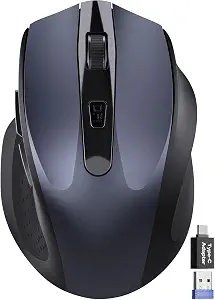 | Best Compact and Quiet Office Mouse for On-the-Go Productivity | Dimensions: 4.09 × 2.68 × 1.49 inches | DPI Settings: 800/1200/1600 | Battery Life: Up to 18 months | VIEW ON AMAZON | See Our Full Breakdown |
| office mouse | Connectivity | Battery Life | Compatibility |
|---|---|---|---|
| Logitech M240 Compact Silent B | — | — | — |
| Logitech M510 Full Size Ambide | 2.4 GHz wireless | Up to 2 years | Windows, Mac OS X |
| Logitech Signature M550 Full S | Bluetooth Low Energy or Logi Bolt USB receiver | Up to 24 months | Windows, macOS, Linux, Chrome OS, iPadOS, Android |
| Logitech MX Master 4 Ergonomic | USB-C dongle and Bluetooth | Up to 70 days | Windows, macOS, Linux, Chrome OS, iPadOS, Android |
| Acer Wireless Mouse for Laptop | — | — | — |
| Logitech M185 Compact Ambidext | Wireless 2.4 GHz | Up to 1 year | Windows, Mac |
| TSQQST Wireless Mouse for Lapt | 2.4GHz wireless, Bluetooth, USB-C wired | — | — |
| Logitech M240 Compact Silent B | Bluetooth wireless | Up to 18 months | Windows, macOS, Linux, ChromeOS, iPadOS, Android |
| Logitech Lift Vertical Ergonom | Bluetooth or Logi Bolt USB receiver | 24 months | — |
| Logitech M720 Triathlon Full S | — | 24 months | — |
| Wireless Mouse for Laptop | 2.4GHz wireless, USB-A & USB-C adapter | Up to 18 months | Windows, Mac, Linux, Chrome OS, Android, iOS |
More Details on Our Top Picks
Logitech M240 Compact Silent Bluetooth Wireless Mouse – Off White
The Logitech M240 Silent stands out for combining quiet operation with portability, making it an excellent choice for frequent travelers or office workers who prefer minimal noise. Compared to the MX Master 4, it lacks advanced features like haptic feedback and customizable buttons, but it compensates with a sleek, lightweight design and exceptional battery life of up to 18 months. Its Bluetooth-only connectivity simplifies pairing across multiple devices, though this can be limiting if you prefer a wired or multi-connection setup. The soundless clicks and ambidextrous shape make it versatile and user-friendly, especially for shared workspace environments. The main tradeoff is its limited feature set, which might not satisfy users seeking extensive customization or advanced tracking. Overall, this pick makes the most sense for those prioritizing quiet, portable, multi-platform use without extra bells and whistles.
Pros:- Quiet operation with 90% reduced click sound
- Long-lasting battery of up to 18 months
- Compact, portable design suitable for travel
- Seamless multi-platform compatibility
Cons:- Limited to Bluetooth connectivity only
- No customizable buttons or advanced features
- Requires Bluetooth pairing for use
Best for: Travelers and office workers who need a quiet, lightweight mouse compatible with multiple operating systems
Not ideal for: Power users who want customizable buttons or advanced features like multi-device switching
- Connectivity Technology:Bluetooth
- Additional Features:Lightweight, Portable, Soundless, Wireless
- Movement Detection:Optical
- Button Quantity:3
- Hand Orientation:Ambidextrous
- Compatible Platforms:Windows, macOS, Linux, ChromeOS, iPadOS, Android
Our verdict“This mouse is ideal for users who need a quiet, portable device with broad OS compatibility and minimal setup.”
Logitech M510 Full Size Ambidextrous Wireless Mouse
The Logitech M510 is designed with comfort in mind, featuring a contoured shape and soft rubber grips that support extended use, distinguishing itself from more compact models like the M240. Its ergonomic form reduces fatigue, making it well-suited for long work sessions, while the laser sensor ensures precise cursor control across various surfaces. The inclusion of programmable buttons and side-to-side scrolling adds to its versatility, though it does require Logitech software for full customization, which may be a hassle for some users. The battery life of up to two years minimizes the need for frequent replacements, but the laser sensor’s inability to work on glass or reflective surfaces is a drawback. This model is better suited for users who prioritize comfort over portability and are willing to invest in software for enhanced functionality. It’s less ideal for those seeking a lightweight travel mouse or advanced multi-device features.
Pros:- Ergonomic design with soft rubber grips for all-day comfort
- Long battery life of up to two years
- Includes a compact Unifying receiver for easy connectivity
- Programmable buttons for customization
Cons:- Laser sensor does not work on glass or mirrors
- Requires Logitech software for some features
- Side-to-side scrolling may take some adjustment
Best for: Office workers who spend long hours at their desks and need ergonomic support and programmable controls
Not ideal for: Users who need a compact mouse for travel or work on glass surfaces
- Connectivity:2.4 GHz wireless
- Battery Life:Up to 2 years
- Tracking Method:Laser
- Compatibility:Windows, Mac OS X
- Receiver:Logitech Unifying receiver
- Buttons:Standard + Back/Forward + Scroll + Zoom
Our verdict“This mouse is best suited for users seeking ergonomic comfort and customizable controls for long-term desktop use.”
Logitech Signature M550 Full Size Wireless Mouse – Black
The Logitech Signature M550 is tailored for users with larger hands, offering a full-size, ergonomic shape that reduces strain during extended periods of work. It features quiet clicks, similar to the M240 but with a more substantial build, and boasts a battery life of up to 24 months, minimizing interruptions. Its dual connectivity options—Bluetooth Low Energy and Logi Bolt USB receiver—provide flexibility for various setups, making it more versatile than the Bluetooth-only M240. The use of recycled plastics and eco-friendly manufacturing adds a sustainable touch, appealing to environmentally conscious buyers. A notable limitation is that it’s designed for right-handed users only, and the AA battery replacement can be inconvenient over time. This model makes sense for those with larger hands or seeking a durable, eco-friendly mouse mainly for office or home use. It’s less suitable for users with smaller hands or those seeking multi-device switching features.
Pros:- Ergonomic design for larger hands
- Quiet clicks with 90% less noise
- Long battery life of up to 2 years
- Made from recycled and sustainable materials
Cons:- Requires AA battery replacement after long use
- Limited to right-handed users
- No advanced multi-device switching
Best for: Professionals with larger hands who prefer quiet, durable mice for daily office tasks
Not ideal for: Left-handed users or those seeking multi-device switching capability
- Connectivity:Bluetooth Low Energy or Logi Bolt USB receiver
- Battery Life:Up to 24 months
- Compatibility:Windows, macOS, Linux, Chrome OS, iPadOS, Android
- Material:Recycled plastic
- Color:Black
Our verdict“This mouse is ideal for larger-handed users needing a quiet, eco-friendly device for daily use.”
Logitech MX Master 4 Ergonomic Wireless Mouse with Haptics – Graphite
The Logitech MX Master 4 elevates office mice with its advanced features like customizable haptic feedback, a dynamic Actions Ring, and the MagSpeed scroll wheel, making it ideal for power users who need efficiency and precision. Compared to the Signature M550, it offers more extensive personalization options via Logi Options+ and a faster, smoother scrolling experience. Its ergonomic design promotes comfort during long sessions, while the 70-day battery life, fast charging, and recycled materials demonstrate a focus on sustainability. The need for the Logi Options+ app for full customization could be a barrier for some, and the absence of the charging cable might inconvenience those who prefer wired charging. This model suits professionals who value high-end features for multitasking, creative work, or extensive navigation, though it may be overkill for basic office tasks.
Pros:- Customizable haptic feedback enhances control
- Fast, precise MagSpeed scroll wheel
- Long battery life with quick charging
- Made with sustainable recycled materials
Cons:- Requires Logi Options+ app for full customization
- Charging cable not included
- Higher price point for advanced features
Best for: Power users and professionals demanding high customization, precise control, and ergonomic comfort
Not ideal for: Casual users seeking a straightforward, budget-friendly mouse without advanced features
- Connectivity:USB-C dongle and Bluetooth
- Scroll Speed:1,000 lines per second
- Sensor:8k DPI tracking
- Battery Life:Up to 70 days
- Recycled Materials:54% recycled plastic, recycled cobalt
- Compatibility:Windows, macOS, Linux, Chrome OS, iPadOS, Android
Our verdict“This mouse suits professionals who prioritize precision, customization, and ergonomic design for demanding workflows.”
Acer Wireless Mouse for Laptop, 2.4GHz Computer Mouse with 3 Adjustable DPI
The Acer Wireless Mouse offers a straightforward, affordable option for office users who need basic functionality and adjustable sensitivity. Its 2.4GHz wireless connection provides a stable link up to 32 feet, making it suitable for flexible workspaces, while the three DPI settings (800, 1200, 1600) allow for tailored cursor control, unlike simpler models like the M185. The six-button layout includes forward and back buttons, enhancing browsing efficiency, though the side buttons are not compatible with Mac, which could be limiting for some users. The mouse’s lightweight design (86g) and durable build support everyday use, but it requires two AAA batteries, which adds ongoing cost and inconvenience. This pick makes sense for budget-conscious buyers or those who want a reliable, adjustable office mouse without extras. However, it’s less ideal for users needing extensive customization or multi-device switching.
Pros:- Easy plug-and-play with USB-A receiver
- Adjustable DPI for precise control
- Comfortable for medium to large hands
- Long battery life with sleep mode
Cons:- Side button does not work on Mac
- Requires 2 AAA batteries (not included)
- Limited to basic functionality without advanced customization
Best for: Budget-conscious office workers needing adjustable sensitivity and basic browsing controls
Not ideal for: Mac users or those seeking a rechargeable, multi-device mouse
- Connectivity Technology:USB A
- Additional Features:3 DPI settings, forward/back buttons
- Movement Detection:Optical
- Range:Up to 32 feet
- Item Weight:85 g
- Button Quantity:6
Our verdict“This mouse is best for budget-minded users who need adjustable sensitivity and reliable wireless performance for everyday tasks.”
Logitech M185 Compact Ambidextrous 2.4 GHz Wireless Mouse – Swift Grey
The Logitech M185 stands out for its simplicity and reliability, making it an excellent choice for those who need a no-fuss wireless mouse. Its ambidextrous design ensures comfort for both left- and right-handed users, and with up to one year of battery life, it minimizes interruptions. Compared to the Logitech M240, it lacks silent operation but offers a slightly broader compatibility range. Its plug-and-play setup guarantees quick connectivity, ideal for busy work environments. However, it’s limited to basic functions and doesn’t support customization or advanced features, which might be a downside for power users. The reliance on AA batteries means replacement is inevitable after a year. Overall, this pick makes the most sense for budget-conscious buyers who prioritize dependability and simplicity over bells and whistles.
Pros:- Ambidextrous design suits both hands comfortably
- Up to one-year battery life reduces maintenance
- Plug-and-play setup ensures quick connectivity
- Includes recycled plastic, supporting sustainability
Cons:- Requires AA battery replacements after a year
- Limited to basic features without advanced customization
Best for: Budget-conscious users seeking a reliable, straightforward wireless mouse for everyday office tasks
Not ideal for: Power users or those needing customizable buttons and silent operation, as it offers limited features
- Connectivity:Wireless 2.4 GHz
- Battery Life:Up to 1 year
- Compatibility:Windows, Mac
- Range:Up to 33 feet / 10 meters
- Material:Includes recycled plastic
- Warranty:3-year limited hardware
Our verdict“Ideal for users who want a reliable, simple wireless mouse without extra features, and are okay with basic functionality.”
TSQQST Wireless Mouse for Laptop, 2.4GHz Ergonomic Computer Mouse, Black
The TSQQST Wireless Mouse offers a compelling blend of ergonomic design, multi-device switching, and modern features, making it well-suited for users juggling multiple devices. Its ergonomic shape for medium-to-large hands reduces fatigue during long work sessions, which sets it apart from more compact models like the Logitech M240. The inclusion of an OLED display and rechargeable USB-C battery adds convenience, though the USB-C port might be a limitation for users with older laptops. The ability to switch seamlessly between Bluetooth, 2.4GHz, and USB-C wired connections enhances flexibility, especially compared to mice that only support a single connection type. However, the stored USB receiver can be tricky to access, and some may find the size less suitable for smaller hands. Overall, this mouse makes sense for professionals requiring multi-device support with ergonomic comfort.
Pros:- Reliable 2.4GHz wireless connection with long range
- Ergonomic shape reduces fatigue
- Multi-device switching via Bluetooth, 2.4GHz, or USB-C
- Rechargeable USB-C battery with OLED display
Cons:- USB receiver stored inside the mouse can be hard to retrieve
- Requires USB-C port for charging, limiting compatibility with older devices
Best for: Office workers who need to switch between multiple computers or tablets and prioritize ergonomic design
Not ideal for: Users with small hands or those preferring a compact, lightweight mouse for travel, as it is somewhat bulky and size-specific
- Connectivity:2.4GHz wireless, Bluetooth, USB-C wired
- Range:up to 32 feet
- Battery:Rechargeable USB-C
- Display:OLED smart display
- Scroll Wheel:Infinite and side scroll
- Design:Ergonomic for medium-to-large hands
Our verdict“Best suited for professionals needing multi-device capability with ergonomic comfort, especially in fixed office setups.”
Logitech M240 Compact Silent Bluetooth Wireless Mouse – Graphite
The Logitech M240 excels in quiet operation, making it perfect for shared or distraction-sensitive office settings. Its compact, ambidextrous form factor is highly portable, and with up to 18 months of battery life, it minimizes interruptions for battery replacements. Unlike the Logitech M185, it offers silent clicks, which can be a decisive factor for quiet working environments. Its Bluetooth connectivity supports a wide range of devices, including tablets and Chromebooks, but it requires a Bluetooth-compatible device, limiting wired options. The plastic build feels less premium compared to higher-end models, but it is lightweight and easy to carry. If noise reduction is a priority, this mouse suits frequent travelers or quiet office spaces but may feel underwhelming for users who prefer wired or customizable options.
Pros:- Silent operation reduces noise and distractions
- Long battery life of up to 18 months
- Compact and lightweight, ideal for travel
- Compatible with multiple operating systems
Cons:- Requires Bluetooth connection, no wired alternative
- Plastic construction may feel less durable or premium
Best for: Users who prioritize quiet operation and portability in multi-platform environments
Not ideal for: Power users seeking customizable buttons or wired connectivity, as it offers limited feature set and only Bluetooth
- Connectivity:Bluetooth wireless
- Battery Life:Up to 18 months
- Range:Up to 10 meters / 33 feet
- Compatibility:Windows, macOS, Linux, ChromeOS, iPadOS, Android
- Material:Certified post-consumer recycled plastic (48%)
Our verdict“Perfect for users needing a quiet, portable mouse for everyday tasks across different devices, especially in shared workspaces.”
Logitech Lift Vertical Ergonomic Wireless Mouse – Graphite
The Logitech Lift emphasizes ergonomic comfort, with a 57-degree vertical angle that promotes natural wrist and forearm posture. Its design helps reduce strain during long hours of use, making it suitable for those suffering from discomfort with traditional mice, unlike the more standard shapes of the Logitech M185 or M240. Customizable buttons and whisper-quiet clicks enhance productivity without noise distractions. However, full customization requires Logitech’s software, which may not be preferred by all users. Its AA battery life of up to two years and support for multiple devices via Bluetooth or Logi Bolt USB receiver make it a practical choice for intensive use. The vertical shape limits use to right-handed users, and some may find the software setup extra step. Overall, this mouse makes the most sense for those prioritizing ergonomic health in a professional setting.
Pros:- Ergonomic vertical design reduces wrist strain
- Long battery life of up to two years
- Supports multi-device connectivity with Easy-Switch and Flow
- Customizable buttons for enhanced productivity
Cons:- Requires Logitech’s software for full feature access
- Only supports AA batteries, which may need replacement
Best for: Office workers experiencing wrist or forearm discomfort who need ergonomic support for long hours
Not ideal for: Left-handed users or those seeking a traditional, low-profile mouse for quick tasks, as it only supports right-handed use and vertical design
- Weight:125 g
- Dimensions:108 x 70 x 71 mm
- Tracking:4000 DPI, adjustable
- Battery Type:1x AA
- Battery Life:24 months
- Connectivity:Bluetooth or Logi Bolt USB receiver
Our verdict“Ideal for users who need ergonomic relief and multi-device support during extended work sessions, with a focus on health benefits.”
Logitech M720 Triathlon Full Size Multi-Device Wireless Mouse – Black
The Logitech M720 Triathlon excels in versatility, supporting multiple devices with seamless switching, and its full-size design offers comfort for extended use. Compared to the smaller Logitech M185 or M240, it provides a more ergonomic grip suited for prolonged sessions. With up to 24 months of battery life, it reduces the need for frequent replacements, and its six-button layout allows for extensive customization. While it requires software for button customization, its support for both Bluetooth and Unifying receiver broadens compatibility. Its size might be less ideal for small hands, but for those with larger hands or multiple device needs, it offers unmatched convenience. This mouse makes the most sense for users who need a durable, multi-device mouse for long work hours and productivity-focused tasks.
Pros:- Supports up to three devices with easy switching
- Long-lasting 24-month battery life
- Ergonomic, full-size design for comfort
- Customizable buttons for productivity
Cons:- Requires software installation for button customization
- Design may be too large for users with small hands
Best for: Power users with multiple devices who need a durable, full-sized ergonomic mouse for all-day use
Not ideal for: Individuals with small hands or those preferring a lightweight, compact mouse for travel, as it is larger and heavier
- Connectivity Technology:Bluetooth, USB
- Battery Life:24 months
- Number of Buttons:6
- Supported Devices:Computers, laptops, tablets
- Supported Operating Systems:Windows, macOS, Chrome OS, Linux, iPadOS
- Color:Black
Our verdict“Best suited for multi-device users needing a durable, ergonomic mouse that supports long hours of work without frequent battery changes.”
Wireless Mouse for Laptop, Quiet Cordless Computer Mouse for Office & Travel
This wireless mouse stands out for its quiet clicks, which reduce noise by up to 90%, making it ideal for open-plan offices or shared spaces where noise can be disruptive. Compared with larger, full-sized options like the Logitech M510, this model sacrifices ergonomics slightly for portability, but its adjustable DPI settings ensure precise cursor control despite its compact size. The long battery life—up to 18 months—means less hassle with replacements, a significant advantage over some models with shorter endurance. However, it requires one AA battery (not included), and its ergonomic design favors right-handed users exclusively, limiting versatility. This pick makes the most sense for remote workers or travelers who prioritize portability and quiet operation over extensive ergonomic features.
Pros:- Quiet clicks reduce noise by up to 90%, ideal for quiet environments
- Compact, travel-friendly design fits easily into bags and pockets
- Adjustable DPI settings allow precise cursor control for different tasks
- Long battery life up to 18 months minimizes interruptions
Cons:- Requires one AA battery, which is not included, adding to the cost
- Ergonomic design favors right-handed users only, limiting flexibility
- Limited to basic ergonomic features compared to larger, more supportive mice
Best for: Travelers and remote workers who need a quiet, compact mouse that fits easily into a laptop bag
Not ideal for: Users with left-handed dominance or those seeking a highly ergonomic, full-sized mouse for extended use
- Dimensions:4.09 × 2.68 × 1.49 inches
- DPI Settings:800/1200/1600
- Battery Life:Up to 18 months
- Connectivity:2.4GHz wireless, USB-A & USB-C adapter
- Compatibility:Windows, Mac, Linux, Chrome OS, Android, iOS
- Design:Right-handed ergonomic shape
Our verdict“This mouse is perfect for portable users prioritizing quiet operation and space-saving design, but not for those needing ambidextrous or highly ergonomic options.”

How We Picked
We evaluated each office mouse based on performance, build quality, ergonomic design, and value. Our focus was on models that suit a range of users from casual home workers to professionals who spend hours at their desks. We prioritized wireless connectivity options, ease of use, and durability, ensuring each product offers a meaningful benefit over competitors. The ranking reflects a combination of user-friendly features, ergonomic considerations, and overall value, helping readers find the best option for their specific work style and budget.| office mouse | Compatibility |
|---|---|
| Logitech M240 Compact Silent B | — |
| Logitech M510 Full Size Ambide | Windows, Mac OS X |
| Logitech Signature M550 Full S | Windows, macOS, Linux, Chrome OS, iPadOS, Android |
| Logitech MX Master 4 Ergonomic | Windows, macOS, Linux, Chrome OS, iPadOS, Android |
| Acer Wireless Mouse for Laptop | — |
| Logitech M185 Compact Ambidext | Windows, Mac |
| TSQQST Wireless Mouse for Lapt | — |
| Logitech M240 Compact Silent B | Windows, macOS, Linux, ChromeOS, iPadOS, Android |
| Logitech Lift Vertical Ergonom | — |
| Logitech M720 Triathlon Full S | — |
| Wireless Mouse for Laptop | Windows, Mac, Linux, Chrome OS, Android, iOS |
Factors to Consider When Choosing Office Mouse
When selecting an office mouse, it’s important to consider several factors that directly impact your comfort and productivity. An ergonomic design can reduce strain during long hours, while connectivity options influence convenience. DPI settings determine cursor precision, which matters for detailed tasks. Size and shape should match your hand for comfort, especially if you work all day. Also, think about additional features like programmable buttons or silent clicks, which can enhance your workflow and environment.Ergonomic Design and Comfort
Ergonomics play a critical role in preventing repetitive strain injuries and fatigue. Look for a mouse that fits your hand size and grip style—whether palm, claw, or fingertip. Vertical mice or models with contoured shapes tend to be better for wrist health. It’s worth trying different shapes if possible, because even small differences can impact comfort over hours of use. Remember, a comfortable mouse can significantly improve your focus and reduce discomfort.
Connectivity and Compatibility
Wireless options like Bluetooth and 2.4GHz are common, but each offers tradeoffs. Bluetooth mice are often more versatile, compatible with a wide range of devices, and eliminate the need for a dongle. However, they might experience slight latency or connection drops in busy wireless environments. 2.4GHz mice generally offer more reliable and faster connections, especially for gaming or precision tasks, but require a dedicated receiver. Consider your device ecosystem and workspace setup when choosing between these options.
Precision and DPI Settings
DPI (dots per inch) controls how sensitive the mouse is—higher DPI means faster cursor movement. For detailed work like graphic design or precision editing, adjustable DPI settings are valuable, allowing you to switch sensitivity on the fly. For everyday office tasks, moderate DPI settings are usually sufficient. Avoid overly high DPI defaults if you prefer fine control, and check if the mouse allows easy customization. Balance DPI with your screen resolution for the best experience.
Size, Shape, and Weight
The physical size of the mouse influences comfort, especially during extended use. Larger, full-sized mice suit users with bigger hands or those who prefer a palm grip. Smaller or compact mice are portable and easier to store but can cause discomfort if they don’t match your hand size. Weight also matters—heavier mice offer stability, while lighter models are easier to move quickly. Picking a size and weight that matches your natural grip ensures better control and less fatigue.
Additional Features and Customization
Extra buttons, silent clicks, and customizable controls can streamline workflows, especially for power users. Programmable buttons allow shortcuts for common functions, reducing reliance on keyboard commands. Silent clicks are ideal for quiet office environments, though they sometimes lack tactile feedback. Consider your daily tasks and environment when selecting these features—sometimes, simpler is better if you value straightforward reliability over bells and whistles.
Frequently Asked Questions
Should I choose a wired or wireless office mouse?
Wireless mice offer greater freedom of movement and reduce clutter, making them ideal for most office setups. Bluetooth models tend to be more compatible with laptops and tablets, while 2.4GHz mice often provide more stable connections and faster response times. Wired mice eliminate concerns about battery life and potential connectivity issues, which might appeal to users needing maximum reliability. Consider your workspace, mobility needs, and whether you prefer the convenience of wireless or the simplicity of wired connections.
How important is DPI adjustment for everyday office work?
For typical office tasks like document editing, browsing, or email, adjustable DPI isn’t crucial, as lower sensitivity often provides more precise cursor control. However, if you work with detailed spreadsheets, graphic design, or multi-monitor setups, flexible DPI settings can improve accuracy and comfort. Many modern mice include easy-to-access DPI buttons or software customization, making it simple to adapt sensitivity on the fly. Ultimately, a moderate DPI range is sufficient for most office users, but extra adjustability benefits power users.
Are ergonomic mice worth the investment for regular office use?
Investing in an ergonomic mouse can significantly reduce wrist strain and fatigue during prolonged use, making it worthwhile for those who spend many hours at the desk. Vertical and contoured designs promote a more natural hand position, which can help prevent repetitive strain injuries. While ergonomic mice tend to cost more upfront, the health benefits and increased comfort often justify the expense. If you experience discomfort or want to prevent issues before they start, choosing an ergonomic model is a sensible decision.
What’s the best size for a compact office mouse?
Compact mice are designed for portability and smaller hands, but they can cause fatigue if they don’t fit well. Look for a model that comfortably supports your entire hand without requiring you to grip tightly. For travel or occasional use, a smaller mouse makes sense, but if you’re using it for long hours, a slightly larger, ergonomically shaped compact model may be more comfortable. Trying different sizes, if possible, helps ensure you find a model that minimizes strain while still being portable.
How can I prolong the battery life of my wireless office mouse?
Battery life varies widely across models, but generally, turning off the mouse when not in use, using energy-saving modes, and selecting models with larger batteries can extend usage. Some mice include automatic sleep functions that activate after periods of inactivity, conserving power. Using rechargeable batteries or USB charging options also helps reduce ongoing costs. Picking a model with a reputation for long battery life is particularly important if you rely on your mouse throughout the workday without frequent charging opportunities.
Conclusion
For most users, the Logitech MX Master 4 remains the best overall choice, thanks to its balance of comfort, features, and versatility. Those on a budget should consider the Logitech M185 for reliable performance without extra bells and whistles. If ergonomic comfort is a priority, the Logitech Lift Vertical provides a natural hand position that can reduce strain. Beginners or casual users might prefer simple, silent models, while power users should look for customizable mice with adjustable DPI and extra buttons. Ultimately, selecting the right office mouse hinges on your specific work habits, comfort needs, and budget constraints.
Halloween Picks
halloween
As an affiliate, we earn on qualifying purchases.