Finding the right office keyboard can significantly enhance your daily productivity and comfort. The best options balance typing comfort, build quality, and connectivity, while tradeoffs often involve price, size, or noise levels. The Amazon Basics Wired QWERTY Keyboard stands out as a reliable budget choice for basic needs, while the Logitech MX Keys S caters to those seeking a premium, low-profile experience. Wireless models offer convenience but may sacrifice some responsiveness, whereas wired keyboards excel in reliability and simplicity. Continue reading for a detailed breakdown of the top office keyboards and what makes each unique.

Get business pricing on office and shipping supplies
- Business-only prices and quantity discounts
- Tax-exempt purchasing
- Multiple users, one account, clear invoices
Key Takeaways
- Wireless keyboards provide greater flexibility but can introduce slight latency compared to wired options.
- Ergonomic designs, like the Logitech Ergo K860, are best for long hours to reduce strain, but often come at a higher price.
- Budget models like the Amazon Basics offer reliable performance but lack advanced features like quiet typing or ergonomic layouts.
- Premium keyboards such as the Logitech MX Keys S deliver superior build quality and typing experience, suitable for intensive use.
- Size and form factor matter; full-sized keyboards include a numpad, which is essential for some workflows, while compact models save space.
| Amazon Basics Wired QWERTY Keyboard, Works with Windows, Plug and Play, Full-Sized, Black |  | Best Budget Wired Keyboard for Windows Users | Compatibility: Windows Vista, 7, 8, 10 | Connection: USB wired | Layout: Full-sized QWERTY | VIEW ON AMAZON | See Our Full Breakdown |
| Logitech MK270 Full Size Wireless Keyboard and Mouse Combo – Black |  | Best Wireless Combo for Reliable Connectivity and Convenience | Wireless Range: up to 33 ft | Keyboard Type: Full-size, spill-resistant | Battery Life: 36 months (keyboard), 12 months (mouse) | VIEW ON AMAZON | See Our Full Breakdown |
| Logitech MK335 Full Size Quiet Wireless Keyboard and Mouse Combo – Black/Silver |  | Best Quiet Wireless Keyboard for Comfortable, Low-Noise Typing | Connectivity: 2.4 GHz wireless | Key Type: Low-profile, whisper-quiet | Battery Life: Up to 24 months | VIEW ON AMAZON | See Our Full Breakdown |
| Logitech MK345 Full Size Wireless Keyboard and Mouse Combo – Black |  | Best All-Around Wireless Keyboard for Versatile Office Use | Connectivity: 2.4 GHz wireless | Range: up to 10 meters | Keyboard Layout: Full-size | VIEW ON AMAZON | See Our Full Breakdown |
| Logitech MK295 Full Size Silent Wireless Keyboard and Mouse Combo – Graphite | 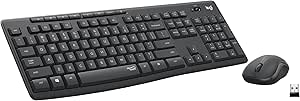 | Best Quiet, Low-Distraction Wireless Keyboard for Focused Work | Technology: SilentTouch | Connection: 2.4 GHz wireless | Range: 10 meters | VIEW ON AMAZON | See Our Full Breakdown |
| Logitech Ergo K860 Wireless Ergonomic Split Keyboard with Wrist Rest |  | Best Ergonomic Office Keyboard for Long-Term Comfort | Type: Wireless ergonomic split keyboard | Connectivity: USB receiver and Bluetooth | Wrist Rest: Pillowed with memory foam | VIEW ON AMAZON | See Our Full Breakdown |
| Logitech Signature K650 Comfort Full-Size Wireless Keyboard – Graphite |  | Best Comfort-Focused Full-Size Wireless Keyboard | Type: Wireless Keyboard | Connectivity: Bluetooth and Logi Bolt USB receiver | Battery Life: Up to 36 months | VIEW ON AMAZON | See Our Full Breakdown |
| Logitech K120 Full Size Wired Keyboard USB Plug-and-Play Windows – Black |  | Best Budget-Friendly Full-Size Wired Keyboard | Dimensions: 17.72 x 6.10 x 0.93 inches | Weight: 19.4 oz | Cable Length: 59.06 inches | VIEW ON AMAZON | See Our Full Breakdown |
| Logitech MX Keys S Wireless Keyboard Low Profile Graphite |  | Best Premium Low-Profile Keyboard for Productivity | Type: Wireless low-profile keyboard | Color: Graphite | Key Type: Spherical-dished | VIEW ON AMAZON | See Our Full Breakdown |
| Logitech K270 Full Size Wireless Keyboard for Windows – Black |  | Best Wireless Keyboard for Reliable Windows Use | Layout: Full-size with numeric pad | Hotkeys: 8 | Wireless Technology: 2.4 GHz | VIEW ON AMAZON | See Our Full Breakdown |
| office keyboard | Battery Life | Connectivity | Key Type |
|---|---|---|---|
| Amazon Basics Wired QWERTY Key | — | — | — |
| Logitech MK270 Full Size Wirel | 36 months (keyboard), 12 months (mouse) | — | — |
| Logitech MK335 Full Size Quiet | Up to 24 months | 2.4 GHz wireless | Low-profile, whisper-quiet |
| Logitech MK345 Full Size Wirel | Keyboard: 3 years, Mouse: 18 months | 2.4 GHz wireless | — |
| Logitech MK295 Full Size Silen | 36 months (keyboard), 18 months (mouse) | — | — |
| Logitech Ergo K860 Wireless Er | — | USB receiver and Bluetooth | Perfect Stroke keys |
| Logitech Signature K650 Comfor | Up to 36 months | Bluetooth and Logi Bolt USB receiver | Deep-cushioned keys |
| Logitech K120 Full Size Wired | — | — | Deep profile |
| Logitech MX Keys S Wireless Ke | Up to 10 days (full charge), up to 5 months (backlit off) | Bluetooth, Logi Bolt USB receiver | Spherical-dished |
| Logitech K270 Full Size Wirele | — | Unifying receiver | — |
More Details on Our Top Picks
Amazon Basics Wired QWERTY Keyboard, Works with Windows, Plug and Play, Full-Sized, Black
This full-sized wired keyboard from Amazon Basics excels in delivering straightforward functionality with its plug-and-play setup, making it ideal for those who prefer a simple, no-fuss device. Compared with the Logitech K120, it offers similar full-size keys and media hotkeys but lacks the adjustable features or ergonomic design that some users might want for extended typing sessions. The Amazon Basics model is perfect for budget-conscious buyers who need a reliable, Windows-compatible keyboard, but it falls short for users seeking wireless convenience or advanced customization. Its broad Windows compatibility and sleek black design make it suitable for standard office setups, yet it’s limited to Windows and offers no extra features beyond basic hotkeys.
Pros:- Easy plug-and-play setup, compatible with many Windows versions
- Full-sized layout with dedicated media hotkeys
- Sleek, minimalist black design
Cons:- Limited to Windows operating systems
- No wireless connectivity or advanced features
Best for: Budget-conscious Windows users who want a reliable, plug-and-play keyboard for everyday tasks
Not ideal for: Mac users or those seeking wireless flexibility or advanced customization options
- Compatibility:Windows Vista, 7, 8, 10
- Connection:USB wired
- Layout:Full-sized QWERTY
- Color:Black
Our verdict“This keyboard offers essential functionality at an affordable price, ideal for Windows users who prioritize straightforward performance.”
Logitech MK270 Full Size Wireless Keyboard and Mouse Combo – Black
The Logitech MK270 combo stands out for its dependable wireless connection and long battery life, making it a strong choice for users who want freedom from cables without sacrificing full-size comfort. When compared to the Logitech MK335, it offers a more traditional keyboard layout without the low-profile keys, which might appeal to users who prefer a classic feel. Its long-lasting batteries—up to three years for the keyboard—reduce maintenance and downtime, but the wireless range can sometimes be affected by environmental factors, which could be a concern in larger or interference-prone spaces. This set is best for those who need a durable, wireless keyboard and mouse combo that can handle everyday office tasks without frequent replacements.
Pros:- Reliable wireless connection up to 33 ft
- Long battery life—3 years for keyboard, 1 year for mouse
- Comfortable, quiet keys with full-size layout
- Multimedia hotkeys for quick access
Cons:- Wireless range may vary depending on environment
- Limited advanced ergonomic features
Best for: Office workers seeking a reliable, long-lasting wireless keyboard and mouse combo for daily use
Not ideal for: Users who need a highly ergonomic or customizable setup or work in environments with significant wireless interference
- Wireless Range:up to 33 ft
- Keyboard Type:Full-size, spill-resistant
- Battery Life:36 months (keyboard), 12 months (mouse)
- Compatibility:Compatible with various devices
Our verdict“This combo is an excellent choice for those wanting a dependable wireless setup with long battery life and full-size keys.”
Logitech MK335 Full Size Quiet Wireless Keyboard and Mouse Combo – Black/Silver
The Logitech MK335 offers a sleek look with whisper-quiet, low-profile keys that make it ideal for shared workspaces or quiet environments. Unlike the Logitech MK270, it emphasizes silent operation and style, though it sacrifices some of the hotkey customization options found on higher-end models. Its reliable 2.4 GHz wireless connectivity and 24-month battery life for the keyboard make it suitable for long-term use without frequent replacements, but some users might prefer a wired setup for zero latency or more consistent connectivity. This pick makes the most sense for professionals who prioritize quiet operation and a stylish appearance but are okay with a slightly less feature-rich experience.
Pros:- Quiet, low-profile keys for comfortable, silent typing
- Long battery life—up to 24 months
- Reliable wireless connection with minimal delays
- Stylish black/silver design
Cons:- Some users may prefer wired for zero latency
- Limited customization options
Best for: Professionals working in shared or quiet office environments who want a stylish, silent keyboard
Not ideal for: Users who require high customization, gaming features, or wired reliability
- Connectivity:2.4 GHz wireless
- Key Type:Low-profile, whisper-quiet
- Battery Life:Up to 24 months
- Color:Black/Silver
Our verdict“This keyboard is perfect for those needing a quiet, stylish wireless keyboard that reduces noise during busy workdays.”
Logitech MK345 Full Size Wireless Keyboard and Mouse Combo – Black
The Logitech MK345 provides a well-rounded wireless experience with a spill-resistant, full-sized keyboard featuring media keys and a comfortable right-handed mouse. Compared to the MK295, it offers a more traditional setup with a palm rest, enhancing comfort during extended typing sessions. Its 3-year battery life for the keyboard and 18 months for the mouse make it suitable for users who dislike frequent replacements. While it lacks backlit keys, its broad compatibility across Windows, macOS, and ChromeOS makes it versatile for various office environments. This model is ideal for those seeking a dependable, all-purpose wireless keyboard and mouse combo with a focus on comfort and durability.
Pros:- Reliable wireless connection up to 10 meters
- Long-lasting batteries—3 years for keyboard
- Comfortable, full-size keyboard with spill resistance
- Easy to set up with plug-and-play functionality
Cons:- No backlit keys for low-light work
- Right-handed mouse design may not suit left-handed users
Best for: Office workers needing a reliable, versatile wireless keyboard and mouse that works across multiple OS
Not ideal for: Those requiring backlit keys or highly ergonomic, customizable setups
- Connectivity:2.4 GHz wireless
- Range:up to 10 meters
- Keyboard Layout:Full-size
- Battery Life:Keyboard: 3 years, Mouse: 18 months
Our verdict“This combo offers reliable, versatile performance suitable for everyday office tasks across different operating systems.”
Logitech MK295 Full Size Silent Wireless Keyboard and Mouse Combo – Graphite
The Logitech MK295 combines SilentTouch technology with a full-sized layout, making it an ideal choice for environments where noise reduction is critical. Its 36-month battery life for the keyboard and 18 months for the mouse reduce maintenance, while the spill-resistant design adds durability. Compared to the MK335, it relies on a USB receiver and offers slightly different aesthetics, with a more subdued, professional look. Its 10-meter wireless range provides flexibility, but the requirement for a USB receiver may be inconvenient for users who prefer Bluetooth. This keyboard makes the most sense for users who prioritize quiet operation and long-term reliability in a standard office setting.
Pros:- SilentTouch technology for quiet typing and clicking
- Long battery life—up to 36 months for the keyboard
- Reliable 2.4 GHz wireless connection with 10-meter range
- Spill-resistant for added durability
Cons:- Requires a USB receiver, adding a dongle to the setup
- Limited to Windows and Chrome OS
Best for: Professionals in shared workspaces or quiet offices seeking a quiet, durable wireless keyboard
Not ideal for: Users who want Bluetooth connectivity or a more eco-friendly design
- Technology:SilentTouch
- Connection:2.4 GHz wireless
- Range:10 meters
- Battery Life:36 months (keyboard), 18 months (mouse)
Our verdict“This keyboard is well-suited for those who need a quiet, long-lasting wireless solution for focused work environments.”
Logitech Ergo K860 Wireless Ergonomic Split Keyboard with Wrist Rest
The Logitech Ergo K860 stands out for its focus on ergonomic comfort, offering a split, curved layout that promotes natural wrist and forearm positioning—something the standard Logitech K120 lacks. Its pillowed memory foam wrist rest and adjustable tilt help customize the fit, reducing strain over extended typing sessions. Compared to the Logitech K120, which is more basic and less supportive, the Ergo K860 prioritizes health but requires a longer setup time and may feel expensive for those seeking a simple, no-frills keyboard. Its wireless connectivity via USB receiver or Bluetooth enhances flexibility, and the long battery life minimizes interruptions. However, some users may find the key feel different from traditional keyboards and might prefer a more straightforward typing experience. This pick makes the most sense for users prioritizing ergonomic health and willing to invest in long-term comfort.Pros:- Reduces wrist and muscle strain with ergonomic split and curved design
- Comfortable pillowed wrist rest with memory foam
- Adjustable tilt for personalized comfort
- Long battery life of two years
Cons:- Requires initial setup and customization, which may be time-consuming
- Can be costly compared to standard keyboards
- Some may dislike the key feel as it differs from traditional mechanical or membrane types
Best for: Office workers experiencing wrist discomfort or looking for a keyboard that encourages ergonomic posture during long hours of typing
Not ideal for: Budget-conscious users who need a basic, wired setup or prefer a standard keyboard without ergonomic features
- Type:Wireless ergonomic split keyboard
- Connectivity:USB receiver and Bluetooth
- Wrist Rest:Pillowed with memory foam
- Wrist Support:54% more support, 25% less wrist bending
- Key Type:Perfect Stroke keys
- Adjustable Tilt:0, -4, -7 degrees
Our verdict“This keyboard is ideal for health-conscious professionals seeking ergonomic design and long-term comfort despite a higher price point.”
Logitech Signature K650 Comfort Full-Size Wireless Keyboard – Graphite
The Logitech Signature K650 excels for all-day comfort, featuring a soft-touch palm rest and deep-cushioned keys that make long typing sessions more pleasant—something the Logitech K120 cannot match. Its versatile connectivity options, including Bluetooth and Logi Bolt, provide seamless setup across multiple devices and operating systems, unlike the basic wired K120. While the long battery life of up to 36 months is impressive, full customization requires software installation, which might be a hassle for some users. The spill-resistant design adds durability, but the plastic components, though recycled, may not feel as premium. This keyboard is best suited for those who value comfort and wireless flexibility over minimalistic design or ultra-low profile keys.Pros:- Comfortable soft-touch palm rest and cushioned keys for extended use
- Versatile wireless connectivity with Bluetooth and Logi Bolt
- Long battery life up to 36 months reduces maintenance
- Compatible with a broad range of operating systems
Cons:- Requires software for full customization on Windows and macOS
- Plastic may feel less premium despite recycled content
- Battery life can vary depending on usage and environment
Best for: Office workers who spend many hours typing and need a comfortable, versatile wireless keyboard compatible with multiple OS
Not ideal for: Users seeking a compact or ultra-low profile keyboard, or those preferring a wired connection for simplicity
- Type:Wireless Keyboard
- Connectivity:Bluetooth and Logi Bolt USB receiver
- Battery Life:Up to 36 months
- Key Type:Deep-cushioned keys
- Palm Rest:Integrated soft-touch
- Compatibility:Windows, macOS, Chrome OS, Linux, iPadOS, iOS, Android
Our verdict“This keyboard offers exceptional comfort and connectivity for users who prioritize ergonomic design and multi-device support.”
Logitech K120 Full Size Wired Keyboard USB Plug-and-Play Windows – Black
The Logitech K120 is a straightforward, durable wired keyboard that offers reliable performance without frills, making it a solid choice compared to more feature-rich options like the Logitech MX Keys S. Its spill-resistant design and deep-profile keys provide comfortable typing, but it lacks wireless capability, backlit keys, or customizable hotkeys. The simple plug-and-play setup is ideal for those who want a reliable, no-nonsense keyboard for everyday use, especially on Windows platforms. While it doesn’t offer the advanced features of premium models, its affordability and durability make it suitable for shared work environments or budget-conscious setups. If you need a dependable keyboard without extra features, this is a practical choice.Pros:- Durable and spill-resistant design
- Full-size layout with numeric keypad
- Plug-and-play USB connectivity
- Deep-profile keys for comfortable typing
Cons:- Limited to Windows compatibility
- Lacks wireless functionality and customization options
- Basic feature set may not satisfy advanced users
Best for: Users who need a reliable, basic wired keyboard for Windows without extra features or wireless setup
Not ideal for: Users who prefer wireless connectivity, backlit keys, or advanced hotkey customization
- Dimensions:17.72 x 6.10 x 0.93 inches
- Weight:19.4 oz
- Cable Length:59.06 inches
- Key Type:Deep profile
- Compatibility:Windows 7, 8, 10 or later
- Spill-resistant:Yes
Our verdict“This keyboard suits budget-conscious users needing a reliable, straightforward wired keyboard for daily Windows use.”
Logitech MX Keys S Wireless Keyboard Low Profile Graphite
The Logitech MX Keys S offers a sleek, low-profile design with spherical, laptop-like keys that deliver a smooth, quiet typing experience—far more refined than the Logitech K270. Its smart adaptive backlighting and seamless multi-device switching make it ideal for multitasking across different systems, unlike more basic models. The rechargeable battery lasts up to 10 days with backlit on or five months with it off, which may be less convenient than the longer-lasting K650 but aligns with a premium, feature-rich experience. Full customization requires Logi Options+ software, which adds complexity for some users. This keyboard is best for professionals who want a high-end, low-profile typing experience combined with advanced features and multi-device support.Pros:- Fluid, precise, and quiet spherical keys for a laptop-like feel
- Adaptive backlit illumination for optimal visibility
- Seamless multi-device and multi-OS switching
- Rechargeable with quick charging capability
Cons:- High price point may deter budget-conscious users
- Requires Logi Options+ software for full customization
- Backlighting can drain battery faster
Best for: Productivity-focused professionals who want a sleek, quiet, and multi-device compatible keyboard for daily multitasking
Not ideal for: Budget buyers or users seeking a traditional, mechanical, or highly customizable keyboard without premium price
- Type:Wireless low-profile keyboard
- Color:Graphite
- Key Type:Spherical-dished
- Backlit:Yes, adaptive lighting
- Connectivity:Bluetooth, Logi Bolt USB receiver
- Battery Life:Up to 10 days (full charge), up to 5 months (backlit off)
Our verdict“This keyboard is perfect for professionals seeking a premium, quiet, and stylish low-profile keyboard for multi-device workflows.”
Logitech K270 Full Size Wireless Keyboard for Windows – Black
The Logitech K270 offers dependable 2.4 GHz wireless connectivity with a solid full-size layout, making it suitable for typical office setups that favor stability over bells and whistles. Its spill-resistant, UV-coated keys and familiar hotkeys provide a comfortable typing experience similar to wired models but with wireless convenience. Compared to the more advanced MX Keys S, it lacks backlit keys, multi-device support, and customizable hotkeys, which might limit productivity for power users. Its simple plug-and-play setup makes it ideal for users who prioritize reliability and ease of use over premium features. If you need a straightforward, wireless Windows keyboard with a reliable connection, this is a practical choice.Pros:- Full-size layout with numeric keypad
- Reliable 2.4 GHz wireless connection up to 33 feet
- Spill-resistant and UV-coated keys for durability
- Simple, plug-and-play setup
Cons:- Limited to Windows compatibility
- No backlit keys or customizable hotkeys
- Basic feature set compared to premium options
Best for: Office workers needing a reliable, no-frills wireless keyboard for Windows desktops or shared workspaces
Not ideal for: Users wanting backlit keys, multi-device switching, or advanced customization features
- Layout:Full-size with numeric pad
- Hotkeys:8
- Wireless Technology:2.4 GHz
- Range:33 feet
- Connectivity:Unifying receiver
- Key Features:Spill-resistant, UV-coated keys
Our verdict“This keyboard fits users seeking a dependable, straightforward wireless option for Windows environments without extra features.”

How We Picked
Our evaluation focused on key factors that influence daily office use, including typing comfort, build quality, connectivity options, and value. We prioritized models that cater to different needs—whether wired or wireless, ergonomic or budget-friendly—ensuring each product offers a clear advantage for its target user. Products were ranked based on performance, durability, ease of use, and overall value, with a keen eye on how well they meet typical office demands. This approach helps identify the best all-around options as well as niche picks for specific preferences.| office keyboard | Key Type |
|---|---|
| Amazon Basics Wired QWERTY Key | — |
| Logitech MK270 Full Size Wirel | — |
| Logitech MK335 Full Size Quiet | Low-profile, whisper-quiet |
| Logitech MK345 Full Size Wirel | — |
| Logitech MK295 Full Size Silen | — |
| Logitech Ergo K860 Wireless Er | Perfect Stroke keys |
| Logitech Signature K650 Comfor | Deep-cushioned keys |
| Logitech K120 Full Size Wired | Deep profile |
| Logitech MX Keys S Wireless Ke | Spherical-dished |
| Logitech K270 Full Size Wirele | — |
Factors to Consider When Choosing Office Keyboard
Choosing the right office keyboard involves balancing comfort, functionality, and budget. Understanding what features matter most can help you avoid common pitfalls like sacrificing ergonomics for price or opting for a model that doesn’t fit your workspace. Consider how you’ll use the keyboard daily—long hours or casual use—and whether specific features like quiet keys or wireless connectivity are priorities. This guide explores key factors to consider before making your purchase, helping you find a keyboard that enhances your productivity without unnecessary compromises.Connectivity and Compatibility
Deciding between wired and wireless options is often the first step. Wired keyboards, such as the Amazon Basics model, offer a plug-and-play experience with zero latency, making them ideal for tasks that require precision or real-time responsiveness. Wireless models, on the other hand, provide greater freedom of movement and a cleaner workspace but can introduce slight delays and require battery management. Ensuring compatibility with your operating system—Windows, macOS, or others—is essential for seamless use. Consider whether you need multi-device pairing or Bluetooth support for added convenience.
Ergonomics and Comfort
If you spend hours typing, investing in ergonomic features pays off. Split keyboards like the Logitech Ergo K860 reduce wrist strain and promote a natural hand position, which can prevent repetitive strain injuries. However, ergonomic designs often come at a higher cost and may require a learning curve. For more casual use, standard full-sized models can still offer comfortable key layouts, especially if they feature cushioned wrist rests or adjustable tilt. Avoid models with overly shallow key travel or hard edges, as these can cause discomfort over time.
Size and Layout
Size matters, especially if your workspace is limited. Full-sized keyboards include a numpad, which is useful for data entry or finance work, but they take up more desk space. Compact or tenkeyless models omit the numpad for a smaller footprint, making them easier to fit into tight spaces or portable for travel. Consider your workflow—if you regularly use the numpad, prioritize full-sized layouts; if space is tight or portability is key, a compact model may be better. Also, check key spacing and layout consistency to prevent accidental presses.
Build Quality and Durability
Office keyboards endure daily use, so durability is a critical factor. Metal-reinforced frames and high-quality key switches extend lifespan and improve typing feel. Mechanical switches are favored for their responsiveness and longevity but tend to be noisier and more expensive. Membrane or rubber dome switches, common in budget models, are quieter and softer but may wear out faster. Consider the environment—if you need quiet operation or spill resistance, select accordingly. Investing in a sturdy keyboard can save money in the long run by avoiding frequent replacements.
Additional Features
Features like backlit keys, programmable shortcuts, and dedicated media controls can boost productivity and convenience. Backlit keys are especially useful in low-light environments but often add to the cost. Programmable keys enable customization for repetitive tasks, a boon for power users. Wireless models with long battery life reduce the need for frequent charging, while detachable cables or adjustable height stands improve ergonomics. Prioritize features based on your workflow—extra buttons or lighting may be worth it if they streamline your tasks.
Frequently Asked Questions
Can I use a Windows keyboard on a Mac?
Many Windows-compatible keyboards can be used with Macs, but some key functions may differ. You might need to remap certain keys or adjust settings for shortcuts. Some keyboards, like the Logitech MX Keys S, are designed to be compatible with multiple operating systems, providing seamless switching between Windows and macOS. Always check for dedicated Mac key functions or software support to ensure a smooth experience. In some cases, third-party software can help customize key mappings for optimal compatibility.
Are mechanical keyboards better for office use?
Mechanical keyboards are favored for their tactile feedback, durability, and precision, making them appealing for long typing sessions. However, they tend to be noisier, which might disturb colleagues in shared spaces. For office environments that require quiet operation, membrane or low-profile mechanical switches are preferable. The decision depends on your priorities—if you value typing feel and longevity over noise, a mechanical keyboard can be a worthwhile investment. Otherwise, quieter models like the Logitech MX Keys S may better suit typical office settings.
Is wireless always better than wired?
Wireless keyboards offer greater flexibility and reduce clutter, but they can sometimes introduce slight latency or connectivity issues, especially in busy Wi-Fi environments. Wired keyboards provide a reliable, lag-free connection, which is crucial for tasks requiring precision, like data entry or gaming. The choice depends on your workspace and workflow—if you value mobility and a clean desk, wireless is appealing; for critical tasks where responsiveness matters, wired options remain a solid choice. Battery life and potential interference are additional considerations for wireless models.
Should I prioritize backlit keys?
Backlit keys are convenient in dim lighting, helping prevent typing errors and reducing eye strain. However, they often come at a higher price and can drain battery life in wireless models. If your workspace is well-lit or you rarely work in low-light conditions, backlighting may be unnecessary. On the other hand, if you often work late into the night or in environments with variable lighting, a keyboard with adjustable backlighting adds significant comfort. Choose a model with customizable brightness to get the best of both worlds.
How important is key switch type for office work?
The type of key switch impacts both typing feel and noise level. Mechanical switches, such as Cherry MX or Logitech’s own, offer tactile feedback and durability, which can enhance comfort during prolonged typing. However, they tend to be louder, which can be disruptive in open office settings. Membrane switches are quieter and generally less expensive but may feel softer and less precise. Consider your typical work environment—if noise is an issue, look for low-profile or silent switches, or opt for membrane alternatives.
Conclusion
For general office use, the Logitech MX Keys S presents an excellent balance of premium build quality, comfortable typing, and wireless convenience, making it ideal for professionals who spend hours at their desk. Budget-conscious buyers or those with simple needs will find the Amazon Basics Wired QWERTY Keyboard a dependable choice that covers all basic functions. If ergonomic comfort is a priority, the Logitech Ergo K860 is the best suited for reducing strain during extended work sessions. For users seeking a seamless blend of functionality and customization, premium options like the Logitech Signature K650 stand out. Ultimately, your ideal keyboard depends on your workspace, work style, and specific needs.Fall Picks
fall essentials
As an affiliate, we earn on qualifying purchases.