For a mini PC for home office setups, I’d start with the HP Elite 805 Mini PC: its Ryzen 5, 16GB of RAM, Windows 11 Pro, and dual-display support make it a balanced fit for everyday work. The ASUS NUC 13 Pro stands out for demanding multitasking and modern connectivity, while the Lenovo ThinkCentre M720Q pairs 16GB of RAM with a 500GB NVMe SSD in a refurbished business-class system. The main tradeoffs are processing headroom, memory and storage capacity, connectivity, and whether you prefer a new model or a renewed business desktop. Keep reading for the full comparison and recommendations by work style.

Get office and shipping supplies delivered free — and shop member deals
- Fast, free delivery on millions of items
- Access to Prime Big Deal Days deals on October 6–7
- Prime Video, Amazon Music and more included
Key Takeaways
- The HP Elite 805 is the most balanced office pick in this lineup: it combines a Ryzen 5, 16GB of RAM, Windows 11 Pro, and dual-4K display support without leaning on an entry-level processor.
- For heavier multitasking and newer connections, the ASUS NUC 13 Pro separates itself with a Core i5-13420H, 16GB of RAM, a 1.25TB SSD, Thunderbolt 4, and Wi-Fi 6E.
- The HP ProDesk 4 G1i has the newest listed processor, a Core Ultra 5 235T, but its 512GB SSD and 16GB of RAM make it a better fit for buyers prioritizing a modern business platform than maximum included storage.
- Several Ryzen 5 3501U systems share similar core specs, so details such as 8GB versus 16GB of RAM, 256GB versus 512GB storage, and seller or model distinctions matter more than the processor name alone.
- The renewed Dell OptiPlex 3070 Micro and HP EliteDesk 800 G4 can suit basic office workloads, but their older Core i5 processors and smaller SSDs make them less compelling for buyers who want more room for growth.
| HP Elite 805 Mini PC Desktop – AMD Ryzen 5, 16GB RAM, 256GB PCIe SSD, Dual 4K Display, USB‑C, Bluetooth 5.2, Wi‑Fi 6, Keyboard & Mouse, Windows 11 Pro |  | Best Overall | Processor: AMD Ryzen 5 5650G, 6 cores / 12 threads | Memory: 16GB DDR4, expandable to 64GB | Storage: 256GB PCIe SSD, expandable up to 4TB | VIEW ON AMAZON | See Our Full Breakdown |
| Lenovo ThinkCentre M720Q Mini PC, Intel Core i5, 16GB RAM, 500GB NVMe SSD, Windows 11 Pro (Renewed) |  | Best Storage and Memory Balance | Processor: 8th-generation Intel Core i5, listed as 6-core | Memory: 16GB DDR4 | Storage: 500GB NVMe SSD | VIEW ON AMAZON | See Our Full Breakdown |
| GMKtec G3 S Mini PC with Intel N95, 8GB RAM, and 256GB SSD |  | Best for a Basic Dual-Monitor Desk | Processor: Intel N95, 4 cores / 4 threads, up to 3.4GHz | Memory: 8GB DDR4, 3200 MT/s | Storage: 256GB M.2 SSD | VIEW ON AMAZON | See Our Full Breakdown |
| Dell OptiPlex 3070 Micro Mini PC, Intel Core i5-9500, 8GB RAM, 250GB SSD, Windows 11 Pro (Renewed) |  | Best Renewed Office Basic | Processor: Intel Core i5-9500, 6 cores, 3.2GHz | Memory: 8GB DDR4 | Storage: 250GB SSD | VIEW ON AMAZON | See Our Full Breakdown |
| BOSGAME E2 Plus Mini PC with AMD Ryzen 5 3501U, 8GB RAM, 256GB SSD |  | Best for Multi-Display Flexibility | Processor: AMD Ryzen 5 3501U, 4 cores / 8 threads, 2.1GHz up to 3.7GHz | Memory: 8GB DDR4, upgradeable to 32GB | Storage: 256GB SATA SSD | VIEW ON AMAZON | See Our Full Breakdown |
| Getorli Mini PC with AMD Ryzen 5 3501U, 16GB DDR4 RAM, and 512GB NVMe SSD |  | Best for a Balanced Everyday Office Setup | Processor: AMD Ryzen 5 3501U, 4 cores and 8 threads, 2.1–3.7 GHz | Memory: 16GB DDR4, expandable to 32GB | Storage: 512GB NVMe SSD | VIEW ON AMAZON | See Our Full Breakdown |
| ACEMAGIC K1 Mini PC with AMD Ryzen 5 7430U, 16GB RAM, 512GB SSD, Windows 11 Pro | 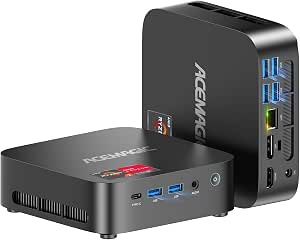 | Best for Quiet Multitasking and Three Displays | Processor: AMD Ryzen 5 7430U, 6 cores and 12 threads, up to 4.5 GHz | Memory: 16GB DDR4, 3200 MHz; expandable to 64GB | Storage: 512GB SSD; two M.2 2280 slots, up to 4TB stated | VIEW ON AMAZON | See Our Full Breakdown |
| BOSGAME E2 Air Mini PC with AMD Ryzen 5 3501U, 8GB RAM, 256GB SSD |  | Best for a Compact, Upgradeable Starter Desk | Processor: AMD Ryzen 5 3501U, 4 cores and 8 threads, up to 3.7 GHz | Graphics: Integrated Radeon Vega 8 | Memory: 8GB DDR4, expandable to 32GB | VIEW ON AMAZON | See Our Full Breakdown |
| HP ProDesk 4 G1i Mini PC, Intel Core Ultra 5 235T, 16GB RAM, 512GB SSD |  | Best for a Business-Ready Windows Office | Processor: Intel Core Ultra 5 235T, 14 cores, up to 5.0 GHz | Memory: 16GB DDR5 | Storage: 512GB PCIe SSD | VIEW ON AMAZON | See Our Full Breakdown |
| ASUS NUC 13 Pro Mini Desktop Computer – 13th Gen Intel Core i5-13420H, 16 GB RAM, 1.25 TB SSD, Dual HDMI & Thunderbolt 4, Wi-Fi 6E, RJ-45, Windows 11 |  | Best for a Connected, Expandable Premium Desk | Processor: Intel Core i5-13420H, 13th Gen, 8 cores and 12 threads, up to 4.6 GHz | Memory: 16GB DDR5, expandable to 64GB | Storage: 1.25TB SSD; supports up to 4TB | VIEW ON AMAZON | See Our Full Breakdown |
| Glorlin GT101 Mini PC, AMD Ryzen 5 3501U, 16GB DDR4 RAM, 512GB NVMe SSD |  | Best for Three-Screen Home Offices | Processor: AMD Ryzen 5 3501U, 4 cores and 8 threads, 2.1–3.7 GHz | Memory: 16GB DDR4, expandable to 32GB | Storage: 512GB NVMe SSD listed; product text also mentions 1TB | VIEW ON AMAZON | See Our Full Breakdown |
| Glorlin Mini PC with Ryzen 5 3501U, 16GB RAM, and 512GB SSD |  | Best for Lightweight, Space-Saving Setups | Processor: AMD Ryzen 5 3501U, 4 cores, up to 3.7 GHz | Memory: 16GB DDR4, 2666 MHz; maximum 32GB | Storage: 512GB SSD | VIEW ON AMAZON | See Our Full Breakdown |
| KAMRUI AK1PLUS Mini PC, Intel N5030, 12GB RAM, 256GB SSD |  | Best for Expandable Local Storage | Processor: Intel N5030, 4 cores, up to 3.1 GHz | Memory: 12GB LPDDR4 in title and description; product information also lists 16GB | Storage: 256GB M.2 SSD | VIEW ON AMAZON | See Our Full Breakdown |
| BOSGAME E5 Mini PC with AMD Ryzen 3 5300U, 16GB RAM and 1TB SSD |  | Best Overall for Multi-Monitor Productivity | Processor: AMD Ryzen 3 5300U, 4 cores and 8 threads, up to 3.8 GHz | Graphics: Integrated Radeon Graphics, up to 1500 MHz | Memory: 16GB DDR4 | VIEW ON AMAZON | See Our Full Breakdown |
| HP EliteDesk 800 G4 Mini PC, Intel Core i5-8500T, 16GB RAM, 256GB NVMe SSD, Windows 11 Pro (Renewed) |  | Best for Business-Class Multitasking | Processor: Intel Core i5-8500T, 6 cores, up to 3.5 GHz | Memory: 16GB DDR4 | Storage: 256GB NVMe SSD | VIEW ON AMAZON | See Our Full Breakdown |
| mini pc for home office setup | Processor | Memory | Storage | Graphics |
|---|---|---|---|---|
| HP Elite 805 Mini PC Desktop | AMD Ryzen 5 5650G, 6 cores / 12 threads | 16GB DDR4, expandable to 64GB | 256GB PCIe SSD, expandable up to 4TB | Integrated AMD UHD Graphics |
| Lenovo ThinkCentre M720Q Mini | 8th-generation Intel Core i5, listed as 6-core | 16GB DDR4 | 500GB NVMe SSD | Integrated graphics |
| GMKtec G3 S Mini PC with Intel | Intel N95, 4 cores / 4 threads, up to 3.4GHz | 8GB DDR4, 3200 MT/s | 256GB M.2 SSD | Intel UHD Graphics, up to 1000MHz |
| Dell OptiPlex 3070 Micro Mini | Intel Core i5-9500, 6 cores, 3.2GHz | 8GB DDR4 | 250GB SSD | Intel UHD Graphics 630 |
| BOSGAME E2 Plus Mini PC with A | AMD Ryzen 5 3501U, 4 cores / 8 threads, 2.1GHz up to 3.7GHz | 8GB DDR4, upgradeable to 32GB | 256GB SATA SSD | Integrated graphics |
| Getorli Mini PC with AMD Ryzen | AMD Ryzen 5 3501U, 4 cores and 8 threads, 2.1–3.7 GHz | 16GB DDR4, expandable to 32GB | 512GB NVMe SSD | — |
| ACEMAGIC K1 Mini PC with AMD R | AMD Ryzen 5 7430U, 6 cores and 12 threads, up to 4.5 GHz | 16GB DDR4, 3200 MHz; expandable to 64GB | 512GB SSD; two M.2 2280 slots, up to 4TB stated | — |
| BOSGAME E2 Air Mini PC with AM | AMD Ryzen 5 3501U, 4 cores and 8 threads, up to 3.7 GHz | 8GB DDR4, expandable to 32GB | 256GB SSD | Integrated Radeon Vega 8 |
| HP ProDesk 4 G1i Mini PC | Intel Core Ultra 5 235T, 14 cores, up to 5.0 GHz | 16GB DDR5 | 512GB PCIe SSD | — |
| ASUS NUC 13 Pro Mini Desktop C | Intel Core i5-13420H, 13th Gen, 8 cores and 12 threads, up to 4.6 GHz | 16GB DDR5, expandable to 64GB | 1.25TB SSD; supports up to 4TB | Intel Iris Xe |
| Glorlin GT101 Mini PC | AMD Ryzen 5 3501U, 4 cores and 8 threads, 2.1–3.7 GHz | 16GB DDR4, expandable to 32GB | 512GB NVMe SSD listed; product text also mentions 1TB | — |
| Glorlin Mini PC with Ryzen 5 3 | AMD Ryzen 5 3501U, 4 cores, up to 3.7 GHz | 16GB DDR4, 2666 MHz; maximum 32GB | 512GB SSD | — |
| KAMRUI AK1PLUS Mini PC | Intel N5030, 4 cores, up to 3.1 GHz | 12GB LPDDR4 in title and description; product information also lists 16GB | 256GB M.2 SSD | Intel UHD Graphics |
| BOSGAME E5 Mini PC with AMD Ry | AMD Ryzen 3 5300U, 4 cores and 8 threads, up to 3.8 GHz | 16GB DDR4 | 1TB M.2 2280 PCIe SSD, expandable up to 4TB | Integrated Radeon Graphics, up to 1500 MHz |
| HP EliteDesk 800 G4 Mini PC | Intel Core i5-8500T, 6 cores, up to 3.5 GHz | 16GB DDR4 | 256GB NVMe SSD | Integrated Intel UHD Graphics 630 |
More Details on Our Top Picks
HP Elite 805 Mini PC Desktop – AMD Ryzen 5, 16GB RAM, 256GB PCIe SSD, Dual 4K Display, USB‑C, Bluetooth 5.2, Wi‑Fi 6, Keyboard & Mouse, Windows 11 Pro
The HP Elite 805 is my strongest all-around fit for a home office that needs dependable multitasking and room for two 4K monitors. Its six-core Ryzen 5 5650G and 16GB of RAM give it more headroom for video calls, office apps, and many browser tabs than the 8GB GMKtec G3 S or BOSGAME E2 Plus. Two DisplayPort outputs, fast USB ports, and Wi-Fi 6 suit a desk with several peripherals, while the included keyboard and mouse shorten setup. The tradeoff is its 256GB SSD, which can fill quickly if you keep large work files locally; it is expandable, but that means a later upgrade. I would choose it over the renewed Lenovo ThinkCentre M720Q when a newer-feeling connectivity mix and included accessories matter more than its larger bundled drive.
Pros:- Six-core, 12-thread processor and 16GB RAM suit everyday multitasking
- Two DisplayPort 1.4 outputs support dual 4K displays
- Wi-Fi 6, Bluetooth 5.2, USB-C, and multiple USB-A ports cover common desk connections
- Keyboard and mouse are included
Cons:- 256GB SSD leaves limited room for large local files
- Integrated graphics are intended for office work, not demanding graphics workloads
Best for: Home-office workers who run several work apps at once, use two 4K monitors, and want a ready-to-connect desktop with keyboard and mouse included.
Not ideal for: People who store large video, photo, or project libraries locally and want ample storage without upgrading.
- Processor:AMD Ryzen 5 5650G, 6 cores / 12 threads
- Memory:16GB DDR4, expandable to 64GB
- Storage:256GB PCIe SSD, expandable up to 4TB
- Graphics:Integrated AMD UHD Graphics
- Operating system:Windows 11 Pro
- Display outputs:2× DisplayPort 1.4
- Wireless:Wi-Fi 6, Bluetooth 5.2
- Dimensions and weight:6.96 × 6.88 × 1.33 in; 3 lb
Our verdict“Choose the HP Elite 805 for a capable, well-connected home-office hub, provided its 256GB starting storage fits your workflow.”
Lenovo ThinkCentre M720Q Mini PC, Intel Core i5, 16GB RAM, 500GB NVMe SSD, Windows 11 Pro (Renewed)
The renewed Lenovo ThinkCentre M720Q is a practical pick for people who want a ready home-office desktop with 16GB RAM and a 500GB NVMe SSD out of the box. That storage advantage matters beside the HP Elite 805, whose faster wireless standard and newer Ryzen 5 platform come with only 256GB. For documents, browser tabs, video meetings, and common office apps, the Lenovo’s listed six-core, 8th-generation Core i5 and memory allotment make a balanced setup. It also offers useful desk connections, including HDMI, DisplayPort, Ethernet, and USB-C. The main caveat is its renewed condition, along with a processor description that does not name the exact Core i5 model. Its integrated graphics also make it a work-focused choice, not a graphics-heavy workstation.
Pros:- 16GB DDR4 RAM supports everyday multitasking
- 500GB NVMe SSD offers more bundled capacity than the HP Elite 805
- HDMI, DisplayPort, Ethernet, USB 3.0, and USB-C support varied desk setups
- Windows 11 Pro and Wi-Fi/Bluetooth connectivity are included
Cons:- Renewed condition may not suit buyers seeking a new computer
- Exact Core i5 processor model is not specified
- Integrated graphics are suited to basic office tasks rather than demanding visual workloads
Best for: Home-office users who want 16GB memory and more bundled storage for documents and applications, and are comfortable buying a renewed desktop.
Not ideal for: Buyers who require a precisely identified processor model, a new-condition machine, or strong graphics performance.
- Processor:8th-generation Intel Core i5, listed as 6-core
- Memory:16GB DDR4
- Storage:500GB NVMe SSD
- Graphics:Integrated graphics
- Operating system:Windows 11 Pro
- Ports:DisplayPort, HDMI, Ethernet, USB 3.0, USB Type-C
- Connectivity:Wi-Fi and Bluetooth
- Condition:Renewed
Our verdict“Pick the ThinkCentre M720Q if bundled storage and 16GB RAM matter more than a clearly specified processor or new-condition hardware.”
GMKtec G3 S Mini PC with Intel N95, 8GB RAM, and 256GB SSD
The GMKtec G3 S suits a home office built around straightforward tasks: email, web apps, documents, and a pair of 4K displays. Its dual HDMI 2.0 outputs make monitor connection simple, while Gigabit Ethernet provides a wired network option that the supplied wireless specs do not replace. Its 6-watt power rating is a useful fit for a low-power desk setup. The limits are clear beside the HP Elite 805: the G3 S has a four-core Intel N95 and 8GB RAM, so it offers less room for heavy multitasking, and its Wi-Fi 5 is an older standard than the HP’s Wi-Fi 6. Its 256GB SSD is also modest. I would select it for a lighter workload and two-screen convenience, not as the roundup’s choice for demanding daily workloads.
Pros:- Two HDMI 2.0 ports support dual 4K displays at 60Hz
- Gigabit Ethernet offers a wired network connection
- Low 6-watt power consumption suits a low-power desk setup
- Windows 11 Pro and a 256GB M.2 SSD are included
Cons:- 8GB RAM can limit multitasking compared with the 16GB HP Elite 805 and Lenovo ThinkCentre M720Q
- Four-core Intel N95 is a basic-workload processor
- Wi-Fi 5 and 256GB storage offer less headroom than some alternatives
Best for: People with a light home-office workload who want a compact computer with two direct HDMI connections for dual monitors.
Not ideal for: Users who keep many applications open, need substantial memory, or rely on demanding creative or computational software.
- Processor:Intel N95, 4 cores / 4 threads, up to 3.4GHz
- Memory:8GB DDR4, 3200 MT/s
- Storage:256GB M.2 SSD
- Graphics:Intel UHD Graphics, up to 1000MHz
- Display support:2× HDMI 2.0, up to 4K at 60Hz
- Connectivity:Wi-Fi 5, Bluetooth 5.0, Gigabit Ethernet
- Operating system:Windows 11 Pro
- Power consumption:6 watts
Our verdict“Choose the GMKtec G3 S for light office tasks and straightforward dual-HDMI monitor support, not for heavy multitasking.”
Dell OptiPlex 3070 Micro Mini PC, Intel Core i5-9500, 8GB RAM, 250GB SSD, Windows 11 Pro (Renewed)
The renewed Dell OptiPlex 3070 Micro is a no-frills option for routine home-office jobs: documents, browser-based tools, email, and video calls. Its six-core Core i5-9500 gives it a stronger processor foundation than the GMKtec G3 S’s four-core Intel N95, but Dell’s 8GB RAM can still constrain busy multitasking. The 250GB SSD is similarly tight for users who keep files on the computer, and the listing specifies DisplayPort rather than a broader set of display outputs. That makes it less flexible for varied monitor arrangements than the HP Elite 805, which has two DisplayPort connections and more memory. Since this is a renewed unit, condition is another buyer-specific tradeoff. I would consider it for a basic, single-monitor office setup, not as a flexible long-term workstation.
Pros:- Six-core Intel Core i5-9500 handles everyday office tasks
- SSD supports responsive startup and routine file access
- Includes Windows 11 Pro, Wi-Fi, and Bluetooth
- Six USB ports accommodate common desk peripherals
Cons:- 8GB RAM may restrict multitasking compared with the HP Elite 805 and Lenovo ThinkCentre M720Q
- 250GB SSD leaves little space for large local work files
- Renewed condition and a specified DisplayPort output may not suit every buyer or monitor setup
Best for: A home worker with a basic single-monitor setup who wants a compact renewed desktop for documents, email, and web-based work.
Not ideal for: People who need multiple specified display outputs, more than 8GB of memory, or generous local storage from the start.
- Processor:Intel Core i5-9500, 6 cores, 3.2GHz
- Memory:8GB DDR4
- Storage:250GB SSD
- Graphics:Intel UHD Graphics 630
- Operating system:Windows 11 Pro
- Video output:DisplayPort
- USB ports:6
- Condition:Renewed
Our verdict“Consider the renewed OptiPlex for routine work on a simple desk, but choose a 16GB alternative if you multitask heavily.”
BOSGAME E2 Plus Mini PC with AMD Ryzen 5 3501U, 8GB RAM, 256GB SSD
The BOSGAME E2 Plus is the lineup’s choice for a home office that values display flexibility over built-in memory. It can connect up to three displays through two HDMI 2.0 ports and USB-C, a useful arrangement for spreading documents, chat, and reference material across a desk. It also has Gigabit Ethernet, Wi-Fi 5, Bluetooth 5.0, and memory upgrade support up to 32GB. That upgrade path gives it a different appeal from the GMKtec G3 S, which lists only 8GB; still, the BOSGAME starts with 8GB RAM and a 256GB SATA SSD, so buyers may need to budget for an upgrade to handle heavier multitasking. The HP Elite 805 is the stronger ready-to-work choice with 16GB RAM and Wi-Fi 6, while this BOSGAME makes more sense when three screens are the deciding factor.
Pros:- Supports up to three displays through dual HDMI 2.0 and USB-C
- Memory can be upgraded to 32GB
- Gigabit Ethernet, Wi-Fi 5, and Bluetooth 5.0 provide wired and wireless options
- Supports Windows 11 Pro, Ubuntu, and Linux
Cons:- Ships with only 8GB RAM, below the HP Elite 805 and Lenovo ThinkCentre M720Q
- 256GB SATA SSD is limited in capacity and uses SATA storage
- No built-in speakers; external audio equipment is needed
Best for: Home-office users who need up to three displays and are willing to upgrade memory as their multitasking needs grow.
Not ideal for: Buyers who want 16GB RAM and ample storage preinstalled, or who need a ready-made setup for demanding workloads.
- Processor:AMD Ryzen 5 3501U, 4 cores / 8 threads, 2.1GHz up to 3.7GHz
- Memory:8GB DDR4, upgradeable to 32GB
- Storage:256GB SATA SSD
- Graphics:Integrated graphics
- Display outputs:2× HDMI 2.0 and 1× USB-C; supports up to 3 displays
- Maximum display resolution:4K at 60Hz
- Connectivity:Gigabit Ethernet, Wi-Fi 5, Bluetooth 5.0
- Operating system support:Windows 11 Pro, Ubuntu, and Linux
Our verdict“Choose the BOSGAME E2 Plus if three-display support matters most and you are prepared to add memory for heavier office use.”
Getorli Mini PC with AMD Ryzen 5 3501U, 16GB DDR4 RAM, and 512GB NVMe SSD
The Getorli pairs a 4-core Ryzen 5 3501U with 16GB of memory and a 512GB NVMe SSD, a practical starting point for office apps, video calls, browser tabs, and local files. Its dual HDMI outputs can run two 4K displays, which suits a desk built around a main screen and a second monitor. Compared with the BOSGAME E2 Air, it arrives with twice the memory and storage, reducing the need to upgrade before everyday work feels comfortable. The ACEMAGIC K1 is a stronger fit for heavier multitasking and three-screen desks, though. The Getorli’s older, four-core processor is better kept to routine workloads, and its one-year warranty offers less coverage than the HP ProDesk’s warranty on upgraded parts. Wi-Fi 6 and Bluetooth 5.3 round out a capable, space-saving office setup.
Pros:- 16GB RAM and a 512GB NVMe SSD are a stronger starting configuration than the BOSGAME E2 Air’s 8GB and 256GB
- Dual HDMI supports two displays up to 4K
- Wi-Fi 6 and Bluetooth 5.3 provide current wireless connectivity
- Memory can be expanded to 32GB
Cons:- The 4-core Ryzen 5 3501U is aimed at everyday tasks, not demanding workloads
- Only two HDMI display outputs are specified, limiting flexibility compared with three-display alternatives
- One-year warranty provides less coverage than the HP ProDesk’s three-year coverage on upgraded memory and storage
Best for: Home-office users who want two monitors, solid everyday multitasking, and enough memory and storage to get started without an immediate upgrade.
Not ideal for: People running demanding creative workloads or planning a three-monitor workstation; its 4-core processor and dual-HDMI display setup are less suited to those jobs.
- Processor:AMD Ryzen 5 3501U, 4 cores and 8 threads, 2.1–3.7 GHz
- Memory:16GB DDR4, expandable to 32GB
- Storage:512GB NVMe SSD
- Display outputs:2 × HDMI; supports two displays up to 3840 × 2160
- Wireless:Wi-Fi 6, Bluetooth 5.3
- USB ports:2 × USB 2.0, 2 × USB 3.0, 1 × USB-C 2.0, 1 × USB-C 3.2
- Power consumption:15W
- Warranty:1 year
Our verdict“Choose the Getorli for a straightforward two-monitor home office with useful memory and storage included, but look elsewhere for heavier computing or three displays.”
ACEMAGIC K1 Mini PC with AMD Ryzen 5 7430U, 16GB RAM, 512GB SSD, Windows 11 Pro
For a home office that stretches beyond basic documents and calls, the K1 offers a more capable base than the Getorli: its 6-core, 12-thread Ryzen 5 7430U is paired with support for three 4K displays at 60 Hz. That combination suits people who keep email, spreadsheets, and reference material visible at once. Its listed noise level of under 30 dB makes it a more desk-friendly choice for quiet rooms, while Windows 11 Pro is ready for business-oriented use. The 16GB RAM and 512GB SSD match the Getorli’s starting capacity, but the K1’s memory ceiling of 64GB and two M.2 slots allow more room to grow. The tradeoff is that it is more capability than a simple one-screen office needs, and the supplied data does not detail the warranty beyond one year.
Pros:- Six-core, 12-thread processor is better suited to busy multitasking than the Getorli’s four-core chip
- Supports up to three 4K displays at 60 Hz
- Memory can expand to 64GB, with two M.2 slots for storage expansion
- Listed noise level under 30 dB and includes Windows 11 Pro
Cons:- Three-display and expansion capabilities may be unnecessary for a basic home-office desk
- The supplied information does not specify a detailed warranty arrangement
- At 2.29 lb, it is heavier than the ASUS NUC 13 Pro’s listed approximate 1.3 lb weight
Best for: Multitaskers who want a quiet home-office PC for three 4K screens, with room to expand memory and storage later.
Not ideal for: Users who only need a basic single-monitor computer and prefer to avoid paying for display support and upgrade capacity they will not use.
- Processor:AMD Ryzen 5 7430U, 6 cores and 12 threads, up to 4.5 GHz
- Memory:16GB DDR4, 3200 MHz; expandable to 64GB
- Storage:512GB SSD; two M.2 2280 slots, up to 4TB stated
- Display support:Up to three 4K displays at 60 Hz
- Video outputs:HDMI 2.0, DisplayPort 1.4, USB-C
- Operating systems:Windows 11 Pro; Linux compatible
- Noise level:Under 30 dB
- Dimensions and weight:5.05 × 5.05 × 1.61 inches; 2.29 lb
Our verdict“Pick the ACEMAGIC K1 if quiet operation, three 4K screens, and future upgrades matter more than keeping an office PC simple.”
BOSGAME E2 Air Mini PC with AMD Ryzen 5 3501U, 8GB RAM, 256GB SSD
The E2 Air is the smallest-footprint option in this group by its listed dimensions, and its three-display support gives a compact home-office desk room to grow. The Ryzen 5 3501U can handle routine browsing, office work, and streaming, while the RAM can be expanded to 32GB. That flexibility is useful, but the included 8GB RAM and 256GB SSD are the clearest compromises: the Getorli uses the same processor yet starts with 16GB and 512GB, making it a more ready-to-work choice for heavier tab use or larger local files. The E2 Air also has Gigabit Ethernet, dual HDMI, and USB-C, plus Windows 11 Pro and Linux support. Its Wi-Fi 5 and Bluetooth 5.0 are older standards than the wireless connections on the Getorli and ACEMAGIC K1.
Pros:- Compact 5 × 4.45 × 1.61-inch body fits a crowded desk
- Supports up to three displays through dual HDMI and USB-C
- RAM can be expanded to 32GB
- Gigabit Ethernet and support for Windows 11 Pro and Ubuntu
Cons:- 8GB RAM is half the Getorli’s included memory
- 256GB SSD leaves less room for local files and applications than the 512GB options
- Wi-Fi 5 and Bluetooth 5.0 are older wireless standards than those on the Getorli
Best for: Home-office beginners who want a compact computer for everyday tasks, wired networking, and possible memory upgrades later.
Not ideal for: People who keep large files locally or run many applications and browser tabs at once; the included 8GB RAM and 256GB SSD may feel restrictive.
- Processor:AMD Ryzen 5 3501U, 4 cores and 8 threads, up to 3.7 GHz
- Graphics:Integrated Radeon Vega 8
- Memory:8GB DDR4, expandable to 32GB
- Storage:256GB SSD
- Display support:Up to three displays; dual HDMI 2.0 and USB-C
- Connectivity:Wi-Fi 5, Bluetooth 5.0, Gigabit Ethernet
- Operating systems:Windows 11 Pro; supports Ubuntu and Linux
- Dimensions and weight:5 × 4.45 × 1.61 inches; 0.9 kg
Our verdict“Choose the E2 Air for a compact, upgradeable starter setup if its included memory and storage fit your workload.”
HP ProDesk 4 G1i Mini PC, Intel Core Ultra 5 235T, 16GB RAM, 512GB SSD
The HP ProDesk is the business-oriented pick for a home office that needs Windows 11 Pro, three-monitor support, and newer DDR5 memory in a compact desktop. Its 14-core Core Ultra 5 235T and 16GB of RAM give it a stronger work-focused profile than the four-core Getorli, while Wi-Fi 6E and Gigabit Ethernet suit desks that use either wireless or wired networking. The included keyboard and mouse also make it easier to assemble a complete workstation. There is a meaningful condition and coverage tradeoff: the original seal was opened for the RAM and SSD upgrades, and those upgraded parts have a three-year seller warranty while the remaining components retain a one-year manufacturer warranty. The ASUS NUC 13 Pro offers Thunderbolt 4 and 2.5Gb Ethernet, so it may suit a desk built around high-speed peripherals better.
Pros:- 14-core Core Ultra 5 235T and 16GB DDR5 memory suit busy office multitasking
- Supports up to three monitors through dual DisplayPort and HDMI 2.1
- Includes Windows 11 Pro, Wi-Fi 6E, Bluetooth 5.3, and Gigabit Ethernet
- Keyboard and mouse are included
Cons:- Original seal was opened for hardware upgrades
- Warranty differs by component: three years on upgraded RAM and SSD, one year on other components
- Gigabit Ethernet is slower than the ASUS NUC 13 Pro’s listed 2.5Gb Ethernet
Best for: Home-office professionals who want a compact Windows 11 Pro workstation, three-monitor support, and a keyboard and mouse included.
Not ideal for: Buyers who require an unopened factory-sealed system or one uniform warranty covering every component for the same period.
- Processor:Intel Core Ultra 5 235T, 14 cores, up to 5.0 GHz
- Memory:16GB DDR5
- Storage:512GB PCIe SSD
- Operating system:Windows 11 Pro
- Wireless:Wi-Fi 6E, Bluetooth 5.3
- Networking:Gigabit Ethernet
- Display outputs:Dual DisplayPort and HDMI 2.1; supports up to three monitors
- Warranty:Three years on upgraded RAM and SSD; one year on remaining components
Our verdict“Choose the HP for a business-minded, three-monitor Windows setup if you accept opened packaging and split warranty coverage.”
ASUS NUC 13 Pro Mini Desktop Computer – 13th Gen Intel Core i5-13420H, 16 GB RAM, 1.25 TB SSD, Dual HDMI & Thunderbolt 4, Wi-Fi 6E, RJ-45, Windows 11
The ASUS NUC 13 Pro makes the strongest case for a compact office that has demanding workloads and a tangle of peripherals. Its Core i5-13420H, 16GB DDR5, and 1.25TB SSD provide more listed storage than the 512GB HP ProDesk and Getorli, while dual Thunderbolt 4 adds options for fast accessories and displays. Dual HDMI 2.1, Wi-Fi 6E, and 2.5Gb Ethernet make it a particularly flexible desk hub; the HP, by comparison, lists Gigabit Ethernet and no Thunderbolt. Memory and storage can also be expanded, giving the system a longer upgrade path. The compromise is that Intel Iris Xe is integrated graphics, not a dedicated GPU, so this is not a substitute for a workstation built around graphics-heavy production. Its 120W adapter is also a notable part of a setup where the small chassis might suggest a minimal power footprint.
Pros:- 1.25TB SSD provides more included storage than the 512GB HP ProDesk and Getorli
- Dual Thunderbolt 4, dual HDMI 2.1, and 2.5Gb Ethernet suit a connected workstation
- 16GB DDR5 memory can expand to 64GB
- Compact 4.6 × 4.4 × 2.1-inch chassis weighs about 1.3 lb
Cons:- Intel Iris Xe is integrated graphics rather than a dedicated graphics card
- The included 16GB RAM may need expansion for demanding multitasking or content work
- The listed 120W power adapter is a substantial accessory for a compact desktop
Best for: Home-office users who need fast wired networking, Thunderbolt peripherals, generous included storage, and room for future memory and SSD upgrades.
Not ideal for: People whose work depends on dedicated graphics, or users who only need basic office apps and would not benefit from its extensive connectivity.
- Processor:Intel Core i5-13420H, 13th Gen, 8 cores and 12 threads, up to 4.6 GHz
- Memory:16GB DDR5, expandable to 64GB
- Storage:1.25TB SSD; supports up to 4TB
- Graphics:Intel Iris Xe
- Operating system:Windows 11 Pro
- Ports:2 HDMI 2.1, 2 Thunderbolt 4, 3 USB-A 3.2 Gen 2, 1 USB 2.0, 1 combo audio jack
- Connectivity:Wi-Fi 6E, Bluetooth 5.3, 2.5Gb Ethernet RJ-45
- Dimensions and weight:4.6 × 4.4 × 2.1 inches; approximately 1.3 lb
Our verdict“Pick the ASUS NUC 13 Pro for a compact, highly connected office with expansion plans, but not for graphics-heavy work that needs dedicated GPU hardware.”
Glorlin GT101 Mini PC, AMD Ryzen 5 3501U, 16GB DDR4 RAM, 512GB NVMe SSD
The GT101 makes sense for a home office built around several monitors: its three-display support gives more room for documents, video calls, and spreadsheets than the dual-display KAMRUI AK1PLUS. Its Ryzen 5 3501U and 16GB of memory suit everyday productivity and moderate multitasking, while the NVMe drive should keep startup and file access responsive. Wi-Fi 6, Bluetooth 5.3, and Windows 11 Pro add useful connectivity and business-oriented software features without taking much desk space.
The tradeoff is processing headroom: this older four-core chip is a weaker fit for demanding creative work or heavy sustained workloads than the BOSGAME E5 with Ryzen 3 5300U. Product details also conflict on whether storage is 512GB or 1TB, so I would verify the included capacity before buying. It is a sensible multi-monitor office pick, but not the strongest performer here.
Pros:- Supports up to three 4K displays for a broad multi-monitor workspace.
- 16GB RAM supports everyday multitasking.
- Wi-Fi 6 and Bluetooth 5.3 provide current wireless connectivity.
- USB-C includes DisplayPort, data, and power delivery support.
Cons:- Ryzen 5 3501U is intended for everyday work, not demanding workloads.
- Product details conflict on whether the SSD is 512GB or 1TB.
- One-year warranty is shorter than the parts coverage listed for the BOSGAME E5.
Best for: Remote workers who want a compact Windows 11 Pro desktop for everyday tasks across three monitors.
Not ideal for: People running demanding editing, rendering, or compute-heavy workloads, or buyers who need a clearly confirmed storage capacity.
- Processor:AMD Ryzen 5 3501U, 4 cores and 8 threads, 2.1–3.7 GHz
- Memory:16GB DDR4, expandable to 32GB
- Storage:512GB NVMe SSD listed; product text also mentions 1TB
- Operating system:Windows 11 Pro
- Display support:Up to three 4K displays
- Ports:2 HDMI, 2 USB-C, 2 USB 3.2, 2 USB 2.0
- Wireless:Wi-Fi 6, Bluetooth 5.3
- Warranty:1 year
Our verdict“Choose the GT101 if three-screen productivity matters more than newer processing performance and you can confirm the SSD capacity.”
Glorlin Mini PC with Ryzen 5 3501U, 16GB RAM, and 512GB SSD
At a listed 0.42 kg, this Glorlin is the lightest clearly specified option in this batch, making it a practical fit for a small desk or a setup that may move between rooms. Its 16GB of memory and 512GB SSD give it a more ready-to-work configuration than the KAMRUI AK1PLUS, which has less stated storage and conflicting memory figures. Wi-Fi 6, Bluetooth 5.3, Ethernet, and two HDMI ports cover familiar home-office connections, and the listing says it can support up to three displays.
The main limitation is the Ryzen 5 3501U: it is geared to browsing, calls, and standard office apps rather than demanding work. Unlike the BOSGAME E5, this Glorlin has no stated 1TB SSD or newer Ryzen 3 5300U processor. Its operating-system description is also unclear, listing “OS/11 Pro,” so I would confirm exactly what ships. This is the compact, modest-workload choice, not a performance upgrade.
Pros:- Listed weight of 0.42 kg suits compact or movable work areas.
- 16GB RAM and a 512GB SSD provide a practical everyday configuration.
- Wi-Fi 6, Bluetooth 5.3, and Ethernet cover common network needs.
- Two HDMI ports and stated support for up to three displays.
Cons:- Ryzen 5 3501U is aimed at everyday computing rather than demanding work.
- Operating-system listing is ambiguous as “OS/11 Pro.”
- Maximum memory is 32GB, limiting future expansion.
Best for: Home workers with limited desk space who need a light mini PC for web apps, office documents, calls, and routine multitasking.
Not ideal for: Users with demanding workloads, or buyers who need unambiguous operating-system and display-output details before purchase.
- Processor:AMD Ryzen 5 3501U, 4 cores, up to 3.7 GHz
- Memory:16GB DDR4, 2666 MHz; maximum 32GB
- Storage:512GB SSD
- Display support:Up to three displays
- Connections:2 HDMI, 5 USB ports, Ethernet, audio
- Wireless:Wi-Fi 6, Bluetooth 5.3
- Operating system:Listed as “OS/11 Pro”; exact version is unclear
- Weight:0.42 kg
Our verdict“Pick this Glorlin for a light, space-conscious office setup if your workload is routine and you confirm the operating system.”
KAMRUI AK1PLUS Mini PC, Intel N5030, 12GB RAM, 256GB SSD
The AK1PLUS has a useful distinction for a home office that keeps files and backups on the machine: its listed storage expansion supports an M.2 SSD and a 2.5-inch SATA drive, with up to 2TB for each. That flexibility is more compelling than the fixed-capacity details provided for the Glorlin GT101. Dual HDMI 2.0 outputs also support two 4K displays at 60Hz, while Gigabit Ethernet offers a wired-network option that can help when video calls need a stable connection.
Its Intel N5030 is the clear compromise. The four-core processor is positioned for basic office tasks, browsing, and classes, not heavy multitasking or demanding apps; the BOSGAME E5 is a stronger alternative for users wanting a newer stated processor and three displays. Memory capacity is inconsistent in the product details, with 12GB in the title and description but 16GB elsewhere. I would confirm the actual configuration, and the listed Windows 10 Pro may also appeal less to buyers who want Windows 11 out of the box.
Pros:- Storage expansion supports an M.2 drive and a 2.5-inch SATA drive.
- Dual HDMI 2.0 outputs support two 4K displays at 60Hz.
- Gigabit Ethernet complements Wi-Fi and Bluetooth.
- Four USB 3.2 ports provide connections for office peripherals.
Cons:- Intel N5030 is suited to basic productivity, not demanding workloads.
- Memory is inconsistently listed as 12GB and 16GB.
- Windows 10 Pro is listed rather than Windows 11 Pro.
Best for: Home users who want a compact basic office PC with wired networking, two 4K monitors, and room to add substantial storage.
Not ideal for: People who routinely run demanding applications, need three displays, or require a confirmed memory configuration and Windows 11.
- Processor:Intel N5030, 4 cores, up to 3.1 GHz
- Memory:12GB LPDDR4 in title and description; product information also lists 16GB
- Storage:256GB M.2 SSD
- Storage expansion:Up to 2TB M.2 SSD and up to 2TB 2.5-inch SATA SSD/HDD
- Graphics:Intel UHD Graphics
- Display output:2 HDMI 2.0, up to 4K at 60Hz
- Networking:Wi-Fi, Bluetooth 5, Gigabit Ethernet
- Operating system:Windows 10 Pro
Our verdict“Choose the AK1PLUS for a basic two-monitor office that values storage expansion more than processing speed or a confirmed RAM specification.”
BOSGAME E5 Mini PC with AMD Ryzen 3 5300U, 16GB RAM and 1TB SSD
The E5 is the strongest all-round fit here for a home office that needs both working room and practical capacity. Its Ryzen 3 5300U, 16GB of memory, and 1TB PCIe SSD make a more balanced starting point than the Glorlin models with Ryzen 5 3501U: the E5 pairs a newer listed processor with twice the storage of their stated 512GB configurations. It also supports three 4K displays at 60Hz, and HDMI, DisplayPort, and USB-C give monitor setups more connection choices.
Dual Gigabit Ethernet is an unusual advantage for office networking, though most home workers may only need one network connection. Its integrated Radeon graphics are for everyday use and light gaming, not graphics-heavy production, and the keyboard is not included. The HP EliteDesk 800 G4 has a six-core Intel processor, but its renewed condition, 256GB SSD, and shorter warranty make the E5 the more straightforward new-system-style office configuration on the supplied details. Storage can expand to 4TB if local files grow.
Pros:- 1TB PCIe SSD provides more included space than the 512GB Glorlin configurations.
- Three 4K displays at 60Hz support a broad desktop workspace.
- HDMI, DisplayPort, and USB-C offer varied video connections.
- Dual Gigabit Ethernet and storage expansion up to 4TB.
Cons:- Integrated Radeon graphics are not intended for demanding graphics work.
- Keyboard is not included.
- At 1.1 kg, it is heavier than the listed Glorlin Mini PC.
Best for: Remote professionals who want three high-resolution monitors, generous included storage, and a newer everyday-work processor.
Not ideal for: Buyers seeking a graphics workstation, an included keyboard, or no need for multi-display and storage headroom.
- Processor:AMD Ryzen 3 5300U, 4 cores and 8 threads, up to 3.8 GHz
- Graphics:Integrated Radeon Graphics, up to 1500 MHz
- Memory:16GB DDR4
- Storage:1TB M.2 2280 PCIe SSD, expandable up to 4TB
- Display support:Up to three 4K displays at 60Hz
- Video outputs:HDMI 2.0, DisplayPort, USB-C
- Networking:2 x 1000Mbps RJ45 LAN
- Weight:1.1 kg
Our verdict“The E5 is my pick for a multi-monitor home office that wants a 1TB SSD and a more capable everyday platform without workstation graphics.”
HP EliteDesk 800 G4 Mini PC, Intel Core i5-8500T, 16GB RAM, 256GB NVMe SSD, Windows 11 Pro (Renewed)
The renewed EliteDesk stands apart from the newer-style compact systems by pairing a six-core Intel Core i5-8500T with 16GB of memory and Windows 11 Pro. For office users who keep many applications open or want a familiar business desktop format, that six-core design is a stronger productivity proposition than the four-core Ryzen 5 3501U Glorlin models. Its HDMI and DisplayPort outputs cover a conventional dual-monitor setup, while the 7-by-7-inch footprint keeps it practical for a crowded desk.
The tradeoff is storage and purchase condition: the 256GB NVMe SSD is smaller than the BOSGAME E5’s 1TB drive, and this unit is renewed, with possible cosmetic wear and a 90-day warranty. The listing also flags conflicting model and storage details, so I would check the exact configuration. This is a sensible choice for buyers who value the business-class processor and Windows Pro more than a large drive or a longer warranty.
Pros:- Six-core Core i5-8500T offers more listed CPU cores than the four-core Glorlin and BOSGAME options.
- 16GB DDR4 supports everyday multitasking.
- Windows 11 Pro and NVMe storage are included.
- Compact 7-by-7-inch footprint with HDMI and DisplayPort.
Cons:- Renewed condition may include minor cosmetic wear.
- 256GB SSD is smaller than the BOSGAME E5’s 1TB drive.
- 90-day warranty and conflicting model and storage details warrant verification.
Best for: Office workers who want a compact, renewed business PC for multitasking and standard HDMI-plus-DisplayPort monitor setups.
Not ideal for: Buyers who require a new unit, a large built-in SSD, three-display support, or a longer warranty.
- Processor:Intel Core i5-8500T, 6 cores, up to 3.5 GHz
- Memory:16GB DDR4
- Storage:256GB NVMe SSD
- Operating system:Windows 11 Pro
- Graphics:Integrated Intel UHD Graphics 630
- Video outputs:HDMI, DisplayPort
- Dimensions:7 x 7 x 1.25 inches
- Condition and warranty:Renewed; 90-day warranty
Our verdict“Choose the EliteDesk if you favor its six-core business processor and Windows 11 Pro over a new unit, larger storage, and broader display support.”
How We Picked
I ranked these systems around the demands of a typical home office: responsive everyday work, browser and video-call multitasking, display support, useful ports and wireless connections, and enough memory and storage to avoid early limits. I gave more weight to stated processor generation and configuration than to product labels, since a compact case alone does not make a system a good fit for a full workday.
The order reflects how complete each machine looks for its intended buyer, not a claim of hands-on testing. The HP Elite 805 leads as a balanced office package; the ASUS NUC 13 Pro and HP ProDesk 4 G1i appeal to buyers seeking stronger, newer platforms. Systems with 16GB of RAM and larger SSDs generally rank ahead of similar configurations with 8GB or limited storage, while renewed business PCs remain useful choices for straightforward work but carry more age and condition tradeoffs. Where the listing provides limited detail, I avoid assuming unlisted ports, upgrade options, or performance.
| mini pc for home office setup | Operating system |
|---|---|
| HP Elite 805 Mini PC Desktop | Windows 11 Pro |
| Lenovo ThinkCentre M720Q Mini | Windows 11 Pro |
| GMKtec G3 S Mini PC with Intel | Windows 11 Pro |
| Dell OptiPlex 3070 Micro Mini | Windows 11 Pro |
| BOSGAME E2 Plus Mini PC with A | — |
| Getorli Mini PC with AMD Ryzen | — |
| ACEMAGIC K1 Mini PC with AMD R | — |
| BOSGAME E2 Air Mini PC with AM | — |
| HP ProDesk 4 G1i Mini PC | Windows 11 Pro |
| ASUS NUC 13 Pro Mini Desktop C | Windows 11 Pro |
| Glorlin GT101 Mini PC | Windows 11 Pro |
| Glorlin Mini PC with Ryzen 5 3 | Listed as “OS/11 Pro”; exact version is unclear |
| KAMRUI AK1PLUS Mini PC | Windows 10 Pro |
| BOSGAME E5 Mini PC with AMD Ry | — |
| HP EliteDesk 800 G4 Mini PC | Windows 11 Pro |
Factors to Consider When Choosing Mini Pc For Home Office Setups
A small desktop can tidy a workspace, but the right choice depends on what your work actually asks of it. I’d match the system to your busiest workday, your monitor setup, and how long you expect to keep it before adding capacity or replacing it.
Match the processor to your busiest workday
Think about the heaviest routine you expect, not just the apps you open most often. Email, documents, and a handful of browser tabs place different demands on a system than large spreadsheets, frequent video calls, or several work apps running together. A newer processor such as the Core Ultra 5 in the HP ProDesk 4 G1i or the Core i5-13420H in the ASUS NUC 13 Pro offers a different starting point from older chips in renewed business models. That does not mean every office user needs a premium processor; paying for headroom you rarely use can be a poor fit. On the other hand, choosing an entry-level chip for a workload that grows may make a compact PC feel limiting sooner. List your most demanding regular tasks before comparing processor names.
Treat memory and storage as separate decisions
Memory affects how comfortably a PC handles several active apps, while storage determines how much local data and software it can hold. A 16GB configuration, as found in many of this roundup’s stronger office candidates, gives more breathing room than the 8GB setups listed for some Ryzen 5 3501U and entry-level models. Storage needs vary: a 256GB SSD may work if documents live in cloud services, but locally stored files, project folders, and installed applications can fill it faster than expected. A larger drive, such as the 1TB or 1.25TB options in this group, can reduce storage housekeeping without improving processor speed. Check whether the listing specifies an upgrade path before treating a small starting configuration as easy to expand. Keep cloud backup and external storage needs in your plan, too.
Plan around monitors, ports, and desk accessories
Write down how many monitors you use and which inputs they accept before choosing a mini PC. A stated dual-display feature can be useful, but the exact port types and supported resolutions still matter when matching screens, adapters, and docks. The ASUS NUC 13 Pro lists dual HDMI and Thunderbolt 4, while the HP Elite 805 specifies dual-4K display support; those details make their display roles clearer than listings with sparse connection information. Count the ports you need for a webcam, headset, keyboard, external drive, and other peripherals, then check whether a dock is part of your setup. Do not assume every USB-C port supports video, charging, or fast data transfer just because it uses the same connector shape. A little connection planning can prevent an otherwise capable PC from requiring a stack of adapters.
Decide how much uncertainty you accept with renewed hardware
Renewed business mini PCs can offer familiar office-oriented configurations, but their age and prior use change the buying calculation. Compare the exact processor, memory, SSD, included operating system, and seller’s condition and return terms rather than relying on a business model name. The Dell OptiPlex 3070 Micro has 8GB of RAM and a 250GB SSD, while the renewed Lenovo ThinkCentre M720Q lists 16GB and a 500GB NVMe SSD; those configuration differences can matter more than the shared refurbished label. A renewed system may suit document work and routine communication, but buyers who want current connectivity or longer-term performance headroom may prefer newer models. Confirm whether a power adapter and other essentials are included, since listing contents can vary. Choose renewed hardware when its configuration and purchase protections fit your comfort level.
Check the whole video-call setup, not just the mini PC
A mini PC usually handles the computing, but it may not supply every part of a remote-work station. Check whether a webcam, microphone, speakers, keyboard, and mouse are included or need separate purchases; the HP Elite 805 listing explicitly includes a keyboard and mouse. If calls are central to your day, look at headset connections, wireless capability, and the placement of ports for frequently used accessories. Wi-Fi 6 or Wi-Fi 6E can be useful in a compatible network, but a wired Ethernet connection may be preferable where reliability matters most. A fast wireless standard cannot fix a weak router signal or a busy home network. Budget attention as well as money for the complete desk setup, not just the computer.
Pay for capacity and features you will actually use
Premium connectivity, a larger SSD, or a newer processor can be worthwhile when they solve a real daily problem. Thunderbolt 4 on the ASUS NUC 13 Pro may suit a desk built around compatible docks and fast accessories, while its larger listed SSD can help users keeping substantial files local. Buyers doing routine browser and document work may get more practical value from adequate memory and straightforward display connections than from features they will leave unused. Compare the listed configuration rather than assuming a product family always includes the same ports or capacity. Also leave room for a monitor, backup drive, or reliable headset if those would improve your workday more than a higher computer tier. The best fit is the one that meets your actual workload without paying for unused headroom.
Frequently Asked Questions
Is 8GB of RAM enough for a home office mini PC?
It can be enough for light work such as documents, email, and a modest number of browser tabs. For frequent video calls, larger spreadsheets, or several apps open at once, 16GB provides more breathing room and is the safer choice among these listed configurations. In this roundup, some Ryzen 5 3501U models have 8GB while other systems with a similar processor offer 16GB, so the processor name alone does not tell the full story. Check whether memory can be upgraded before buying if you are considering an 8GB system. If the configuration is fixed or upgrade details are unclear, choose based on the memory it ships with.
Should I choose a renewed business mini PC or a newer model?
A renewed business PC can make sense for routine office tasks if its exact configuration meets your needs and you are comfortable checking condition and return terms. The renewed Dell OptiPlex 3070 Micro, for example, lists 8GB of RAM and a 250GB SSD, while the renewed Lenovo ThinkCentre M720Q lists 16GB and a 500GB NVMe SSD. Newer options in this lineup include newer processor platforms and, in some cases, more current listed connectivity. Consider how long you plan to keep the PC and whether you need current wireless or peripheral connections. Compare the complete specifications and purchase protections rather than treating renewed status as an automatic bargain or an automatic drawback.
Do I need Thunderbolt 4 for a home office?
Most home office setups do not need Thunderbolt 4 if a mini PC already connects to your monitors and everyday peripherals. It becomes more useful when you rely on a compatible dock, fast external storage, or a connection that consolidates several devices at one desk. The ASUS NUC 13 Pro is the standout here because its listing specifies Thunderbolt 4 alongside dual HDMI. Check that your dock and accessories support the features you want; the port alone does not make an incompatible device work better. If your setup is a single monitor, keyboard, mouse, and headset, prioritizing enough RAM and the right display outputs may matter more.
How much SSD storage should I choose if I work mainly in the cloud?
Cloud-based work can reduce the need for a large local drive, but the operating system, applications, downloaded files, and offline documents still take space. A 256GB SSD may suit a light setup with little local media, while 500GB or more gives extra room for projects, updates, and files kept on the computer. This lineup ranges from 250GB and 256GB options to systems listing 1TB or 1.25TB, so buyers have several capacity levels to weigh. Think about whether you regularly work offline or handle large files before choosing the smallest drive. Also check for a stated upgrade path instead of assuming the SSD is easy to replace.
What should I verify before buying a mini PC for two monitors?
Confirm that the model supports two displays at the resolutions and refresh rates your monitors use, then check which physical outputs it provides. The HP Elite 805 listing states dual-4K display support, while the ASUS NUC 13 Pro lists dual HDMI; those are useful starting points, but connector type still has to match your screens or adapter plan. Check whether USB-C supports display output rather than assuming every USB-C port can drive a monitor. Consider whether you need both screens active at the same time and whether a dock will occupy ports needed by other accessories. If the listing leaves display details unclear, seek the manufacturer’s specification for that exact configuration before purchasing.
Conclusion
For the broadest mix of everyday office capability and clear display support, I recommend the HP Elite 805 Mini PC as the best overall choice. The best value depends on the exact configuration and purchase terms, but the Lenovo ThinkCentre M720Q is a strong fit for buyers who want 16GB of RAM and a 500GB NVMe SSD in a renewed business system. For a premium setup built around newer connectivity and larger storage, choose the ASUS NUC 13 Pro; for a modern business platform, the HP ProDesk 4 G1i merits a close look. Beginners who want a straightforward office bundle can start with the HP Elite 805, which lists a keyboard and mouse. For a compact desk with two 4K screens, favor the HP Elite 805; for Thunderbolt 4 and dual HDMI, choose the ASUS NUC 13 Pro. Match the final choice to your workload, display connections, and comfort with renewed hardware, then verify the exact configuration before ordering.
Fall Picks
fall essentials
As an affiliate, we earn on qualifying purchases.