

Choosing the right Mac for remote working requires balancing portability, processing power, and budget. The Apple MacBook Air 15-inch (2025) stands out as the best overall pick because it offers a large screen without the weight penalty of a Pro model. For those with fixed home offices, the Apple Mac mini Desktop Computer with M5 Pro delivers superior performance per dollar. The main tradeoff you face is between mobility and raw power; lighter machines often throttle under heavy multitasking loads. Continue reading to see how these options stack up against older models and specialized configurations.

Get business pricing on office and shipping supplies
- Business-only prices and quantity discounts
- Tax-exempt purchasing
- Multiple users, one account, clear invoices
Key Takeaways
- The M4 and M5 chips provide significantly better battery life and thermal management than the 2019 Intel models, making them far superior for all-day remote work.
- A 16GB memory baseline is now the practical minimum for smooth video conferencing and multitasking, rendering 8GB models risky for future-proofing.
- The Mac mini offers the best performance-per-dollar ratio for remote workers who already own a monitor and keyboard, ignoring the laptop premium.
- Older Intel-based Macs like the 2019 MacBook Pro suffer from poor battery life and limited software support, making them poor choices for mobile remote work.
- The 15-inch MacBook Air strikes the ideal balance for most users, providing enough screen real estate for split-screen productivity without the bulk of a 16-inch Pro.
| Apple MacBook Air 15-inch (2025) with M4 chip, 16GB memory, 256GB SSD, and Liquid Retina display | 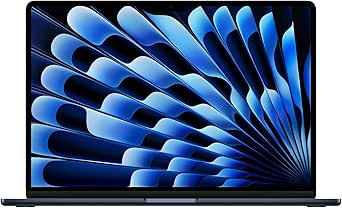 | Best Overall for a Spacious Mobile Workspace | Chip: Apple M4 | Display: 15.3-inch Liquid Retina | Memory: 16GB unified memory | VIEW ON AMAZON | See Our Full Breakdown |
| Apple Mac mini Desktop Computer with M5 Pro |  | Best for a Permanent Multi-Display Desk | Chip: Apple M5 Pro | Dimensions: 5 x 5 x 1.97 inches | Weight: 1.61 pounds | VIEW ON AMAZON | See Our Full Breakdown |
| Apple MacBook Air 13.6-inch (2022) with M2 Chip, 8GB RAM, 256GB SSD, Midnight (Renewed) |  | Best Compact Renewed Mac for Basic Remote Work | Model year: 2022 | Processor: Apple M2, 8-core CPU | Memory: 8GB unified memory | VIEW ON AMAZON | See Our Full Breakdown |
| Apple MacBook Air 13-inch with M5 Chip, 16GB Memory, 512GB SSD, Silver |  | Best Portable Pick for Frequent Travel | Chip: Apple M5 | Display: 13.6-inch Liquid Retina | Memory: 16GB unified memory | VIEW ON AMAZON | See Our Full Breakdown |
| Apple MacBook Pro 16-inch (Late 2019), Intel Core i7, 16GB RAM, 512GB SSD, Space Gray (Renewed) |  | Best Renewed Large-Screen Option for Graphics Work | Model year: 2019 | Processor: 2.6 GHz 6-core Intel Core i7-9750H | Memory: 16GB DDR4 RAM, 2666 MHz | VIEW ON AMAZON | See Our Full Breakdown |
| Apple MacBook Air 13.3-inch, 1.8 GHz Core i5, 8 GB RAM, 128 GB SSD (2017) |  | Best for Basic, Budget-Conscious Remote Work | Model year: 2017 | Processor: Intel Core i5-7360U, 1.8 GHz, dual-core | Memory: 8GB DDR3 SDRAM | VIEW ON AMAZON | See Our Full Breakdown |
| 2023 Apple MacBook Air 15-inch with M2 Chip, 8GB RAM, 256GB SSD, Midnight (Renewed) |  | Best Renewed Large-Screen Pick | Model year: 2023 | Condition: Renewed | Chip: Apple M2, 8-core CPU and 10-core GPU | VIEW ON AMAZON | See Our Full Breakdown |
| Apple MacBook Neo 13-inch Laptop with A18 Pro Chip, 8GB Memory, 512GB SSD, and Touch ID |  | Best Compact Everyday Work Mac | Processor: Apple A18 Pro | Memory: 8GB unified memory | Storage: 512GB SSD | VIEW ON AMAZON | See Our Full Breakdown |
| Apple 16.2-inch MacBook Pro with M5 Pro, 18-core CPU, 20-core GPU, 24GB Memory, 1TB SSD, Space Black |  | Best for Demanding Professional Work | Chip: Apple M5 Pro | CPU and GPU: 18-core CPU, 20-core GPU | Memory: 24GB unified memory | VIEW ON AMAZON | See Our Full Breakdown |
| Apple MacBook Air 15-inch (2026) with M5 Chip, 24GB Memory, 1TB SSD — Midnight |  | Best Overall for Remote Work | Processor: Apple M5 chip | Memory: 24GB | Storage: 1TB SSD | VIEW ON AMAZON | See Our Full Breakdown |
| Apple MacBook Air 13-inch (2025) with M4 chip |  | Best for Portability | Chip: Apple M4 | Display: 13.6-inch Liquid Retina | Unified Memory: 16GB | VIEW ON AMAZON | See Our Full Breakdown |
| Apple Mac mini Desktop Computer (2024) with M4 Chip |  | Best for Fixed Workstations | Processor: Apple M4 chip, 10-core CPU | Graphics: 10-core GPU | Memory: 16GB unified memory | VIEW ON AMAZON | See Our Full Breakdown |
| Apple 14.2-inch MacBook Pro with M5 Chip |  | Best for Power Users | Processor: Apple M5 chip with 10-core CPU | Graphics: 10-core GPU | Memory: 16GB unified memory | VIEW ON AMAZON | See Our Full Breakdown |
| mac for remote working | Weight | Storage | Display | Memory |
|---|---|---|---|---|
| Apple MacBook Air 15-inch | 3.32 pounds | 256GB SSD | 15.3-inch Liquid Retina | 16GB unified memory |
| Apple Mac mini Desktop Compute | 1.61 pounds | — | — | — |
| Apple MacBook Air 13.6-inch | 2.7 pounds | 256GB SSD | 13.6-inch Liquid Retina, 2560 x 1664 pixels | 8GB unified memory |
| Apple MacBook Air 13-inch with | 2.71 pounds | 512GB SSD | 13.6-inch Liquid Retina | 16GB unified memory |
| Apple MacBook Pro 16-inch | 4 pounds | 512GB SSD | 16-inch Retina, 3072 x 1920 | 16GB DDR4 RAM, 2666 MHz |
| Apple MacBook Air 13.3-inch | 2.96 pounds (description) | 128GB SSD | 13.3-inch, 1366 x 768 | 8GB DDR3 SDRAM |
| 2023 Apple MacBook Air 15-inch | 3.3 pounds | 256GB SSD | 15.3-inch Liquid Retina, 2880 x 1864, up to 500 nits | 8GB |
| Apple MacBook Neo 13-inch Lapt | 2.71 pounds | 512GB SSD | 13-inch Liquid Retina, supports 1 billion colors | 8GB unified memory |
| Apple 16.2-inch MacBook Pro wi | 4.71 pounds | 1TB SSD | 16.2-inch Liquid Retina XDR | 24GB unified memory |
| Apple MacBook Air 15-inch | 3.32 pounds | 1TB SSD | 15.3-inch Liquid Retina, supports 1 billion colors | 24GB |
| Apple MacBook Air 13-inch | 2.73 pounds | 256GB SSD | 13.6-inch Liquid Retina | — |
| Apple Mac mini Desktop Compute | 1.5 pounds | 256GB SSD | — | 16GB unified memory |
| Apple 14.2-inch MacBook Pro wi | 3.41 pounds | 1TB SSD | 14.2-inch Liquid Retina XDR | 16GB unified memory |
More Details on Our Top Picks
Apple MacBook Air 15-inch (2025) with M4 chip, 16GB memory, 256GB SSD, and Liquid Retina display
The 15-inch MacBook Air with M4 is the strongest fit here for remote workers who want a large work area without moving to a heavier Pro. Its 15.3-inch display gives documents and side-by-side windows more room than the 13.6-inch M5 Air, while 16GB of memory and the M4 chip suit busy video calls, browsers, and office apps. The 12MP Center Stage camera and up-to-18-hour battery rating also support calls away from a desk. The compromise is its 256GB SSD, which can fill quickly with offline files, and its two Thunderbolt 4 ports leave little room for accessories without a hub. Choose the M5 13-inch Air instead if lighter travel and more storage matter more than screen space.
Pros:- 15.3-inch display provides more room for documents and split-screen work than the 13-inch Air models.
- M4 chip and 16GB unified memory support responsive multitasking.
- 12MP Center Stage camera is suited to frequent video meetings.
- Up to 18 hours of battery life supports long stretches away from an outlet.
Cons:- 256GB SSD may be restrictive for large work files and offline media.
- Only two Thunderbolt 4 ports, so multiple wired devices may call for a hub.
- At 3.32 pounds, it is heavier than the 13-inch MacBook Air options.
Best for: Remote professionals who split time between home and travel and want a roomy laptop display, capable multitasking, and a strong video-call camera.
Not ideal for: People who keep large media or project libraries locally, or who regularly connect several wired accessories without a dock.
- Chip:Apple M4
- Display:15.3-inch Liquid Retina
- Memory:16GB unified memory
- Storage:256GB SSD
- Camera:12MP Center Stage
- Battery life:Up to 18 hours
- Ports:Two Thunderbolt 4, MagSafe charging port, headphone jack
- Weight:3.32 pounds
Our verdict“Choose this Air if screen space and all-day mobility matter more than extra storage or the lightest possible carry.”
Apple Mac mini Desktop Computer with M5 Pro
The Mac mini with M5 Pro is the workstation choice in this group: its small 5-by-5-inch enclosure can anchor a home office with up to three external displays, Thunderbolt 5, HDMI, and 2.5Gb Ethernet. That port selection is better suited to a fixed desk with monitors, fast wired networking, and peripherals than either MacBook Air, which can be carried between workspaces but offers fewer connections. Wi-Fi 7 and Bluetooth 6 add current wireless options, while the M5 Pro is aimed at demanding creative, technical, and on-device AI work. The tradeoff is fundamental for remote workers: this is a desktop, so it needs a separate display and input devices and is not useful as a laptop away from the desk. The listing also does not specify memory or storage capacity, making those details important to confirm before choosing it over a laptop.
Pros:- Compact 5-by-5-inch footprint suits a permanent desk setup.
- M5 Pro chip is positioned for demanding creative, technical, and AI workflows.
- Three Thunderbolt 5 ports, HDMI, and 2.5Gb Ethernet support a broad desk setup.
- Supports up to three external displays and includes Wi-Fi 7.
Cons:- Requires a separate monitor, keyboard, and pointing device.
- Not portable for work away from the home office.
- Memory and storage capacities are not specified in the supplied product data.
Best for: Home-based developers, designers, or analysts who already have monitors and want a compact computer for a multi-display desk.
Not ideal for: Hybrid workers who need to take their Mac to meetings or cafes, or buyers who need confirmed memory and storage details before choosing.
- Chip:Apple M5 Pro
- Dimensions:5 x 5 x 1.97 inches
- Weight:1.61 pounds
- Ports:Three Thunderbolt 5, HDMI, 2.5Gb Ethernet, two USB-C, headphone jack
- Wireless:Wi-Fi 7 and Bluetooth 6
- External display support:Up to three displays
- Memory bandwidth:307GB/s
- Model number:MHQN4LL/A
Our verdict“Pick the Mac mini if your remote-work setup stays at one desk and you value ports and multiple displays over portability.”
Apple MacBook Air 13.6-inch (2022) with M2 Chip, 8GB RAM, 256GB SSD, Midnight (Renewed)
This renewed 13.6-inch MacBook Air makes the most sense for routine remote tasks when a compact, 2.7-pound laptop is the priority. Its M2 chip, 1080p camera, MagSafe charging, and Liquid Retina display cover everyday email, documents, and video calls; MagSafe also frees the two Thunderbolt ports while charging. Compared with the newer M5 13-inch Air, though, this model has half the listed memory and a smaller 256GB SSD, so it is a less comfortable fit for heavy multitasking or a growing local file collection. The renewed condition adds another tradeoff: the supplied data lists a 90-day limited warranty, rather than the assurance of a new device. I’d reserve it for lighter workloads and buyers comfortable with a renewed laptop, not as the safest long-term choice for demanding work.
Pros:- At 2.7 pounds, it is easy to carry between home, office, and other workspaces.
- 13.6-inch Liquid Retina display has a 2560 x 1664 resolution and P3 wide color.
- 1080p camera supports clearer video calls than a basic built-in webcam.
- MagSafe charging leaves two Thunderbolt ports available while plugged in.
Cons:- 8GB unified memory may limit demanding workloads and extensive multitasking.
- 256GB SSD leaves limited room for a large local work library.
- Renewed condition and a 90-day limited warranty offer less purchase assurance than a new model.
Best for: Students, part-time remote workers, and frequent commuters handling browser-based tasks, documents, and video calls on a compact laptop.
Not ideal for: People who keep many demanding apps open, work with large local files, or want a new Mac with more memory and a longer stated warranty.
- Model year:2022
- Processor:Apple M2, 8-core CPU
- Memory:8GB unified memory
- Storage:256GB SSD
- Display:13.6-inch Liquid Retina, 2560 x 1664 pixels
- Camera:1080p
- Weight:2.7 pounds
- Ports:MagSafe, two Thunderbolt ports, headphone jack
Our verdict“Choose this renewed Air for light remote work and easy carrying, but favor the newer M5 Air for more headroom and storage.”
Apple MacBook Air 13-inch with M5 Chip, 16GB Memory, 512GB SSD, Silver
For a remote worker who carries a laptop daily, this 13.6-inch M5 MacBook Air is the most balanced compact option in the group. At 2.71 pounds, it is easier to pack than the 15-inch M4 Air, yet it pairs 16GB of memory with a 512GB SSD—twice the listed storage of that larger model. That combination gives everyday work files more breathing room while supporting multitasking, and the 12MP Center Stage camera helps keep video calls in frame. Up to 18 hours of battery life is useful for days with limited access to outlets; Wi-Fi 7 and support for up to two external displays help at home or in a shared office. The tradeoff is a smaller screen and just two Thunderbolt 4 ports. Choose the 15-inch Air if a broad built-in workspace matters more than travel weight.
Pros:- 2.71-pound design is well suited to regular travel and commuting.
- 16GB memory and 512GB SSD provide more working room than the listed 15-inch M4 Air configuration.
- 12MP Center Stage camera supports frequent video meetings.
- Wi-Fi 7, up to 18 hours of battery life, and support for up to two external displays suit varied work setups.
Cons:- 13.6-inch display offers less room for split-screen work than the 15-inch MacBook Air.
- Two Thunderbolt 4 ports may require a hub for multiple wired accessories.
Best for: Hybrid employees and consultants who carry a Mac between work locations and want modern connectivity, useful storage, and a good meeting camera.
Not ideal for: Remote workers who need a large built-in screen for side-by-side documents or several wired peripherals without a hub.
- Chip:Apple M5
- Display:13.6-inch Liquid Retina
- Memory:16GB unified memory
- Storage:512GB SSD
- Camera:12MP Center Stage
- Battery life:Up to 18 hours
- Wireless:Wi-Fi 7 and Bluetooth 6
- Weight:2.71 pounds
Our verdict“Choose this M5 Air if you want a light, travel-ready work laptop with more storage than the 15-inch M4 Air.”
Apple MacBook Pro 16-inch (Late 2019), Intel Core i7, 16GB RAM, 512GB SSD, Space Gray (Renewed)
The renewed 16-inch MacBook Pro from 2019 is the large-screen alternative for remote workers whose tasks can use its discrete AMD graphics. Its 3072 x 1920 display, Radeon Pro 5300M, 16GB RAM, and 512GB SSD make it a better match for graphics-heavy work than the fanless MacBook Air models, especially when a roomy screen matters. That comes with a clear mobility cost: at 4 pounds, it is substantially heavier than either Air, and its listed battery life reaches up to 11 hours rather than the Air models’ up-to-18-hour figure. It also uses an older Intel platform and 802.11ac Wi-Fi, while the newer M5 Air offers Wi-Fi 7 and a lighter design. Renewed condition means prior use is another consideration. This is a niche pick for a desk-based creative workflow, not the easy default for everyday remote work.
Pros:- 16-inch Retina display provides a large 3072 x 1920 workspace.
- AMD Radeon Pro 5300M has 4GB of dedicated GDDR6 graphics memory.
- 16GB RAM and a 512GB SSD offer useful capacity for work files and applications.
- Four listed USB ports, including Thunderbolt and USB Type-C, provide several connection options.
Cons:- At 4 pounds, it is considerably heavier than the MacBook Air options.
- Listed battery life is up to 11 hours, shorter than the Air models’ stated maximum.
- Renewed condition and the older Intel platform may be a poor fit for buyers seeking newer hardware.
Best for: Remote creatives who need a 16-inch high-resolution screen and discrete graphics in a MacBook and are comfortable buying renewed hardware.
Not ideal for: Frequent travelers, buyers who prioritize long battery life or newer wireless standards, and people who want a new Apple silicon Mac.
- Model year:2019
- Processor:2.6 GHz 6-core Intel Core i7-9750H
- Memory:16GB DDR4 RAM, 2666 MHz
- Storage:512GB SSD
- Display:16-inch Retina, 3072 x 1920
- Graphics:AMD Radeon Pro 5300M, 4GB GDDR6
- Battery life:Up to 11 hours
- Weight:4 pounds
- Wireless:Wi-Fi 802.11ac
Our verdict“Pick this renewed Pro for a large screen and discrete graphics at a mostly stationary workspace, not for frequent travel.”
Apple MacBook Air 13.3-inch, 1.8 GHz Core i5, 8 GB RAM, 128 GB SSD (2017)
This older MacBook Air is best suited to remote work built around email, documents, and browser-based meetings. Its 2.96-pound unibody design and stated battery life of up to 12 hours make it easier to carry between home and a shared workspace than the larger 15-inch MacBook Air with M2. The tradeoff is age: its dual-core Intel processor and 8GB of RAM offer less headroom for heavy video calls, many open tabs, or demanding creative apps. The 1366 x 768 display also gives you less workspace and detail than the newer Retina models, while 128GB of storage leaves limited room for files. I’d choose it only when basic tasks and portability matter more than screen quality, speed, or long-term flexibility.
Pros:- Lightweight 2.96-pound unibody design is easy to carry
- Stated battery life of up to 12 hours suits work away from an outlet
- 8GB of RAM supports everyday office tasks
- SDXC slot provides a way to access compatible memory cards
Cons:- 1366 x 768 display has less detail and workspace than newer MacBook Air screens
- Dual-core Intel processor and 8GB of RAM limit demanding multitasking
- 128GB SSD can fill quickly with work files and applications
Best for: Remote workers with light workloads—email, documents, and occasional video calls—who prioritize a light laptop over a high-resolution screen.
Not ideal for: People who keep many apps or browser tabs open, edit media, or need a sharp, spacious display for long work sessions.
- Model year:2017
- Processor:Intel Core i5-7360U, 1.8 GHz, dual-core
- Memory:8GB DDR3 SDRAM
- Storage:128GB SSD
- Display:13.3-inch, 1366 x 768
- Graphics:Integrated Intel HD Graphics 6000
- Weight:2.96 pounds (description)
- Battery life:Up to 12 hours
- Connectivity:Wi-Fi 802.11ac, Bluetooth, SDXC slot
Our verdict“Choose this 2017 Air for light, portable office work only if you can accept its dated display and limited storage.”
2023 Apple MacBook Air 15-inch with M2 Chip, 8GB RAM, 256GB SSD, Midnight (Renewed)
For remote work, the main appeal here is a 15.3-inch Liquid Retina display in a laptop that weighs 3.3 pounds and has no fan, so it can stay quiet during calls. The extra screen area makes side-by-side documents and meeting windows more comfortable than on the MacBook Neo 13-inch, while the M2 chip and stated battery life of up to 18 hours suit a full day of mixed office tasks. Its limits are the 8GB of memory and renewed condition: extensive multitasking has less breathing room, and cosmetic or battery condition may vary. The Neo offers more storage, but this Air gives you a larger, higher-resolution workspace. I’d pick it for screen space, not for buyers who need maximum memory or want a new machine.
Pros:- 15.3-inch Liquid Retina display provides generous workspace
- Fanless design avoids fan noise during calls
- Stated battery life of up to 18 hours supports long workdays
- 256GB SSD offers twice the listed capacity of the 2017 MacBook Air
Cons:- 8GB of memory can constrain demanding multitasking
- Renewed condition may bring wear or variation in battery health
- Larger footprint is less convenient than a 13-inch laptop in tight workspaces
Best for: Remote workers who want a large, sharp screen for documents and video calls, and are comfortable buying a renewed laptop.
Not ideal for: People who need more than 8GB of memory for heavy multitasking or prefer the predictability of a new device.
- Model year:2023
- Condition:Renewed
- Chip:Apple M2, 8-core CPU and 10-core GPU
- Memory:8GB
- Storage:256GB SSD
- Display:15.3-inch Liquid Retina, 2880 x 1864, up to 500 nits
- Weight:3.3 pounds
- Battery life:Up to 18 hours
- Wireless:Wi-Fi 6, Bluetooth 5.3
Our verdict“Choose this renewed M2 Air if a spacious screen matters more than extra memory and new-device condition.”
Apple MacBook Neo 13-inch Laptop with A18 Pro Chip, 8GB Memory, 512GB SSD, and Touch ID
The MacBook Neo is the compact choice for remote workers who move between rooms, coworking spaces, or travel days and want more storage than many basic configurations provide. At 2.71 pounds, it is lighter than the 15-inch M2 Air, while its 13-inch Liquid Retina display is a clearer, more modern workspace than the 2017 Air’s low-resolution screen. The listed 1080p camera and dual microphones are useful for calls, and up to 16 hours of stated battery life reduces outlet hunting. Its 8GB of unified memory is the main compromise: buyers who routinely run demanding apps alongside calls should look to a higher-memory model, such as the 16-inch MacBook Pro. The 512GB SSD is generous for this lineup, but the smaller screen is less suited to split-screen work.
Pros:- 2.71-pound weight makes it easy to carry throughout the workday
- 512GB SSD provides ample space for local documents and applications
- 1080p FaceTime HD camera and dual microphones suit video meetings
- Stated battery life of up to 16 hours supports work away from a desk
Cons:- 8GB of unified memory limits headroom for demanding multitasking
- 13-inch screen offers less room for side-by-side work than the 15-inch MacBook Air
- A18 Pro chip details do not specify CPU or GPU core counts in the supplied product data
Best for: Mobile remote workers who want a light 13-inch laptop, substantial local storage, and a better-than-basic video-call setup.
Not ideal for: People who rely on heavy multitasking or want a large display for keeping multiple work windows visible.
- Processor:Apple A18 Pro
- Memory:8GB unified memory
- Storage:512GB SSD
- Display:13-inch Liquid Retina, supports 1 billion colors
- Camera:1080p FaceTime HD
- Battery life:Up to 16 hours
- Weight:2.71 pounds
- Dimensions:8.12 x 11.71 x 0.5 inches
Our verdict“Choose the Neo for portable everyday remote work and ample storage, but look elsewhere if you need a large screen or more memory.”
Apple 16.2-inch MacBook Pro with M5 Pro, 18-core CPU, 20-core GPU, 24GB Memory, 1TB SSD, Space Black
This MacBook Pro is the specialist pick for remote workers whose day includes demanding creative, technical, or AI workloads. Its 18-core CPU, 20-core GPU, and 24GB of memory give it substantially more listed processing capacity than the 15-inch M5 MacBook Air, while the 1TB SSD can keep large work files close at hand. The 16.2-inch Liquid Retina XDR display and 12MP Center Stage camera also suit long desk sessions and frequent video meetings. The cost of that capability is portability: at 4.71 pounds, it is heavier than either Air, and its size is less convenient for cramped desks or daily commuting. For typical documents, email, and calls, the M5 Air is the more portable fit; choose this Pro when demanding apps make the extra headroom useful.
Pros:- 18-core CPU and 20-core GPU target demanding professional workloads
- 24GB of unified memory offers more multitasking headroom than the listed 8GB laptops
- 1TB SSD provides substantial local storage
- HDMI, SDXC, MagSafe 3, and three Thunderbolt 5 ports reduce reliance on adapters
Cons:- 4.71-pound weight makes it the least portable laptop in this batch
- Its performance and large display are more than many standard office workloads require
- Large chassis can be awkward on small desks and during frequent travel
Best for: Remote professionals running demanding creative, technical, or on-device AI workloads who want a large display and room for substantial local files.
Not ideal for: Office-focused workers who mainly use email, documents, and video calls and would rather carry a lighter laptop.
- Chip:Apple M5 Pro
- CPU and GPU:18-core CPU, 20-core GPU
- Memory:24GB unified memory
- Storage:1TB SSD
- Display:16.2-inch Liquid Retina XDR
- Camera:12MP Center Stage
- Wireless:Wi-Fi 7, Bluetooth 6
- Ports:Three Thunderbolt 5, MagSafe 3, SDXC, HDMI, headphone jack
- Weight:4.71 pounds
Our verdict“Pick this MacBook Pro when demanding work benefits from its memory, graphics, and ports, not when portability is your main priority.”
Apple MacBook Air 15-inch (2026) with M5 Chip, 24GB Memory, 1TB SSD — Midnight
This Air offers the strongest balance in this batch for remote work that spans calls, documents, and multitasking. Its 15.3-inch Liquid Retina display creates more room for shared screens and side-by-side windows than the 13-inch Neo, while 24GB of memory and a 1TB SSD provide more breathing room than the renewed M2 Air’s 8GB and 256GB. At 3.32 pounds, it remains far easier to carry than the 16-inch MacBook Pro, and the fanless Air design suits quiet home offices. Up to 18 hours of stated battery life, a 12MP Center Stage camera, and support for two external displays add flexibility. The tradeoff is a thinner port selection: two Thunderbolt 4 ports mean some desk setups may need adapters.
Pros:- 24GB of memory and 1TB SSD provide capacity for heavier everyday multitasking and local files
- 15.3-inch Liquid Retina display offers generous workspace
- Stated battery life of up to 18 hours supports long workdays away from an outlet
- 12MP Center Stage camera and support for up to two external displays suit home-office setups
Cons:- Two Thunderbolt 4 ports may require a hub for accessories and desk connections
- Less suited to sustained demanding workloads than the 16-inch MacBook Pro
- At 3.32 pounds, it is less compact than the 13-inch MacBook Neo
Best for: Remote professionals who want a large-screen, portable Mac with substantial memory and storage for multitasking, calls, and external displays.
Not ideal for: People who need the MacBook Pro’s broader built-in port selection or its higher-performance hardware for sustained demanding workloads.
- Processor:Apple M5 chip
- Memory:24GB
- Storage:1TB SSD
- Display:15.3-inch Liquid Retina, supports 1 billion colors
- Camera:12MP Center Stage
- Battery life:Up to 18 hours
- Wireless:Wi-Fi 7, Bluetooth 6
- Ports:Two Thunderbolt 4, MagSafe charging port, headphone jack
- Weight:3.32 pounds
Our verdict“Choose this M5 Air for a portable remote-work setup that needs a spacious screen, substantial memory, and ample storage without Pro-level bulk.”
Apple MacBook Air 13-inch (2025) with M4 chip
This model stands out as the ultimate travel companion for remote workers who prioritize weight over raw power. At just 2.73 pounds, it is significantly lighter than the MacBook Pro 14-inch, making it easier to carry between home, cafes, and co-working spaces. The M4 chip handles multitasking and video calls with ease, though the fanless design means it may throttle during sustained heavy workloads compared to the Pro. The 12MP Center Stage camera ensures you look professional on Zoom without needing an external webcam. However, the 256GB SSD is a tight constraint if you store large files locally, often forcing reliance on cloud storage or external drives. It supports two external displays, which is sufficient for most standard remote setups, but lacks the HDMI port found on the Pro model.
Pros:- Extremely lightweight at 2.73 pounds for easy portability
- Up to 18 hours of battery life supports full workdays without charging
- 12MP Center Stage camera provides high-quality video calls
- Silent fanless operation eliminates noise distractions during calls
Cons:- Limited 256GB storage requires external drives for large projects
- Only two Thunderbolt ports restrict simultaneous peripheral connections
- Fanless design may throttle performance under sustained heavy loads
Best for: Remote workers who commute frequently or travel and need a lightweight device for meetings, writing, and light multitasking.
Not ideal for: Users who need to edit 4K video locally or require more than 256GB of internal storage without carrying an external drive.
- Chip:Apple M4
- Display:13.6-inch Liquid Retina
- Unified Memory:16GB
- Storage:256GB SSD
- Camera:12MP Center Stage
- Battery Life:Up to 18 hours
- Weight:2.73 pounds
- Ports:Two Thunderbolt 4, MagSafe, Headphone Jack
Our verdict“Choose this if you value portability and battery life over maximum performance and storage capacity.”
Apple Mac mini Desktop Computer (2024) with M4 Chip
If your remote work setup is stationary, this compact desktop offers better value than a laptop by letting you invest in a high-quality monitor instead. Its five-by-five-inch footprint fits almost anywhere, unlike the bulkier MacBook Pro. The M4 chip with 10-core CPU and GPU delivers strong performance for coding and design, while the Gigabit Ethernet port provides a stable connection that Wi-Fi cannot match. You gain front-facing USB-C ports for easy access to drives or headphones, a convenience missing on many laptops. However, you must budget for a separate monitor, keyboard, and mouse, which adds to the total cost. The 256GB SSD is also a potential bottleneck, requiring careful file management or external storage solutions.
Pros:- Tiny 5×5 inch footprint saves desk space
- Gigabit Ethernet ensures stable, low-latency internet for calls
- Front-facing USB-C ports offer convenient peripheral access
- M4 chip provides strong performance for multitasking
Cons:- Requires separate purchase of monitor and peripherals
- 256GB SSD may fill up quickly with local project files
- No battery means it is unusable during power outages
Best for: Remote workers with a dedicated home office who prefer a desktop setup with stable wired internet and external peripherals.
Not ideal for: Those who need to work from different locations or do not already own a monitor, keyboard, and mouse.
- Processor:Apple M4 chip, 10-core CPU
- Graphics:10-core GPU
- Memory:16GB unified memory
- Storage:256GB SSD
- Ports:Thunderbolt, HDMI, Gigabit Ethernet, USB-C
- Dimensions:5 x 5 x 2 inches
- Weight:1.5 pounds
Our verdict“Ideal for stationary remote workers who want desktop performance and port connectivity without laptop bulk.”
Apple 14.2-inch MacBook Pro with M5 Chip
This machine is the premium choice for remote workers who demand top-tier performance and display quality. The M5 chip outperforms the M4 found in the MacBook Air, handling complex workflows like video editing or data analysis without slowing down. Its Liquid Retina XDR display reaches 1600 nits, offering superior brightness and color accuracy for creative tasks. Unlike the Air, it includes an HDMI port and SDXC slot, reducing dongle clutter for presentations and media transfer. The tradeoff is weight and thickness; at 3.41 pounds, it is less portable than the Air. You also pay a premium for this capability, but the 1TB SSD and robust cooling system make it a long-term investment for demanding professionals.
Pros:- M5 chip delivers top-tier performance for heavy workloads
- 1600-nit XDR display offers exceptional brightness and color
- Versatile ports including HDMI and SDXC reduce dongle needs
- 1TB SSD provides ample storage for large project files
Cons:- Heavier and thicker than the MacBook Air
- Higher price point compared to Air and mini options
- Overkill power for basic email and document tasks
Best for: Creative professionals and developers who need high performance, excellent screen quality, and versatile ports for a mobile workstation.
Not ideal for: Users on a tight budget or those who only need basic office applications and prioritize light weight over power.
- Processor:Apple M5 chip with 10-core CPU
- Graphics:10-core GPU
- Memory:16GB unified memory
- Storage:1TB SSD
- Display:14.2-inch Liquid Retina XDR
- Peak Brightness:1600 nits
- Ports:Three Thunderbolt 4, MagSafe 3, SDXC, HDMI
- Weight:3.41 pounds
Our verdict“The definitive choice for professionals who need laptop portability combined with desktop-class performance and connectivity.”

How We Picked
I evaluated these machines based on their ability to handle typical remote workloads: video conferencing, web-based multitasking, document editing, and light creative tasks. Priority was given to Apple Silicon efficiency, as battery life and silent operation are critical for working from home or cafes. I compared generation differences directly, contrasting the M2, M4, and M5 chips to identify where performance jumps justify the cost increase.
I also assessed the practical utility of each form factor. Desktops were judged on their connectivity and expansion potential for multi-monitor setups, while laptops were evaluated for portability and screen size. Renewed models were scrutinized for their remaining software support window, ensuring they are not obsolete within the next two years.
| mac for remote working | Battery life |
|---|---|
| Apple MacBook Air 15-inch | Up to 18 hours |
| Apple Mac mini Desktop Compute | — |
| Apple MacBook Air 13.6-inch | — |
| Apple MacBook Air 13-inch with | Up to 18 hours |
| Apple MacBook Pro 16-inch | Up to 11 hours |
| Apple MacBook Air 13.3-inch | Up to 12 hours |
| 2023 Apple MacBook Air 15-inch | Up to 18 hours |
| Apple MacBook Neo 13-inch Lapt | Up to 16 hours |
| Apple 16.2-inch MacBook Pro wi | — |
| Apple MacBook Air 15-inch | Up to 18 hours |
| Apple MacBook Air 13-inch | Up to 18 hours |
| Apple Mac mini Desktop Compute | — |
| Apple 14.2-inch MacBook Pro wi | — |
Factors to Consider When Choosing Mac For Remote Working
Selecting a Mac for remote work is less about raw horsepower and more about workflow integration. Here are the specific factors that should drive your decision.Memory vs. Storage Priorities
For remote work, RAM is more important than storage. Video calls, browser tabs, and background sync services consume memory rapidly. A machine with 8GB of RAM may feel sluggish when running Zoom alongside a Chrome window with ten tabs. I recommend prioritizing 16GB of memory over larger SSDs. You can always use cloud storage or an external drive for files, but you cannot upgrade internal memory later. This tradeoff ensures your system remains responsive during peak work hours.
The Laptop vs. Desktop Dilemma
If your remote work location is fixed, the Mac mini often beats the MacBook Pro in value. You get similar processing power for a lower price because you are not paying for the screen, battery, and keyboard. However, this requires buying peripherals separately. If you ever need to work from a coffee shop or travel, a laptop is non-negotiable. Assess your mobility needs honestly; a desktop setup is cheaper but locks you to one desk.
Screen Size and Ergonomics
Working on a 13-inch screen often leads to poor posture because you hunch closer to the display. The 15-inch MacBook Air provides a comfortable middle ground, allowing for split-screen views without excessive eye movement. For dedicated home offices, an external monitor is still the best ergonomic choice. However, if you rely on the laptop screen, prioritize larger displays to reduce neck strain. Smaller screens force you to constantly switch windows, breaking your flow.
Renewed vs. New Hardware
Buying renewed Macs can save money, but check the chip generation carefully. An M2 model is still viable, but an Intel-based 2017 or 2019 model is becoming obsolete. Apple’s software support for Intel chips is winding down, which affects security updates and app compatibility. I advise avoiding Intel Macs for new purchases unless you have a specific legacy software requirement. The performance gap between Apple Silicon and Intel is too wide to ignore for daily productivity.
Connectivity and Peripheral Needs
Remote work setups often require multiple monitors, webcams, and storage drives. Laptops with fewer ports will force you to buy hubs, adding clutter and potential failure points. The Mac mini and larger MacBook Pros offer more native connectivity. If you plan to use a dual-monitor setup, ensure your chosen Mac supports the necessary resolutions. Check the Thunderbolt port count, as this determines how many high-resolution displays you can drive simultaneously.
Frequently Asked Questions
Is 8GB of RAM enough for remote work on a Mac in 2027?
For most people, no. While macOS is efficient, modern web browsers and video conferencing apps are memory-hungry. With 8GB, you may experience swapping to the SSD, which slows down the system. I strongly recommend 16GB as the starting point for a smooth experience. If you only use a few apps and have a slow internet connection, 8GB might suffice, but it limits your future flexibility.Should I buy a renewed Intel Mac instead of a new Apple Silicon Mac?
Generally, no. Intel Macs run hotter, have worse battery life, and are losing software support. The performance per watt of M-series chips is vastly superior. Unless you need to run specific Windows-only software via Boot Camp, the newer Apple Silicon models are better investments. The price difference for a new M-series machine is justified by the longer lifespan and better efficiency.Do I need a MacBook Pro for remote work, or is the Air sufficient?
For 90% of remote workers, the MacBook Air is sufficient. It handles video calls, office suites, and web development without issue. The Pro is only necessary if you do heavy video editing, 3D rendering, or compile massive codebases. The Air is lighter, quieter, and has better battery life. Save the money on the Pro and invest in a better monitor or ergonomic chair instead.Which Mac is best for a dual-monitor home office setup?
The Mac mini or the MacBook Pro are the best choices here. The Mac mini usually offers better thermal headroom for sustained multi-monitor use. If you choose a MacBook Air, you may need to verify its external display limits. Some Air models support two external displays only when the lid is closed. Check the specific model’s connectivity specs before committing to a multi-monitor workflow.Is the MacBook Neo with the A18 Pro chip suitable for professional work?
The MacBook Neo is designed for light productivity and media consumption, not heavy professional workflows. The A18 Pro chip is powerful for mobile tasks but lacks the multi-core performance of the M-series chips. It is a good option for students or casual users who prioritize portability and battery life. However, if you run multiple virtual machines or heavy creative apps, stick with an M4 or M5 model.Conclusion
To choose the right Mac for remote working, match the hardware to your daily workflow. The Apple MacBook Air 15-inch (2025) is the best overall choice for most users, offering the ideal balance of screen size, portability, and performance. If you are on a tight budget and work from a fixed desk, the Apple Mac mini (2024) provides incredible value. For those needing maximum power for creative tasks, the Apple 14.2-inch MacBook Pro with M5 is the premium pick. Avoid the older Intel models and 8GB RAM configurations to prevent early obsolescence. Focus on memory and chip generation, and you will find a machine that lasts for years.
Halloween Picks
halloween
As an affiliate, we earn on qualifying purchases.