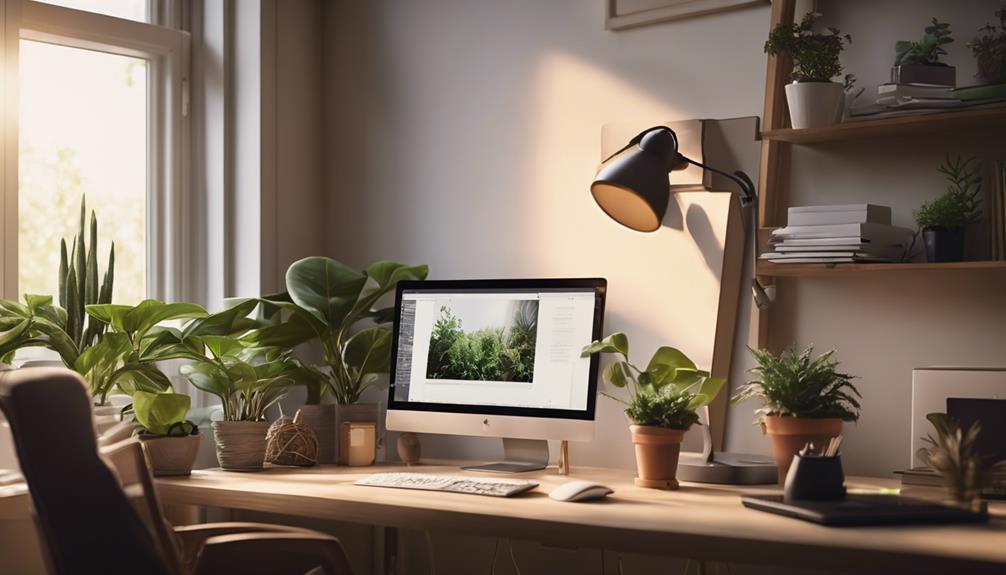

Eye strain is the single biggest lighting problem in home offices, and the right lamp fixes it faster than a new monitor or a screen filter. The Honeywell HWT-H2 Full-Spectrum LED Desk Lamp earns the best overall spot because its full-spectrum output and stable dimming come closest to natural daylight, which is exactly what tired eyes want during long desk sessions. If budget leads your decision, the SUPERDANNY gooseneck clamp lamp delivers adjustable, flicker-free light at a fraction of the cost, while the Micomlan 24W auto-dimming architect lamp suits buyers who want the lamp to adjust itself as room light changes throughout the day. The core tradeoff in this category is between precision and simplicity: high-wattage architect lamps with memory functions and remotes cover large desks but add complexity and cord clutter, whereas simple clamp and gooseneck models are easy to place but lack the brightness range serious eye care demands. Keep reading for the full breakdown, including which models fall short and who each one actually suits.

Get business pricing on office and shipping supplies
- Business-only prices and quantity discounts
- Tax-exempt purchasing
- Multiple users, one account, clear invoices
Key Takeaways
- Auto-dimming and ambient light sensors, found on the Micomlan 24W and Honeywell HWT-H2, separated the top picks from lamps that force manual adjustment every time daylight shifts.
- Full-spectrum output mattered more than raw wattage: the Honeywell HWT-H2 beat several higher-lumen architect lamps on perceived eye comfort because its color rendering mimics daylight more closely.
- Dual-head designs like the Motumen and Micomlan dual-light spread light across wide desks with fewer shadows, making them better for multi-monitor setups than single-head equivalents.
- Gooseneck clamp lamps (SUPERDANNY, Voncerus) are the value play for small desks and reading corners, but their lower output limits them for full workdays.
- Memory functions and remote controls, present on the Pzloz and SKYLEO, sound like luxuries but proved genuinely useful for eye care — they make it likely you will actually keep brightness matched to the time of day.




More Details on Our Top Picks
Pzloz LED Desk Lamp with Clamp – 24W Architect Lamp with Remote Control
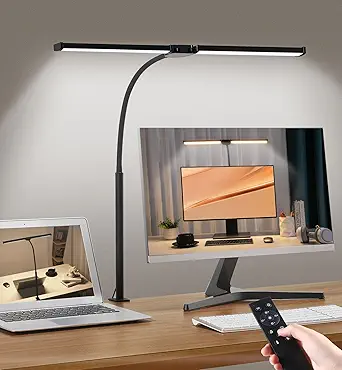
The Pzloz 24W architect lamp earns the top spot because it combines the widest range of adjustments with genuine eye-care engineering. With 25 light combinations spanning 3000K to 5500K and a CRI above 90, it lets you tune light precisely for screen work versus paper reading — the kind of flexibility that actually reduces strain over a long day. Compared with the Motumen dual-head, the Pzloz trades some raw coverage for a more rigid swing-arm architecture, which holds position better when you adjust your monitor or desk layout. The wireless remote is a real convenience for a lamp this adjustable, letting you change modes without reaching across your workspace. The tradeoffs are real: it’s tethered to an outlet, so placement is limited, and remote quality control can be inconsistent.
Pros:- 25 lighting combinations with 5 color temperatures and 5 brightness levels for precise eye-comfort tuning
- Fully articulating design: 360° rotation, 180° swing arms, 270° rotating head
- CRI above 90 with flicker-free, low-blue-light output for true color and less fatigue
- Wireless remote keeps adjustments effortless
Cons:- Corded power limits where you can place it
- Some remote units arrive defective and need a replacement
Best for: Remote workers with dual monitors or drafting desks who need precise, wide-reaching light they can reposition daily
Not ideal for: Anyone without a free desk edge for the clamp, or those wanting a battery or USB-powerbank option for flexible placement
- Wattage:24 watts
- Color Temperature:3000K–5500K (5 modes)
- Brightness Levels:5 (20%–100%)
- Lighting Combinations:25, plus night light and reading modes
- CRI:Above 90
- Control:Wireless remote
- Mounting:Tabletop clamp
- Power Source:Corded electric
Our verdict“If you want one lamp that handles every lighting scenario a demanding home office throws at it, this is the pick — as long as you have a clampable desk edge and a nearby outlet.”
SUPERDANNY LED Desk Lamp with Adjustable Gooseneck
This SUPERDANNY model proves you don’t need to pay architect-lamp prices for genuinely eye-friendly lighting. Its 45° beam angle cuts screen glare by roughly 30% — a measurable benefit the other picks here can’t claim — and 60 LED units running at just 12W keep energy draw minimal. Compared with the SKYLEO swing-arm lamp, the gooseneck design trades structured positioning for pure flexibility: you can bend it into awkward corners or over a laptop, and the neck is rated for 100,000 bends. The 10%–100% continuous dimming also outclasses the stepped 5-level systems on the Pzloz and Motumen for fine-tuning low-light evening work. The catch is the clamp requirement and dependence on a USB power source, which rules out some setups.
Pros:- 45° beam angle reduces screen glare by about 30%, directly easing eye fatigue
- Continuous 10%–100% dimming across 3 color temperatures for very fine tuning
- 360° gooseneck rated for 100,000 bends reaches up to 30 inches
- USB powered with included adapter, plus power bank compatibility
Cons:- Clamp-only mounting doesn’t suit every desk
- Requires an external USB power source at all times
Best for: Students and budget-conscious remote workers who want glare reduction and flexible positioning without a premium price
Not ideal for: People with thick or shelf-backed desks that can’t accept a clamp, or anyone wanting a self-contained lamp with built-in controls at arm’s reach
- Power:12W
- LED Units:60
- Color Temperatures:3000K / 4000K / 6000K
- Brightness Range:10%–100% continuous dimming
- Beam Angle:45°
- Max Height:30 inches
- Power Adapter:5V/2.4A USB (included)
- Mounting:Metal clamp with silicone pad
Our verdict“The smartest low-cost entry point for eye-care lighting, especially if glare off your monitor is your main complaint.”
SKYLEO LED Desk Lamp with Adjustable Swing Arm and Memory Function
The SKYLEO fills a specific gap: it delivers architect-style directional light — a swing arm and rotatable head that aim illumination exactly where your eyes need it — in a compact footprint that won’t crowd a small workspace. Its 11 brightness levels actually beat the LEPOWER’s 10, and the 5 color modes give it more range than SUPERDANNY’s 3. Where it falls short of the Pzloz architect lamp is coverage and muscle: this isn’t the lamp for a large desk, and there’s no remote, so every adjustment happens at the base. The 45-minute timer is a thoughtful addition for pomodoro-style work sessions, and the memory function means you’re not re-dialing your preferred setting each morning.
Pros:- 11 brightness levels and 5 color modes offer finer control than most compact lamps
- Swing arm and rotatable head direct light away from your screen line of sight
- Memory function plus 45-minute timer suit focused work sessions
- USB powered from laptop, power bank, or adapter
Cons:- USB adapter not always included, so factor that in
- Not bright enough to cover a large desk surface
Best for: Anyone with a compact desk who still wants directional, glare-controllable light rather than a fixed dome lamp
Not ideal for: Owners of large L-shaped or oversized desks who need wider coverage — the output won’t stretch far enough
- Color Modes:5
- Brightness Levels:11
- Timer:45 minutes
- Memory Function:Yes
- Arm Type:Adjustable swing arm with rotatable head
- Power Source:USB
- Color:Black
Our verdict“A tidy, budget-friendly choice for small setups where aiming light precisely matters more than raw output.”
Motumen LED Desk Lamp with Clamp, Dual-Head Eye-Care Design
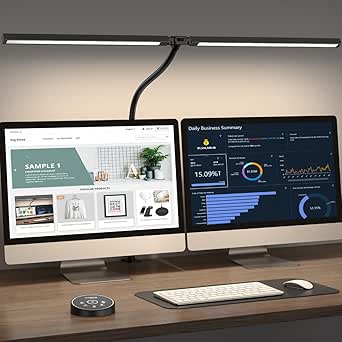
If your workspace is deep or spread across two monitors, the Motumen’s dual-head design with 168 LED beads is the standout: instead of one pool of light, you get uniform illumination across a wide surface, which matters because uneven lighting forces your pupils to constantly readjust — a hidden source of eye strain. Its 6500K top-end color temperature runs cooler than the Pzloz’s 5500K ceiling, useful for daytime alertness. The 32.8-ft remote range outclasses anything else in this lineup, and the 1-hour auto-off timer is more generous than SKYLEO’s 45 minutes. The tradeoffs mirror other clamp lamps: you need a suitable desk edge, and there’s no battery option, so plan around outlet placement.
Pros:- Dual heads with 168 LED beads deliver uniform, flicker-free coverage over wide desks
- 5 color temperatures (3000K–6500K) and 5 brightness levels with memory
- Flexible goose-neck positioning plus both remote and on-lamp controls
- 1-hour auto-off timer and 32.8 ft remote range
Cons:- Clamp mounting restricts where it can go
- No battery operation — must sit near a power outlet
Best for: Owners of wide or dual-monitor desks who need even, flicker-free light across the whole work surface
Not ideal for: Small-desk users or anyone without a clampable desk edge near an outlet — the dual heads would be wasted
- Color Temperature:3000K–6500K (5 modes)
- Brightness Levels:5 (20%–100%)
- LED Beads:168
- Remote Range:32.8 ft / 10 m
- Timer:1-hour auto-off
- Design:Dual-head, flexible goose-neck, clamp mount
- Color:Black
Our verdict“The best coverage-per-dollar option when your desk is big enough to justify two light heads.”
LEPOWER LED Desk Lamp, 800 Lumens
What separates the LEPOWER is how you interact with it. The stepless slide control makes brightness feel analog rather than digital — you nudge it rather than tap through preset levels — which, alongside the touch buttons, makes finding a comfortable setting faster than on the stepped Pzloz or Motumen. Output is a specified 800 lumens at 1400 lux, which makes brightness claims concrete where competitors stay vague. That said, its 3 color temperature tiers are narrower than SKYLEO’s 5 modes, and it lacks extras like a remote, timer, or clamp. It’s the most conventional lamp of this batch: a solid panel, a 360° gooseneck, and excellent controls, best for people who value simplicity over configurability.
Pros:- Stepless slide control plus touch buttons make quick, precise brightness changes easy
- Stated output of 800 lumens / 1400 lux gives a concrete brightness benchmark
- 5 color temperatures and 10 brightness levels with memory function
- 360° gooseneck suits reading, studying, and craft work
Cons:- No remote, timer, or clamp — fewer placement and control options than rivals
- Fewer color modes than similarly priced swing-arm picks
Best for: Readers and crafters who adjust brightness frequently and prefer a quick slide to tapping preset buttons
Not ideal for: Tech-forward buyers wanting a remote, timer, or clamp mount — this is a straightforward desktop lamp only
- Light Source:LED
- Power:12W
- Brightness:800 lumens
- Illuminance:1400 lux
- Color Temperatures:5
- Brightness Levels:10
- Controls:Touch buttons and stepless slide control
- Gooseneck Adjustment:360°
- Memory Function:Remembers last settings
Our verdict“The easiest lamp to live with day to day if slide-control convenience matters more to you than smart features.”
Adjustable Four-Head LED Desk Lamp with Clamp and Remote
If your workspace stretches across multiple monitors or a wide drafting surface, most single-bar lamps simply can’t cover it — and that’s exactly the gap this four-head model fills. With a maximum span of 40.9 inches and 192 LEDs pushing 24W, it spreads even, high-CRI light across a desk that would leave the Honeywell HWT-H2‘s 11-inch head lighting only one corner. The wireless remote and hand-wave activation are genuinely useful mid-task, since you can adjust brightness without reaching across your desk. The tradeoff is structural: a clamp mount that fits desks up to 2 inches thick, and a maximum work height of about 31 inches that may sit too low beneath a large monitor arm setup. Compared with the Micomlan architect lamp, you get broader coverage but a less refined anti-glare design.
Pros:- Four adjustable heads cover far more desk area than single-bar lamps
- Stepless dimming and color temperature from a remote or hand-wave
- CRI above 95 with flicker-free, anti-glare output
- Clamp base keeps the entire desk surface clear
Cons:- Clamp only fits desk edges up to 2 inches thick
- Maximum height of about 31 inches may not clear larger monitors
Best for: Remote workers with wide desks or dual-monitor setups who need even light across a large surface
Not ideal for: Anyone with a thick desktop over 2 inches or a raised monitor stand, since the clamp and height limits will fight the setup
- Power:24W
- LEDs:192
- Color Temperature:3000K–5700K
- CRI:>95
- Light Heads:4 (8-inch arms, 40.9-inch max span)
- Controls:Wireless remote and hand-wave activation
- Clamp Capacity:Up to 2 inches thick
- Preset Modes:6 with 10/40-minute auto-off timers
Our verdict“Buy this if your desk is wide enough that ordinary lamps leave dark zones; skip it if your desk edge or monitor height rules out the clamp.”
Honeywell HWT-H2 Full-Spectrum LED Desk Lamp with USB Charging
This is the pick where light quality itself is the headline. The full-spectrum output and CRI 94 render colors and text the way sunlight does, which reduces the strain your eyes accumulate over long reading or writing sessions. Its 2700K–5700K range reaches warmer than the clamp-mounted Micomlan options, giving a genuinely cozy evening mode rather than jumping straight from warm to clinical. The built-in USB-A and USB-C ports let you charge a phone without hunting for a wall brick — a small thing you notice daily. The foldable design also travels better than any clamp lamp in this lineup. The tradeoff: it sits on your desk, so it consumes surface space the four-head clamp lamp frees up, and it must stay plugged in, so placement is tethered to an outlet.
Pros:- Full-spectrum light with CRI 94 for natural color rendering
- Warmest color range in this batch (down to 2700K)
- USB-A and USB-C charging ports built in
- Foldable, adjustable design with memory function
Cons:- Requires a plug-in outlet, limiting desk placement
- Desk footprint eats workspace compared with clamp mounts
Best for: Readers and writers who spend hours on detailed text work and want the most natural-feeling light available
Not ideal for: Buyers with tiny desks — the base and 11-inch head take up permanent surface space that a clamp lamp wouldn’t
- Light Type:Full-spectrum LED
- CRI:94
- Color Temperature:2700K–5700K (4 modes)
- Brightness:Stepless, 10%–100%
- Lamp Head Width:11 inches
- Charging Ports:USB-A and USB-C
- Timer:30-minute auto-off
- Design:Foldable, multi-angle adjustable
Our verdict“If eye comfort during long reading sessions matters more to you than saving desk real estate, this is the strongest light quality in the batch.”
Micomlan LED Desk Lamp with Clamp – 24W Architect Lamp with Auto Dimming and Ambient Lighting
This model earns the top spot because it solves the specific problem that hurts eyes most in a home office: screen glare. The asymmetric 45° angled light throws illumination across your desk and keyboard while keeping brightness off the monitor itself — something none of the other clamp lamps here engineer for as deliberately. Add a built-in light sensor that auto-dims as ambient conditions change, and it actively manages eye strain rather than waiting for you to notice a headache. With 7 rotatable joints and 3 light bars, positioning is more precise than the simpler Micomlan dual-light model, and the 3000K–6500K range runs cooler for detail work. Its quirks are real, though: the main and auxiliary lights switch separately, which gets fiddly, and the clamp won’t fit every desk edge.
Pros:- Asymmetric 45° light design specifically reduces screen glare
- Auto-dimming sensor adapts brightness to room conditions
- 7 rotatable joints and rotating bars for precise aiming
- Wide 3000K–6500K range with memory function
Cons:- Main and auxiliary lights must be controlled separately
- Clamp mount won’t fit every desk configuration
Best for: Full-time screen workers who want a lamp that actively reduces glare and adjusts brightness for them
Not ideal for: Buyers who want dead-simple controls — separate main/auxiliary switching and sensor behavior add a learning curve
- Power:24W
- Rotatable Joints:7
- CRI:>90
- Color Temperature:3000K–6500K
- Brightness:20%–100% stepless
- Light Sensor:Auto-dimming
- Mounting:Clamp
- Memory Function:Yes
Our verdict“The most eye-conscious design in this batch — buy it if glare and brightness fluctuations are your main fatigue triggers.”
Micomlan LED Desk Lamp with Clamp, Dual Light and Adjustable Swing Arm
For buyers who want the clamp-and-swing-arm formula without paying for extras they won’t use, this is the sensible entry point. The dual light sources cover a wide desktop effectively, and the adjustable arm with seven rotating parts gives positioning flexibility close to what the pricier Micomlan architect lamp offers — you just give up the auto-dimming sensor and the 45° anti-glare engineering. Its CRI 95 actually edges out that sibling model’s CRI 90, so color accuracy for reading is excellent at this tier. Controls are straightforward touch with four color temperatures and five brightness levels, which is more limiting than stepless dimming but easier to operate on instinct. The clamp accommodates desks up to 2.5 inches thick — the most forgiving fit in this batch. The corded tether and fixed brightness steps are the compromises you accept.
Pros:- CRI 95 color rendering, the highest accuracy-to-price ratio here
- Dual light sources cover a wide desk area
- Clamp fits desktops up to 2.5 inches thick, the widest range in this batch
- Timer and memory function included despite the lower tier
Cons:- Five fixed brightness levels instead of stepless dimming
- Corded power limits where you can place it
Best for: Students and budget-conscious home workers who want clamp-mounted, wide-coverage lighting without premium features
Not ideal for: Anyone wanting stepless dimming or auto-adjusting brightness — the five fixed levels feel coarse by comparison
- Light Source:Dual LED
- CRI:95
- Color Temperature Modes:4
- Brightness Levels:5 per color mode
- Wattage:12W
- Controls:Touch with timer and memory
- Clamp Capacity:Up to 2.5 inches thick
- Body Material:Aluminum
Our verdict“The smart budget pick if you want clamp-mount flexibility and clean light, as long as preset brightness levels satisfy you.”
Honeywell LED Desk Lamp with USB Charging Ports, Eye-Caring Dimmable Reading Light for Home Office
This lamp shares its sibling’s DNA with the Honeywell HWT-H2 — same full-spectrum flicker-free light, CRI of at least 94, four color modes from 2700K to 5700K — but packages it as a compact, foldable workhorse aimed at study desks rather than executive setups. The 30,000-hour LED lifespan means it will outlast several academic careers, and the rotating head with adjustable arm lets you angle light precisely over a textbook or laptop. Stepless touch dimming beats the preset-level approach of the Micomlan dual-light lamp for fine-tuning brightness to your comfort. Like the HWT-H2, it doubles as a charging station with USB-A and USB-C ports. The main limitation is familiar: it must stay plugged in, and its light output is suited to a single workspace rather than a sprawling multi-monitor desk.
Pros:- Full-spectrum flicker-free light with CRI of at least 94
- Stepless touch dimming across four color modes
- Built-in USB-A and USB-C ports charge devices from the base
- Foldable design stores flat and lasts up to 30,000 LED hours
Cons:- Plug-in only — no battery or rechargeable option
- Single-head coverage too limited for wide desks
Best for: Students and anyone with a compact desk who wants premium light quality plus device charging in one footprint
Not ideal for: Owners of large or multi-monitor workstations who need the wide coverage of a clamp-mounted bar lamp
- Color Temperatures:2700K / 4000K / 5000K / 5700K
- CRI:≥94
- USB Ports:USB-A and USB-C, 5V/2A
- Power Source:Plug-in (not rechargeable)
- LED Lifespan:30,000 hours
- Timer:30-minute
- Memory Function:Yes
- Design:Rotating head, adjustable arm, foldable
Our verdict“The best fit for a student or small-desk worker who values gentle, adjustable light and built-in charging over maximum coverage.”
Voncerus LED Desk Lamp with Clamp, Clip-On Light for Home Office, Black
For a small desk where keeping the surface clear matters, I’d choose this Voncerus clamp lamp. Its flexible 360° neck lets me aim light at a book or keyboard without giving up space to a base, and the three color temperatures plus ten brightness levels allow finer adjustment than the simpler setup on the LEPOWER LED Desk Lamp, 800 Lumens. The listed eye-care features include flicker-free illumination, which suits long reading or screen sessions, while the memory function saves repeated adjustments. Its 10-watt output and compact clamp setup are less suited to lighting a broad workbench than the SUPERDANNY Eye-Caring LED Clamp-On Desk Lamp, whose 16-inch head is described as covering a wider desk. Check that the clamp fits your desk edge, and plan around the USB cord: this lamp needs a nearby power source and is not water resistant.
Pros:- Clamp mounting keeps a lamp base off the desk
- 360° flexible neck supports precise light placement
- Three color temperatures and ten brightness levels offer adjustment for different tasks
- Memory function restores the previous settings
Cons:- Clamp may not fit every desk thickness
- USB corded power limits placement to areas near an outlet
- Not water resistant
Best for: Home office workers with limited desk space who want adjustable light for reading and close-up computer tasks
Not ideal for: People with thick or unusually shaped desk edges, or anyone who needs broad workbench coverage from one light
- Light source:LED
- Wattage:10 watts
- Color temperatures:2700K, 4500K, 6500K
- Brightness levels:10
- Mounting:Clip-on
- Power:5V DC, USB corded electric
- Included adapter:5V/2A USB adapter
- Estimated lifespan:50,000 hours
Our verdict“Choose the Voncerus if you want adjustable, space-saving task light and your desk edge can accommodate its clamp.”
LitONES LED Desk Lamp with Adjustable Swing Arm
If my desk light needs to serve on camera as well as on the page, the LitONES is the most purpose-built option here. Its edge-lit design, adjustable brightness and color temperature, and five-pivot arm make it easier to position light for a video call than the Voncerus LED Desk Lamp with Clamp, which is focused on compact task lighting. The stated CRI of at least 95 is useful when natural-looking color matters on camera or while working with color-sensitive materials. A stable, movable base means I can reposition it without clamping to the desk, though it uses more surface area than either the Voncerus or SUPERDANNY Eye-Caring LED Clamp-On Desk Lamp. The 26.7-inch swing arm gives it reach, but there is no built-in battery, so the cord and outlet location still shape where it can go.
Pros:- Doubles as a desk lamp and webcam light
- Five pivot joints allow flexible positioning
- Diffused edge-lit illumination with CRI ≥95
- Stable base can be moved between workspaces
Cons:- Free-standing base occupies desk space
- No built-in battery, so it needs a nearby power outlet
Best for: Remote workers and streamers who want one adjustable lamp for desk tasks and video calls
Not ideal for: People with crowded desks, no nearby outlet, or a preference for clamp-mounted lighting
- Lighting technology:Edge-lit LED
- LED beads:84
- LED lifespan:100,000 hours
- Color rendering index:CRI ≥95
- Swing arm length:26.7 inches
- Rotating head length:7.09 inches
- Pivot joints:5
- Warranty:36 months
Our verdict“Pick the LitONES if camera-friendly light and flexible positioning matter more than saving desk space.”
LitONES Tall LED Desk Lamp with 50 Light Modes
For a tall monitor arrangement or a desk that needs light from above, this LitONES offers more height range than the other lamps in this batch. It extends from 14 to 40 inches, so I can lift the light source above a screen or spread illumination across a deeper work area; that makes it a different fit from the lower, clamp-mounted Voncerus LED Desk Lamp with Clamp. Its 50 lighting combinations pair color temperature from 2700K to 6500K with ten brightness settings, giving plenty of room to tune the light for reading or screen work. The stated CRI above 97.8 is another plus for color-sensitive tasks. The tradeoff is its tall footprint, which may crowd a small desk, and the product details do not say whether an adapter is included. The LitONES Adjustable Swing Arm is a more compact alternative when height is less important.
Pros:- Height adjusts from 14 to 40 inches
- 50 combinations pair three color temperatures with ten brightness levels
- Diffused illumination is designed to reduce glare
- Memory function and 45-minute auto-off timer
Cons:- Tall design may crowd smaller desks
- Adapter inclusion is not specified
Best for: People with high monitors, layered desk setups, or work that benefits from lighting at several heights
Not ideal for: Small-desk users who need a compact lamp or buyers who need confirmed adapter details before choosing
- Power:15W
- Height range:14–40 inches (35–102 cm)
- Lighting combinations:50
- Color temperatures:2700K–6500K
- Brightness:10 levels, 3%–100%
- Color rendering index:CRI >97.8
- Adjustable joints:3
- Timer:45-minute auto-off
- Warranty:36 months
Our verdict“Choose this LitONES for adjustable overhead reach and fine light tuning when your desk has room for a tall lamp.”
LED Desk Lamp with Adjustable Swing Arm, Dimmable Eye Care Architect Desk Light
For someone who moves between reading, computer work, and detailed tasks, I’d favor this Galnolt swing-arm lamp for its four adjustable joints and dual light sources. Those give me more ways to direct light than the simpler flexible neck on the Voncerus LED Desk Lamp with Clamp, while its weighted base keeps it freestanding instead of requiring a suitable desk edge. Four color temperature modes from 3000K to 6500K and five brightness settings cover the basic adjustments for different tasks. The listed flicker-free, CRI 95 output is aimed at comfortable viewing, and the timer and memory function reduce repeated setup. Its 12-watt corded design and weighted base make it less convenient to move than the clamp-on SUPERDANNY Eye-Caring LED Clamp-On Desk Lamp; it also occupies desk space and is not water resistant.
Pros:- Four-joint arm and dual light sources support directional task lighting
- Four color temperature modes from 3000K to 6500K
- Flicker-free illumination with stated CRI 95
- Weighted anti-slip base, memory function, and timer
Cons:- Corded design limits placement flexibility
- Freestanding base uses desk space
- Not water resistant
Best for: Readers, home office workers, and hobbyists who want stable, directional light for varied close-up tasks
Not ideal for: People with very limited desk space or anyone who needs a cordless lamp they can move freely
- Brand:Galnolt
- Light sources:2
- Wattage:12 watts
- Voltage:24 volts
- Color temperatures:3000K–6500K, 4 modes
- Brightness levels:5, 20%–100%
- Base material:Aluminum
- Shade material:Frosted metal
- Control:Touch
Our verdict“Choose the Galnolt if you want a stable, highly adjustable task lamp and can spare room for its base.”
SUPERDANNY Eye-Caring LED Clamp-On Desk Lamp with Flexible Gooseneck, Black
When I need to light a broad desk or workbench from one clamp, the SUPERDANNY’s 16-inch head and stated 500-lumen output give it a clear role. That wider head is a practical advantage over the compact Voncerus LED Desk Lamp with Clamp, which offers more brightness steps but lacks a stated head length or lumen figure in its specs. The SUPERDANNY pairs three color temperatures with smooth dimming from 10% to 100%, so I can lower output for close reading or raise it for detailed work. Its 360° gooseneck and 60° eye-care lighting angle help aim light across the surface. The clamp saves desk space, though it can rule out desks with incompatible edges; the freestanding LitONES LED Desk Lamp with Adjustable Swing Arm avoids that constraint but takes up more surface area. This lamp is also corded and not water resistant.
Pros:- 16-inch light head is designed to illuminate a broad desk or workbench
- 500-lumen output with smooth 10%–100% dimming
- Three color temperatures and a flexible 360° gooseneck
- Clamp mounting keeps a lamp base off the work surface
Cons:- Clamp may not fit every desk thickness or edge shape
- Not water resistant
- Corded power limits placement
Best for: Crafters, workbench users, and home office workers who need adjustable light across a wide surface
Not ideal for: People whose desk edge cannot accept a clamp or who need a lamp for damp or outdoor spaces
- Light source:LED, 54 chips
- Brightness:500 lumens
- Wattage:12 watts
- Color temperatures:3000K, 4500K, 6000K
- Dimming range:10%–100%
- Light head length:16 inches
- Maximum height:29 inches
- Gooseneck:360° adjustable
- Mounting:Clamp-on
Our verdict“Pick the SUPERDANNY if your priority is adjustable, wide-area task lighting and your desk can take its clamp.”

How We Picked
My ranking logic starts with what actually protects eyes over an eight-hour workday: flicker-free dimming range, color temperature adjustability, brightness stability, and how evenly the light covers a workspace. Full-spectrum and auto-dimming features ranked highest because they keep light levels matched to ambient conditions without relying on the user remembering to adjust anything. A lamp that is comfortable at noon but glaring at 8 p.m. loses points, no matter how bright it gets.
From there, I weighed usability and fit: clamp security, arm reach, control placement, and whether memory functions or remotes make daily adjustments painless. Build quality and desk footprint broke ties, since a lamp that wobbles or eats half a small desk is a poor long-term companion. Finally, I placed each model against the others in the lineup rather than in isolation — a budget gooseneck was judged on whether it delivers 80% of a premium lamp’s eye comfort, and a 24W architect lamp was judged on whether its extra power and features justify the added complexity and price.
Factors to Consider When Choosing Home Office Lighting For Eyes
Beyond the individual picks, a few category-wide principles determine whether any desk lamp actually reduces eye strain. These are the factors I would weigh before clicking buy, along with the mistakes that send most buyers back for a second lamp.Flicker and Dimming Quality Matter More Than Brightness
The biggest eye-comfort factor is invisible on a spec sheet: how smoothly a lamp dims. Cheap LED drivers flicker or step through brightness levels in noticeable jumps, and that imperceptible flicker is a leading cause of afternoon headaches and fatigue. A lamp with a wide, stepless dimming range lets you match screen brightness to room light, which is the actual mechanism that reduces strain. Full-spectrum models like the Honeywell picks measure light quality in ways that matter — higher color rendering makes text and screens easier to process. If a listing only advertises lumens and says nothing about dimming granularity or flicker, treat that as a warning sign rather than a neutral omission.
Match Light Spread to Your Desk, Not the Room
A common mistake is buying a lamp sized to the room instead of the work surface and screen arrangement. A single-head lamp aimed at one monitor leaves a second screen in shadow, forcing your pupils to constantly readjust — a quiet source of strain. Dual-head lamps (Motumen, Micomlan dual-light) and four-head models exist precisely to solve this, spreading even light across wide or multi-monitor setups. Conversely, if you work from a small corner desk or a reading nook, a high-wattage architect lamp becomes overkill that creates glare rather than comfort. Measure your work surface before choosing, and remember that clamps need a desk edge of the right thickness to grip securely.
Color Temperature Range: Warm Evenings, Cool Mornings
Eye comfort changes through the day, and a fixed color temperature lamp fights your body clock rather than supporting it. Cooler light (5000K+) in the morning supports alertness and pairs well with daylight, while warmer light (3000–4000K) in the evening reduces the harsh contrast between screen and room as the sun goes down. Lamps with adjustable color temperature — or auto-dimming models like the Micomlan 24W that respond to ambient conditions — handle this shift for you. Buyers who fixate on a single ‘natural daylight’ setting often end up with lamps that feel clinical after dark. The same logic applies to placement: position the lamp to the side of your screen, not behind it or directly in your sightline, so the source never competes with your display.
When Auto-Dimming Is Worth Paying More For
Auto-dimming is the feature most buyers skip and then regret. Manual adjustment works only if you remember to do it, and most people set a lamp once and never touch it again — meaning their eyes work harder in the evening than necessary. Ambient light sensors keep the light level constant relative to the room, which is the whole point of eye-care lighting. This is where spending more genuinely changes the daily experience rather than adding gadget appeal. That said, buyers with a stable lighting environment — a windowless room with fixed overhead light — get less benefit and can safely prioritize brightness range or build quality instead. The premium here buys consistency, not raw performance.
Controls, Memory, and the Realism of Daily Use
Think about how you will actually interact with the lamp every day. Memory functions that restore your last brightness and temperature settings remove one small friction every morning, and touch controls placed where your hand naturally rests beat buttons hidden on the lamp head. Remotes, like the one on the Pzloz 24W, are divisive: useful for lamps mounted behind monitors, but another object to lose on a small desk. Gooseneck lamps trade electronic sophistication for physical simplicity — bending the neck is slower than tapping a dimmer, but it never misfires and rarely breaks. There is no single right answer, but matching control style to your tolerance for fiddling determines whether the eye-care features get used or ignored.
Frequently Asked Questions
Is a clamp lamp or a base-style desk lamp better for eye comfort?
It depends on your desk layout more than the lighting itself. Clamp lamps like the Pzloz, Motumen, and SUPERDANNY models free up desk surface and let you position light exactly where your screens need it, which improves evenness — the real driver of eye comfort. The catch is that clamps need a suitable desk edge, and a poorly clamped lamp slowly drifts out of position, undoing your careful aiming. Base-style lamps like the LEPOWER sit anywhere but occupy surface area and are harder to reposition around multiple monitors. If your desk is small or crowded, clamping wins; if you rent or use a table without a square edge, a weighted base is the safer choice.
Do I really need auto-dimming, or is manual brightness control enough?
Auto-dimming helps most for people whose lighting environment changes during the workday — a window-facing desk, or a room where daylight fades while you are still working. The sensor keeps the lamp’s output proportional to room light, which prevents the contrast swings between screen and surroundings that tire your eyes. If you work in a basement or a room with constant overhead lighting, the sensor has little to react to and manual controls do the same job for less money. The honest tradeoff is that auto-dimming is a convenience premium, not a health requirement. A disciplined user who adjusts a manual lamp three times a day gets identical eye comfort — the question is whether you will actually keep that habit.
How much brightness do I need for an eye-friendly home office setup?
For a typical desk with one or two monitors, something in the range of 800 to 1,200 lumens aimed at the work surface is enough to keep screen-to-room contrast comfortable without creating glare. The 24W architect lamps in this lineup — Pzloz and Micomlan — exceed that comfortably, which matters if you have a deep desk, paperwork, or drafting work alongside screens. Going far beyond what you need backfires: excessive brightness creates reflections on glossy screens and forces squinting, the opposite of eye care. A wide dimming range is more valuable than a high maximum, because you will spend more evenings at low output than afternoons at full power. Buy headroom, but use it selectively.
Are dual-head lamps actually better for eyes, or just a gimmick?
Dual heads solve a real problem for wide desks and multi-monitor setups, where a single light source always leaves one area dimmer, creating shadows your eyes constantly adapt to. Models like the Motumen dual-head and Micomlan dual-light spread coverage so the whole work surface sits at a similar brightness level, which reduces pupil readjustment. For a small desk or a single laptop, the second head adds cost and visual clutter with little benefit — a well-aimed single head does the same job. The other advantage is angle independence: you can aim one head at paperwork and one at the keyboard. Treat dual heads as a fit decision based on desk width, not a universal upgrade.
What is the difference between ‘eye-caring’ marketing claims and features that actually protect eyes?
Nearly every lamp in this category advertises ‘eye-caring,’ so the label itself tells you nothing. The features that genuinely matter are flicker-free drivers, stepless dimming, adjustable color temperature, and high color rendering — and reputable brands publish specs for these rather than leaning on the phrase. Full-spectrum lamps like the Honeywell models back the claim with measurable color rendering data, which is why they ranked higher despite the marketing looking similar on the surface. When a listing lists only lumens and the word ‘eye-caring,’ assume the basics are adequate but unverified. Reading the dimming and temperature specs is a better filter than any comfort-related slogan.
Conclusion
The right pick here depends less on budget than on your desk and habits. For best overall, the Honeywell HWT-H2 Full-Spectrum stands out for buyers who want the closest thing to natural daylight with stable, eye-friendly output — it is the pick I would make for a full-time desk job. The Micomlan 24W auto-dimming architect lamp is the best premium choice for tech-forward users who want the lamp to manage itself across changing daylight. For best value, the SUPERDANNY gooseneck clamp lamp covers the eye-care basics — dimming, flexible aiming, flicker-free light — at a price that leaves room for other upgrades. Beginners and anyone with a small or temporary setup should start with the Voncerus or SUPERDANNY clamp models, which are forgiving to position and simple to operate. For specific needs: wide multi-monitor desks are best served by the Motumen dual-head, remote-control fans and drafting-style reach suit the Pzloz 24W, and the LEPOWER remains the pick when a clamp simply will not fit your furniture. Whatever you choose, prioritize dimming quality and light placement over raw brightness — that is where eye comfort is actually won.