For branding materials, I rank the Creality Falcon A1C 10W AI as the best overall because its enclosure, camera, autofocus, and interchangeable platform suit repeatable small-batch work. The xTool F2 is the standout for businesses marking metal and seeking speed, while the Woxcker 5.5W offers a larger work area for branding wider items. The main tradeoffs are material range, work area, setup and safety features, and how much machine capacity your actual orders require. A stronger or more specialized laser can expand what you mark, but may add workflow complexity or leave capacity unused. Read on for the full comparison, selection criteria, and guidance on matching a machine to your branding jobs.

Get business pricing on office and shipping supplies
- Business-only prices and quantity discounts
- Tax-exempt purchasing
- Multiple users, one account, clear invoices
Key Takeaways
- The Falcon A1C 10W AI is the most balanced pick for repeat work: its camera, autofocus, enclosure, and interchangeable platform address alignment and handling tasks that matter when branding batches.
- The xTool F2 is the specialist choice for metal and speed: its 5W IR and 15W diode sources cover different marking needs, but its premium feature set is most useful when those jobs are part of your regular workflow.
- Work area changes what you can brand in one setup: the Woxcker’s 300 × 300 mm area suits larger layouts better than the LaserVii L1 Mini’s 150 × 150 mm area.
- Enclosures are practical workflow features, not just add-ons: enclosed options such as the Falcon, xTool M2, and BlazeX M3 can better suit indoor work than an open-frame setup, subject to proper ventilation and operating guidance.
- Several models share the ACMER S1 name but differ in output: the 2,500mW, 3,500mW, and 6,000mW versions should be compared by the materials and job pace you need, not treated as interchangeable.
| Woxcker 5.5W Enclosed Laser Engraver, 300 × 300 mm Engraving Area |  | Best for Larger Branding Layouts | Laser power: 5.5 W | Engraving area: 300 × 300 mm | Laser class: Class 1 | VIEW ON AMAZON | See Our Full Breakdown |
| xTool F2 5W IR & 15W Diode Dual Laser Engraver |  | Best for Metal Branding and On-Site Personalization | Diode laser: 15 W | Infrared laser: 5 W | Maximum speed: 6,000 mm/s | VIEW ON AMAZON | See Our Full Breakdown |
| Creality Falcon A1C 10W Enclosed Laser Engraver |  | Best for Expandable Branding Workflows | Included laser module: 10W diode | Compatible laser modules: 5W diode, 10W diode, 1.2W infrared | Maximum engraving speed: 15,000 mm/min | VIEW ON AMAZON | See Our Full Breakdown |
| Creality Falcon A1C 5W AI Laser Engraver |  | Best for Compact, Guided Branding Projects | Included laser module: 5W | Compatible laser modules: 5W, 10W, 1.2W | Working area: 150 × 150 × 148 mm | VIEW ON AMAZON | See Our Full Breakdown |
| Creality Falcon A1C 10W AI Laser Engraver with AI Camera |  | Best for AI-Assisted Logo Setup | Included laser module: 10W | Compatible laser modules: 5W, 10W, 1.2W | Working area: 150 × 150 × 148 mm | VIEW ON AMAZON | See Our Full Breakdown |
| ACMER S1 3500mW Laser Engraver and Cutter |  | Best Balanced Compact Pick | Laser power: 3500 mW | Machine output: 36 W | Wavelength: 455 ± 5 nm | VIEW ON AMAZON | See Our Full Breakdown |
| LaserVii L1 Mini 3W Laser Engraver, 150 × 150 mm Work Area |  | Best for Offline Small-Item Branding | Laser power: 3W | Work area: 150 × 150 mm | Maximum engraving speed: 12,000 mm/min | VIEW ON AMAZON | See Our Full Breakdown |
| xTool M2 10W Laser Engraver, Built-in Dual Cameras, Class 1 Enclosed Safe Laser Engraving Machine |  | Best Enclosed Branding Workflow | Laser output power: 10W (10,000 mW) | Laser type: Diode laser | Safety classification: Class 1 enclosed machine | VIEW ON AMAZON | See Our Full Breakdown |
| ACMER S1 Laser Engraver and Cutter, 2500 mW |  | Best Compact Entry-Level Pick | Laser power: 2500 mW | Machine output: 24 W | Wavelength: 455 ± 5 nm | VIEW ON AMAZON | See Our Full Breakdown |
| ACMER S1 Laser Engraver and Cutter, 6000 mW | 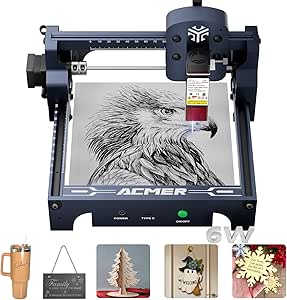 | Best for Small-Batch Cutting | Laser power: 6000 mW | Machine output: 48 W | Wavelength: 455 ± 5 nm | VIEW ON AMAZON | See Our Full Breakdown |
| Carverall A1 Pro 5W Desktop Laser Engraver with Camera, AI, App Control, Beginner Lazer Engraving Machine for Wood Coated Metal Leather Dog Tag Paper Glass Food 5000mW Class 1 |  | Best for Small, Precisely Placed Branding | Laser power: 5W (listed verified output: 5.12–5.35W) | Work area: 3.94 × 3.94 inches | Advertised precision: 0.01 mm | VIEW ON AMAZON | See Our Full Breakdown |
| BlazeX M3 10W Laser Engraver and Cutter with Enclosure and Honeycomb Bed |  | Best for Higher-Power Desktop Production | Laser power: 10W | Advertised accuracy: 0.01 mm | Item weight: 8 pounds | VIEW ON AMAZON | See Our Full Breakdown |
| desktop laser engraver for branding materials buyer guide | Laser power |
|---|---|
| Woxcker 5.5W Enclosed Laser En | 5.5 W |
| xTool F2 5W IR & 15W Diode Dua | — |
| Creality Falcon A1C 10W Enclos | — |
| Creality Falcon A1C 5W AI Lase | — |
| Creality Falcon A1C 10W AI Las | — |
| ACMER S1 3500mW Laser Engraver | 3500 mW |
| LaserVii L1 Mini 3W Laser Engr | 3W |
| xTool M2 10W Laser Engraver | — |
| ACMER S1 Laser Engraver and Cu | 2500 mW |
| ACMER S1 Laser Engraver and Cu | 6000 mW |
| Carverall A1 Pro 5W Desktop La | 5W (listed verified output: 5.12–5.35W) |
| BlazeX M3 10W Laser Engraver a | 10W |
More Details on Our Top Picks
Woxcker 5.5W Enclosed Laser Engraver, 300 × 300 mm Engraving Area
For branding work where logos need to fit on larger blanks or several small pieces share a layout, the 300 × 300 mm work area is this Woxcker’s main advantage. It offers more room than either Creality Falcon A1C configuration, whose listed work area is 150 × 150 × 148 mm. The Class 1 enclosure, flame sensor, tilt protection, and auto-stop cover also suit a small studio that wants a contained desktop setup. A 0.01 mm fixed-focus spot is aimed at fine detail, while Wi-Fi, USB, app, and TF-card options give buyers flexibility in how they send jobs. The tradeoff is its 5.5W output, and the material list does not distinguish clearly between engraving and cutting. Air Assist and rotary capability are accessories, so I would not treat them as included production tools.
Pros:- 300 × 300 mm work area accommodates larger blanks and multi-item layouts
- Class 1 enclosure with auto-stop cover, flame sensor, emergency stop, and tilt protection
- 0.01 mm fixed-focus spot is suited to fine logo details
- Wi-Fi, USB, app, and offline TF-card connectivity support varied workflows
Cons:- 5.5W laser output is less suited to demanding cutting than higher-power options such as the Creality Falcon A1C 10W
- Material compatibility does not clearly identify which materials can be cut versus engraved
- Air Assist and Rotary Roller are described as accessories rather than included equipment
Best for: Small branding studios that need a generous flat work area for larger logos, signs, or batches of small wood and leather items.
Not ideal for: Shops focused on metal color marking or clearly specified cutting performance; the listed material compatibility lacks an engraving-versus-cutting breakdown, and this model has no stated infrared module.
- Laser power:5.5 W
- Engraving area:300 × 300 mm
- Laser class:Class 1
- Focus size:0.01 mm
- Maximum speed:20,000 mm/min
- Connectivity:Wi-Fi, USB, app, offline TF card
- Compatible software:LightBurn, LaserGRBL, Cutlabx
- Supported file formats:JPEG, PNG, SVG, DXF, AI
- Warranty:1 year
Our verdict“Choose the Woxcker if a large enclosed work area matters more to your branding workflow than higher laser power or dedicated metal-marking capability.”
xTool F2 5W IR & 15W Diode Dual Laser Engraver
The dual-laser combination makes the xTool F2 the most specialized choice here for brands that mark both metal and nonmetal merchandise. Its 5W infrared laser is described for vivid metal color marking, while the 15W diode handles work such as wood engraving, embossing, and cutting. That gives it a broader branding toolkit than the single-module Creality Falcon A1C 10W, but the F2’s appeal is less about maximizing work area than handling varied materials and quick custom jobs. The 50MP camera and stated 0.1 mm alignment accuracy help position artwork on small items, and its portable 4.6 kg build suits pop-ups. At up to 6,000 mm/s, it is specified faster than the Creality models, though actual job time depends on the task. It is a Class 4 machine, not the Class 1 enclosed choice offered by the Woxcker.
Pros:- 5W IR and 15W diode lasers cover distinct metal-marking and nonmetal workflows
- 50MP camera supports visual placement on small branding blanks
- Listed maximum speed of 6,000 mm/s suits rapid personalization jobs
- Portable 4.6 kg design is suited to on-site work and pop-up events
Cons:- Class 4 classification differs from the Class 1 enclosed Woxcker and Creality options
- A stated work-area dimension is not provided in the supplied product data
- The listed purifier is optional, so indoor fume management may require additional equipment
Best for: Personalization businesses and brand teams that need to mark metal items as well as wood or other diode-compatible materials, including at events.
Not ideal for: Buyers who prioritize Class 1 classification or a larger stated work area; the F2 is Class 4, and its supplied package details do not specify a comparable large-format workspace.
- Diode laser:15 W
- Infrared laser:5 W
- Maximum speed:6,000 mm/s
- Camera:Built-in 50MP camera
- Alignment accuracy:Up to 0.1 mm
- Laser class:Class 4
- Weight:4.6 kg
- Included items:Machine, base plate, base material kit
Our verdict“Pick the xTool F2 for mobile branding work that spans metal and diode-compatible materials, but choose a Class 1 option if that classification is a priority.”
Creality Falcon A1C 10W Enclosed Laser Engraver
The Falcon A1C 10W earns its place for buyers who want a 10W diode starting point with a path to different laser modules later. Its smart camera and autofocus can reduce manual alignment and focusing steps when repeating logos across products; flame detection, tilt protection, USB safety lock, and an enclosed Class 1 design add workshop-friendly safeguards. Against the smaller 5W Falcon A1C, this version has higher included diode power, making it the more suitable of the two for buyers who expect to move beyond light engraving tasks. The platform can also accept compatible 5W diode and 1.2W infrared modules, but they are sold separately. That flexibility comes with a qualification: the infrared module is needed for certain metals and plastics, so the stated support for 300+ materials should not be read as universal capability from the included 10W diode alone.
Pros:- Included 10W diode provides more laser power than the 5W Falcon A1C configuration
- Smart camera and autofocus simplify artwork placement and setup
- Enclosed Class 1 design includes flame detection, tilt protection, and USB safety lock
- Compatible module platform allows later changes to laser type or power
Cons:- 5W diode and 1.2W infrared modules are sold separately
- Selected metals and plastics require the additional infrared module
- The supplied description does not state a work-area dimension
Best for: Small businesses that mainly brand wood, leather, and other diode-compatible materials and want camera positioning plus an upgrade path to other modules.
Not ideal for: Metal-branding shops expecting infrared marking straight out of the box, or buyers unwilling to purchase additional modules for expanded material work.
- Included laser module:10W diode
- Compatible laser modules:5W diode, 10W diode, 1.2W infrared
- Maximum engraving speed:15,000 mm/min
- Material compatibility:300+ materials, subject to laser module and material
- Camera:Smart camera
- Focus:Autofocus
- Safety classification:Enclosed Class 1
- Safety features:Flame detection, tilt protection, USB safety lock
Our verdict“Choose this Falcon A1C if your branding work is primarily diode-friendly and you value the option to add other laser modules later.”
Creality Falcon A1C 5W AI Laser Engraver
For a small studio branding repeatable, compact items—such as tags, ornaments, and small logo plates—the 5W Falcon A1C combines camera-assisted positioning with autofocus and AI design tools in a contained desktop machine. Its 150 × 150 × 148 mm work area is substantially smaller than the Woxcker’s 300 × 300 mm bed, so it favors individual pieces over larger signs or broad batch layouts. The 5W module also makes this a more modest-power choice than the 10W Falcon A1C; the higher-power model is a better fit when material demands call for more diode output. This version’s strength is a guided, compact workflow, not the broadest capacity. Its interchangeable platform can accept compatible 10W and 1.2W modules, but those are not included, so future capability adds a separate purchase.
Pros:- AI camera and up to 0.1 mm positioning accuracy help place logos on small blanks
- Autofocus and AI design tools reduce setup and artwork-preparation steps
- Enclosed FDA Class 1 design fits a contained desktop workspace
- Interchangeable platform supports compatible 5W, 10W, and 1.2W modules
Cons:- 150 × 150 × 148 mm work area limits blank size and batch layout
- Included 5W module has less power than the 10W Falcon A1C configuration
- Compatible alternative laser modules are not included
Best for: Beginners or small makers branding compact items who want camera placement, autofocus, and design guidance in an enclosed desktop format.
Not ideal for: Businesses producing larger branded goods or processing multiple pieces in one layout; the 150 × 150 mm work area is much smaller than the Woxcker’s.
- Included laser module:5W
- Compatible laser modules:5W, 10W, 1.2W
- Working area:150 × 150 × 148 mm
- Positioning accuracy:Up to 0.1 mm
- Maximum engraving speed:15,000 mm/min
- Safety classification:FDA Class 1
- Product dimensions:18.5 × 16.54 × 15.75 in
- Item weight:29.8 lb
Our verdict“Pick the 5W Falcon A1C for guided branding of small items, but move to the 10W version or the larger-bed Woxcker if your jobs demand more power or workspace.”
Creality Falcon A1C 10W AI Laser Engraver with AI Camera
This 10W Falcon A1C is the strongest fit in the lineup for buyers who want software and camera guidance to take more of the friction out of preparing branded artwork. Its AI One-Tap Engraving, background removal, smart layout tools, and AI assistant are aimed at turning source images into jobs and placing them on material; the camera is specified for up to 0.1 mm positioning accuracy, with autofocus helping reduce manual setup. Compared with the 5W Falcon A1C, this package pairs that guided workflow with a 10W included module, while retaining the same listed 150 × 150 × 148 mm work area. It suits small pieces better than the Woxcker when guided placement matters more than bed size. The tradeoff is a limited workspace, and only one module is included; the advertised interchangeable platform does not mean the other laser heads come in the box.
Pros:- AI tools support image conversion, background removal, layout, and settings guidance
- AI camera provides up to 0.1 mm positioning accuracy
- Included 10W module offers more diode power than the 5W Falcon A1C
- Enclosed FDA Class 1 design and autofocus suit a contained, guided workflow
Cons:- 150 × 150 × 148 mm work area limits larger branding blanks and batch layouts
- Only one laser module is included; other compatible modules are separate
- The Woxcker offers a much larger listed work area for oversized flat items
Best for: Small branding businesses and design-led makers who prepare logo artwork from photos or need assisted layout and repeatable placement on compact blanks.
Not ideal for: Production shops branding large items or needing broad batch capacity; the work area is limited, and additional laser modules are separate.
- Included laser module:10W
- Compatible laser modules:5W, 10W, 1.2W
- Working area:150 × 150 × 148 mm
- Positioning accuracy:Up to 0.1 mm
- Maximum engraving speed:15,000 mm/min
- Safety classification:FDA Class 1
- Product dimensions:18.5 × 16.54 × 15.75 in
- Item weight:29.8 lb
Our verdict“Choose this Falcon A1C if AI-assisted artwork setup and a 10W diode matter more than a large work area or included module variety.”
ACMER S1 3500mW Laser Engraver and Cutter
The ACMER S1 3500mW balances branding work across small wood, leather, and ceramic pieces without demanding much bench space. Its 0.04 mm spot size and stated 0.01 mm positioning accuracy suit fine logos and compact text, while LightBurn and LaserGRBL support give buyers room to use familiar design workflows. Compared with the ACMER S1 2500mW, this version offers more laser power for engraving and limited cutting; the 6000mW S1 is the stronger choice when cutting capacity matters more. The tradeoff is the shared 130 × 130 mm work area, which restricts larger plaques, signs, and repeatable batch layouts. Cutting is specified for thin sheet materials, so I would treat this as a small-item branding tool rather than a production cutter.
Pros:- 0.04 mm laser spot and 0.01 mm positioning accuracy are suited to detailed small logos.
- Supports wood, leather, and ceramics, with cutting listed for thin plywood, MDF, and acrylic.
- Works with ACMER Studio, LightBurn, and LaserGRBL across macOS, Windows, and Linux.
- 99% preassembled and compact at 250 × 250 × 162 mm.
Cons:- The 130 × 130 mm work area limits branding projects to small items.
- Cutting capability is specified only for thin materials.
- The higher-power 6000mW S1 is a better fit when cutting is a frequent part of the workflow.
Best for: Small makers branding leather tags, wooden tokens, and compact ceramic pieces who want multiple software options and a small desktop footprint.
Not ideal for: Businesses producing large branded panels or cutting thicker stock; the 130 × 130 mm bed and thin-material cutting limits are restrictive.
- Laser power:3500 mW
- Machine output:36 W
- Wavelength:455 ± 5 nm
- Engraving speed:Up to 10,000 mm/min
- Positioning accuracy:0.01 mm
- Laser spot size:0.04 mm
- Working area:130 × 130 mm
- Compatible software:ACMER Studio, LightBurn, LaserGRBL
- Warranty:12 months
Our verdict“Choose this S1 for detailed branding on small objects when you want more cutting headroom than the 2500mW version without moving to the 6000mW model.”
LaserVii L1 Mini 3W Laser Engraver, 150 × 150 mm Work Area
The LaserVii L1 Mini 3W is a practical entry point for makers who want a little more room for small branded pieces than the ACMER S1 models provide. Its 150 × 150 mm work area can accommodate modestly larger tags or layouts, and the TF-card option lets jobs run without a continuous computer connection. Bluetooth and Type-C add further ways to connect, while LightBurn and LaserGRBL support suit buyers who want more control than a basic bundled app may offer. Compared with the ACMER S1 3500mW, its stated 3W power is lower, so I would favor it for engraving rather than material cutting. The 12,000 mm/min maximum speed is useful on suitable jobs, but speed alone does not offset the limited cutting headroom or the stated ±0.15 mm accuracy.
Pros:- 150 × 150 mm work area is larger than the ACMER S1 models’ 130 × 130 mm bed.
- TF-card support allows offline engraving once a job is prepared.
- Compatible with LightBurn and LaserGRBL.
- Includes safety goggles and starter accessories.
Cons:- 3W laser power limits its usefulness for cutting compared with the ACMER S1 3500mW and 6000mW models.
- Stated engraving accuracy is ±0.15 mm, less precise than the ACMER S1 models’ 0.01 mm positioning figure.
- The compact work area still rules out larger branded panels and broad batch layouts.
Best for: First-time makers and small gift or promotional-item shops engraving compact wood and leather branding pieces, especially those who value TF-card operation.
Not ideal for: Buyers who need dependable cutting of thicker stock, very fine positioning accuracy, or a larger production bed.
- Laser power:3W
- Work area:150 × 150 mm
- Maximum engraving speed:12,000 mm/min
- Engraving accuracy:±0.15 mm
- Compressed spot size:0.12 × 0.08 mm
- Connections:Bluetooth, TF card, Type-C
- Compatible software:LightBurn, LaserGRBL
- Dimensions:11.65 × 11.73 × 6.88 inches
Our verdict“Pick the L1 Mini for beginner-friendly engraving on small branding items when offline operation and a slightly larger bed matter more than cutting power.”
xTool M2 10W Laser Engraver, Built-in Dual Cameras, Class 1 Enclosed Safe Laser Engraving Machine
For branding work where placement accuracy and a contained workspace matter, the xTool M2 takes a different approach from the open-frame ACMER S1 machines. Its dual cameras provide a workspace preview intended to reduce guesswork when positioning logos on material, and the Class 1 enclosed design suits home studios where an open laser frame is less welcome. The included 10W diode supports engraving and cutting across listed craft materials; the optional CMYK inkjet and 3W IR modules add capabilities, but they are not part of this standalone package. Compared with the ACMER S1 6000mW, the M2 emphasizes enclosure, camera-assisted placement, and an integrated software workflow over a compact, lightweight frame. The tradeoffs are its add-on-dependent expanded functions and the lack of a stated work-area measurement in the supplied product data.
Pros:- Class 1 enclosed design with real-time monitoring is suited to home workspaces.
- Dual cameras provide a workspace preview to help place branding artwork.
- 10W diode supports engraving and cutting on listed materials such as wood, leather, felt, fabric, and paper.
- xTool Studio includes templates and an AI image generator for preparing designs.
Cons:- The CMYK inkjet and 3W IR laser modules are sold separately, so full-color printing and the described fine metal or plastic engraving require add-ons.
- No work-area dimensions are provided in the supplied product information.
- Compared with the ACMER S1 machines, the M2’s camera and enclosure focus may be more than buyers need for simple small-item engraving.
Best for: Home-based makers and small branding studios that prioritize an enclosed machine, camera-assisted placement, and guided template workflows for repeatable small jobs.
Not ideal for: Buyers seeking a clearly specified large work area, a portable open-frame machine, or full-color and metal-marking functions included in the base setup.
- Laser output power:10W (10,000 mW)
- Laser type:Diode laser
- Safety classification:Class 1 enclosed machine
- Cameras:Built-in dual cameras
- Supported materials listed:Cardstock, felt, leather, wood, fabric, and paper
- Software:xTool Studio
- Optional modules:CMYK Inkjet module and 3W IR laser, sold separately
Our verdict“Choose the M2 if a safer enclosed setup and camera-guided placement matter more than a compact frame or built-in access to optional color and IR functions.”
ACMER S1 Laser Engraver and Cutter, 2500 mW
The ACMER S1 2500mW is the most restrained choice among the three ACMER models here: it keeps the same 130 × 130 mm work area and 0.01 mm positioning accuracy while offering less laser power than the 3500mW and 6000mW versions. That makes it a sensible match for small logos, labels, and personalization on wood, bamboo, leather, plastic, or ceramics when cutting is occasional rather than central to the work. Its mostly preassembled setup and compatibility with LightBurn and LaserGRBL give buyers flexibility without requiring a large machine. Compared with the LaserVii L1 Mini, it has less working area but a finer stated positioning figure; compared with the ACMER S1 3500mW, it gives up power while retaining the same footprint. Thin-material cutting and the small bed are the main limits.
Pros:- 0.01 mm positioning accuracy supports detailed small-scale logo placement.
- Engraves a range of listed materials, including wood, bamboo, leather, plastic, and ceramics.
- Supports Acmerstudio, LightBurn, and LaserGRBL on macOS, Windows, and Linux.
- Mostly preassembled aluminum-alloy machine with a compact footprint.
Cons:- 2500 mW is less powerful than the ACMER S1 3500mW and 6000mW versions.
- The 130 × 130 mm work area limits item size and batch capacity.
- Cutting is described for thin plywood, MDF, and acrylic rather than thicker stock.
Best for: Solo makers starting a small branded-goods workflow focused on engraved tags, labels, and compact wood or leather items, with only occasional thin-sheet cutting.
Not ideal for: Shops that need faster or more capable cutting, larger batch layouts, or room for oversized branding pieces.
- Laser power:2500 mW
- Machine output:24 W
- Wavelength:455 ± 5 nm
- Focal length:2 mm
- Maximum engraving speed:10,000 mm/min
- Positioning accuracy:0.01 mm
- Working area:130 × 130 mm
- Material:Aluminum alloy
- Warranty:12 months
Our verdict“Choose the 2500mW S1 for affordable-in-capability small-item engraving when its compact bed is enough and cutting is a secondary task.”
ACMER S1 Laser Engraver and Cutter, 6000 mW
Among the three ACMER S1 options, the 6000mW model is the clearest pick when a branding workflow includes cutting as well as engraving. It retains the family’s 0.04 mm laser spot, stated 0.01 mm repeatable positioning accuracy, and compact 130 × 130 mm bed, while its higher laser power gives it more headroom than the 2500mW and 3500mW versions for the listed thin-sheet cutting tasks. LightBurn and LaserGRBL support also makes it easier to fit into a more customized workflow than a single-software machine. The compromise is not subtle: the small bed limits batch size, and the supplied description specifies cutting thin plywood, MDF, and acrylic rather than thick stock. Compared with the xTool M2, this is a compact open-frame alternative, not an enclosed camera-guided setup.
Pros:- Highest laser power among the three ACMER S1 models in this batch.
- 0.04 mm spot size and 0.01 mm repeatable positioning accuracy suit detailed small branding work.
- Supports ACMER Studio, LightBurn, and LaserGRBL across macOS, Windows, and Linux.
- 99% preassembled in a compact 250 × 250 × 162 mm machine.
Cons:- The 130 × 130 mm work area limits larger pieces and batch layouts.
- Cutting is specified for thin plywood, MDF, and acrylic, not thick stock.
- Unlike the enclosed xTool M2, the supplied product details do not describe an enclosure or built-in camera workflow.
Best for: Small workshops making branded wooden or acrylic tags and pieces that need both engraving and occasional cutting of thin stock.
Not ideal for: Businesses making large signs, cutting thick materials, or prioritizing an enclosed, camera-assisted workspace like the xTool M2.
- Laser power:6000 mW
- Machine output:48 W
- Wavelength:455 ± 5 nm
- Engraving speed:Up to 10,000 mm/min
- Repeatable positioning accuracy:0.01 mm
- Laser spot:0.04 mm
- Working area:130 × 130 mm
- Dimensions:250 × 250 × 162 mm
- Warranty:12 months
Our verdict“Pick the 6000mW S1 when cutting thin branding blanks is part of the job, but skip it if your work needs a larger bed or enclosed camera-guided placement.”
Carverall A1 Pro 5W Desktop Laser Engraver with Camera, AI, App Control, Beginner Lazer Engraving Machine for Wood Coated Metal Leather Dog Tag Paper Glass Food 5000mW Class 1
For compact branded items such as pet tags, jewelry blanks, and bookmarks, the Carverall A1 Pro prioritizes placement accuracy and simple repeat jobs over a large work area. Its camera lets buyers position artwork against a live view of the material, while the TF card and saved-file memory can help repeat small batches without keeping a computer connected. Compared with the BlazeX M3, its 5W output and 3.94 × 3.94-inch work area suit smaller jobs, not faster or broader production. The enclosed Class 1 design, interlocks, and tilt shutoff add safeguards for a home studio, but branding teams should still plan around its limited bed size. Bare-metal marking requires an optional IR head, and the listed material presets apply to materials under 3 mm.
Pros:- Camera-assisted positioning helps place logos on small pieces with less trial and error.
- Enclosed Class 1 design with lid and tilt shutoffs adds useful safeguards for a home workspace.
- TF card operation and saved-file memory support repeat jobs without a connected computer or phone.
- CutLabX, LightBurn, and LaserGRBL compatibility offers an approachable start with a path to more advanced software.
Cons:- The 3.94 × 3.94-inch work area limits the size and batch quantity of branding jobs.
- Bare-metal marking requires an optional IR head, adding an accessory requirement for that material.
- Air purifier and rotary attachment are optional, while smoke control and cylindrical-item branding may require extra equipment.
Best for: Home-based makers and small businesses producing personalized tags, jewelry blanks, or other compact branded goods that benefit from camera-assisted placement.
Not ideal for: Branding shops handling large signs, wide merchandise, or frequent cutting jobs; the work area is small and the 5W laser is less suited to production throughput than the BlazeX M3’s 10W system.
- Laser power:5W (listed verified output: 5.12–5.35W)
- Work area:3.94 × 3.94 inches
- Advertised precision:0.01 mm
- Maximum speed:12,000 mm/min
- Maximum object height:10.63 inches (27 cm)
- Safety design:Enclosed Class 1; laser stops when opened and shuts off if tilted over 15°
- Included functions:HD camera, built-in air assist, exhaust fan, TF card offline operation
- Software:CutLabX, LightBurn, and LaserGRBL
- Bare-metal marking:Requires optional IR head
Our verdict“Choose the Carverall A1 Pro for enclosed, camera-positioned branding on small items, but choose a higher-power, larger-bed machine for broader production work.”
BlazeX M3 10W Laser Engraver and Cutter with Enclosure and Honeycomb Bed
The BlazeX M3 is the stronger fit when branding work includes both engraving and cutting: its 10W laser gives it more cutting headroom than the 5W Carverall A1 Pro, while the supplied honeycomb bed supports a ready-to-use cutting setup. An enclosure, safety sensors, tool kit, and 13 starter materials make it a more production-oriented package than a bare machine. It also works with LightBurn, LaserGRBL, and CutLabX, giving buyers flexibility as workflows develop. Its advertised 0.01 mm accuracy is appealing for detailed logos, though the supplied information does not establish a work area or throughput figures, so I would not choose it on presumed batch capacity. Rotary roller, risers, air assist, and purifier are add-ons, and claims covering more than 300 materials are not detailed.
Pros:- 10W laser offers more cutting headroom than the 5W Carverall A1 Pro.
- Enclosure and honeycomb bed are included, giving buyers a more complete cutting setup.
- Safety sensors stop operation if the lid opens or the machine tilts.
- Compatibility with LightBurn, LaserGRBL, and CutLabX supports different levels of software experience.
Cons:- Rotary roller, risers, air assist, and purifier are add-ons rather than included equipment.
- No work-area dimensions or engraving-speed figures are provided, making job-size and throughput planning difficult.
- The broad material-compatibility claim is not detailed, so buyers should verify suitability for their specific branding stock.
Best for: Small branding studios and experienced makers who need a 10W desktop machine for engraving and cutting wood, leather, and similar materials, with core accessories included.
Not ideal for: Buyers who need camera-guided placement, a specified large work area, bare-metal marking, or a ready-to-run rotary and fume-management setup without purchasing add-ons.
- Laser power:10W
- Advertised accuracy:0.01 mm
- Item weight:8 pounds
- Power source:Corded electric
- Included accessories:Enclosure, honeycomb bed, tool kit, and 13 engraving materials
- Software compatibility:LightBurn, LaserGRBL, and CutLabX
- Safety features:Sensors stop the machine if it tilts or the lid opens
- Supported material examples:Wood, leather, glass, and coated metal
- Optional accessories:Rotary roller, risers, air assist, and purifier
Our verdict“Choose the BlazeX M3 if cutting power and included enclosure-and-bed accessories matter more than camera placement or a fully equipped rotary workflow.”
How We Picked
I judged these machines through the needs of a branding workflow: repeatable placement on logos and names, compatibility with likely blanks, usable work area, setup demands, enclosure and positioning features, and the ability to handle small batches. I gave more weight to practical workflow aids such as cameras, autofocus, and enclosed designs when they could reduce alignment work or suit shared indoor spaces. I also separated machines by the materials and operating roles suggested by their listed laser types and power rather than assuming that wattage alone predicts branding quality.
The ranking favors versatile machines that balance repeatability, material options, and manageable operation. The Falcon A1C 10W AI leads for its combination of camera, autofocus, enclosure, and platform flexibility; the xTool F2 ranks as a stronger specialist when metal marking and speed are priorities. Smaller or lower-output machines remain useful for compact, simpler jobs, while models with less stated automation or narrower work areas rank lower for batch branding. Product names and listed features do not establish real-world results, so buyers should confirm material compatibility, ventilation needs, and supported workflow details before ordering.
Factors to Consider When Choosing Desktop Laser Engraver For Branding Materials Buyer Guide
Choosing a branding engraver starts with the objects and order pattern you expect, not the longest feature list. I would map the machine to your blanks, logo dimensions, placement tolerance, and daily batch size before comparing advertised speed or power.
Match the laser type to the material, not the product name
Branding jobs often mix wood, leather, coated metal, acrylic, and finished goods, but a machine that handles one material well may not mark another in the same way. A dual-source system such as the xTool F2 is appealing when metal marking and diode-compatible jobs both matter, while a diode-only machine may fit a narrower set of blanks. Check the manufacturer’s compatibility guidance for the exact material and finish; “metal” or “acrylic” alone is too broad to predict a clean result. Coatings, color, thickness, and surface treatment can change the outcome. A common mistake is buying extra power before confirming the machine can mark the material used in the product line. I would test samples from suppliers before committing to branded inventory.
Treat repeatable placement as a production requirement
A logo that looks good once still has to land consistently across a batch. Cameras can help position artwork over irregular or pre-cut pieces, while autofocus can reduce setup adjustments when material height changes. Neither feature replaces a stable fixture, especially for small objects or curved blanks. Plan how each product will sit on the bed and whether you need a jig to keep its position consistent. For names, serial numbers, or variable designs, check how the machine’s software handles file setup and repeated jobs. Buying a camera-equipped machine without planning a placement routine can leave the main source of batch inconsistency unresolved.
Choose the work area around your largest recurring job
A larger bed can accommodate wider signs, multiple blanks, or a batch layout, but it does not automatically improve a small-item branding workflow. Measure the full usable area against your largest item, including the room needed for a fixture and safe margins. The Woxcker’s listed 300 × 300 mm area offers more room than the LaserVii L1 Mini’s 150 × 150 mm area, but compact jobs may not benefit from that extra footprint. Also check whether the object itself fits under the enclosure and within the machine’s working height. Buyers sometimes compare only the advertised bed dimensions and miss limits imposed by jigs or taller products. Favor the smallest machine that comfortably fits your real jobs if workspace is constrained.
Budget for ventilation, fire precautions, and a suitable workspace
An enclosure can help contain light and make a desktop setup more practical, but it does not remove smoke, fumes, or fire risk. Confirm the maker’s ventilation requirements and plan an appropriate exhaust route before placing a machine in a home studio or shared shop. Material choice matters: some plastics and coated products can release hazardous fumes or damage equipment, so follow the manufacturer’s material restrictions. Keep the machine attended and use the safety procedures specified for its laser class and configuration. An open or compact unit may need additional workspace controls even if the purchase itself seems simpler. Include extraction, clearance, and safe material storage in your setup plan rather than treating them as later upgrades.
Pay for capacity only when your order mix can use it
Higher output, faster motion, and added automation can matter when orders are frequent or deadlines are tight, but they do not guarantee a better-looking brand mark. For occasional personalization, a lower-output ACMER S1 or compact LaserVii may cover the work if its material limits match the product range. A faster dual-laser system makes more sense when it saves time across recurring jobs or adds access to materials you already sell. Ask how much time goes into setup, alignment, loading, and cleanup, not just laser-on time. A common purchasing error is paying for speed while batch preparation remains the bottleneck. Start with expected weekly volume and upgrade for a specific constraint, such as metal capability or reduced alignment work.
Check software and fixtures before committing to a workflow
The machine is only one part of a branding station: software, file preparation, fixtures, and product handling affect whether orders are repeatable. Confirm that the supported software fits your design process and that it can manage the file types, text, and batch layouts you use. For a business marking dog tags or other small goods, a dedicated jig may matter more than a generous bed. For changing artwork across orders, evaluate how easily you can update and position designs without rebuilding the entire setup. Check accessory availability and replacement-part support as well. A feature-rich machine can still slow production if its software or workholding does not fit the way your products are made.
Frequently Asked Questions
Which of these machines makes the most sense for branding coated metal items?
I would start with the xTool F2 because it lists both an IR laser and a diode laser, making it the clearest fit in this group for buyers with metal-marking jobs alongside other materials. That flexibility matters only if the specific metal, coating, and desired mark are supported by the manufacturer. The other machines may suit coated items under their stated material guidance, but their listed specifications do not establish the same dual-laser option. Test the exact blank and finish before placing a production order. If metal is only an occasional job, compare the added capability against your actual workload.
Do I need a camera or autofocus to make consistent branded batches?
Not every buyer needs both, but they can reduce setup friction when products vary in shape or placement. A camera helps relate the design to the item on the bed, while autofocus can simplify focusing across different material heights. Neither feature prevents a blank from shifting or guarantees identical placement, so a stable jig remains useful. For repeated flat items with a fixed layout, a simpler machine may be sufficient once the setup is dialed in. I would pay for automation when manual alignment is a frequent source of wasted time or mispositioned marks.
Is a 10W machine automatically better for business branding than a lower-output model?
No. Output is only one part of the decision; material compatibility, focus, motion, software, and workholding also shape the result and the pace of a job. A lower-output unit can be a sensible fit for small, occasional marks on supported materials, while a 10W option may suit buyers seeking more capacity for their chosen workflow. The xTool F2 also shows why laser type matters: its IR source adds a different capability from simply increasing diode output. Check the machine’s guidance for your material and sample the mark before selecting by wattage alone.
Should I choose an enclosed machine for a home or small studio?
An enclosure can make a desktop setup easier to manage, particularly around a shared workspace, but it does not replace exhaust ventilation or safe operating practices. Among this lineup, enclosed choices include the Falcon A1C models, xTool M2, and BlazeX M3, with the listed configurations varying by features. Confirm how smoke is removed and what clearance the manufacturer requires. Also check the machine’s laser-class information for the exact model and setup. If you cannot provide suitable ventilation and supervision, changing the workspace plan is safer than relying on an enclosure alone.
How should I choose among the 2,500mW, 3,500mW, and 6,000mW ACMER S1 versions?
Compare the exact supported materials, cutting or engraving tasks, work area, and operating guidance for each version rather than assuming the higher figure is always the right purchase. The 2,500mW model may suit simpler supported jobs, while the 6,000mW version is the more relevant candidate if your work calls for additional capacity. The 3,500mW option sits between those listed outputs, but output alone does not tell you how quickly or cleanly it will mark a particular blank. Ask what your regular products require and test representative samples. If your branding work is mostly repeated logos rather than varied cutting tasks, workflow and fixtures may matter more than the output difference.
Conclusion
For most small branding operations, I recommend the Creality Falcon A1C 10W AI as the best overall because its camera, autofocus, enclosure, and interchangeable platform make it a balanced choice for repeatable work. The ACMER S1 3,500mW is my best value direction for buyers whose materials and job sizes fit a simpler setup, while the xTool F2 is the best premium specialist for workflows that need its dual-laser approach, metal-marking focus, and speed. New operators should look first at an enclosed, camera-equipped option such as the Creality Falcon A1C 5W AI or Carverall A1 Pro, then confirm software and ventilation needs. For larger layouts, the Woxcker 5.5W stands out for its listed 300 × 300 mm area; for a compact workspace and small items, consider the LaserVii L1 Mini. Choose by the material you sell, the consistency your batches demand, and the workspace you can support—not by wattage alone.
Halloween Picks

HOPOCO Halloween Pumpkin Fog Machine with 12 LED Colors and 4 Light Modes

Vexalify 11-Inch Halloween Pumpkin Fog Machine with 12-Color Lights

10 ft Halloween Inflatable Archway with Built-in LEDs
As an affiliate, we earn on qualifying purchases.