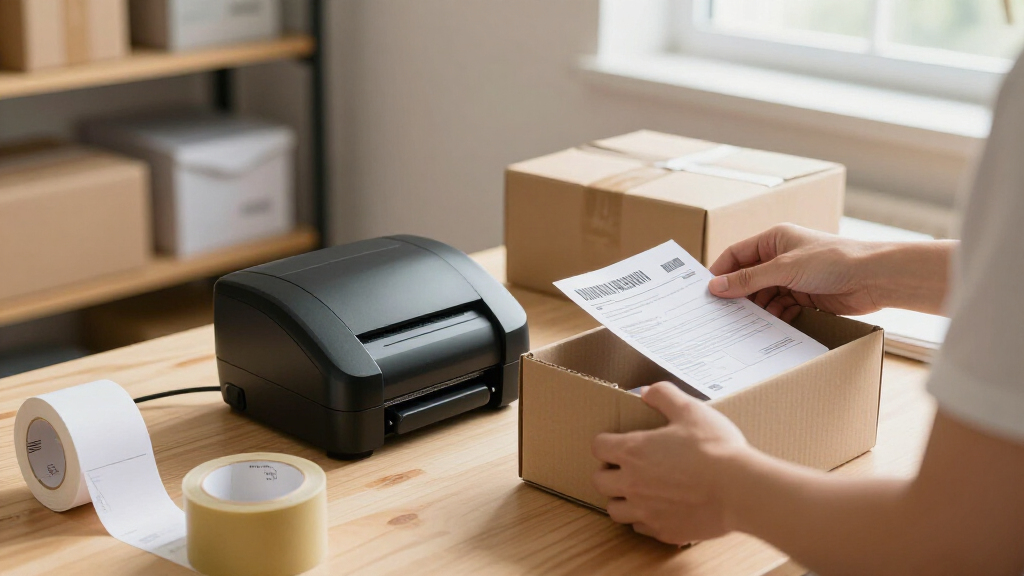

For most ecommerce sellers, I’d start with the Rollo Wireless Shipping Label Printer for its Wi-Fi connectivity and 4×6 shipping-label focus. The Rollo USB is a simpler fit for a fixed packing station, while the Brother TD-2020A suits sellers who need compact 2-inch labels rather than standard shipping labels. The main tradeoffs are wireless convenience versus a direct USB connection, 4×6 shipping-label support versus narrower label formats, and extra setup features versus a simpler workflow. I compare these options by their fit for day-to-day order fulfillment, not by connectivity alone. Continue reading for the full breakdown and help choosing the right printer for your shipping volume and setup.

Get business pricing on office and shipping supplies
- Business-only prices and quantity discounts
- Tax-exempt purchasing
- Multiple users, one account, clear invoices
Key Takeaways
- Wireless models dominate this roundup, but Wi-Fi and Bluetooth serve different setups: Wi-Fi can suit a shared packing station, while Bluetooth is more dependent on device and app compatibility.
- The two Rollo printers fill different roles: the Wireless model is the more flexible choice for a printer that needs to connect without a direct USB link; the USB model favors a straightforward fixed workstation.
- Several listings share model names, including the JADENS 168BT and Rongta RP425 entries, so buyers should check the exact bundle and included holder rather than assume duplicate listings are identical.
- Most of the lineup centers on 4×6 shipping labels; the Brother TD-2020A stands apart with a 2-inch format, which can suit narrower labels but is not a like-for-like replacement for a standard shipping-label printer.
- Included label holders and connection options can affect daily convenience, but neither replaces checking operating-system support, shipping-platform compatibility, and label-size requirements before ordering.
| Rongta RP425 Bluetooth Thermal Shipping Label Printer |  | Best for Broad Device Compatibility | Model: RP425 | Printer type: Thermal, monochrome | Connectivity: Bluetooth | VIEW LATEST PRICE | See Our Full Breakdown |
| Omezizy D450BT Bluetooth 4×6 Thermal Shipping Label Printer |  | Best for High-Volume Label Batches | Printer type: Thermal, monochrome | Connectivity: Bluetooth, USB | Resolution: 203 DPI | VIEW LATEST PRICE | See Our Full Breakdown |
| Nelko Bluetooth Thermal Shipping Label Printer | 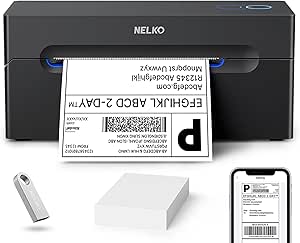 | Best for Marketplace Flexibility | Printer type: Thermal, monochrome | Connectivity: Bluetooth via NELKO app; USB | Resolution: 203 × 203 DPI | VIEW LATEST PRICE | See Our Full Breakdown |
| JADENS 168BT Bluetooth Thermal Shipping Label Printer with Built-In Label Holder | 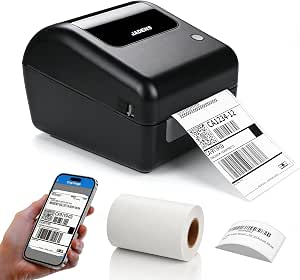 | Best for a Ready-to-Pack Setup | Model: 168BT | Printer type: Thermal, monochrome | Connectivity: Bluetooth, USB | VIEW LATEST PRICE | See Our Full Breakdown |
| NULLTONEX 4×6 Bluetooth Thermal Shipping Label Printer |  | Best for a Compact Dual-Connection Setup | Printer type: Direct thermal, monochrome | Connectivity: Bluetooth, USB | Resolution: 203 DPI | VIEW LATEST PRICE | See Our Full Breakdown |
| Rollo Wireless Shipping Label Printer – Wi‑Fi 4×6 Thermal Label Printer |  | Best for Wi‑Fi and AirPrint Flexibility | Printing technology: Direct thermal | Resolution: 203 × 203 DPI | Print speed: 150 mm/s; up to one 4×6 label per second | VIEW LATEST PRICE | See Our Full Breakdown |
| JADENS 168BT Bluetooth Thermal Shipping Label Printer with Built-In Label Holder |  | Best Bluetooth Starter Kit | Printer type: Monochrome thermal | Resolution: 203 × 203 DPI | Print speed: Up to 150 mm/s | VIEW LATEST PRICE | See Our Full Breakdown |
| Arkscan 2054A Direct Thermal Shipping Label Printer |  | Best for Label-Format Flexibility | Printing technology: Direct thermal | Connectivity: USB | Compatible devices: Windows, Mac, Chromebook, and Android | VIEW LATEST PRICE | See Our Full Breakdown |
| Rongta RP425 Bluetooth 4×6 Thermal Shipping Label Printer |  | Best Lightweight Bluetooth Pick | Model: RP425-WH | Printer type: Monochrome thermal | Resolution: 203 × 203 DPI | VIEW LATEST PRICE | See Our Full Breakdown |
| Westinghouse Thermal Shipping Label Printer USB, 4×6 Commercial Grade |  | Best for Wired, Higher-Throughput Workstations | Printer type: Thermal, monochrome | Resolution: 203 × 203 DPI | Print speed: Up to 6 inches per second | VIEW LATEST PRICE | See Our Full Breakdown |
| MUNBYN Bluetooth Thermal Label Printer – Wireless 4×6 Shipping Labels |  | Best for Flexible Label Sizes | Printer type: Direct thermal | Connectivity: Bluetooth, USB | Print width range: 1.57–4.25 inches | VIEW LATEST PRICE | See Our Full Breakdown |
| Labeer Bluetooth Thermal Shipping Label Printer, 4×6 |  | Best for App-Based Mobile Shipping | Printer type: Direct thermal | Print resolution: 203 × 203 dpi | Supported label widths: 1.57–4.41 inches | VIEW LATEST PRICE | See Our Full Breakdown |
| Rollo USB Thermal Shipping Label Printer |  | Best for Fast, Computer-Based Fulfillment | Model: X1038 | Printer type: Thermal | Print resolution: 203 × 203 dpi | VIEW LATEST PRICE | See Our Full Breakdown |
| JADENS Bluetooth Thermal Shipping Label Printer, 4×6 | 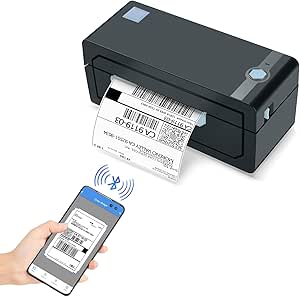 | Best for Bluetooth and Mixed Media | Model: JD268BT | Print resolution: 203 × 203 dpi | Connectivity: Bluetooth, USB 2.0 | VIEW LATEST PRICE | See Our Full Breakdown |
| Brother TD-2020A 2-Inch Direct Thermal Desktop Label Printer with USB |  | Best for Narrow Business Labels | Model: TD2020A | Print resolution: 203 dpi | Print speed: Up to 6 inches per second | VIEW LATEST PRICE | See Our Full Breakdown |
| thermal label printers for ecommerce | Connectivity | Printer type | Dimensions | Print speed |
|---|---|---|---|---|
| Rongta RP425 Bluetooth Thermal | Bluetooth | Thermal, monochrome | — | Up to 150 mm/s |
| Omezizy D450BT Bluetooth 4×6 T | Bluetooth, USB | Thermal, monochrome | 7.3 × 6.3 × 5.35 inches | Up to 72 labels per minute |
| Nelko Bluetooth Thermal Shippi | Bluetooth via NELKO app; USB | Thermal, monochrome | 9 × 5 × 6 inches | Up to 72 4×6 labels per minute |
| JADENS 168BT Bluetooth Thermal | Bluetooth, USB | Thermal, monochrome | — | — |
| NULLTONEX 4×6 Bluetooth Therma | Bluetooth, USB | Direct thermal, monochrome | 8.08 × 4.73 × 6.9 inches | Up to 150 mm/s; up to 72 labels per minute |
| Rollo Wireless Shipping Label | Wi‑Fi and USB | — | 3 × 7 × 3.5 inches (D × W × H) | 150 mm/s; up to one 4×6 label per second |
| JADENS 168BT Bluetooth Thermal | Bluetooth; USB for Mac | Monochrome thermal | 10 × 7 × 7 inches | Up to 150 mm/s |
| Arkscan 2054A Direct Thermal S | USB | — | — | — |
| Rongta RP425 Bluetooth 4×6 The | Bluetooth and USB | Monochrome thermal | — | 15 pages per minute |
| Westinghouse Thermal Shipping | Ethernet and USB | Thermal, monochrome | 9.45 × 8.36 × 6.88 inches (D × W × H) | Up to 6 inches per second |
| MUNBYN Bluetooth Thermal Label | Bluetooth, USB | Direct thermal | 4.9 × 9.67 × 6.49 inches | — |
| Labeer Bluetooth Thermal Shipp | Bluetooth, USB | Direct thermal | 7.2 × 2.64 × 3.15 inches | — |
| Rollo USB Thermal Shipping Lab | USB | Thermal | 4 × 8 × 4 inches | Up to 1 label per second |
| JADENS Bluetooth Thermal Shipp | Bluetooth, USB 2.0 | — | 5.91 × 9.06 × 5.91 inches | — |
| Brother TD-2020A 2-Inch Direct | USB 2.0, RS-232C serial | — | 8.4 × 4.33 × 6.77 inches | Up to 6 inches per second |
More Details on Our Top Picks
Rongta RP425 Bluetooth Thermal Shipping Label Printer
The Rongta RP425 is a flexible fit for ecommerce sellers who switch between a phone, tablet, and computer. It supports Bluetooth on iOS and Android alongside Windows, macOS, and Chrome OS, while its 0.98–4.37-inch label range covers more than standard 4×6 shipping labels. Compared with the Omezizy D450BT, it has a slightly wider stated range at the narrow end, but Omezizy adds USB connectivity and an internal bin for up to 250 labels. Rongta’s automatic label identification and feeding can simplify loading different media, and its 150 mm/s speed suits regular packing sessions. The tradeoffs are that phone printing uses the RONGTA app, and conflicting listed dimensions make its footprint hard to judge before buying.
Pros:- Bluetooth printing support for iOS and Android
- Compatible with Windows, macOS, and Chrome OS
- Automatically identifies and feeds supported labels
- Supports label widths from 0.98 to 4.37 inches
Cons:- Mobile printing requires the RONGTA app
- Conflicting dimensions make it difficult to plan desk space
Best for: Small ecommerce sellers who print from a mix of mobile devices and desktop operating systems and may use several label widths.
Not ideal for: Buyers who want a clearly documented footprint or prefer mobile printing without a dedicated manufacturer app.
- Model:RP425
- Printer type:Thermal, monochrome
- Connectivity:Bluetooth
- Supported label width:0.98–4.37 inches
- Print speed:Up to 150 mm/s
- Resolution:203 dpi
- Compatible operating systems:Windows 7 or newer, macOS 10.11 or newer, Chrome OS, Android, iOS
- Weight:0.65 kg
- Warranty:1 year
Our verdict“Choose the RP425 if broad device support and flexible label widths matter more than a clearly specified footprint or app-free mobile printing.”
Omezizy D450BT Bluetooth 4×6 Thermal Shipping Label Printer
The Omezizy D450BT is the strongest fit here for sellers who want a ready-to-load supply of labels close at hand: its built-in bin holds up to 250 labels. A stated output of up to 72 labels per minute and both Bluetooth and USB connections suit a packing station that alternates between a computer and mobile device. Compared with the NULLTONEX, Omezizy offers more storage inside the printer, while NULLTONEX’s listed package includes starter labels and cables. The D450BT also supports several desktop and mobile systems, including Linux and ChromeOS. Its limits are straightforward: output is monochrome, and it requires thermal labels, so it cannot print on ordinary paper or produce color branding.
Pros:- Built-in bin holds up to 250 labels
- Bluetooth and USB provide two connection options
- Supports Android, iOS, Windows, macOS, Linux, and ChromeOS
- Prints at up to 72 labels per minute
Cons:- Monochrome output cannot reproduce color branding
- Requires thermal labels rather than standard paper
Best for: Small fulfillment teams or frequent marketplace sellers who print batches of shipping labels and want a large label supply loaded in the printer.
Not ideal for: Sellers who need color printing, use ordinary paper labels, or do not want to rely on thermal media.
- Printer type:Thermal, monochrome
- Connectivity:Bluetooth, USB
- Resolution:203 DPI
- Print speed:Up to 72 labels per minute
- Supported label width:1–4.6 inches
- Built-in label capacity:Up to 250 labels
- Compatible operating systems:Android, iOS, Windows, macOS, Linux, ChromeOS
- Dimensions:7.3 × 6.3 × 5.35 inches
- Weight:0.97 kg
Our verdict“Pick the D450BT for frequent batch printing and a high-capacity built-in label bin, provided monochrome thermal media suits your workflow.”
Nelko Bluetooth Thermal Shipping Label Printer
The Nelko Bluetooth Thermal Shipping Label Printer stands out for sellers working across several marketplaces: its listed platform support includes Amazon, eBay, Shopify, USPS, UPS, Etsy, PayPal, and Poshmark. It can connect through Bluetooth using the NELKO app or by USB, and it accepts both fanfold and roll labels. Compared with the JADENS 168BT, Nelko lists a broader set of marketplace integrations, while JADENS includes a built-in holder and 50 shipping labels. Nelko’s 203 DPI resolution and stated speed of up to 72 4×6 labels per minute suit routine shipping work. The main compromise is device-specific connectivity: Mac and Chrome OS printing are USB-only, and Bluetooth printing requires the NELKO app.
Pros:- Listed support for multiple ecommerce and shipping platforms
- Accepts both fanfold and roll labels
- Offers Bluetooth through the app and USB connectivity
- Prints without ink or toner
Cons:- Bluetooth printing requires the NELKO app
- Mac and Chrome OS printing are limited to USB
Best for: Marketplace sellers who list across multiple channels and want one printer for shipping labels from both fanfold stacks and rolls.
Not ideal for: Mac or Chrome OS users who need wireless printing, or anyone who wants to avoid a manufacturer app for Bluetooth use.
- Printer type:Thermal, monochrome
- Connectivity:Bluetooth via NELKO app; USB
- Resolution:203 × 203 DPI
- Print speed:Up to 72 4×6 labels per minute
- Supported label width:1.54–4.1 inches
- Supported media:Fanfold and roll labels
- Compatible platforms:Amazon, eBay, Shopify, USPS, UPS, Etsy, PayPal, Poshmark
- Dimensions:9 × 5 × 6 inches
- Weight:1.4 kg
Our verdict“Choose Nelko if marketplace flexibility and support for both label formats matter more than wireless printing from a Mac or Chrome OS device.”
JADENS 168BT Bluetooth Thermal Shipping Label Printer with Built-In Label Holder
The JADENS 168BT is a practical choice for a new packing station because its built-in label holder keeps a roll positioned with the printer, and the package includes 50 4×6 labels. Its 150 mm/s speed and 203 DPI resolution match the stated performance of the NULLTONEX, but JADENS adds the holder for roll-fed media; NULLTONEX instead lists USB and Bluetooth plus starter sheets and cables. JADENS supports wireless printing from iPhone, iPad, Android, and Windows devices, with USB for Mac. That Mac restriction is the main workflow catch, and monochrome output means this is for shipping information rather than color-branded inserts. It supports common ecommerce platforms and label widths up to 4.1 inches.
Pros:- Built-in holder accommodates label rolls
- Includes 50 4×6-inch thermal labels
- Prints at up to 150 mm/s
- Works with major shipping and ecommerce platforms
Cons:- Mac printing requires a USB connection
- Monochrome output does not support color branding
Best for: First-time online sellers setting up a dedicated packing area who want a roll holder and a small starter supply of 4×6 labels.
Not ideal for: Mac users who need Bluetooth printing, or sellers who require color labels or a wider media format.
- Model:168BT
- Printer type:Thermal, monochrome
- Connectivity:Bluetooth, USB
- Resolution:203 × 203 DPI
- Maximum print speed:150 mm/s
- Supported label width:1.57–4.1 inches
- Maximum media size:4 × 6 inches
- Included labels:50 × 4 × 6-inch thermal labels
- Warranty:1 year
Our verdict“The JADENS 168BT suits new sellers who want a roll holder and included 4×6 labels, as long as Mac printing by USB is acceptable.”
NULLTONEX 4×6 Bluetooth Thermal Shipping Label Printer
The NULLTONEX 4×6 earns its place for sellers who need a printer that can connect wirelessly to mobile devices or plug into a computer by USB. It supports label widths from 1.57 to 4.3 inches, prints at up to 150 mm/s, and includes a power cord, USB cable, and 25 sheets of 4×6 labels—useful for getting a basic shipping workflow started. Compared with the JADENS 168BT, it has a slightly wider maximum label width and includes cables, while JADENS provides a built-in roll holder and 50 labels. NULLTONEX’s compact listed dimensions suit a crowded desk, but the included label quantity is limited, and monochrome thermal printing rules out color output.
Pros:- Bluetooth and USB connectivity
- Supports label widths from 1.57 to 4.3 inches
- Includes a power cord, USB cable, and 25 sheets of 4×6 labels
- Prints at up to 150 mm/s without ink or toner
Cons:- Includes only 25 sheets of labels
- Monochrome output cannot print color branding
Best for: Home-based sellers who want Bluetooth and USB options, a compact printer, and enough included labels to begin shipping.
Not ideal for: High-volume packers seeking a built-in roll holder or a substantial included label supply, and sellers who need color printing.
- Printer type:Direct thermal, monochrome
- Connectivity:Bluetooth, USB
- Resolution:203 DPI
- Print speed:Up to 150 mm/s; up to 72 labels per minute
- Supported label width:1.57–4.3 inches
- Compatible platforms:Amazon, Shopify, Etsy, USPS, UPS, FedEx, DHL
- Compatible devices:Laptops, Mac, PC, smartphones, tablets
- Dimensions:8.08 × 4.73 × 6.9 inches
- Included:Printer, power cord, USB cable, 25 sheets of 4×6 thermal labels
Our verdict“Choose NULLTONEX for a compact dual-connection setup with starter supplies, but look to the JADENS 168BT if a roll holder and more included labels matter more.”
Rollo Wireless Shipping Label Printer – Wi‑Fi 4×6 Thermal Label Printer
The Rollo Wireless stands out for ecommerce sellers who want to send labels from a mix of phones and computers without relying on Bluetooth. Wi‑Fi and AirPrint support make it a more flexible fit across devices than the USB-only Arkscan 2054A, while its stated speed of one 4×6 label per second suits regular order batches. The Rollo Ship Manager app adds label creation and shipping-platform tools in one place, which may simplify a small seller’s workflow. It also handles custom media up to 4.1 inches wide, beyond standard shipping labels. The tradeoff is setup: it needs a Wi‑Fi network, and it has no Bluetooth fallback. Its stated output capacity is 20 labels, so sellers printing large batches may need to reload more often than they would prefer.
Pros:- Wi‑Fi and AirPrint support broad device compatibility without Bluetooth.
- Prints a 4×6 label in about one second, according to the product data.
- Rollo Ship Manager offers label creation and shipping-platform tools.
- Supports custom media up to 4.1 inches wide.
Cons:- Requires Wi‑Fi setup and does not offer Bluetooth connectivity.
- Stated output capacity of 20 labels can mean frequent reloading during batch work.
- Monochrome direct thermal printing is not suited to color labels.
Best for: Ecommerce sellers who print from both mobile devices and computers and want Wi‑Fi-based label creation across a range of platforms.
Not ideal for: Sellers who need Bluetooth as a wireless fallback or regularly print large batches without pausing to reload labels.
- Printing technology:Direct thermal
- Resolution:203 × 203 DPI
- Print speed:150 mm/s; up to one 4×6 label per second
- Maximum media width:4.1 inches
- Supported label sizes:4×6 inches and 2×1 inches
- Connectivity:Wi‑Fi and USB
- Weight:3.5 pounds
- Dimensions:3 × 7 × 3.5 inches (D × W × H)
Our verdict“Choose the Rollo Wireless if you want fast Wi‑Fi and AirPrint printing from varied devices; skip it if Bluetooth or longer unattended batches matter more.”
JADENS 168BT Bluetooth Thermal Shipping Label Printer with Built-In Label Holder
For a new seller who wants to start printing standard shipping labels without sourcing a roll holder separately, the JADENS 168BT is a practical entry point. Its built-in label holder and included 50 4×6 labels make the initial setup more complete than the Rongta RP425, whose supplied-label details are not specified here. Bluetooth printing supports iPhone, iPad, and Android, while USB is listed for Mac; that split matters if a shop’s main computer is not a Mac. At up to 150 mm/s, it has speed comparable to the faster Rollo Wireless, but uses Bluetooth rather than Wi‑Fi and AirPrint. The printer handles several common label widths, though the output is monochrome and Bluetooth support can vary by device. Buyers should check their device’s connection path before choosing it.
Pros:- Built-in holder supports roll installation without a separate holder.
- Includes 50 4×6 thermal labels for getting started.
- Prints at up to 150 mm/s without ink, toner, or ribbons.
- Supports label widths from 1.57 to 4.1 inches.
Cons:- USB connectivity is specified for Mac, limiting the stated wired path for other computers.
- Bluetooth compatibility varies by device.
- Monochrome output cannot produce color product or shipping labels.
Best for: New marketplace sellers printing standard 4×6 shipping labels from a supported phone or tablet who want a holder and starter labels included.
Not ideal for: Sellers who need dependable wireless printing from a broad mix of computers, or who want Wi‑Fi or AirPrint rather than device-dependent Bluetooth.
- Printer type:Monochrome thermal
- Resolution:203 × 203 DPI
- Print speed:Up to 150 mm/s
- Supported label width:1.57–4.1 inches
- Maximum media size:4×6 inches
- Connectivity:Bluetooth; USB for Mac
- Included labels:50 thermal labels, 4×6 inches
- Dimensions:10 × 7 × 7 inches
Our verdict“Pick the JADENS 168BT for a ready-to-start Bluetooth setup with a built-in holder, but verify your device’s compatibility first.”
Arkscan 2054A Direct Thermal Shipping Label Printer
The Arkscan 2054A earns its place for sellers who print more than standard parcel labels. Its 0.75–4.25-inch label-width range, support for roll and fanfold paper, and maximum label length of 90 inches accommodate varied product, barcode, and shipping formats. That flexibility is broader than the Rollo Wireless’s listed 4.1-inch maximum width, but the Arkscan is a wired USB model rather than a Wi‑Fi option. Its 5-inch-per-second speed is suitable for steady small-business work, though it is slower on paper than the Westinghouse printer’s stated 6 inches per second. Windows users also get BarTender UltraLite for label design; Mac and other users do not get that same software benefit. This makes it a better fit for a mixed-label desktop workflow than for sellers seeking phone-first convenience.
Pros:- Accepts roll and fanfold label stock.
- Supports label widths from 0.75 to 4.25 inches and lengths up to 90 inches.
- USB compatibility is listed for Windows, Mac, Chromebook, and Android.
- Includes BarTender UltraLite label-design software for Windows.
Cons:- USB-only connection lacks the wireless convenience of the Rollo Wireless.
- Included BarTender UltraLite software is limited to Windows.
- Stated 5-inch-per-second speed is below the Westinghouse printer’s 6 inches per second.
Best for: Small ecommerce businesses that print shipping labels alongside narrower product or barcode labels on roll or fanfold media.
Not ideal for: Mobile-first sellers or anyone who wants wireless printing, and non-Windows users relying on the included label-design software.
- Printing technology:Direct thermal
- Connectivity:USB
- Compatible devices:Windows, Mac, Chromebook, and Android
- Printing speed:5 inches per second
- Label width:0.75–4.25 inches
- Maximum label length:90 inches
- Paper types:Roll and fanfold
- Included software:BarTender UltraLite for Windows
Our verdict“Choose the Arkscan 2054A when varied label formats matter more than wireless access or the faster stated speed of the Westinghouse.”
Rongta RP425 Bluetooth 4×6 Thermal Shipping Label Printer
The Rongta RP425 is the compact, straightforward choice for sellers who want a small thermal printer with both Bluetooth and USB connections. At 16 ounces, it is far lighter than the 3.5-pound Rollo Wireless, which may suit a cramped packing desk or a setup that moves between work areas. It prints standard labels up to 4×6 inches at 203 DPI and supports phones, tablets, and computers. The product data gives a speed of 15 pages per minute, but does not define page size, so I would not treat that figure as directly comparable to the Rollo’s one-label-per-second claim. Unlike the JADENS 168BT, the Rongta’s listed details do not mention a built-in holder or included labels. It is a focused shipping-label option, not a versatile color or duplex printer.
Pros:- Light 16-ounce design suits compact or movable workspaces.
- Bluetooth and USB support printing from mobile devices and computers.
- Handles thermal media up to 4×6 inches.
- 203 DPI resolution is specified for shipping-label output.
Cons:- The stated 15-pages-per-minute speed does not specify page size, making throughput hard to compare.
- Monochrome printing cannot produce color labels.
- Product data does not list a built-in holder or included labels.
Best for: Sellers with limited packing space who want a lightweight 4×6 printer and plan to print from both mobile devices and computers.
Not ideal for: High-volume shippers who need a clearly stated per-label speed, or buyers who want a built-in holder and starter labels included.
- Model:RP425-WH
- Printer type:Monochrome thermal
- Resolution:203 × 203 DPI
- Print speed:15 pages per minute
- Maximum media size:4×6 inches
- Connectivity:Bluetooth and USB
- Weight:16 ounces
- Warranty:1 year
Our verdict“Choose the Rongta RP425 for a lightweight Bluetooth-and-USB setup, but look elsewhere if batch speed and included roll-handling accessories are priorities.”
Westinghouse Thermal Shipping Label Printer USB, 4×6 Commercial Grade
The Westinghouse is the strongest fit here for a fixed packing station that values a faster stated print rate and networked desktop connections over mobile access. Its 6-inch-per-second output edges the Arkscan 2054A’s 5 inches per second, while both accept fanfold stock; the Westinghouse also lists label sheets, giving the buyer another feed option. Ethernet and USB suit a desktop workflow, but this is not a Bluetooth printer, so it is less convenient than the JADENS 168BT for phone-based label printing. It produces 203 DPI monochrome labels up to 4×6 inches, with a wider listed media range of 0.78–4.6 inches. The tradeoff is setup cost and space: Ethernet cable and USB‑C adapter are sold separately, and its desktop-sized footprint is not a compact mobile setup.
Pros:- Stated 6-inch-per-second speed is faster than the Arkscan 2054A’s listed 5 inches per second.
- Ethernet and USB provide wired workstation connection options.
- Supports fanfold rolls or label sheets.
- Accepts media widths from 0.78 to 4.6 inches.
Cons:- No Bluetooth connection for direct mobile printing.
- Ethernet cable and USB‑C adapter are sold separately.
- Monochrome output cannot print color labels.
Best for: Small ecommerce teams with a dedicated desktop packing station that want Ethernet or USB, multiple media-feed options, and a clearly stated print speed.
Not ideal for: Mobile sellers who need Bluetooth printing, or businesses seeking a compact printer with all connection accessories supplied.
- Printer type:Thermal, monochrome
- Resolution:203 × 203 DPI
- Print speed:Up to 6 inches per second
- Maximum media size:4×6 inches
- Label width range:0.78–4.6 inches
- Media types:Fanfold rolls and label sheets
- Connectivity:Ethernet and USB
- Dimensions:9.45 × 8.36 × 6.88 inches (D × W × H)
Our verdict“Choose the Westinghouse for a wired ecommerce packing station that benefits from Ethernet and flexible media handling, not for phone-first printing.”
MUNBYN Bluetooth Thermal Label Printer – Wireless 4×6 Shipping Labels
The MUNBYN makes the most sense for ecommerce sellers who print more than standard 4×6 shipping labels. Its 1.57–4.25-inch width range accommodates smaller barcode and inventory labels without requiring a separate printer, while Bluetooth and USB give it more connection options than the USB-only Rollo X1038. The listed compatibility also spans computers, phones, tablets, and Chromebooks, making it a flexible fit for mixed-device workspaces.
Automatic alignment is a useful safeguard against wasted labels when changing media, and the stated 60 dB operation may suit a shared office. The tradeoff is that the single tray offers no convenient way to keep multiple label stocks loaded, and output is monochrome. Sellers focused on shipping alone may find the more straightforward Labeer or Rollo sufficient.
Pros:- Supports a broad 1.57–4.25-inch label-width range for shipping and smaller business labels.
- Bluetooth and USB connectivity support a range of devices.
- DAC auto-calibration is designed to align labels and reduce misprints.
- Stated 60 dB operation is suited to shared workspaces.
Cons:- Monochrome printing cannot produce color-coded labels.
- One tray means reloading when switching label stock.
- The maximum speed is listed as 72 pages per minute, which is not directly comparable to label-per-second specifications.
Best for: Small ecommerce teams that print shipping labels alongside narrower inventory, barcode, or organization labels from different devices.
Not ideal for: High-volume sellers who need multiple label stocks ready to use or businesses that require color printing.
- Printer type:Direct thermal
- Connectivity:Bluetooth, USB
- Print width range:1.57–4.25 inches
- Dimensions:4.9 × 9.67 × 6.49 inches
- Maximum speed:Listed as 72 pages per minute
- Supported devices:Laptops, PCs, smartphones, tablets, and Chromebooks
- Warranty:2 years
Our verdict“Choose the MUNBYN if your ecommerce workflow needs wireless printing across several label sizes, not just 4×6 shipping labels.”
Labeer Bluetooth Thermal Shipping Label Printer, 4×6
The Labeer is a practical pick for sellers who want Bluetooth shipping-label printing from a phone as well as a computer. It handles 4×6 labels and smaller formats, with custom sizes available, so it can cover packing slips and compact barcode labels in addition to parcels. Compared with the Rollo X1038, which relies on USB, Labeer offers wireless printing and broader stated operating-system support, including ChromeOS and Linux.
Automatic calibration and jam and paper-out detection can make routine label runs easier to manage. The compromise is that mobile printing depends on the FlashLabel Pro app, adding a software step that the desktop-focused Rollo does not impose. Its listed paper capacity is 50 sheets, so sellers printing continuously should check that this suits their workflow. Like the other options here, it prints in monochrome only.
Pros:- Supports common 4×6 shipping labels, smaller sizes, and custom formats.
- Bluetooth and USB provide wireless and wired connection options.
- Automatic calibration and jam and paper-out detection help manage routine printing.
- Compatibility includes Windows, macOS, ChromeOS, Linux, iPhone, and Android.
Cons:- Mobile printing requires the FlashLabel Pro app.
- Monochrome output does not support color-coded shipping or product labels.
- Listed capacity is 50 sheets, which may require attention during larger batches.
Best for: Small online sellers who fulfill orders from a phone or laptop and want one printer for standard shipping labels plus smaller formats.
Not ideal for: Sellers who want app-free mobile printing, color output, or a printer specified for uninterrupted high-volume runs.
- Printer type:Direct thermal
- Print resolution:203 × 203 dpi
- Supported label widths:1.57–4.41 inches
- Maximum media size:4 × 6 inches
- Supported label sizes:4×6, 4×4, 4×2, 2×1, and custom sizes
- Connectivity:Bluetooth, USB
- Compatible systems:Windows, macOS, ChromeOS, Linux, iPhone, Android
- Dimensions:7.2 × 2.64 × 3.15 inches
Our verdict“Pick Labeer if you want app-enabled Bluetooth shipping labels across phones and computers, and can work with its required mobile app.”
Rollo USB Thermal Shipping Label Printer
For a packing station built around a computer, the Rollo X1038 prioritizes speed and a simple wired workflow. Its stated output of up to one 4×6 label per second suits sellers printing batches of orders, and compatibility with major shipping platforms and marketplaces helps it fit into established fulfillment routines. Compared with the Bluetooth-equipped JADENS JD268BT, Rollo gives up wireless and mobile printing in exchange for a direct USB connection and a clear desktop-first setup.
The printer supports labels from 1.57 to 4.1 inches wide, so it is not limited to one shipping format. It also avoids ink and toner. The main tradeoffs are a USB-only connection, monochrome output, and a one-year limited warranty. Sellers who pack away from a fixed workstation or print from phones should look to MUNBYN or JADENS instead.
Pros:- Stated speed reaches up to one 4×6 label per second for order batches.
- Supports label widths from 1.57 to 4.1 inches.
- Works with Windows, Mac, and major shipping platforms and marketplaces.
- Direct thermal printing avoids ink and toner.
Cons:- USB-only connectivity limits flexible placement and mobile printing.
- Monochrome output cannot create color labels.
- Limited one-year warranty is shorter than the stated coverage for the MUNBYN.
Best for: Computer-based ecommerce packing stations that print batches of 4×6 labels and value a stated one-label-per-second rate.
Not ideal for: Mobile-first sellers, teams needing Bluetooth printing, or businesses that want a longer stated warranty.
- Model:X1038
- Printer type:Thermal
- Print resolution:203 × 203 dpi
- Print speed:Up to 1 label per second
- Supported label width:1.57–4.1 inches
- Connectivity:USB
- Compatible operating systems:Windows XP and newer; Mac 10.9 and newer
- Dimensions:4 × 8 × 4 inches
- Warranty:Limited 1 year
Our verdict“Choose the Rollo X1038 for a fixed computer-based packing station where batch speed matters more than wireless flexibility.”
JADENS Bluetooth Thermal Shipping Label Printer, 4×6
The JADENS JD268BT is a good match for sellers who want wireless printing but also need a choice between roll and fanfold labels. That media flexibility sets it apart from the Rollo X1038, which is USB-only, and makes the JADENS easier to adapt to different packing setups. It supports 1.57–4.1-inch label widths and connects by Bluetooth or USB, with stated support for Windows, macOS, Android, and iOS.
There is a software and setup tradeoff: phone printing requires the Jadens Printer app, and changing label types calls for recalibration. Those steps may be a nuisance for sellers who switch media often. Its 203 dpi resolution is in line with the Labeer and Rollo specifications, while the one-year warranty is shorter than the MUNBYN’s listed two years. This is a flexible shipping-label option, not a color or hands-off multi-stock system.
Pros:- Supports both fanfold and roll labels.
- Bluetooth and USB 2.0 allow wireless or wired connection.
- Works with label widths from 1.57 to 4.1 inches, including 4×6 shipping labels.
- Supports Windows, macOS, Android, and iOS.
Cons:- Android and iOS printing requires the Jadens Printer app.
- Changing label types requires recalibration.
- One-year warranty is shorter than the MUNBYN’s listed two-year coverage.
Best for: Small ecommerce sellers who want Bluetooth printing and may use both fanfold and roll labels at a compact packing station.
Not ideal for: Teams that frequently switch label stock and want minimal recalibration, or mobile users unwilling to install a printer app.
- Model:JD268BT
- Print resolution:203 × 203 dpi
- Connectivity:Bluetooth, USB 2.0
- Label width:1.57–4.1 inches
- Maximum media size:4 × 6 inches
- Supported media:Fanfold and roll labels
- Compatible systems:Windows 7 or later, macOS 10.9 or later, Android, iOS
- Dimensions:5.91 × 9.06 × 5.91 inches
- Warranty:1 year
Our verdict“Choose the JADENS JD268BT if you need Bluetooth plus roll-and-fanfold media support and can accept app setup and recalibration.”
Brother TD-2020A 2-Inch Direct Thermal Desktop Label Printer with USB
The Brother TD-2020A serves a different ecommerce job from the 4×6-focused printers in this roundup. Its 2.4-inch maximum media width rules out standard full-size shipping labels, but the stated speed of up to 6 inches per second and included P-touch Editor software suit sellers producing narrow product, barcode, shelf, or receipt labels from a PC. Compared with the MUNBYN, it trades broad label-width flexibility and Bluetooth for a compact desktop format and USB or serial connections.
Drop-in loading for rolls up to 5 inches in diameter can simplify routine media replacement, while the listed three-year Premier Limited Warranty is longer than the one-year coverage on the Rollo and JADENS. It is not a general-purpose parcel-label choice, though: buyers still need another printer for 4×6 carrier labels, and the wired connections are better suited to a fixed workstation.
Pros:- Stated print speed reaches up to 6 inches per second.
- Compact dimensions suit a fixed workstation with limited desk space.
- Drop-in roll loading supports media up to 5 inches in diameter.
- Includes P-touch Editor software and a stated three-year Premier Limited Warranty.
Cons:- Maximum media width of 2.4 inches does not accommodate standard 4×6 shipping labels.
- USB 2.0 and RS-232C serial connections do not provide wireless printing.
- Monochrome output cannot produce color labels.
Best for: Ecommerce businesses that already print 4×6 labels elsewhere and need a fast desktop printer for narrow product, barcode, or receipt labels.
Not ideal for: New sellers seeking one printer for standard parcel labels, or mobile-first teams needing Bluetooth or Wi-Fi.
- Model:TD2020A
- Print resolution:203 dpi
- Print speed:Up to 6 inches per second
- Maximum media width:2.4 inches
- Maximum roll diameter:5 inches
- Connectivity:USB 2.0, RS-232C serial
- Weight:4 pounds
- Dimensions:8.4 × 4.33 × 6.77 inches
- Warranty:3 years Premier Limited
Our verdict“Pick the Brother TD-2020A for fast narrow-label work alongside a separate 4×6 shipping printer, not as your sole parcel-label device.”

How We Picked
I ranked these thermal label printers for ecommerce by how well their stated formats and connections fit common shipping workflows. I gave priority to clear 4×6 label support, practical USB or wireless connectivity, and compatibility claims relevant to selling and shipping platforms. I also weighed usability details—such as an included holder—because fewer add-on parts can make a small packing station easier to set up.
The order reflects role and workflow fit, not a claim that every printer has been independently tested. Models with a clear use case for ecommerce shipping rank ahead of options whose main distinction is less clear from the supplied product information. I also account for tradeoffs: wireless models can reduce cable clutter but call for compatibility checks, while USB models offer a more direct workstation connection but less placement flexibility. Duplicate or closely named listings are treated cautiously; buyers should verify the exact version and bundle.
| thermal label printers for ecommerce | Printer type |
|---|---|
| Rongta RP425 Bluetooth Thermal | Thermal, monochrome |
| Omezizy D450BT Bluetooth 4×6 T | Thermal, monochrome |
| Nelko Bluetooth Thermal Shippi | Thermal, monochrome |
| JADENS 168BT Bluetooth Thermal | Thermal, monochrome |
| NULLTONEX 4×6 Bluetooth Therma | Direct thermal, monochrome |
| Rollo Wireless Shipping Label | — |
| JADENS 168BT Bluetooth Thermal | Monochrome thermal |
| Arkscan 2054A Direct Thermal S | — |
| Rongta RP425 Bluetooth 4×6 The | Monochrome thermal |
| Westinghouse Thermal Shipping | Thermal, monochrome |
| MUNBYN Bluetooth Thermal Label | Direct thermal |
| Labeer Bluetooth Thermal Shipp | Direct thermal |
| Rollo USB Thermal Shipping Lab | Thermal |
| JADENS Bluetooth Thermal Shipp | — |
| Brother TD-2020A 2-Inch Direct | — |
Factors to Consider When Choosing Thermal Label Printers For Ecommerce
Before choosing a printer, I’d match it to the way orders move through your workspace. The biggest source of avoidable hassle is buying around a headline feature—often Bluetooth—without checking label dimensions, device support, or how the printer will sit beside the packing materials. These factors can help narrow the field before comparing individual models.
Match Label Size to the Jobs You Actually Ship
Start with the label dimensions required by your carriers and selling channels, then check the printer’s supported width and feed method. A 4×6 format is a common choice for shipping labels, while a 2-inch printer such as the Brother TD-2020A serves a different, narrower-label role. Buying a smaller format for standard parcel labels can create workarounds or make the printer unsuitable for your workflow. If you print product, bin, or barcode labels as well as postage, list each size before choosing one device. Check whether the printer supports the label stock you plan to use, including rolls or fanfold labels. A printer that fits your main shipping label but cannot handle your other recurring formats may leave you needing a second device.
Choose Connectivity Around Your Packing Station
USB is a sensible choice when one computer stays beside the printer and you want a direct connection. Wireless options can help when the packing area is shared, the printer needs to sit away from the computer, or multiple compatible devices are involved. Do not treat Bluetooth and Wi-Fi as interchangeable: each depends on different device, network, software, and app support. Before buying, check the manufacturer’s current compatibility details for your operating system and the shipping tools you use. Also think through what happens if a connection drops during a busy dispatch period; a simple wired fallback may matter more than a cable-free desk. Sellers with one fixed station may gain little from wireless features, while a shared setup may benefit from them.
Plan for the Full Cost of a Working Setup
A printer is only one part of the setup: label stock, a holder, a cable, and compatible software can all affect readiness. Listings that include a built-in holder may reduce loose-roll clutter, but confirm the holder works with the label format and loading direction you need. If a printer does not include a holder, check whether it can feed your preferred labels without one or whether an accessory is required. Look at consumable availability and whether the model needs direct-thermal labels, rather than assuming any label roll will work. Also account for the time spent changing rolls and clearing feed issues, especially if you ship daily. A lower-complexity setup can be more useful than extra connectivity features you rarely use.
Buy for Peak Order Volume, Not Just Today’s Average
Your average number of daily orders may hide sharp peaks around promotions, holidays, or marketplace events. Think about how many labels you need to print in one batch and whether the printer can keep pace with your packing routine; check the manufacturer’s specifications for speed and duty-cycle guidance. A small seller printing a few labels at a time may value easy setup more than high throughput. A growing shop should also consider roll capacity, feed interruptions, and whether the printer fits a permanent workstation. Do not infer commercial capacity from a product title alone; seek clear specifications and support details. Buying for realistic peak days can prevent a printer from becoming a bottleneck as order volume grows.
Check Software and Operating-System Support Before Checkout
Compatibility is a workflow question, not just a feature on a box. Verify support for the computer or phone you plan to print from, then confirm that your shipping platform can generate a label in a format the printer accepts. Some setups rely on a desktop driver, while others may use a mobile app or a platform integration. Confirm whether the software is available for your operating system and whether updates or setup steps are required. This check matters most for Bluetooth printers, where a phone connection may not replace desktop printing in every workflow. If you switch devices or platforms often, favor clear documentation and a connection method supported across your current tools.
Frequently Asked Questions
Should I choose a Bluetooth, Wi-Fi, or USB label printer for my ecommerce shop?
I’d choose based on where orders are created and where labels need to print. USB suits a dedicated computer and packing station, with fewer network variables. Wi-Fi may fit a shared workspace or a printer placed away from one computer, while Bluetooth can be convenient for compatible nearby devices. Check the exact operating-system, app, and platform support for the model before deciding, since wireless labels do not guarantee every device can print directly. If reliable printing from one computer matters most, a wired option may be the simpler fit.
Can a 2-inch printer replace a 4×6 shipping-label printer?
Not automatically. A 2-inch model such as the Brother TD-2020A is designed for narrower label needs, while many parcel workflows call for 4×6 labels. Check the label dimensions required by your carrier and selling platform rather than relying on a printer’s general label-printing capability. Resizing a shipping label to fit a narrower format may not be supported or may reduce usability. If your business ships parcels with standard labels, a printer explicitly specified for 4×6 stock is the safer match.
Do I need a separate label holder for a thermal printer?
It depends on the printer’s feed design and the label stock you plan to use. A built-in holder, as listed with one JADENS 168BT version, can keep a roll positioned near the printer and reduce loose supplies on a small desk. Other models may feed fanfold labels or require an external holder for rolls. Check the exact listing and supported label format before ordering, particularly when similarly named versions appear. If your packing area is tight, include holder placement and roll clearance in your setup plan.
Will these printers work with my ecommerce platform and shipping carrier?
Do not assume compatibility from a broad claim that a printer works with shipping services. The actual workflow may depend on the printer driver, operating system, label file format, and whether you print from a browser, desktop app, or phone. Check the manufacturer’s compatibility list alongside your platform’s label-printing instructions. Confirm that the label dimensions and orientation match the printer’s supported stock. If you rely on a particular marketplace or carrier tool, verify that exact combination before buying.
When should I pay more for a wireless or higher-capacity setup?
Wireless features make sense when they solve a real placement or device-sharing problem, not just to remove a cable from a single-computer desk. Higher-capacity features matter when you print batches often or expect busy shipping periods, since fewer interruptions can help keep packing moving. Look for clear specifications on supported label formats, speed, and duty cycle rather than relying on labels such as commercial grade. A low-volume seller may be better served by a simple USB printer and a tidy workstation. Revisit the decision if order volume, staffing, or the physical layout of your packing area changes.
Conclusion
For a flexible shipping setup, I’d choose the Rollo Wireless as the best overall pick; for a fixed computer-based station, the Rollo USB is the straightforward alternative. The best value depends on the exact bundle and required accessories, so compare included holders and connection needs rather than choosing by a listing title alone. For beginners, I’d favor a printer with a clear 4×6 workflow, a connection compatible with their existing device, and minimal accessory requirements. Buyers who need narrower labels should look at the Brother TD-2020A, while sellers who prioritize a built-in holder can compare the JADENS 168BT listing carefully. For a premium-style wireless setup, the Rollo Wireless is the strongest fit in this lineup; for every pick, verify software support and label dimensions before ordering.