
Choosing a wireless laser printer for a hybrid office involves balancing speed, connectivity, and multi-functionality to support both remote and in-office workflows. The Brother MFC-L5710DW stands out as the best overall for its reliability, fast printing, and versatile features. For those prioritizing affordability, the Brother HL-L2460DW offers excellent value with solid monochrome performance. Meanwhile, the Xerox C245 excels in color versatility for creative or presentation needs. Each option offers different tradeoffs, such as cost versus feature set or speed versus ease of use. Continue reading for a detailed breakdown of these and other top models to find the best fit for your hybrid office setup.
Key Takeaways
- Top picks like the Brother MFC-L5710DW combine speed, multi-functionality, and reliable wireless connections for seamless hybrid workflows.
- Color laser options, such as the Xerox C245 and Brother’s color models, are ideal for creative projects but tend to come at a higher price point.
- Compact models like the Brother HL-L2405W focus on space-saving design, though they may lack advanced features needed in busy hybrid environments.
- Tradeoffs often involve balancing upfront costs against ongoing expenses like toner and maintenance, especially in multi-function devices.
- Ease of setup and mobile connectivity are key factors that distinguish user-friendly models for less tech-savvy users.
| Brother MFC-L5710DW Business Monochrome Laser All-in-One Printer with Wireless Networking and Duplex Print, Scan, and Copy |  | Best Overall for High-Volume Office Use | Print Speed: up to 48 ppm | Auto Document Feeder Capacity: 50 pages | Duplex Scanning Speed: up to 60 ipm | VIEW LATEST PRICE | See Our Full Breakdown |
| Brother HL-L2460DW Wireless Monochrome Laser Printer with Duplex and Mobile Printing |  | Best Compact Choice for Small Home Offices | Print Speed: 36 pages per minute | Connectivity: Wi-Fi (2.4GHz/5GHz), Ethernet, USB | Paper Capacity: 250 sheets | VIEW LATEST PRICE | See Our Full Breakdown |
| Brother MFC-L6810DW Enterprise Monochrome Laser All-in-One Printer |  | Best for Large Workgroups with Security Needs | Print Speed: up to 52 ppm | Auto Document Feeder Capacity: 80 pages | Maximum Paper Capacity: 1660 sheets with optional trays | VIEW LATEST PRICE | See Our Full Breakdown |
| Brother HL-L3220CDW Color Laser Printer with Wireless Printing and Duplex |  | Best for Color Quality in Small Offices | Print Speed: 19 PPM | Paper Tray Capacity: 250 sheets | Duplex Printing: Yes | VIEW LATEST PRICE | See Our Full Breakdown |
| Brother MFC-L2900DW Laser All-in-One Printer with Scanner, Wireless Duplex Printing, 36 ppm, 3.5-inch Touchscreen, Cloud-Ready for Small Business |  | Best for Small Business with Cloud Integration | Print Speed: 36 ppm | Printer Type: Laser Monochrome | Connectivity: Wireless, Ethernet, USB | VIEW LATEST PRICE | See Our Full Breakdown |
| HP LaserJet Pro MFP 3101sdw Wireless Black and White All-in-One Laser Printer |  | Best Overall for Small Teams Needing Reliable Black-and-White Printing | Print Speed: up to 35 ppm | Printer Type: Laser All-in-One | Color: Black and White | VIEW LATEST PRICE | See Our Full Breakdown |
| Brother HL-L2480DW Wireless Monochrome Multi-Function Laser Printer with Copy and Scan |  | Best for Small Offices Needing a Compact All-in-One with User-Friendly Interface | Print Speed: 36 pages per minute | Paper Capacity: 250 sheets | Connectivity: Wi-Fi, Ethernet, USB | VIEW LATEST PRICE | See Our Full Breakdown |
| Xerox C245 Wireless Color All-in-One Printer |  | Best for Small Offices Requiring Vibrant Color and Mobile Flexibility | Functionality: Print, Scan, Copy | Print Speed: 26 ppm | Document Feeder: 50 sheets | VIEW LATEST PRICE | See Our Full Breakdown |
| Brother MFC-L2820DW Wireless Monochrome All-in-One Laser Printer |  | Best for Small Offices Needing a Reliable, Versatile Monochrome Multi-Function | Print Speed: up to 36 ppm | Scan Speed: up to 23.6/7.9 ipm | Auto Document Feeder: 50 pages | VIEW LATEST PRICE | See Our Full Breakdown |
| Brother HL-L2405W Wireless Monochrome Laser Printer with Mobile Printing |  | Best for Home Users and Small Offices with Mobile Needs | Print Speed: 30 pages per minute | Connectivity: Wi-Fi, USB | Paper Capacity: 250 sheets | VIEW LATEST PRICE | See Our Full Breakdown |
| Brother MFC-L3720CDW Wireless Color Laser Printer with Scanner, Copier, and Fax |  | Best Overall for High-Volume Business Use | Print Speed: 19 ppm | Paper Capacity: 250 sheets | Auto Document Feeder: 50 sheets | VIEW LATEST PRICE | See Our Full Breakdown |
| Brother DCP-L2640DW Wireless Monochrome Multi-Function Laser Printer with Copy and Scan |  | Best for Small Offices on a Budget | Print Speed: up to 36 ppm | Scan Speed: up to 23.6/7.9 ipm | Auto Document Feeder: 50 pages | VIEW LATEST PRICE | See Our Full Breakdown |
| HP Color LaserJet Pro 3201dw Wireless Color Laser Printer |  | Best for Vivid Color Documents in Small Teams | Print Speed: 26 ppm | Color: Color | Connectivity: Wireless Wi-Fi | VIEW LATEST PRICE | See Our Full Breakdown |
| Brother HL-L3280CDW Wireless Compact Digital Color Printer with Laser Quality Output, Duplex, Mobile Printing & Ethernet | 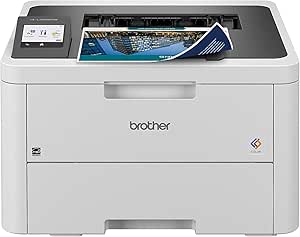 | Best for Small and Home Offices with Color Needs | Print Speed: up to 27 ppm | Connectivity: Wi-Fi, Ethernet, Mobile Printing | Duplex Printing: Automatic | VIEW LATEST PRICE | See Our Full Breakdown |
| Wireless laser printer for hybrid office | Print Speed | Connectivity |
|---|---|---|
| Brother MFC-L5710DW Business M | up to 48 ppm | Gigabit Ethernet, dual band wireless |
| Brother HL-L2460DW Wireless Mo | 36 pages per minute | Wi-Fi (2.4GHz/5GHz), Ethernet, USB |
| Brother MFC-L6810DW Enterprise | up to 52 ppm | — |
| Brother HL-L3220CDW Color Lase | 19 PPM | — |
| Brother MFC-L2900DW Laser All- | 36 ppm | Wireless, Ethernet, USB |
| HP LaserJet Pro MFP 3101sdw Wi | up to 35 ppm | Wireless |
| Brother HL-L2480DW Wireless Mo | 36 pages per minute | Wi-Fi, Ethernet, USB |
| Xerox C245 Wireless Color All- | 26 ppm | Wi-Fi, Apple AirPrint, Mopria |
| Brother MFC-L2820DW Wireless M | up to 36 ppm | Wireless, Ethernet, USB |
| Brother HL-L2405W Wireless Mon | 30 pages per minute | Wi-Fi, USB |
| Brother MFC-L3720CDW Wireless | 19 ppm | Dual-band Wi-Fi, Wi-Fi Direct, USB 2.0 |
| Brother DCP-L2640DW Wireless M | up to 36 ppm | Wi-Fi (dual-band), Ethernet, USB |
| HP Color LaserJet Pro 3201dw W | 26 ppm | Wireless Wi-Fi |
| Brother HL-L3280CDW Wireless C | up to 27 ppm | Wi-Fi, Ethernet, Mobile Printing |
More Details on Our Top Picks
Brother MFC-L5710DW Business Monochrome Laser All-in-One Printer with Wireless Networking and Duplex Print, Scan, and Copy
The Brother MFC-L5710DW stands out for its exceptional speed, reaching up to 48 ppm, making it ideal for busy offices with high printing demands. Compared with the Brother HL-L2460DW, it offers faster print speeds and more advanced scanning features, including duplex scan support, which enhances productivity. However, it only prints in monochrome, so if color output is needed, this could be a limitation. Its high-yield toner reduces long-term costs, but replacement cartridges can be expensive. The setup process might challenge less tech-savvy users due to its extensive features. Overall, this model suits high-volume, professional environments that prioritize speed and cost efficiency over color printing.
Pros:- Fast print and copy speeds up to 48 ppm boost productivity
- High-yield toner reduces operating costs over time
- Supports duplex scanning and multiple cloud destinations
- Flexible wired and wireless connectivity options
Cons:- Monochrome only, no color printing capability
- Complex setup process for less experienced users
- High-yield toner cartridges can be costly to replace
Best for: Large offices or workgroups requiring fast, reliable monochrome printing with extensive scanning capabilities
Not ideal for: Small home users or teams needing color printing or simple setup, as its complexity and monochrome focus may be overkill
- Print Speed:up to 48 ppm
- Auto Document Feeder Capacity:50 pages
- Duplex Scanning Speed:up to 60 ipm
- Toner Cartridge:TN920XXL, 11,000 pages
- Included Toner:3,000 pages
- Connectivity:Gigabit Ethernet, dual band wireless
- Mobile Printing:Yes
Our verdict“This printer is perfect for high-volume, monochrome office environments where speed and efficiency are paramount.”
Brother HL-L2460DW Wireless Monochrome Laser Printer with Duplex and Mobile Printing
The Brother HL-L2460DW is a strong fit for small offices or home setups thanks to its compact footprint and reliable performance. It offers a respectable 36 ppm, slightly lower than the MFC-L5710DW, but still fast enough for most small workflows. Its wireless and Ethernet options make integration straightforward, and automatic duplex printing helps save paper. While it is limited to monochrome output, its simplicity makes it easier to set up and maintain. The toner cartridges, such as TN830, are affordable and readily available, making ongoing costs manageable. This model makes the most sense for users who want quick, dependable printing without extra frills or high costs.
Pros:- Fast printing at 36 ppm supports everyday tasks efficiently
- Compact design fits small spaces comfortably
- Wireless and Ethernet connectivity for flexible setup
- Automatic duplex printing reduces paper use
Cons:- Limited to monochrome printing only, no color capability
- Requires compatible toner cartridges for optimal performance
- No advanced scanning or document management features
Best for: Small business owners or home users needing a space-saving, straightforward monochrome laser printer
Not ideal for: Teams requiring color printing or advanced scanning features, as this model lacks those options
- Print Speed:36 pages per minute
- Connectivity:Wi-Fi (2.4GHz/5GHz), Ethernet, USB
- Paper Capacity:250 sheets
- Automatic Duplex:Yes
- Compatible Toner:TN830, TN830XL
Our verdict“This printer best serves small offices or homes focused on reliable, monochrome document printing in limited space.”
Brother MFC-L6810DW Enterprise Monochrome Laser All-in-One Printer
The Brother MFC-L6810DW is engineered for mid to large-sized offices, offering up to 52 ppm and a large paper capacity with optional trays, making it suitable for high-volume environments. Its 7-inch touchscreen simplifies management, and integrated NFC and wireless security features protect sensitive documents better than basic models like the HL-L2460DW. Despite its impressive speed and security, its monochrome-only output limits versatility for those needing color. The sizable footprint and high initial investment might be barriers for smaller setups. This printer performs best where security, capacity, and speed are more critical than color printing or compact size.
Pros:- High-speed printing up to 52 ppm accelerates workflows
- Large paper capacity with optional trays reduces refills
- Advanced security features protect sensitive data
- Wireless and NFC connectivity ease integration
Cons:- No color printing capabilities, limiting versatility
- High initial purchase cost may be prohibitive
- Large physical size requires significant space
Best for: Medium to large teams requiring fast, secure monochrome printing with extensive paper handling
Not ideal for: Small offices or users seeking color printing, as this model is specialized for high-volume black-and-white output
- Print Speed:up to 52 ppm
- Auto Document Feeder Capacity:80 pages
- Maximum Paper Capacity:1660 sheets with optional trays
- Touchscreen Display:7 inches
- Security Features:Triple Layer Security, badge authentication
- Cartridge Yield:8,000 pages (standard), 18,000 pages (high-yield)
Our verdict“Ideal for security-conscious, high-volume offices needing reliable monochrome output with large capacity and fast speeds.”
Brother HL-L3220CDW Color Laser Printer with Wireless Printing and Duplex
The Brother HL-L3220CDW provides vibrant color output at a competitive 19 ppm, making it suitable for offices that require sharp graphics and professional-quality documents. Compared to the monochrome options like the HL-L2460DW, this model offers the advantage of color, though at a slower speed. Its 250-sheet paper tray and automatic duplex printing support efficient workflows, but the absence of detailed resolution specs makes it harder to assess true print quality. Cost-wise, color toner cartridges tend to be pricier, which could influence long-term expenses. This printer appeals most to offices that prioritize visual impact over rapid monochrome throughput.
Pros:- Vibrant color printing with crisp text and graphics
- Automatic duplex printing supports efficient paper use
- Wireless connectivity and mobile device compatibility
- Large 250-sheet paper tray reduces refills
Cons:- Slower than monochrome models at 19 ppm
- Lack of detailed resolution specifications for print quality
- Color toner can be expensive over time
Best for: Small teams or creative departments needing vibrant color printing for presentations and marketing materials
Not ideal for: Heavy-duty monochrome document workflows or users on a tight budget due to higher toner costs
- Print Speed:19 PPM
- Paper Tray Capacity:250 sheets
- Duplex Printing:Yes
- Wireless Connectivity:Yes
- Mobile Device Compatibility:Yes
Our verdict“Best suited for offices that need eye-catching color output for professional documents and presentations.”
Brother MFC-L2900DW Laser All-in-One Printer with Scanner, Wireless Duplex Printing, 36 ppm, 3.5-inch Touchscreen, Cloud-Ready for Small Business
The Brother MFC-L2900DW combines solid speed (36 ppm) with cloud compatibility, making it well-suited for small businesses that rely on digital workflows. Its 3.5-inch touchscreen simplifies operation, and wireless, Ethernet, and USB options ensure flexible setup. Unlike larger models like the MFC-L6810DW, it offers a more compact design but still includes features like automatic duplexing and a 50-page document feeder. Its cloud integration with services like Google Drive and Dropbox streamlines document management. However, its monochrome focus limits use cases requiring color, and the slightly lower speed compared to higher-end units might not suffice for very high-volume environments. It fits small teams seeking a balance of features, speed, and cloud access.
Pros:- Fast printing at 36 ppm supports quick turnaround
- Versatile connectivity including wireless, Ethernet, and USB
- Automatic duplexing and 50-page document feeder improve efficiency
- Cloud integration with Google Drive, Dropbox, and OneNote
Cons:- Limited to monochrome output, no color option
- Designed primarily for small business users, possibly overkill for casual use
- Might be larger than ideal for very tight spaces
Best for: Small business owners or team members needing fast monochrome printing with cloud storage integration
Not ideal for: Teams requiring color printing or extremely high-volume output, as this model is optimized for moderate workloads
- Print Speed:36 ppm
- Printer Type:Laser Monochrome
- Connectivity:Wireless, Ethernet, USB
- Touchscreen:3.5 inches
- Auto Document Feeder:50 pages
- Cloud Compatibility:Google Drive, Dropbox, OneNote
Our verdict“This printer is well-suited for small businesses seeking fast, secure monochrome printing with seamless cloud connectivity.”
HP LaserJet Pro MFP 3101sdw Wireless Black and White All-in-One Laser Printer
This HP model stands out for its balance of speed, reliability, and wireless convenience, making it ideal for small teams that prioritize efficient monochrome output. Compared with the Brother HL-L2480DW, it offers similar functions but adds a larger input tray (250 sheets) and auto document feeder, streamlining workflows. However, it’s limited to black-and-white, which could be a restriction for those needing color. Its reliance on HP-specific cartridges might add to ongoing costs, but the fast 35 ppm speed and duplex capability support high-volume work with minimal fuss. This pick suits offices that value consistent, professional monochrome documents without the need for color.
Pros:- Fast printing speeds of up to 35 ppm for efficient workflow
- Wireless connectivity for flexible placement and easy sharing
- Automatic duplex printing to save paper and time
- Reliable performance suitable for professional use
Cons:- Works only with HP-specific cartridges, potentially increasing per-page costs
- Limited to monochrome printing, not suitable for color needs
Best for: Small business teams or departments needing fast, reliable monochrome printing with minimal user intervention
Not ideal for: Offices that require color printing or high-volume multi-color output, as this model only prints in black and white
- Print Speed:up to 35 ppm
- Printer Type:Laser All-in-One
- Color:Black and White
- Connectivity:Wireless
- Automatic Duplex Printing:Yes
- Input Tray Capacity:250 sheets
Our verdict“This printer is perfect for small teams focusing on quick, dependable black-and-white documents without the need for color or high-volume capacity.”
Brother HL-L2480DW Wireless Monochrome Multi-Function Laser Printer with Copy and Scan
Compared with the HP LaserJet Pro 3101sdw, the Brother HL-L2480DW offers a slightly faster print speed (36 ppm) and a more compact footprint, making it ideal for tight spaces. Its 2.7-inch touchscreen simplifies operation, appealing to users who prefer straightforward controls. Like the HP, it handles printing, scanning, and copying, but lacks duplex scanning and fax, which could be a drawback for some. Its reliance on toner cartridges means ongoing costs are a consideration, though its wireless and Ethernet options provide flexible setup. This model makes the most sense for small offices that prioritize space efficiency and easy-to-use features over high-volume or color printing.
Pros:- Compact design fits small office spaces
- Fast print speed of 36 ppm for productivity
- Intuitive 2.7-inch touchscreen makes setup and operation simple
- Wireless and Ethernet connectivity for flexible network setup
Cons:- Limited to monochrome printing, no color support
- No fax functionality, which might be needed in some offices
Best for: Small office environments needing a space-saving, all-in-one monochrome printer with intuitive controls
Not ideal for: Teams requiring color printing or fax functionality, as this model lacks color and fax features
- Print Speed:36 pages per minute
- Paper Capacity:250 sheets
- Connectivity:Wi-Fi, Ethernet, USB
- Touchscreen:2.7 inches
- Functions:Print, Scan, Copy
Our verdict“Ideal for small offices that need a straightforward, space-efficient monochrome multifunction printer with easy controls.”
Xerox C245 Wireless Color All-in-One Printer
The Xerox C245 introduces vibrant color, making it a strong contender for offices that need color reports, visuals, or marketing materials. It’s smaller than many color printers, fitting comfortably on a desk, and supports mobile printing via Wi-Fi, Apple AirPrint, and Mopria, unlike some monochrome models that focus solely on wired or basic wireless. Compared with the Brother MFC-L2820DW, which is monochrome, it offers richer output but at a potentially higher price point and limited availability outside Amazon North America. Its 26 ppm speed is adequate for most small office tasks, but it’s not designed for high-volume production. This makes it best suited for professional environments where color quality and mobile compatibility outweigh speed or volume.
Pros:- Vivid color and sharp text quality for professional documents
- Compact design fits small desks or remote workspaces
- Wireless, Apple AirPrint, and Mopria support for easy mobile printing
- Simple setup via smartphone app
Cons:- Limited to small-scale print volume, not suited for high-volume jobs
- Higher price due to color capability and exclusivity
Best for: Small creative teams or remote workers needing vibrant color output and easy mobile printing setup
Not ideal for: Offices with high-volume printing needs or strict cost constraints, due to higher pricing and limited availability outside North America
- Functionality:Print, Scan, Copy
- Print Speed:26 ppm
- Document Feeder:50 sheets
- Connectivity:Wi-Fi, Apple AirPrint, Mopria
- Exclusive:Amazon
Our verdict“Best for small offices or remote teams that need excellent color output and mobile-friendly features for occasional printing tasks.”
Brother MFC-L2820DW Wireless Monochrome All-in-One Laser Printer
Compared with the HP LaserJet Pro 3101sdw, the Brother MFC-L2820DW offers similar speed (36 ppm) but adds a user-friendly 2.7-inch touchscreen, enhancing ease of use. Its strong suite includes fast printing, scanning, copying, and even faxing—making it a robust choice for offices with diverse needs. Its multiple connectivity options, including wireless and Ethernet, provide flexible setup options, but it shares the limitation of monochrome-only output with the HP. For those who need a dependable all-in-one with a familiar interface and versatile network options, this model delivers reliable performance, though at the expense of color support and potentially higher ongoing toner costs.
Pros:- Fast print and scan speeds support busy workflows
- Multiple connectivity options including wireless and Ethernet
- User-friendly 2.7-inch touchscreen simplifies operation
- Versatile functions including faxing
Cons:- Limited to monochrome printing, not suitable for color needs
- Requires compatible toner cartridges, which can add to maintenance costs
Best for: Small offices or home workplaces needing a dependable monochrome multifunction device with extensive connectivity
Not ideal for: Teams requiring color printing or high-volume color jobs, as this is strictly monochrome
- Print Speed:up to 36 ppm
- Scan Speed:up to 23.6/7.9 ipm
- Auto Document Feeder:50 pages
- Connectivity:Wireless, Ethernet, USB
- Touchscreen:2.7 inches
Our verdict“This model suits small offices needing a versatile, reliable monochrome all-in-one with extensive connectivity options.”
Brother HL-L2405W Wireless Monochrome Laser Printer with Mobile Printing
This Brother model emphasizes simplicity and mobility, offering a 30 ppm print speed and easy wireless setup, making it suitable for casual or small-scale office environments. Its large 250-sheet tray supports moderate workloads without frequent refilling. While it shares the monochrome limitation with other models like the Brother HL-L2480DW, it distinguishes itself with mobile printing support and a straightforward design. However, the absence of multifunction features like scanning or copying limits its use in more complex office setups. For users primarily printing black-and-white documents from mobile devices, this model provides a cost-effective, space-saving solution, though ongoing toner costs and lack of color are tradeoffs.
Pros:- Fast printing at 30 ppm for quick turnaround
- Wireless and USB connectivity for versatile setup
- Large 250-sheet paper tray reduces refill frequency
- Supports mobile printing for flexible device use
Cons:- Limited to monochrome printing, no color support
- No scanning or copying functions, restricting multifunctionality
Best for: Home office users or small teams needing fast, reliable mobile monochrome printing with minimal fuss
Not ideal for: Offices needing multi-function capabilities like scanning, copying, or color printing, as this model is purely a printer
- Print Speed:30 pages per minute
- Connectivity:Wi-Fi, USB
- Paper Capacity:250 sheets
- Warranty:1 year
Our verdict“Best suited for home or small office users prioritizing fast, mobile-friendly black-and-white printing with minimal space usage.”
Brother MFC-L3720CDW Wireless Color Laser Printer with Scanner, Copier, and Fax
This model stands out for delivering professional-quality color output at a solid speed of 19 ppm, making it ideal for busy offices that require vibrant documents. Compared to the Brother HL-L3280CDW, it offers more advanced connectivity options like dual-band Wi-Fi and Wi-Fi Direct, along with a larger 3.5-inch touchscreen that simplifies workflow management. However, its setup can be complex and the price may be prohibitive for very small teams. The large paper capacity and automatic duplex printing boost productivity, especially in environments with heavy printing needs. These features come with a tradeoff of higher initial cost and potentially steeper learning curve for setup, but the overall package caters well to high-demand office settings.
Pros:- High-quality color laser output with 19 ppm speed
- Multiple connectivity options including dual-band Wi-Fi and USB
- User-friendly 3.5-inch color touchscreen with shortcuts
- Auto duplex printing to save time and paper
Cons:- Higher purchase price may be a barrier for small businesses
- Setup process can be complicated for less tech-savvy users
Best for: Medium to large offices needing fast, color laser printing with comprehensive connectivity
Not ideal for: Small teams or budget-conscious setups that prioritize simplicity and lower upfront costs
- Print Speed:19 ppm
- Paper Capacity:250 sheets
- Auto Document Feeder:50 sheets
- Connectivity:Dual-band Wi-Fi, Wi-Fi Direct, USB 2.0
- Touchscreen:3.5-inch color display
- Features:Auto duplex printing, cloud integration, mobile printing
Our verdict“This printer is suited for growing offices that need fast, reliable, and versatile color printing with robust connectivity options.”
Brother DCP-L2640DW Wireless Monochrome Multi-Function Laser Printer with Copy and Scan
This compact monochrome laser printer offers impressive speeds of up to 36 ppm, making it a strong choice for small teams that primarily need black-and-white documents. Compared with the Brother MFC-L3720CDW, it lacks color, but it compensates with a smaller footprint and lower cost, suitable for space-constrained environments. Its multi-function capabilities include copying and scanning, and it supports flexible wireless and Ethernet connectivity, which is perfect for shared office use. The inclusion of a toner subscription trial can reduce ongoing costs, but the need for toner replacements and the absence of color limits its versatility. It makes sense for offices focused on speed and efficiency without the need for color output.
Pros:- Fast monochrome printing at up to 36 ppm
- Compact design fits small office spaces
- Flexible wireless and Ethernet connectivity
- Includes toner subscription trial for lower ongoing costs
Cons:- Limited to monochrome printing and scanning
- Toner replacement costs can add up over time
Best for: Small businesses or home offices that prioritize fast monochrome printing and multi-function features
Not ideal for: Design studios or marketing teams needing color output, or offices requiring color scanning and printing
- Print Speed:up to 36 ppm
- Scan Speed:up to 23.6/7.9 ipm
- Auto Document Feeder:50 pages
- Connectivity:Wi-Fi (dual-band), Ethernet, USB
- Includes:Refresh Subscription Trial
- Features:Copy, scan, wireless and Ethernet connectivity
Our verdict“Ideal for small offices seeking quick, reliable monochrome printing with multi-function capabilities and space efficiency.”
HP Color LaserJet Pro 3201dw Wireless Color Laser Printer
This printer excels in producing vibrant color documents with a speed of 26 ppm, making it suitable for teams that require professional-quality color output. Compared with the Brother MFC-L3720CDW, it offers slightly faster speeds and a dedicated color focus, but it only works with original HP cartridges, which can increase ongoing costs. Its auto duplex feature boosts efficiency, and the self-reset Wi-Fi ensures reliable wireless connectivity. However, the restriction to HP cartridges and potential firmware updates that limit third-party toner use can be inconvenient for cost-conscious or environmentally-minded buyers. This model is best for small teams that prioritize consistent, vivid color printing over multi-function versatility.
Pros:- Fast color printing at 26 ppm
- Auto duplex printing for efficiency
- Reliable wireless connectivity with self-reset Wi-Fi
- Produces vivid, professional color documents
Cons:- Only compatible with original HP cartridges, increasing costs
- Firmware updates may restrict third-party toner use
Best for: Small office teams needing high-quality, reliable color printing with minimal fuss
Not ideal for: Offices on a tight budget or those looking for multi-function devices with scanning and copying
- Print Speed:26 ppm
- Color:Color
- Connectivity:Wireless Wi-Fi
- Duplex Printing:Auto 2-sided
- Input Tray Capacity:250 sheets
- Features:Reliable Wi-Fi, vivid color output
Our verdict“This printer makes the most sense for small teams that require dependable, vivid color output with straightforward wireless connectivity.”
Brother HL-L3280CDW Wireless Compact Digital Color Printer with Laser Quality Output, Duplex, Mobile Printing & Ethernet
This compact color laser printer offers quick speeds of up to 27 ppm and delivers laser-quality color output, making it a versatile choice for small or home offices. Compared to the Brother MFC-L3720CDW, it emphasizes simplicity and space-saving design, with a 2.7-inch touchscreen for easy cloud and mobile printing. While it lacks the multi-function features of scanning and copying, it compensates with a lower price point and straightforward operation, ideal for occasional color printing. Its automatic duplex printing supports eco-friendly workflows, but the absence of scanning limits its utility in multi-tasking environments. This pick is best for users who need reliable color printing in tight spaces without the need for extensive document handling.
Pros:- Fast color printing at 27 ppm
- Compact size fits small spaces
- Laser-quality color output
- Automatic duplex printing supports eco-conscious printing
Cons:- Limited to printing, no scanning or copying
- Subscription trial may require renewal for ongoing use
Best for: Small or home offices requiring easy-to-use color printing with space constraints
Not ideal for: Offices that need scanning, copying, or high-volume multi-function capabilities
- Print Speed:up to 27 ppm
- Connectivity:Wi-Fi, Ethernet, Mobile Printing
- Duplex Printing:Automatic
- Touchscreen:2.7-inch color
- Includes:2-month subscription trial
- Features:Laser-quality color, compact design
Our verdict“This device suits small or home offices that prioritize simple, reliable color printing without multi-function features.”
How We Picked
These products were evaluated based on core criteria that matter most for hybrid office use: print speed, connectivity options, multi-function capabilities (print, scan, copy, fax), build quality, and value for money. We prioritized models with reliable wireless features that support multiple devices and operating systems, as well as ease of setup and maintenance. To rank these printers, we considered user reviews, feature sets relative to price, and the overall versatility needed in a hybrid environment. The top picks offer a balance of performance, durability, and affordability, ensuring they meet the diverse demands of both remote and in-office workspaces.Factors to Consider When Choosing Wireless Laser Printer For Hybrid Office
When selecting a wireless laser printer for a hybrid office, it’s essential to evaluate several key factors beyond just initial cost. Compatibility with your devices, the speed of printing, and the multifunction capabilities can greatly influence your daily productivity. Understanding these aspects helps avoid common pitfalls, such as purchasing a model that underperforms in busy environments or lacks mobile connectivity, which is vital for hybrid work. Let’s explore the main considerations to keep in mind when choosing the right printer for your setup.Connectivity and Mobile Printing
In a hybrid office, seamless wireless connectivity is non-negotiable. Look for printers that support Wi-Fi, Ethernet, and mobile printing protocols like AirPrint or Google Cloud Print. This ensures you can print from multiple devices, whether you’re in the office or remote. Avoid models with limited or complicated setup processes, which can hamper productivity. Compatibility with your existing network and devices should be verified before purchase to prevent frustration later.
Speed and Volume Capacity
Speed matters in busy hybrid environments. Consider models with higher pages-per-minute (PPM) ratings, especially if multiple users will print frequently. Also, check input and output tray capacities; larger trays reduce the need for frequent refills, streamlining workflow. Be cautious about choosing a printer with a speed or capacity that exceeds your actual needs—this can lead to unnecessary costs. Balance your volume expectations with the performance specs to avoid bottlenecks.
Multi-Functionality and Versatility
Multi-function printers that scan, copy, and fax can save space and money, especially in smaller hybrid setups. However, the inclusion of features like duplex printing and cloud integration can significantly enhance usability. Think about what features you’ll actually use daily—paying extra for unused functions can be wasteful. Also, verify that the device’s interface and controls are intuitive, reducing setup and ongoing operation frustrations.
Cost of Ownership and Maintenance
Initial purchase price is only part of the equation. Toner costs, drum replacements, and maintenance supplies can add up. Models with high-yield toner options tend to be more economical over time, especially in high-volume settings. Avoid printers with proprietary cartridges that are expensive or hard to find. Calculating the total cost of ownership helps prevent surprises that can make a seemingly affordable printer costly in the long run.
Size, Design, and Placement
In a hybrid setup, space may be limited or need flexible placement. Compact, all-in-one models can fit into small offices or shared desks without clutter. However, smaller printers sometimes sacrifice tray capacity or speed. Consider where you’ll place the printer and measure available space before purchasing. Also, look for models with quiet operation modes to avoid disrupting remote workers or shared workspaces.
Frequently Asked Questions
Can these printers support multiple users simultaneously?
Yes, most wireless laser printers in this roundup are designed with multiple users in mind. Features like robust Wi-Fi connections, Ethernet options, and compatibility with mobile devices facilitate shared access. However, the actual performance depends on your network’s capacity and the printer’s processing speed. For offices with many concurrent users, selecting a model with higher PPM ratings and advanced networking features ensures smoother multi-user operation.
Are color laser printers suitable for a hybrid office, or should I stick with monochrome?
Color laser printers add versatility for presentations, marketing materials, and creative tasks, making them valuable in hybrid offices where visual impact matters. Yet, they typically cost more upfront and have higher ongoing toner expenses. For most document-focused tasks, monochrome models like the Brother MFC-L5710DW provide faster, more cost-effective printing. Choose a color model if your work demands vibrant, high-quality color output regularly.
How important is mobile printing compatibility in a hybrid setup?
Mobile printing compatibility has become essential as hybrid workflows often involve remote work and varied devices. Support for AirPrint, Google Cloud Print, or manufacturer-specific apps allows users to print directly from smartphones and tablets, reducing delays. Lack of mobile support can create bottlenecks and frustrate remote workers. Prioritize models with seamless, reliable mobile connectivity for a truly flexible hybrid office.
What should I consider regarding toner and consumable costs?
Toner and consumables represent ongoing expenses that can significantly affect total ownership costs. High-yield toner cartridges extend time between replacements and lower per-page costs, which is crucial in high-volume environments. Beware of proprietary cartridges that are expensive or difficult to source. Evaluating the cost per page and availability of supplies helps ensure your printer remains economical over its lifespan.
Are compact printers as reliable as larger models for daily office use?
Compact printers are designed to save space, making them ideal for small or shared offices. However, they often have smaller trays and slower print speeds, which may hinder productivity in busy environments. While most are reliable for light to moderate use, high-volume tasks might strain smaller models. Assess your daily workload carefully to determine whether a compact printer can meet your performance needs without frequent refills or slowdowns.