Choosing the best wireless presentation clicker for a boardroom setting involves balancing ease of use, range, compatibility, and additional features like laser pointers or digital highlighting. The Logitech Wireless Presenter R500s stands out as the best overall for its reliable performance and intuitive controls. For those seeking a premium experience, the Logitech Spotlight offers advanced digital highlighting and Bluetooth connectivity, making it ideal for high-stakes presentations. Budget-conscious buyers might prefer the QUI Wireless Presenter series, which provides solid performance at a more accessible price point. The main tradeoffs typically involve range, compatibility, and feature sets—continue reading for a detailed breakdown of which clicker suits your specific needs.

Get business pricing on office and shipping supplies
- Business-only prices and quantity discounts
- Tax-exempt purchasing
- Multiple users, one account, clear invoices




More Details on Our Top Picks
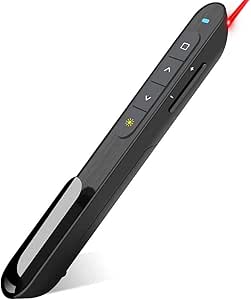
Logitech Wireless Presenter R500s, PowerPoint Clicker with Laser Pointer, Wireless Presentation Clicker Remote
This pick stands out for its wide compatibility across Windows, Mac, iOS, and Android, making it a versatile choice compared to the more specialized QUI Presentation Clicker. Its 20-meter range offers freedom of movement, ideal for larger boardrooms, but it relies on a AAA battery that lasts about a year and enters power-saving mode when low, which can be a minor inconvenience. The dual connectivity via USB or Bluetooth adds flexibility, while the Logitech App allows customization, a feature absent in some simpler models. Compared to the QUI BK600, the R500s offers more software support but has a slightly larger form factor. Its laser pointer is bright and effective, though a green laser could improve visibility on screens. The USB receiver stores inside the remote, reducing clutter, and the intuitive controls ensure smooth navigation. Overall, this remote is best suited for professionals needing reliable, long-range performance with customization options.
Pros:- Universal compatibility with multiple OS and software
- Long 20-meter operating range for mobility
- Dual connectivity via USB and Bluetooth
Cons:- Relies on AAA battery that may need replacement annually
- Laser pointer brightness limited; green laser could be more visible
Best for: Educators, corporate presenters, and professionals requiring reliable, versatile control in medium to large rooms.
Not ideal for: Users seeking a compact, ultra-lightweight option for frequent travel or small meeting rooms, as it is slightly bulkier than alternatives.
- Maximum Range:20 meters
- Connectivity Technology:USB, Bluetooth
- Supported Devices:Windows, Mac, iOS, Android
- Batteries:1 AAA (included)
- Button Quantity:3
- Item Weight:0.2 ounces
Bottom line: Best for users who want a dependable, customizable remote suitable for larger spaces and varied devices.
Wireless Presenter Remote, Presentation Clicker with Hyperlink & Volume Remote Control PowerPoint Office Presentation Clicker for Keynote/PPT/Mac/PC/Laptop(Battery Included)
This model makes the most sense for budget-conscious users who need a lengthy control distance, boasting a true 100-meter range that surpasses many rivals like the Logitech R500s. Its plug-and-play design ensures quick setup without software, which is a benefit over more complex options. The remote supports a variety of systems, including Windows, Mac, Linux, and Android, making it highly versatile, though the overall build may not be as premium as the Logitech Spotlight. The bright red laser pointer is easy to see even in well-lit rooms, and the multiple functions—hyperlink, volume, window switch—add convenience. Weighing just 31 grams, it’s comfortable for extended use, but the connectivity range can sometimes be affected by environmental factors. It’s ideal for presenters who prioritize distance and compatibility over advanced digital features.
Pros:- Impressive 100-meter control range
- Supports multiple OS and software platforms
- Easy plug-and-play setup
Cons:- Build quality feels less premium than higher-end models
- Some environmental interference may reduce effective range
Best for: Small to medium-sized presenters who need extensive range and multi-system support on a budget.
Not ideal for: Travelers or users who prefer a more compact, lightweight remote for frequent portability, as it is slightly bulkier than ultra-light models.
- Maximum Range:100 meters
- Connectivity Technology:Wireless RF 2.4GHz
- Supported Devices:Windows, Mac, Linux, Android
- Batteries:1 AAA (included)
- Button Quantity:6
- Item Weight:31 grams
Bottom line: Ideal for those who need a long-range, multi-device remote without complex setup or software.
Logitech Spotlight Presentation Remote – Universal Wireless Presentation Clicker with Laser Pointer, Advanced Digital Highlighting, Bluetooth, 30 m Range and Quick Charging – Black
This pick excels for users wanting more than just a basic remote, including digital highlighting and cursor control via Bluetooth, making it suitable for hybrid presentations. Its 30-meter range and quick charging are advantageous over simpler models like the QUI BK600, which lacks advanced features. The integration with Logi Options+ allows for custom effects and timing alerts, perfect for dynamic, interactive presentations. Unlike the Logitech R500s, which relies heavily on physical buttons, the Spotlight offers on-screen control and magnification features. While feature-rich, its setup and learning curve are slightly more involved, and it’s pricier. It’s best suited for presenters who want granular control and digital interaction capabilities.
Pros:- Advanced digital highlighting and cursor control
- Long 30-meter range with Bluetooth and USB options
- Customizable effects via Logi Options+
Cons:- Higher price point than basic models
- Requires some setup to utilize advanced features
Best for: Executives, educators, and professionals delivering highly interactive or hybrid presentations requiring on-screen control.
Not ideal for: Those seeking a simple, plug-and-play device with minimal setup or for casual use in small rooms, as it’s more complex and premium-priced.
- Range:30 meters
- Connectivity Technology:Bluetooth, USB
- Supported Devices:Windows, Mac
- Battery:Rechargeable via quick charge
- Button Quantity:Multiple customizable buttons
- Item Weight:Lightweight, specific weight not provided
Bottom line: Best suited for highly interactive, hybrid presentations where digital control enhances engagement.
Presentation Clicker Wireless Presenter Remote for PowerPoint, Powerpoint Clicker with Volume Control PowerPoint Slide Advancer for Mac, Computer, Laptop
This pick makes a strong case for simplicity and broad compatibility, supporting both Mac and Windows with plug-and-play operation—no software needed, unlike many other models. Its contoured keys are easy to locate by touch, and it supports functions like volume control, page up/down, and full/black screen. The up to 20-meter range offers decent mobility, though it’s less than some models like the QUI BK600 with 100 meters. The USB Type-C and USB connection provide versatility, especially for Apple users, but the build feels more utilitarian than premium. The laser pointer is bright enough for most settings, but a green laser could improve visibility on screens. This remote is ideal for presenters who want straightforward operation without sacrificing device compatibility.
Pros:- No software required for operation
- Supports both Mac and Windows systems
- Versatile USB Type-C and USB connectivity
Cons:- Limited range compared to RF or Bluetooth models
- Build quality is functional but not premium
Best for: Educators and professionals seeking a reliable, easy-to-use remote that works seamlessly with Mac and Windows without complex setup.
Not ideal for: Power users or those needing ultra-long-range control or digital features, as it’s more basic in functionality.
- Maximum Range:20 meters
- Connectivity Technology:USB, USB-C
- Supported Devices:Mac, Windows
- Batteries:2 AAA (not included)
- Button Quantity:5
- Item Weight:0.05 kg
Bottom line: Ideal for users who want straightforward, compatible control without complex setup or digital features.
QUI Presentation Clicker for PowerPoint, RF 2.4GHz USB C Wireless Presenter Remote with Volume Control, PowerPoint Clicker Slide Advancer for Mac, Windows, Laptop, Keynote
This pick is highly suited for users who prioritize portability and ease of use, with a compact design and Type-C & USB connection supporting a range of devices, including Mac and Windows. Its up to 20 meters range is adequate for most meeting settings, and the bright red laser pointer helps highlight key points. The button layout is simple, with functions like volume control and slide navigation grouped for quick access. Compared to larger remotes like the Logitech R500s, it offers fast setup and lightweight operation, but it lacks digital highlighting or advanced features. The laser pointer brightness is good, but a green laser option could boost visibility in bright rooms. This is perfect for presenters who need a portable, no-fuss device without sacrificing core functionality.
Pros:- Highly portable and lightweight
- Supports Type-C and USB connections
- Reliable 20-meter range
Cons:- Lacks advanced digital highlighting features
- Laser pointer brightness could be improved with a green laser
Best for: Travelers, educators, and professionals needing a compact, reliable remote for smaller rooms or on-the-go presentations.
Not ideal for: Large conference rooms or hybrid presentations requiring advanced digital interaction, as it mainly offers basic slide control.
- Maximum Range:20 meters
- Connectivity Technology:RF 2.4GHz USB-C, USB
- Supported Devices:Mac, Windows
- Batteries:2 AAA (not included)
- Button Quantity:6
- Item Weight:approx. 0.05 kg
Bottom line: Best for mobile presenters who need a compact, easy-to-carry device with solid basic controls.
ELISWEEN WP503 Wireless Presenter Model Number WP503
This pick makes sense for users who value easy operation and reliable wireless control for standard presentations. Its simple button layout supports functions like slide navigation, volume, and black screen, with a bright red laser pointer ensuring visibility in most settings. The long range of 20 meters is comparable to other basic models like the Logitech R500s, but without the advanced features such as digital highlighting. Its plug-and-play design is straightforward, and the support for both Mac and Windows broadens its appeal. While it’s less feature-rich than the Logitech Spotlight, its simplicity and durability make it suitable for everyday use, especially in smaller or less tech-intensive environments. The build quality is solid, though not premium, making it a dependable choice for daily presenters.
Pros:- Simple, intuitive button layout
- Supports Mac and Windows seamlessly
- Reliable wireless control up to 20 meters
Cons:- Lacks digital highlighting or advanced interaction features
- Laser pointer brightness might be less vivid on screens
Best for: Office workers, teachers, and casual presenters who want straightforward, reliable slide control with minimal fuss.
Not ideal for: Presenters seeking advanced features like digital annotation or hybrid control, as it covers only basic slide navigation.
- Range:20 meters
- Connectivity Technology:RF 2.4GHz
- Supported Devices:Mac, Windows
- Batteries:2 AAA (not included)
- Button Quantity:6
- Item Weight:approx. 0.05 kg
Bottom line: Great for everyday users who need a dependable, easy-to-use remote for standard presentations.
QUI Presentation Clicker for PowerPoint, RF 2.4GHz USB C Wireless Presenter Remote with Volume Control, PowerPoint Clicker Slide Advancer for Mac, Windows, Laptop, Keynote
This pick is ideal for users prioritizing portability and seamless compatibility, supporting both Mac and Windows with a Type-C and USB connection. Its up to 20-meter range is sufficient for most room sizes, and the bright red laser pointer helps emphasize key points. The plug-and-play setup is quick, with straightforward controls for slide navigation and volume. Compared to the Logitech R500s, it’s more compact and lightweight, but it doesn’t offer advanced digital features like highlighting or cursor control. The laser pointer’s brightness is adequate, though a green laser could improve visibility in bright environments. This remote fits perfectly for presenters who need reliable control with minimal bulk and broad device support.
Pros:- Compact and lightweight design
- Supports Type-C and USB connectivity
- Reliable operation up to 20 meters
Cons:- Limited to basic slide control, no advanced digital features
- Laser pointer brightness could be improved with a green laser
Best for: Travelers, educators, and professionals who want a portable, reliable remote for smaller presentations or mobile use.
Not ideal for: Large conference rooms or hybrid sessions requiring interactive digital annotations or extended control features.
- Range:20 meters
- Connectivity Technology:RF 2.4GHz USB-C, USB
- Supported Devices:Mac, Windows
- Batteries:2 AAA (not included)
- Button Quantity:6
- Item Weight:approx. 0.05 kg
Bottom line: Best for mobile presenters needing a compact, dependable remote with essential controls.
Presentation Clickers for PowerPoint, Clicker for Laptop Presentations Remote, USB Wireless Presenter Remote, Power Point Remote Clicker for Computer/Mac/PPT/Google Slide Advancer
This presentation clicker stands out for its simplicity and broad compatibility, making it an ideal choice for users who want a straightforward, plug-and-play experience. Unlike the Logitech Wireless Presenter R500s, which lacks detailed ergonomic design, this model offers an ergonomic grip and large buttons that reduce accidental presses. Its impressive 98-foot range and 328-foot laser pointer range outperform many competitors, providing flexibility in large rooms. The USB receiver conveniently slides into the device, minimizing the risk of loss. However, it requires two AAA batteries, which adds to ongoing costs, and its feature set is relatively basic compared to premium options like the Logitech Spotlight. This pick is perfect for professionals who prioritize ease and compatibility over advanced features. BestFor: Office professionals and teachers needing reliable, easy-to-use control. NotIdealFor: Tech enthusiasts seeking advanced highlighting or rechargeable tech.
- Ergonomic, comfortable grip
- Long wireless and laser pointer range
- Broad OS and software support
- Plug-and-play setup
- Requires AAA batteries
- Basic feature set
Verdict: This remote offers the most user-friendly experience for those needing dependable performance without extra complexity.
- Range: 98 FT / 30 M
- Laser Pointer Range: 328 FT / 100 M
- Batter: 2 AAA (included)
- Compatibility: Windows, Mac, Linux
- Design: Ergonomic grip
- Plug & Play: Yes
Pros:- Ergonomic, comfortable grip
- Very long wireless and laser pointer range
- Supports multiple OS and software types
- Simple plug-and-play setup
Cons:- Uses disposable AAA batteries
- Limited advanced features like highlighting or reprogramming
Best for: Small to medium conference room users who value simplicity and broad device compatibility.
Not ideal for: Power users seeking rechargeable batteries or advanced presentation features.
- Range:98 FT / 30 M
- Laser Pointer Range:328 FT / 100 M
- Batteries:2 AAA (included)
- Compatibility:Windows, Mac, Linux
- Design:Ergonomic grip
- Setup:Plug and Play
Bottom line: Ideal for users who want a reliable, easy-to-operate presentation remote without unnecessary bells and whistles.
Wireless Presenter, Hyperlink Volume Control Presentation Clicker RF 2.4GHz USB PowerPoint Clicker Presentation Remote Control Pointer Slide Advancer (Black)
This model makes a solid choice for those who need essential presentation controls at a low cost. Unlike the more advanced QUI Presentation Clicker B0DZT8FSX8, which offers a built-in laser pointer, this device relies solely on a bright red pointer that may be harder to see on certain backgrounds. Its 100-foot wireless range and simple USB plug-and-play setup make it highly convenient for large rooms, comparable to the Norwii N76. The slim design and rubber buttons enhance comfort, but it lacks reprogrammable options and rechargeable batteries, unlike the Norwii N76, which offers a rechargeable Li-ion battery. While reliable for straightforward presentations, it doesn’t support complex customization or advanced highlighting features. This pick is ideal for those who need basic slide control without extra features. BestFor: Occasional presenters in small to medium rooms on a budget. NotIdealFor: Power users requiring rechargeable batteries or multifunction buttons.
- Long wireless range of 100 feet
- Plug-and-play USB receiver
- Bright red pointer visibility
- No laser pointer
- No reprogrammable buttons
Verdict: A straightforward, budget-friendly option for infrequent presenters who need reliable basic controls.
- Range: 100 FT / 30 M
- Pointer: Bright red laser
- Batter: 1 AAA (not included)
- Compatibility: Windows, Mac, Linux, Android
- Design: Slim, ergonomic
- Setup: Plug and play
Pros:- Long wireless range
- Simple plug-and-play operation
- Bright red laser pointer for visibility
- Lightweight and ergonomic design
Cons:- No laser pointer included
- Lacks reprogrammable or rechargeable features
Best for: Budget-conscious individuals who occasionally present in medium-sized rooms.
Not ideal for: Frequent presenters or those desiring rechargeable or customizable features.
- Range:100 FT / 30 M
- Pointer:Bright red laser
- Batteries:1 AAA (not included)
- Compatibility:Windows, Mac, Linux, Android
- Design:Slim, ergonomic
- Setup:Plug and play
Bottom line: Great for infrequent users who need a basic, reliable remote without extra complexity.
QUI Presentation Clicker Wireless Presenter Remote Clicker for PowerPoint Presentation Remote, PowerPoint Slide Advancer for Mac/Windows/Linux, Google Slide/PPT/Keynote, USB A, Blue
This model excels in compatibility, supporting a wide array of operating systems and presentation software, making it suited for diverse user environments. Compared with the Norwii N76, which offers rechargeable batteries, this QUI presentation remote emphasizes broad software support with a simple plug-and-play experience. Its 328-foot range provides ample freedom to move around, and the built-in red laser pointer enhances presentation clarity. However, it lacks advanced features like reprogramming or a rechargeable battery, which the Norwii N76 offers. Its ergonomic design and multiple control buttons make it suitable for users who frequently switch between different software and operating systems, but those looking for rechargeable options may prefer other models. This pick is tailored for users needing maximum compatibility with minimal fuss. BestFor: Multi-platform professionals and educators with diverse software needs. NotIdealFor: Power users wanting rechargeability or extensive customization.
- Long range of 328 feet
- Supports Windows, Mac, Linux, Android
- Versatile software compatibility
- No rechargeable battery
- Basic feature set
Verdict: Ideal for users who need reliable cross-platform support without extra bells and whistles.
- Range: 328 FT / 100 M
- Pointer: Red laser
- Batter: AAA (not included)
- Compatibility: Windows, Mac, Linux, Android
- Design: Compact, ergonomic
- Setup: Plug and play
Pros:- Extensive software and OS support
- Very long wireless range
- Reliable plug-and-play operation
- Comfortable, ergonomic design
Cons:- No rechargeable battery
- Limited advanced features
Best for: Professionals and educators working across multiple operating systems and presentation platforms.
Not ideal for: Power users seeking rechargeable batteries or customizable controls.
- Range:328 FT / 100 M
- Pointer:Red laser
- Batteries:AAA (not included)
- Compatibility:Windows, Mac, Linux, Android
- Control Buttons:Multiple including page and volume
- Setup:Plug and play
Bottom line: Perfect for those who need broad compatibility with minimal setup effort.
Wireless Presentation Clicker PowerPoint Presenter Remote : USB Type C Clicker with Red Laser Pointer Long Range PPT Control -Power Point Google Slide Advancer for Mac Laptop PC Computer Keynote
This model offers versatility with its dual USB-A and USB-C receivers and a rechargeable Li-ion battery, making it suitable for modern, diverse device environments. Unlike the QUI model, which relies on disposable batteries, the Norwii N76 emphasizes eco-friendliness and cost savings. Its 328-foot range and 100-meter laser pointer range provide excellent mobility, comparable to other high-range models. The ergonomic design and large buttons support comfortable use during long presentations. However, it does not include advanced highlighting features or extensive software support; it focuses on fundamental slide advancing and laser pointing. This remote is ideal for users who want a rechargeable solution with wide device compatibility. This pick is best for professionals who prioritize rechargeable batteries and flexible connectivity. BestFor: Power users working with multiple device types and seeking eco-friendly operation. NotIdealFor: Those who need advanced annotations or laser pointer customization.
- Rechargeable Li-ion battery
- Dual USB-A and USB-C receivers
- Long wireless and laser pointer range
- No advanced highlighting features
- Basic control functions only
Verdict: Excellent for eco-conscious professionals needing rechargeable batteries and versatile connectivity.
- Range: 98 FT / 30 M
- Laser Pointer Range: 328 FT / 100 M
- Batter: Rechargeable Li-ion
- Compatibility: Windows, Mac, Linux, Keynote, PowerPoint
- Connection: USB-A & USB-C
- Design: Ergonomic
Pros:- Rechargeable battery reduces ongoing costs
- Dual USB-A and USB-C support
- Long wireless and laser range
- Ergonomic, comfortable design
Cons:- Limited advanced presentation features
- Basic control buttons only
Best for: Tech-savvy professionals who need rechargeable, multi-connection support across different devices.
Not ideal for: Users seeking advanced annotation tools or customizable laser features.
- Range:98 FT / 30 M
- Laser Range:328 FT / 100 M
- Battery:Rechargeable Li-ion
- Connectivity:USB-A & USB-C
- Control Range:Long-range
- Design:Ergonomic
Bottom line: Best suited for environmentally conscious professionals who need versatile and rechargeable presentation control.
Norwii N76 Rechargeable Presentation clicker, Long Range Presentation Remote, Wireless Presenter, Pointer for PowerPoint Presentations, Slide Control – Green Light+Case
This model emphasizes sustainability with a rechargeable Li-ion battery and offers excellent control range, making it suitable for frequent users. Compared to the QUI model, which has a USB Type A receiver, the Norwii N76 supports USB-A and USB-C, broadening device compatibility and convenience. Its 328-foot range and 100-meter laser pointer range outstrip many competitors, providing maximum flexibility in large rooms. The customizable buttons, including hyperlink and window switch functions, appeal to power users who want personalization. However, it does not include advanced annotation features or a built-in laser pointer, focusing instead on core slide control and long-range operation. This pick is ideal for professionals who need durable, rechargeable tech with extensive range. BestFor: Power users and frequent presenters in large venues. NotIdealFor: Users wanting built-in laser pointers or advanced annotation tools.
- Rechargeable Li-ion battery
- Supports USB-A and USB-C
- Extended 328-foot range
- No laser pointer included
- Limited to basic slide controls
Verdict: A reliable, eco-friendly remote perfect for heavy use in large spaces and device versatility.
- Range: 328 FT / 100 M
- Battery: Rechargeable Li-ion
- Connectivity: USB-A & USB-C
- Control Buttons: 6 programmable
- Design: Compact, ergonomic
- Support: Windows, Mac, Linux, Android
Pros:- Rechargeable long-lasting battery
- Supports USB-A and USB-C connections
- Long wireless and laser control range
- Personalizable buttons
Cons:- No built-in laser pointer
- Limited to core slide and hyperlink functions
Best for: Frequent, high-range presenters needing rechargeable, multi-device support.
Not ideal for: Those seeking built-in laser pointers or advanced annotation features.
- Range:328 FT / 100 M
- Laser Range:100 M
- Battery:Rechargeable Li-ion
- Connectivity:USB-A & USB-C
- Control Buttons:6 reprogrammable
- Design:Compact, ergonomic
Bottom line: Perfect for heavy users who need durability, eco-friendliness, and extensive control range.
QUI Presentation Clicker Wireless Presenter Remote Clicker for PowerPoint Remote, PowerPoint Slide Advancer for Mac/Windows/Linux, Google Slide/PPT/Keynote, USB A&C, Blue
This QUI presentation clicker stands out for its impressive wireless range of up to 328 feet, giving you the freedom to move around the stage without losing control. Unlike the Logitech R400, which offers a shorter, 50-foot range, this model supports a wider space and more dynamic presentations. Its built-in red light pointer enhances clarity against most backgrounds, although the pointer’s visibility may be less precise than laser pointers. It supports multiple operating systems including Windows, Mac, Linux, and Android, making it highly adaptable—something the Logitech R600s doesn’t match. The easy plug-and-play setup requires no software, but the tradeoff is that battery life depends solely on the AAA battery used, which might need frequent replacement. Overall, this pick makes the most sense for users who need flexibility across devices and a long-range connection, but it’s less ergonomic for those prioritizing compactness or quick handling.
Pros:- Exceptional wireless range of 328 feet for maximum mobility
- Broad compatibility with Windows, Mac, Linux, and Android systems
- Includes a visible red light pointer for clarity on most backgrounds
Cons:- Larger, less ergonomic design may be cumbersome for small hands
- Requires AAA battery, which may need frequent replacement
Best for: Professionals who need a versatile, long-range presentation tool compatible with multiple OS and software platforms.
Not ideal for: Travelers or users seeking a compact, lightweight clicker for frequent on-the-go presentations, due to its size and battery dependency.
- Maximum Range:328 feet
- Compatible Devices:Computer, Laptop, Presentation Device
- Controller Type:Button Control
- Button Quantity:6
- Backlit:Yes
- Color:Blue
- Warranty:1 Year
- Built-in Media Pointer:Red Light Pointer
Bottom line: Best suited for presenters who prioritize range, versatility, and cross-platform compatibility over portability.
QUI Presentation Clicker for PowerPoint, RF 2.4GHz USB Wireless Presenter Remote with Volume Control, PowerPoint Clicker Slide Advancer for Mac, Windows, Laptop, Keynote
This QUI model excels in plug-and-play simplicity with its straightforward USB connection and intuitive button layout, supporting functions like hyperlink navigation, volume control, and full-screen toggling. Compared with the Logitech R400, which lacks volume control, this pick offers added multimedia control, making it ideal for multimedia-rich presentations. Its bright red light pointer ensures visibility in large or brightly lit rooms, although it may not be as precise as laser pointers. The 328-foot wireless range is on par with the QUI model mentioned above, but the design is more compact and lightweight, suited for users who prioritize portability. However, some users might find the button controls less refined than premium models like the Logitech Spotlight. It’s a good choice for presenters seeking reliability and ease without complex setup, but it may lack advanced features for high-end professional use.
Pros:- Simple plug-and-play setup with no software required
- Multifunction buttons including volume and hyperlink controls
- Lightweight and portable for on-the-go use
Cons:- Button controls may feel less premium or tactile than higher-end models
- No dedicated laser pointer; relies on light for highlighting
Best for: Beginners or casual presenters who want an easy, reliable remote with multimedia controls and portability.
Not ideal for: Power users requiring advanced highlighting tools or ergonomic designs, as the button layout is basic and less refined.
- Maximum Range:328 feet
- Compatible Devices:Mac, Windows, Laptop
- Controller Type:Button Control
- Button Quantity:6
- Backlit:No
- Color:Black
- Batteries:1 AAA (not included)
Bottom line: Ideal for users seeking a straightforward, reliable remote with basic multimedia and navigation features for everyday presentations.
Logitech Wireless Presenter R400, USB-A PowerPoint Clicker with Laser Pointer, Wireless Presentation Clicker Remote
The Logitech R400 emphasizes ease of use with its simple plug-and-play setup and familiar design, featuring a built-in red laser pointer suitable for most backgrounds. It supports a wireless range of up to 50 feet, which is considerably shorter than the QUI options but still sufficient for smaller rooms or typical conference settings. The intuitive touch keys allow for straightforward slide control, making it a solid choice for users who prioritize reliability and ease of handling. Compared to the QUI models, it lacks extended range and advanced multimedia controls, but its ergonomic shape and straightforward operation make it ideal for quick, hassle-free presentations. However, the limited range may be a drawback for larger venues, and the laser pointer, while bright, is less versatile than digital highlighters or spotlight features.
Pros:- Easy plug-and-play with no software needed
- Bright, visible red laser pointer for most backgrounds
- Compact, lightweight design for portability
Cons:- Limited wireless range of only 50 feet, less suitable for large rooms
- Lacks multimedia controls like volume or hyperlink navigation
Best for: Office professionals needing a simple, dependable clicker with laser pointing for small to medium rooms.
Not ideal for: Large conference halls or dynamic, interactive presentations where long-range control and advanced features are required.
- Maximum Range:50 feet
- Compatible Devices:PC, Laptop, Projectors
- Controller Type:Touch Keys
- Button Quantity:Multiple
- Laser Pointer:Red Laser
- Batteries:AAA (not included)
- Connectivity:USB-A
Bottom line: Best suited for straightforward presentations in smaller settings where simplicity and laser pointing are enough.

How We Picked
In selecting these wireless presentation clickers, I prioritized performance reliability, ease of use, build quality, and versatility across different presentation platforms and devices. Range was a key factor, as boardroom presentations often require remote control from a distance, so models with at least 30 meters of reach ranked higher. Compatibility with Windows, Mac, and various presentation software was also critical, along with features like laser pointers, volume controls, and digital highlighting that enhance presentation effectiveness. Cost was balanced against feature set to identify options that deliver the best value for different buyer needs. The final rankings reflect a mix of these criteria, favoring products that combine reliability with user-friendly features for professional environments.Factors to Consider When Choosing Best Wireless Presentation Clickers For Boardrooms
When selecting the best wireless presentation clicker for a boardroom, it’s important to consider several key factors that influence usability and long-term value. Beyond basic features, understanding how each factor impacts your presentation experience will help you make a more informed choice catered to your specific environment and presentation style.Range and Connectivity
The effective range of a presentation clicker determines how freely you can move around the room without losing connection. Most models offer 30 meters or more, which is generally sufficient for large boardrooms. Bluetooth models tend to provide more stable connections and less interference than RF (radio frequency) USB options, especially in environments crowded with wireless devices. Consider your room size and whether a longer range is a priority for your style of presenting.
Compatibility and Software Support
Ensure the clicker supports your operating system and presentation software, whether it’s PowerPoint, Keynote, Google Slides, or others. Many devices work universally via USB or Bluetooth, but some might have specific requirements or limited functionality on certain platforms. Compatibility issues can cause delays or frustration during crucial moments, so verify that your preferred software and hardware are fully supported before purchasing.
Ease of Use and Ergonomics
A comfortable, intuitive design reduces fatigue and minimizes mistakes during presentations. Look for well-placed buttons, a lightweight build, and simple controls for slide navigation, laser pointers, and volume adjustments. Some models incorporate additional features like digital highlighting or customizable buttons, which can enhance engagement but may complicate the device for first-time users. Prioritize ease of use if you frequently switch between presenters or have limited technical experience.
Battery Life and Power Options
Battery longevity varies widely among models, from a few hours to several weeks of continuous use. Rechargeable batteries can be more economical and sustainable, but they require regular charging. Devices with replaceable batteries might be more convenient for extended use in busy boardrooms. Consider how often you present and choose a model that matches your frequency of use to avoid interruptions during critical moments.
Additional Features and Price
Extra features like laser pointers, digital highlighting, volume control, and multi-device connectivity can significantly elevate your presentation. However, these features often come at a higher price. Balance your budget against the importance of these extras. For example, if you frequently emphasize points with highlighting or need to control multiple devices, investing in a premium model like the Logitech Spotlight may justify the cost. Conversely, if basic slide control suffices, a more affordable option might be all you need.
Frequently Asked Questions
Will my presentation clicker work with both Mac and Windows?
Most modern wireless presentation clickers are designed to be compatible with both Mac and Windows systems, especially those that connect via Bluetooth or USB-A/USB-C. However, some features like digital highlighting or advanced controls might be limited on certain platforms. Checking the product specifications for cross-platform support is essential if you often switch between operating systems. In general, models with Bluetooth connectivity tend to offer broader compatibility and fewer connection issues across different devices.
What range should I look for in a wireless presentation clicker for a typical boardroom?
For typical boardrooms, a range of at least 30 meters (approximately 100 feet) is advisable. This ensures you can move around freely without losing connection, even in larger rooms or when standing far from your laptop or projector. Devices offering longer ranges, like 50 meters or more, can provide additional flexibility for very spacious environments or if you prefer to control your presentation from the back of the room. Always verify the stated range and consider potential interference from other wireless devices.
Are laser pointers included in most presentation clickers?
Many presentation clickers include built-in laser pointers, especially models aimed at professional use. However, the quality, brightness, and ease of activation can vary. Some budget models may omit the laser pointer altogether or offer a less powerful version. If emphasizing points with laser pointers is important for your presentations, select a model explicitly featuring this capability and consider reviews on laser brightness and control ease.
How durable are these presentation remotes for frequent use?
Durability depends on build quality and materials used. Higher-end models often feature metal components, reinforced buttons, and sturdy casings designed to withstand regular handling. Cheaper options might feel fragile and susceptible to damage over time. For frequent use in a busy boardroom environment, investing in a well-constructed device can prevent costly replacements and ensure consistent performance over the long term.
Should I prioritize a model with digital highlighting or a simple slide control?
Choosing between digital highlighting and basic slide control depends on your presentation style. Digital highlighting, available in advanced models like Logitech Spotlight, allows you to emphasize content dynamically, making your presentation more engaging. If you often need to draw attention to specific points or prefer a more interactive approach, investing in a feature-rich model makes sense. Conversely, if your presentations are straightforward, a simple slide control might be more cost-effective and easier to operate.
Conclusion
For most users, the Logitech Wireless Presenter R500s offers a reliable, easy-to-use experience at a reasonable price, making it ideal as a best overall choice. If you seek premium features and advanced control, the Logitech Spotlight stands out as the best for high-stakes or frequent presenters. Budget-conscious buyers will find the QUI Wireless Presenter series provides solid performance without breaking the bank. Beginners should lean toward models with simple controls and straightforward setup, like the Logitech R400. For those with specific needs such as long-range control or digital highlighting, selecting a model that aligns with those priorities will enhance your presentation effectiveness in any boardroom setting.
Fall Picks
fall essentials
As an affiliate, we earn on qualifying purchases.