

Choosing the right wireless routers for small business requires balancing raw speed with reliable management features. My top pick, the TP-Link Archer BE600, stands out for its Wi-Fi 7 capabilities and robust security suite, making it ideal for growing teams. For those on a tighter budget, the TP-Link Archer AX21 offers solid Wi-Fi 6 performance without the premium price tag. The main tradeoff you will face is between future-proofing your network with newer standards like Wi-Fi 7 and sticking with cost-effective Wi-Fi 6 or 5 solutions. Keep reading to see how these models stack up against each other and which one fits your specific office needs.

Get business pricing on office and shipping supplies
- Business-only prices and quantity discounts
- Tax-exempt purchasing
- Multiple users, one account, clear invoices
Key Takeaways
- Wi-Fi 7 adoption is accelerating, with models like the NETGEAR Nighthawk RS600 offering multi-gigabit speeds that benefit high-density office environments.
- Budget-friendly options like the DBIT AC1200 often lack advanced security protocols, making them risky for businesses handling sensitive client data.
- Tri-band routers consistently outperform dual-band models in offices with many connected devices, reducing congestion during peak hours.
- Cloud-based management features are becoming standard even in mid-range models, simplifying remote troubleshooting for IT staff.
- Wired backhaul support is a critical differentiator; routers with 2.5G or 10G ports provide better scalability for future office expansions.
| TP-Link Archer AXE75 AXE5400 Tri-Band WiFi 6E Router |  | Best for Wi-Fi 6E Device Separation | Wi-Fi generation: Wi-Fi 6E | Bands: Tri-band: 6 GHz, 5 GHz, and 2.4 GHz | Maximum data transfer rate: Up to 5400 Mbps | VIEW LATEST PRICE | See Our Full Breakdown |
| TP-Link Archer AX21 AX1800 Wi-Fi 6 Dual-Band Router |  | Best Value for Basic Wi-Fi 6 | Wi-Fi standard: Wi-Fi 6 (802.11ax) | Wireless bands: Dual-band: 2.4 GHz and 5 GHz | Combined bandwidth: Up to 1.8 Gbps | VIEW LATEST PRICE | See Our Full Breakdown |
| TP-Link Archer BE230 Dual-Band Wi-Fi 7 Router |  | Best for Multi-Gigabit Wired Connections | Wi-Fi standard: Wi-Fi 7 (802.11be) | Bands: Dual-band: 2.4 GHz and 5 GHz | Maximum speed: Up to 3.6 Gbps total | VIEW LATEST PRICE | See Our Full Breakdown |
| TP-Link Archer A54 AC1200 Dual-Band Wi-Fi Router | 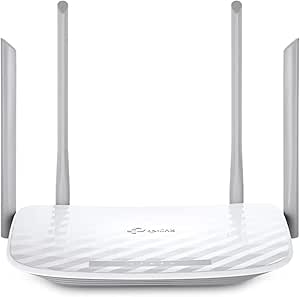 | Best for Light-Duty or Access Point Use | Wi-Fi standard: Wi-Fi 5 (802.11a/b/g/n/ac) | Total bandwidth: Up to 1200 Mbps | Band speeds: 5 GHz: up to 867 Mbps; 2.4 GHz: up to 300 Mbps | VIEW LATEST PRICE | See Our Full Breakdown |
| TP-Link Archer BE600 Tri-Band Wi-Fi 7 Router (BE9700) |  | Best Premium Small-Business Capacity | Wi-Fi standard: Wi-Fi 7 | Bands: Tri-band: 6 GHz, 5 GHz, and 2.4 GHz | Maximum combined speed: Up to 9.7 Gbps | VIEW LATEST PRICE | See Our Full Breakdown |
| NETGEAR Nighthawk R6700AX WiFi 6 Router |  | Best Budget WiFi 6 for Micro-Businesses | WiFi Generation: WiFi 6 (802.11ax) | Frequency Bands: Dual-band (2.4 GHz and 5 GHz) | Max WiFi Speed: 1.8 Gbps | VIEW LATEST PRICE | See Our Full Breakdown |
| NETGEAR Nighthawk RS600 Tri-Band WiFi 7 Router |  | Best Premium Performance for High-Density Offices | WiFi Generation: WiFi 7 | Frequency Bands: Tri-band (2.4, 5, 6 GHz) | Max Data Rate: 18 Gbps | VIEW LATEST PRICE | See Our Full Breakdown |
| TP-Link Archer AX3000 Dual-Band Wi-Fi 6 Gigabit Router | 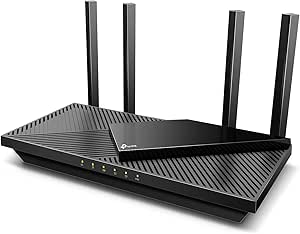 | Best Value for Security-Conscious SMBs | Wi-Fi Generation: Wi-Fi 6 | Data Transfer Rate: 2976 Mbps | Frequency Bands: Dual-band | VIEW LATEST PRICE | See Our Full Breakdown |
| NETGEAR Nighthawk RS90 WiFi 7 Dual-Band Router |  | Best Compact WiFi 7 for Small Offices | WiFi Generation: WiFi 7 | Frequency Bands: Dual-band (2.4, 5 GHz) | Max Data Rate: 3.6 Gbps | VIEW LATEST PRICE | See Our Full Breakdown |
| NETGEAR Nighthawk RS140 Dual-Band WiFi 7 Router |  | Best Overall Balance for Growing Teams | WiFi Generation: WiFi 7 | Frequency Bands: Dual-band (2.4, 5 GHz) | Max Speed: 5 Gbps | VIEW LATEST PRICE | See Our Full Breakdown |
| DBIT AC1200 Dual-Band Wi-Fi 5 Router |  | Best Budget Starter | Wi-Fi Standard: Wi-Fi 5 (802.11ac) | Frequency Bands: 2.4 GHz and 5 GHz | Maximum Speed: 1200 Mbps combined | VIEW LATEST PRICE | See Our Full Breakdown |
| wireless routers for small business | Antennas | Frequency Bands |
|---|---|---|
| TP-Link Archer AXE75 AXE5400 T | 8 fixed antennas | — |
| TP-Link Archer AX21 AX1800 Wi- | 4 fixed high-gain antennas | — |
| TP-Link Archer BE230 Dual-Band | — | — |
| TP-Link Archer A54 AC1200 Dual | 4 fixed external antennas | — |
| TP-Link Archer BE600 Tri-Band | 6 | — |
| NETGEAR Nighthawk R6700AX WiFi | — | Dual-band (2.4 GHz and 5 GHz) |
| NETGEAR Nighthawk RS600 Tri-Ba | — | Tri-band (2.4, 5, 6 GHz) |
| TP-Link Archer AX3000 Dual-Ban | 4 fixed external | Dual-band |
| NETGEAR Nighthawk RS90 WiFi 7 | — | Dual-band (2.4, 5 GHz) |
| NETGEAR Nighthawk RS140 Dual-B | — | Dual-band (2.4, 5 GHz) |
| DBIT AC1200 Dual-Band Wi-Fi 5 | 4 fixed external (5 dBi) | 2.4 GHz and 5 GHz |
More Details on Our Top Picks
TP-Link Archer AXE75 AXE5400 Tri-Band WiFi 6E Router
I’d choose the Archer AXE75 for a small office that has newer 6 GHz-capable laptops alongside older devices and wants a separate band for compatible traffic. Its tri-band Wi-Fi 6E setup gives it more room to distribute wireless activity than the dual-band Archer AX21, which can help reduce competition between devices on busy networks. It also adds EasyMesh expansion and VPN client and server functions, useful for extending coverage or connecting remote workers through a VPN. The tradeoff is that its wired ports are listed at 1 Gbps, so it is a weaker fit than the Archer BE230 or BE600 for a business building around multi-gigabit wired links. It also needs a separate modem for most providers, and 6 GHz helps only when client devices support it.
Pros:- Tri-band Wi-Fi 6E adds a 6 GHz band for compatible devices.
- EasyMesh support allows compatible equipment to extend coverage.
- VPN client and server support offers flexible remote-access options.
- WPA3 support and HomeShield features provide security tools.
Cons:- Listed LAN bandwidth is limited to 1 Gbps, unlike the multi-gigabit ports on the Archer BE230 and BE600.
- Most internet providers require a separate modem.
- The 6 GHz band benefits only compatible devices.
Best for: Small offices with a mix of Wi-Fi 6E-capable and older devices that want a dedicated 6 GHz band, VPN functions, and room to extend coverage.
Not ideal for: Businesses that need multi-gigabit Ethernet or primarily use devices without 6 GHz support; the BE230 or BE600 is a better fit for faster wired networking.
- Wi-Fi generation:Wi-Fi 6E
- Bands:Tri-band: 6 GHz, 5 GHz, and 2.4 GHz
- Maximum data transfer rate:Up to 5400 Mbps
- Processor and memory:1.0 GHz dual-core CPU; 512 MB RAM
- Antennas:8 fixed antennas
- Ports and LAN bandwidth:5 ports; 1000 Mbps LAN bandwidth
- Security and VPN:WPA2, WPA2-Enterprise, WPA3; OpenVPN, PPTP, and L2TP
- Mesh compatibility:EasyMesh
Our verdict“Choose the Archer AXE75 if your office has Wi-Fi 6E clients and values a third wireless band more than multi-gigabit Ethernet.”
TP-Link Archer AX21 AX1800 Wi-Fi 6 Dual-Band Router
The Archer AX21 is the straightforward choice for a small business moving to Wi-Fi 6 without needing a 6 GHz band or multi-gigabit ports. Its OFDMA support is designed to handle multiple connected devices more efficiently, while beamforming and four high-gain antennas help direct coverage around a compact office. Compared with the older Wi-Fi 5 Archer A54, it offers a newer wireless standard and gigabit LAN bandwidth; compared with the Archer AXE75, it gives up tri-band capacity and Wi-Fi 6E. That makes the AX21 a sensible match for ordinary browsing, cloud tools, and video calls, but not a strong choice for especially busy wireless environments or fast multi-gigabit service. It also requires a separate modem for most providers.
Pros:- Wi-Fi 6 and OFDMA support multiple connected devices.
- Four high-gain antennas and beamforming help direct wireless coverage.
- Gigabit LAN bandwidth supports wired devices at up to 1 Gbps.
- OpenVPN and PPTP server support adds VPN options.
Cons:- Dual-band Wi-Fi lacks the 6 GHz band available on the Archer AXE75 and Archer BE600.
- Combined bandwidth of up to 1.8 Gbps is modest beside the newer Wi-Fi 7 options.
- Most internet providers require a separate modem.
Best for: Small teams with standard broadband, several connected devices, and Wi-Fi 6 clients that do not need 6 GHz or multi-gigabit wired networking.
Not ideal for: Offices with heavy simultaneous wireless traffic, Wi-Fi 6E devices seeking a 6 GHz band, or multi-gigabit internet and LAN requirements.
- Wi-Fi standard:Wi-Fi 6 (802.11ax)
- Wireless bands:Dual-band: 2.4 GHz and 5 GHz
- Combined bandwidth:Up to 1.8 Gbps
- Band speeds:5 GHz: up to 1200 Mbps; 2.4 GHz: up to 574 Mbps
- Antennas:4 fixed high-gain antennas
- Ports and LAN bandwidth:5 ports; 10/100/1000 Mbps LAN
- Security:WPA/WPA2, WPA/WPA2-Enterprise (802.1x), and WPA3
- VPN server support:OpenVPN and PPTP
Our verdict“Pick the Archer AX21 for a small office that needs practical Wi-Fi 6 and gigabit LAN without paying for newer bands or multi-gigabit hardware.”
TP-Link Archer BE230 Dual-Band Wi-Fi 7 Router
For a small business whose wired equipment matters as much as Wi-Fi, the Archer BE230 is a distinctive step up from the Archer AX21: it brings Wi-Fi 7 and two 2.5 Gbps Ethernet ports without moving to the larger tri-band Archer BE600. That can suit an office with a multi-gigabit internet connection or a fast wired workstation, while the quad-core CPU and stated support for up to 60 devices cover a growing collection of clients. Its key compromise is band selection: this is a dual-band router without 6 GHz, so it cannot provide the extra wireless band offered by the Archer AXE75 or BE600. The advertised Wi-Fi 7 benefits also depend on compatible client devices. I’d favor it when multi-gigabit wiring is the priority, not when broad 6 GHz capacity is.
Pros:- Wi-Fi 7 supports newer wireless clients and Multi-Link Operation.
- Two 2.5 Gbps Ethernet ports support multi-gigabit wired connections.
- Quad-core processing and stated capacity for up to 60 devices suit a growing small office.
- Tether app management and WPA3 security provide accessible setup and security tools.
Cons:- No 6 GHz band, unlike the Archer AXE75 and tri-band Archer BE600.
- Full Wi-Fi 7 benefits depend on compatible client devices.
- Most internet setups still require a separate modem.
Best for: Small offices with multi-gigabit internet or wired workstations that want Wi-Fi 7 and two 2.5 Gbps Ethernet ports in a dual-band router.
Not ideal for: Businesses that want 6 GHz Wi-Fi, need the higher stated device capacity of the Archer BE600, or have few Wi-Fi 7 clients.
- Wi-Fi standard:Wi-Fi 7 (802.11be)
- Bands:Dual-band: 2.4 GHz and 5 GHz
- Maximum speed:Up to 3.6 Gbps total
- Band speeds:5 GHz: 2882 Mbps; 2.4 GHz: 688 Mbps
- Processor:Quad-core CPU
- Ports:1 × 2.5 Gbps WAN/LAN, 1 × 2.5 Gbps LAN, 3 × 1 Gbps LAN
- Coverage and device capacity:Up to 2,000 sq. ft.; supports up to 60 devices
- Security and management:WPA3 and HomeShield; TP-Link Tether app
Our verdict“Choose the Archer BE230 when two 2.5 Gbps ports and Wi-Fi 7 matter more than a 6 GHz band or tri-band coverage.”
TP-Link Archer A54 AC1200 Dual-Band Wi-Fi Router
The Archer A54 fits a small, light-duty office that needs basic wireless access or an inexpensive way to add an access point, rather than a router built for heavier business traffic. Its Access Point mode, EasyMesh compatibility, and app management make it more flexible to place in an existing setup than its Wi-Fi 5 generation alone suggests. Against the Archer AX21, though, it gives up Wi-Fi 6 and OFDMA; against the other options here, its 10/100 Mbps LAN ports are a major limit for wired computers, printers, or network storage. The stated coverage is up to 1,000 sq. ft., but that does not change its modest wired capacity. I’d reserve it for light workloads or extending an existing network, not as the core router for a busy office.
Pros:- Access Point mode supports use as an extension to an existing network.
- EasyMesh compatibility offers a path to expand compatible coverage.
- Four external antennas and stated coverage up to 1,000 sq. ft.
- WPA3 and app-based management are included.
Cons:- Fast Ethernet LAN ports are limited to 10/100 Mbps, well below the gigabit ports on the Archer AX21 and AXE75.
- Wi-Fi 5 lacks the newer Wi-Fi 6 features of the Archer AX21.
- Most providers require a separate modem.
Best for: Very small offices or satellite work areas needing a basic access point, guest Wi-Fi, and app management for light network use.
Not ideal for: Teams relying on wired file transfers, fast broadband, or many simultaneous users; its Fast Ethernet LAN ports and Wi-Fi 5 standard are limiting.
- Wi-Fi standard:Wi-Fi 5 (802.11a/b/g/n/ac)
- Total bandwidth:Up to 1200 Mbps
- Band speeds:5 GHz: up to 867 Mbps; 2.4 GHz: up to 300 Mbps
- Coverage:Up to 1,000 sq. ft.
- Antennas:4 fixed external antennas
- Ethernet ports:5 total; 4 Fast Ethernet LAN ports
- Security:WPA3, WPA-PSK, WPA2-PSK, and WPA2-Enterprise
- Modes and mesh:Router mode, Access Point mode, and EasyMesh
Our verdict“Use the Archer A54 for light office networking or access-point duty, but choose the Archer AX21 or newer if it will carry a busy business network.”
TP-Link Archer BE600 Tri-Band Wi-Fi 7 Router (BE9700)
The Archer BE600 is the most capable fit in this group for a small business expecting many wireless clients and wanting fast wired connections in the same router. Its tri-band Wi-Fi 7 includes 6 GHz, while the stated capacity of up to 120 devices and coverage up to 2,600 sq. ft. give it more headroom than the dual-band Archer BE230. It also offers a 10 Gbps WAN/LAN port, three 2.5 Gbps LAN ports, and USB 3.0—useful connections for multi-gigabit service and wired equipment. That capacity comes with a caveat: compatible Wi-Fi 7 clients are needed to gain the full wireless benefits, and some advanced HomeShield features may require a subscription. For a smaller or lightly loaded office, the AX21 or BE230 may be a more proportionate choice.
Pros:- Tri-band Wi-Fi 7 includes a 6 GHz band and Multi-Link Operation.
- Advertised capacity of up to 120 devices and coverage up to 2,600 sq. ft.
- 10 Gbps WAN/LAN and three 2.5 Gbps LAN ports support fast wired equipment.
- USB 3.0, VPN support, and HomeShield add connection and management options.
Cons:- Full Wi-Fi 7 performance depends on compatible client devices.
- Some advanced HomeShield features may require a subscription.
- Its capacity may be more than a small, lightly loaded office needs.
Best for: Growing small businesses with many wireless devices, Wi-Fi 7 clients, multi-gigabit internet, and several fast wired connections.
Not ideal for: Small teams with basic broadband or few compatible Wi-Fi 7 devices; the Archer AX21 or BE230 may better match their networking needs.
- Wi-Fi standard:Wi-Fi 7
- Bands:Tri-band: 6 GHz, 5 GHz, and 2.4 GHz
- Maximum combined speed:Up to 9.7 Gbps
- Band speeds:6 GHz: up to 5765 Mbps; 5 GHz: up to 2882 Mbps; 2.4 GHz: up to 1032 Mbps
- Coverage and device capacity:Up to 2,600 sq. ft.; up to 120 devices
- Ports:1 × 10 Gbps WAN/LAN, 1 × 2.5 Gbps WAN/LAN, 3 × 2.5 Gbps LAN, 1 × USB 3.0
- Antennas:6
- Management and compatibility:TP-Link Tether app or web interface; Alexa and Google Assistant
Our verdict“Choose the Archer BE600 for a growing office that can use its 6 GHz Wi-Fi and multi-gigabit ports, rather than for a basic network.”
NETGEAR Nighthawk R6700AX WiFi 6 Router
This model stands out for micro-businesses with under 20 employees who need reliable WiFi 6 without breaking the budget. While it lacks the multi-gigabit throughput of the NETGEAR Nighthawk RS140, its 1.8 Gbps combined speed is sufficient for standard office tasks like email, cloud browsing, and light file sharing. The inclusion of four Gigabit LAN ports is a practical advantage for connecting a few desktop PCs or a network-attached storage device directly. However, the 20-device limit is a hard ceiling; growing teams will outgrow this quickly. Compared to the TP-Link Archer AX3000, it offers similar coverage but fewer advanced security features without a subscription. It is a solid entry point, but not a long-term solution for scaling companies.
Pros:- Affordable entry into WiFi 6 technology
- Four Gigabit LAN ports for wired connections
- WPA3 security and automatic firmware updates
- Simple app-guided setup process
Cons:- Supports only up to 20 connected devices
- Requires a separate modem or gateway
- NETGEAR Armor security requires a paid subscription after trial
Best for: Freelancers or micro-offices with fewer than 20 active devices and basic internet needs.
Not ideal for: Growing teams needing more than 20 connections or businesses requiring multi-gigabit WAN speeds.
- WiFi Generation:WiFi 6 (802.11ax)
- Frequency Bands:Dual-band (2.4 GHz and 5 GHz)
- Max WiFi Speed:1.8 Gbps
- Coverage:Up to 1,500 sq. ft.
- Max Connected Devices:20
- Ethernet Ports:4 Gigabit LAN, 1 Gigabit WAN
- Security:WPA2, WPA3, Auto-updates
Our verdict“Choose this if you are a solo entrepreneur or tiny team needing reliable WiFi 6 on a strict budget.”
NETGEAR Nighthawk RS600 Tri-Band WiFi 7 Router
The RS600 is engineered for high-density environments where bandwidth congestion is a real threat. Its WiFi 7 tri-band architecture allows it to handle up to 150 devices simultaneously, far surpassing the NETGEAR Nighthawk RS90, which caps out at 50 devices. The inclusion of 10 Gigabit WAN and LAN ports makes it future-proof for businesses with multi-gig fiber connections or heavy internal data transfer needs. This is not an overkill option; it is a necessity for creative studios or firms with heavy video conferencing loads. The tradeoff is the high entry cost and the physical size. If your office has fewer than 30 devices, the RS140 offers better value. But for scaling teams demanding low latency and massive capacity, this is the definitive choice.
Pros:- Tri-band WiFi 7 supports up to 150 devices
- 10 Gigabit WAN and LAN ports for future-proofing
- Extensive coverage up to 3,300 sq. ft.
- Quad-core processor handles heavy traffic loads
Cons:- Premium price point may exceed small business budgets
- Requires a separate modem or gateway
- Overkill for low-bandwidth office tasks
Best for: Medium-to-large offices with 50-150 devices and multi-gigabit internet plans.
Not ideal for: Small businesses with under 30 devices or single-gigabit internet speeds.
- WiFi Generation:WiFi 7
- Frequency Bands:Tri-band (2.4, 5, 6 GHz)
- Max Data Rate:18 Gbps
- Coverage:Up to 3,300 sq. ft.
- Max Devices:150
- WAN Port:1 × 10 Gig Ethernet
- LAN Ports:1 × 10 Gig, 3 × 1 Gig Ethernet
- Processor:Quad-core 2.0 GHz
Our verdict“This is the definitive choice for scaling offices that need massive device capacity and multi-gigabit ports.”
TP-Link Archer AX3000 Dual-Band Wi-Fi 6 Gigabit Router
This router distinguishes itself with built-in security features that don’t require an immediate subscription, unlike the NETGEAR Nighthawk R6700AX. The HomeShield platform offers basic network scanning and parental controls that are useful for small offices with mixed device types. Its 2976 Mbps combined speed provides a slight edge over the Nighthawk R6700AX for 5 GHz devices. However, the lack of specified coverage area is a significant drawback; you may need to add mesh extenders if your office layout is complex. While it lacks WiFi 7, the OFDMA technology helps maintain stability with multiple users. It is a pragmatic choice for businesses that prioritize security tools over raw speed, but it falls short of the NETGEAR Nighthawk RS140 in terms of future-proofing and device capacity.
Pros:- HomeShield security suite included without mandatory subscription
- Higher combined speed (2976 Mbps) than entry-level competitors
- USB 3.0 port for local file sharing
- Supports VPN server and client functionality
Cons:- No specific coverage square footage provided by manufacturer
- Limited to 512 MB RAM which may struggle with many devices
- Dual-band only; lacks dedicated 6 GHz band
Best for: Small offices prioritizing built-in security tools and basic WiFi 6 connectivity.
Not ideal for: Large open-plan offices needing guaranteed wide-area coverage or WiFi 7 speeds.
- Wi-Fi Generation:Wi-Fi 6
- Data Transfer Rate:2976 Mbps
- Frequency Bands:Dual-band
- Antennas:4 fixed external
- USB Port:USB 3.0
- RAM:512 MB
- Security:HomeShield, WPA3
Our verdict“Pick this if you want integrated security features and decent speed without paying for premium WiFi 7 hardware.”
NETGEAR Nighthawk RS90 WiFi 7 Dual-Band Router
The RS90 offers a balanced approach to WiFi 7 adoption for businesses that don’t need the extreme throughput of the RS600. With a 2.5 Gigabit WAN port, it supports mid-tier fiber plans that exceed standard gigabit speeds, making it a smarter investment than the NETGEAR Nighthawk R6700AX. It supports up to 50 devices, which is double the capacity of the entry-level Nighthawk but significantly less than the RS140. The dual-band design means it lacks the dedicated 6 GHz band, which limits its ability to offload legacy devices compared to tri-band models. This makes it ideal for small offices upgrading from WiFi 5 who want future-proofing without the premium price tag of tri-band units. It is a focused tool for specific upgrade paths, not a general-purpose powerhouse.
Pros:- WiFi 7 speeds up to 3.6 Gbps
- 2.5 Gigabit WAN port supports multi-gig internet
- Compact design suitable for small desks
- Supports up to 50 devices
Cons:- Dual-band only; no dedicated 6 GHz band
- Lower device capacity than the RS140
- Requires separate modem
Best for: Small offices upgrading from WiFi 5 with mid-tier internet plans and under 50 devices.
Not ideal for: Businesses needing 6 GHz band support or more than 50 simultaneous connections.
- WiFi Generation:WiFi 7
- Frequency Bands:Dual-band (2.4, 5 GHz)
- Max Data Rate:3.6 Gbps
- Coverage:Up to 2,000 sq. ft.
- Supported Devices:50
- WAN Port:1 × 2.5 Gigabit
- Processor:Quad-core 2.0 GHz
Our verdict“This is the logical upgrade for small teams moving to WiFi 7 who don’t need tri-band complexity.”
NETGEAR Nighthawk RS140 Dual-Band WiFi 7 Router
This model sits in the sweet spot for growing small businesses that need more than 50 devices but don’t require 10 Gig ports. With support for 80 devices and speeds up to 5 Gbps, it outperforms the RS90 in capacity while remaining more affordable than the RS600. The 2.5 Gigabit WAN port ensures that businesses on 2 Gbps fiber plans get full value. Unlike the TP-Link Archer AX3000, this is a WiFi 7 device, offering better latency management and efficiency for modern hardware. The dual-band design is a limitation compared to tri-band models, but for most office applications, the 5 GHz band handles the load effectively. It is the most versatile option in this lineup, balancing cost, capacity, and speed for teams that are actively expanding.
Pros:- Supports up to 80 devices
- WiFi 7 speeds up to 5 Gbps
- 2.5 Gigabit WAN port for fast internet
- Good coverage for medium-sized offices
Cons:- Dual-band only; lacks 6 GHz band
- Requires a separate modem
- Fewer LAN ports than the RS600
Best for: Growing businesses with 50-80 devices and multi-gig internet plans.
Not ideal for: Micro-businesses with under 20 devices or those needing 6 GHz band support.
- WiFi Generation:WiFi 7
- Frequency Bands:Dual-band (2.4, 5 GHz)
- Max Speed:5 Gbps
- Coverage:Up to 2,250 sq. ft.
- Max Devices:80
- WAN Port:1 × 2.5 Gigabit
- LAN Ports:3 × 1 Gigabit
- Processor:Quad-core 2.0 GHz
Our verdict“The best all-around choice for expanding teams needing high capacity and multi-gig speed without extreme cost.”
DBIT AC1200 Dual-Band Wi-Fi 5 Router
This router serves as a practical entry point for small offices with basic connectivity needs. Compared to the TP-Link Archer AX21, it lacks Wi-Fi 6 efficiency, meaning it may struggle with dense device loads. However, its four Gigabit Ethernet ports provide essential wired stability for desktops and printers. The inclusion of EasyMesh support allows for simple expansion if your office layout demands it, a feature often reserved for premium models. While it uses older WPA2-PSK security, this remains sufficient for most non-sensitive business data. I find it best suited for teams prioritizing cost-effective reliability over cutting-edge speed. It handles standard browsing and cloud applications well, but heavy video conferencing might reveal its Wi-Fi 5 limitations.
Pros:- Includes four Gigabit Ethernet ports for stable wired connections
- Supports EasyMesh for easy network expansion
- Offers multiple operating modes including router and repeater
- Delivers adequate dual-band speeds for standard office tasks
Cons:- Uses older WPA2-PSK security instead of WPA3
- Wi-Fi 5 technology may bottleneck high-bandwidth applications
- Requires a separate modem for internet access
Best for: Small offices with fewer than 15 devices that need reliable basic connectivity without high-end features.
Not ideal for: Teams using heavy video conferencing or requiring the latest WPA3 security standards for compliance.
- Wi-Fi Standard:Wi-Fi 5 (802.11ac)
- Frequency Bands:2.4 GHz and 5 GHz
- Maximum Speed:1200 Mbps combined
- Ethernet Ports:1 WAN, 3 LAN (Gigabit)
- Antennas:4 fixed external (5 dBi)
- Security Protocol:WPA2-PSK
- Mesh Support:EasyMesh
Our verdict“This is the sensible choice for small businesses seeking affordable, wired-heavy connectivity without the premium price tag.”

How We Picked
I evaluated these routers based on their ability to handle typical small business workloads, including video conferencing, cloud storage access, and multi-user browsing. Network stability and security features were weighted heavily, as downtime or breaches can cost a small business more than the price of the router itself. I also looked at ease of management, favoring models with intuitive apps or web interfaces that allow non-technical staff to manage guest networks and parental controls effectively.
Ranking was determined by how well each product balanced performance with value. High-end models like the NETGEAR Nighthawk RS90 ranked high for raw throughput but lower for value, while mid-range options like the TP-Link Archer AX3000 offered the best compromise for most offices. I prioritized routers with WPA3 encryption and QoS (Quality of Service) capabilities, ensuring critical business applications get priority bandwidth.
Factors to Consider When Choosing Wireless Routers For Small Business
Selecting the right hardware involves more than just checking the speed rating. You need to consider how the router fits into your existing infrastructure and growth plans. Here are the key factors I recommend evaluating before making a purchase.
Wi-Fi Standards and Future Proofing
The Wi-Fi standard determines the maximum speed and efficiency of your wireless network. Wi-Fi 6 (802.11ax) is currently the sweet spot for most small businesses, offering better handling of multiple devices than older Wi-Fi 5 models. However, if your office uses many high-bandwidth applications or expects rapid growth, investing in Wi-Fi 6E or Wi-Fi 7 routers can prevent the need for an upgrade within two years. Be aware that newer standards require compatible client devices to realize the full benefits, so check if your employees’ laptops and phones support the latest protocols.
Security and Network Isolation
Small businesses are frequent targets for cyberattacks, so your router must act as a robust firewall. Look for models that support WPA3 encryption and offer built-in intrusion prevention systems (IPS). A critical feature for offices is the ability to create a separate guest network that isolates visitors from your internal company resources. This prevents accidental data leaks or malware infection from a contractor’s personal device. Routers with automatic firmware updates also help patch vulnerabilities without manual IT intervention.
Port Connectivity and Scalability
Wireless speed is irrelevant if your wired backhaul is a bottleneck. Check the number and type of Ethernet ports available on the router. Most small offices need at least four to eight Gigabit Ethernet ports for connecting desktops, printers, and switches. If you plan to use Network Attached Storage (NAS) or have high-speed internet plans exceeding 1 Gbps, prioritize routers with Multi-Gig (2.5G or 10G) ports. This ensures that wired devices do not throttle your overall network performance.
Management and Ease of Use
Time is money for small business owners, so the router should be easy to set up and monitor. Cloud-based management apps allow you to check network status, restart devices, or block users from your phone. This is particularly useful for managers who are often out of the office. Avoid routers that require complex command-line interface (CLI) knowledge unless you have dedicated IT support. A clean, intuitive dashboard for viewing connected devices and bandwidth usage is a valuable trait for quick troubleshooting.
Coverage Area and Mesh Capability
Office layout significantly impacts Wi-Fi performance. Walls, metal structures, and distance can weaken signals. If your office spans more than 1,500 square feet or has multiple floors, a single router may create dead zones. Consider routers that support Mesh networking, allowing you to add satellite nodes easily to extend coverage seamlessly. Alternatively, you might need a router with high-power amplifiers and external antennas for better penetration through solid walls. Mapping your office space before buying helps avoid coverage gaps that disrupt productivity.
Frequently Asked Questions
Is Wi-Fi 7 worth the extra cost for a small business right now?
For most small businesses, Wi-Fi 7 is not yet necessary unless you have specific high-bandwidth needs like 4K video editing or VR applications. The client devices (laptops, phones) that support Wi-Fi 7 are still relatively expensive and scarce. Wi-Fi 6 and 6E offer excellent performance for typical office tasks like email, web browsing, and video calls. I recommend sticking with Wi-Fi 6 unless you are setting up a new office that will remain unchanged for five years, in which case Wi-Fi 7 might offer better longevity. The price premium for Wi-Fi 7 routers is significant, and the performance gain is often marginal for standard business workloads.How many devices can a typical small business router handle?
This depends on the router’s CPU and Wi-Fi standard. A basic dual-band router might struggle with more than 20-30 active devices, leading to lag. Wi-Fi 6 and 6E routers use OFDMA technology to handle multiple devices more efficiently, often supporting 50-100 connections without significant degradation. For a small office with 10-20 employees, look for a router rated for at least 50 devices to account for personal phones, tablets, and IoT devices. Always check the manufacturer’s recommended device limit, but treat it as a maximum, not a target for optimal performance.Do I need a separate access point or just a router?
If your office is small and open-plan, a single high-quality router may suffice. However, for offices with multiple rooms, thick walls, or more than 1,500 square feet, a Mesh Wi-Fi system or a router paired with dedicated access points is better. Routers are designed to be the gateway to the internet, while access points are optimized for extending wireless coverage. Using a router in router mode (AP mode) can work, but dedicated mesh nodes often provide smoother roaming between coverage areas. If you experience dead zones, adding a mesh node is usually easier and cheaper than rewiring the office.What is the difference between QoS and bandwidth control?
QoS (Quality of Service) prioritizes specific types of traffic, such as video calls or VoIP, ensuring they remain smooth even when the network is busy. Bandwidth control limits the amount of data a specific device or user can consume, preventing one employee from hogging all the bandwidth with large downloads. For a small business, QoS is generally more useful for maintaining productivity during meetings, while bandwidth control is better for enforcing fair usage policies. Many modern routers offer both, allowing you to prioritize critical apps and restrict non-essential traffic like streaming services.Can I use a consumer router for my business, or do I need an enterprise model?
You can use a high-end consumer router for a small business with fewer than 15 employees, provided it has decent security features. Consumer routers are cheaper and easier to manage, but they often lack advanced features like VLAN support, detailed logging, or seamless roaming across multiple nodes. Enterprise-grade routers offer better reliability, centralized management, and stronger security protocols but require more technical expertise to configure. If your business handles sensitive data or requires 99.9% uptime, an enterprise model or a prosumer line like the Nighthawk or Archer business series is a safer investment.Conclusion
Choosing the right wireless routers for small business comes down to matching your office size, budget, and technical requirements. For most users, the TP-Link Archer AX21 provides the best value, delivering reliable Wi-Fi 6 performance without breaking the bank. If you need top-tier speed and future-proofing, the NETGEAR Nighthawk RS600 is the best premium choice, though it comes at a higher cost. Beginners or those with simple needs should look at the TP-Link Archer AX3000 for its balance of ease of use and performance. For very tight budgets where security is less critical, the DBIT AC1200 is a viable starter option, but I recommend upgrading as soon as possible. Evaluate your current device count and office layout to make the final call.
Fall Picks

Samsung 32-Inch Movingstyle Essential 4K UHD Smart Monitor with Adjustable Rolling Stand
As an affiliate, we earn on qualifying purchases.