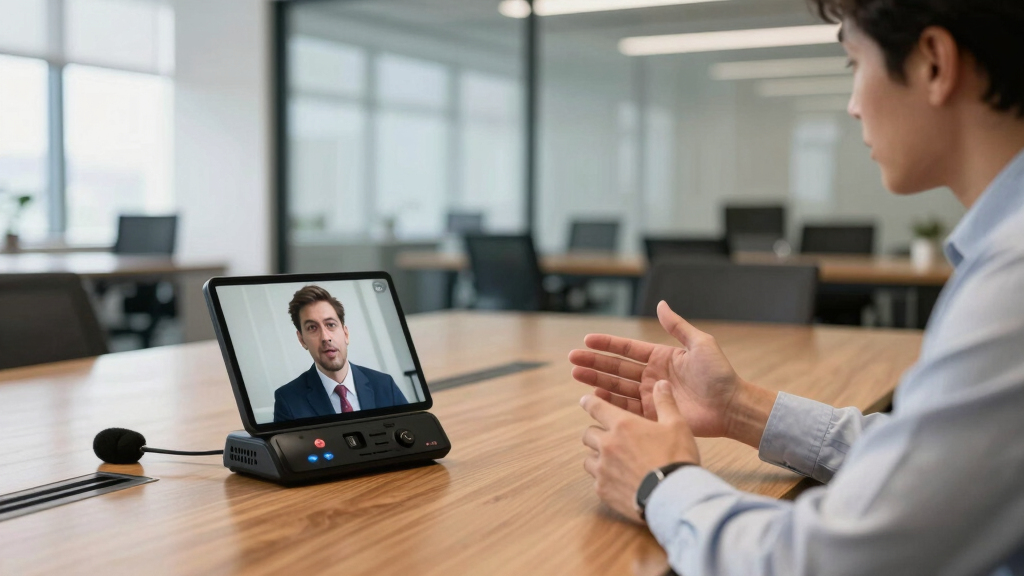

When choosing a conference camera with a speaker and mic, you need a solution that balances video clarity, audio quality, ease of use, and room size compatibility. The Logitech BCC950 stands out for its plug-and-play simplicity and reliable HD video, making it ideal for small offices or personal use. The Owl Labs Meeting Owl 3 offers a 360° view and AI-driven speaker tracking, perfect for collaborative environments, though it comes at a higher price. A common challenge in this category is balancing audio and video quality against budget constraints and room size. Continue reading for a detailed breakdown of the best options to suit your specific needs.
Key Takeaways
- Top picks vary significantly in price, with premium models offering advanced AI tracking and 4K resolution.
- Room size and layout heavily influence the best choice; larger spaces benefit from PTZ and auto-tracking features.
- Audio quality is often overlooked but is crucial; models with noise reduction and multiple microphones tend to perform better.
- Ease of setup and compatibility with common conferencing platforms can make or break user experience.
- The most capable options tend to have higher prices, but budget-friendly choices still deliver solid performance for smaller rooms.




More Details on Our Top Picks
Logitech BCC950 Desktop Conferencing Solution, Full HD 1080p B23 Calling, Hi-Definition Webcam, Speakerphone with Noise-Reducing Mic, for Skype, WebEx, Zoom PC/Mac/Laptop/MacBook – Black
This Logitech BCC950 stands out for its all-in-one design, combining high-quality HD video with a professional-grade speakerphone and noise-canceling microphone. Its 1080p webcam with Carl Zeiss lens ensures sharp images, while the full duplex speakerphone supports clear audio up to 8 feet away—ideal for small to medium rooms. Unlike the Meeting Owl 3, which offers 360° views, the BCC950 provides more control over framing with pan, tilt, and zoom functions. Its plug-and-play USB connectivity makes setup straightforward, though it lacks the intelligent auto-tracking of higher-end models. The remote control simplifies call management, but the fixed microphone range may limit larger room coverage. Overall, this pick suits teams needing reliable, professional-quality video and audio in a compact setup, though it might fall short for larger, more dynamic spaces.
Pros:- Business-grade HD video with Zeiss lens for sharp images
- Built-in noise-canceling microphone and full duplex speakerphone
- Remote control for call management and camera adjustments
- Plug-and-play USB connectivity for quick setup
Cons:- Limited microphone range for larger rooms
- No AI auto-tracking or panoramic view
- Fixed camera position without automatic framing
Best for: Small to medium business teams that prioritize high-quality video and clear audio with simple setup.
Not ideal for: Large conference rooms or hybrid environments requiring AI auto-tracking and panoramic views.
- Video Resolution:1080p Full HD
- Frame Rate:30 fps
- Connectivity:USB
- Built-in Microphone:Noise-canceling, full duplex
- Speakerphone:Full duplex, noise reduction
- Camera Control:Remote pan, tilt, zoom
Bottom line: This model is perfect for small teams seeking a reliable, easy-to-use conference camera with integrated audio.
TONGVEO 4K Conference Room Camera System with Gesture Control, AI Auto-Tracking PTZ Camera 5X Digital Zoom with Speakerphone Set 120° Wide-Angle USB3.0 for Remote Meetings Zoom Teams OBS and More
This TONGVEO system excels in delivering ultra-high-definition 4K video with AI-driven auto-tracking, making it ideal for dynamic, larger meeting spaces. Its 6 gesture controls and remote allow precise operation, and the 120° wide-angle lens captures expansive room views. Compared to the Meeting Owl 3, which offers 360° coverage, this setup provides more targeted framing of speakers, but requires users to manually manage tracking. The 5X digital zoom helps focus on specific speakers or objects, while the dual HDMI and USB outputs support flexible integration. However, high resolution demands more bandwidth, and the system’s complexity might be overkill for smaller rooms. Overall, this pick is best for organizations needing sharp, automated video with flexible control in medium to large spaces.
Pros:- 4K ultra HD resolution with smooth 60fps video
- AI auto-tracking and gesture controls for dynamic framing
- Wide 120° field of view for comprehensive room coverage
- Multiple output options for flexible setup
Cons:- Requires higher bandwidth and more processing power
- Complex setup and configuration can be daunting
- More expensive than basic webcams
Best for: Medium to large conference rooms requiring high-resolution, auto-tracking, and flexible camera control.
Not ideal for: Small rooms or users needing a simple plug-and-play webcam without AI features.
- Video Resolution:4K UHD
- Frame Rate:30 fps
- Zoom:5X digital
- Field of View:120°
- Connectivity:USB 3.0, HDMI
- Control:Gesture, remote
Bottom line: Ideal for tech-savvy users seeking high-quality, auto-tracking video in larger meeting environments.
Owl Labs Meeting Owl 3 – 360° 1080p HD Conference Room Camera, AI-Driven Speaker-Tracking, 18-Foot Mic Pickup – Certified for Microsoft Teams – Works with Zoom, Google Meet – Plug & Play Setup
The Meeting Owl 3 redefines hybrid meetings with its 360° panoramic view, capturing the entire room in 1080p HD while automatically focusing on active speakers. Its AI-driven system ensures remote participants see and hear the person speaking, fostering inclusiveness. Compared to the Logitech BCC950, which offers targeted framing, the Owl 3 provides a broader perspective that works well in collaborative environments. The 18-foot mic pickup and clear audio make it suitable for larger rooms, and setup is straightforward with plug-and-play USB. On the downside, the 360° view might be less suitable for rooms needing focused shots or presentations. Overall, this device excels in creating engaging, inclusive hybrid experiences for small to medium-sized groups.
Pros:- 360° HD video with automatic speaker focus
- AI-driven tracking for active speakers
- Integrated mic array with 18-foot pickup range
- Simple plug-and-play setup
Cons:- Less suitable for rooms needing focused shots
- Higher cost compared to traditional webcams
- Limited control over camera framing
Best for: Organizations seeking a holistic, easy-to-deploy hybrid conferencing solution that emphasizes participant engagement.
Not ideal for: Rooms requiring specific speaker framing or those with very large or complex layouts.
- Video Resolution:1080p HD
- Field of View:360°
- Mic Pickup Range:18 feet
- Connectivity:USB
- AI Features:Speaker tracking
- Compatibility:Teams, Zoom, Google Meet
Bottom line: Best for teams wanting an all-in-one, engaging hybrid conferencing experience with minimal setup effort.
PANOCORE360 All-in-One Meeting Camera – 360° Conference Cam for PC Mac, Speaker & Mic Array, Auto Speaker Focus, 1080P Output, AI Voice Isolation, Local Recording,Compatible with Webex/Zoom/Teams/Meet
The PANOCORE360 combines four cameras, microphones, and speakers into a compact design, offering full 4K 360° capture with a 1080p output stream. Its adaptive dual vision modes—auto-focus on active speakers or dual 180° views—provide flexible room coverage, making it ideal for small to medium rooms. Unlike the Owl Labs, which emphasizes participant engagement, the PANOCORE excels in delivering detailed room visuals with AI voice isolation and local recording options. Its plug-and-play operation ensures compatibility with most platforms, but the device’s complexity may require some initial setup. The lower power consumption and local recording ability make it attractive for versatile environments. Overall, this model is suitable for users needing a capable, space-efficient conference camera with AI-enhanced features.
Pros:- Full 4K 360° capture with dual modes
- AI voice isolation and auto-focus
- Local recording via MicroSD card
- Plug-and-play compatibility with major platforms
Cons:- Limited zoom capability
- Requires initial configuration for optimal use
- Less suitable for large, complex rooms
Best for: Small to medium conference rooms requiring detailed room coverage and AI voice features in a compact package.
Not ideal for: Large rooms or scenarios demanding high zoom or panoramic focus on specific speakers.
- Video Output:1080p
- Field of View:360°
- AI Features:Auto-focus, voice isolation
- Recording:MicroSD
- Connectivity:USB
- Platform Compatibility:Zoom, Teams, Webex
Bottom line: Ideal for users needing comprehensive room coverage with AI features in a small-to-medium space.
TONGVEO All-in-One Conference Room Video Camera System Al Auto-Tracking HD1080P 60fps 3X Optical Zoom USB3.0 HDMI PTZ Camera and Bluetooth Conference Speakerphone with Microphones
The TONGVEO system offers a comprehensive conference setup with a 1080p PTZ camera featuring 3x optical zoom, combined with a wireless Bluetooth speakerphone. Its AI auto-tracking and 350° pan / 180° tilt make it well-suited for small to medium rooms, especially when budget-conscious. Compared with the Meeting Owl 3, it provides more control with its zoom and PTZ capabilities, but it lacks the seamless 360° room coverage. The HDMI and USB outputs allow flexible integration, and the long battery life ensures reliable operation. However, the system’s complexity and wiring requirements might be challenging for some users, and the audio pickup range may be limited in larger rooms. Overall, this setup is best for organizations seeking a balanced mix of professional features and affordability for smaller conference environments.
Pros:- 1080p PTZ camera with 3x optical zoom
- AI auto-tracking and face recognition
- Wireless Bluetooth speakerphone with echo cancellation
- Flexible HDMI and USB outputs
Cons:- Complex wiring and setup process
- Limited room coverage compared to 360° models
- Audio pickup may be insufficient for large rooms
Best for: Small to medium conference rooms needing a professional-grade camera and speakerphone combo on a budget.
Not ideal for: Large rooms or environments requiring full 360° coverage or AI auto-tracking with panoramic views.
- Video Resolution:1080p HD
- Zoom:3X optical
- Field of View:Pan 350°, Tilt 180°
- Connectivity:USB3.0, HDMI
- Audio:Bluetooth speakerphone
- Auto-Tracking:Yes
Bottom line: Best suited for budget-conscious small to medium rooms that need professional camera control and clear audio.
Meeting Owl 4+ 360-Degree, 4K Smart Video Conference Camera, Microphone, and Speaker (Automatic Focus, Zooming, Noise Equalizing, Certified for Microsoft Teams)
The Meeting Owl 4+ stands out for its ability to deliver a truly immersive 360° experience with 4K video and 360° audio, automatically focusing on the speaker and adapting seamlessly to room dynamics. Compared to the Logitech MeetUp, it offers a more comprehensive room coverage with its 360° view, making it ideal for larger or more dynamic spaces. The Owl’s proprietary intelligence system ensures remote participants stay engaged, but this comes with higher setup costs and a slightly more complex management system. The plug-and-play design simplifies deployment, while its compatibility with major platforms like Microsoft Teams and Zoom broadens usability. However, its bulkier size and higher price point may be a drawback for small or budget-conscious setups. This pick makes the most sense for organizations seeking a versatile, all-in-one hybrid conferencing solution that adapts to various room sizes and configurations.
Pros:- 360° 4K video capture for complete room coverage
- Award-winning Owl Intelligence System for automatic focus
- Easy deployment with plug-and-play USB connection
- Compatible with major platforms like Microsoft Teams and Zoom
Cons:- Heavier and larger than typical webcams, requiring more space
- Higher price compared to single-camera solutions
- Limited expandability without additional Owl devices
Best for: Medium to large conference rooms needing a comprehensive hybrid setup with automatic speaker tracking.
Not ideal for: Small huddle rooms or users with tight budgets, due to its size and cost.
- Video Resolution:4K
- Audio Coverage:up to 18 ft
- Connection Method:USB, Ethernet, WiFi
- Platform Compatibility:Microsoft Teams, Zoom, Webex, Google Meet
- Room Coverage:360° view
- Focus Features:Automatic, Zooming, Noise Equalizing
Bottom line: Ideal for organizations that need a versatile, all-in-one hybrid conferencing device capable of handling larger rooms with ease.
Bose Professional VB-S, All-in-one Video Conference HD Camera, Noise-reducing Mic, and Hi-Fidelity Bluetooth Speaker for Home, Office, or Classroom
The Bose VB-S excels in delivering exceptional audio quality with noise-reducing microphones and a hi-fidelity Bluetooth speaker, complemented by a robust 4K camera with 5x zoom and auto-framing modes. Unlike the Logitech MeetUp, which offers a wide field of view, this system emphasizes audio clarity, making it perfect for settings where sound quality is critical. The remote control and customizable presets simplify operation, but its fixed lens and lack of pan-tilt features limit its flexibility for larger, more dynamic rooms. It supports multiple conferencing platforms and is easy to set up, ideal for small to medium spaces where impeccable sound is paramount. However, the higher price and focus on audio might be less appealing for users seeking extensive room coverage or pan-tilt features. This product makes the most sense for environments prioritizing crystal-clear communication and high-quality audio.
Pros:- Exceptional audio with noise-reducing microphones
- High-fidelity Bluetooth speaker for versatile use
- 4K camera with 5x digital zoom and auto-framing
- Easy setup with remote control and multiple platform compatibility
Cons:- Limited pan-tilt or auto-tracking capabilities
- Higher cost compared to basic webcam solutions
- Less suitable for large, dynamic spaces requiring wide coverage
Best for: Small to medium conference rooms prioritizing superior sound quality and crystal-clear video.
Not ideal for: Large rooms or those requiring wide-angle coverage or pan-tilt capabilities.
- Video Resolution:4K
- Zoom:5x digital
- Microphones:Noise-reducing, beamforming
- Connectivity:Bluetooth, USB
- Platform Compatibility:Zoom, Teams, Webex
- Audio Coverage:up to 18 ft
Bottom line: Best for users who need premium audio and high-quality video in smaller, acoustically sensitive environments.
TONGVEO 3-in-1 4K Webcam with Microphones and Speaker, AI Auto-Tracking 5X Digital Zoom Webcam 4K Adjustable Field of View Remote Control Works with Microsoft Teams, Zoom, Google Meet, PC Mac Laptop
The TONGVEO 4K Webcam offers a compelling combination of AI auto-tracking, 5x digital zoom, and multiple FOV modes, making it highly adaptable for different meeting scenarios. Compared to the Meeting Owl 4+, which provides a 360° view, the Tongveo focuses on tracking and framing specific speakers, which benefits users wanting targeted views in smaller or more formal settings. Its included remote simplifies control over zoom, view, and muting, but the reliance on AI tracking may occasionally misidentify speakers, especially in very crowded rooms. The 4K resolution guarantees crisp visuals, and its compatibility with all major conferencing platforms makes it flexible. However, the auto-tracking feature can sometimes be less reliable in complex layouts. This product is best suited for dynamic, speaker-focused meetings where flexible framing matters most.
Pros:- AI auto-tracking that follows active speakers
- Supports multiple FOV modes with remote control
- 4K resolution ensures crisp image quality
- Compatible with major conferencing apps
Cons:- Auto-tracking can occasionally misfire in crowded rooms
- Requires reliance on AI for tracking, which may have occasional glitches
- Limited room coverage compared to full 360° systems
Best for: Small to medium rooms with active presenters needing auto-tracking and adjustable views.
Not ideal for: Large rooms with multiple speakers or scenarios demanding wide-angle coverage.
- Video Resolution:4K
- Zoom:5x digital
- FOV Modes:118°, 100°, 88°
- Auto-Tracking:Yes
- Connectivity:USB 2.0/3.0
- Platform Compatibility:Zoom, Teams, Google Meet
Bottom line: Designed for dynamic meetings where auto-tracking and flexible framing enhance engagement in smaller spaces.
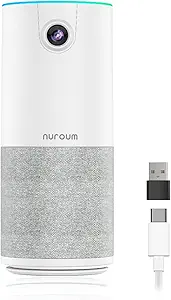
NUROUM C10(2nd Gen) 1080P Conference Webcam with Microphone Speaker, Portable All in One Computer Camera for Video Conference, AI Noise Cancellation & AGC, USB Plug&Play for PC/Desktop Zoom/Teams
The NUROUM C10 impresses with its all-in-one design—integrating a 1080P camera, noise-canceling microphone array, and high-fidelity speaker into a portable unit. It’s perfect for small rooms or home offices, especially for users who prefer a simple, plug-and-play setup. Compared to the Meeting Owl 4+ or Logitech MeetUp, it offers a compact footprint with straightforward USB connectivity, making it ideal for quick deployment. Its AI noise cancellation and automatic gain control ensure clear audio even at distances up to 10 feet, but the camera’s fixed focus and wide-angle lens limit its flexibility for larger or more dynamic spaces. The video quality is good but not as sharp as 4K solutions, which might matter for detailed presentations. This pick suits users seeking portability and ease of use without sacrificing essential conference features.
Pros:- Portable, compact all-in-one design
- AI noise cancellation and AGC for clear audio
- Plug-and-play USB connection, no drivers needed
- Automatic microphone coverage up to 10 ft
Cons:- Fixed focus lens limits zoom flexibility
- Limited to 1080P resolution, less sharp than 4K models
- No pan-tilt or auto-tracking features
Best for: Small conference or huddle rooms needing a portable, easy-to-use all-in-one system.
Not ideal for: Large or highly dynamic spaces where wider coverage or pan-tilt features are necessary.
- Video Resolution:1080P
- Microphone:4-element noise-canceling array
- Speaker:High-fidelity
- Connectivity:USB
- Focus:Fixed
- Platform Compatibility:Zoom, Teams, Skype
Bottom line: Perfect for small, quick-deploy setups that prioritize portability and ease of use without complex features.
Logitech MeetUp Video Conferencing System, Ultra HD 4K/1080p/720p, 3 Microphones/Adjustable Speakers, Wide Field of View 120°, PC/Mac/Laptop/MacBook/Tablet – Black
The Logitech MeetUp offers a versatile all-in-one solution with a wide 120° field of view and 4K UHD resolution, making it ideal for small conference rooms where capturing everyone on screen is vital. Its motorized pan and tilt extend the view even further, up to 170°, providing flexibility for dynamic presentations or whiteboard views. The three beamforming microphones ensure clear voice pickup within 4 meters, supporting a natural conversation flow. Compared to the Meeting Owl 4+, it offers more traditional camera controls and wider coverage, but lacks the full-room 360° view. Its straightforward plug-and-play setup makes it accessible for most users, but the absence of AI auto-tracking means manual adjustments are sometimes necessary. It’s perfect for small rooms that need wide coverage and reliable camera control.
Pros:- Ultra HD 4K resolution with wide 120° FOV
- Motorized pan/tilt for flexible viewing
- Multiple mounting options for versatility
- 3 beamforming microphones for clear audio
Cons:- No AI auto-tracking or speaker following
- Limited to small room sizes without additional expansion
- Higher cost for 4K features compared to lower-res webcams
Best for: Small conference rooms requiring wide-angle coverage and easy manual control.
Not ideal for: Large rooms or environments needing auto-tracking or 360° views.
- Video Resolution:4K UHD
- Field of View:120°
- Zoom:Motorized pan/tilt
- Microphones:3 beamforming
- Connectivity:USB
- Platform Compatibility:PC, Mac, Tablet
Bottom line: Best suited for small conference rooms needing wide coverage and flexible camera controls without auto-tracking.
EMEET C980 PRO 3-in-1 4K Webcam with Microphone and Speaker, 60°-98° Wide Angle Webcam w/ 4 Noise Cancel Mics, 2 Speakers, Fixed Focus, Magnetic Privacy Cover, Great for Group and Personal Video Calls
The EMEET C980 PRO stands out for combining a stunning 4K resolution with a comprehensive audio system, including 4 noise-canceling microphones and 2 powerful speakers. Compared to models like the Logitech BCC950, which offers full HD resolution but less advanced audio, the C980 PRO delivers more detailed visuals and richer sound, making it ideal for both small team meetings and larger group calls. Its wide-angle lens (60°-98°) and fixed focus ensure everyone stays in view without manual adjustments, while the plug-and-play setup simplifies deployment. However, the reliance on a single USB connection can be limiting if multiple devices need to be connected simultaneously. The absence of onboard zoom or pan features means users must rely on the wider physical field of view. This pick makes the most sense for those prioritizing high-quality visuals along with excellent audio in a single, easy-to-use package.
Pros:- Stunning 4K video quality for sharp, detailed images
- Integrated 4 noise-canceling microphones and 2 speakers for clear audio
- Wide adjustable angle (60°-98°) for versatile room coverage
- Plug-and-play setup with USB 2.0 interface for quick deployment
Cons:- No zoom or pan functionalities, limiting framing control
- Fixed focus may reduce clarity at close or distant object distances
- Requires direct USB connection; not compatible with hubs for stable power
Best for: Small to medium-sized teams needing a high-quality all-in-one conference solution with excellent audio and wide-angle video.
Not ideal for: Users requiring optical zoom or PTZ capabilities for large conference rooms or detailed presentations.
- Resolution:4K UHD
- Microphones:4 noise-canceling
- Speakers:2 built-in
- Field of View:60°-98° adjustable
- Focus Type:Fixed focus
- Connectivity:USB 2.0 Type A
- Sensor Type:CMOS
- Compatibility:Windows, macOS, Android TV
Bottom line: This camera is best suited for small to medium teams that want a sleek, all-in-one solution with premium audio and high-resolution video without complex controls.
How We Picked
Products were evaluated based on several key factors: video resolution and clarity, audio quality and microphone pickup range, ease of setup and usability, compatibility with popular conferencing platforms like Zoom, Microsoft Teams, and Webex, and overall build quality. We prioritized solutions that balance performance with value, recognizing that not every user needs advanced AI tracking or 4K resolution. Devices with robust audio capture, simple interfaces, and reliable connectivity ranked higher, while those with complex setups or limited platform support were rated lower. The ranking reflects a combination of these technical qualities and user-friendly design, catering to diverse meeting environments.Factors to Consider When Choosing Conference Camera With Speaker And Mic
Choosing the right conference camera with a speaker and mic depends on your specific meeting environment, team size, and budget. Beyond the features listed in product reviews, it’s important to consider how the device integrates with your existing systems and the level of audio-visual quality you require. Mistakes like prioritizing resolution over audio quality or ignoring room acoustics can hinder effective communication. Here are key factors to weigh when selecting your ideal setup.Room Size and Layout
Understanding your room’s dimensions and seating arrangement is vital. Smaller rooms may only require a standard webcam with a decent microphone, while larger conference rooms benefit from PTZ (pan-tilt-zoom) capabilities and auto-tracking features to keep everyone in frame. Consider whether the camera can cover the entire space or if multiple devices are necessary. This choice impacts not only the camera’s design but also the microphone placement and speaker volume.
Video Resolution and Field of View
Higher resolution cameras, like 4K models, deliver sharper images, but they often come at a higher cost and may require more bandwidth. Conversely, Full HD (1080p) often suffices for most meetings and reduces network strain. The field of view is equally important; wide-angle lenses can capture the entire room, minimizing the need for multiple devices, but may introduce distortion if too wide. Match resolution and FOV to your room size and visual clarity needs.
Audio Quality and Microphone Range
Clear audio is essential for effective meetings. Devices with multiple microphones and noise-reduction features tend to produce better sound, especially in noisy environments. Consider the pickup range—larger rooms need microphones with longer reach or array microphones that can pick up voices from a distance. Poor audio quality can lead to misunderstandings, even if the video is excellent, making this a critical factor.
Platform Compatibility and Ease of Use
Ensure the device works seamlessly with your preferred conferencing platform, whether it’s Zoom, Teams, or Webex. Compatibility issues can cause delays and frustration. User-friendly interfaces and simple setup processes save time and reduce technical difficulties. Some devices offer plug-and-play setups, while others require driver installations or app configurations—consider your technical comfort level.
Budget and Long-term Value
While premium models offer advanced features like AI tracking and 4K resolution, they come with higher price tags. Balance your budget against your needs—smaller teams or occasional users might find a mid-range device sufficient. Investing in a higher-quality model can pay off through more reliable performance and better collaboration, especially in frequent meeting scenarios. Be wary of devices that cut corners on essential features like audio or connectivity to save costs.
Frequently Asked Questions
Can I use a conference camera with speaker and mic for both small and large rooms?
Yes, but the effectiveness depends on the device’s capabilities. Small rooms often require compact, easy-to-set-up solutions with a narrow field of view, while large rooms benefit from PTZ, auto-tracking, and wider coverage. Many models are designed with adjustable features to adapt to different room sizes, but for very large spaces, multiple devices or a professional AV setup may be necessary. Matching the device’s specs with your room size ensures clear visuals and audio for all participants.
Is 4K resolution necessary for conference cameras?
Not always. 4K provides sharper images, which can be beneficial for detail-oriented meetings or large displays, but it also demands more bandwidth and higher processing power. For most small to medium-sized rooms, Full HD (1080p) offers excellent clarity at a lower cost and bandwidth requirement. Consider your meeting environment and whether the visual detail justifies the extra expense—often, good lighting and a decent resolution are more impactful than ultra-high definitions.
How important is microphone pickup range in choosing a device?
Microphone range is a critical factor, especially in larger rooms. A device with a short-range microphone may only pick up voices close to it, leading to poor audio for distant participants. Longer-range or array microphones can capture voices across the room, improving clarity and reducing the need for multiple microphones. For larger spaces, prioritize models with a broad pickup range or multiple microphones to ensure everyone’s voice is heard clearly.
Should I prioritize AI tracking or multiple microphones?
Both features serve different purposes: AI tracking keeps the camera focused on the active speaker or moving participants, which is ideal for dynamic meetings, while multiple microphones ensure better audio pickup across the room. If your meetings involve active discussions with movement, AI tracking adds convenience. Conversely, if you have a fixed setup with multiple participants spread out, multiple microphones might be more beneficial. In some cases, combining both features offers the most comprehensive experience.
What is the best way to ensure a reliable conference experience?
Choosing a device with proven compatibility, robust build quality, and a straightforward setup process helps prevent technical issues. Regularly updating firmware and drivers ensures optimal performance. Consider your network bandwidth and ensure your internet connection is stable enough for high-quality video and audio streaming. Testing your setup before important meetings can catch potential problems early, providing a smoother experience for all participants.
Conclusion
For small teams or personal use, the Logitech BCC950 offers reliable, straightforward performance at an accessible price. Larger conference rooms or dynamic meetings benefit from high-end options like the Owl Labs Meeting Owl 3 or TONGVEO 4K Conference Room Camera with AI tracking and wide coverage. Budget-conscious buyers should consider mid-range models with decent resolution and audio, while those needing professional-grade quality should look toward premium solutions with advanced features. Ultimately, the right choice depends on your room size, meeting frequency, and desired feature set.