
The best business routers with failover internet keep essential connections available when a primary ISP goes down, but the right choice depends on how you want backup service to work. I’d choose the TP-Link Omada ER7206 as the best overall balance of multi-WAN flexibility and business routing, while the NETGEAR PR60X stands out for high-speed multi-gig networks and the MOFINETWORK MOFI6500 for built-in cellular backup. The main tradeoffs are wired WAN flexibility versus cellular independence, and simpler setup versus more control over a growing network. Port count, Wi-Fi needs, management tools, and backup connection costs can also change which model makes sense. Read on for the full breakdown and a guide to matching failover capability to your business.

Get business pricing on office and shipping supplies
- Business-only prices and quantity discounts
- Tax-exempt purchasing
- Multiple users, one account, clear invoices
Key Takeaways
- Multi-WAN flexibility is the main dividing line: the ER7206 and ER605 suit businesses choosing among wired ISP connections, while the MOFI6500 adds a cellular backup path.
- Speed tiers matter beyond the WAN port count: the PR60X and Omada Fusion 2.5G are aimed at multi-gig networks; a gigabit router may become a bottleneck if the internet service exceeds that class.
- Built-in Wi-Fi is not the same as failover: the ER706W and MOFI6500 include Wi-Fi, while wired models may call for separate access points and a clearer division of network duties.
- Integrated switching can reduce equipment needs: the Cisco RV345P combines routing with a 16-port PoE switch, but its larger role may be unnecessary for a small office with few wired devices.
- Backup independence has an ongoing cost: cellular-capable equipment can keep a separate path available, but buyers need to account for SIM service, coverage, and data limits as well as the router.
| D-Link Guardian 600 PoE Multi-Gig Business Router (DBR-600-P) |  | Best Multi-Gig PoE Pick | Model: DBR-600-P | WAN: 2.5 GbE | LAN: 8 × 2.5 GbE PoE+ | VIEW ON AMAZON | See Our Full Breakdown |
| Cisco RV340 VPN Router with 4 Gigabit Ethernet (GbE) Ports plus Dual WAN, Limited Lifetime Protection (RV340-K9-NA), Black |  | Best for VPN-Centered Small Offices | Ethernet ports: 4 Gigabit Ethernet | WAN: Dual WAN with load balancing and failover | VPN protocols: IPsec, L2TP over IPsec, Cisco AnyConnect | VIEW ON AMAZON | See Our Full Breakdown |
| D-Link DSR-250V2 Gigabit VPN Router with Dual WAN Failover |  | Best for High VPN Tunnel Capacity | Model: DSR-250V2 | WAN ports: 1 × 1 Gbps WAN; 1 × configurable 1 Gbps LAN/WAN | Dedicated LAN ports: 3 × 1 Gbps | VIEW ON AMAZON | See Our Full Breakdown |
| TP-Link Omada ER706W Gigabit AX3000 Wi-Fi 6 VPN Router | 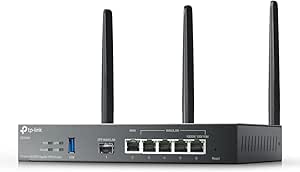 | Best Built-In Wi-Fi Failover Router | Wi-Fi: Wi-Fi 6, dual-band 2.4 GHz and 5 GHz | Maximum listed Wi-Fi rates: 2402 Mbps on 5 GHz; 574 Mbps on 2.4 GHz | Ports: 1 Gigabit SFP slot, 5 Gigabit RJ45 ports, 1 USB 3.0 port | VIEW ON AMAZON | See Our Full Breakdown |
| Cisco RV345P VPN Router with 16-Port Gigabit Ethernet Switch, PoE, and Dual WAN |  | Best for Larger PoE-Wired Offices | Ethernet ports: 16 Gigabit | PoE ports: 8 | WAN: Dual Ethernet WAN | VIEW ON AMAZON | See Our Full Breakdown |
| TP-Link ER605 Multi-WAN Gigabit VPN Router |  | Best Value for Small Offices | Ethernet ports: 5 Gigabit ports: 1 WAN, 2 WAN/LAN, 2 LAN | Maximum WAN connections: Up to 3 | USB WAN: Compatible 4G/3G modem backup | VIEW ON AMAZON | See Our Full Breakdown |
| TP-Link ER7206 Multi-WAN Gigabit VPN Router |  | Best for Higher VPN Capacity | WAN interfaces: 1 Gigabit SFP WAN, 1 Gigabit WAN, and 2 Gigabit WAN/LAN | Dedicated LAN ports: 1 Gigabit LAN | Maximum WAN connections: 4 | VIEW ON AMAZON | See Our Full Breakdown |
| NETGEAR PR60X 10G/Multi-Gigabit Dual WAN Cloud-Managed Pro Router |  | Best for Multi-Gigabit Offices | WAN ports: 1 × 2.5G WAN and 1 × configurable 10G/Multi-Gigabit LAN/WAN | LAN ports: 3 × 2.5G LAN | SFP+ port: 1 × 10G SFP+ | VIEW ON AMAZON | See Our Full Breakdown |
| Omada Fusion 2.5G Multi-WAN Wired VPN Router |  | Best for On-Device Network Visibility | Ports: 5 Ethernet ports | Port bandwidth: 2.5 Gbps | Data transfer rate: 2.1 Gbps | VIEW ON AMAZON | See Our Full Breakdown |
| MOFINETWORK MOFI6500 5G/LTE Dual SIM Cellular Router with Wi-Fi 6 |  | Best Cellular-First Failover Router | Cellular connectivity: 5G and LTE | SIM support: Dual SIM with automatic failover | Wi-Fi: Wi-Fi 6 (802.11ax), dual-band | VIEW ON AMAZON | See Our Full Breakdown |
More Details on Our Top Picks
D-Link Guardian 600 PoE Multi-Gig Business Router (DBR-600-P)
I’d choose the D-Link Guardian 600 when failover needs to support a faster wired office, not just keep basic browsing online. Its multi-WAN intelligent failover pairs with a 2.5 GbE WAN port and eight 2.5 GbE PoE+ LAN ports, so cameras, phones, and access points can connect and receive power without a separate PoE switch. That makes it a more integrated fit than the Cisco RV345P, whose 16-port switch offers more connections but is Gigabit and has PoE on only eight ports. The D-Link also supports up to 50 VPN tunnels across three listed protocols. The tradeoff is capacity planning: its 123 W PoE budget and real-world performance depend on the network configuration, and it has no Wi-Fi radios listed. I’d skip it if standard Gigabit speeds or wireless coverage matter more than multi-gig PoE.
Pros:- Multi-WAN intelligent failover helps keep the office connected when a WAN link drops.
- Eight 2.5 GbE PoE+ ports combine multi-gig wired access and device power.
- Supports up to 50 VPN tunnels using IPsec, WireGuard, and OpenVPN.
- WPA3 and an SPI firewall provide listed wireless and perimeter security features.
Cons:- The 123 W total PoE budget may limit how many high-draw devices can run together.
- No built-in Wi-Fi capability is listed.
- Performance and power delivery depend on network configuration and operating conditions.
Best for: Small and midsize offices with multi-gig wired equipment, PoE cameras or access points, and a need for WAN failover plus remote-access VPNs.
Not ideal for: Businesses that need built-in Wi-Fi, more than eight PoE-powered devices, or a large 16-port wired switch in one chassis.
- Model:DBR-600-P
- WAN:2.5 GbE
- LAN:8 × 2.5 GbE PoE+
- PoE budget:Up to 30 W per port; 123 W total
- WAN failover:Multi-WAN intelligent failover
- VPN:Up to 50 tunnels; IPsec, WireGuard, and OpenVPN
- Security:WPA3 and SPI firewall
- Warranty:Limited lifetime coverage in North America; 5 years for internal power supplies and fans; 1 year for external power supplies
Our verdict“Choose the Guardian 600 if you want multi-gig failover networking with substantial PoE capacity in one business router.”
Cisco RV340 VPN Router with 4 Gigabit Ethernet (GbE) Ports plus Dual WAN, Limited Lifetime Protection (RV340-K9-NA), Black
The Cisco RV340 is a sensible pick when failover is part of a small office’s security plan and wired needs stay modest. Its dual-WAN load balancing and failover are paired with IPsec, L2TP over IPsec, and AnyConnect support, giving remote staff several listed ways to connect securely. Compared with the D-Link DSR-250V2, it has fewer listed LAN ports and VPN protocols, but Cisco’s AnyConnect support may suit teams already using that client. The four-port Gigabit switch keeps a small wired setup simple; it does not provide built-in Wi-Fi, so guest access depends on separate equipment and VLAN configuration. I’d also be cautious about the listed 45 Mbps maximum upstream rate: that figure makes this a poor fit for buyers who need high-throughput VPN or WAN performance. Setup may call for networking expertise, and technical support is listed for one year.
Pros:- Dual WAN supports failover and load balancing.
- Four integrated Gigabit Ethernet ports simplify a compact wired setup.
- Supports IPsec, L2TP over IPsec, and Cisco AnyConnect.
- Includes limited lifetime hardware protection.
Cons:- No built-in Wi-Fi radios are listed, despite guest Wi-Fi and VLAN support.
- The listed maximum upstream transfer rate is 45 Mbps.
- Advanced configuration may require networking expertise, while technical support is limited to one year.
Best for: Small offices already using Cisco AnyConnect that need dual-WAN continuity, a few wired connections, and remote-access VPN support.
Not ideal for: Businesses needing built-in Wi-Fi, multi-gig ports, many LAN connections, or high upstream throughput for VPN traffic.
- Ethernet ports:4 Gigabit Ethernet
- WAN:Dual WAN with load balancing and failover
- VPN protocols:IPsec, L2TP over IPsec, Cisco AnyConnect
- Guest network:VLAN-based guest Wi-Fi isolation supported
- RAM:1024 MB
- Maximum upstream rate:45 Mbps
- LAN port bandwidth:1000 Mbps
- Warranty and support:Limited lifetime hardware protection; 1 year of technical support
Our verdict“Pick the RV340 for a small, Cisco-oriented office that values AnyConnect and dual-WAN failover more than speed or built-in Wi-Fi.”
D-Link DSR-250V2 Gigabit VPN Router with Dual WAN Failover
The D-Link DSR-250V2 puts VPN scale ahead of wireless convenience: it supports up to 75 VPN tunnels, including as many as 50 IPsec tunnels, while dual WAN supports failover and load balancing. That tunnel ceiling gives it an advantage over the Cisco RV340, which lists fewer VPN options and is a more modest fit for distributed teams. The DSR-250V2 also accepts USB mobile broadband modems for backup connectivity, adding a possible fallback route beyond a second wired provider. Its web and SNMP management suit an administrator who wants familiar network controls. The tradeoff is a wired-only design with three dedicated LAN ports and no Wi-Fi specified; the fourth LAN/WAN port is configurable, not an extra fixed LAN port. I’d skip it for a small office that wants an all-in-one wireless router or a simpler setup.
Pros:- Dual WAN supports failover and load balancing.
- Supports up to 75 VPN tunnels, including up to 50 IPsec tunnels.
- USB mobile broadband modem support can add a cellular backup connection.
- Web-based and SNMP management support different administration workflows.
Cons:- No Wi-Fi capability is specified.
- Only three LAN ports are dedicated LAN ports; the fourth is configurable as LAN or WAN.
- Its business-focused VPN and management features may be more involved than a small home office needs.
Best for: Small and midsize businesses with remote users, several VPN connections, and an administrator comfortable managing a wired router.
Not ideal for: Home offices or small teams that want built-in Wi-Fi, minimal configuration, or more than three dedicated LAN ports without repurposing the configurable port.
- Model:DSR-250V2
- WAN ports:1 × 1 Gbps WAN; 1 × configurable 1 Gbps LAN/WAN
- Dedicated LAN ports:3 × 1 Gbps
- VPN capacity:Up to 75 VPN tunnels; up to 50 IPsec tunnels
- Firewall throughput:950 Mbps
- Maximum sessions:50,000
- Security protocols:IPsec, PPTP, L2TP, OpenVPN, SSL, DES, 3DES, AES
- Management and warranty:Web-based and SNMP management; limited lifetime warranty
Our verdict“Choose the DSR-250V2 if VPN tunnel capacity and wired WAN redundancy matter more than built-in wireless or a simple setup.”
TP-Link Omada ER706W Gigabit AX3000 Wi-Fi 6 VPN Router
I’d put the TP-Link Omada ER706W first for a small business that wants failover and wireless access in the same unit. Unlike the wired-only D-Link DSR-250V2, it includes dual-band Wi-Fi 6, plus Omada Mesh and centralized SDN management for businesses building around compatible Omada gear. Its USB 3.0 port can support LTE backup with a compatible dongle, while multi-WAN load balancing supports up to five WAN ports. The main distinction is convenience, not a built-in cellular modem: LTE backup requires extra hardware, and some management and mesh functions depend on compatible equipment. It also lists WPA2 rather than WPA3, so the Guardian 600 has the newer listed Wi-Fi security standard. I’d choose this when integrated Wi-Fi matters more than multi-gig Ethernet or PoE.
Pros:- Built-in Wi-Fi 6 provides wireless access without a separate access point for basic deployments.
- Supports multi-WAN load balancing across up to five WAN ports.
- USB 3.0 can support LTE backup with a compatible dongle.
- Omada Mesh and centralized SDN management can suit offices using compatible Omada equipment.
Cons:- LTE backup requires a separately compatible dongle.
- Listed wireless security is WPA2, while the D-Link Guardian 600 lists WPA3.
- Some Omada features depend on compatible access points or other equipment.
Best for: Small offices that need one device for dual-band Wi-Fi, VPN access, multi-WAN balancing, and optional LTE backup through a compatible dongle.
Not ideal for: Businesses requiring built-in cellular service, WPA3, multi-gig Ethernet, or PoE ports for powered network devices.
- Wi-Fi:Wi-Fi 6, dual-band 2.4 GHz and 5 GHz
- Maximum listed Wi-Fi rates:2402 Mbps on 5 GHz; 574 Mbps on 2.4 GHz
- Ports:1 Gigabit SFP slot, 5 Gigabit RJ45 ports, 1 USB 3.0 port
- WAN:Multi-WAN load balancing; supports up to 5 WAN ports
- LTE backup:Supported through a compatible USB dongle
- VPN protocols:SSL, IPsec, GRE, WireGuard, PPTP, L2TP, OpenVPN
- Mesh and management:Omada Mesh and centralized Omada SDN management
- Security and warranty:WPA2; 5-year warranty
Our verdict“Choose the ER706W if built-in Wi-Fi and Omada management are priorities and you are comfortable adding compatible hardware for LTE backup.”
Cisco RV345P VPN Router with 16-Port Gigabit Ethernet Switch, PoE, and Dual WAN
The Cisco RV345P is the lineup’s port-count pick: it combines dual-WAN failover with a 16-port Gigabit switch, including eight PoE ports. That makes it a stronger fit than the D-Link Guardian 600 when an office has many standard Gigabit devices and needs more total wired connections; the D-Link counters with 2.5 GbE ports and PoE+ across all eight of its listed LAN ports. The RV345P’s listed VPN support includes IPsec and L2TP, so I’d favor it for straightforward wired remote access rather than a broad protocol mix like the D-Link DSR-250V2 offers. It lists advanced firewall security and a limited-lifetime warranty, but technical support lasts one year. Wi-Fi availability is unclear for this variant, so plan on separate wireless equipment rather than assuming it is included.
Pros:- Sixteen Gigabit Ethernet ports reduce the need for a separate wired switch.
- Dual Ethernet WAN supports load balancing or failover.
- Eight PoE ports can power compatible network devices.
- Supports IPsec and L2TP VPN protocols and lists advanced firewall security.
Cons:- Wi-Fi availability is unclear for this model variant.
- All listed Ethernet ports are Gigabit, unlike the Guardian 600’s 2.5 GbE ports.
- Technical support is listed for one year, despite the limited-lifetime hardware warranty.
Best for: Small businesses with many Gigabit wired devices, up to eight PoE endpoints, and a need for dual-WAN continuity in one chassis.
Not ideal for: Offices that need multi-gig connections, PoE on more than eight ports, built-in Wi-Fi, or a broad set of listed VPN protocols.
- Ethernet ports:16 Gigabit
- PoE ports:8
- WAN:Dual Ethernet WAN
- WAN features:Load balancing and failover
- VPN protocols:IPsec and L2TP
- Data transfer rate:1000 Mbps
- Maximum upstream rate:500 Mbps
- Warranty and support:Limited lifetime warranty; 1 year of technical support
Our verdict“Choose the RV345P if your priority is a high count of Gigabit ports and eight PoE connections alongside dual-WAN failover.”
TP-Link ER605 Multi-WAN Gigabit VPN Router
I’d shortlist the ER605 for a small office that wants wired failover and VPN features without moving to a higher-capacity platform. Its five Gigabit Ethernet ports can be arranged for up to three WAN connections, while a compatible 4G/3G modem can provide another backup path through USB. That gives a small team useful flexibility, though modem compatibility is a separate requirement rather than built-in cellular service. Compared with the TP-Link ER7206, the ER605 supports fewer WAN connections and VPN sessions, making it a better fit for modest network demands than a larger, busier site. Omada integration can also help when managing compatible network equipment. The tradeoff is clear: it has no Wi-Fi, and its Gigabit ports are less suited to multi-gigabit internet than the NETGEAR PR60X.
Pros:- Supports up to three WAN connections for load balancing and failover flexibility.
- USB WAN can use a compatible 4G/3G modem as a backup connection.
- Supports several VPN protocols and integrates with Omada SDN.
- SPI firewall includes DoS defense and IP, MAC, and URL filtering.
Cons:- Provides no built-in Wi-Fi, so wireless access requires separate equipment.
- USB cellular backup depends on a compatible modem and is not built-in cellular service.
Best for: Small offices already using separate Wi-Fi access points that need multi-WAN failover, basic VPN capacity, and Omada management options.
Not ideal for: Businesses with multi-gigabit internet, heavy VPN workloads, or no separate wireless access point; its ports are Gigabit-only and it provides no Wi-Fi.
- Ethernet ports:5 Gigabit ports: 1 WAN, 2 WAN/LAN, 2 LAN
- Maximum WAN connections:Up to 3
- USB WAN:Compatible 4G/3G modem backup
- VPN capacity:Up to 20 IPsec, 16 OpenVPN, 16 L2TP, and 16 PPTP connections
- Firewall:SPI with DoS defense and IP/MAC/URL filtering
- Data transfer rate:1 Gbps
- Dimensions:6.22 × 3.98 × 0.98 in
- Warranty:5-year manufacturer warranty
Our verdict“Choose the ER605 for a small, wired office seeking multi-WAN resilience and Omada support without the greater capacity of the ER7206.”
TP-Link ER7206 Multi-WAN Gigabit VPN Router
When a business needs more VPN headroom than the ER605 offers, I’d look at the ER7206. It supports up to four WAN connections and substantially higher listed VPN connection counts, making it a stronger match for a growing office with multiple remote users or site links. The SFP WAN port adds an option the ER605 does not list, while Omada cloud, app, and standalone management let an administrator choose how to run the router. That extra flexibility comes with a wired-only design and just one dedicated Gigabit LAN port; the remaining WAN/LAN ports may need careful assignment. Compared with the NETGEAR PR60X, the ER7206 stays at Gigabit speeds rather than offering 10G and 2.5G interfaces. I’d favor it for VPN scale and Omada workflows, not multi-gigabit throughput.
Pros:- Supports up to four WAN connections, including an SFP WAN interface.
- Listed VPN capacity exceeds the ER605 across IPsec, OpenVPN, L2TP, and PPTP.
- Can be managed through Omada SDN, cloud access, an app, or standalone mode.
- Includes firewall policies, DoS defense, and IP/MAC/URL filtering.
Cons:- Has no built-in Wi-Fi.
- Only one port is dedicated to LAN; other Ethernet ports are WAN/LAN and require assignment.
- Gigabit interfaces do not match the multi-gigabit speeds offered by the NETGEAR PR60X.
Best for: Growing offices using Omada equipment that need several internet links and higher listed VPN connection capacity for staff or site-to-site access.
Not ideal for: Teams needing built-in Wi-Fi, multiple dedicated LAN ports, or 2.5G/10G wired networking.
- WAN interfaces:1 Gigabit SFP WAN, 1 Gigabit WAN, and 2 Gigabit WAN/LAN
- Dedicated LAN ports:1 Gigabit LAN
- Maximum WAN connections:4
- VPN capacity:Up to 100 IPsec, 50 OpenVPN, 50 L2TP, and 50 PPTP connections
- Maximum clients:Up to 700
- Memory:512 MB RAM
- Management:Omada SDN, cloud access, app, or standalone mode
- Data transfer rate:1 Gbps
Our verdict“Pick the ER7206 when multi-WAN flexibility and listed VPN capacity matter more than Wi-Fi or multi-gigabit port speeds.”
NETGEAR PR60X 10G/Multi-Gigabit Dual WAN Cloud-Managed Pro Router
The PR60X is the clearest fit here for a business that needs failover without putting a ceiling at Gigabit speeds. Its 10G and 2.5G ports, including a 10G SFP+ connection, make it better suited than the TP-Link ER7206 or ER605 to fast internet service and a multi-gigabit local network. Dual WAN supports failover and load balancing, while VLAN support and several VPN options give administrators tools to separate traffic and connect remote users. The tradeoff is that this is a more specialized, rack-mountable wired router, not an all-in-one wireless gateway. Remote management runs through NETGEAR Insight, with a one-year subscription included; I’d check the ongoing service terms before building a management plan around it. For a small site on ordinary Gigabit service, the less elaborate ER605 may be a closer match.
Pros:- Dual WAN supports failover and load balancing.
- 10G, 2.5G, and 10G SFP+ connections suit multi-gigabit networks.
- Supports up to 32 VLANs and multiple VPN options, including WireGuard.
- Rack-mount kit and NETGEAR Insight remote management are included.
Cons:- Has no listed built-in Wi-Fi.
- NETGEAR Insight includes one year of service, but ongoing service terms are not specified.
- Its multi-gigabit interfaces may be unnecessary for offices with only Gigabit internet and local networking.
Best for: Businesses with multi-gigabit internet or switching infrastructure that want dual-WAN resilience, VLAN segmentation, and remote cloud management.
Not ideal for: Small offices seeking a simple Wi-Fi router or buyers who want to avoid cloud-management subscriptions and service-term uncertainty.
- WAN ports:1 × 2.5G WAN and 1 × configurable 10G/Multi-Gigabit LAN/WAN
- LAN ports:3 × 2.5G LAN
- SFP+ port:1 × 10G SFP+
- Failover and load balancing:Dual WAN
- VPN:IPSec Site-to-Site, Client-to-Site, OpenVPN, and WireGuard
- VLAN capacity:Up to 32
- VPN capacity:Up to 30 tunnels and 100 VPN client connections
- Management:NETGEAR Insight; one-year subscription included
- Dimensions:17.32 × 3.94 × 1.70 in
Our verdict“Choose the PR60X if your business needs dual-WAN resilience alongside 10G and 2.5G connectivity, and you are comfortable with Insight cloud management.”
Omada Fusion 2.5G Multi-WAN Wired VPN Router
The Fusion 2.5G makes multi-WAN status unusually visible: its 2.51-inch touchscreen displays network information, alerts, speed tests, and traffic details at the router. That is a practical distinction from the ER605 and ER7206, which are Gigabit options, and it pairs with five 2.5G ports for faster wired links. Up to four WAN connections can use load balancing and automatic failover, while the built-in Omada controller can simplify management for compatible equipment. I’d choose it when an administrator wants multi-gigabit ports and at-a-glance status without relying solely on a remote dashboard. The display is still small, so it is a status panel rather than a substitute for detailed network administration. It also has no Wi-Fi, unlike the MOFINETWORK cellular router, and its wired role calls for separate wireless access points.
Pros:- Five 2.5G ports support faster wired connections than the ER605 and ER7206.
- Supports up to four WAN connections with load balancing and automatic failover.
- Built-in Omada controller supports cloud management of compatible equipment.
- Touchscreen surfaces network status, alerts, speed tests, and traffic information.
Cons:- Provides no built-in Wi-Fi, so wireless access requires separate equipment.
- The 2.51-inch touchscreen is small and is best treated as a status display.
- Its 2.1 Gbps data transfer rate is lower than the stated 2.5 Gbps port bandwidth.
Best for: Small or midsize offices using multi-gigabit wired equipment that want up to four WAN paths and local status visibility at the router.
Not ideal for: Businesses needing built-in Wi-Fi, cellular connectivity, or a large screen for detailed on-device configuration.
- Ports:5 Ethernet ports
- Port bandwidth:2.5 Gbps
- Data transfer rate:2.1 Gbps
- WAN support:Up to 4 connections with load balancing and automatic failover
- Processor:Quad-core CPU
- Touchscreen:2.51 in
- Security:Advanced firewall and IPS/IDS
- Management features:Built-in Omada controller, remote access, QoS, and ACL
- Warranty:5 years
Our verdict“Choose the Fusion 2.5G if you want multi-WAN failover, 2.5G ports, and quick on-device network visibility in a wired Omada setup.”
MOFINETWORK MOFI6500 5G/LTE Dual SIM Cellular Router with Wi-Fi 6
Unlike the wired TP-Link ER605 and ER7206, the MOFI6500 brings cellular connectivity and Wi-Fi into the same device. Its dual SIM automatic failover makes it a fit for businesses that need 5G/LTE as a primary connection, a backup path, or both, while Wi-Fi 6 can serve nearby devices without a separate access point. Features such as IP pass-through, band locking, VPN compatibility, and ZeroTier support give network administrators more control than a basic cellular hotspot. The tradeoff is that the supplied data does not specify a conventional multi-WAN Ethernet failover setup like the four-WAN Omada Fusion 2.5G. Listed Ethernet ports are Gigabit, not multi-gigabit, and the antenna count is inconsistent in the listing. I’d favor this for cellular resilience and wireless access, not for a high-speed wired core.
Pros:- Supports 5G and LTE with dual SIM automatic failover.
- Built-in Wi-Fi 6 avoids the need for a separate wireless access point in small deployments.
- IP pass-through, band locking, VPN compatibility, and ZeroTier support suit business network setups.
- Rugged all-metal case and detachable antennas support flexible installation.
Cons:- Does not list the multiple Ethernet WAN connections offered by the Omada Fusion 2.5G.
- Gigabit LAN ports are a limit for multi-gigabit wired networks.
- The listed antenna count varies between five and nine, leaving the supplied configuration unclear.
Best for: Small businesses, mobile sites, or remote offices that need a 5G/LTE connection with automatic SIM switching and built-in Wi-Fi 6.
Not ideal for: Offices prioritizing multiple wired ISP connections, 2.5G/10G LAN ports, or a clearly specified antenna configuration.
- Cellular connectivity:5G and LTE
- SIM support:Dual SIM with automatic failover
- Wi-Fi:Wi-Fi 6 (802.11ax), dual-band
- Ports:5; LAN bandwidth listed as 10/100/1000 Mbps
- Maximum data transfer rate:3.4 Gbps
- Maximum upstream transfer rate:900 Mbps
- Security protocols:WPA2-Enterprise, WPA2-PSK, and WPA3
- Case and antennas:All-metal case; detachable antennas, count varies in listing
- Operating system and memory:Linux; 1 GB RAM
Our verdict“Choose the MOFI6500 when cellular service and automatic SIM failover matter more than multi-WAN Ethernet or multi-gigabit LAN speeds.”

How We Picked
I ranked these routers around the job implied by the search: keeping business internet available when a connection fails. I gave the most weight to the number and type of WAN options, whether the router can support a practical backup path, and whether its speed and ports fit a business network. I also compared management approach, built-in Wi-Fi or switching, VPN capabilities, and the extra equipment a buyer may need.
The ranking favors useful failover capability and fit for a broad range of small-business networks, not the longest feature list. That puts the ER7206 first as a flexible multi-WAN choice, while the ER605 is a simpler value-oriented option and the PR60X ranks higher for multi-gig requirements than for basic offices. Models with integrated Wi-Fi, PoE switching, or cellular service earn a distinct place when those features solve a specific need; buyers who do not need them may be better served by a more focused router. I also treated cellular backup and wired dual-WAN as different approaches rather than interchangeable features.
Factors to Consider When Choosing Business Routers With Failover Internet
Failover is a network design choice, not just a checkbox on a router. Before choosing a model, decide what kind of outage you need to cover, how much interruption your business can accept, and what equipment or service the backup path will require.
Choose the Backup Path Before Comparing Routers
Two WAN ports do not automatically give you a backup internet connection; they let the router connect to two sources, which still need to come from separate services or networks. A second wired ISP can offer stable capacity, but it may share local infrastructure with the primary connection. Cellular backup can avoid that dependency, though performance depends on local coverage and network congestion. For essential operations, check whether the backup provider uses a genuinely separate access method or route into the building. A common mistake is buying a dual-WAN router before confirming that a second service is available at the site. Match the failover path to the outages you actually face.
Decide How Much Downtime Your Applications Can Tolerate
Failover can restore internet access without preserving every active session. Some applications reconnect quickly, while voice calls, remote desktops, or payment sessions may drop when the public IP address or route changes. Ask vendors or IT staff how the router detects a failed connection and how it returns traffic to the primary WAN after service resumes. For routine browsing, a short interruption may be acceptable; for voice, point-of-sale, or remote access, test the behavior with those applications. Do not confuse automatic switching with uninterrupted service. If seconds matter, plan for application recovery and not only router failover.
Size WAN Throughput for Both Normal and Backup Operation
Router capacity should reflect the internet plan and the traffic that must pass through the device, including VPN use and security functions where applicable. A multi-gig WAN port helps only if the modem, switch, cabling, and client network can also carry that speed. Backup service may be slower than the primary line, so decide which business tasks deserve priority during an outage. That can make a lower-bandwidth backup practical if staff can pause large transfers or guest access. Avoid paying for port speeds that the rest of the network cannot use, but leave room for planned ISP upgrades. Check both the router’s port speeds and its real-world routing limits for your intended workload.
Map Ports, Wi-Fi, and PoE to the Rest of the Network
Some routers focus on WAN flexibility and leave switching and wireless access to separate devices; others combine several roles. An integrated PoE switch can simplify powering access points or phones, while built-in Wi-Fi may suit a compact office with modest coverage needs. Separate components can be easier to replace or expand, but they add hardware, configuration, and cabling. Count wired devices, access points, cameras, and phones before choosing based on port totals alone. Check whether ports share a speed limit or PoE budget that could restrict future expansion. The simplest-looking all-in-one setup is not always the easiest to scale.
Include Management, Security, and Ongoing Service in the Decision
A router that is easy to monitor can reduce the time spent diagnosing whether an outage is caused by the ISP, modem, or local network. Cloud management may help a distributed team, while a locally managed interface may suit an office that prefers direct control. Compare VPN needs, firmware support, configuration backups, and how alerts are delivered before settling on a management style. Cellular routers add another ongoing consideration: SIM activation, coverage, data allowances, and possible overage limits. A backup line that is suspended or out of data when needed offers little resilience. Include both administration effort and recurring connectivity requirements in the ownership plan.
Frequently Asked Questions
Can I use any second internet provider for router failover?
Usually, the router needs a second connection it can reach through another WAN port, but compatibility depends on the service handoff and router configuration. Check whether the provider supplies Ethernet from a modem or gateway, and whether the router supports any required settings such as a static address or VLAN tagging. For stronger resilience, avoid assuming that two brands mean two independent networks; both services may rely on the same local infrastructure. Ask each provider about the access route serving your address. Confirm the setup before ordering hardware or cancelling an existing line.
Does dual-WAN failover keep calls and VPN sessions connected?
Not necessarily. When traffic moves to another ISP, the public IP address and network path may change, which can interrupt calls, remote sessions, and some VPN connections. The router can restore general internet access while individual applications reconnect on their own. Ask how health checks trigger failover and whether the router supports the recovery features your applications require. Test with a planned outage before relying on the setup for business-critical work. If uninterrupted sessions are a strict requirement, discuss that need with your network or application provider rather than assuming a second WAN will meet it.
Is cellular backup better than a second wired ISP?
Neither is universally better: cellular can provide a more independent path when wired infrastructure fails, while a second wired service may offer steadier speed or more data. Cellular performance depends on signal strength, tower load, carrier coverage, and the router’s supported bands. Wired backup can still be vulnerable to a shared cable route or local outage affecting both providers. Compare the likely failure modes at your location and the amount of backup traffic your business needs. For many offices, the best answer depends on whether independence or predictable capacity matters more.
Should I choose a router with built-in Wi-Fi or use separate access points?
Built-in Wi-Fi can simplify a small office with limited coverage needs and fewer network devices. Separate access points give more flexibility when you need broader coverage, multiple floors, guest networks, or a planned wireless upgrade. The router’s Wi-Fi presence does not tell you how well it will cover your building; walls, layout, and client density matter. Also check whether the chosen router can manage the access points you plan to use, or whether they will need separate administration. Choose around coverage and operations, not just the convenience of one box.
How much backup internet capacity does a small business need?
Start by listing the functions that must remain available during an outage, such as payment processing, email, voice, or access to cloud systems. The backup line need not always match the primary connection if staff can pause video meetings, large downloads, and guest traffic. Estimate concurrent users and the bandwidth required by those priority applications, then confirm whether the router can apply traffic rules if needed. If the backup is cellular, include data limits and expected outage duration in the calculation. A modest connection can be useful, but only if it supports the work you intend to preserve.
Conclusion
For most small businesses that want flexible wired backup options, I’d start with the TP-Link Omada ER7206 as the best overall pick. The TP-Link ER605 is my best value choice for a simpler multi-WAN setup, while the NETGEAR PR60X makes more sense as the best premium option for a multi-gig network. Beginners who want wireless built into the router should look at the TP-Link Omada ER706W, provided its coverage and layout fit their site. For a distinct backup path that uses mobile service, the MOFINETWORK MOFI6500 is the specialist pick; for a wired network with many PoE devices, consider the Cisco RV345P. Choose based on the outage you need to withstand, then verify service availability, capacity, and management fit before committing.
Fall Picks

Samsung Essential S3 27-Inch Curved FHD Monitor
As an affiliate, we earn on qualifying purchases.