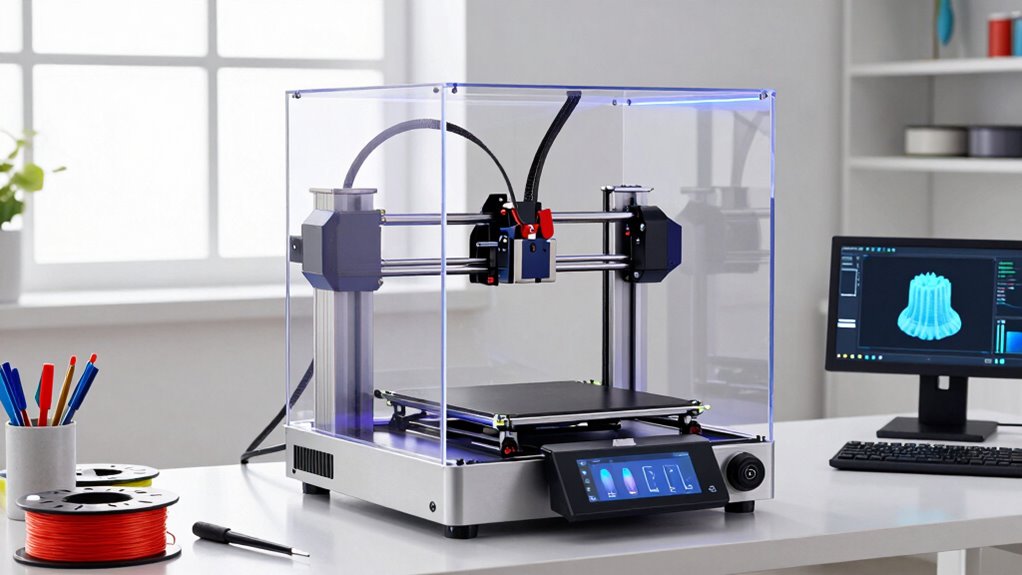
For engineering startups, the Bambu Lab P2S Combo with AMS 2 Pro is my best overall pick for teams that want a capable enclosed printer and a multicolor workflow in one system. The Bambu Lab P1S is a simpler enclosed option, while the Creality K2 Pro stands out for teams prioritizing a larger, more production-oriented machine. The main choice is whether to favor ease of use, material flexibility, build capacity, or reduced filament changes and toolhead workflows. Each choice brings different setup, maintenance, and process tradeoffs for a small team. Read on for the full breakdown and guidance on matching a printer to your startup’s work.

Get business pricing on office and shipping supplies
- Business-only prices and quantity discounts
- Tax-exempt purchasing
- Multiple users, one account, clear invoices
Complete the kit


Key Takeaways
- The Bambu Lab P2S Combo is my best overall balance: its enclosed format and AMS 2 Pro suit teams seeking a versatile prototyping setup, while single-material workflows may not need the added system complexity.
- The Bambu Lab A1 is the approachable entry point: it can fit a startup learning its print workflow, but an open-frame machine is a different proposition from enclosed options for material and environmental control.
- Multi-toolhead printers address a workflow problem, not just a color preference: the Flashforge Creator 5 Pro and Snapmaker U1 may suit teams that value tool changes, though they add process and maintenance decisions.
- The Creality K2 Plus and K2 Pro families target teams with broader capacity needs: compare their specific configurations and combo bundles rather than assuming the larger or bundled choice is automatically right.
- The Adventurer 5M Pro and Bambu Lab P1S favor contained, practical prototyping: they offer a different priority from multi-toolhead systems, which are most compelling when their workflow features will see regular use.
| Bambu Lab A1 FDM 3D Printer |  | Best for Fast, Low-Friction Prototyping | Printing technology: FDM | Maximum acceleration: 10,000 mm/s² | Calibration: Automatic | VIEW ON AMAZON | See Our Full Breakdown |
| Creality K2 Plus Combo Multi-Color 3D Printer |  | Best for Large, Multi-Color Builds | Build volume: 350 × 350 × 350 mm | Maximum print speed: 600 mm/s | Maximum acceleration: 30,000 mm/s² | VIEW ON AMAZON | See Our Full Breakdown |
| Creality K2 Pro 3D Printer |  | Best for Engineering-Material Prototypes | Build volume: 300 × 300 × 300 mm | Maximum printing speed: 600 mm/s | Acceleration: 20,000 mm/s² | VIEW ON AMAZON | See Our Full Breakdown |
| Flashforge Creator 5 Pro 4-Toolhead 3D Printer |  | Best for Multi-Material Parts with Less Purge Waste | Toolheads: 4 independent toolheads | Tool change time: 7 seconds | Maximum chamber temperature: 65°C | VIEW ON AMAZON | See Our Full Breakdown |
| Anycubic Kobra X Multicolor 3D Printer |  | Best Value-Oriented Entry to Multicolor Printing | Printer type: FDM | Native colors: 4 | Maximum colors: 19 with four ACE 2 Pro units | VIEW ON AMAZON | See Our Full Breakdown |
| Bambu Lab P2S 3D Printer Combo with AMS 2 Pro |  | Best for Fast, Flexible Prototyping | Printer type: FDM 3D printer | Maximum print speed: 600 mm/s | Included system: AMS 2 Pro | VIEW ON AMAZON | See Our Full Breakdown |
| Snapmaker U1 3D Printer with Four Toolheads |  | Best for Low-Waste Multi-Material Prototypes | Motion system: CoreXY | Toolheads: 4 independent toolheads | Tool change time: About 5 seconds | VIEW ON AMAZON | See Our Full Breakdown |
| FLASHFORGE Adventurer 5M Pro 3D Printer |  | Best Compact Enclosed Workhorse | Printing speed: Up to 600 mm/s | Build volume: 220 × 220 × 220 mm | Nozzle temperature: Up to 280 °C | VIEW ON AMAZON | See Our Full Breakdown |
| Bambu Lab P1S Enclosed FDM 3D Printer |  | Best for Straightforward Enclosed Printing | Technology: FDM | Design: Enclosed CoreXY | Maximum print speed: 500 mm/s | VIEW ON AMAZON | See Our Full Breakdown |
| Creality K2 Pro Combo Multicolor 3D Printer |  | Best for Large, Demanding Engineering Parts | Build volume: 300 × 300 × 300 mm | Maximum print speed: 600 mm/s | Maximum acceleration: 20,000 mm/s² | VIEW ON AMAZON | See Our Full Breakdown |
| 3d printers for engineering startup | Maximum print speed | Build volume |
|---|---|---|
| Bambu Lab A1 FDM 3D Printer | — | — |
| Creality K2 Plus Combo Multi-C | 600 mm/s | 350 × 350 × 350 mm |
| Creality K2 Pro 3D Printer | — | 300 × 300 × 300 mm |
| Flashforge Creator 5 Pro 4-Too | 600 mm/s | — |
| Anycubic Kobra X Multicolor 3D | 600 mm/s | 260 × 260 × 260 mm |
| Bambu Lab P2S 3D Printer Combo | 600 mm/s | — |
| Snapmaker U1 3D Printer with F | 500 mm/s | 270 × 270 × 270 mm |
| FLASHFORGE Adventurer 5M Pro 3 | — | 220 × 220 × 220 mm |
| Bambu Lab P1S Enclosed FDM 3D | 500 mm/s | — |
| Creality K2 Pro Combo Multicol | 600 mm/s | 300 × 300 × 300 mm |
More Details on Our Top Picks
Bambu Lab A1 FDM 3D Printer
I’d shortlist the Bambu Lab A1 for a startup that needs a straightforward FDM printer for quick fit checks, concept models, and routine part iterations. Automatic calibration and active flow rate compensation reduce the amount of manual tuning between jobs, while acceleration up to 10,000 mm/s² supports brisk prototyping. Compared with the larger Creality K2 Pro, the A1 has fewer details pointing to demanding engineering materials or an enclosed, heated build environment; its advantage is a simpler workflow, not a broader material range. The touchscreen and quick-swap nozzle also help teams move between jobs without a complicated setup routine. The tradeoff is that multicolor printing requires a separately sold AMS lite, and the supplied product details don’t establish a build volume or advanced-material capability. I’d treat it as a practical iteration tool, not a one-machine answer for every engineering workload.
Pros:- Automatic calibration reduces manual setup before printing.
- Active flow rate compensation helps maintain print consistency.
- Acceleration up to 10,000 mm/s² supports fast prototype cycles.
- Touchscreen and quick-swap nozzle make routine operation and nozzle changes simpler.
Cons:- Multicolor printing requires the separately available AMS lite.
- The supplied product information does not specify build volume or support for engineering-grade materials.
Best for: Small engineering teams that primarily print everyday FDM prototypes and want automatic calibration to reduce printer setup and tuning.
Not ideal for: Startups that need a specified large build area, a heated chamber, or multicolor printing without buying a separate AMS lite.
- Printing technology:FDM
- Maximum acceleration:10,000 mm/s²
- Calibration:Automatic
- Flow rate compensation:Active
- Nozzle:1-Clip quick swap
- Multi-color printing:Requires separately available AMS lite
Our verdict“Choose the A1 for accessible, fast-turnaround FDM prototyping, but look to the Creality K2 Pro if your work calls for a heated chamber and a stated range of advanced filaments.”
Creality K2 Plus Combo Multi-Color 3D Printer
For a startup producing oversized prototypes, batch parts, or complex color-coded models, the Creality K2 Plus Combo offers the broadest stated capacity in this group: a 350 × 350 × 350 mm build volume and support for up to 16 colors with four CFS units. That build area exceeds the K2 Pro’s 300 mm cube and the Anycubic Kobra X’s 260 mm cube, giving teams more room to print larger parts in one piece or consolidate smaller jobs. Its stated 600 mm/s maximum speed, 350°C nozzle limit, and 60°C chamber limit add flexibility for demanding workflows. Dual AI cameras and automatic leveling are useful monitoring and setup aids, though they don’t remove the need to manage a more involved system. The main tradeoff is scale: reaching 16 colors calls for four CFS units, and this machine is a larger commitment than the more compact A1 or Kobra X.
Pros:- 350 × 350 × 350 mm build volume accommodates larger parts and batch jobs.
- Supports up to 16 colors when configured with four CFS units.
- Maximum nozzle temperature of 350°C and chamber temperature of 60°C provide a broad stated thermal range.
- Dual AI cameras and automatic bed leveling support print monitoring and setup.
Cons:- The full 16-color configuration requires four CFS units.
- Its large capacity and multi-unit color system may be more machine than a small prototyping team needs.
Best for: Engineering startups that regularly print large prototypes or batches and have a clear use for multi-color output and a large build area.
Not ideal for: Small teams with limited workspace or occasional color-printing needs, especially if they don’t want to manage four CFS units for 16-color jobs.
- Build volume:350 × 350 × 350 mm
- Maximum print speed:600 mm/s
- Maximum acceleration:30,000 mm/s²
- Maximum flow rate:40 mm³/s
- Maximum nozzle temperature:350°C
- Maximum chamber temperature:60°C
- Multi-color capacity:Up to 16 colors with four CFS units
- Monitoring:Two AI cameras
- Leveling:Automatic bed leveling with independently motorized dual Z-axis
Our verdict“Pick the K2 Plus Combo when large-format capacity and extensive color options matter more than a compact, simpler setup.”
Creality K2 Pro 3D Printer
The Creality K2 Pro is the clearest fit here for a startup that wants a stated path from basic models to functional parts in materials such as ABS, ASA, PPA-CF, and PET-CF. Its actively heated chamber, direct-drive extruder with hardened steel gears, and 300 × 300 × 300 mm build volume make it more engineering-oriented on paper than the Bambu Lab A1, whose supplied specifications focus on ease of use and don’t list a heated chamber or comparable material range. It also reaches a stated 600 mm/s, with dual AI cameras for chamber and nozzle monitoring. Against the K2 Plus Combo, the K2 Pro has a smaller build area and less stated color capacity, but its feature set is more focused on materials and functional prototypes than large, many-color jobs. Expect added setup and maintenance demands, and budget for the CFS system separately if multicolor printing is needed.
Pros:- Actively heated chamber supports the listed advanced filament options.
- 300 × 300 × 300 mm build volume accommodates substantial prototype parts.
- Direct-drive extruder with hardened steel gears pairs with support for filled filaments.
- Dual AI cameras monitor both chamber and nozzle.
Cons:- Multicolor printing requires a compatible CFS Smart Filament System.
- Advanced features may add setup and maintenance work for a small team.
Best for: Product-development teams printing functional prototypes in ABS, ASA, or filled engineering filaments that benefit from an actively heated chamber.
Not ideal for: Startups focused on the largest possible parts or extensive multicolor work; the K2 Plus Combo offers a larger build volume and up to 16 colors.
- Build volume:300 × 300 × 300 mm
- Maximum printing speed:600 mm/s
- Acceleration:20,000 mm/s²
- Maximum chamber temperature:60°C
- Maximum flow rate:40 mm³/s
- Extruder:Direct drive with hardened steel gears
- Supported materials:PLA, ABS, ASA, PPA-CF, PET-CF
- Connectivity:Wi-Fi, LAN
- Multicolor printing:Compatible with CFS Smart Filament System
Our verdict“Choose the K2 Pro if functional parts and heated-chamber material support matter more than the K2 Plus Combo’s larger build area or extensive color capacity.”
Flashforge Creator 5 Pro 4-Toolhead 3D Printer
The Flashforge Creator 5 Pro stands apart from the single-nozzle color systems here by using four independent toolheads. That approach is a strong match for engineering startups printing assemblies, support-heavy parts, or color-coded prototypes where swapping among materials can otherwise consume filament in purging. A stated seven-second tool change and an enclosed CoreXY frame support a faster, more controlled workflow, while a chamber rated to 65°C is the highest listed here, just above the K2 Pro’s 60°C. HEPA 13 and activated-carbon filtration also make this a more considered option for teams printing ABS, PC, or PA indoors. The tradeoff is missing information: the supplied data gives no build volume, so I can’t compare part capacity directly with the K2 Plus Combo or K2 Pro. Its 39-pound weight also makes it less suited to frequent relocation.
Pros:- Four independent toolheads support multi-material and multicolor jobs with reduced purge waste.
- Seven-second stated tool change supports efficient transitions between toolheads.
- Heated chamber supports the listed ABS, PC, and PA materials.
- HEPA 13 and activated-carbon filtration are included.
Cons:- The supplied product information does not specify build volume, making part-size comparisons difficult.
- At 39 pounds, it is less convenient to relocate than lighter options such as the K2 Pro.
Best for: Engineering teams that often combine multiple materials or colors in one part and want an enclosed printer with listed filtration.
Not ideal for: Buyers who need a confirmed build volume before choosing, or teams that need a lightweight printer they can move between work areas.
- Toolheads:4 independent toolheads
- Tool change time:7 seconds
- Maximum chamber temperature:65°C
- Maximum print speed:600 mm/s
- Frame and motion system:Enclosed CoreXY
- Filtration:HEPA 13 and activated carbon
- Supported materials:ABS, PC, PA
- Dimensions:16 × 14 × 18 inches
- Weight:39 pounds
Our verdict“Choose the Creator 5 Pro for multi-material work and filtration, but confirm its build volume against your part requirements before selecting it over the K2 Plus Combo.”
Anycubic Kobra X Multicolor 3D Printer
The Anycubic Kobra X gives a startup a direct route into multicolor FDM without starting with the K2 Plus Combo’s large-format, four-CFS setup. It prints four colors natively and can expand to 19 with four ACE 2 Pro units, while its 260 × 260 × 260 mm build volume is a sensible middle ground for routine prototypes rather than oversized parts. Compared with the Bambu Lab A1, the Kobra X has stated multicolor capability and support for TPU, PVA, and ASA; the A1 instead emphasizes automatic calibration and active flow rate compensation. The Kobra X also lists a hardened-steel nozzle, 300°C maximum nozzle temperature, and 49-point automatic bed leveling. Its limits are practical: the filament is not included, ACE 2 Pro and ACE Pro units are listed as incompatible, and expansion to 19 colors needs additional hardware.
Pros:- Native four-color printing, expandable to 19 colors with four ACE 2 Pro units.
- 260 × 260 × 260 mm build volume suits many routine prototype jobs.
- Supports PLA, PETG, TPU, PVA, and ASA.
- 49-point automatic bed leveling and AI monitoring support setup and print observation.
Cons:- Filament is not included.
- ACE 2 Pro and ACE Pro are listed as incompatible, limiting use of those systems.
- Expansion to 19 colors requires four ACE 2 Pro units.
Best for: Startups that want native four-color printing, a moderate build area, and support for both rigid and flexible filament types.
Not ideal for: Teams that need a large-format printer, want filament included, or already own ACE Pro equipment they expect to use with this model.
- Printer type:FDM
- Native colors:4
- Maximum colors:19 with four ACE 2 Pro units
- Maximum print speed:600 mm/s
- Build volume:260 × 260 × 260 mm
- Nozzle:Hardened steel
- Maximum nozzle temperature:300°C
- Supported filaments:PLA, PETG, TPU, PVA, ASA
- Bed leveling:LeviQ 3.0, 49-point automatic bed leveling
Our verdict“Pick the Kobra X for accessible multicolor prototyping and flexible-material options, but choose the K2 Plus Combo if your startup needs substantially more build space.”
Bambu Lab P2S 3D Printer Combo with AMS 2 Pro
The P2S Combo suits startups that want quick iteration without treating every filament change as a separate workflow. Its 600 mm/s top speed, automatic calibration, and active flowrate compensation are aimed at reducing hands-on tuning, while AI failure detection can help catch a bad job before it consumes more material. The included AMS 2 Pro adds multi-color and multi-material printing, plus drying up to 65 °C—a useful pairing for teams cycling through materials. Compared with the Bambu Lab P1S, this bundle includes the material system rather than requiring a separate AMS purchase; the Creality K2 Pro Combo offers a larger build volume and a hotter chamber for more demanding engineering work. The P2S tradeoff is a smaller stated chamber-temperature ceiling of 50 °C, and some workflows require setup.
Pros:- AMS 2 Pro is included for multi-color and multi-material printing
- Filament drying up to 65 °C can help manage moisture-sensitive stock
- Automatic calibration and AI failure detection reduce routine operator checks
- Active flowrate compensation supports high-speed prototyping
Cons:- The stated chamber temperature reaches only 50 °C, limiting its fit for some demanding materials
- Some features and workflow services may need setup before they fit a startup’s process
- The printer without the included Combo system does not support multi-color printing
Best for: Small product-development teams that value fast functional prototypes, automated print checks, and included multi-material capability.
Not ideal for: Startups that regularly print large engineering parts or need a chamber hotter than 50 °C; the Creality K2 Pro Combo is better suited to those needs.
- Printer type:FDM 3D printer
- Maximum print speed:600 mm/s
- Included system:AMS 2 Pro
- Multi-color printing:Supported with Combo version
- Filament drying temperature:Up to 65 °C
- Chamber temperature:Up to 50 °C
- Notable features:AI failure detection, automatic calibration, quick-swap nozzles, active flowrate compensation, adaptive airflow, carbon filter
Our verdict“Choose the P2S Combo for an automation-minded team that wants rapid prototyping and multi-material printing in one package, rather than the larger, hotter chamber of the K2 Pro Combo.”
Snapmaker U1 3D Printer with Four Toolheads
The U1’s defining choice is its four independent toolheads: automatic changes take about five seconds, letting a team combine materials or colors without the purge-heavy changes common to single-nozzle systems. That can make it a better fit than the Bambu Lab P1S for prototypes that need distinct flexible, support, or visual elements in one build. Its 270 × 270 × 270 mm volume also leaves more room for larger assemblies than the P1S’s stated dimensions suggest, while the CoreXY system is specified for speeds up to 500 mm/s. Automatic calibration, monitoring, and app control support a less hands-on workflow. The tradeoff is that the supplied product information does not establish independent performance results, and material outcomes can vary with setup; teams needing a stated heated chamber or hardened nozzle may prefer the Creality K2 Pro Combo.
Pros:- Four independent toolheads enable multi-material and multi-color builds
- About five-second tool changes can reduce time spent switching materials
- Designed to reduce filament waste during changes
- 270 mm cubed build volume and automatic monitoring support varied prototype work
Cons:- Independent user reviews and verified performance results are not provided in the product information
- Print results may vary by material and setup
- The supplied specifications do not state a heated chamber temperature
Best for: Engineering teams making prototypes that combine multiple colors, flexible parts, or support materials and want to reduce filament waste during changes.
Not ideal for: Startups that need proven performance data or a specified heated chamber and hardened nozzle for repeated engineering-material work.
- Motion system:CoreXY
- Toolheads:4 independent toolheads
- Tool change time:About 5 seconds
- Maximum print speed:500 mm/s
- Build volume:270 × 270 × 270 mm
- Compatible materials:PLA, PVA, TPU, PETG, PCTG, ABS, ASA, PA, PC, and more
- Display:3.5-inch touchscreen
- Warranty:1 year
Our verdict“Pick the U1 when multi-material prototypes and reduced filament waste matter more than documented performance history or a specified heated chamber.”
FLASHFORGE Adventurer 5M Pro 3D Printer
The Adventurer 5M Pro is a practical fit for a startup that needs an enclosed machine for everyday prototype work but does not need a large-format platform. It pairs an all-metal CoreXY frame with speeds up to 600 mm/s, automatic leveling, and vibration compensation, while the built-in camera and mobile controls make remote job checks easier. Its 220 mm cubed build volume is more modest than the Creality K2 Pro Combo’s 300 mm cubed space, so it suits brackets, housings, and test pieces better than larger assemblies. The enclosure, dual filtration, and support for ABS, ASA, and PETG-CF widen its material options beyond basic PLA and PETG. Its 280 °C nozzle limit, though, falls short of the K2 Pro Combo’s 300 °C ceiling, and the enclosed footprint still calls for dedicated bench space.
Pros:- Enclosed CoreXY design supports a range of functional materials
- Automatic leveling and vibration compensation reduce routine setup work
- Built-in camera and mobile controls support remote job monitoring
- Dual filtration and multiple nozzle sizes add flexibility to shop use
Cons:- 220 × 220 × 220 mm build volume restricts larger prototype parts
- 280 °C maximum nozzle temperature is below the K2 Pro Combo’s 300 °C limit
- Enclosed design takes dedicated space despite its smaller capacity
Best for: Small engineering teams that need an enclosed printer for common functional materials, remote monitoring, and fast parts within a 220 mm build envelope.
Not ideal for: Startups producing large assemblies or requiring higher nozzle temperatures; the K2 Pro Combo provides more build volume and a 300 °C nozzle limit.
- Printing speed:Up to 600 mm/s
- Build volume:220 × 220 × 220 mm
- Nozzle temperature:Up to 280 °C
- Heated bed temperature:Up to 110 °C
- Supported materials:PLA, PETG, ABS, ASA, and PETG-CF
- Nozzle sizes:0.25, 0.4, 0.6, and 0.8 mm
- Dimensions:16 × 14 × 18 inches
- Weight:22 pounds
Our verdict“Choose the Adventurer 5M Pro for fast, enclosed prototyping on a smaller bench, but look to the K2 Pro Combo if your parts need more room or higher nozzle temperatures.”
Bambu Lab P1S Enclosed FDM 3D Printer
The P1S makes sense for a startup that wants an enclosed CoreXY printer with a quick path from setup to routine prototyping. Its stated setup time is about 15 minutes, and automatic bed leveling cuts down on an early source of failed jobs. The 500 mm/s maximum speed and support for common filaments, including ABS and ASA, give small teams a useful mix of turnaround and material choice. Compared with the FLASHFORGE Adventurer 5M Pro, the P1S reaches a similar speed but requires a separately connected AMS for multi-color printing; the Flashforge product data lists a built-in camera and mobile controls that are not specified here. The P1S’s enclosed CoreXY design is a solid base for everyday engineering prototypes, but carbon- and glass-fiber-reinforced filaments are not recommended, and the AMS adds another system to acquire for color work.
Pros:- Enclosed CoreXY design supports common engineering filaments such as ABS and ASA
- Automatic bed leveling reduces setup and maintenance tasks
- About 15-minute setup suits teams without dedicated printer technicians
- 500 mm/s maximum speed supports rapid iteration
Cons:- Multi-color printing requires a separately connected Bambu Lab AMS
- Carbon- and glass-fiber-reinforced filaments are not recommended
- Product data does not specify a chamber-temperature rating
Best for: Early-stage teams seeking a relatively quick-to-set-up enclosed printer for common prototype materials and single-material functional parts.
Not ideal for: Teams that need included multi-color hardware or plan to print carbon- or glass-fiber-reinforced filaments.
- Technology:FDM
- Design:Enclosed CoreXY
- Maximum print speed:500 mm/s
- Maximum acceleration:20,000 mm/s²
- Multi-color printing:Up to 16 colors; requires Bambu Lab AMS
- Supported filaments:PLA, PETG, TPU, PVA, PET, ABS, ASA; capable of PA and PC
- Dimensions:15.31 × 18.03 × 15.31 inches
- Weight:38.9 pounds
Our verdict“Choose the P1S for accessible enclosed prototyping with common materials, but select a bundled multi-material system or a fiber-capable option if those needs are central.”
Creality K2 Pro Combo Multicolor 3D Printer
For a startup whose prototypes are growing beyond small housings and fixtures, the K2 Pro Combo is the most capable large-format choice in this group. Its 300 × 300 × 300 mm build volume accommodates parts that would need splitting on the 220 mm Adventurer 5M Pro, while a heated chamber up to 60 °C and a 300 °C nozzle target more demanding engineering materials. The included CFS unit brings multi-color printing into the bundle, with expansion to as many as 16 colors using up to four units. Dual AI cameras and automatic bed leveling add monitoring and setup assistance. Compared with the Bambu Lab P2S Combo, this Creality prioritizes chamber heat and part size over filament drying at 65 °C. The tradeoff is substantial: at 84.9 pounds, it needs a committed location, and only one CFS unit is included.
Pros:- 300 mm cubed build volume fits larger prototype parts
- Heated chamber up to 60 °C and 300 °C nozzle support engineering-material workflows
- Included CFS unit enables multi-color printing, with expansion up to 16 colors
- Dual AI cameras and automatic bed leveling support monitoring and setup
Cons:- 84.9-pound weight makes the printer difficult to relocate
- Only one CFS unit is included; expanded capacity requires additional units
- Large 33.46-inch height requires careful workspace planning
Best for: Product-development teams printing larger functional prototypes or engineering-material parts that benefit from a heated chamber and multi-color capability.
Not ideal for: Small studios with limited bench space or teams that need a lightweight, easy-to-relocate printer; additional CFS units also require separate purchase for expanded color capacity.
- Build volume:300 × 300 × 300 mm
- Maximum print speed:600 mm/s
- Maximum acceleration:20,000 mm/s²
- Multicolor printing:Up to 16 colors with up to 4 CFS units
- Included CFS units:1
- Maximum chamber temperature:60 °C
- Maximum nozzle temperature:300 °C
- Dimensions and weight:17.51 × 19.88 × 33.46 inches; 84.9 pounds
Our verdict“Choose the K2 Pro Combo when large parts, a heated chamber, and engineering-material support outweigh its heavy footprint and the need to add CFS units for expanded color capacity.”

How We Picked
I ranked these printers for the constraints common to engineering startups: short iteration cycles, limited staff time, changing prototype requirements, and the need to make repeatable parts without building a complicated print operation. I weighed enclosure and workflow design, material and job flexibility, usability, maintenance burden, and whether a machine’s distinctive features address a real engineering task. A printer’s headline capability mattered less than how useful it could be in a small team’s day-to-day process.
The order favors versatile machines that balance capability with manageable operation, then separates picks aimed at narrower needs such as multi-toolhead workflows, higher capacity, or a simpler entry point. Bundles and similarly named models are not treated as interchangeable: the included equipment and intended workflow can change the decision. No one printer fits every startup; teams should check current manufacturer specifications for build volume, material compatibility, and bundle contents against their own parts and process.
Factors to Consider When Choosing 3d Printers For Engineering Startups
Choosing a startup printer is a workflow decision as much as a hardware decision. Before comparing feature lists, I would map the parts the team expects to print, who will run jobs, and what happens when a prototype fails or needs revision.
Match the Printer to the Material You Actually Need
Start with the engineering requirements of your parts, not a list of materials you might use someday. A prototype for fit and form may have very different needs from a functional part exposed to heat, impact, or repeated loading. An enclosure can help create a more controlled printing environment, but it does not by itself prove that a printer supports every engineering material or produces qualified parts. Check the manufacturer’s material guidance and the conditions attached to it, including nozzle, build surface, and ventilation requirements. A common mistake is buying for a demanding material before confirming that the team can manage its print conditions and post-processing. If part performance matters, plan to test printed samples under the actual use conditions instead of treating material names as a guarantee.
Size the Build Area Around Real Parts and Batch Work
Measure representative parts, including the supports, orientation, and clearance needed to print them, rather than relying on the largest item in a concept sketch. A larger build area can reduce splitting and assembly, but it also invites bigger jobs that consume more material and tie up the machine longer. For a startup, several smaller parts printed together may improve iteration throughput more than one very large build volume. Consider whether your team needs multiple copies for fit checks or parallel experiments, and leave room for fixtures and test coupons. Oversizing to cover a remote future project can mean paying in floor space and operational complexity now. If part dimensions vary widely, compare a machine’s usable build volume with your actual CAD files before choosing.
Treat Throughput as More Than Print Speed
A fast printer does not automatically deliver faster engineering decisions. Setup, failed jobs, tool changes, material swaps, cooling, and inspection all affect the time from CAD revision to useful feedback. A multi-toolhead or multicolor system can reduce some changeover work for particular jobs, but it also introduces extra mechanisms and a workflow the team must learn. Estimate how many iterations the team expects per week and identify the bottleneck: machine time, operator attention, or design approval. If one person is responsible for printing alongside other duties, predictable unattended operation may matter more than a short advertised print time. Track completed, usable parts rather than judging throughput by motion speed alone.
Choose a Multi-Material Workflow Only When It Solves a Repeated Need
Multi-color capability is easy to notice, but engineering teams may gain more from soluble or distinct support materials, material separation, or tool changes that suit recurring part designs. Those benefits depend on what the specific printer and configuration support, so check the actual toolhead and material workflow rather than inferring capability from the word “combo.” More complex systems can add calibration, consumables, and troubleshooting steps that a small team may not have time to absorb. List the jobs that would use the feature each month and compare them with jobs that remain single-material. If the list is short, a simpler machine may free budget and attention for measurement tools or additional capacity. If the feature removes repeated manual steps, the added system complexity may be worthwhile.
Budget for the Whole Printing Process, Not Just the Machine
The printer is only one part of a working prototyping station. Filament storage, spare nozzles and build surfaces, ventilation, software, workspace, and time for maintenance all affect the practical cost of ownership. Startups can underestimate operator time, especially when several people share a machine without clear procedures for material loading, file approval, and job handoff. Before purchase, decide who owns routine upkeep and how the team will record settings that produce reliable parts. A bundled system may simplify some tasks while adding equipment that needs space and care. Comparing the full setup against the cost of outsourcing occasional specialty parts can also help prevent buying capacity the team will rarely use.
Plan for Repeatability Before Parts Become Product Evidence
FDM printers are useful for rapid iteration, but a prototype printer should not be treated as a certified production process by default. Part strength and dimensions can vary with orientation, settings, material handling, and machine condition. For early design work, that variation may be acceptable; for a test fixture or a part used to support a major design decision, document the print settings and inspect critical dimensions. If a part must meet a defined tolerance or safety requirement, validate the process and consider whether another manufacturing method is more appropriate. A common startup mistake is interpreting one successful print as proof that every later copy will behave the same way. Build a repeatable workflow early, even if the printer is initially used only for internal prototypes.
Frequently Asked Questions
Should an engineering startup choose an enclosed printer even if it mostly prints basic prototypes?
Not automatically. An enclosure can make the printing environment more controlled and can be useful when the team expects to explore materials that benefit from one, but the benefit depends on the printer’s supported materials and your workspace. If most jobs are simple fit checks, an open-frame model may be enough and easier to accommodate. Consider who will use the machine, where it will run, and whether noise, ventilation, or access are concerns. Choose the enclosure for a clear workflow need rather than treating it as a guarantee of better parts.
Is a multicolor or multi-toolhead printer worth it for engineering work?
It can be, but the strongest case is usually a repeated workflow need rather than appearance alone. Separate materials or toolheads may help with particular support strategies, part identification, or jobs that otherwise require manual changes. Those workflows also bring more setup and maintenance decisions, so occasional use may not justify the added complexity. Review the exact configuration’s capabilities and think through a representative job from slicing to finished part. If most of your prototypes use one material, a straightforward printer may keep iteration simpler.
How many printers should a small engineering team start with?
One well-matched printer is often enough while the team is learning what it prints and how frequently it needs parts. A second machine becomes more useful when printer access regularly delays design work, jobs need different material conditions, or one machine’s downtime would block an important project. Before adding hardware, track actual job queues and operator time for several weeks. That evidence can show whether the bottleneck is capacity, preparation, or failed prints. Buying multiple machines before defining a shared workflow can multiply upkeep without speeding decisions.
Can these FDM printers produce parts suitable for final products?
They can produce useful functional parts, but suitability depends on the design, material, print orientation, process control, and product requirements. A successful prototype does not establish durability, dimensional consistency, or compliance for every application. For parts that carry loads, contact users, or affect safety, define test conditions and validate the complete manufacturing process. The printer’s material support is only one part of that assessment. If a product needs certified or tightly controlled components, compare FDM printing with a qualified production process before relying on in-house prints.
What should I verify before ordering a printer bundle for a startup?
Check the exact model, included accessories, and supported workflow for the bundle rather than relying on the product-family name. Confirm usable build volume, compatible materials, tool or feeder configuration, power and workspace needs, and what routine maintenance the system requires. Ask whether the bundled equipment supports the jobs your team expects to run, not just whether it adds features. Also decide how software access, file preparation, and shared operation will work across the team. Current manufacturer documentation is the best place to confirm specifications and bundle contents before purchase.
Conclusion
For a balanced startup prototyping setup, my best overall recommendation is the Bambu Lab P2S Combo with AMS 2 Pro; choose it when its enclosed format and bundled material workflow fit the team’s real jobs. The best value in capability depends on whether your priority is a simpler enclosed workflow or a more accessible starting point: I would shortlist the Bambu Lab P1S for contained prototyping and the Bambu Lab A1 for teams prioritizing an approachable entry. For a best premium or higher-capacity direction, compare the Creality K2 Plus Combo and K2 Pro against your part size and production needs. The Flashforge Creator 5 Pro and Snapmaker U1 are the specific-workflow picks when four-toolhead printing solves recurring jobs; the Adventurer 5M Pro and Anycubic Kobra X round out the shortlist for teams weighing contained operation or multicolor capability. My final choice would follow the material, part dimensions, and operator time the startup can support—not the longest feature list.
Halloween Picks
halloween
As an affiliate, we earn on qualifying purchases.